"1062d43bc714d570"{"id":"1001437","slug":"fps-toolkit-lite","title":"FPS Toolkit Lite","category":"Weapons \u0026 Combat","engine":"5.0+","assetVersion":"","engineVersion":"Engine Version: 5.0+","tag":"Weapons \u0026 Combat","accent":"blue","visual":"mech","summary":"FPS Toolkit Lite provides a data-table-driven first-person framework for Unreal Engine, featuring easy weapon expansion and modular system integration.","platform":"Unreal Engine","publishedAt":"2026-10-07T08:30:52.617Z","updatedAt":"2026-10-07T08:30:52.617Z","sourceNotes":[],"fileContents":[],"compatibility":["Unreal Engine","Engine Version: 5.0+"],"featuredImage":{"alt":"FPS Toolkit Lite","src":"/wp-content/uploads/published/2026/10/29122674fe41-1f6128cf-2491-4af7-9810-01e8d62a51a3-71a412a9b8.webp"},"hasDownloadLink":true,"downloads":0,"terms":[{"taxonomy":"category","slug":"weapons-and-combat","name":"Weapons \u0026 Combat"}],"galleryImages":[{"src":"/wp-content/uploads/published/2026/10/6708da0e5b04-849ce8c1-ca16-4d79-91cd-853a9d771d2e-f9092c1a26.webp","alt":"FPS Toolkit Lite"},{"src":"/wp-content/uploads/published/2026/10/13a6bec66edc-a7a7ce61-e2c8-44b5-b13c-5092ae12850d-51105dbcf4.webp","alt":"FPS Toolkit Lite"},{"src":"/wp-content/uploads/published/2026/10/899384960e26-991bd759-ec01-438a-9f8c-bd384b88e6f4-f84f7d76cc.webp","alt":"FPS Toolkit Lite"},{"src":"/wp-content/uploads/published/2026/10/cb602be8743b-8f6149a2-4b51-4953-a4c0-9dc904251a11-4d6dd39f02.webp","alt":"FPS Toolkit Lite"},{"src":"/wp-content/uploads/published/2026/10/fe21c34c48e0-0e0047a4-17fb-4e33-ac81-429e8978a0b9-0a1002381e.webp","alt":"FPS Toolkit Lite"}],"accessPanel":{"kind":"resource","title":"Download this resource","eyebrow":"Free Download","message":"Log in or create a free account to start your download.","fileName":"FPS Toolkit Lite.7z","safetyNote":"Resources are manually reviewed before listing to improve quality and reduce obvious risks.","actionLabel":"Download Free","resourceType":"Resource archive"},"contentHtml":"\u003ch2\u003eEstablishing the FPS Toolkit Lite Project Foundation\u003c/h2\u003e\u003cp\u003eSetting up a first-person shooter framework in Unreal Engine often requires configuring complex interactions between player input, camera behavior, and gameplay logic. FPS Toolkit Lite provides a streamlined starting point for this setup, giving developers a structured blueprint architecture that minimizes setup time while delivering responsive player mechanics. The system emphasizes low-overhead deployment, allowing creators to move directly into gameplay prototyping without having to build standard first-person mechanics from scratch.\u003c/p\u003e\u003cp\u003eThe package includes documentation and demo content to guide initial project setup. By examining the demo implementation, developers can inspect how base character controllers, input events, and camera positions interact inside Unreal Engine. This structural clarity benefits both experienced creators looking to bypass repetitive framework assembly and newer developers who require an accessible blueprint foundation for their mechanics.\u003c/p\u003e\u003ch2\u003eWeapon Customization Through Data Tables\u003c/h2\u003e\u003cp\u003eManaging weapon behavior across diverse arsenals presents unique challenges in game balance and code organization. FPS Toolkit Lite addresses this workflow through the use of data tables. Rather than hardcoding properties into individual weapon blueprints, the framework centralizes parameters inside easily modifiable tables. This architecture allows developers to adjust values, tune mechanical feedback, and introduce new armaments without rewriting core script logic.\u003c/p\u003e\u003cp\u003eData tables handle a wide spectrum of weapon archetypes, making it straightforward to implement and differentiate firearms such as handguns, shotguns, assault rifles, and machineguns, alongside close-quarters melee options. Modifying fire characteristics, managing inventory references, or adjusting behavioral variables occurs directly within these tables. Developers can quickly clone existing table rows to prototype new weapon variations, accelerating iteration cycles during combat balancing.\u003c/p\u003e\u003ch2\u003eIntegration with COMBAT FURY and External Systems\u003c/h2\u003e\u003cp\u003eGameplay frameworks must rarely operate in total isolation; production pipelines frequently require intertwining shooter controls with inventory systems, third-party mechanics, or distinct melee logic. FPS Toolkit Lite is constructed to integrate smoothly with external systems and other development tools, avoiding rigid dependencies that lock a project into an inflexible architecture.\u003c/p\u003e\u003cp\u003eA notable verified point of interoperability is compatibility with COMBAT FURY. Developers seeking to blend first-person gunplay with specialized combat mechanics can connect the two systems cleanly. Because the toolkit uses standard Unreal Engine blueprints and structured data management, linking external logic into the player loop avoids destructive refactoring. The framework functions as an adaptable base that accepts companion mechanics rather than conflicting with them.\u003c/p\u003e\u003ch2\u003eAsset Separation: Handling Meshes and Animations\u003c/h2\u003e\u003cp\u003eA crucial technical consideration when configuring FPS Toolkit Lite involves visual mesh assets. The pistol and rifle models displayed in project previews and screenshots are not included directly within the base package. The package focuses purely on underlying systems, code, and functional blueprint execution.\u003c/p\u003e\u003cp\u003eThis functional separation keeps the codebase lean and decoupled from specific artistic styles. Developers are intended to plug in their own 3D weapon meshes, custom rigs, and animation sequences to match their project's visual direction. Sockets, animation triggers, and visual components can be assigned to the weapon data entries, allowing teams to connect custom assets to the existing logic framework without encountering unwanted model dependencies inside their project hierarchy.\u003c/p\u003e\u003ch2\u003eExtending from Lite to Pro Architecture\u003c/h2\u003e\u003cp\u003eFPS Toolkit Lite serves projects that prioritize essential first-person shooter functionality or require a clean, unbloated framework. For productions that eventually demand expanded systems, an upgrade path is established through an upcoming separate extension pack that introduces all FPS Toolkit Pro features. This arrangement ensures teams can build their foundations immediately in the Lite edition without fearing architectural dead ends.\u003c/p\u003e\u003cp\u003eBy maintaining consistent baseline data structures, the toolkit allows projects to evolve gracefully. Developers can review the Pro feature specifications early in production to determine whether their current scope requires the broader toolkit or whether the core Lite mechanics—combined with custom blueprints and data table entries—fulfill their game design goals.\u003c/p\u003e\n\n\u003ch2\u003eRelated Resources Worth Checking\u003c/h2\u003e\n\u003cul\u003e\n\u003cli\u003e\u003ca href=\"https://3dcghub.com/mg-15-with-accessories-wwii-german-lmg/\" title=\"MG-15 with Accessories (WWII German LMG)\"\u003eMG-15 with Accessories (WWII German LMG)\u003c/a\u003e\u003c/li\u003e\n\u003cli\u003e\u003ca href=\"https://3dcghub.com/5-fps-4k-custom-modern-handguns-vol-1-modern-handguns-handgun-tactical/\" title=\"(5) FPS 4K Custom Modern Handguns - VOL.1 ( Modern Handguns Handgun Tactical )\"\u003e(5) FPS 4K Custom Modern Handguns - VOL.1 ( Modern Handguns Handgun Tactical )\u003c/a\u003e\u003c/li\u003e\n\u003cli\u003e\u003ca href=\"https://3dcghub.com/fps-weapon-ak47-modular-customizable/\" title=\"FPS Weapon AK47 (Modular, Customizable)\"\u003eFPS Weapon AK47 (Modular, Customizable)\u003c/a\u003e\u003c/li\u003e\n\u003cli\u003e\u003ca href=\"https://3dcghub.com/br-50-fpsk-ready/\" title=\"BR-50 (FPSK Ready)\"\u003eBR-50 (FPSK Ready)\u003c/a\u003e\u003c/li\u003e\n\u003cli\u003e\u003ca href=\"https://3dcghub.com/ww2-germany-weapons/\" title=\"WW2 Germany Weapons\"\u003eWW2 Germany Weapons\u003c/a\u003e\u003c/li\u003e\n\u003c/ul\u003e","contentTextLength":4898,"navigation":{"current":7,"total":3379,"previous":{"id":"1001438","slug":"horror-collection-blood-1000-textures","title":"Horror Collection: Blood [1000+ textures]","category":"Organic","platform":"Unreal Engine","updatedAt":"2026-10-07T08:31:33.371Z"},"next":{"id":"1001436","slug":"fps-multiplayer-controller","title":"FPS Multiplayer Controller","category":"Shooter","platform":"Unreal Engine","updatedAt":"2026-10-07T08:29:53.920Z"}},"relatedResources":[{"id":"1001058","slug":"mg-15-with-accessories-wwii-german-lmg","title":"MG-15 with Accessories (WWII German LMG)","category":"Weapons \u0026 Combat","engine":"5.1+","assetVersion":"","engineVersion":"Engine Version: 5.1+","tag":"Weapons \u0026 Combat","accent":"blue","visual":"mech","summary":"A WWII Luftwaffe LMG pack with skeletal mesh props for FPS/TPS weapons, separated static meshes for environment props, and segmented trigger animations.","platform":"Unreal Engine","publishedAt":"2026-08-30T14:54:50.549Z","updatedAt":"2026-08-30T14:54:50.549Z","sourceNotes":[],"fileContents":[],"compatibility":["Unreal Engine","Engine Version: 5.1+"],"featuredImage":{"alt":"MG-15 with Accessories (WWII German LMG)","src":"/wp-content/uploads/published/2026/08/d88930631972-9d89ccf9-c759-4420-a226-d409c29aefac-b4dfe6a9f3.webp"},"hasDownloadLink":true,"downloads":0},{"id":"1001417","slug":"5-fps-4k-custom-modern-handguns-vol-1-modern-handguns-handgun-tactical","title":"(5) FPS 4K Custom Modern Handguns - VOL.1 ( Modern Handguns Handgun Tactical )","category":"Weapons \u0026 Combat","engine":"4.17+,5.0+","assetVersion":"","engineVersion":"Engine Version: 4.17+,5.0+","tag":"Weapons \u0026 Combat","accent":"blue","visual":"mech","summary":"Explore implementation workflows, AAA visual standards, and ULAT modular integration for the FPS 4K Custom Modern Handguns pack in Unreal Engine.","platform":"Unreal Engine","publishedAt":"2026-10-06T14:53:12.999Z","updatedAt":"2026-10-06T14:53:12.999Z","sourceNotes":[],"fileContents":[],"compatibility":["Unreal Engine","Engine Version: 4.17+,5.0+"],"featuredImage":{"alt":"(5) FPS 4K Custom Modern Handguns - VOL.1 ( Modern Handguns Handgun Tactical )","src":"/wp-content/uploads/published/2026/10/158dd0b204ec-4871c0f7-98b4-49c5-8588-80e1af64d3ff-af33db5315.webp"},"hasDownloadLink":true,"downloads":0},{"id":"1000294","slug":"fps-weapon-ak47-modular-customizable","title":"FPS Weapon AK47 (Modular, Customizable)","category":"Weapons \u0026 Combat","engine":"4.26+,5.0+","assetVersion":"","engineVersion":"Engine Version: 4.26+,5.0+","tag":"Weapons \u0026 Combat","accent":"blue","visual":"mech","summary":"A high-fidelity, game-ready AK47 mesh featuring a Blueprint customization system, modular attachments, UI elements, and performance-scaling capabilities.","platform":"Unreal Engine","publishedAt":"2026-07-03T17:43:23.817Z","updatedAt":"2026-07-03T17:46:34.318Z","sourceNotes":[],"fileContents":[],"compatibility":["Unreal Engine","Engine Version: 4.26+,5.0+"],"featuredImage":{"alt":"FPS Weapon AK47 (Modular, Customizable)","src":"/wp-content/uploads/published/2026/07/f99d88c234c4-f98c833f-e34a-420a-9054-6283dd1cb7c5-22af1cba83.webp"},"hasDownloadLink":true,"downloads":2}]}
Weapons & Combat
FPS Toolkit Lite
FPS Toolkit Lite provides a data-table-driven first-person framework for Unreal Engine, featuring easy weapon expansion and modular system integration.
Establishing the FPS Toolkit Lite Project Foundation
Setting up a first-person shooter framework in Unreal Engine often requires configuring complex interactions between player input, camera behavior, and gameplay logic. FPS Toolkit Lite provides a streamlined starting point for this setup, giving developers a structured blueprint architecture that minimizes setup time while delivering responsive player mechanics. The system emphasizes low-overhead deployment, allowing creators to move directly into gameplay prototyping without having to build standard first-person mechanics from scratch.
The package includes documentation and demo content to guide initial project setup. By examining the demo implementation, developers can inspect how base character controllers, input events, and camera positions interact inside Unreal Engine. This structural clarity benefits both experienced creators looking to bypass repetitive framework assembly and newer developers who require an accessible blueprint foundation for their mechanics.
Weapon Customization Through Data Tables
Managing weapon behavior across diverse arsenals presents unique challenges in game balance and code organization. FPS Toolkit Lite addresses this workflow through the use of data tables. Rather than hardcoding properties into individual weapon blueprints, the framework centralizes parameters inside easily modifiable tables. This architecture allows developers to adjust values, tune mechanical feedback, and introduce new armaments without rewriting core script logic.
Data tables handle a wide spectrum of weapon archetypes, making it straightforward to implement and differentiate firearms such as handguns, shotguns, assault rifles, and machineguns, alongside close-quarters melee options. Modifying fire characteristics, managing inventory references, or adjusting behavioral variables occurs directly within these tables. Developers can quickly clone existing table rows to prototype new weapon variations, accelerating iteration cycles during combat balancing.
Integration with COMBAT FURY and External Systems
Gameplay frameworks must rarely operate in total isolation; production pipelines frequently require intertwining shooter controls with inventory systems, third-party mechanics, or distinct melee logic. FPS Toolkit Lite is constructed to integrate smoothly with external systems and other development tools, avoiding rigid dependencies that lock a project into an inflexible architecture.
A notable verified point of interoperability is compatibility with COMBAT FURY. Developers seeking to blend first-person gunplay with specialized combat mechanics can connect the two systems cleanly. Because the toolkit uses standard Unreal Engine blueprints and structured data management, linking external logic into the player loop avoids destructive refactoring. The framework functions as an adaptable base that accepts companion mechanics rather than conflicting with them.
Asset Separation: Handling Meshes and Animations
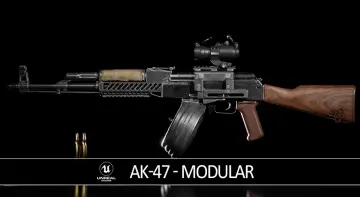
A crucial technical consideration when configuring FPS Toolkit Lite involves visual mesh assets. The pistol and rifle models displayed in project previews and screenshots are not included directly within the base package. The package focuses purely on underlying systems, code, and functional blueprint execution.
This functional separation keeps the codebase lean and decoupled from specific artistic styles. Developers are intended to plug in their own 3D weapon meshes, custom rigs, and animation sequences to match their project's visual direction. Sockets, animation triggers, and visual components can be assigned to the weapon data entries, allowing teams to connect custom assets to the existing logic framework without encountering unwanted model dependencies inside their project hierarchy.
Extending from Lite to Pro Architecture
FPS Toolkit Lite serves projects that prioritize essential first-person shooter functionality or require a clean, unbloated framework. For productions that eventually demand expanded systems, an upgrade path is established through an upcoming separate extension pack that introduces all FPS Toolkit Pro features. This arrangement ensures teams can build their foundations immediately in the Lite edition without fearing architectural dead ends.
By maintaining consistent baseline data structures, the toolkit allows projects to evolve gracefully. Developers can review the Pro feature specifications early in production to determine whether their current scope requires the broader toolkit or whether the core Lite mechanics—combined with custom blueprints and data table entries—fulfill their game design goals.
 Weapons & Combat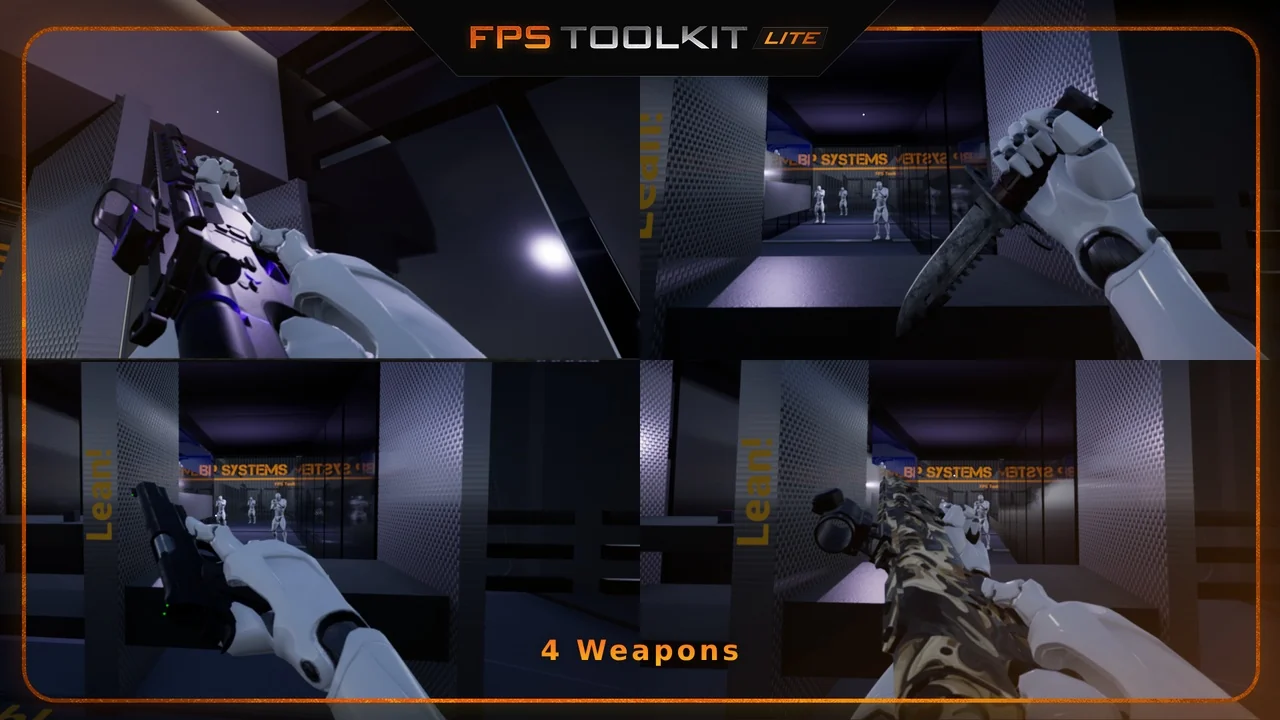
 Weapons & Combat
 Weapons & Combat
 Weapons & Combat