"c14ff6bd758dadb1"{"id":"1001058","slug":"mg-15-with-accessories-wwii-german-lmg","title":"MG-15 with Accessories (WWII German LMG)","category":"Weapons \u0026 Combat","engine":"5.1+","assetVersion":"","engineVersion":"Engine Version: 5.1+","tag":"Weapons \u0026 Combat","accent":"blue","visual":"mech","summary":"A WWII Luftwaffe LMG pack with skeletal mesh props for FPS/TPS weapons, separated static meshes for environment props, and segmented trigger animations.","platform":"Unreal Engine","publishedAt":"2026-08-30T14:54:50.549Z","updatedAt":"2026-08-30T14:54:50.549Z","sourceNotes":[],"fileContents":[],"compatibility":["Unreal Engine","Engine Version: 5.1+"],"featuredImage":{"alt":"MG-15 with Accessories (WWII German LMG)","src":"/wp-content/uploads/published/2026/08/d88930631972-9d89ccf9-c759-4420-a226-d409c29aefac-b4dfe6a9f3.webp"},"hasDownloadLink":true,"downloads":0,"terms":[{"taxonomy":"category","slug":"weapons-and-combat","name":"Weapons \u0026 Combat"}],"galleryImages":[{"src":"/wp-content/uploads/published/2026/08/7198b6b11b98-5dc452dd-57f9-465e-b3dd-de71aa37bf52-d749d7a618.webp","alt":"MG-15 with Accessories (WWII German LMG)"},{"src":"/wp-content/uploads/published/2026/08/3584c6a4312c-c6b061cc-60cf-4bc5-a329-34c329f80716-e14ba6518f.webp","alt":"MG-15 with Accessories (WWII German LMG)"},{"src":"/wp-content/uploads/published/2026/08/ed552054902a-d0ac8564-bfc7-402f-8719-42cb7c0b2563-3ab49bfd75.webp","alt":"MG-15 with Accessories (WWII German LMG)"},{"src":"/wp-content/uploads/published/2026/08/6e127da202b3-9c419f01-54ba-4aba-ac72-7c97a8e0e36f-810019c796.webp","alt":"MG-15 with Accessories (WWII German LMG)"},{"src":"/wp-content/uploads/published/2026/08/8d178c0d09fb-e7f1e0d8-988a-4e73-ad8d-06004647a5aa-13b8923fae.webp","alt":"MG-15 with Accessories (WWII German LMG)"},{"src":"/wp-content/uploads/published/2026/08/026674428019-79d6a078-e9e3-4c70-945f-557f7bfd4f78-5df04874a4.webp","alt":"MG-15 with Accessories (WWII German LMG)"},{"src":"/wp-content/uploads/published/2026/08/eb3e2e70203d-c3fed1d1-b061-4137-bd8e-281da301ead0-39706efa5a.webp","alt":"MG-15 with Accessories (WWII German LMG)"},{"src":"/wp-content/uploads/published/2026/08/250c41856513-c500e648-a471-42c3-8703-a6a67fc2ae02-43862da3bf.webp","alt":"MG-15 with Accessories (WWII German LMG)"},{"src":"/wp-content/uploads/published/2026/08/49ebe114c379-f89c6922-4a97-447c-bda0-11dfe587ee7e-3e88a3cdc5.webp","alt":"MG-15 with Accessories (WWII German LMG)"},{"src":"/wp-content/uploads/published/2026/08/7cca3140eab1-0898fd9b-ab18-4a03-bc79-f134cd2c30fc-f6bc41b2a4.webp","alt":"MG-15 with Accessories (WWII German LMG)"}],"accessPanel":{"kind":"resource","title":"Download this resource","eyebrow":"Free Download","message":"Log in or create a free account to start your download.","fileName":"Content.7z","safetyNote":"Resources are manually reviewed before listing to improve quality and reduce obvious risks.","actionLabel":"Download Free","resourceType":"Resource archive"},"contentHtml":"\u003ch2\u003eFrom MG-34 and MG-42 Fatigue to an MG-15 Alternative\u003c/h2\u003e\n\u003cp\u003eWhen a WWII game needs a German light machine gun, the armory shelf often ends up with MG-34 and MG-42 models in every scene. The MG-15 with Accessories pack starts from that exact complaint. The creator positions the MG-15 as a great solution to diversify WWII armories, giving teams a way to keep the German LMG role filled with a different visual identity.\u003c/p\u003e\n\u003cp\u003eThe MG-15 carries its own Luftwaffe context, which the tag list makes explicit. Alongside the Machinegun tag, the asset is tagged with Luftwaffe, Aircraft, Plane, and Infantry. The tripod and magazine tags broaden the setup possibilities, and the Ww2 tag anchors the whole pack in a historical period.\u003c/p\u003e\n\u003ch2\u003eSkeletal Mesh Props vs. Separated Static Meshes\u003c/h2\u003e\n\u003cp\u003eThis pack does more than hand over one rigged weapon. The content is split into two structural layers. The skeletal mesh props are meant to be deployed as weapons in FPS or TPS games. Those props can be attached to player or NPC skeletons and can carry the animations that make the gun move and fire. The second layer is made up of separated components as static meshes. These are environmental objects that do not need a skeleton. They can be placed in a workshop, an armory, or any scene that calls for MG-15 parts without having to run a full animation blueprint.\u003c/p\u003e\n\u003cp\u003eOn a practical level, this split means different team members can work with the asset at different stages. A gameplay programmer can focus on the skeletal mesh and its animation clips, while a level artist pulls the static meshes into the scene. The asset does not force all use cases through the same rigged setup.\u003c/p\u003e\n\u003cp\u003eStatic meshes also allow the MG-15 to appear in more than one state within a level. The magazine can be placed beside the receiver, the tripod can stand alone, and the bullet props can be scattered around a loading area. The separation supports environment storytelling without requiring a character to pick up the weapon.\u003c/p\u003e\n\u003ch2\u003eSegmented Operating Animations for Trigger Control\u003c/h2\u003e\n\u003cp\u003eBasic operating animations are included in the pack. These are not full movement, reload, or character locomotion sets. They cover the mechanical operations that make the machine gun usable. The key detail is that these animations are divided into separate segments. As an example, the trigger animation is split into three distinct pieces: press the trigger, hold the trigger, and release the trigger.\u003c/p\u003e\n\u003cp\u003eFrom an implementation angle, this segmentation is helpful because a weapon does not usually have a single animation that covers everything. The press segment can start the shot, the hold segment can keep the trigger down during sustained fire, and the release segment can end the action. Separating them lets the game logic decide when each part plays, instead of relying on one long continuous clip that might not match the player's input.\u003c/p\u003e\n\u003cp\u003eThis modular structure also makes future reuse easier. Because the trigger animation is already separated into press, hold, and release, the same pattern can be applied to other machine gun or automatic weapon logic without rebuilding the underlying animation clips.\u003c/p\u003e\n\u003ch2\u003eDemo Video Shows the Animation Behavior\u003c/h2\u003e\n\u003cp\u003eA demo video accompanies the asset and shows animations for controlling the machine gun. That video serves as a practical reference for how the segmented animations are expected to behave. Watching it before importing the asset can help a developer understand the relationship between trigger input and animation playback. It also gives a preview of what the skeletal mesh can do when the segments are wired together in a weapon system. The video makes it easier to evaluate the animation behavior before integrating the MG-15 into a project.\u003c/p\u003e\n\u003ch2\u003eAccessories in the Tag List and a Compatibility Note\u003c/h2\u003e\n\u003cp\u003eThe accessory side of the pack is easy to spot in the tags. Magazine, Tripod, and Bullet are listed alongside the main Machinegun tag. The Luftwaffe and Aircraft tags tie the weapon to German air power, while Infantry and Plane show that the context can move between ground and airborne scenes. These tags help when filtering the asset library, but they also give an environment designer a mental picture of the pieces that come with the MG-15.\u003c/p\u003e\n\u003cp\u003eThe tags also point to the equipment's dual role. Aircraft and Plane cover aerial mounts, while Infantry covers ground use. Tripod and Magazine represent the support and feed accessories. The Ww2 tag places the entire assembly in a specific conflict.\u003c/p\u003e\n\u003cp\u003eA compatibility note appears in the pack details: the asset is compatible with Medieval Land Transports Pack. That tells teams already using that pack that the MG-15 can be brought into the same project workflow. The note is short, so it does not explain how the two packs interact in practice, but it is a concrete statement from the creator that they work together.\u003c/p\u003e\n\u003ch2\u003eProduction Fit for WWII Armories\u003c/h2\u003e\n\u003cp\u003eTeams that want to move past the MG-34 and MG-42 repeat have a third option with this MG-15 pack. The skeletal meshes deliver the weapon path for FPS and TPS projects, while the separated static meshes support environmental dressing. The segment-based animations make trigger handling modular, and the demo video shows what the animation control looks like before any code is written. The same visual language can carry from the interactive weapon to a leveled campaign map, making the pack useful for both mission designers and art teams. For a WWII project looking for a less common German LMG, the MG-15 with Accessories offers a direct way to expand the armory.\u003c/p\u003e\n\n\u003ch2\u003eRelated Resources Worth Checking\u003c/h2\u003e\n\u003cul\u003e\n\u003cli\u003e\u003ca href=\"https://3dcghub.com/ww2-germany-weapons/\" title=\"WW2 Germany Weapons\"\u003eWW2 Germany Weapons\u003c/a\u003e\u003c/li\u003e\n\u003cli\u003e\u003ca href=\"https://3dcghub.com/customizable-weapon-pack/\" title=\"Customizable Weapon Pack\"\u003eCustomizable Weapon Pack\u003c/a\u003e\u003c/li\u003e\n\u003cli\u003e\u003ca href=\"https://3dcghub.com/world-war-ii-vol-1/\" title=\"World War II - VOL.1\"\u003eWorld War II - VOL.1\u003c/a\u003e\u003c/li\u003e\n\u003cli\u003e\u003ca href=\"https://3dcghub.com/death-from-above-gunship-mini-game/\" title=\"Death From Above - Gunship Mini-Game\"\u003eDeath From Above - Gunship Mini-Game\u003c/a\u003e\u003c/li\u003e\n\u003cli\u003e\u003ca href=\"https://3dcghub.com/medieval-weapons-bundle-medieval-weapons-melee-weapons-fantasy-weapons/\" title=\"Medieval Weapons Bundle (Medieval Weapons, Melee Weapons, Fantasy Weapons)\"\u003eMedieval Weapons Bundle (Medieval Weapons, Melee Weapons, Fantasy Weapons)\u003c/a\u003e\u003c/li\u003e\n\u003c/ul\u003e","contentTextLength":5741,"navigation":{"current":773,"total":3719,"previous":{"id":"1001059","slug":"modern-office-environment-modern-office-environment-modern-office-3d-office-2","title":"Modern Office Environment ( Modern Office Environment Modern Office 3D Office )","category":"Interior","platform":"Unreal Engine","updatedAt":"2026-08-30T15:00:21.323Z"},"next":{"id":"1001057","slug":"medieval-tents-and-camping-props-pack","title":"Medieval Tents \u0026 Camping Props Pack","category":"Medieval","platform":"Unreal Engine","updatedAt":"2026-08-30T14:45:31.934Z"}},"relatedResources":[{"id":"5506","slug":"ww2-germany-weapons","title":"WW2 Germany Weapons","category":"Weapons \u0026 Combat","engine":"4.26+,5.0+","assetVersion":"Engine version: 4.26+,5.0+","engineVersion":"4.26","tag":"Weapons \u0026 Combat","accent":"blue","visual":"city","summary":"Enhance your historical shooter with this realistic WW2 German weapon pack. Featuring 5 animated guns with high-quality PBR textures for game development.","platform":"Unreal Engine","publishedAt":"2026-02-15T15:35:54.000Z","updatedAt":"2026-04-19T15:56:56.000Z","sourceNotes":[],"fileContents":[],"compatibility":["Unreal Engine","Engine version: 4.26+,5.0+"],"featuredImage":{"alt":"WW2 Germany Weapons","src":"https://3dcghub.com/wp-content/uploads/2026/02/eb836f48-9462-4f7c-9a0c-8938316f45cd.webp"},"hasDownloadLink":true,"downloads":2},{"id":"1001579","slug":"fps-weapon-loadout-system","title":"FPS Weapon Loadout System","category":"Weapons \u0026 Combat","engine":"5.0+","assetVersion":"","engineVersion":"Engine Version: 5.0+","tag":"Weapons \u0026 Combat","accent":"blue","visual":"mech","summary":"Explore the FPS Weapon Loadout System for UE4 and UE5, featuring dynamic UMG widgets, DataAsset-driven attachments, and asynchronous save-and-load mechanics.","platform":"Unreal Engine","publishedAt":"2026-10-10T08:51:41.065Z","updatedAt":"2026-10-10T08:51:41.065Z","sourceNotes":[],"fileContents":[],"compatibility":["Unreal Engine","Engine Version: 5.0+"],"featuredImage":{"alt":"FPS Weapon Loadout System","src":"/wp-content/uploads/published/2026/10/3c948291f92d-22bace22-be84-4654-bcfa-92c3bd95bcbf-65e34db5db.webp"},"hasDownloadLink":true,"downloads":2},{"id":"1001437","slug":"fps-toolkit-lite","title":"FPS Toolkit Lite","category":"Weapons \u0026 Combat","engine":"5.0+","assetVersion":"","engineVersion":"Engine Version: 5.0+","tag":"Weapons \u0026 Combat","accent":"blue","visual":"mech","summary":"FPS Toolkit Lite provides a data-table-driven first-person framework for Unreal Engine, featuring easy weapon expansion and modular system integration.","platform":"Unreal Engine","publishedAt":"2026-10-07T08:30:52.617Z","updatedAt":"2026-10-07T08:30:52.617Z","sourceNotes":[],"fileContents":[],"compatibility":["Unreal Engine","Engine Version: 5.0+"],"featuredImage":{"alt":"FPS Toolkit Lite","src":"/wp-content/uploads/published/2026/10/29122674fe41-1f6128cf-2491-4af7-9810-01e8d62a51a3-71a412a9b8.webp"},"hasDownloadLink":true,"downloads":2}]}
Weapons & Combat
MG-15 with Accessories (WWII German LMG)
A WWII Luftwaffe LMG pack with skeletal mesh props for FPS/TPS weapons, separated static meshes for environment props, and segmented trigger animations.
From MG-34 and MG-42 Fatigue to an MG-15 Alternative
When a WWII game needs a German light machine gun, the armory shelf often ends up with MG-34 and MG-42 models in every scene. The MG-15 with Accessories pack starts from that exact complaint. The creator positions the MG-15 as a great solution to diversify WWII armories, giving teams a way to keep the German LMG role filled with a different visual identity.
The MG-15 carries its own Luftwaffe context, which the tag list makes explicit. Alongside the Machinegun tag, the asset is tagged with Luftwaffe, Aircraft, Plane, and Infantry. The tripod and magazine tags broaden the setup possibilities, and the Ww2 tag anchors the whole pack in a historical period.
Skeletal Mesh Props vs. Separated Static Meshes
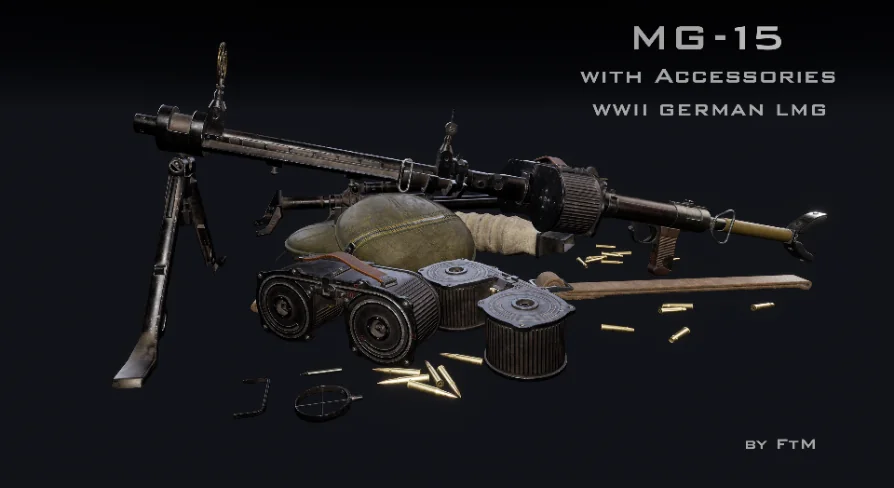
This pack does more than hand over one rigged weapon. The content is split into two structural layers. The skeletal mesh props are meant to be deployed as weapons in FPS or TPS games. Those props can be attached to player or NPC skeletons and can carry the animations that make the gun move and fire. The second layer is made up of separated components as static meshes. These are environmental objects that do not need a skeleton. They can be placed in a workshop, an armory, or any scene that calls for MG-15 parts without having to run a full animation blueprint.
On a practical level, this split means different team members can work with the asset at different stages. A gameplay programmer can focus on the skeletal mesh and its animation clips, while a level artist pulls the static meshes into the scene. The asset does not force all use cases through the same rigged setup.
Static meshes also allow the MG-15 to appear in more than one state within a level. The magazine can be placed beside the receiver, the tripod can stand alone, and the bullet props can be scattered around a loading area. The separation supports environment storytelling without requiring a character to pick up the weapon.
Segmented Operating Animations for Trigger Control
Basic operating animations are included in the pack. These are not full movement, reload, or character locomotion sets. They cover the mechanical operations that make the machine gun usable. The key detail is that these animations are divided into separate segments. As an example, the trigger animation is split into three distinct pieces: press the trigger, hold the trigger, and release the trigger.
From an implementation angle, this segmentation is helpful because a weapon does not usually have a single animation that covers everything. The press segment can start the shot, the hold segment can keep the trigger down during sustained fire, and the release segment can end the action. Separating them lets the game logic decide when each part plays, instead of relying on one long continuous clip that might not match the player's input.
This modular structure also makes future reuse easier. Because the trigger animation is already separated into press, hold, and release, the same pattern can be applied to other machine gun or automatic weapon logic without rebuilding the underlying animation clips.
Demo Video Shows the Animation Behavior
A demo video accompanies the asset and shows animations for controlling the machine gun. That video serves as a practical reference for how the segmented animations are expected to behave. Watching it before importing the asset can help a developer understand the relationship between trigger input and animation playback. It also gives a preview of what the skeletal mesh can do when the segments are wired together in a weapon system. The video makes it easier to evaluate the animation behavior before integrating the MG-15 into a project.
Accessories in the Tag List and a Compatibility Note
The accessory side of the pack is easy to spot in the tags. Magazine, Tripod, and Bullet are listed alongside the main Machinegun tag. The Luftwaffe and Aircraft tags tie the weapon to German air power, while Infantry and Plane show that the context can move between ground and airborne scenes. These tags help when filtering the asset library, but they also give an environment designer a mental picture of the pieces that come with the MG-15.
The tags also point to the equipment's dual role. Aircraft and Plane cover aerial mounts, while Infantry covers ground use. Tripod and Magazine represent the support and feed accessories. The Ww2 tag places the entire assembly in a specific conflict.
A compatibility note appears in the pack details: the asset is compatible with Medieval Land Transports Pack. That tells teams already using that pack that the MG-15 can be brought into the same project workflow. The note is short, so it does not explain how the two packs interact in practice, but it is a concrete statement from the creator that they work together.
Production Fit for WWII Armories
Teams that want to move past the MG-34 and MG-42 repeat have a third option with this MG-15 pack. The skeletal meshes deliver the weapon path for FPS and TPS projects, while the separated static meshes support environmental dressing. The segment-based animations make trigger handling modular, and the demo video shows what the animation control looks like before any code is written. The same visual language can carry from the interactive weapon to a leveled campaign map, making the pack useful for both mission designers and art teams. For a WWII project looking for a less common German LMG, the MG-15 with Accessories offers a direct way to expand the armory.
 Weapons & Combat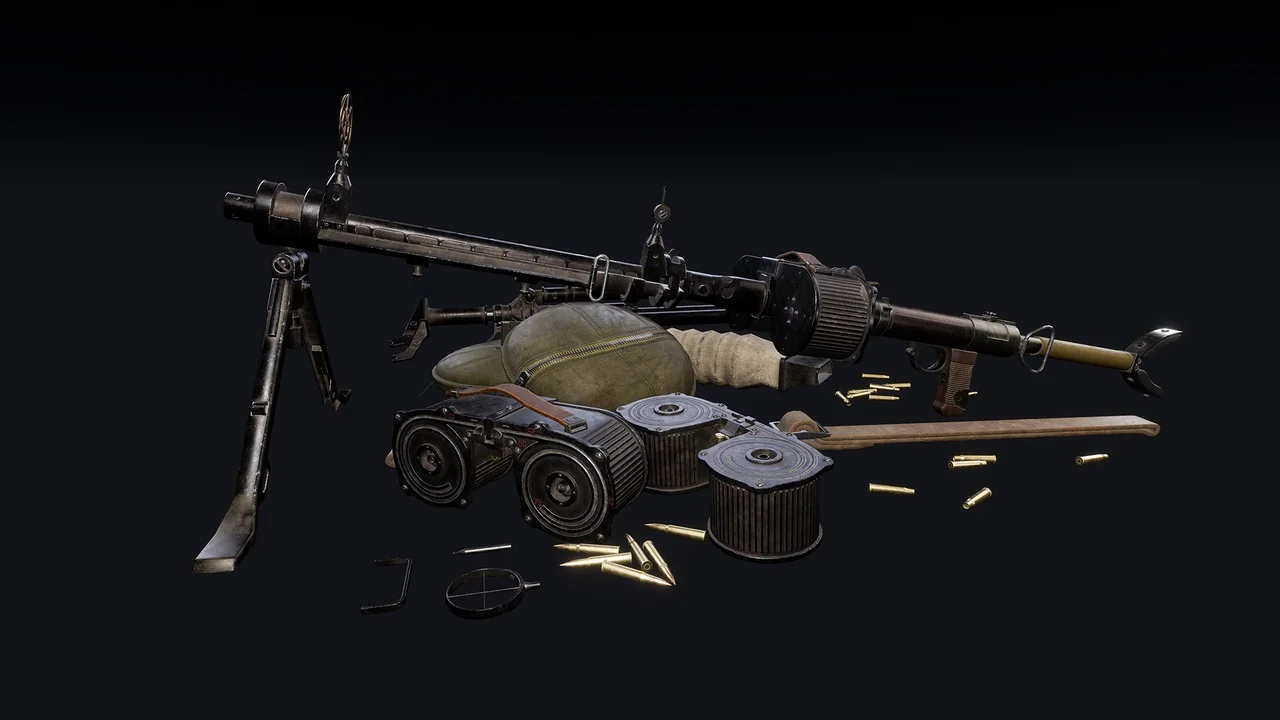
 Weapons & Combat
 Weapons & Combat
 Weapons & Combat