"2596237520a17fbf"{"id":"1002911","slug":"fighting-camera-manager","title":"Fighting Camera Manager","category":"Fighting","engine":"5.3+","assetVersion":"","engineVersion":"Engine Version: 5.3+","tag":"Fighting","accent":"blue","visual":"mech","summary":"Explore Fighting Camera Manager, a fully replicated Blueprint camera component featuring dynamic auto zoom, smart player tracking, and dual combat modes.","platform":"Unreal Engine","indexPolicy":"index","publishedAt":"2026-11-21T15:40:09.100Z","updatedAt":"2026-11-21T15:40:09.100Z","sourceNotes":[],"fileContents":[],"compatibility":["Unreal Engine","Engine Version: 5.3+"],"featuredImage":{"alt":"Fighting Camera Manager","src":"/wp-content/uploads/published/2026/11/e37e0a6add3c-a7a5fd26-90ae-431e-9c63-e36e7490e998-2682a5fdee.webp"},"fileSizeBytes":16807337,"hasDownloadLink":true,"downloads":0,"terms":[{"taxonomy":"category","slug":"fighting","name":"Fighting"}],"galleryImages":[{"src":"/wp-content/uploads/published/2026/11/b4558ec74c0b-51bfcb06-8eb4-4582-8c1f-0bfefed58dfb-9565317bd4.webp","alt":"Fighting Camera Manager"},{"src":"/wp-content/uploads/published/2026/11/4a6c3f0818c0-5895b9f0-1720-470a-8a6b-cb65e0957fb5-6cb5f7288d.webp","alt":"Fighting Camera Manager"},{"src":"/wp-content/uploads/published/2026/11/7cde2151b2de-382d757d-da1d-42da-9eaf-7753fd462775-4fd4532ce7.webp","alt":"Fighting Camera Manager"},{"src":"/wp-content/uploads/published/2026/11/429abc5dee4e-afeb252c-b6be-4a0a-81c7-7ad45fe0befa-019f670503.webp","alt":"Fighting Camera Manager"}],"contentHtml":"\u003cp\u003eStaging combat in a fighting game presents unique technical demands. Whether an arena is locked to a traditional two-dimensional plane or opened up to full three-dimensional movement, players rely heavily on clear spatial awareness to judge attack range, dodge timing, and frame advantage. An awkward perspective disrupts spatial readability, throwing off player orientation during fast trades. Fighting Camera Manager delivers a focused, ready-to-use camera system tailored specifically to solve these framing hurdles across both 2.5D and 3D fighting projects.\u003c/p\u003e \u003ch2\u003eSwitching Perspectives with the Fighting Camera\u003c/h2\u003e\n\u003cp\u003eCombat games often diverge significantly in how they handle player movement and arena geography. Traditional competitive titles rely on a strict side-on plane where combatants face each other laterally, while brawlers and arena fighters grant participants full rotational freedom across a 3D floor. Fighting Camera Manager accommodates both styles through dual combat modes that developers can toggle seamlessly with a single variable.\u003c/p\u003e\n\u003cp\u003eIn 2.5D Mode, the system locks into a classic side-on perspective, maintaining the geometric clarity required for precise footsies, high-low mixups, and projectile spacing. Characters can navigate standard fighting game planes without the camera drifting out of alignment. Switching the controlling variable over to 3D Mode transitions the logic to follow full 3D movement. The camera retains tactical perspective as fighters circle each other, reposition around obstacles, or battle in open arenas. Because this flexibility is contained within the same underlying logic, projects that incorporate both side-scrolling stages and free-roaming battlegrounds can utilize the same unified camera pipeline without separate bespoke setups.\u003c/p\u003e \u003ch2\u003eAuto Zoom and Group Tracking in the Manager Component\u003c/h2\u003e\n\u003cp\u003eTracking rapid movements while keeping visual focus locked onto the brawl requires reliable multi-target math. Fighting Camera Manager integrates smart player tracking that automatically calculates the center point between active combatants. Rather than relying on simple midpoint averaging that can fail when players jump or perform aerial combos, the component continuously assesses participant positions to maintain the core battle in the exact center of the screen.\u003c/p\u003e\n\u003cp\u003eThis tracking logic operates effectively not only with two duelists in a traditional head-to-head match, but also scales to accommodate multiple fighters simultaneously. When three or more combatants clash in a chaotic free-for-all or team engagement, the tracking logic evaluates the positions of all registered characters to establish a collective focus point. This prevents one fighter from monopolizing camera attention while leaving an opponent off in the margins.\u003c/p\u003e\n\u003cp\u003eWorking alongside tracking is the dynamic auto zoom system. As combatants close the distance to trade short-range strikes, the camera glides inward to heighten visual impact and emphasize hit reactions. When fighters dash backward to reset the neutral game or throw ranged attacks, the camera dynamically draws back, expanding the visible field. This behavior preserves spatial context across the entire arena floor without requiring scripted zoom triggers or manual intervention from the animator.\u003c/p\u003e \u003ch2\u003eGranular Offsets, Lag Smoothing, and Player Distance Bounds\u003c/h2\u003e\n\u003cp\u003eFraming requirements vary significantly depending on character proportions, stage designs, and artistic directions. Fighting Camera Manager exposes a detailed collection of parameters to let creators fine-tune framing behavior to match specific aesthetic goals:\u003c/p\u003e\n\u003cul\u003e \u003cli\u003e\u003cstrong\u003eZoom Controls:\u003c/strong\u003e Dedicated settings for Zoom Min, Zoom Max, and an Auto Zoom toggle govern how close the camera can push during infighting and how far it can retract when participants spread out across the arena.\u003c/li\u003e \u003cli\u003e\u003cstrong\u003ePosition Offsets:\u003c/strong\u003e Parameters such as Height Offset and Offset Side Distance allow developers to position the camera higher above character head levels or adjust lateral staging to account for asymmetric HUD layouts.\u003c/li\u003e \u003cli\u003e\u003cstrong\u003eAngle Adjustments:\u003c/strong\u003e Offset Angle Yaw and Angle Pitch controls enable precise pitch tilting and horizontal viewing angles, which helps maintain a grounded floor line or create a dramatic downward view of the stage.\u003c/li\u003e \u003cli\u003e\u003cstrong\u003eSmoothness and Lag:\u003c/strong\u003e Smooth Camera Rotation settings handle both camera lag and rotation lag independently. By damping abrupt position spikes, the camera responds fluidly to quick dashes or sudden knockbacks without inducing motion disorientation.\u003c/li\u003e \u003cli\u003e\u003cstrong\u003eBounds Enforcement:\u003c/strong\u003e The Max Distance P2P setting defines the maximum allowed distance between players. This threshold acts as an invisible boundary, ensuring participants cannot dash or get knocked entirely off-screen, maintaining competitive framing discipline throughout the match.\u003c/li\u003e\n\u003c/ul\u003e \u003ch2\u003eNetwork Replication and Single-Screen Local Play\u003c/h2\u003e\n\u003cp\u003eCompetitive fighting titles require robust networking that avoids camera jitter or desynchronization between opponents. Fighting Camera Manager is fully network replicated, operating on a server-authoritative framework. The server maintains authoritative oversight of the camera logic, while smooth client-side blending interpolates camera motion locally. This architecture ensures that network fluctuations, latency spikes, or rapid player inputs do not translate into jagged camera snapping on remote clients, keeping online PvP encounters readable and stable.\u003c/p\u003e\n\u003cp\u003eAlongside its networked multiplayer functionality, the component features native support for local multiplayer play. Couch co-op and versus battles on a shared screen function natively out of the box. The manager can track multiple participants sharing a single keyboard, dual gamepads, or mixed input configurations on one machine, applying its auto zoom and midpoint calculations uniformly across local versus sessions.\u003c/p\u003e \u003ch2\u003eClean Blueprint Integration in Active Projects\u003c/h2\u003e\n\u003cp\u003eWorkflow efficiency is a core strength of the architecture. Packaged as a single, well-organized component, Fighting Camera Manager drops directly into an existing camera actor. It operates without requiring invasive rewrites to existing character Blueprints or animation graphs. Once added, it works with the characters already on stage and begins calculating target center points and distance bounds.\u003c/p\u003e\n\u003cp\u003eUnder the hood, the component is built using efficient calculations and Blueprint best practices to keep tick costs minimal. Math routines that govern vector interpolation, target averaging, and zoom scaling are structured to run cleanly even during heavy particle effects, high-frame-rate inputs, and multi-character collisions. Studios developing arena combatants, local party brawlers, or competitive online duelists can implement complete dynamic framing right from the prototyping phase, bypassing the lengthy technical hurdles usually associated with building dedicated combat camera rigs from scratch.\u003c/p\u003e\n\n\u003ch2\u003eExplore Similar Assets\u003c/h2\u003e\n\u003cul\u003e\n\u003cli\u003e\u003ca href=\"https://3dcghub.com/basic-multiplayer-melee-combat-system/\" rel=\"noopener noreferrer\"\u003eBasic Multiplayer Melee Combat System\u003c/a\u003e\u003c/li\u003e\n\u003cli\u003e\u003ca href=\"https://3dcghub.com/fighter-template/\" rel=\"noopener noreferrer\"\u003eFighter Template\u003c/a\u003e\u003c/li\u003e\n\u003cli\u003e\u003ca href=\"https://3dcghub.com/action-camera-manager-2/\" rel=\"noopener noreferrer\"\u003eAction Camera Manager\u003c/a\u003e\u003c/li\u003e\n\u003cli\u003e\u003ca href=\"https://3dcghub.com/action-camera-manager/\" rel=\"noopener noreferrer\"\u003eAction Camera Manager\u003c/a\u003e\u003c/li\u003e\n\u003cli\u003e\u003ca href=\"https://3dcghub.com/selection-manager/\" rel=\"noopener noreferrer\"\u003eSelection Manager\u003c/a\u003e\u003c/li\u003e\n\u003c/ul\u003e","contentTextLength":6998,"navigation":{"current":8,"total":4839,"previous":{"id":"1002912","slug":"gmcv2-advanced-locomotion-and-network-prediction-framework","title":"GMCv2 - Advanced Locomotion \u0026 Network Prediction Framework","category":"Network \u0026 Multiplayer","platform":"Unreal Engine","updatedAt":"2026-11-21T15:41:06.486Z"},"next":{"id":"1002910","slug":"ezprojectiles-realistic-bullet-simulation","title":"EZProjectiles - Realistic Bullet Simulation","category":"Procedural Systems","platform":"Unreal Engine","updatedAt":"2026-11-21T15:39:35.038Z"}},"relatedResources":[{"id":"1001247","slug":"basic-multiplayer-melee-combat-system","title":"Basic Multiplayer Melee Combat System","category":"Fighting","engine":"5.0+","assetVersion":"","engineVersion":"Engine Version: 5.0+","tag":"Fighting","accent":"blue","visual":"mech","summary":"A technical look at the Basic Multiplayer Melee Combat System, featuring modular actor components, hit scan tracing, lock-on targeting, and 3v3 bot support.","platform":"Unreal Engine","indexPolicy":"index","publishedAt":"2026-09-23T15:24:40.286Z","updatedAt":"2026-09-23T15:24:40.286Z","sourceNotes":[],"fileContents":[],"compatibility":["Unreal Engine","Engine Version: 5.0+"],"featuredImage":{"alt":"Basic Multiplayer Melee Combat System","src":"/wp-content/uploads/published/2026/09/035e110571a9-f0a9ce02-9dce-45fd-b0a4-670e3182aabb-234ab47290.webp"},"fileSizeBytes":333605407,"hasDownloadLink":true,"downloads":1},{"id":"1000826","slug":"fighter-template","title":"Fighter Template","category":"Fighting","engine":"5.0+","assetVersion":"","engineVersion":"Engine Version: 5.0+","tag":"Fighting","accent":"blue","visual":"mech","summary":"A Blueprint-driven foundation for local multiplayer fighting games, featuring data table integration for rapid character setup and map selection flows.","platform":"Unreal Engine","indexPolicy":"index","publishedAt":"2026-08-01T14:23:21.048Z","updatedAt":"2026-08-01T14:23:21.048Z","sourceNotes":[],"fileContents":[],"compatibility":["Unreal Engine","Engine Version: 5.0+"],"featuredImage":{"alt":"Fighter Template","src":"/wp-content/uploads/published/2026/08/6b82304d435a-67202852-1042-404e-83cc-de1060b77428-4b9400cc3f.webp"},"fileSizeBytes":20503020,"hasDownloadLink":true,"downloads":0},{"id":"1001316","slug":"action-camera-manager-2","title":"Action Camera Manager","category":"Gameplay Features","engine":"5.1 - 5.6","assetVersion":"Asset Version: 2.12 - 2.17","engineVersion":"Engine Version: 5.1 - 5.6","tag":"Gameplay Features","accent":"blue","visual":"mech","summary":"An in-depth look at Action Camera Manager, detailing its 2D, 2D_Fix, and 3D modes, multiplayer server replication, and character component setup.","platform":"Unreal Engine","indexPolicy":"index","publishedAt":"2026-10-02T09:07:50.866Z","updatedAt":"2026-10-02T09:07:50.866Z","sourceNotes":[],"fileContents":[],"compatibility":["Unreal Engine","Asset Version: 2.12 - 2.17","Engine Version: 5.1 - 5.6"],"featuredImage":{"alt":"Action Camera Manager","src":"/wp-content/uploads/published/2026/10/59253223dc30-1b4cbc9a-a2ab-4e3a-adbe-e7eda0fb618d-2380f3f785.webp"},"fileSizeBytes":56713452,"hasDownloadLink":true,"downloads":0}]}
Resource screenshots
1 / 4
Join our channel
Follow 3DCGHUB on Telegram for new resource drops, migration updates, and community notices.
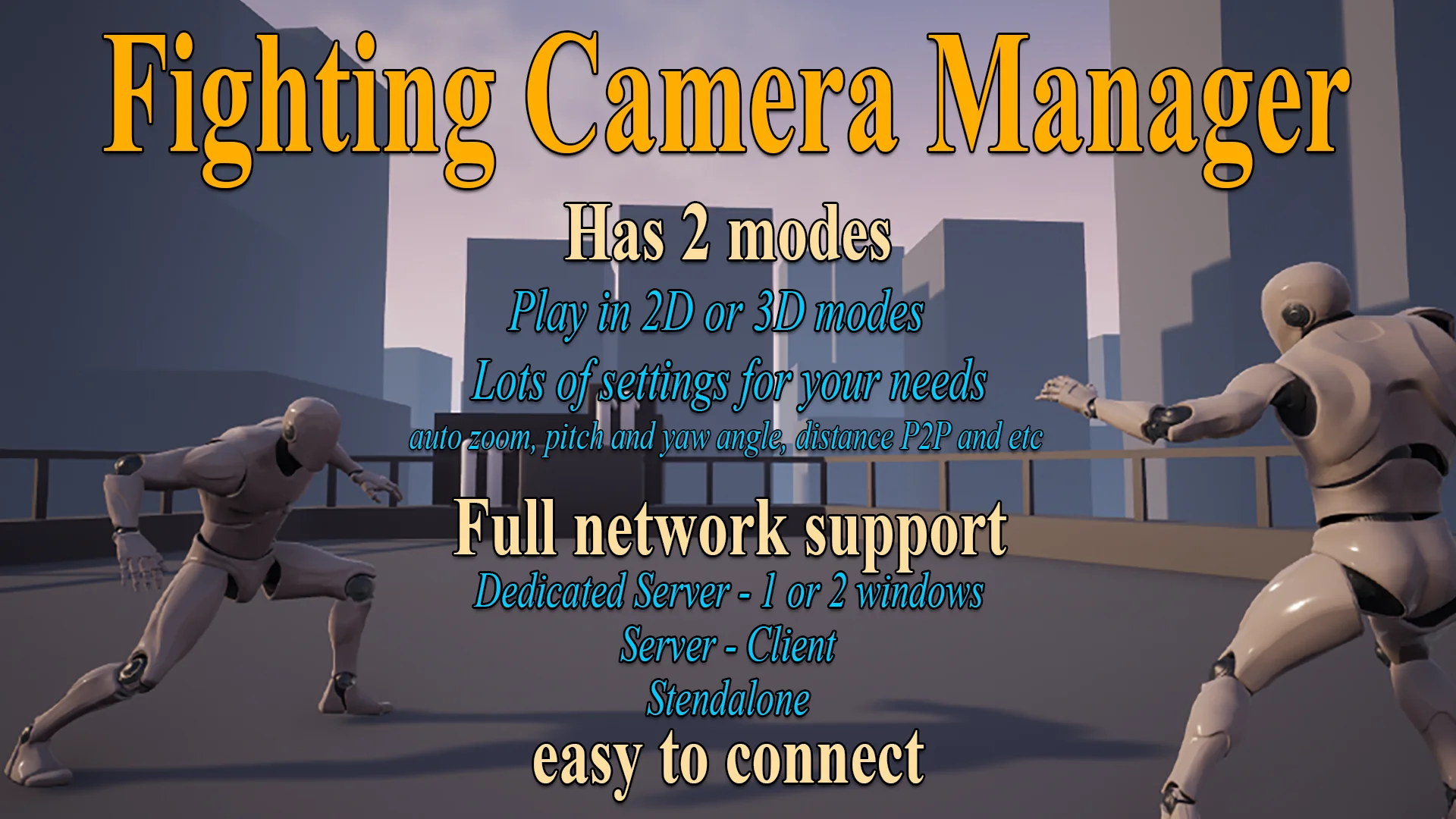
Explore Fighting Camera Manager, a fully replicated Blueprint camera component featuring dynamic auto zoom, smart player tracking, and dual combat modes.
Staging combat in a fighting game presents unique technical demands. Whether an arena is locked to a traditional two-dimensional plane or opened up to full three-dimensional movement, players rely heavily on clear spatial awareness to judge attack range, dodge timing, and frame advantage. An awkward perspective disrupts spatial readability, throwing off player orientation during fast trades. Fighting Camera Manager delivers a focused, ready-to-use camera system tailored specifically to solve these framing hurdles across both 2.5D and 3D fighting projects.
Switching Perspectives with the Fighting Camera
Combat games often diverge significantly in how they handle player movement and arena geography. Traditional competitive titles rely on a strict side-on plane where combatants face each other laterally, while brawlers and arena fighters grant participants full rotational freedom across a 3D floor. Fighting Camera Manager accommodates both styles through dual combat modes that developers can toggle seamlessly with a single variable.
In 2.5D Mode, the system locks into a classic side-on perspective, maintaining the geometric clarity required for precise footsies, high-low mixups, and projectile spacing. Characters can navigate standard fighting game planes without the camera drifting out of alignment. Switching the controlling variable over to 3D Mode transitions the logic to follow full 3D movement. The camera retains tactical perspective as fighters circle each other, reposition around obstacles, or battle in open arenas. Because this flexibility is contained within the same underlying logic, projects that incorporate both side-scrolling stages and free-roaming battlegrounds can utilize the same unified camera pipeline without separate bespoke setups.
Auto Zoom and Group Tracking in the Manager Component
Tracking rapid movements while keeping visual focus locked onto the brawl requires reliable multi-target math. Fighting Camera Manager integrates smart player tracking that automatically calculates the center point between active combatants. Rather than relying on simple midpoint averaging that can fail when players jump or perform aerial combos, the component continuously assesses participant positions to maintain the core battle in the exact center of the screen.
This tracking logic operates effectively not only with two duelists in a traditional head-to-head match, but also scales to accommodate multiple fighters simultaneously. When three or more combatants clash in a chaotic free-for-all or team engagement, the tracking logic evaluates the positions of all registered characters to establish a collective focus point. This prevents one fighter from monopolizing camera attention while leaving an opponent off in the margins.
Working alongside tracking is the dynamic auto zoom system. As combatants close the distance to trade short-range strikes, the camera glides inward to heighten visual impact and emphasize hit reactions. When fighters dash backward to reset the neutral game or throw ranged attacks, the camera dynamically draws back, expanding the visible field. This behavior preserves spatial context across the entire arena floor without requiring scripted zoom triggers or manual intervention from the animator.
Granular Offsets, Lag Smoothing, and Player Distance Bounds
Framing requirements vary significantly depending on character proportions, stage designs, and artistic directions. Fighting Camera Manager exposes a detailed collection of parameters to let creators fine-tune framing behavior to match specific aesthetic goals:
Zoom Controls: Dedicated settings for Zoom Min, Zoom Max, and an Auto Zoom toggle govern how close the camera can push during infighting and how far it can retract when participants spread out across the arena.
Position Offsets: Parameters such as Height Offset and Offset Side Distance allow developers to position the camera higher above character head levels or adjust lateral staging to account for asymmetric HUD layouts.
Angle Adjustments: Offset Angle Yaw and Angle Pitch controls enable precise pitch tilting and horizontal viewing angles, which helps maintain a grounded floor line or create a dramatic downward view of the stage.
Smoothness and Lag: Smooth Camera Rotation settings handle both camera lag and rotation lag independently. By damping abrupt position spikes, the camera responds fluidly to quick dashes or sudden knockbacks without inducing motion disorientation.
Bounds Enforcement: The Max Distance P2P setting defines the maximum allowed distance between players. This threshold acts as an invisible boundary, ensuring participants cannot dash or get knocked entirely off-screen, maintaining competitive framing discipline throughout the match.
Network Replication and Single-Screen Local Play
Competitive fighting titles require robust networking that avoids camera jitter or desynchronization between opponents. Fighting Camera Manager is fully network replicated, operating on a server-authoritative framework. The server maintains authoritative oversight of the camera logic, while smooth client-side blending interpolates camera motion locally. This architecture ensures that network fluctuations, latency spikes, or rapid player inputs do not translate into jagged camera snapping on remote clients, keeping online PvP encounters readable and stable.
Alongside its networked multiplayer functionality, the component features native support for local multiplayer play. Couch co-op and versus battles on a shared screen function natively out of the box. The manager can track multiple participants sharing a single keyboard, dual gamepads, or mixed input configurations on one machine, applying its auto zoom and midpoint calculations uniformly across local versus sessions.
Clean Blueprint Integration in Active Projects
Workflow efficiency is a core strength of the architecture. Packaged as a single, well-organized component, Fighting Camera Manager drops directly into an existing camera actor. It operates without requiring invasive rewrites to existing character Blueprints or animation graphs. Once added, it works with the characters already on stage and begins calculating target center points and distance bounds.
Under the hood, the component is built using efficient calculations and Blueprint best practices to keep tick costs minimal. Math routines that govern vector interpolation, target averaging, and zoom scaling are structured to run cleanly even during heavy particle effects, high-frame-rate inputs, and multi-character collisions. Studios developing arena combatants, local party brawlers, or competitive online duelists can implement complete dynamic framing right from the prototyping phase, bypassing the lengthy technical hurdles usually associated with building dedicated combat camera rigs from scratch.
 Fighting
 Fighting
 Gameplay Features