"a19e0535960bd083"{"id":"1002010","slug":"esm-buff-icon","title":"ESM Buff Icon","category":"Gameplay Features","engine":"4.26+,5.0+","assetVersion":"","engineVersion":"Engine Version: 4.26+,5.0+","tag":"Gameplay Features","accent":"blue","visual":"mech","summary":"A focused technical breakdown of ESM Buff Icon, detailing its Blueprint-driven status display workflow and compatibility with ESM Code Spider.","platform":"Unreal Engine","publishedAt":"2026-10-26T12:30:54.765Z","updatedAt":"2026-10-26T12:30:54.765Z","sourceNotes":[],"fileContents":[],"compatibility":["Unreal Engine","Engine Version: 4.26+,5.0+"],"featuredImage":{"alt":"ESM Buff Icon","src":"/wp-content/uploads/published/2026/10/ff43820b5cb4-9f7a82c1-37bf-463e-b56d-f5cca76b2472-4154c07400.webp"},"hasDownloadLink":true,"downloads":0,"terms":[{"taxonomy":"category","slug":"gameplay-features","name":"Gameplay Features"}],"galleryImages":[{"src":"/wp-content/uploads/published/2026/10/1e6c56c965b6-c26bd16b-4ea5-4f16-a4cb-b25ffc560d68-74be3e6f38.webp","alt":"ESM Buff Icon"},{"src":"/wp-content/uploads/published/2026/10/e8380d95ee3c-4f31da70-f71a-4017-9850-dd85330ae753-96a8cde469.webp","alt":"ESM Buff Icon"}],"accessPanel":{"kind":"resource","title":"Download this resource","eyebrow":"Free Download","message":"Log in or create a free account to start your download.","fileName":"Content.7z","safetyNote":"Resources are manually reviewed before listing to improve quality and reduce obvious risks.","actionLabel":"Download Free","resourceType":"Resource archive"},"contentHtml":"\u003ch2\u003eCommunicating Active Status States with ESM Buff Icon\u003c/h2\u003e\u003cp\u003eIn real-time combat and role-playing titles, the player screen constantly negotiates information density against visual clarity. Visual indicators for temporary enhancements, debuffs, cooldowns, and tactical alterations form the core of player decision-making during high-intensity sequences. The ESM Buff Icon package targets this specific interface demand, presenting a structured solution for displaying transient conditions cleanly on the user interface.\u003c/p\u003e\u003cp\u003eStatus tracking relies heavily on immediate, unmistakable visual feedback. When an in-game entity receives a stat modification, an elemental resistance change, or an aura-based empowerment, that mechanical shift must register immediately on screen. ESM Buff Icon is constructed to represent these changing gameplay variables through direct interface iconography, giving developers a dedicated visual element to reflect character modifications as they trigger, persist, and expire.\u003c/p\u003e\u003ch2\u003eBlueprint Foundations for Status Effect Display\u003c/h2\u003e\u003cp\u003eImplemented directly through Blueprints, the package integrates with visual scripting pipelines rather than requiring manual C++ hookups for visual updates. Blueprint implementation allows technical designers and UI artists to configure display parameters, wire up update logic, and manipulate interface behaviors within a standard node graph. This structural choice makes the system accessible during rapid prototyping phases while remaining flexible enough for production integration.\u003c/p\u003e\u003cp\u003eBy utilizing Blueprints, the icon handling avoids rigid interface setups. Designers can link visual states directly to gameplay gameplay events, dispatchers, or interface calls. The visual scripting environment provides a transparent path for driving properties such as visibility changes, icon swapping, numeric readouts, and visual transitions whenever active attributes fluctuate in the game world.\u003c/p\u003e\u003ch2\u003eInterfacing with the ESM Code Spider Framework\u003c/h2\u003e\u003cp\u003eCompatibility with ESM Code Spider defines the technical role of ESM Buff Icon within a wider game architecture. Rather than operating as an isolated, standalone graphic without systemic ties, the asset aligns directly with the architectural patterns established by the ESM Code Spider framework. This compatibility ensures that the underlying communication patterns—handling how code modules register events and broadcast status changes—connect smoothly with the front-end icon widget.\u003c/p\u003e\u003cp\u003eIn systems using ESM Code Spider, systemic efficiency depends on how clean the separation remains between core gameplay logic and presentation layers. ESM Buff Icon serves as the front-facing terminal in this pipeline. The underlying code handles state tracking, duration management, and stack calculations, while the icon component consumes those updates through compatible hooks to reflect the current state on screen without creating unnecessary performance bottlenecks or tangled data dependencies.\u003c/p\u003e\u003ch2\u003eInterface Scalability and Buff Lifecycle Tracking\u003c/h2\u003e\u003cp\u003eManaging status indicators in complex game projects quickly becomes difficult if individual icons require unique code paths. A scalable system requires a uniform way to instantiate, update, and remove icons based on an entity's current condition list. The lifecycle of a buff typically involves distinct stages: initialization upon application, real-time polling or event-driven updates while active, and cleanup when the effect fades or is cleansed.\u003c/p\u003e\u003cp\u003eESM Buff Icon accommodates this lifecycle by functioning as a modular visual unit. Because it operates within a Blueprint setup, instances of the icon can be spawned dynamically inside container widgets such as horizontal boxes, grids, or floating entity plates above character heads. When coordinated with a status management backend, each icon instance displays its designated representation until a removal event triggers its dismissal, maintaining an organized interface footprint during crowded multiplayer encounters or particle-heavy boss fights.\u003c/p\u003e\u003ch2\u003eProduction Considerations for ESM Buff Icon Implementation\u003c/h2\u003e\u003cp\u003eDeploying ESM Buff Icon effectively requires planning the communication flow between character state components and the user interface. Teams working with ESM Code Spider should verify that event triggers match the expected data structures exposed by the Blueprint widget. Establishing clear data transfer patterns—such as transmitting remaining duration, current stack counts, and buff classification tags—ensures that the visual elements populate reliably without redundant casting or unnecessary ticking logic.\u003c/p\u003e\u003cp\u003eFor projects requiring clear visual status feedback built on visual scripting workflows, the asset delivers an integrated approach that respects architectural modularity. By keeping visual feedback tied cleanly to systemic frameworks, technical artists can focus on styling, layout balance, and responsive user feedback without rebuilding foundational Blueprint interfaces from scratch.\u003c/p\u003e\n\n\u003ch2\u003eRelated Resources Worth Checking\u003c/h2\u003e\n\u003cul\u003e\n\u003cli\u003e\u003ca href=\"https://3dcghub.com/checkpoint-course-creator/\" title=\"Checkpoint Course Creator\"\u003eCheckpoint Course Creator\u003c/a\u003e\u003c/li\u003e\n\u003cli\u003e\u003ca href=\"https://3dcghub.com/advanced-multiplayer-lobby-system-v2/\" title=\"Advanced Multiplayer Lobby System V2\"\u003eAdvanced Multiplayer Lobby System V2\u003c/a\u003e\u003c/li\u003e\n\u003cli\u003e\u003ca href=\"https://3dcghub.com/combat-drone/\" title=\"Combat Drone\"\u003eCombat Drone\u003c/a\u003e\u003c/li\u003e\n\u003cli\u003e\u003ca href=\"https://3dcghub.com/inventory-for-battle-royale-v1-1/\" title=\"Inventory for Battle Royale v1.1\"\u003eInventory for Battle Royale v1.1\u003c/a\u003e\u003c/li\u003e\n\u003cli\u003e\u003ca href=\"https://3dcghub.com/multiplayer-traps-pack/\" title=\"Multiplayer Traps Pack\"\u003eMultiplayer Traps Pack\u003c/a\u003e\u003c/li\u003e\n\u003c/ul\u003e","contentTextLength":5147,"navigation":{"current":81,"total":4026,"previous":{"id":"1002011","slug":"esm-hurricaneknight-raphael","title":"ESM HurricaneKnight Raphael","category":"Characters \u0026 Creatures","platform":"Unreal Engine","updatedAt":"2026-10-26T12:31:34.413Z"},"next":{"id":"1002009","slug":"entrance-doors-pack","title":"Entrance Doors Pack","category":"Doors","platform":"Unreal Engine","updatedAt":"2026-10-26T12:30:30.543Z"}},"relatedResources":[{"id":"1002017","slug":"fade-camera-occluders","title":"Fade Camera Occluders","category":"Gameplay Features","engine":"4.26+,5.0+","assetVersion":"","engineVersion":"Engine Version: 4.26+,5.0+","tag":"Gameplay Features","accent":"blue","visual":"mech","summary":"Keep characters visible with Fade Camera Occluders, a 100% Blueprint component that fades static and skeletal meshes blocking the camera view.","platform":"Unreal Engine","publishedAt":"2026-10-26T12:56:17.838Z","updatedAt":"2026-10-26T12:56:17.838Z","sourceNotes":[],"fileContents":[],"compatibility":["Unreal Engine","Engine Version: 4.26+,5.0+"],"featuredImage":{"alt":"Fade Camera Occluders","src":"/wp-content/uploads/published/2026/10/d9d34e7d5aaa-edc584d7-865e-4401-9925-8368ca97634b-e405fd6672.webp"},"hasDownloadLink":true,"downloads":0},{"id":"1001978","slug":"checkpoint-course-creator","title":"Checkpoint Course Creator","category":"Gameplay Features","engine":"4.26+,5.0+","assetVersion":"","engineVersion":"Engine Version: 4.26+,5.0+","tag":"Gameplay Features","accent":"blue","visual":"mech","summary":"Checkpoint Course Creator sets up grounded and flying racing tracks with Chaos vehicle physics, lap tracking, trophy tiers, and dynamic blueprint markers.","platform":"Unreal Engine","publishedAt":"2026-10-24T14:18:21.930Z","updatedAt":"2026-10-24T14:18:21.930Z","sourceNotes":[],"fileContents":[],"compatibility":["Unreal Engine","Engine Version: 4.26+,5.0+"],"featuredImage":{"alt":"Checkpoint Course Creator","src":"/wp-content/uploads/published/2026/10/20410469e4a7-59be1b7d-d0c8-4084-81c8-9e78f6da32e5-c1405e9904.webp"},"hasDownloadLink":true,"downloads":0},{"id":"1001938","slug":"advanced-multiplayer-lobby-system-v2","title":"Advanced Multiplayer Lobby System V2","category":"Gameplay Features","engine":"4.26+,5.0+","assetVersion":"","engineVersion":"Engine Version: 4.26+,5.0+","tag":"Gameplay Features","accent":"blue","visual":"mech","summary":"Explore Advanced Multiplayer Lobby System V2, featuring customizable player pods, Steam Subsystem integration, replicated chat, and modular Actor Components.","platform":"Unreal Engine","publishedAt":"2026-10-24T11:14:17.405Z","updatedAt":"2026-10-24T11:14:17.405Z","sourceNotes":[],"fileContents":[],"compatibility":["Unreal Engine","Engine Version: 4.26+,5.0+"],"featuredImage":{"alt":"Advanced Multiplayer Lobby System V2","src":"/wp-content/uploads/published/2026/10/bb90ebda1d38-fcf74666-81cc-481a-8f29-e136d71e0b58-08afe87973.webp"},"hasDownloadLink":true,"downloads":0}]}
Gameplay Features
ESM Buff Icon
A focused technical breakdown of ESM Buff Icon, detailing its Blueprint-driven status display workflow and compatibility with ESM Code Spider.
Communicating Active Status States with ESM Buff Icon
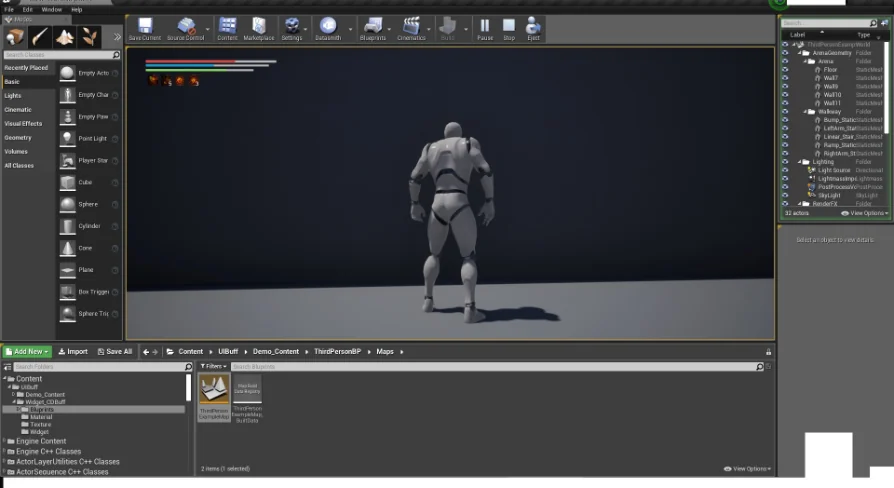
In real-time combat and role-playing titles, the player screen constantly negotiates information density against visual clarity. Visual indicators for temporary enhancements, debuffs, cooldowns, and tactical alterations form the core of player decision-making during high-intensity sequences. The ESM Buff Icon package targets this specific interface demand, presenting a structured solution for displaying transient conditions cleanly on the user interface.
Status tracking relies heavily on immediate, unmistakable visual feedback. When an in-game entity receives a stat modification, an elemental resistance change, or an aura-based empowerment, that mechanical shift must register immediately on screen. ESM Buff Icon is constructed to represent these changing gameplay variables through direct interface iconography, giving developers a dedicated visual element to reflect character modifications as they trigger, persist, and expire.
Blueprint Foundations for Status Effect Display
Implemented directly through Blueprints, the package integrates with visual scripting pipelines rather than requiring manual C++ hookups for visual updates. Blueprint implementation allows technical designers and UI artists to configure display parameters, wire up update logic, and manipulate interface behaviors within a standard node graph. This structural choice makes the system accessible during rapid prototyping phases while remaining flexible enough for production integration.
By utilizing Blueprints, the icon handling avoids rigid interface setups. Designers can link visual states directly to gameplay gameplay events, dispatchers, or interface calls. The visual scripting environment provides a transparent path for driving properties such as visibility changes, icon swapping, numeric readouts, and visual transitions whenever active attributes fluctuate in the game world.
Interfacing with the ESM Code Spider Framework
Compatibility with ESM Code Spider defines the technical role of ESM Buff Icon within a wider game architecture. Rather than operating as an isolated, standalone graphic without systemic ties, the asset aligns directly with the architectural patterns established by the ESM Code Spider framework. This compatibility ensures that the underlying communication patterns—handling how code modules register events and broadcast status changes—connect smoothly with the front-end icon widget.
In systems using ESM Code Spider, systemic efficiency depends on how clean the separation remains between core gameplay logic and presentation layers. ESM Buff Icon serves as the front-facing terminal in this pipeline. The underlying code handles state tracking, duration management, and stack calculations, while the icon component consumes those updates through compatible hooks to reflect the current state on screen without creating unnecessary performance bottlenecks or tangled data dependencies.
Interface Scalability and Buff Lifecycle Tracking
Managing status indicators in complex game projects quickly becomes difficult if individual icons require unique code paths. A scalable system requires a uniform way to instantiate, update, and remove icons based on an entity's current condition list. The lifecycle of a buff typically involves distinct stages: initialization upon application, real-time polling or event-driven updates while active, and cleanup when the effect fades or is cleansed.
ESM Buff Icon accommodates this lifecycle by functioning as a modular visual unit. Because it operates within a Blueprint setup, instances of the icon can be spawned dynamically inside container widgets such as horizontal boxes, grids, or floating entity plates above character heads. When coordinated with a status management backend, each icon instance displays its designated representation until a removal event triggers its dismissal, maintaining an organized interface footprint during crowded multiplayer encounters or particle-heavy boss fights.
Production Considerations for ESM Buff Icon Implementation
Deploying ESM Buff Icon effectively requires planning the communication flow between character state components and the user interface. Teams working with ESM Code Spider should verify that event triggers match the expected data structures exposed by the Blueprint widget. Establishing clear data transfer patterns—such as transmitting remaining duration, current stack counts, and buff classification tags—ensures that the visual elements populate reliably without redundant casting or unnecessary ticking logic.
For projects requiring clear visual status feedback built on visual scripting workflows, the asset delivers an integrated approach that respects architectural modularity. By keeping visual feedback tied cleanly to systemic frameworks, technical artists can focus on styling, layout balance, and responsive user feedback without rebuilding foundational Blueprint interfaces from scratch.
 Gameplay Features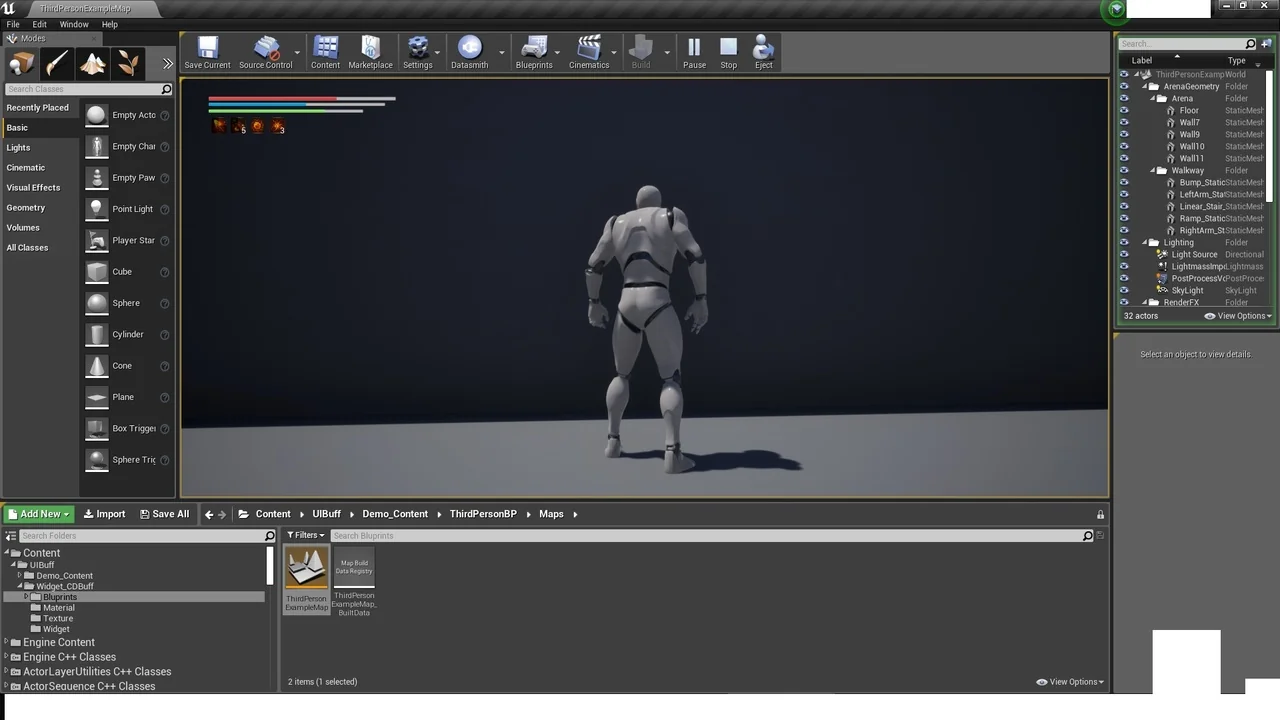
 Gameplay Features
 Gameplay Features
 Gameplay Features