"1f00f67f9253451b"{"id":"1001266","slug":"editor-interface-size","title":"Editor Interface Size","category":"Engine Tools","engine":"4.27 - 5.4","assetVersion":"Asset Version: 1.0","engineVersion":"Engine Version: 4.27 - 5.4","tag":"Engine Tools","accent":"blue","visual":"mech","summary":"Adjust and scale the editor user interface, text legibility, and workspace layout using the lightweight Editor Interface Size plugin for developers.","platform":"Unreal Engine","publishedAt":"2026-09-30T05:47:01.584Z","updatedAt":"2026-09-30T05:47:01.584Z","sourceNotes":[],"fileContents":[],"compatibility":["Unreal Engine","Asset Version: 1.0","Engine Version: 4.27 - 5.4"],"featuredImage":{"alt":"Editor Interface Size","src":"/wp-content/uploads/published/2026/09/8064d0610be7-197146b2-ec8d-4d8c-b52f-9d4dfb4edc4d-7239362bd4.webp"},"hasDownloadLink":true,"downloads":0,"terms":[{"taxonomy":"category","slug":"engine-tools-tools-and-plugins","name":"Engine Tools"}],"galleryImages":[{"src":"/wp-content/uploads/published/2026/09/f67fb9f676e2-9ddec190-f763-43b9-94db-08e9a8c90f9b-027ccbf358.webp","alt":"Editor Interface Size"},{"src":"/wp-content/uploads/published/2026/09/41309bdd1679-b5ac2125-dfc4-430a-928a-c38e90d1a197-f4071a0617.webp","alt":"Editor Interface Size"}],"accessPanel":{"kind":"resource","title":"Download this resource","eyebrow":"Free Download","message":"Log in or create a free account to start your download.","fileName":"Editor Interface Size.7z","safetyNote":"Resources are manually reviewed before listing to improve quality and reduce obvious risks.","actionLabel":"Download Free","resourceType":"Resource archive"},"contentHtml":"\u003ch2\u003eAdjusting the Editor Interface Size\u003c/h2\u003e\n\u003cp\u003eIntegrating a dedicated user interface scaling utility alters how you interact with your primary workspace on a fundamental level. Rather than reconfiguring project-level parameters, world assets, or viewport rendering settings, the deployment of this tool centers exclusively on the environment where development happens. The software functions as a small plugin designed to resize the editor's user interface, giving direct control over the physical dimensions of on-screen development components.\u003c/p\u003e\n\u003cp\u003eWorkspaces often fail to map cleanly across varying physical monitors and resolution settings. When an editor renders natively without customized scaling options, the interaction panels can quickly become uncomfortably small or disproportionately large relative to active viewport boundaries. Deploying an interface sizing tool creates a manageable framework where the editor user interface adapts to your immediate display demands. Because the plugin maintains a small footprint, it introduces targeted functionality into the workspace pipeline without modifying unrelated editor subsystems.\u003c/p\u003e \u003ch2\u003eScaling Font Elements and Text Legibility\u003c/h2\u003e\n\u003cp\u003eText readability forms the foundation of sustained production speed. Within any modern editor, typography conveys critical data: hierarchical asset trees, numeric transform inputs, toggle states, variable names, and contextual drop-down selections. Adjusting the interface scale carries immediate consequences for font presentation across every docked panel.\u003c/p\u003e\n\u003cp\u003eFont scaling inside a development tool requires careful balance. Increasing the global interface size allows textual labels to expand, resolving eye fatigue during long sessions or when operating on high-density visual panels. Decreasing scale condenses textual properties, permitting an expansive view of deeply nested directories and complex component lists without requiring continuous scrolling. By focusing directly on interface and font dimensions, the plugin allows typography to sit at an optimal visual balance alongside interactive controls.\u003c/p\u003e \u003ch2\u003eInterface Dimensioning Across Workspace Panels\u003c/h2\u003e\n\u003cp\u003eManipulating editor scale shifts how screen real estate is distributed between tools and working areas. Standard development configurations combine asset browsers, detail inspectors, console feeds, and primary display viewports into a single window layout. When the user interface changes size, the operational bounds of these docked windows adjust simultaneously.\u003c/p\u003e\n\u003cp\u003eAltering interface size delivers functional advantages across varied workstation layouts:\u003c/p\u003e\n\u003cul\u003e \u003cli\u003eCompact scaling preserves larger viewing areas for scene viewports, lighting visualizers, and interactive canvases by reducing the spatial footprint of surrounding toolbars.\u003c/li\u003e \u003cli\u003eExpanded scale improves tactile targeting for clickable buttons, input fields, checkboxes, and adjustment sliders when working on high-resolution screens.\u003c/li\u003e \u003cli\u003eConsistent scale adjustments align typography, menu bars, and sub-panels so visual density remains uniform across the entire development shell.\u003c/li\u003e\n\u003c/ul\u003e\n\u003cp\u003eBecause the interface size impacts the full layout rather than isolated windows, the visual hierarchy of the editor remains cohesive. Windows do not clip into adjacent containers or lose their relative alignment when scaling operations occur.\u003c/p\u003e \u003ch2\u003eOperating with a Focused, Small Plugin Architecture\u003c/h2\u003e\n\u003cp\u003eUtility tools built with a singular focus provide operational clarity. Instead of bundling complicated asset management suites or modifying underlying engine source trees, this implementation functions specifically as a small plugin targeting the editor interface. This lightweight design profile prevents conflicts with broader workflow pipelines and leaves existing project configurations intact.\u003c/p\u003e\n\u003cp\u003eA smaller technical footprint simplifies how the tool operates within a pipeline. When a plugin restricts its operations to editor UI scale, font dimensions, and workspace size, maintenance overhead stays minimal. Developers do not need to manage complicated configuration graphs or adjust secondary dependencies simply to obtain a comfortable interface size. The plugin loads directly into the editor context, executes its layout scaling responsibilities, and lets the developer return to creative tasks.\u003c/p\u003e \u003ch2\u003eManaging Editor Scale for Everyday Production\u003c/h2\u003e\n\u003cp\u003eAdopting an interface sizing utility establishes predictable ergonomic baselines across different hardware setups. Creative workstations regularly switch between ultra-wide desktop monitors, portable secondary screens, and dense multi-display arrays. Standard factory presets rarely account for the physical viewing distances and varied eye levels common in these multi-display production environments.\u003c/p\u003e\n\u003cp\u003eUsing the plugin to dial in precise interface proportions ensures that all windows remain sharp, legible, and proportionate throughout continuous production cycles. Adjusting the scale, font, and size attributes across the editor creates a calibrated viewing setup that supports precision editing, minimizes visual strain, and preserves critical screen space for production workflows.\u003c/p\u003e\n\n\u003ch2\u003eExplore Similar Assets\u003c/h2\u003e\n\u003cul\u003e\n\u003cli\u003e\u003ca href=\"https://3dcghub.com/darker-nodes/\" title=\"Darker Nodes\"\u003eDarker Nodes\u003c/a\u003e\u003c/li\u003e\n\u003cli\u003e\u003ca href=\"https://3dcghub.com/pak-creator-plugin/\" title=\"Pak Creator Plugin\"\u003ePak Creator Plugin\u003c/a\u003e\u003c/li\u003e\n\u003cli\u003e\u003ca href=\"https://3dcghub.com/light-explorer/\" title=\"Light Explorer\"\u003eLight Explorer\u003c/a\u003e\u003c/li\u003e\n\u003cli\u003e\u003ca href=\"https://3dcghub.com/logic-driver-pro-blueprint-editor-for-dialogue-quest-combat-and-fsm-systems/\" title=\"Logic Driver Pro - Blueprint Editor for Dialogue, Quest, Combat \u0026amp; FSM Systems\"\u003eLogic Driver Pro - Blueprint Editor for Dialogue, Quest, Combat \u0026amp; FSM Systems\u003c/a\u003e\u003c/li\u003e\n\u003cli\u003e\u003ca href=\"https://3dcghub.com/rdlodtools-rd-tools-pro/\" title=\"rdLODtools (rd Tools Pro)\"\u003erdLODtools (rd Tools Pro)\u003c/a\u003e\u003c/li\u003e\n\u003c/ul\u003e","contentTextLength":5268,"navigation":{"current":15,"total":3222,"previous":{"id":"1001267","slug":"insta-deform-component","title":"Insta Deform Component","category":"Engine Tools","platform":"Unreal Engine","updatedAt":"2026-09-30T05:49:51.218Z"},"next":{"id":"1000587","slug":"dlc-in-blueprints","title":"DLC in Blueprints","category":"Engine Tools","platform":"Unreal Engine","updatedAt":"2026-09-30T05:45:19.996Z"}},"relatedResources":[{"id":"13834","slug":"darker-nodes","title":"Darker Nodes","category":"Engine Tools","engine":"4.26 - 5.8","assetVersion":"Asset Version:2.6 - 3.6","engineVersion":"Engine version: 4.26 - 5.8","tag":"Engine Tools","accent":"blue","visual":"city","summary":"Enhance your development environment with Darker Nodes, a comprehensive theme for the Unreal Editor. This tool optimizes interface brightness and simplifies complex layouts to improve your daily workflow.","platform":"Unreal Engine","publishedAt":"2026-03-11T10:16:04.000Z","updatedAt":"2026-08-27T11:17:12.825Z","sourceNotes":[],"fileContents":[],"compatibility":["Unreal Engine","Asset Version:2.6 - 3.6","Engine version: 4.26 - 5.8"],"featuredImage":{"alt":"Darker Nodes","src":"https://3dcghub.com/wp-content/uploads/2026/03/18fa5af4-6fba-42db-9e00-28fe14d01c2b.webp"},"hasDownloadLink":true,"downloads":2},{"id":"14323","slug":"pak-creator-plugin","title":"Pak Creator Plugin","category":"Engine Tools","engine":"4.27,5.0 - 5.7","assetVersion":"Engine version: 4.27,5.0 - 5.7","engineVersion":"Asset Version:1.7.1","tag":"Engine Tools","accent":"blue","visual":"luts","summary":"The Pak Creator Plugin simplifies the process of creating independent .pak files from content plugins in Unreal Engine. It is an ideal solution for developers looking to distribute assets for modding or architectural visualization.","platform":"Unreal Engine","publishedAt":"2026-03-11T17:41:02.000Z","updatedAt":"2026-04-19T15:45:48.000Z","sourceNotes":[],"fileContents":[],"compatibility":["Unreal Engine","Engine version: 4.27,5.0 - 5.7","Asset Version: 1.7.1"],"featuredImage":{"alt":"Pak Creator Plugin","src":"https://3dcghub.com/wp-content/uploads/2026/03/791550ef-8520-4427-86de-d70ce899e2ee.webp"},"hasDownloadLink":true,"downloads":0},{"id":"14114","slug":"light-explorer","title":"Light Explorer","category":"Engine Tools","engine":"4.24 - 5.8","assetVersion":"Asset Version: 1.0.3 - 1.0.5","engineVersion":"Engine version: 4.24 - 5.8","tag":"Engine Tools","accent":"blue","visual":"city","summary":"Improve your scene management with Light Explorer, a dedicated tool for Unreal Editor. This resource allows developers to locate and edit light sources quickly within complex environments.","platform":"Unreal Engine","publishedAt":"2026-03-11T15:53:53.000Z","updatedAt":"2026-09-29T09:25:45.289Z","sourceNotes":[],"fileContents":[],"compatibility":["Unreal Engine","Asset Version: 1.0.3 - 1.0.5","Engine version: 4.24 - 5.8"],"featuredImage":{"alt":"Light Explorer","src":"https://3dcghub.com/wp-content/uploads/2026/03/22cb5752-76c8-4b46-8262-d60368bddf7c.webp"},"hasDownloadLink":true,"downloads":0}]}
Engine Tools
Editor Interface Size
Adjust and scale the editor user interface, text legibility, and workspace layout using the lightweight Editor Interface Size plugin for developers.
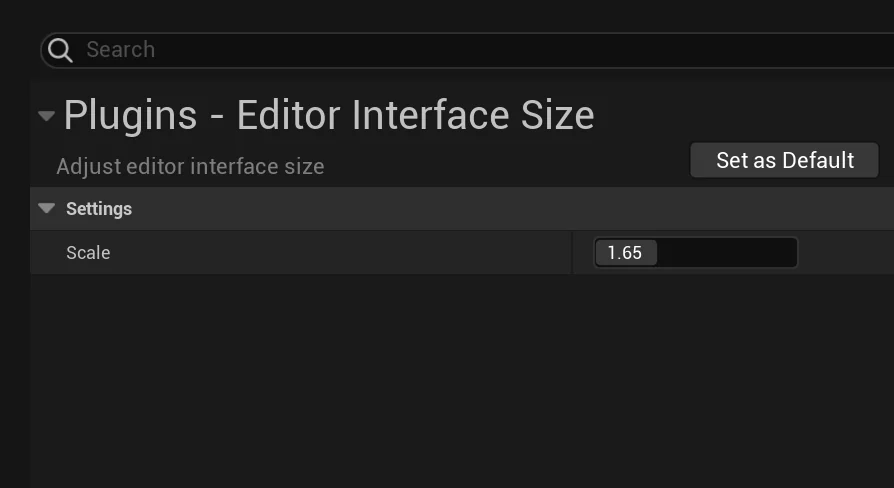
Integrating a dedicated user interface scaling utility alters how you interact with your primary workspace on a fundamental level. Rather than reconfiguring project-level parameters, world assets, or viewport rendering settings, the deployment of this tool centers exclusively on the environment where development happens. The software functions as a small plugin designed to resize the editor's user interface, giving direct control over the physical dimensions of on-screen development components.
Workspaces often fail to map cleanly across varying physical monitors and resolution settings. When an editor renders natively without customized scaling options, the interaction panels can quickly become uncomfortably small or disproportionately large relative to active viewport boundaries. Deploying an interface sizing tool creates a manageable framework where the editor user interface adapts to your immediate display demands. Because the plugin maintains a small footprint, it introduces targeted functionality into the workspace pipeline without modifying unrelated editor subsystems.
Scaling Font Elements and Text Legibility
Text readability forms the foundation of sustained production speed. Within any modern editor, typography conveys critical data: hierarchical asset trees, numeric transform inputs, toggle states, variable names, and contextual drop-down selections. Adjusting the interface scale carries immediate consequences for font presentation across every docked panel.
Font scaling inside a development tool requires careful balance. Increasing the global interface size allows textual labels to expand, resolving eye fatigue during long sessions or when operating on high-density visual panels. Decreasing scale condenses textual properties, permitting an expansive view of deeply nested directories and complex component lists without requiring continuous scrolling. By focusing directly on interface and font dimensions, the plugin allows typography to sit at an optimal visual balance alongside interactive controls.
Interface Dimensioning Across Workspace Panels
Manipulating editor scale shifts how screen real estate is distributed between tools and working areas. Standard development configurations combine asset browsers, detail inspectors, console feeds, and primary display viewports into a single window layout. When the user interface changes size, the operational bounds of these docked windows adjust simultaneously.
Altering interface size delivers functional advantages across varied workstation layouts:
Compact scaling preserves larger viewing areas for scene viewports, lighting visualizers, and interactive canvases by reducing the spatial footprint of surrounding toolbars.
Expanded scale improves tactile targeting for clickable buttons, input fields, checkboxes, and adjustment sliders when working on high-resolution screens.
Consistent scale adjustments align typography, menu bars, and sub-panels so visual density remains uniform across the entire development shell.
Because the interface size impacts the full layout rather than isolated windows, the visual hierarchy of the editor remains cohesive. Windows do not clip into adjacent containers or lose their relative alignment when scaling operations occur.
Operating with a Focused, Small Plugin Architecture
Utility tools built with a singular focus provide operational clarity. Instead of bundling complicated asset management suites or modifying underlying engine source trees, this implementation functions specifically as a small plugin targeting the editor interface. This lightweight design profile prevents conflicts with broader workflow pipelines and leaves existing project configurations intact.
A smaller technical footprint simplifies how the tool operates within a pipeline. When a plugin restricts its operations to editor UI scale, font dimensions, and workspace size, maintenance overhead stays minimal. Developers do not need to manage complicated configuration graphs or adjust secondary dependencies simply to obtain a comfortable interface size. The plugin loads directly into the editor context, executes its layout scaling responsibilities, and lets the developer return to creative tasks.
Managing Editor Scale for Everyday Production
Adopting an interface sizing utility establishes predictable ergonomic baselines across different hardware setups. Creative workstations regularly switch between ultra-wide desktop monitors, portable secondary screens, and dense multi-display arrays. Standard factory presets rarely account for the physical viewing distances and varied eye levels common in these multi-display production environments.
Using the plugin to dial in precise interface proportions ensures that all windows remain sharp, legible, and proportionate throughout continuous production cycles. Adjusting the scale, font, and size attributes across the editor creates a calibrated viewing setup that supports precision editing, minimizes visual strain, and preserves critical screen space for production workflows.
 Engine Tools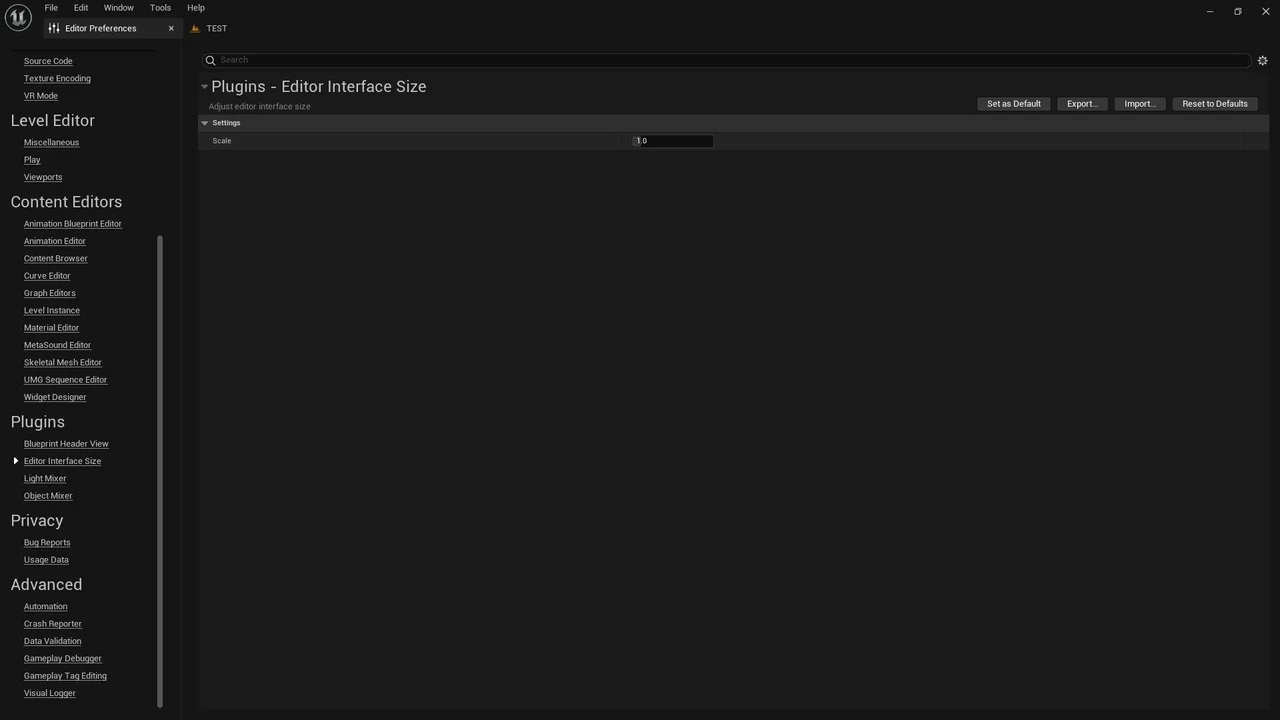
 Engine Tools
 Engine Tools
 Engine Tools