"c14ff6bd758dadb1"{"id":"1000592","slug":"easy-toolbag","title":"Easy Toolbag","category":"Widgets \u0026 Controls","engine":"5.6+","assetVersion":"","engineVersion":"Engine Version: 5.6+","tag":"Widgets \u0026 Controls","accent":"blue","visual":"mech","summary":"An Unreal Engine 5 built-in menu tool offering one-click viewport helpers, post process volumes, sequences, and EasySuite integration for faster scene workflows","platform":"Unreal Engine","publishedAt":"2026-07-17T00:43:08.420Z","updatedAt":"2026-07-17T00:43:08.420Z","sourceNotes":[],"fileContents":[],"compatibility":["Unreal Engine","Engine Version: 5.6+"],"featuredImage":{"alt":"Easy Toolbag","src":"/wp-content/uploads/published/2026/07/ada51d7c6ef6-2aac9f70-50b5-42a4-8208-df003eb50455-3d7c42ae4d.webp"},"hasDownloadLink":true,"downloads":3,"terms":[{"taxonomy":"category","slug":"widgets-and-controls","name":"Widgets \u0026 Controls"}],"galleryImages":[{"src":"/wp-content/uploads/published/2026/07/65b1cf00dfb7-53f68ee3-fdc7-4c82-a3cf-014df89d33fc-59c7b69bab.webp","alt":"Easy Toolbag"},{"src":"/wp-content/uploads/published/2026/07/1da2187f6e0a-062e9acb-7073-4317-9629-db1145919eb3-05801f2ab1.webp","alt":"Easy Toolbag"},{"src":"/wp-content/uploads/published/2026/07/78b5701e2d47-3709b391-8497-4c43-a65c-1396b0b19fe2-d3ab08cd72.webp","alt":"Easy Toolbag"},{"src":"/wp-content/uploads/published/2026/07/eb99bd89ec20-cc3891ac-fac1-4794-b403-408acfc6cf15-bb1fa6ba71.webp","alt":"Easy Toolbag"},{"src":"/wp-content/uploads/published/2026/07/85a168d1f5e1-4582ef03-a3ab-41f1-8b68-bc2ac039da25-8efefe1e63.webp","alt":"Easy Toolbag"},{"src":"/wp-content/uploads/published/2026/07/36a4460f3ab6-bbc550ed-8d56-44f5-a62d-7c46008806b6-47280cfe75.webp","alt":"Easy Toolbag"},{"src":"/wp-content/uploads/published/2026/07/faceedb4d1e2-11f8202c-9024-42ec-9a99-5656d89913ae-40165f5f3e.webp","alt":"Easy Toolbag"}],"accessPanel":{"kind":"resource","title":"Download this resource","eyebrow":"Free Download","message":"Log in or create a free account to start your download.","fileName":"Content.7z","safetyNote":"Resources are manually reviewed before listing to improve quality and reduce obvious risks.","actionLabel":"Download Free","resourceType":"Resource archive"},"contentHtml":"\u003cp\u003eCreating worlds in Unreal Engine 5 involves a steady rhythm of small, repetitive setup tasks that slowly eat into a developer's day. Dropping a post process volume, spawning a level sequence paired with a camera, or hunting down the right blueprint for atmospheric weather all require navigating multiple menus and content browser folders. Easy Toolbag inserts itself directly into the viewport as a built-in menu, pulling those scattered actions into a single panel. The goal is straightforward: fewer clicks, less time lost to navigation, and a cleaner workspace.\u003c/p\u003e\u003ch2\u003eOne-Click Scene Foundations in Easy Toolbag\u003c/h2\u003e\u003cp\u003eSeveral of the most repeated actions when blocking out a new scene center around getting basic systems running. Easy Toolbag bundles these into single-button presses. A post process volume can be spawned with commonly used defaults already applied, skipping the manual property configuration that normally follows. Level sequences and their accompanying cameras can be created together, so the mechanic of setting up a cinematic shot or a scripted camera move takes one interaction instead of several.\u003c/p\u003e\u003cp\u003eA sky system is available through the same menu, placing the foundational lighting and sky dome setup needed for exterior scenes without manual assembly. Lighting reference spheres also get a dedicated button, giving artists a physical calibration tool inside the scene for evaluating how materials and lighting interact under current conditions.\u003c/p\u003e\u003ch2\u003eViewport Helpers for Performance and Visibility Control\u003c/h2\u003e\u003cp\u003eWorkspaces open in the viewport are where most of the daily work happens. Easy Toolbag adds a series of toggle and adjustment helpers directly to the menu bar for common viewport parameters.\u003c/p\u003e\u003cul\u003e\u003cli\u003e\u003cstrong\u003eCap FPS:\u003c/strong\u003e A framerate limiter that can restrict the viewport to a chosen frame count, helpful for keeping GPU temperatures and energy consumption in check during long sessions.\u003c/li\u003e\u003cli\u003e\u003cstrong\u003eScreen Percentage Adjustment:\u003c/strong\u003e A quick control for scaling the viewport render resolution without navigating deeper settings menus.\u003c/li\u003e\u003cli\u003e\u003cstrong\u003eExposure Compensation:\u003c/strong\u003e Direct viewport control over exposure, allowing immediate visual feedback when tuning lighting.\u003c/li\u003e\u003cli\u003e\u003cstrong\u003eAA Type:\u003c/strong\u003e A toggle that switches the anti-aliasing method used in the viewport, letting artists compare methods rapidly.\u003c/li\u003e\u003c/ul\u003e\u003ch3\u003eHandling the Unreal Engine 5.6 Viewport UI Overhaul\u003c/h3\u003e\u003cp\u003eUnreal Engine 5.6 introduced an overhaul to the viewport UI. Some developers adapted quickly to the changes, while others preferred the layout and behavior of the previous iteration. Easy Toolbag includes a Viewport UI Type toggle that addresses this directly. Users can revert the viewport to the old UI version, keep the new one, or run both. This option prevents the workflow disruption that occurs when an engine update reshuffles familiar controls, letting users stay on the interface they are most productive with.\u003c/p\u003e\u003ch2\u003eEasySuite Integration: Spawning EasyFog, EasySnow, EasyRain, and EasyAtmos\u003c/h2\u003e\u003cp\u003eEasy Toolbag extends its functionality by connecting to the EasySuite family of environmental tools. For projects that already have EasyFog, EasyRain, EasyAtmos, or EasySnow installed, Easy Toolbag provides dedicated buttons that spawn these tools directly in front of the camera view. The tool detects whether the relevant EasySuite package is present in the project. If a specific EasySuite tool is not installed, its corresponding button has no effect, so the menu remains clean and context-aware rather than throwing missing asset errors.\u003c/p\u003e\u003cp\u003eFor creators used to digging through the content browser to locate the correct blueprint for weather or atmospheric systems, this integration removes that friction. Instead of navigating folder hierarchies and manually dragging assets into the scene, a single click places the environmental system exactly where the camera is looking. This keeps the creative momentum intact when moving from scene blocking to atmospheric polish.\u003c/p\u003e\u003ch2\u003eReducing Repetitive Motion Across Daily Unreal Engine Workflows\u003c/h2\u003e\u003cp\u003eThe cumulative value of Easy Toolbag comes from how many small steps it removes from a session. Creating a level sequence with a camera, adjusting viewport exposure, capping the framerate to cool down a GPU, and spawning a lighting reference sphere are tasks that happen repeatedly across a project. Each instance might only take a few extra clicks when done manually, but those detours add up over weeks of development.\u003c/p\u003e\u003cp\u003eSupport materials accompany the tool. Text documentation and a tutorial are provided to walk users through the features and their applications. A Discord channel is available for support, giving users a place to ask questions or report issues as they integrate the menu into their pipeline.\u003c/p\u003e\u003ch2\u003eWho Benefits Most From Easy Toolbag\u003c/h2\u003e\u003cp\u003eDevelopers who spend significant time blocking out scenes, setting up cinematics, or managing environmental conditions will feel the impact of Easy Toolbag most directly. Level designers dropping post process volumes and lighting references multiple times a day gain immediate time savings. Cinematic artists who frequently create new sequences and cameras can skip the setup overhead. Teams using the EasySuite environmental packages get a tighter integration where weather and atmosphere tools are one click away from the active camera position, treating the broader toolset as a connected workflow rather than isolated plugins sitting in folders waiting to be found.\u003c/p\u003e\n\n\u003ch2\u003eContinue Browsing Similar Packs\u003c/h2\u003e\n\u003cul\u003e\n\u003cli\u003e\u003ca href=\"https://3dcghub.com/delayed-healthbar-system/\" title=\"Delayed Healthbar System\"\u003eDelayed Healthbar System\u003c/a\u003e\u003c/li\u003e\n\u003cli\u003e\u003ca href=\"https://3dcghub.com/rd-lighting-kit/\" title=\"RD: Lighting Kit\"\u003eRD: Lighting Kit\u003c/a\u003e\u003c/li\u003e\n\u003cli\u003e\u003ca href=\"https://3dcghub.com/extended-progress-bar/\" title=\"Extended Progress Bar\"\u003eExtended Progress Bar\u003c/a\u003e\u003c/li\u003e\n\u003cli\u003e\u003ca href=\"https://3dcghub.com/ultimate-menu-system/\" title=\"Ultimate Menu System\"\u003eUltimate Menu System\u003c/a\u003e\u003c/li\u003e\n\u003cli\u003e\u003ca href=\"https://3dcghub.com/archviz-user-interface-3/\" title=\"ArchViz User Interface 3\"\u003eArchViz User Interface 3\u003c/a\u003e\u003c/li\u003e\n\u003c/ul\u003e","contentTextLength":5496,"navigation":{"current":1270,"total":3719,"previous":{"id":"1000593","slug":"easy-urban-concrete-kit","title":"Easy Urban Concrete Kit","category":"Industrial","platform":"Unreal Engine","updatedAt":"2026-07-17T00:49:42.939Z"},"next":{"id":"1000591","slug":"easy-dynmc-ragdoll","title":"EASY DYNMC RAGDOLL","category":"Characters \u0026 Creatures","platform":"Unreal Engine","updatedAt":"2026-07-17T00:37:41.477Z"}},"relatedResources":[{"id":"15459","slug":"delayed-healthbar-system","title":"Delayed Healthbar System","category":"Widgets \u0026 Controls","engine":"5.0+","assetVersion":"Engine version: 5.0+","engineVersion":"5.0","tag":"Widgets \u0026 Controls","accent":"blue","visual":"audio","summary":"Enhance your game's user interface with the Delayed Healthbar System. This asset provides a ready-to-use solution for animated health bars, damage blips, and screen-space indicators.","platform":"Unreal Engine","publishedAt":"2026-03-12T09:07:20.000Z","updatedAt":"2026-04-19T15:44:46.000Z","sourceNotes":[],"fileContents":[],"compatibility":["Unreal Engine","Engine version: 5.0+"],"featuredImage":{"alt":"Delayed Healthbar System","src":"https://3dcghub.com/wp-content/uploads/2026/03/072782e5-1fcd-4671-915e-3f517fc8aea5.webp"},"hasDownloadLink":true,"downloads":0},{"id":"15496","slug":"rd-lighting-kit","title":"RD: Lighting Kit","category":"Widgets \u0026 Controls","engine":"5.0+","assetVersion":"Engine version: 5.0+","engineVersion":"5.0","tag":"Widgets \u0026 Controls","accent":"blue","visual":"character","summary":"Transform your renders with RD: Lighting Kit, a comprehensive tool for creating photorealistic studio environments in Unreal Engine. It features over 50 handcrafted presets and unique backdrops for professional results.","platform":"Unreal Engine","publishedAt":"2026-03-12T09:11:29.000Z","updatedAt":"2026-04-19T15:44:45.000Z","sourceNotes":[],"fileContents":[],"compatibility":["Unreal Engine","Engine version: 5.0+"],"featuredImage":{"alt":"RD: Lighting Kit","src":"https://3dcghub.com/wp-content/uploads/2026/03/56a37b57-480a-454b-a6d3-4243c4f68a88.webp"},"hasDownloadLink":true,"downloads":0},{"id":"15480","slug":"hqui-progress-bars","title":"HQUI: Progress Bars","category":"Widgets \u0026 Controls","engine":"4.26+,5.0+","assetVersion":"Engine version: 4.26+,5.0+","engineVersion":"4.19","tag":"Widgets \u0026 Controls","accent":"blue","visual":"animation","summary":"HQUI: Progress Bars offers a robust set of highly customizable UMG components for developers. This pack features advanced settings, gradients, and automated interpolation to elevate your game's user interface.","platform":"Unreal Engine","publishedAt":"2026-03-12T09:09:48.000Z","updatedAt":"2026-04-19T15:44:46.000Z","sourceNotes":[],"fileContents":[],"compatibility":["Unreal Engine","Engine version: 4.26+,5.0+"],"featuredImage":{"alt":"HQUI: Progress Bars","src":"https://3dcghub.com/wp-content/uploads/2026/03/327a22db-0f44-410f-93b6-73bd636562cb.webp"},"hasDownloadLink":true,"downloads":2}]}
Widgets & Controls
Easy Toolbag
An Unreal Engine 5 built-in menu tool offering one-click viewport helpers, post process volumes, sequences, and EasySuite integration for faster scene workflows
Creating worlds in Unreal Engine 5 involves a steady rhythm of small, repetitive setup tasks that slowly eat into a developer's day. Dropping a post process volume, spawning a level sequence paired with a camera, or hunting down the right blueprint for atmospheric weather all require navigating multiple menus and content browser folders. Easy Toolbag inserts itself directly into the viewport as a built-in menu, pulling those scattered actions into a single panel. The goal is straightforward: fewer clicks, less time lost to navigation, and a cleaner workspace.
One-Click Scene Foundations in Easy Toolbag
Several of the most repeated actions when blocking out a new scene center around getting basic systems running. Easy Toolbag bundles these into single-button presses. A post process volume can be spawned with commonly used defaults already applied, skipping the manual property configuration that normally follows. Level sequences and their accompanying cameras can be created together, so the mechanic of setting up a cinematic shot or a scripted camera move takes one interaction instead of several.
A sky system is available through the same menu, placing the foundational lighting and sky dome setup needed for exterior scenes without manual assembly. Lighting reference spheres also get a dedicated button, giving artists a physical calibration tool inside the scene for evaluating how materials and lighting interact under current conditions.
Viewport Helpers for Performance and Visibility Control
Workspaces open in the viewport are where most of the daily work happens. Easy Toolbag adds a series of toggle and adjustment helpers directly to the menu bar for common viewport parameters.
Cap FPS: A framerate limiter that can restrict the viewport to a chosen frame count, helpful for keeping GPU temperatures and energy consumption in check during long sessions.
Screen Percentage Adjustment: A quick control for scaling the viewport render resolution without navigating deeper settings menus.
Exposure Compensation: Direct viewport control over exposure, allowing immediate visual feedback when tuning lighting.
AA Type: A toggle that switches the anti-aliasing method used in the viewport, letting artists compare methods rapidly.
Handling the Unreal Engine 5.6 Viewport UI Overhaul
Unreal Engine 5.6 introduced an overhaul to the viewport UI. Some developers adapted quickly to the changes, while others preferred the layout and behavior of the previous iteration. Easy Toolbag includes a Viewport UI Type toggle that addresses this directly. Users can revert the viewport to the old UI version, keep the new one, or run both. This option prevents the workflow disruption that occurs when an engine update reshuffles familiar controls, letting users stay on the interface they are most productive with.
EasySuite Integration: Spawning EasyFog, EasySnow, EasyRain, and EasyAtmos
Easy Toolbag extends its functionality by connecting to the EasySuite family of environmental tools. For projects that already have EasyFog, EasyRain, EasyAtmos, or EasySnow installed, Easy Toolbag provides dedicated buttons that spawn these tools directly in front of the camera view. The tool detects whether the relevant EasySuite package is present in the project. If a specific EasySuite tool is not installed, its corresponding button has no effect, so the menu remains clean and context-aware rather than throwing missing asset errors.
For creators used to digging through the content browser to locate the correct blueprint for weather or atmospheric systems, this integration removes that friction. Instead of navigating folder hierarchies and manually dragging assets into the scene, a single click places the environmental system exactly where the camera is looking. This keeps the creative momentum intact when moving from scene blocking to atmospheric polish.
Reducing Repetitive Motion Across Daily Unreal Engine Workflows
The cumulative value of Easy Toolbag comes from how many small steps it removes from a session. Creating a level sequence with a camera, adjusting viewport exposure, capping the framerate to cool down a GPU, and spawning a lighting reference sphere are tasks that happen repeatedly across a project. Each instance might only take a few extra clicks when done manually, but those detours add up over weeks of development.
Support materials accompany the tool. Text documentation and a tutorial are provided to walk users through the features and their applications. A Discord channel is available for support, giving users a place to ask questions or report issues as they integrate the menu into their pipeline.
Who Benefits Most From Easy Toolbag
Developers who spend significant time blocking out scenes, setting up cinematics, or managing environmental conditions will feel the impact of Easy Toolbag most directly. Level designers dropping post process volumes and lighting references multiple times a day gain immediate time savings. Cinematic artists who frequently create new sequences and cameras can skip the setup overhead. Teams using the EasySuite environmental packages get a tighter integration where weather and atmosphere tools are one click away from the active camera position, treating the broader toolset as a connected workflow rather than isolated plugins sitting in folders waiting to be found.
 Widgets & Controls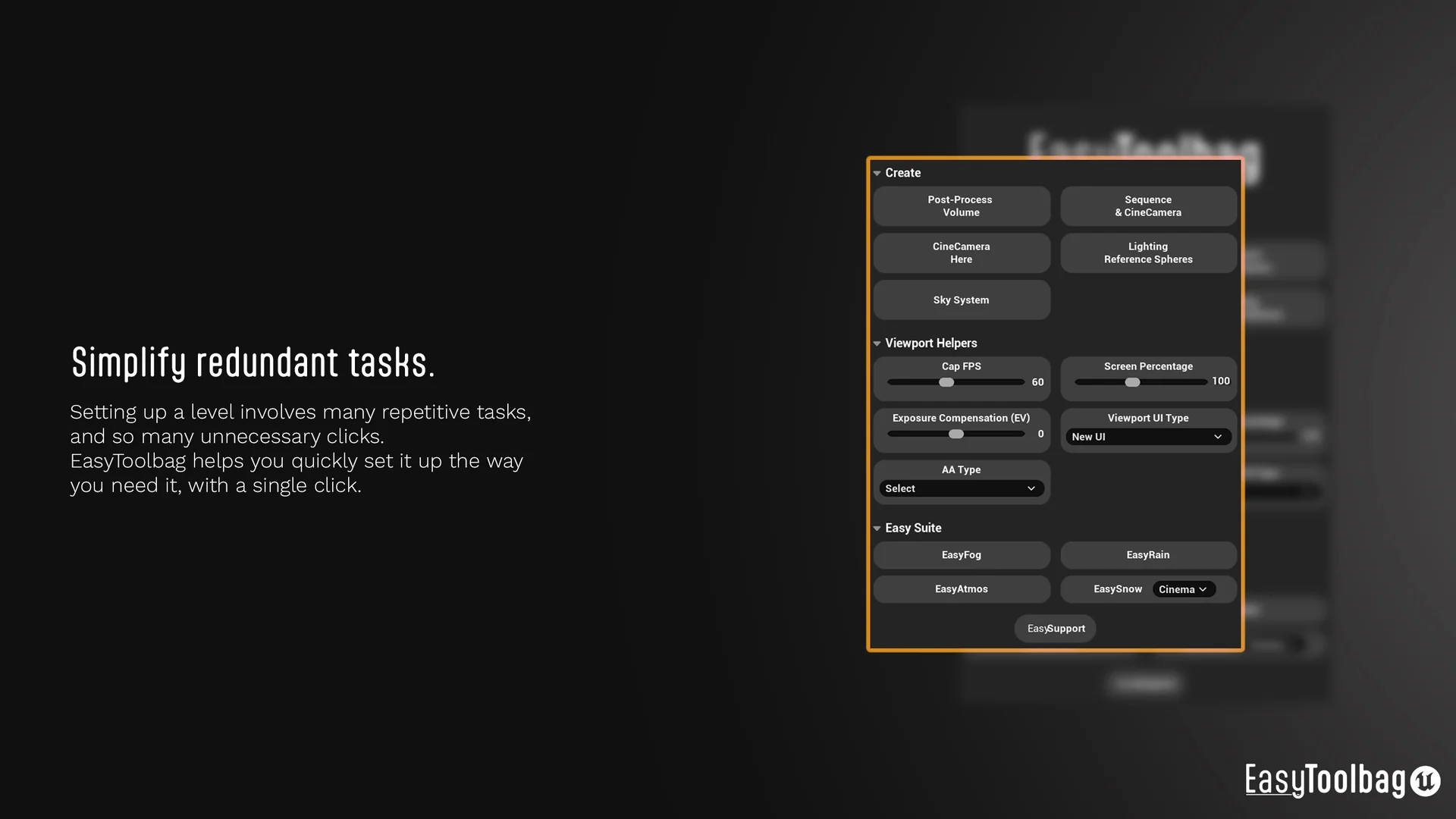
 Widgets & Controls
 Widgets & Controls
 Widgets & Controls