"b00678cacce53329"{"id":"1002783","slug":"easy-dissolve-material","title":"Easy Dissolve Material","category":"Shaders","engine":"4.23+,5.0+","assetVersion":"","engineVersion":"Engine Version: 4.23+,5.0+","tag":"Shaders","accent":"blue","visual":"luts","summary":"A breakdown of Easy Dissolve Material, featuring six distinct dissolution modes, multi-location masking, and stylized erosion techniques.","platform":"Unreal Engine","indexPolicy":"index","publishedAt":"2026-11-20T07:05:58.737Z","updatedAt":"2026-11-20T07:05:58.737Z","sourceNotes":[],"fileContents":[],"compatibility":["Unreal Engine","Engine Version: 4.23+,5.0+"],"featuredImage":{"alt":"Easy Dissolve Material","src":"/wp-content/uploads/published/2026/11/04731b63b0fe-244412f8-fb6c-402f-b67d-1ad8d0618f89-f1bdac0c46.webp"},"fileSizeBytes":28679004,"hasDownloadLink":true,"downloads":0,"terms":[{"taxonomy":"category","slug":"shaders","name":"Shaders"}],"galleryImages":[{"src":"/wp-content/uploads/published/2026/11/1c4bdebc3c0f-5b216c04-b017-402c-b35a-762a58542343-7fa7327378.webp","alt":"Easy Dissolve Material"},{"src":"/wp-content/uploads/published/2026/11/c30987f5afc7-0415b370-c4ed-4b2f-bdc6-8afe1f12f8e0-d2cef87807.webp","alt":"Easy Dissolve Material"},{"src":"/wp-content/uploads/published/2026/11/d1956b1ced4c-e29d08d0-b7d5-4c5b-92bd-7f5c7da93ddc-dd0a86ad3f.webp","alt":"Easy Dissolve Material"},{"src":"/wp-content/uploads/published/2026/11/c137df8b0f6e-1415e436-f5ab-4f4f-9c5f-756135fa1136-3991451a40.webp","alt":"Easy Dissolve Material"},{"src":"/wp-content/uploads/published/2026/11/2bfa9e23748a-bf2198a9-e14a-4c04-ac28-a8a21baab0eb-3747994b5b.webp","alt":"Easy Dissolve Material"},{"src":"/wp-content/uploads/published/2026/11/59663367044c-7a401249-a604-4c2f-bfdf-e8968e072f68-20dd627f5b.webp","alt":"Easy Dissolve Material"},{"src":"/wp-content/uploads/published/2026/11/33106847c9bc-f87f0d4f-5da8-4a58-a688-91fd02dab3cc-803f371f9e.webp","alt":"Easy Dissolve Material"},{"src":"/wp-content/uploads/published/2026/11/49c294eb68c3-af47fecf-c7e9-4d5f-8e3c-07c044bfbb8b-474f8afbae.webp","alt":"Easy Dissolve Material"},{"src":"/wp-content/uploads/published/2026/11/42efbb4d00f6-74312968-8f4b-4e92-bc9d-b3ee7a950522-8058e606f1.webp","alt":"Easy Dissolve Material"}],"accessPanel":{"kind":"resource","title":"Get this resource","safetyNote":"Resources are manually reviewed before listing to improve quality and reduce obvious risks.","fileName":"Content.7z","resourceType":"Resource archive","versions":[]},"contentHtml":"\u003cp\u003eSix dissolving behaviors form the foundational framework of Easy Dissolve Material. The package pairs volumetric and mathematical masking routines with texture-driven shading, giving creators concrete pathways to disintegrate, slice, or assemble 3D meshes. Alongside these distinct transition types, the asset supports manual multi-point positioning, allowing dissolution sweeps to trigger from several distinct spatial coordinates rather than relying on a solitary origin point. Comprehensive documentation and two dedicated video demonstrations accompany the setup to guide configuration across various scene assets.\u003c/p\u003e \u003ch2\u003eGeometric Masking in Easy Dissolve Material\u003c/h2\u003e\n\u003cp\u003eThree of the primary modes included in the package rely on explicit geometric boundaries: Cube Mask Dissolve, Sphere Mask Dissolve, and Plane Mask Dissolve. These spatial methods calculate surface visibility relative to mathematically defined shapes in world or local space. When an artist needs a clean, linear transition across an object, Plane Mask Dissolve projects a planar threshold through the model. As the plane advances, geometry on one side remains intact while the opposing side vanishes, creating a disciplined visual cut across the mesh profile.\u003c/p\u003e \u003cp\u003eSphere Mask Dissolve shifts the boundary calculation from a flat plane to a radial volume. The sphere mask radiates outward from a central anchor point, creating an expanding spherical front that peels away the target material in all directions evenly. This behavior suits localized point impacts, circular shockwaves, or radial energy releases where a surface needs to vanish outward from a specific coordinate. Because the sphere calculation is continuous, the transition retains smooth curvature across complex, high-density geometry without distortion.\u003c/p\u003e \u003cp\u003eCube Mask Dissolve encloses the visibility threshold within an axis-aligned or oriented box volume. Unlike planar or spherical methods, the cubic mask isolates a six-sided volume, enabling localized window cuts or box-shaped clipping zones directly inside a mesh. Creators can define specific cubic parameters to hide interior components, carve rectangular cutaways into props, or isolate dissolution to designated bounding areas without leaking the effect into surrounding geometry.\u003c/p\u003e \u003ch2\u003eTexture, Inversion, and Subtraction Dissolve Methods\u003c/h2\u003e\n\u003cp\u003eBeyond strict mathematical primitives, the package introduces three procedural and pattern-driven dissolution styles: Texture Based Dissolve, Subtract Dissolve, and Materialize Dissolve. Texture Based Dissolve replaces clean geometric thresholds with grayscale or patterned map values. As the dissolve threshold shifts, high-contrast or noisy texture patterns dictate which portions of the surface disappear first. This mode translates texture breakup into physical disappearance, creating jagged silhouettes, porous fragmentation, or uneven surface decay.\u003c/p\u003e \u003cp\u003eSubtract Dissolve applies mathematical subtraction operations directly into the dissolution logic. By subtracting mask values, control maps, or threshold values from one another, artists can selectively carve into the transition field. This method provides fine-grained control over the transition perimeter, allowing users to hollow out dissolve fronts, sharpen transition contours, or peel away surface layers gradually before the underlying geometry disappears completely.\u003c/p\u003e \u003cp\u003eMaterialize Dissolve functions as an inverse reconstruction technique. While standard dissolve systems focus on removing geometry from view, Materialize Dissolve runs the appearance sequence in reverse, constructing visible surfaces from a vacant state into a fully resolved material. This allows objects to manifest dynamically in an environment, reassembling along masked thresholds or patterned textures without requiring separate inverted shader networks or duplicative material graphs.\u003c/p\u003e \u003ch2\u003eTargeting Multiple Dissolve Locations Across Meshes\u003c/h2\u003e\n\u003cp\u003eA notable functional capability of Easy Dissolve Material is its support for manual multiple dissolve locations. Standard dissolution shaders frequently bind their spatial calculations to a single pivot point or a lone dynamic vector, limiting scene interactions to one contact zone at a time. This setup bypasses that limitation by accepting multiple manual coordinates simultaneously.\u003c/p\u003e \u003cp\u003eBy defining several distinct dissolve centers, developers can simulate complex degradation sequences where an object experiences wear, damage, or elemental erosion at multiple contact zones concurrently. For instance, a large environmental prop or structural asset can undergo localized decay at two opposite corners while sustaining a separate dissolve front near its center. The manual coordinate support ensures that each designated location acts as an active origin for the assigned masking routine, maintaining consistent transition parameters across all chosen points.\u003c/p\u003e \u003ch2\u003eAesthetic Applications for Fire, Eroded, and Stylized Shading\u003c/h2\u003e\n\u003cp\u003eThe visual versatility of the package is reflected in its thematic alignments with cut, stylized, fire, and eroded aesthetics. When paired with vibrant, high-contrast textures, the dissolve borders complement stylized visual art styles where clean, graphic edges take precedence over hyper-realistic noise. The ability to choose between hard-edged spatial cuts and patterned texture erosion gives stylized art pipelines distinct ways to handle visual transitions.\u003c/p\u003e \u003cp\u003eIn combustion or burn-away sequences, applying Texture Based Dissolve or Subtract Dissolve enables fiery transition boundaries. Mask boundaries can mimic smoldering edges, where the surface recedes as if consumed by flame. For environmental degradation, the eroded design language takes advantage of noise textures to represent peeling paint, rusted metal surfaces, crumbling stone, or organic decay, providing a convincing sense of breakdown as the dissolve thresholds progress.\u003c/p\u003e \u003ch2\u003eImplementation Guidance and Setup Routine\u003c/h2\u003e\n\u003cp\u003eEasy Dissolve Material is structured through an accessible setup workflow designed to minimize configuration time. Users can assign the material logic to target models and establish dissolve parameters quickly without constructing complex vector operations from scratch. The straightforward architecture ensures that parameters such as mask locations, dissolve progression values, and transition styles remain directly accessible inside material instances.\u003c/p\u003e \u003cp\u003eTo assist with implementation, the package includes dedicated Documentation alongside two video resources labeled Video 1 and Video 2. These walkthrough assets provide direct references for organizing parameters, demonstrating how to place manual location vectors, toggle between the six dissolve styles, and calibrate geometric masks against static or animated scene elements.\u003c/p\u003e\n\n\u003ch2\u003eExplore Similar Assets\u003c/h2\u003e\n\u003cul\u003e\n\u003cli\u003e\u003ca href=\"https://3dcghub.com/slime-vfx/\" rel=\"noopener noreferrer\"\u003eSlime VFX\u003c/a\u003e\u003c/li\u003e\n\u003cli\u003e\u003ca href=\"https://3dcghub.com/radial-scan-fx/\" rel=\"noopener noreferrer\"\u003eRadial Scan FX\u003c/a\u003e\u003c/li\u003e\n\u003cli\u003e\u003ca href=\"https://3dcghub.com/force-shields/\" rel=\"noopener noreferrer\"\u003eForce Shields\u003c/a\u003e\u003c/li\u003e\n\u003cli\u003e\u003ca href=\"https://3dcghub.com/retro-graphics/\" rel=\"noopener noreferrer\"\u003eRetro Graphics\u003c/a\u003e\u003c/li\u003e\n\u003cli\u003e\u003ca href=\"https://3dcghub.com/cy-bloom-kernel-bundle/\" rel=\"noopener noreferrer\"\u003eCy Bloom Kernel Bundle\u003c/a\u003e\u003c/li\u003e\n\u003c/ul\u003e","contentTextLength":6837,"navigation":{"current":97,"total":4797,"previous":{"id":"1002784","slug":"explosion-blueprints","title":"Explosion Blueprints","category":"Variety","platform":"Unreal Engine","updatedAt":"2026-11-20T07:07:26.441Z"},"next":{"id":"1002782","slug":"dynamic-scifi-trail-pack","title":"Dynamic SciFi Trail Pack","category":"Fire \u0026 Explosions","platform":"Unreal Engine","updatedAt":"2026-11-20T07:05:09.140Z"}},"relatedResources":[{"id":"1002835","slug":"shield-system-pack","title":"Shield System pack","category":"Shaders","engine":"4.18+,5.0+","assetVersion":"","engineVersion":"Engine Version: 4.18+,5.0+","tag":"Shaders","accent":"blue","visual":"mech","summary":"Explore the Shield System pack by Construct Games, featuring depth-based materials, stylized fantasy x-ray visuals, and teleportation variations.","platform":"Unreal Engine","indexPolicy":"index","publishedAt":"2026-11-20T12:15:26.458Z","updatedAt":"2026-11-20T12:15:26.458Z","sourceNotes":[],"fileContents":[],"compatibility":["Unreal Engine","Engine Version: 4.18+,5.0+"],"featuredImage":{"alt":"Shield System pack","src":"/wp-content/uploads/published/2026/11/3f8b3804c620-87499dcd-1821-4060-9636-79a9adda1ed1-d4b159891f.webp"},"fileSizeBytes":55672698,"hasDownloadLink":true,"downloads":0},{"id":"1002834","slug":"shapes-fx-pack","title":"Shapes FX Pack","category":"Shaders","engine":"4.24+,5.0+","assetVersion":"","engineVersion":"Engine Version: 4.24+,5.0+","tag":"Shaders","accent":"blue","visual":"mech","summary":"Examine the stylized geometry, spatial interface design, and Blueprint systems powering the Shapes FX Pack for virtual reality and interactive environments.","platform":"Unreal Engine","indexPolicy":"index","publishedAt":"2026-11-20T12:13:18.651Z","updatedAt":"2026-11-20T12:13:18.651Z","sourceNotes":[],"fileContents":[],"compatibility":["Unreal Engine","Engine Version: 4.24+,5.0+"],"featuredImage":{"alt":"Shapes FX Pack","src":"/wp-content/uploads/published/2026/11/2c400e014337-a073f09b-8a1e-4501-9b11-9cc3b72c0418-d0adf03a06.webp"},"fileSizeBytes":122045434,"hasDownloadLink":true,"downloads":0},{"id":"15935","slug":"slime-vfx","title":"Slime VFX","category":"Shaders","engine":"4.27,5.0+","assetVersion":"Engine version: 4.27,5.0+","engineVersion":"4.27","tag":"Shaders","accent":"blue","visual":"luts","summary":"Enhance your digital environments with Slime VFX, a versatile asset pack featuring wobbly materials, diverse particle systems, and integrated audio for a complete slime-themed experience.","platform":"Unreal Engine","indexPolicy":"noindex","publishedAt":"2026-03-12T13:30:50.000Z","updatedAt":"2026-04-19T15:44:39.000Z","sourceNotes":[],"fileContents":[],"compatibility":["Unreal Engine","Engine version: 4.27,5.0+"],"featuredImage":{"alt":"Slime VFX","src":"https://3dcghub.com/wp-content/uploads/2026/03/d22f3a87-e384-454f-9c22-f14e061e7395.webp"},"fileSizeBytes":51901027,"hasDownloadLink":true,"downloads":5}]}
Resource screenshots
1 / 9
Join our channel
Follow 3DCGHUB on Telegram for new resource drops, migration updates, and community notices.
Six dissolving behaviors form the foundational framework of Easy Dissolve Material. The package pairs volumetric and mathematical masking routines with texture-driven shading, giving creators concrete pathways to disintegrate, slice, or assemble 3D meshes. Alongside these distinct transition types, the asset supports manual multi-point positioning, allowing dissolution sweeps to trigger from several distinct spatial coordinates rather than relying on a solitary origin point. Comprehensive documentation and two dedicated video demonstrations accompany the setup to guide configuration across various scene assets.
Geometric Masking in Easy Dissolve Material
Three of the primary modes included in the package rely on explicit geometric boundaries: Cube Mask Dissolve, Sphere Mask Dissolve, and Plane Mask Dissolve. These spatial methods calculate surface visibility relative to mathematically defined shapes in world or local space. When an artist needs a clean, linear transition across an object, Plane Mask Dissolve projects a planar threshold through the model. As the plane advances, geometry on one side remains intact while the opposing side vanishes, creating a disciplined visual cut across the mesh profile.
Sphere Mask Dissolve shifts the boundary calculation from a flat plane to a radial volume. The sphere mask radiates outward from a central anchor point, creating an expanding spherical front that peels away the target material in all directions evenly. This behavior suits localized point impacts, circular shockwaves, or radial energy releases where a surface needs to vanish outward from a specific coordinate. Because the sphere calculation is continuous, the transition retains smooth curvature across complex, high-density geometry without distortion.
Cube Mask Dissolve encloses the visibility threshold within an axis-aligned or oriented box volume. Unlike planar or spherical methods, the cubic mask isolates a six-sided volume, enabling localized window cuts or box-shaped clipping zones directly inside a mesh. Creators can define specific cubic parameters to hide interior components, carve rectangular cutaways into props, or isolate dissolution to designated bounding areas without leaking the effect into surrounding geometry.
Texture, Inversion, and Subtraction Dissolve Methods
Beyond strict mathematical primitives, the package introduces three procedural and pattern-driven dissolution styles: Texture Based Dissolve, Subtract Dissolve, and Materialize Dissolve. Texture Based Dissolve replaces clean geometric thresholds with grayscale or patterned map values. As the dissolve threshold shifts, high-contrast or noisy texture patterns dictate which portions of the surface disappear first. This mode translates texture breakup into physical disappearance, creating jagged silhouettes, porous fragmentation, or uneven surface decay.
Subtract Dissolve applies mathematical subtraction operations directly into the dissolution logic. By subtracting mask values, control maps, or threshold values from one another, artists can selectively carve into the transition field. This method provides fine-grained control over the transition perimeter, allowing users to hollow out dissolve fronts, sharpen transition contours, or peel away surface layers gradually before the underlying geometry disappears completely.
Materialize Dissolve functions as an inverse reconstruction technique. While standard dissolve systems focus on removing geometry from view, Materialize Dissolve runs the appearance sequence in reverse, constructing visible surfaces from a vacant state into a fully resolved material. This allows objects to manifest dynamically in an environment, reassembling along masked thresholds or patterned textures without requiring separate inverted shader networks or duplicative material graphs.
Targeting Multiple Dissolve Locations Across Meshes
A notable functional capability of Easy Dissolve Material is its support for manual multiple dissolve locations. Standard dissolution shaders frequently bind their spatial calculations to a single pivot point or a lone dynamic vector, limiting scene interactions to one contact zone at a time. This setup bypasses that limitation by accepting multiple manual coordinates simultaneously.
By defining several distinct dissolve centers, developers can simulate complex degradation sequences where an object experiences wear, damage, or elemental erosion at multiple contact zones concurrently. For instance, a large environmental prop or structural asset can undergo localized decay at two opposite corners while sustaining a separate dissolve front near its center. The manual coordinate support ensures that each designated location acts as an active origin for the assigned masking routine, maintaining consistent transition parameters across all chosen points.
Aesthetic Applications for Fire, Eroded, and Stylized Shading
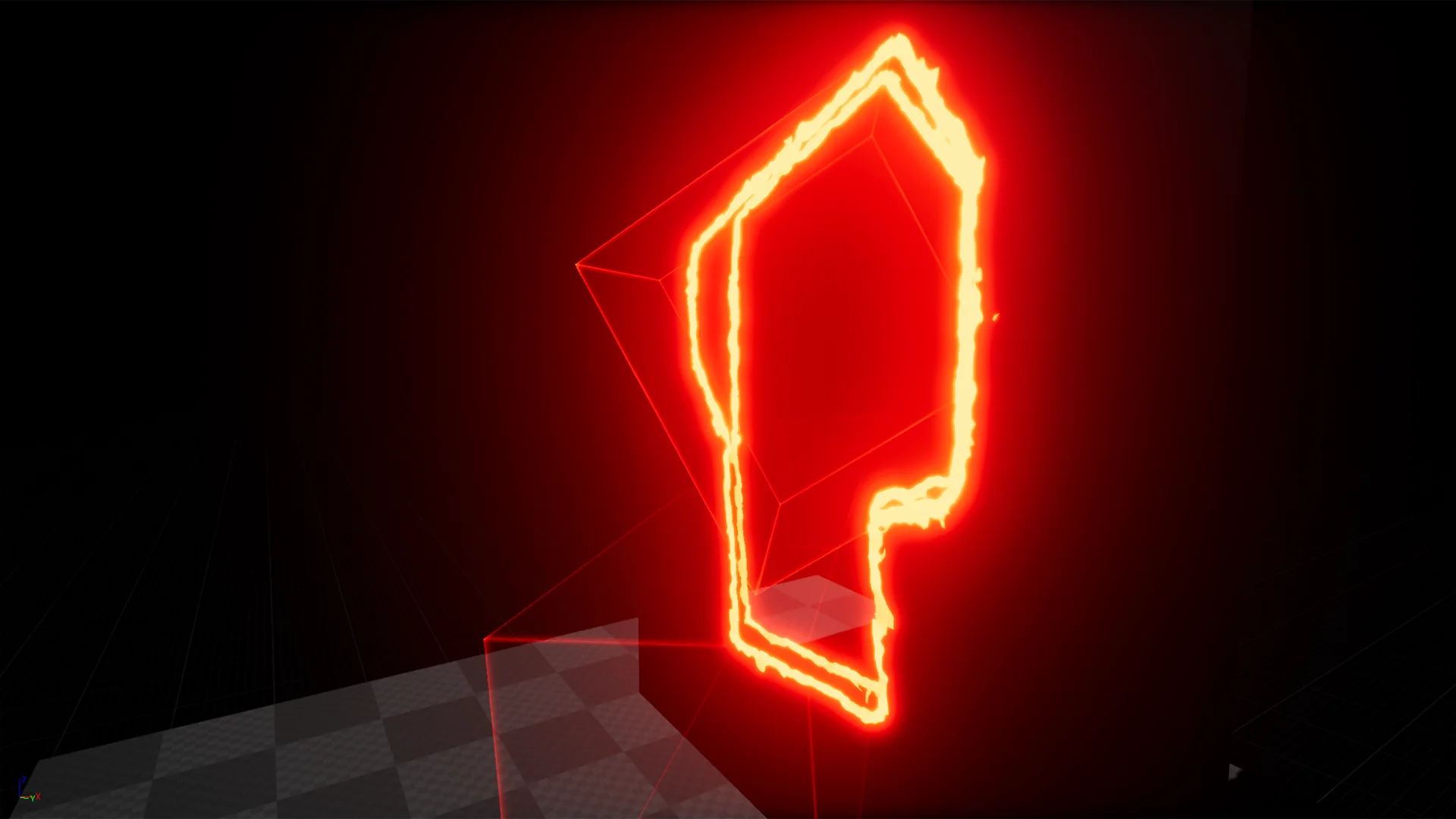
The visual versatility of the package is reflected in its thematic alignments with cut, stylized, fire, and eroded aesthetics. When paired with vibrant, high-contrast textures, the dissolve borders complement stylized visual art styles where clean, graphic edges take precedence over hyper-realistic noise. The ability to choose between hard-edged spatial cuts and patterned texture erosion gives stylized art pipelines distinct ways to handle visual transitions.
In combustion or burn-away sequences, applying Texture Based Dissolve or Subtract Dissolve enables fiery transition boundaries. Mask boundaries can mimic smoldering edges, where the surface recedes as if consumed by flame. For environmental degradation, the eroded design language takes advantage of noise textures to represent peeling paint, rusted metal surfaces, crumbling stone, or organic decay, providing a convincing sense of breakdown as the dissolve thresholds progress.
Implementation Guidance and Setup Routine
Easy Dissolve Material is structured through an accessible setup workflow designed to minimize configuration time. Users can assign the material logic to target models and establish dissolve parameters quickly without constructing complex vector operations from scratch. The straightforward architecture ensures that parameters such as mask locations, dissolve progression values, and transition styles remain directly accessible inside material instances.
To assist with implementation, the package includes dedicated Documentation alongside two video resources labeled Video 1 and Video 2. These walkthrough assets provide direct references for organizing parameters, demonstrating how to place manual location vectors, toggle between the six dissolve styles, and calibrate geometric masks against static or animated scene elements.
 Shaders
 Shaders
 Shaders