"b00678cacce53329"{"id":"1002834","slug":"shapes-fx-pack","title":"Shapes FX Pack","category":"Shaders","engine":"4.24+,5.0+","assetVersion":"","engineVersion":"Engine Version: 4.24+,5.0+","tag":"Shaders","accent":"blue","visual":"mech","summary":"Examine the stylized geometry, spatial interface design, and Blueprint systems powering the Shapes FX Pack for virtual reality and interactive environments.","platform":"Unreal Engine","indexPolicy":"index","publishedAt":"2026-11-20T12:13:18.651Z","updatedAt":"2026-11-20T12:13:18.651Z","sourceNotes":[],"fileContents":[],"compatibility":["Unreal Engine","Engine Version: 4.24+,5.0+"],"featuredImage":{"alt":"Shapes FX Pack","src":"/wp-content/uploads/published/2026/11/2c400e014337-a073f09b-8a1e-4501-9b11-9cc3b72c0418-d0adf03a06.webp"},"fileSizeBytes":122045434,"hasDownloadLink":true,"downloads":0,"terms":[{"taxonomy":"category","slug":"shaders","name":"Shaders"}],"galleryImages":[{"src":"/wp-content/uploads/published/2026/11/b8dfd9d8370d-4f86fcec-489e-46cc-8bd0-f13a382c67c2-5882f5ad75.webp","alt":"Shapes FX Pack"},{"src":"/wp-content/uploads/published/2026/11/8929a98f71ac-c4f448e0-253f-44f5-8bdb-433849d714f8-1d062bcbeb.webp","alt":"Shapes FX Pack"},{"src":"/wp-content/uploads/published/2026/11/c6fd6e27e0fb-f40dfacf-b8e7-47a0-b67e-3abcf7357f94-fcc434e0d2.webp","alt":"Shapes FX Pack"},{"src":"/wp-content/uploads/published/2026/11/7564f006fb50-3cd614ed-7194-4ac2-8657-846e2ac0fd94-70e9895a7f.webp","alt":"Shapes FX Pack"},{"src":"/wp-content/uploads/published/2026/11/375ded0699c6-19ace5b2-58cd-4521-af06-e0a07a186bd8-4396d23f3d.webp","alt":"Shapes FX Pack"},{"src":"/wp-content/uploads/published/2026/11/811e003b34fa-80116275-d056-4244-bc3c-b49ef1c12a60-565b06e14b.webp","alt":"Shapes FX Pack"},{"src":"/wp-content/uploads/published/2026/11/9021069927a4-888c4b28-53f2-433a-8492-8782217c9be6-4d85fcea62.webp","alt":"Shapes FX Pack"},{"src":"/wp-content/uploads/published/2026/11/9ade7ac0a14e-09fb724b-eb48-4452-be7b-fec4b7d45adf-8b60f3a3d9.webp","alt":"Shapes FX Pack"},{"src":"/wp-content/uploads/published/2026/11/8ee285d48d73-1979703d-f08c-4ea7-9ac3-412c35e1bf65-b24a8d0021.webp","alt":"Shapes FX Pack"},{"src":"/wp-content/uploads/published/2026/11/2314be6647de-1fc672ad-db4d-465a-88fd-7058b3c8dcfd-a65db92bbb.webp","alt":"Shapes FX Pack"}],"accessPanel":{"kind":"resource","title":"Get this resource","safetyNote":"Resources are manually reviewed before listing to improve quality and reduce obvious risks.","fileName":"Content.7z","resourceType":"Resource archive","versions":[]},"contentHtml":"\u003ch2\u003eDeploying Geometric Shapes in Stylized Visual Design\u003c/h2\u003e\u003cp\u003eReal-time visual effects often walk a fine line between expressive aesthetic flair and functional visual clarity. In many interactive productions, standard particle simulations relying on fluid smoke, sparks, or amorphous noise textures fail to communicate precise spatial intent. When players or users must parse boundaries, interaction fields, or user interface states instantly, unstructured visual noise can lead to cognitive friction. Grounding visual feedback in recognizable geometric primitives resolves this problem by providing clean silhouettes that remain readable from varying distances and perspective angles.\u003c/p\u003e\u003cp\u003eThe Shapes FX Pack approaches real-time visual accents through this structured geometric philosophy. By relying on foundational three-dimensional forms—specifically the cube, the sphere, and the torus—the asset collection provides stylized clarity that fits both modern gameplay loops and spatial interface systems. These shapes discard erratic noise in favor of defined contours, giving technical artists a dependable visual vocabulary. When stylized shaders and visual effects are wrapped around basic geometry, the resulting visuals stand out with clarity, whether anchored statically in a digital landscape or activated dynamically during high-frequency gameplay sequences.\u003c/p\u003e\u003ch2\u003ePrimitive Geometry and FX Aesthetics: Cube, Sphere, and Torus Forms\u003c/h2\u003e\u003cp\u003eThe core utility of this collection rests in its methodical deployment of primitive geometry. Each primitive shape carries distinct spatial connotations that can be channeled into specialized gameplay and navigational cues.\u003c/p\u003e\u003cp\u003eCubes naturally communicate structured volume, grid alignments, and digital precision. Within stylized visual environments, cube-shaped effects can signify digital boundaries, voxel-inspired environmental highlights, item containment fields, or spatial trigger perimeters. The sharp planar transitions of a cube form crisp edges that interact well with directional lighting and stylized glowing borders, ensuring that players immediately recognize bounding perimeters or interactive zones.\u003c/p\u003e\u003cp\u003eSpheres, conversely, provide isotropic volume that radiates equally in all directions. As an effect primitive, the sphere is uniquely suited for localized points of interest, interaction radii, environmental beacons, and targeting indicators. Because a spherical form maintains an identical silhouette from any camera angle, it eliminates perspective distortion, allowing users to evaluate focal interaction zones without ambiguity.\u003c/p\u003e\u003cp\u003eThe torus introduces a hollow, circular profile that functions effectively as a framing device. Within interactive design, the torus excels as an orientation reticle, selection ring, radial countdown indicator, or threshold marker. Framing interactive items within a torus immediately directs the user's focus through the center of the ring, establishing an intuitive focal point. By styling these three primitive types with fancy visual effect treatments rather than plain unshaded geometry, the pack transforms simple mathematical volumes into polished, expressive graphical components that blend into stylized visual palettes.\u003c/p\u003e\u003ch2\u003eSpatial User Interface Mechanics in Virtual Reality\u003c/h2\u003e\u003cp\u003eTraditional two-dimensional screen-space user interface design often breaks down within virtual reality. Flat viewport overlays disconnect the user from the immersion of an embodied environment, creating depth conflicts, stereoscopic eye strain, and clunky interaction layers. Building spatial user interface elements directly into the three-dimensional world provides a far more natural and comfortable method for displaying interactive data.\u003c/p\u003e\u003cp\u003eThe geometric elements within this collection translate directly into world-space user interface components. Because the pack's visual effects are built upon solid three-dimensional geometry, they hold physical presence within virtual space. An interactive node in a virtual reality application can be manifested as an active stylized sphere that responds to user proximity. Menu categories and data containers can be organized as hovering cubes that react to hand tracking or direct raycast input, giving the interface a tactile, architectural structure.\u003c/p\u003e\u003cp\u003eBeyond that, using geometric shapes for interactive cues clarifies depth perception in virtual reality. Stereoscopic vision relies on edge contrast and structural contours to calculate distance accurately. When user interface cues are rendered as stylized geometric shapes rather than flat billboards, users can judge exact interaction distances effortlessly. This spatial consistency reduces accidental inputs and enhances immersion, making virtual environments feel cohesive and mechanically grounded.\u003c/p\u003e\u003ch2\u003eBlueprint Architecture for Dynamic Pack Implementation\u003c/h2\u003e\u003cp\u003eStatic visual assets can only go so far; interactive applications demand responsive runtime behavior that connects graphic assets directly to underlying gameplay logic. Implementing visuals through an accessible Blueprint framework ensures that these geometric effects can adapt on the fly without requiring hardcoded engine adjustments or complex custom shaders for every single encounter.\u003c/p\u003e\u003cp\u003eWithin the pack, Blueprint integration serves as the functional bridge between the mathematical geometry and real-time state changes. Technical artists and gameplay designers can utilize Blueprint graphs to govern transformation rates, scale adjustments, rotational velocities, and parameter states. For instance, an interaction boundary represented by a cube can dynamically expand its scale upon player entry, pulse its visual intensity in sync with gameplay events, or transition into a torus shape when an action is confirmed.\u003c/p\u003e\u003cp\u003eThis modular Blueprint setup also simplifies lifecycle management. Rather than relying solely on pre-rendered or fixed-timeline animations, effects driven through Blueprint logic can be spawned, adjusted, and terminated procedurally based on live engine triggers. Whether linking an effect to an inventory selection, attaching an active visual cue to a moving character actor, or sequencing interactive puzzle stages, the Blueprint framework keeps the implementation lightweight, modular, and easy to maintain throughout production.\u003c/p\u003e\u003ch2\u003eHarmonizing Shapes FX Across Interactive Environments\u003c/h2\u003e\u003cp\u003eAchieving visual harmony across a multi-stage interactive application requires a unified graphic language. When disparate systems rely on conflicting visual styles—such as mixing hyper-realistic volumetric smoke with minimalist planar UI—the overall user experience becomes fragmented. Adopting a standardized geometric visual effects set provides an overarching aesthetic bridge that ties diverse systems together.\u003c/p\u003e\u003cp\u003eAcross gameplay sequences, puzzle interactions, menu systems, and world markers, relying on the clean contours of cubes, spheres, and toruses keeps visual communication unified. The stylized treatment ensures that effects are decorative and engaging without compromising legibility during fast-paced moments. Because the assets are structured around universal geometric primitives and responsive Blueprint control, they can be deployed repeatedly across different gameplay contexts without visual repetition, serving as environmental markers, tactile user interface widgets, or interactive feedback cues that reinforce clean, stylized design.\u003c/p\u003e\n\n\u003ch2\u003eExplore Similar Assets\u003c/h2\u003e\n\u003cul\u003e\n\u003cli\u003e\u003ca href=\"https://3dcghub.com/good-fx-ui-icon-trail/\" rel=\"noopener noreferrer\"\u003eGood FX : UI Icon Trail\u003c/a\u003e\u003c/li\u003e\n\u003cli\u003e\u003ca href=\"https://3dcghub.com/radial-scan-fx/\" rel=\"noopener noreferrer\"\u003eRadial Scan FX\u003c/a\u003e\u003c/li\u003e\n\u003cli\u003e\u003ca href=\"https://3dcghub.com/cyberpunk-fx-pack-2-neon-panels-and-screens/\" rel=\"noopener noreferrer\"\u003eCyberpunk FX Pack 2 - Neon Panels and Screens\u003c/a\u003e\u003c/li\u003e\n\u003cli\u003e\u003ca href=\"https://3dcghub.com/cyberpunk-fx-pack/\" rel=\"noopener noreferrer\"\u003eCyberpunk FX Pack\u003c/a\u003e\u003c/li\u003e\n\u003cli\u003e\u003ca href=\"https://3dcghub.com/wall-fx-pack/\" rel=\"noopener noreferrer\"\u003eWall FX pack\u003c/a\u003e\u003c/li\u003e\n\u003c/ul\u003e","contentTextLength":7517,"navigation":{"current":46,"total":4797,"previous":{"id":"1002835","slug":"shield-system-pack","title":"Shield System pack","category":"Shaders","platform":"Unreal Engine","updatedAt":"2026-11-20T12:15:26.458Z"},"next":{"id":"1002833","slug":"sci-fi-ui-fx","title":"Sci Fi UI FX","category":"Variety","platform":"Unreal Engine","updatedAt":"2026-11-20T12:12:24.063Z"}},"relatedResources":[{"id":"1000834","slug":"good-fx-ui-icon-trail","title":"Good FX : UI Icon Trail","category":"Shaders","engine":"4.26+,5.0+","assetVersion":"","engineVersion":"Engine Version: 4.26+,5.0+","tag":"Shaders","accent":"blue","visual":"mech","summary":"A material-driven UI effect pack with over 20 icon animation presets, customizable parameters, and support for desktop, mobile, and VR platforms.","platform":"Unreal Engine","indexPolicy":"index","publishedAt":"2026-08-03T13:13:06.882Z","updatedAt":"2026-08-03T13:13:06.882Z","sourceNotes":[],"fileContents":[],"compatibility":["Unreal Engine","Engine Version: 4.26+,5.0+"],"featuredImage":{"alt":"Good FX : UI Icon Trail","src":"/wp-content/uploads/published/2026/08/500483cbcab3-0644eb9a-2271-4184-a014-a7e6abb267e1-c0b2531ae5.webp"},"fileSizeBytes":3512541,"hasDownloadLink":true,"downloads":0},{"id":"1002163","slug":"radial-scan-fx","title":"Radial Scan FX","category":"Shaders","engine":"4.26+,5.0+","assetVersion":"","engineVersion":"Engine Version: 4.26+,5.0+","tag":"Shaders","accent":"blue","visual":"mech","summary":"Explore Radial Scan FX, a deferred decal scanning ring shader and Blueprint system for creating stylized radar waves, highlights, and game mechanics.","platform":"Unreal Engine","indexPolicy":"index","publishedAt":"2026-10-29T10:06:40.826Z","updatedAt":"2026-10-29T10:06:40.826Z","sourceNotes":[],"fileContents":[],"compatibility":["Unreal Engine","Engine Version: 4.26+,5.0+"],"featuredImage":{"alt":"Radial Scan FX","src":"/wp-content/uploads/published/2026/10/181dc30eab4f-dceaeb46-6faa-443c-a199-22723c634e68-2d72e0850e.webp"},"fileSizeBytes":52784660,"hasDownloadLink":true,"downloads":0},{"id":"1001644","slug":"cyberpunk-fx-pack-2-neon-panels-and-screens","title":"Cyberpunk FX Pack 2 - Neon Panels and Screens","category":"Shaders","engine":"4.20+,5.0+","assetVersion":"","engineVersion":"Engine Version: 4.20+,5.0+","tag":"Shaders","accent":"blue","visual":"mech","summary":"Implement deformable neon signs, parallax 3D effect textures, hologram screens, and hologram globes from Cyberpunk FX Pack 2 into custom environments.","platform":"Unreal Engine","indexPolicy":"index","publishedAt":"2026-10-13T02:28:20.229Z","updatedAt":"2026-10-13T02:28:20.229Z","sourceNotes":[],"fileContents":[],"compatibility":["Unreal Engine","Engine Version: 4.20+,5.0+"],"featuredImage":{"alt":"Cyberpunk FX Pack 2 - Neon Panels and Screens","src":"/wp-content/uploads/published/2026/10/420306a50bfd-06b12c54-c578-4a0e-9f69-4f4069add9a2-0df00049ea.webp"},"fileSizeBytes":40245259,"hasDownloadLink":true,"downloads":0}]}
Resource screenshots
1 / 10
Join our channel
Follow 3DCGHUB on Telegram for new resource drops, migration updates, and community notices.
Resources are manually reviewed before listing to improve quality and reduce obvious risks.
No account required
Shaders
Shapes FX Pack
Examine the stylized geometry, spatial interface design, and Blueprint systems powering the Shapes FX Pack for virtual reality and interactive environments.
Deploying Geometric Shapes in Stylized Visual Design
Real-time visual effects often walk a fine line between expressive aesthetic flair and functional visual clarity. In many interactive productions, standard particle simulations relying on fluid smoke, sparks, or amorphous noise textures fail to communicate precise spatial intent. When players or users must parse boundaries, interaction fields, or user interface states instantly, unstructured visual noise can lead to cognitive friction. Grounding visual feedback in recognizable geometric primitives resolves this problem by providing clean silhouettes that remain readable from varying distances and perspective angles.
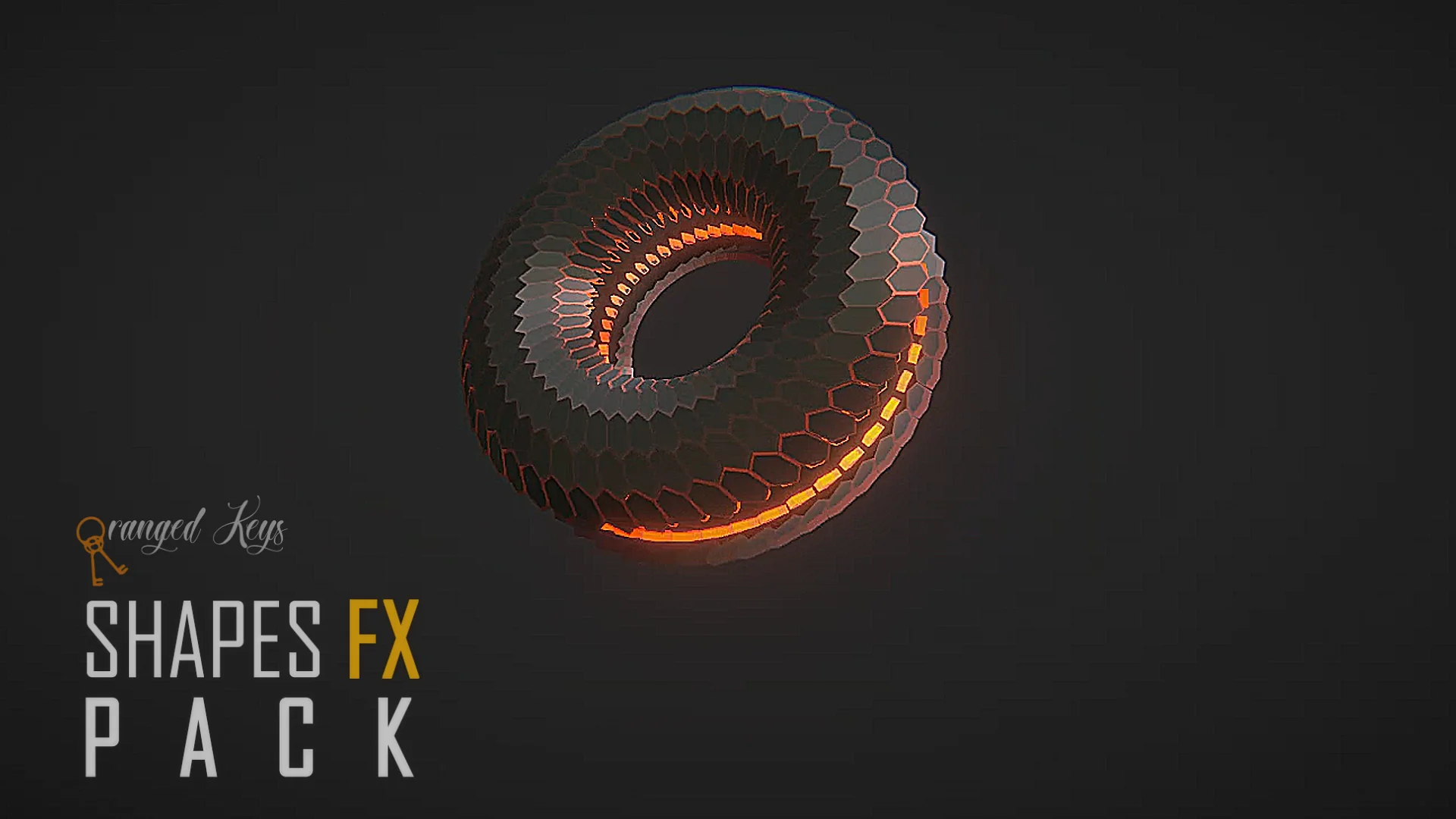
The Shapes FX Pack approaches real-time visual accents through this structured geometric philosophy. By relying on foundational three-dimensional forms—specifically the cube, the sphere, and the torus—the asset collection provides stylized clarity that fits both modern gameplay loops and spatial interface systems. These shapes discard erratic noise in favor of defined contours, giving technical artists a dependable visual vocabulary. When stylized shaders and visual effects are wrapped around basic geometry, the resulting visuals stand out with clarity, whether anchored statically in a digital landscape or activated dynamically during high-frequency gameplay sequences.
Primitive Geometry and FX Aesthetics: Cube, Sphere, and Torus Forms
The core utility of this collection rests in its methodical deployment of primitive geometry. Each primitive shape carries distinct spatial connotations that can be channeled into specialized gameplay and navigational cues.
Cubes naturally communicate structured volume, grid alignments, and digital precision. Within stylized visual environments, cube-shaped effects can signify digital boundaries, voxel-inspired environmental highlights, item containment fields, or spatial trigger perimeters. The sharp planar transitions of a cube form crisp edges that interact well with directional lighting and stylized glowing borders, ensuring that players immediately recognize bounding perimeters or interactive zones.
Spheres, conversely, provide isotropic volume that radiates equally in all directions. As an effect primitive, the sphere is uniquely suited for localized points of interest, interaction radii, environmental beacons, and targeting indicators. Because a spherical form maintains an identical silhouette from any camera angle, it eliminates perspective distortion, allowing users to evaluate focal interaction zones without ambiguity.
The torus introduces a hollow, circular profile that functions effectively as a framing device. Within interactive design, the torus excels as an orientation reticle, selection ring, radial countdown indicator, or threshold marker. Framing interactive items within a torus immediately directs the user's focus through the center of the ring, establishing an intuitive focal point. By styling these three primitive types with fancy visual effect treatments rather than plain unshaded geometry, the pack transforms simple mathematical volumes into polished, expressive graphical components that blend into stylized visual palettes.
Spatial User Interface Mechanics in Virtual Reality
Traditional two-dimensional screen-space user interface design often breaks down within virtual reality. Flat viewport overlays disconnect the user from the immersion of an embodied environment, creating depth conflicts, stereoscopic eye strain, and clunky interaction layers. Building spatial user interface elements directly into the three-dimensional world provides a far more natural and comfortable method for displaying interactive data.
The geometric elements within this collection translate directly into world-space user interface components. Because the pack's visual effects are built upon solid three-dimensional geometry, they hold physical presence within virtual space. An interactive node in a virtual reality application can be manifested as an active stylized sphere that responds to user proximity. Menu categories and data containers can be organized as hovering cubes that react to hand tracking or direct raycast input, giving the interface a tactile, architectural structure.
Beyond that, using geometric shapes for interactive cues clarifies depth perception in virtual reality. Stereoscopic vision relies on edge contrast and structural contours to calculate distance accurately. When user interface cues are rendered as stylized geometric shapes rather than flat billboards, users can judge exact interaction distances effortlessly. This spatial consistency reduces accidental inputs and enhances immersion, making virtual environments feel cohesive and mechanically grounded.
Blueprint Architecture for Dynamic Pack Implementation
Static visual assets can only go so far; interactive applications demand responsive runtime behavior that connects graphic assets directly to underlying gameplay logic. Implementing visuals through an accessible Blueprint framework ensures that these geometric effects can adapt on the fly without requiring hardcoded engine adjustments or complex custom shaders for every single encounter.
Within the pack, Blueprint integration serves as the functional bridge between the mathematical geometry and real-time state changes. Technical artists and gameplay designers can utilize Blueprint graphs to govern transformation rates, scale adjustments, rotational velocities, and parameter states. For instance, an interaction boundary represented by a cube can dynamically expand its scale upon player entry, pulse its visual intensity in sync with gameplay events, or transition into a torus shape when an action is confirmed.
This modular Blueprint setup also simplifies lifecycle management. Rather than relying solely on pre-rendered or fixed-timeline animations, effects driven through Blueprint logic can be spawned, adjusted, and terminated procedurally based on live engine triggers. Whether linking an effect to an inventory selection, attaching an active visual cue to a moving character actor, or sequencing interactive puzzle stages, the Blueprint framework keeps the implementation lightweight, modular, and easy to maintain throughout production.
Harmonizing Shapes FX Across Interactive Environments
Achieving visual harmony across a multi-stage interactive application requires a unified graphic language. When disparate systems rely on conflicting visual styles—such as mixing hyper-realistic volumetric smoke with minimalist planar UI—the overall user experience becomes fragmented. Adopting a standardized geometric visual effects set provides an overarching aesthetic bridge that ties diverse systems together.
Across gameplay sequences, puzzle interactions, menu systems, and world markers, relying on the clean contours of cubes, spheres, and toruses keeps visual communication unified. The stylized treatment ensures that effects are decorative and engaging without compromising legibility during fast-paced moments. Because the assets are structured around universal geometric primitives and responsive Blueprint control, they can be deployed repeatedly across different gameplay contexts without visual repetition, serving as environmental markers, tactile user interface widgets, or interactive feedback cues that reinforce clean, stylized design.
 Shaders
 Shaders
 Shaders