"efaa631e936fd3ee"{"id":"1002168","slug":"retro-graphics","title":"Retro Graphics","category":"Shaders","engine":"4.27+,5.0+","assetVersion":"","engineVersion":"Engine Version: 4.27+,5.0+","tag":"Shaders","accent":"blue","visual":"mech","summary":"Retro Graphics provides shaders, blueprints, vertex snapping, and custom lighting workflows to produce authentic 1990s visuals inside Unreal Engine.","platform":"Unreal Engine","publishedAt":"2026-10-29T10:10:32.120Z","updatedAt":"2026-10-29T10:10:32.120Z","sourceNotes":[],"fileContents":[],"compatibility":["Unreal Engine","Engine Version: 4.27+,5.0+"],"featuredImage":{"alt":"Retro Graphics","src":"/wp-content/uploads/published/2026/10/8e9cb9662d1d-c1267182-3e0d-41da-b727-8b0ee7be996a-40c3e0fb55.webp"},"hasDownloadLink":true,"downloads":0,"terms":[{"taxonomy":"category","slug":"shaders","name":"Shaders"}],"galleryImages":[{"src":"/wp-content/uploads/published/2026/10/714fbdf625c0-bafea195-d6f5-467e-8d3d-25a87794a67d-e39dbeea47.webp","alt":"Retro Graphics"},{"src":"/wp-content/uploads/published/2026/10/10d6d4bdebbf-2b7d3945-1cbb-441d-baeb-585d8dd90538-5ea706e88a.webp","alt":"Retro Graphics"},{"src":"/wp-content/uploads/published/2026/10/20920f7bbae2-07f7e275-228e-4ec3-b61c-2aaccc74e501-400a4d0fb7.webp","alt":"Retro Graphics"},{"src":"/wp-content/uploads/published/2026/10/2dd9306d6a3d-9931d02d-7c03-445b-96a5-fc2e014732c4-f2ee14d556.webp","alt":"Retro Graphics"},{"src":"/wp-content/uploads/published/2026/10/31e4e24eee67-dedbc932-71b2-4f2d-b5ce-cc7ea9729cff-78133f34d4.webp","alt":"Retro Graphics"},{"src":"/wp-content/uploads/published/2026/10/b22adcaf347b-3c92eec4-08e6-4678-a5a2-03aa332b8260-edb545c4c8.webp","alt":"Retro Graphics"},{"src":"/wp-content/uploads/published/2026/10/e3df86d0e27d-ebeb9ebc-77b7-4c37-bb24-547748f0815e-e102d2b472.webp","alt":"Retro Graphics"},{"src":"/wp-content/uploads/published/2026/10/b8c3b2fe72df-e858f161-24b4-4f91-b0e2-38e6d1605310-61dc9985d8.webp","alt":"Retro Graphics"}],"accessPanel":{"kind":"resource","title":"Download this resource","eyebrow":"Free Download","message":"Log in or create a free account to start your download.","fileName":"Retro Graphics.7z","safetyNote":"Resources are manually reviewed before listing to improve quality and reduce obvious risks.","actionLabel":"Download Free","resourceType":"Resource archive"},"contentHtml":"\u003cp\u003eRetro Graphics collects shaders, custom materials, lighting components, and specialized blueprints designed to reproduce the distinct visual constraints of 1990s real-time rendering in Unreal Engine. Rather than relying purely on standard post-process color grading, the system targets the structural geometry artifacts, rasterization compromises, and simplified illumination pipelines characteristic of fifth-generation console and early PC software engines. By pairing screen space vertex snapping and affine texture mapping with material-driven ambient lighting, fog, and vertex-level illumination, the collection establishes a cohesive framework for period-accurate low-poly presentation.\u003c/p\u003e \u003ch2\u003eScreen Space Vertex Snapping and Affine Texture Mapping\u003c/h2\u003e\n\u003cp\u003eEarly hardware rasterizers lacked the precision floating-point pipelines common in modern graphics cards, which led to visible visual instability during camera translation and rotation. Screen space vertex snapping recreates this defining artifact by quantizing transformed vertex positions to an internal low-resolution grid before screen projection. As geometry traverses the camera frustum, vertices jump distinctly between fixed increments rather than gliding continuously across sub-pixel boundaries. This creates the unmistakable swimming and jittering effect historically associated with fixed-point geometry transforms.\u003c/p\u003e \u003cp\u003eWorking alongside vertex quantization is affine texture mapping. Modern rendering pipelines perform perspective-correct interpolation across triangles, dividing texture coordinates by depth values across every fragment. Early 3D architectures omitted this hardware division step to save silicon real estate, resulting in textures that warped and distorted obliquely when viewed at sharp angles. The affine texture mapping implementation replicates this non-linear distortion across polygons, causing surfaces to bend realistically as geometry angles steepen relative to the camera viewpoint. Near clip adjustments, depth error emulation, and controlled polygon draw distances complete the geometric transformation layer, letting developers reproduce strict rendering thresholds where distant meshes drop out cleanly or exhibit clipped geometry boundaries.\u003c/p\u003e \u003ch2\u003eColor Quantization, Dithering, and Screen Door Transparency\u003c/h2\u003e\n\u003cp\u003eDisplay palettes throughout the 1990s frequently operated under strict color limits, ranging from 8-bit indexed buffers to 15-bit or 16-bit high-color framebuffers. Retro Graphics incorporates color quantization to step smooth gradients down into visible banding bands. To mitigate sudden transitions between quantized color bands, the toolkit includes dithering algorithms that interleave pixels in structured spatial patterns. This reproduces the dithered shading that older games utilized to simulate wider color ranges on low-bit displays.\u003c/p\u003e \u003cp\u003eTransparency handling in this era faced similar hardware bottlenecks, as true alpha blending was computationally taxing or completely unsupported by fill-rate-limited chips. The collection addresses this through screen door transparency, also known as stipple transparency. Instead of blending foreground and background colors in memory, materials punch out a fine, alternating pattern of discarded pixels across the mesh surface. This allows background geometry to show through at zero blend cost, mimicking the exact visual style used for transparent fences, glass, water, and vanishing character models on classic platforms. Surfaces are also configured as vertex paint ready, allowing environment artists to paint blending data, grime, or tinting variations directly into mesh vertices without introducing modern alpha masks.\u003c/p\u003e \u003ch2\u003eStatic and Dynamic Vertex Lights in Scene Illumination\u003c/h2\u003e\n\u003cp\u003eIllumination in Retro Graphics steps away from per-pixel deferred lighting in favor of per-vertex calculation techniques. Calculating light intensity at individual vertices and interpolating the values across polygon faces reduces specular precision and eliminates soft per-pixel falloff, establishing the flat, angular lighting typical of vintage engines.\u003c/p\u003e \u003cp\u003eThe package structures lighting support into static and dynamic implementations:\u003c/p\u003e\n\u003cul\u003e \u003cli\u003eStatic vertex lights, allowing up to five individual light evaluations per component to illuminate static world geometry.\u003c/li\u003e \u003cli\u003eDynamic vertex lights, configured by default to evaluate four active lights simultaneously for moving elements and interactive objects.\u003c/li\u003e \u003cli\u003eDirectional spotlights and material-based ambient lighting that tint geometry without requiring resource-heavy engine passes.\u003c/li\u003e \u003cli\u003eMaterial-driven fog systems that blend geometry into a solid background color threshold, masking draw-distance boundaries.\u003c/li\u003e \u003cli\u003eDistance field lighting integration to maintain spatial grounding and basic ambient occlusion without modern screen-space post processing.\u003c/li\u003e\n\u003c/ul\u003e \u003cp\u003eShifting light distribution to the vertex stage ensures that even moving light sources interact cleanly with screen space vertex snapping, preserving low-fidelity visual coherence across lit surfaces.\u003c/p\u003e \u003ch2\u003eProcedural Light Shafts, Sprites, and Destructible Blueprints\u003c/h2\u003e\n\u003cp\u003eBeyond raw surface rendering, the package supplies blueprints and helper materials to populate levels with era-appropriate environmental effects. A procedural light shaft blueprint generates volumetric-style light beams through geometric cones and mapped gradients, avoiding performance-heavy volumetric fog volumes. A pseudo lens flare material supplies simple, non-physical optical flares that react to camera orientation, while camera-facing sprite materials allow props, foliage, and particle bursts to rotate consistently toward the player view, matching classic billboard rendering techniques.\u003c/p\u003e \u003cp\u003eEnvironmental interactivity is handled through a dedicated destructible blueprint accompanied by a destructible material. This setup allows artists to configure breakable props, crates, or architectural barriers that shatter under gameplay triggers while maintaining retro texture stretching, vertex color behavior, and snappy geometry destruction. Because the destruction workflow integrates directly with the rest of the retro shader chain, fractured mesh chunks retain the same affine warping and vertex quantization as the rest of the game world.\u003c/p\u003e \u003ch2\u003eProject Workflows and Scene Integration\u003c/h2\u003e\n\u003cp\u003eRetro Graphics serves projects aiming for faithful mid-90s aesthetics, such as retro survival horror titles, boomer shooters, low-poly action games, and nostalgic adventure titles. Because the tools target shader parameters, vertex transforms, and custom materials rather than relying on external image filters, developers retain deep control over how aggressively retro artifacts are applied. Subtle dithering and affine warping can be chosen for a clean visual target, or heavy vertex snapping, screen door transparency, and steep color quantization can be combined to mirror early console limits.\u003c/p\u003e \u003cp\u003eThe toolkit also coordinates with character assets designed under low-poly specifications, including the complementary Retro Characters set. By combining geometry jitter, hardware-styled transparency, vertex-bound lighting, and procedural scene elements within native Unreal Engine blueprints, the system provides a turnkey pipeline for constructing completely stylized retro worlds from the ground up.\u003c/p\u003e\n\n\u003ch2\u003eMore From The Same Workflow\u003c/h2\u003e\n\u003cul\u003e\n\u003cli\u003e\u003ca href=\"https://3dcghub.com/custom-motion-blur/\" title=\"Custom Motion Blur\"\u003eCustom Motion Blur\u003c/a\u003e\u003c/li\u003e\n\u003cli\u003e\u003ca href=\"https://3dcghub.com/art-of-shader-distortion-and-glitches/\" title=\"Art Of Shader - Distortion And Glitches\"\u003eArt Of Shader - Distortion And Glitches\u003c/a\u003e\u003c/li\u003e\n\u003cli\u003e\u003ca href=\"https://3dcghub.com/radial-scan-fx/\" title=\"Radial Scan FX\"\u003eRadial Scan FX\u003c/a\u003e\u003c/li\u003e\n\u003cli\u003e\u003ca href=\"https://3dcghub.com/slime-vfx/\" title=\"Slime VFX\"\u003eSlime VFX\u003c/a\u003e\u003c/li\u003e\n\u003cli\u003e\u003ca href=\"https://3dcghub.com/cyberpunk-fx-pack-2-neon-panels-and-screens/\" title=\"Cyberpunk FX Pack 2 - Neon Panels and Screens\"\u003eCyberpunk FX Pack 2 - Neon Panels and Screens\u003c/a\u003e\u003c/li\u003e\n\u003c/ul\u003e","contentTextLength":7420,"navigation":{"current":116,"total":4209,"previous":{"id":"1002169","slug":"retro-industrial-props","title":"Retro Industrial Props","category":"Tables","platform":"Unreal Engine","updatedAt":"2026-10-29T10:11:12.660Z"},"next":{"id":"1002167","slug":"resource-gathering-animation-pack","title":"Resource Gathering Animation Pack","category":"Variety","platform":"Unreal Engine","updatedAt":"2026-10-29T10:09:47.922Z"}},"relatedResources":[{"id":"15789","slug":"custom-motion-blur","title":"Custom Motion Blur","category":"Shaders","engine":"4.26+,5.0+","assetVersion":"Engine version: 4.26+,5.0+","engineVersion":"4.18","tag":"Shaders","accent":"blue","visual":"audio","summary":"Enhance your real-time projects with Custom Motion Blur, a tool designed for artist-controllable motion effects on specific objects. Perfect for simulating speed in still shots and dynamic scenes.","platform":"Unreal Engine","publishedAt":"2026-03-12T13:10:11.000Z","updatedAt":"2026-04-19T15:44:41.000Z","sourceNotes":[],"fileContents":[],"compatibility":["Unreal Engine","Engine version: 4.26+,5.0+"],"featuredImage":{"alt":"Custom Motion Blur","src":"https://3dcghub.com/wp-content/uploads/2026/03/f4370398-4d03-468a-be22-b91438b7822a.webp"},"hasDownloadLink":true,"downloads":0},{"id":"1000169","slug":"art-of-shader-distortion-and-glitches","title":"Art Of Shader - Distortion And Glitches","category":"Shaders","engine":"4.27,5.0+","assetVersion":"","engineVersion":"Engine Version: 4.27,5.0+","tag":"Shaders","accent":"blue","visual":"mech","summary":"A comprehensive pack of 40 customizable shaders utilizing Blueprint Actors, Post Process materials, and Niagara FX to create real-time glitch and distortion eff","platform":"Unreal Engine","publishedAt":"2026-06-19T16:49:55.317Z","updatedAt":"2026-06-19T16:49:55.317Z","sourceNotes":[],"fileContents":[],"compatibility":["Unreal Engine","Engine Version: 4.27,5.0+"],"featuredImage":{"alt":"Art Of Shader - Distortion And Glitches","src":"/wp-content/uploads/published/2026/06/19a1408c909c-ebd56bbf-af41-427e-aac4-e2808acf9bad-d1ec457364.webp"},"hasDownloadLink":true,"downloads":0},{"id":"1002163","slug":"radial-scan-fx","title":"Radial Scan FX","category":"Shaders","engine":"4.26+,5.0+","assetVersion":"","engineVersion":"Engine Version: 4.26+,5.0+","tag":"Shaders","accent":"blue","visual":"mech","summary":"Explore Radial Scan FX, a deferred decal scanning ring shader and Blueprint system for creating stylized radar waves, highlights, and game mechanics.","platform":"Unreal Engine","publishedAt":"2026-10-29T10:06:40.826Z","updatedAt":"2026-10-29T10:06:40.826Z","sourceNotes":[],"fileContents":[],"compatibility":["Unreal Engine","Engine Version: 4.26+,5.0+"],"featuredImage":{"alt":"Radial Scan FX","src":"/wp-content/uploads/published/2026/10/181dc30eab4f-dceaeb46-6faa-443c-a199-22723c634e68-2d72e0850e.webp"},"hasDownloadLink":true,"downloads":0}]}
Shaders
Retro Graphics
Retro Graphics provides shaders, blueprints, vertex snapping, and custom lighting workflows to produce authentic 1990s visuals inside Unreal Engine.
Category:Unreal Engine,ShadersPlatform: Unreal EngineEngine Version: 4.27+,5.0+Published: Oct 29, 2026
Shaders
Resource overview
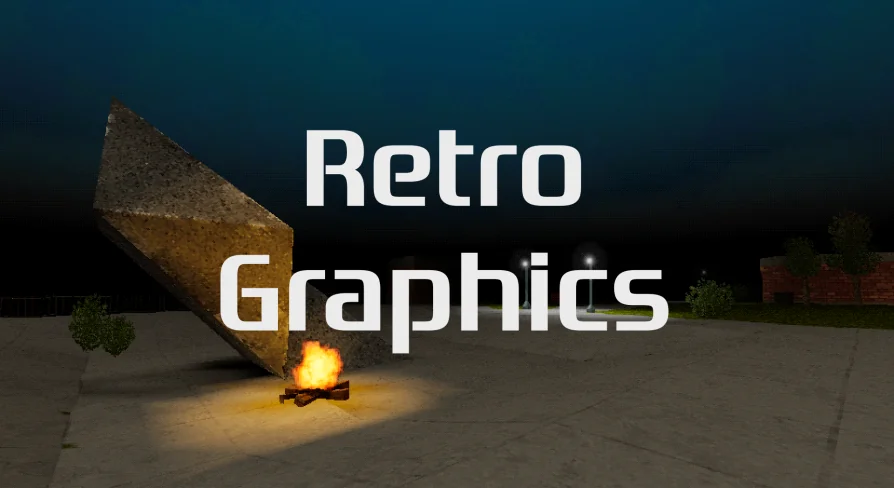
Retro Graphics collects shaders, custom materials, lighting components, and specialized blueprints designed to reproduce the distinct visual constraints of 1990s real-time rendering in Unreal Engine. Rather than relying purely on standard post-process color grading, the system targets the structural geometry artifacts, rasterization compromises, and simplified illumination pipelines characteristic of fifth-generation console and early PC software engines. By pairing screen space vertex snapping and affine texture mapping with material-driven ambient lighting, fog, and vertex-level illumination, the collection establishes a cohesive framework for period-accurate low-poly presentation.
Screen Space Vertex Snapping and Affine Texture Mapping
Early hardware rasterizers lacked the precision floating-point pipelines common in modern graphics cards, which led to visible visual instability during camera translation and rotation. Screen space vertex snapping recreates this defining artifact by quantizing transformed vertex positions to an internal low-resolution grid before screen projection. As geometry traverses the camera frustum, vertices jump distinctly between fixed increments rather than gliding continuously across sub-pixel boundaries. This creates the unmistakable swimming and jittering effect historically associated with fixed-point geometry transforms.
Working alongside vertex quantization is affine texture mapping. Modern rendering pipelines perform perspective-correct interpolation across triangles, dividing texture coordinates by depth values across every fragment. Early 3D architectures omitted this hardware division step to save silicon real estate, resulting in textures that warped and distorted obliquely when viewed at sharp angles. The affine texture mapping implementation replicates this non-linear distortion across polygons, causing surfaces to bend realistically as geometry angles steepen relative to the camera viewpoint. Near clip adjustments, depth error emulation, and controlled polygon draw distances complete the geometric transformation layer, letting developers reproduce strict rendering thresholds where distant meshes drop out cleanly or exhibit clipped geometry boundaries.
Color Quantization, Dithering, and Screen Door Transparency
Display palettes throughout the 1990s frequently operated under strict color limits, ranging from 8-bit indexed buffers to 15-bit or 16-bit high-color framebuffers. Retro Graphics incorporates color quantization to step smooth gradients down into visible banding bands. To mitigate sudden transitions between quantized color bands, the toolkit includes dithering algorithms that interleave pixels in structured spatial patterns. This reproduces the dithered shading that older games utilized to simulate wider color ranges on low-bit displays.
Transparency handling in this era faced similar hardware bottlenecks, as true alpha blending was computationally taxing or completely unsupported by fill-rate-limited chips. The collection addresses this through screen door transparency, also known as stipple transparency. Instead of blending foreground and background colors in memory, materials punch out a fine, alternating pattern of discarded pixels across the mesh surface. This allows background geometry to show through at zero blend cost, mimicking the exact visual style used for transparent fences, glass, water, and vanishing character models on classic platforms. Surfaces are also configured as vertex paint ready, allowing environment artists to paint blending data, grime, or tinting variations directly into mesh vertices without introducing modern alpha masks.
Static and Dynamic Vertex Lights in Scene Illumination
Illumination in Retro Graphics steps away from per-pixel deferred lighting in favor of per-vertex calculation techniques. Calculating light intensity at individual vertices and interpolating the values across polygon faces reduces specular precision and eliminates soft per-pixel falloff, establishing the flat, angular lighting typical of vintage engines.
The package structures lighting support into static and dynamic implementations:
Static vertex lights, allowing up to five individual light evaluations per component to illuminate static world geometry.
Dynamic vertex lights, configured by default to evaluate four active lights simultaneously for moving elements and interactive objects.
Directional spotlights and material-based ambient lighting that tint geometry without requiring resource-heavy engine passes.
Material-driven fog systems that blend geometry into a solid background color threshold, masking draw-distance boundaries.
Distance field lighting integration to maintain spatial grounding and basic ambient occlusion without modern screen-space post processing.
Shifting light distribution to the vertex stage ensures that even moving light sources interact cleanly with screen space vertex snapping, preserving low-fidelity visual coherence across lit surfaces.
Procedural Light Shafts, Sprites, and Destructible Blueprints
Beyond raw surface rendering, the package supplies blueprints and helper materials to populate levels with era-appropriate environmental effects. A procedural light shaft blueprint generates volumetric-style light beams through geometric cones and mapped gradients, avoiding performance-heavy volumetric fog volumes. A pseudo lens flare material supplies simple, non-physical optical flares that react to camera orientation, while camera-facing sprite materials allow props, foliage, and particle bursts to rotate consistently toward the player view, matching classic billboard rendering techniques.
Environmental interactivity is handled through a dedicated destructible blueprint accompanied by a destructible material. This setup allows artists to configure breakable props, crates, or architectural barriers that shatter under gameplay triggers while maintaining retro texture stretching, vertex color behavior, and snappy geometry destruction. Because the destruction workflow integrates directly with the rest of the retro shader chain, fractured mesh chunks retain the same affine warping and vertex quantization as the rest of the game world.
Project Workflows and Scene Integration
Retro Graphics serves projects aiming for faithful mid-90s aesthetics, such as retro survival horror titles, boomer shooters, low-poly action games, and nostalgic adventure titles. Because the tools target shader parameters, vertex transforms, and custom materials rather than relying on external image filters, developers retain deep control over how aggressively retro artifacts are applied. Subtle dithering and affine warping can be chosen for a clean visual target, or heavy vertex snapping, screen door transparency, and steep color quantization can be combined to mirror early console limits.
The toolkit also coordinates with character assets designed under low-poly specifications, including the complementary Retro Characters set. By combining geometry jitter, hardware-styled transparency, vertex-bound lighting, and procedural scene elements within native Unreal Engine blueprints, the system provides a turnkey pipeline for constructing completely stylized retro worlds from the ground up.
 Shaders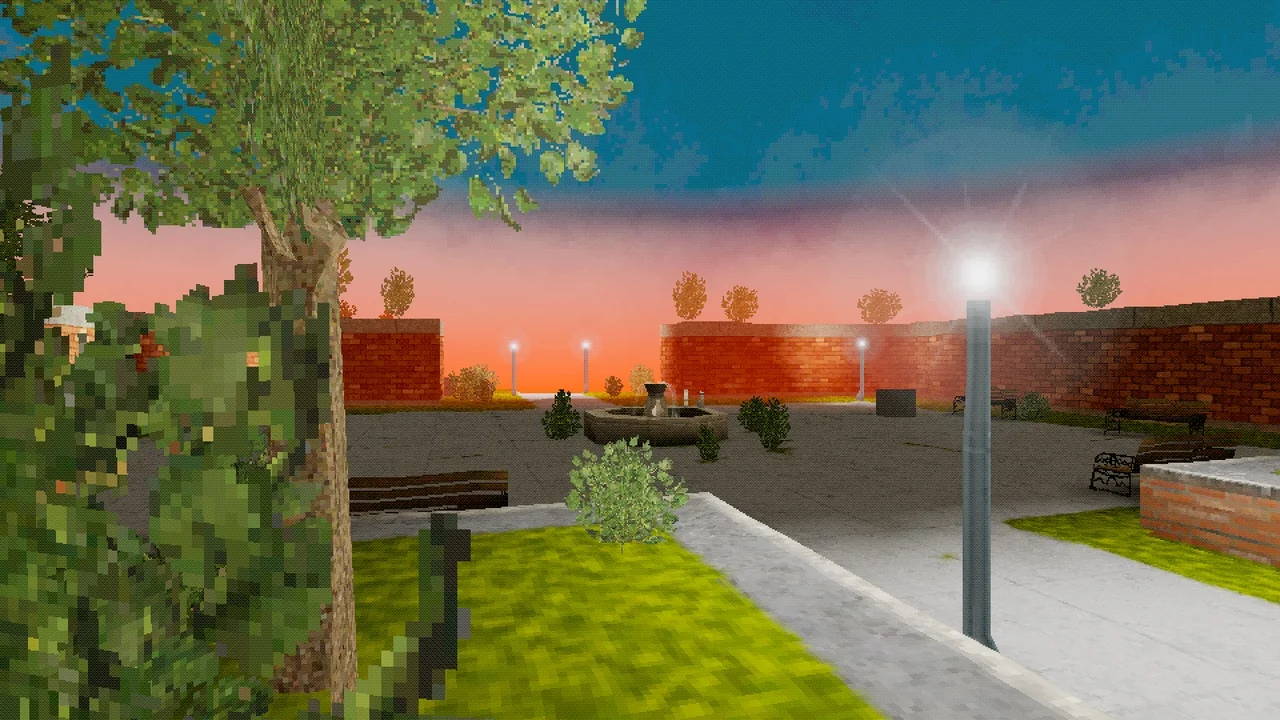
 Shaders
 Shaders
 Shaders