"a19e0535960bd083"{"id":"15789","slug":"custom-motion-blur","title":"Custom Motion Blur","category":"Shaders","engine":"4.26+,5.0+","assetVersion":"Engine version: 4.26+,5.0+","engineVersion":"4.18","tag":"Shaders","accent":"blue","visual":"audio","summary":"Enhance your real-time projects with Custom Motion Blur, a tool designed for artist-controllable motion effects on specific objects. Perfect for simulating speed in still shots and dynamic scenes.","platform":"Unreal Engine","publishedAt":"2026-03-12T13:10:11.000Z","updatedAt":"2026-04-19T15:44:41.000Z","sourceNotes":[],"fileContents":[],"compatibility":["Unreal Engine","Engine version: 4.26+,5.0+"],"featuredImage":{"alt":"Custom Motion Blur","src":"https://3dcghub.com/wp-content/uploads/2026/03/f4370398-4d03-468a-be22-b91438b7822a.webp"},"hasDownloadLink":true,"downloads":0,"terms":[{"taxonomy":"category","slug":"shaders","name":"Shaders"},{"taxonomy":"post_tag","slug":"blueprint","name":"Blueprint"},{"taxonomy":"post_tag","slug":"environment","name":"Environment"},{"taxonomy":"post_tag","slug":"motion-blur","name":"Motion Blur"},{"taxonomy":"post_tag","slug":"motion-graphics","name":"Motion Graphics"},{"taxonomy":"post_tag","slug":"realistic","name":"Realistic"},{"taxonomy":"post_tag","slug":"vfx","name":"VFX"}],"galleryImages":[{"src":"https://3dcghub.com/wp-content/uploads/2026/03/c017bb3723f8_4154d6d1-1340-4e1c-9fc6-29b1258bffa4.webp","alt":"Custom Motion Blur"},{"src":"https://3dcghub.com/wp-content/uploads/2026/03/8ca39a319b2c_a4a04579-2353-41fc-a2f9-28d5e3c89a41.webp","alt":"Custom Motion Blur"},{"src":"https://3dcghub.com/wp-content/uploads/2026/03/9f42dd1e5ffa_5f0494b2-8ee8-44af-af7f-8897aa769125.webp","alt":"Custom Motion Blur"},{"src":"https://3dcghub.com/wp-content/uploads/2026/03/a3430707fd3b_18bcc6ed-84db-4b4d-8daf-9616361274b6.webp","alt":"Custom Motion Blur"},{"src":"https://3dcghub.com/wp-content/uploads/2026/03/03d96743b92a_7e4fb73f-266d-483e-901c-27e52e271fe5.webp","alt":"Custom Motion Blur"},{"src":"https://3dcghub.com/wp-content/uploads/2026/03/a54cbaa17fb2_19f68859-c5ac-4e34-8e7a-5edc632d661e.webp","alt":"Custom Motion Blur"},{"src":"https://3dcghub.com/wp-content/uploads/2026/03/f62e336a7759_519bef08-3f44-4b2a-b68c-1f54c3c249dd.webp","alt":"Custom Motion Blur"},{"src":"https://3dcghub.com/wp-content/uploads/2026/03/bda39d73ba38_3fbbf66d-583e-4f34-b53a-6cdba64b41bc.webp","alt":"Custom Motion Blur"},{"src":"https://3dcghub.com/wp-content/uploads/2026/03/96c95a6daf2f_804de82a-e80a-488f-a9dd-9e870156e673.webp","alt":"Custom Motion Blur"},{"src":"https://3dcghub.com/wp-content/uploads/2026/03/054ddeae35c0_3cfcc0a4-6eb4-47b1-8499-4bf1e52cd054.webp","alt":"Custom Motion Blur"}],"accessPanel":{"kind":"resource","title":"Access this resource","eyebrow":"Free Download","message":"Log in or create a free account to start your download.","fileName":"Content.7z","safetyNote":"All resources are 100% manually reviewed to eliminate all risks.","actionLabel":"Download Free","resourceType":"Resource archive"},"contentHtml":"\u003ch2\u003eHigh-Quality Motion Effects for Real-Time Scenes\u003c/h2\u003e\n\u003cp\u003eCustom Motion Blur is a specialized tool designed to bring professional, artist-controllable motion effects to specific objects within your scene. Unlike standard global effects, this pack allows users to apply high-quality blur to selected items. Consequently, developers can achieve a more precise look for their projects. This asset is particularly useful for those who need to emphasize speed or rotation in a controlled manner.\u003c/p\u003e\n\n\u003cp\u003eThe system is built to provide high-quality results across various real-time environments. Because the focus is on artist control, you can fine-tune how the motion appears on a per-object basis. Therefore, the tool offers a level of flexibility that is often missing from automated camera-based solutions. Whether you are working on a high-speed chase or a subtle environmental detail, this asset helps maintain visual fidelity.\u003c/p\u003e\n\n\u003ch2\u003eLinear and Circular Motion Simulation\u003c/h2\u003e\n\u003cp\u003eOne of the primary features of Custom Motion Blur is its ability to simulate different types of movement. The developer has designed the system to handle both linear and circular motion paths. For example, if an object is moving in a straight line, the linear blur provides a realistic sense of velocity. However, if the object is spinning or moving along an arc, the circular motion simulation ensures the blur follows the correct path.\u003c/p\u003e\n\n\u003cp\u003eThese features are essential for creating realistic visuals in modern 3D workflows. Moreover, the ability to switch between these motion types allows for a wider range of creative applications. You can use these settings to highlight the rotation of a wheel or the rapid movement of a projectile. As a result, the final output looks more dynamic and polished.\u003c/p\u003e\n\n\u003ch2\u003eMotion Blur in Still Shots\u003c/h2\u003e\n\u003cp\u003eA unique advantage of this pack is its capability to simulate fast motion even in still shots. Traditionally, motion blur requires frame-to-frame movement to render correctly. However, Custom Motion Blur allows artists to generate these effects for static high-resolution images. This makes it an invaluable tool for marketing materials and portfolio renders where a sense of action is required.\u003c/p\u003e\n\n\u003cp\u003eBy using this tool, you can capture the essence of speed without needing a complex animation sequence. Consequently, architectural visualization artists and graphic designers can create more compelling static scenes. Therefore, the asset bridges the gap between real-time performance and high-end static rendering.\u003c/p\u003e\n\n\u003ch2\u003eVersatile Real-Time Applications\u003c/h2\u003e\n\u003cp\u003eCustom Motion Blur is suitable for a wide variety of project types. The creator has optimized the tool for use in the following areas:\u003c/p\u003e\n\u003cul\u003e\n \u003cli\u003e\u003cstrong\u003eGame Development:\u003c/strong\u003e Enhance the sense of speed for characters and vehicles.\u003c/li\u003e\n \u003cli\u003e\u003cstrong\u003eArchitectural Visualization:\u003c/strong\u003e Add life to scenes with blurred moving elements.\u003c/li\u003e\n \u003cli\u003e\u003cstrong\u003eMotion Graphics:\u003c/strong\u003e Create fluid, professional-looking transitions and object movements.\u003c/li\u003e\n \u003cli\u003e\u003cstrong\u003eHigh-Resolution Imaging:\u003c/strong\u003e Produce realistic action shots for promotional content.\u003c/li\u003e\n\u003c/ul\u003e\n\n\u003cp\u003eBeyond that, the asset is built using a Blueprint-based system, which aligns with modern real-time development standards. This ensures that the tool remains accessible while providing realistic results. Because it is categorized as a Realistic Blueprint asset, it focuses on delivering believable visual outcomes for demanding projects.\u003c/p\u003e\n\n\u003ch2\u003eBest Fit\u003c/h2\u003e\n\u003cp\u003eIn practice, Custom Motion Blur provides a robust solution for artists needing precise control over motion effects. By supporting both linear and circular motion, it caters to a diverse range of movement types. Additionally, its ability to function in still shots makes it a versatile choice for both video and static media. If you are looking to enhance the realism of your real-time projects, this Blueprint asset offers the tools necessary to achieve high-quality, artist-driven results.\u003c/p\u003e\n\n\u003ch2\u003eMore From The Same Workflow\u003c/h2\u003e\n\u003cul\u003e\n\u003cli\u003e\u003ca href=\"https://3dcghub.com/easy-rain/\" title=\"Easy Rain\"\u003eEasy Rain\u003c/a\u003e\u003c/li\u003e\n\u003cli\u003e\u003ca href=\"https://3dcghub.com/bcd-closeup-camera/\" title=\"BCD Closeup Camera\"\u003eBCD Closeup Camera\u003c/a\u003e\u003c/li\u003e\n\u003cli\u003e\u003ca href=\"https://3dcghub.com/sci-fi-vehicle-constructor/\" title=\"Sci-Fi Vehicle Constructor\"\u003eSci-Fi Vehicle Constructor\u003c/a\u003e\u003c/li\u003e\n\u003cli\u003e\u003ca href=\"https://3dcghub.com/motionui/\" title=\"MotionUI\"\u003eMotionUI\u003c/a\u003e\u003c/li\u003e\n\u003cli\u003eBillboards Pack Vol.01: Animated LED Ads for 3D Cities\u003c/li\u003e\n\u003c/ul\u003e","contentTextLength":3990,"navigation":{"current":3476,"total":4026,"previous":{"id":"15649","slug":"rocket-thruster-exhaust-fx","title":"Rocket Thruster Exhaust FX","category":"Fire \u0026 Explosions","platform":"Unreal Engine","updatedAt":"2026-04-19T15:44:42.000Z"},"next":{"id":"15776","slug":"crystal-vfx-pack","title":"Crystal VFX Pack","category":"Shaders","platform":"Unreal Engine","updatedAt":"2026-04-19T15:44:41.000Z"}},"relatedResources":[{"id":"13019","slug":"water-stylized-custom","title":"Water Stylized Custom","category":"Nature \u0026 Terrain","engine":"4.26+,5.0+","assetVersion":"Engine version: 4.26+,5.0+","engineVersion":"4.26","tag":"Nature \u0026 Terrain","accent":"blue","visual":"luts","summary":"Water Stylized Custom offers a versatile collection of materials and blueprints for building stylized oceans, lakes, and rivers. This package includes advanced customization options and underwater effects to enhance your game environments.","platform":"Unreal Engine","publishedAt":"2026-03-09T18:13:19.000Z","updatedAt":"2026-04-19T15:46:33.000Z","sourceNotes":[],"fileContents":[],"compatibility":["Unreal Engine","Engine version: 4.26+,5.0+"],"featuredImage":{"alt":"Water Stylized Custom","src":"https://3dcghub.com/wp-content/uploads/2026/03/2ce04fba-c79a-4b25-9af6-d17ceeb4106c.webp"},"hasDownloadLink":true,"downloads":1},{"id":"13412","slug":"animated-blood-decals-realistic","title":"Animated Blood Decals - Realistic","category":"Tools, Objects \u0026 Decor","engine":"4.26+,5.0+","assetVersion":"Engine version: 4.26+,5.0+","engineVersion":"4.19","tag":"Tools","accent":"blue","visual":"animation","summary":"Enhance your project with 15 realistic animated blood decals. This pack includes blood pools, droplets, and splatters driven by a custom blueprint actor for maximum visual impact.","platform":"Unreal Engine","publishedAt":"2026-03-10T17:00:08.000Z","updatedAt":"2026-04-19T15:46:28.000Z","sourceNotes":[],"fileContents":[],"compatibility":["Unreal Engine","Engine version: 4.26+,5.0+"],"featuredImage":{"alt":"Animated Blood Decals - Realistic","src":"https://3dcghub.com/wp-content/uploads/2026/03/040c39f6-0f53-4d49-af7d-60add91e8fe0.webp"},"hasDownloadLink":true,"downloads":1},{"id":"15758","slug":"cinematic-luts-kit","title":"Cinematic LUTs Kit","category":"Shaders","engine":"4.26+,5.0+","assetVersion":"Engine version: 4.26+,5.0+","engineVersion":"4.24","tag":"Shaders","accent":"blue","visual":"luts","summary":"Enhance your project's atmosphere with the Cinematic LUTs Kit. This pack includes 270 textures designed to streamline color grading for genres like Horror and Survival.","platform":"Unreal Engine","publishedAt":"2026-03-12T13:03:27.000Z","updatedAt":"2026-04-19T15:44:41.000Z","sourceNotes":[],"fileContents":[],"compatibility":["Unreal Engine","Engine version: 4.26+,5.0+"],"featuredImage":{"alt":"Cinematic LUTs Kit","src":"https://3dcghub.com/wp-content/uploads/2026/03/96d309d2-9a86-4e55-88b7-d16513dec1ee.webp"},"hasDownloadLink":true,"downloads":2}]}
Shaders
Custom Motion Blur
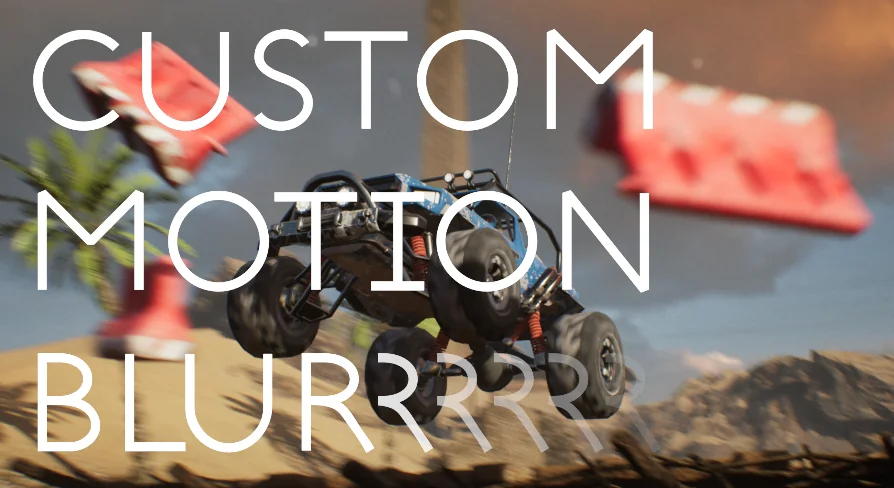
Enhance your real-time projects with Custom Motion Blur, a tool designed for artist-controllable motion effects on specific objects. Perfect for simulating speed in still shots and dynamic scenes.
Custom Motion Blur is a specialized tool designed to bring professional, artist-controllable motion effects to specific objects within your scene. Unlike standard global effects, this pack allows users to apply high-quality blur to selected items. Consequently, developers can achieve a more precise look for their projects. This asset is particularly useful for those who need to emphasize speed or rotation in a controlled manner.
The system is built to provide high-quality results across various real-time environments. Because the focus is on artist control, you can fine-tune how the motion appears on a per-object basis. Therefore, the tool offers a level of flexibility that is often missing from automated camera-based solutions. Whether you are working on a high-speed chase or a subtle environmental detail, this asset helps maintain visual fidelity.
Linear and Circular Motion Simulation
One of the primary features of Custom Motion Blur is its ability to simulate different types of movement. The developer has designed the system to handle both linear and circular motion paths. For example, if an object is moving in a straight line, the linear blur provides a realistic sense of velocity. However, if the object is spinning or moving along an arc, the circular motion simulation ensures the blur follows the correct path.
These features are essential for creating realistic visuals in modern 3D workflows. Moreover, the ability to switch between these motion types allows for a wider range of creative applications. You can use these settings to highlight the rotation of a wheel or the rapid movement of a projectile. As a result, the final output looks more dynamic and polished.
Motion Blur in Still Shots
A unique advantage of this pack is its capability to simulate fast motion even in still shots. Traditionally, motion blur requires frame-to-frame movement to render correctly. However, Custom Motion Blur allows artists to generate these effects for static high-resolution images. This makes it an invaluable tool for marketing materials and portfolio renders where a sense of action is required.
By using this tool, you can capture the essence of speed without needing a complex animation sequence. Consequently, architectural visualization artists and graphic designers can create more compelling static scenes. Therefore, the asset bridges the gap between real-time performance and high-end static rendering.
Versatile Real-Time Applications
Custom Motion Blur is suitable for a wide variety of project types. The creator has optimized the tool for use in the following areas:
Game Development: Enhance the sense of speed for characters and vehicles.
Architectural Visualization: Add life to scenes with blurred moving elements.
Motion Graphics: Create fluid, professional-looking transitions and object movements.
High-Resolution Imaging: Produce realistic action shots for promotional content.
Beyond that, the asset is built using a Blueprint-based system, which aligns with modern real-time development standards. This ensures that the tool remains accessible while providing realistic results. Because it is categorized as a Realistic Blueprint asset, it focuses on delivering believable visual outcomes for demanding projects.
Best Fit
In practice, Custom Motion Blur provides a robust solution for artists needing precise control over motion effects. By supporting both linear and circular motion, it caters to a diverse range of movement types. Additionally, its ability to function in still shots makes it a versatile choice for both video and static media. If you are looking to enhance the realism of your real-time projects, this Blueprint asset offers the tools necessary to achieve high-quality, artist-driven results.
 Shaders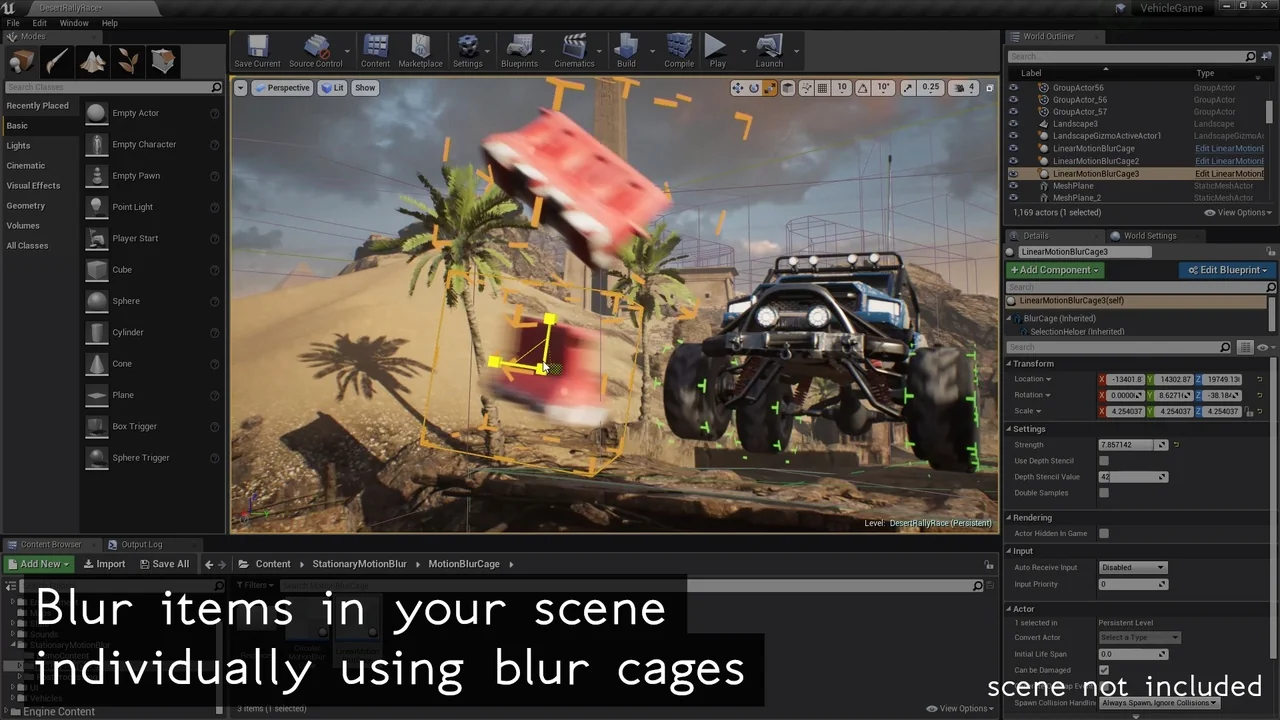
 Nature & Terrain
 Tools
Tools Shaders