"a19e0535960bd083"{"id":"1001994","slug":"cy-bloom-kernel-bundle","title":"Cy Bloom Kernel Bundle","category":"Shaders","engine":"4.25+,5.0+","assetVersion":"","engineVersion":"Engine Version: 4.25+,5.0+","tag":"Shaders","accent":"blue","visual":"mech","summary":"Technical guide to implementing the Cy Bloom Kernel Bundle in Unreal Engine via convolution bloom, camera settings, and lensflare billboard setups.","platform":"Unreal Engine","publishedAt":"2026-10-26T12:13:11.939Z","updatedAt":"2026-10-26T12:13:11.939Z","sourceNotes":[],"fileContents":[],"compatibility":["Unreal Engine","Engine Version: 4.25+,5.0+"],"featuredImage":{"alt":"Cy Bloom Kernel Bundle","src":"/wp-content/uploads/published/2026/10/209cbe1fedf0-a604382e-08ac-4574-a04d-640f5565989a-efb9d3f0dc.webp"},"hasDownloadLink":true,"downloads":0,"terms":[{"taxonomy":"category","slug":"shaders","name":"Shaders"}],"galleryImages":[{"src":"/wp-content/uploads/published/2026/10/9d8c3c9bf04c-62b3aee5-3809-4f44-8656-0065ecc383d4-d6d43eaffd.webp","alt":"Cy Bloom Kernel Bundle"},{"src":"/wp-content/uploads/published/2026/10/85f78b839c33-e9e39d63-47e7-46e5-a597-c0993346e589-1f212e97af.webp","alt":"Cy Bloom Kernel Bundle"},{"src":"/wp-content/uploads/published/2026/10/79b1e1e82f96-a043588d-51db-4b60-9665-dbfd8b2c4575-a474f562c9.webp","alt":"Cy Bloom Kernel Bundle"},{"src":"/wp-content/uploads/published/2026/10/7f956896f260-ed697f44-17d3-4d61-8a1b-52ba0eff2087-404d4b9a46.webp","alt":"Cy Bloom Kernel Bundle"},{"src":"/wp-content/uploads/published/2026/10/76c474dd0bf5-94c8e70a-88d7-46de-9b14-3858d4759b89-e48c8df9d7.webp","alt":"Cy Bloom Kernel Bundle"},{"src":"/wp-content/uploads/published/2026/10/534e128f7255-fa5a37f0-1906-4ff2-b39c-b61095664759-f6b682bd5a.webp","alt":"Cy Bloom Kernel Bundle"},{"src":"/wp-content/uploads/published/2026/10/6cb2a1587b83-683c6159-378f-4cc3-8080-8ed8eaf1afb5-5f9f905aff.webp","alt":"Cy Bloom Kernel Bundle"},{"src":"/wp-content/uploads/published/2026/10/54f00d60cec1-cbcbd41b-6e9e-4924-b31d-66dc626286cf-d49d541422.webp","alt":"Cy Bloom Kernel Bundle"},{"src":"/wp-content/uploads/published/2026/10/cc965a868717-17bae696-2bb8-429d-b23a-d132fcbda257-745bbcd747.webp","alt":"Cy Bloom Kernel Bundle"},{"src":"/wp-content/uploads/published/2026/10/b1963774d06a-6dc9e6b0-6e11-4b1b-aa89-828e441a888d-cb59a9c00b.webp","alt":"Cy Bloom Kernel Bundle"}],"accessPanel":{"kind":"resource","title":"Download this resource","eyebrow":"Free Download","message":"Log in or create a free account to start your download.","fileName":"Content.7z","safetyNote":"Resources are manually reviewed before listing to improve quality and reduce obvious risks.","actionLabel":"Download Free","resourceType":"Resource archive"},"contentHtml":"\u003ch2\u003eConfiguring Convolution Bloom in Post Process Volumes and Cameras\u003c/h2\u003e\n\u003cp\u003eActivating custom optical flares in Unreal Engine begins inside the post-processing pipeline. The Cy Bloom Kernel Bundle operates directly through the engine's native convolution bloom system rather than relying on standard Gaussian bloom methods. You can implement these kernels at the project level via a global Post Process Volume or on an individual Cine Camera Actor or standard Camera Actor to customize shot-specific optical traits.\u003c/p\u003e\n\u003cp\u003eTo begin setup, navigate to the Post Process Settings panel within your volume or selected camera component. Locate the Bloom category, expand it, and locate the Method dropdown. By default, Unreal Engine applies a standard Gaussian bloom calculation, which blends adjacent pixels in screen space using basic blur radius passes. Change the Bloom Method to Convolution to tell the engine to convolve the incoming high-dynamic-range buffer against an imported kernel texture.\u003c/p\u003e\n\u003cp\u003eOnce Convolution is active, locate the Convolution Kernel property under the bloom controls. Assign a kernel asset chosen from the bundle directory located at:\u003c/p\u003e\n\u003cpre\u003e\u003ccode\u003e\\Content\\Cy_BloomKernelBundle_01\\Kernel_2K_16b\\\u003c/code\u003e\u003c/pre\u003e\n\u003cp\u003eOpening the Advanced flyout within the Bloom settings exposes engine-level parameters specific to convolution processing. These controls govern how the kernel texture is centered, how extreme highlights scale, and how color tint offsets interact with the HDR buffer. When fine-tuning exposure and glow thresholds, consulting Unreal Engine's native convolution documentation provides exact formulas for these advanced fields, allowing you to establish exact control over how the convolved pattern spreads across your scene.\u003c/p\u003e \u003ch2\u003e2048x2048 RGBA 16-Bit Texture Specifications in Kernel_2K_16b\u003c/h2\u003e\n\u003cp\u003eEvery asset within the \u003ccode\u003eKernel_2K_16b\u003c/code\u003e Folder is authored at a native resolution of 2048x2048 using an RGBA 16-bit color depth format. In screen-space post-processing, bit depth dictates whether bloom shapes integrate smoothly into the scene or exhibit visible posterization and chromatic banding.\u003c/p\u003e\n\u003cp\u003eStandard 8-bit textures limit channel precision to 256 discrete tonal steps, which frequently introduces stepped artifacts, harsh gradient banding, and clipped highlights when exposed to Unreal Engine's wide-dynamic-range color pipelines. By delivering these kernels in 16-bit precision, each color channel retains smooth numerical transitions from deep core highlights outward into subtle lens fringe tails. The high dynamic resolution ensures that bright emissive objects retain organic edge falloff without snapping abruptly to black.\u003c/p\u003e\n\u003cp\u003eThe texture dimensions balance spatial fidelity with rendering throughput. A 2048x2048 kernel provides sufficient pixel resolution to define intricate lens phenomena, including micro-scratches, petal aperture patterns, and delicate glare spokes. At the same time, the asset author specifically calibrated these patterns to remain relatively unobtrusive during active bloom application, preventing the texture's inner noise from overpowering the core composition of the frame.\u003c/p\u003e \u003ch2\u003eLight Intensity Balancing and Anamorphic Photographic Effects\u003c/h2\u003e\n\u003cp\u003eA persistent challenge when implementing physical convolution kernels is managing how the shape behaves under shifting scene exposures. A kernel calibrated strictly for high-intensity sun directness often disappears when viewing interior artificial lamps; conversely, kernels tuned for low-light practicals can completely white out the frame when an extreme specular highlight enters the viewport.\u003c/p\u003e\n\u003cp\u003eThe patterns within this compilation were authored using a specialized kernel generation tool specifically constructed for Unreal Engine workflows, though the external tool itself is not included in the bundle. Through this process, each texture was adjusted to function consistently across several light intensity ranges. Highlights retain structural definition across shifting exposure steps, making the assets reliable for real-time games, virtual production, cinematic sequences, and film-style rendering.\u003c/p\u003e\n\u003cp\u003eThe aesthetic profile allows you to create an entirely new photographic look for your project. By selecting kernels tailored with horizontal optical flares, you can reproduce authentic anamorphic lens characteristics directly in the viewport. The convolved highlights streak across the frame in response to strong emissives, mirroring the physical behavior of anamorphic glass without needing dedicated post-process material overlays or external composite passes.\u003c/p\u003e \u003ch2\u003eRepurposing Cy Bloom Kernel Assets for Lensflare Billboards\u003c/h2\u003e\n\u003cp\u003eWhile intended primarily as convolution bloom inputs, the textures in the package carry dual utility across rendering pipelines. Their calibrated 16-bit RGBA maps serve cleanly as base textures for custom lensflare billboards, integrating directly with companion setups such as Cy Billboard Lensflare.\u003c/p\u003e\n\u003cp\u003eIn standard game production, full convolution bloom can incur high GPU overhead if applied indiscriminately across low-end target hardware. When convolution cannot run globally across an entire frame, you can map these 2048x2048 textures directly to world-space billboard sprites or screen-aligned particles attached to local light sources. Because the textures feature natural optical falloff and balanced highlight structures, they function as standalone lens flares that rotate, scale, and fade based on player camera orientation.\u003c/p\u003e\n\u003cp\u003eThis dual functionality gives artists the freedom to combine workflows: running the full convolution bloom pipeline on primary cinematics or high-end graphics tiers, while extracting the exact same visual signature as lightweight sprite billboards on lower graphics profiles or isolated background light sources.\u003c/p\u003e \u003ch2\u003eInspecting the Cy_BKb_Feature Demo Level\u003c/h2\u003e\n\u003cp\u003eThe bundle includes a pre-configured demonstration level designed to let you evaluate every kernel texture in an active engine environment. You can locate this testing space within the Content folder hierarchy at:\u003c/p\u003e\n\u003cpre\u003e\u003ccode\u003e\\Content\\Cy_BloomKernelBundle_01\\_Demo\\Cy_BKb_Feature\u003c/code\u003e\u003c/pre\u003e\n\u003cp\u003eLoading the \u003ccode\u003eCy_BKb_Feature\u003c/code\u003e Map allows you to observe kernel falloff, color transmission, and core intensity without having to assemble a test level from scratch. The scene provides calibrated lighting configurations that demonstrate how the kernels behave under various exposure thresholds.\u003c/p\u003e\n\u003cp\u003eIt is important to clarify asset boundaries regarding promotional preview materials. While video captures and still showcases often demonstrate these kernels running within prominent sample environments, such as Epic Games' DMXPrevisSample and the InfiltratorDemo, those specific showcase projects are external Unreal Engine sample releases and are not packaged inside this content directory. Only the dedicated \u003ccode\u003eCy_BKb_Feature\u003c/code\u003e Demonstration map is supplied directly with the bundle, giving you a focused, isolated testing bed to evaluate your post-processing kernels before deploying them into production scenes.\u003c/p\u003e\n\n\u003ch2\u003eContinue Browsing Similar Packs\u003c/h2\u003e\n\u003cul\u003e\n\u003cli\u003e\u003ca href=\"https://3dcghub.com/convolution-bloom-kernels-pack/\" title=\"Convolution Bloom Kernels Pack\"\u003eConvolution Bloom Kernels Pack\u003c/a\u003e\u003c/li\u003e\n\u003cli\u003e\u003ca href=\"https://3dcghub.com/cyberpunk-fx-pack-2-neon-panels-and-screens/\" title=\"Cyberpunk FX Pack 2 - Neon Panels and Screens\"\u003eCyberpunk FX Pack 2 - Neon Panels and Screens\u003c/a\u003e\u003c/li\u003e\n\u003cli\u003e\u003ca href=\"https://3dcghub.com/good-fx-ui-icon-trail/\" title=\"Good FX : UI Icon Trail\"\u003eGood FX : UI Icon Trail\u003c/a\u003e\u003c/li\u003e\n\u003cli\u003e\u003ca href=\"https://3dcghub.com/hologram-vfx-with-niagara/\" title=\"HOLOGRAM VFX With Niagara\"\u003eHOLOGRAM VFX With Niagara\u003c/a\u003e\u003c/li\u003e\n\u003cli\u003e\u003ca href=\"https://3dcghub.com/slime-vfx/\" title=\"Slime VFX\"\u003eSlime VFX\u003c/a\u003e\u003c/li\u003e\n\u003c/ul\u003e","contentTextLength":7107,"navigation":{"current":97,"total":4026,"previous":{"id":"1001995","slug":"daforma-vertex-shader-based-3d-deformation-effectors","title":"daforma - Vertex Shader based 3D Deformation Effectors","category":"Gameplay Features","platform":"Unreal Engine","updatedAt":"2026-10-26T12:14:03.022Z"},"next":{"id":"1001993","slug":"customisable-military-medic-container-vol-1","title":"Customisable Military Medic Container Vol.1","category":"Containers","platform":"Unreal Engine","updatedAt":"2026-10-26T12:11:20.978Z"}},"relatedResources":[{"id":"17077","slug":"convolution-bloom-kernels-pack","title":"Convolution Bloom Kernels Pack","category":"Variety","engine":"4.26+,5.0+","assetVersion":"Engine version: 4.26+,5.0+","engineVersion":"4.25","tag":"Variety","accent":"blue","visual":"luts","summary":"Upgrade your project's visual fidelity with the Convolution Bloom Kernels Pack. This resource utilizes Unreal Engine's built-in convolution system to generate realistic, calculated bloom and glare effects.","platform":"Unreal Engine","publishedAt":"2026-03-13T13:37:14.000Z","updatedAt":"2026-04-19T15:43:37.000Z","sourceNotes":[],"fileContents":[],"compatibility":["Unreal Engine","Engine version: 4.26+,5.0+"],"featuredImage":{"alt":"Convolution Bloom Kernels Pack","src":"https://3dcghub.com/wp-content/uploads/2026/03/d8af99a2-8332-4610-bf4a-ed4ccb1778e0.webp"},"hasDownloadLink":true,"downloads":0},{"id":"1001644","slug":"cyberpunk-fx-pack-2-neon-panels-and-screens","title":"Cyberpunk FX Pack 2 - Neon Panels and Screens","category":"Shaders","engine":"4.20+,5.0+","assetVersion":"","engineVersion":"Engine Version: 4.20+,5.0+","tag":"Shaders","accent":"blue","visual":"mech","summary":"Implement deformable neon signs, parallax 3D effect textures, hologram screens, and hologram globes from Cyberpunk FX Pack 2 into custom environments.","platform":"Unreal Engine","publishedAt":"2026-10-13T02:28:20.229Z","updatedAt":"2026-10-13T02:28:20.229Z","sourceNotes":[],"fileContents":[],"compatibility":["Unreal Engine","Engine Version: 4.20+,5.0+"],"featuredImage":{"alt":"Cyberpunk FX Pack 2 - Neon Panels and Screens","src":"/wp-content/uploads/published/2026/10/420306a50bfd-06b12c54-c578-4a0e-9f69-4f4069add9a2-0df00049ea.webp"},"hasDownloadLink":true,"downloads":0},{"id":"1000834","slug":"good-fx-ui-icon-trail","title":"Good FX : UI Icon Trail","category":"Shaders","engine":"4.26+,5.0+","assetVersion":"","engineVersion":"Engine Version: 4.26+,5.0+","tag":"Shaders","accent":"blue","visual":"mech","summary":"A material-driven UI effect pack with over 20 icon animation presets, customizable parameters, and support for desktop, mobile, and VR platforms.","platform":"Unreal Engine","publishedAt":"2026-08-03T13:13:06.882Z","updatedAt":"2026-08-03T13:13:06.882Z","sourceNotes":[],"fileContents":[],"compatibility":["Unreal Engine","Engine Version: 4.26+,5.0+"],"featuredImage":{"alt":"Good FX : UI Icon Trail","src":"/wp-content/uploads/published/2026/08/500483cbcab3-0644eb9a-2271-4184-a014-a7e6abb267e1-c0b2531ae5.webp"},"hasDownloadLink":true,"downloads":0}]}
Shaders
Cy Bloom Kernel Bundle
Technical guide to implementing the Cy Bloom Kernel Bundle in Unreal Engine via convolution bloom, camera settings, and lensflare billboard setups.
Category:Unreal Engine,ShadersPlatform: Unreal EngineEngine Version: 4.25+,5.0+Published: Oct 26, 2026
Shaders
Resource overview
Configuring Convolution Bloom in Post Process Volumes and Cameras
Activating custom optical flares in Unreal Engine begins inside the post-processing pipeline. The Cy Bloom Kernel Bundle operates directly through the engine's native convolution bloom system rather than relying on standard Gaussian bloom methods. You can implement these kernels at the project level via a global Post Process Volume or on an individual Cine Camera Actor or standard Camera Actor to customize shot-specific optical traits.
To begin setup, navigate to the Post Process Settings panel within your volume or selected camera component. Locate the Bloom category, expand it, and locate the Method dropdown. By default, Unreal Engine applies a standard Gaussian bloom calculation, which blends adjacent pixels in screen space using basic blur radius passes. Change the Bloom Method to Convolution to tell the engine to convolve the incoming high-dynamic-range buffer against an imported kernel texture.
Once Convolution is active, locate the Convolution Kernel property under the bloom controls. Assign a kernel asset chosen from the bundle directory located at:
\Content\Cy_BloomKernelBundle_01\Kernel_2K_16b\
Opening the Advanced flyout within the Bloom settings exposes engine-level parameters specific to convolution processing. These controls govern how the kernel texture is centered, how extreme highlights scale, and how color tint offsets interact with the HDR buffer. When fine-tuning exposure and glow thresholds, consulting Unreal Engine's native convolution documentation provides exact formulas for these advanced fields, allowing you to establish exact control over how the convolved pattern spreads across your scene.
2048x2048 RGBA 16-Bit Texture Specifications in Kernel_2K_16b
Every asset within the Kernel_2K_16b Folder is authored at a native resolution of 2048x2048 using an RGBA 16-bit color depth format. In screen-space post-processing, bit depth dictates whether bloom shapes integrate smoothly into the scene or exhibit visible posterization and chromatic banding.
Standard 8-bit textures limit channel precision to 256 discrete tonal steps, which frequently introduces stepped artifacts, harsh gradient banding, and clipped highlights when exposed to Unreal Engine's wide-dynamic-range color pipelines. By delivering these kernels in 16-bit precision, each color channel retains smooth numerical transitions from deep core highlights outward into subtle lens fringe tails. The high dynamic resolution ensures that bright emissive objects retain organic edge falloff without snapping abruptly to black.
The texture dimensions balance spatial fidelity with rendering throughput. A 2048x2048 kernel provides sufficient pixel resolution to define intricate lens phenomena, including micro-scratches, petal aperture patterns, and delicate glare spokes. At the same time, the asset author specifically calibrated these patterns to remain relatively unobtrusive during active bloom application, preventing the texture's inner noise from overpowering the core composition of the frame.
Light Intensity Balancing and Anamorphic Photographic Effects
A persistent challenge when implementing physical convolution kernels is managing how the shape behaves under shifting scene exposures. A kernel calibrated strictly for high-intensity sun directness often disappears when viewing interior artificial lamps; conversely, kernels tuned for low-light practicals can completely white out the frame when an extreme specular highlight enters the viewport.
The patterns within this compilation were authored using a specialized kernel generation tool specifically constructed for Unreal Engine workflows, though the external tool itself is not included in the bundle. Through this process, each texture was adjusted to function consistently across several light intensity ranges. Highlights retain structural definition across shifting exposure steps, making the assets reliable for real-time games, virtual production, cinematic sequences, and film-style rendering.
The aesthetic profile allows you to create an entirely new photographic look for your project. By selecting kernels tailored with horizontal optical flares, you can reproduce authentic anamorphic lens characteristics directly in the viewport. The convolved highlights streak across the frame in response to strong emissives, mirroring the physical behavior of anamorphic glass without needing dedicated post-process material overlays or external composite passes.
Repurposing Cy Bloom Kernel Assets for Lensflare Billboards
While intended primarily as convolution bloom inputs, the textures in the package carry dual utility across rendering pipelines. Their calibrated 16-bit RGBA maps serve cleanly as base textures for custom lensflare billboards, integrating directly with companion setups such as Cy Billboard Lensflare.
In standard game production, full convolution bloom can incur high GPU overhead if applied indiscriminately across low-end target hardware. When convolution cannot run globally across an entire frame, you can map these 2048x2048 textures directly to world-space billboard sprites or screen-aligned particles attached to local light sources. Because the textures feature natural optical falloff and balanced highlight structures, they function as standalone lens flares that rotate, scale, and fade based on player camera orientation.
This dual functionality gives artists the freedom to combine workflows: running the full convolution bloom pipeline on primary cinematics or high-end graphics tiers, while extracting the exact same visual signature as lightweight sprite billboards on lower graphics profiles or isolated background light sources.
Inspecting the Cy_BKb_Feature Demo Level
The bundle includes a pre-configured demonstration level designed to let you evaluate every kernel texture in an active engine environment. You can locate this testing space within the Content folder hierarchy at:
Loading the Cy_BKb_Feature Map allows you to observe kernel falloff, color transmission, and core intensity without having to assemble a test level from scratch. The scene provides calibrated lighting configurations that demonstrate how the kernels behave under various exposure thresholds.
It is important to clarify asset boundaries regarding promotional preview materials. While video captures and still showcases often demonstrate these kernels running within prominent sample environments, such as Epic Games' DMXPrevisSample and the InfiltratorDemo, those specific showcase projects are external Unreal Engine sample releases and are not packaged inside this content directory. Only the dedicated Cy_BKb_Feature Demonstration map is supplied directly with the bundle, giving you a focused, isolated testing bed to evaluate your post-processing kernels before deploying them into production scenes.
 Shaders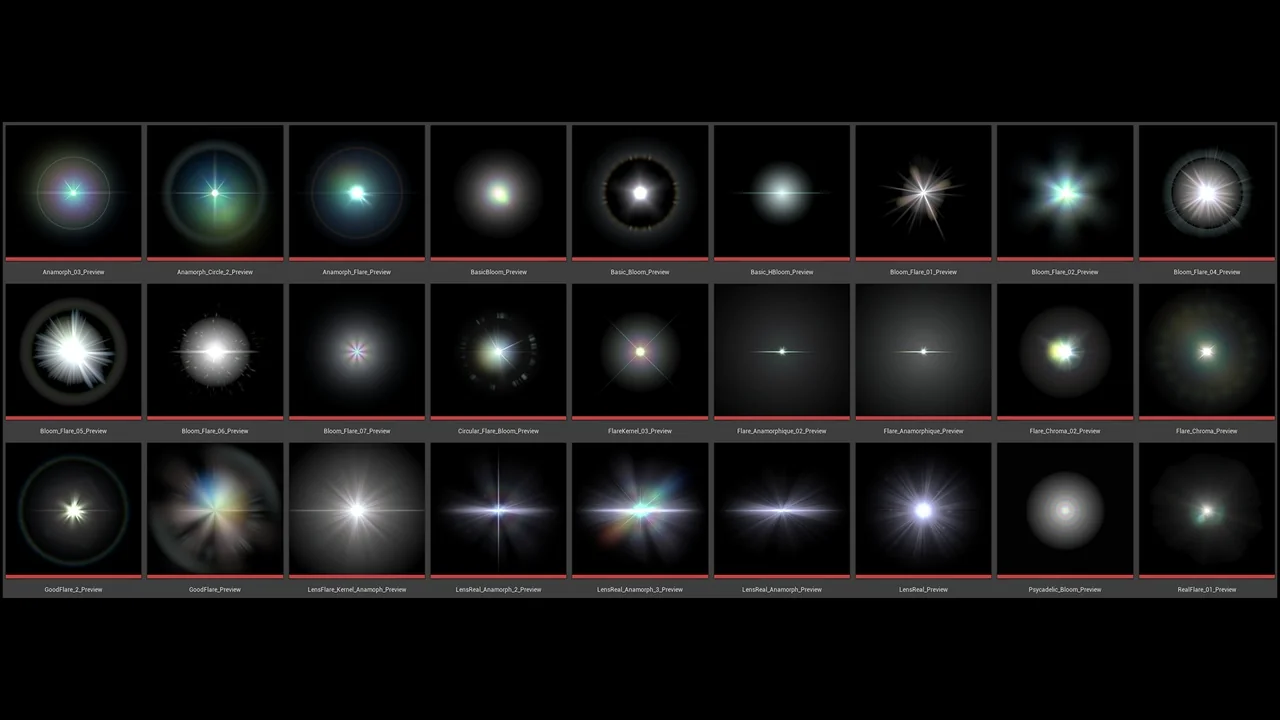
 Variety
 Shaders
 Shaders