"a19c8d5bcdb9294e"{"id":"1003057","slug":"drivable-cars-pick-up-truck-3d-assets-and-blueprints","title":"Drivable Cars: Pick Up Truck 3D Assets and Blueprints","category":"Cars \u0026 Trucks","engine":"4.26+,5.0+","assetVersion":"","engineVersion":"Engine Version: 4.26+,5.0+","tag":"Cars \u0026 Trucks","accent":"blue","visual":"mech","summary":"GTA-style Unreal Engine 4 and 5 pick up with four LOD levels, toggleable lights, cab and orbit cameras, and a steering wheel with the driver's hands attached.","platform":"Unreal Engine","indexPolicy":"index","publishedAt":"2026-11-27T14:56:40.698Z","updatedAt":"2026-11-27T14:56:40.698Z","sourceNotes":[],"fileContents":[],"compatibility":["Unreal Engine","Engine Version: 4.26+,5.0+"],"featuredImage":{"alt":"Drivable Cars: Pick Up Truck 3D Assets and Blueprints","src":"/wp-content/uploads/published/2026/11/52d2e478ca70-8df67321-48ff-4fb6-b4f2-b57bafc30940-6f07617365.webp"},"fileSizeBytes":647605020,"hasDownloadLink":true,"downloads":0,"terms":[{"taxonomy":"category","slug":"cars-and-trucks","name":"Cars \u0026 Trucks"}],"galleryImages":[{"src":"/wp-content/uploads/published/2026/11/c421f8e35522-68cad2b8-eb58-4d27-8df8-37dce8180b69-2ba07f26cc.webp","alt":"Drivable Cars: Pick Up Truck 3D Assets and Blueprints"},{"src":"/wp-content/uploads/published/2026/11/98191a0af998-a7d701f2-4a7e-45b1-ab23-b1d37e9e89ce-734a92751a.webp","alt":"Drivable Cars: Pick Up Truck 3D Assets and Blueprints"},{"src":"/wp-content/uploads/published/2026/11/ce783ca0f230-b65847d6-a5ef-490f-9e21-80928f06d1cb-84f89994b1.webp","alt":"Drivable Cars: Pick Up Truck 3D Assets and Blueprints"},{"src":"/wp-content/uploads/published/2026/11/bc15d7d6fd9f-23bd6fcd-4acc-43fd-8793-6131c5969418-99bd34279c.webp","alt":"Drivable Cars: Pick Up Truck 3D Assets and Blueprints"},{"src":"/wp-content/uploads/published/2026/11/c2afed9f4a4a-bc750495-a5cf-4200-9f0e-b35bac61dfb5-0760d70d73.webp","alt":"Drivable Cars: Pick Up Truck 3D Assets and Blueprints"},{"src":"/wp-content/uploads/published/2026/11/594b63a20ac2-c0edc538-5036-4d03-88a5-d5e37c934fd3-327536183b.webp","alt":"Drivable Cars: Pick Up Truck 3D Assets and Blueprints"},{"src":"/wp-content/uploads/published/2026/11/5a3e85437081-6313c10e-7f6d-4396-b8ce-4f8d0a6fc05a-6787150a56.webp","alt":"Drivable Cars: Pick Up Truck 3D Assets and Blueprints"}],"accessPanel":{"kind":"resource","title":"Get this resource","safetyNote":"Resources are manually reviewed before listing to improve quality and reduce obvious risks.","fileFormat":".7z","resourceType":"Resource archive","versions":[]},"contentHtml":"\u003cp\u003eRoll the truck into a street scene and it already behaves like something a player owns. The lights switch on and off, the steering wheel turns, and a driver's hands stay locked to the rim through the whole rotation. That is the character of this GTA-style pick up for Unreal Engine 4 and 5: 3D assets and blueprints delivered together, with the interactive pieces wired rather than left as a static shell.\u003c/p\u003e \u003ch2\u003eThe Pick Up Truck Once It Starts Moving\u003c/h2\u003e \u003cp\u003eDriving is the first thing the package commits to. The vehicle is set up as a drivable car, not a prop with a good silhouette, and the details that sell it sit where a player actually looks. The lights are toggleable, so a night scene can go from parked to lit without swapping meshes or opening a material and hunting for the right parameter. The steering wheel turns, and the driver's hands are attached to it, which means the cab reads correctly from the seat instead of showing a wheel spinning under empty air.\u003c/p\u003e \u003cp\u003eThose two behaviours matter most in close work. A sequence that starts inside the cab, a camera that swings past the side window, a vehicle that has to hold up when the player leans in — all of them depend on the hands and the wheel staying together. Having that come with the asset removes an animation problem before the scene work even begins, and it keeps the interior believable at the distances where interiors are usually where a vehicle model falls apart.\u003c/p\u003e \u003cp\u003eA 4x4 offroad pick up also carries across settings that have nothing to do with each other. The same truck works on a dirt route, at the side of a track, on a city street, or parked as set dressing in a yard. Because the lights, wheel, and camera are part of the package, it can be used as a hero vehicle a player drives and as background traffic without the two versions diverging.\u003c/p\u003e \u003ch2\u003eCab Cameras, Zoom, and the Orbit View\u003c/h2\u003e \u003cp\u003eAn inside camera and an outside camera are both included, and both carry zoom and orbit function. In practice that gives two quite different ways of framing the same vehicle. The outside camera circles the truck, so it can be pushed in for detail or pulled back for context, and a player can look at it from any angle without leaving the vehicle. The inside camera puts the viewpoint in the cab, where the wheel, the hands, and the lit interior sit in the frame together.\u003c/p\u003e \u003cp\u003eFor anyone building a scene rather than just driving through it, the orbit view does quiet work. Placing a vehicle in a location usually involves checking it from several positions — how it sits on the ground, how it reads against the buildings around it — and an orbiting outside camera makes those checks part of the same asset rather than a temporary editor setup. The zoom pulls the same trick the other way, letting the camera move from a wide establishing angle down onto the truck without a second camera rig.\u003c/p\u003e \u003ch2\u003eFour LOD Levels Behind the Blueprint Setup\u003c/h2\u003e \u003cp\u003eFour LOD levels ship with the truck, and that is the detail that decides whether a vehicle can appear repeatedly in a scene. At close range the full model is used; as the distance grows, the lower levels take over. A single hero truck is an easy problem. A line of pick ups down a street, or one that drives away from the camera and keeps going, is where the LOD chain earns its place, because the cost of the vehicle falls as the player stops being able to see it. The package carries a set of unique properties alongside those levels.\u003c/p\u003e \u003cp\u003eThe blueprint side is what makes the rest usable without a scripting pass. The vehicle arrives rigged and put together with optimisation in mind, so the lights, the cameras, and the steering behaviour are already part of the asset instead of a list of features to rebuild by hand. The construction is modular and customisable, which leaves room to adjust the truck for a particular project — an interior detail, a variant, a specific scene — rather than accepting or rejecting the whole thing as it stands.\u003c/p\u003e \u003ch2\u003eDropping the Pick Up Into a Third Person Project\u003c/h2\u003e \u003cp\u003eCompatibility with a third person template game is the shortest route from an empty level to something playable. Projects already running the standard third person setup can bring the pick up in and have a drivable vehicle inside a game where a character is already walking around, with the camera and control assumptions of that template already in place. The truck does not need a project shaped by it first.\u003c/p\u003e \u003cp\u003eThe package is fully compatible with both \"Driveable Cars: Basic Pack\" and \"Drivable Cars: Advanced Pack\", which changes the scale of what it is. A project already running either pack can add the pick up and keep the same conventions across the fleet instead of bolting on a vehicle that behaves differently from everything else on the road. Mixing it with the other cars in one scene is a supported combination, not a workaround, and the pick up can be the odd vehicle out in a car park or the one the player actually gets to drive.\u003c/p\u003e \u003ch2\u003eTwo Demo Builds and Their Videos\u003c/h2\u003e \u003cp\u003eThe pick up is demonstrated in two builds. The Advanced DEMO combines this package with the Advanced Packs and all available vehicles, which is the version worth loading when the question is how the truck looks next to everything else. The Basic DEMO contains what this package holds on its own, so the individual vehicle can be judged without the surrounding fleet.\u003c/p\u003e \u003cp\u003eTwo videos cover the same split. The Pick Up Basic Video shows the truck by itself; the Pick Up plus Advanced Pack combination video shows it working alongside the advanced content. Watching the pair in that order is the most direct way to see where the package ends and where the packs begin, particularly for the interactive parts — the toggling lights, the turning wheel, the hands, the two cameras — which are easier to understand moving than listed.\u003c/p\u003e \u003cp\u003eFor a team deciding whether this belongs in a project, the strongest concrete case sits in three places: four LOD levels that let the truck repeat across a scene, a cab view and an orbiting exterior camera that make it inspectable from both sides of the glass, and third person template compatibility that turns it into a playable vehicle without a rebuild. Add the fit with the Basic and Advanced packs and the pick up becomes a component of a fleet instead of one asset with a fixed ceiling.\u003c/p\u003e\n\n\u003ch2\u003eExplore Similar Assets\u003c/h2\u003e\n\u003cul\u003e\n\u003cli\u003e\u003ca href=\"https://3dcghub.com/abandoned-hatchback-car/\" rel=\"noopener noreferrer\"\u003eAbandoned Hatchback Car\u003c/a\u003e\u003c/li\u003e\n\u003cli\u003e\u003ca href=\"https://3dcghub.com/soviet-truck-zil-pack/\" rel=\"noopener noreferrer\"\u003eSoviet truck Zil Pack\u003c/a\u003e\u003c/li\u003e\n\u003cli\u003e\u003ca href=\"https://3dcghub.com/physics-based-destructible-vehicle-trailer/\" rel=\"noopener noreferrer\"\u003ePhysics-Based Destructible Vehicle Trailer\u003c/a\u003e\u003c/li\u003e\n\u003cli\u003e\u003ca href=\"https://3dcghub.com/abandoned-service-garage-vol-4-vehicles-and-service-machines/\" rel=\"noopener noreferrer\"\u003eAbandoned Service Garage - VOL.4 - Vehicles and Service Machines\u003c/a\u003e\u003c/li\u003e\n\u003cli\u003e\u003ca href=\"https://3dcghub.com/abandoned-city-props-pack/\" rel=\"noopener noreferrer\"\u003eAbandoned City Props Pack\u003c/a\u003e\u003c/li\u003e\n\u003c/ul\u003e","contentTextLength":6468,"navigation":{"current":2,"total":4978,"previous":{"id":"1003058","slug":"dynamic-medieval-flags-and-banners","title":"Dynamic Medieval Flags and Banners","category":"Buildings \u0026 Architecture","platform":"Unreal Engine","updatedAt":"2026-11-27T14:57:36.584Z"},"next":{"id":"1003055","slug":"damage-resource-and-stat-system","title":"Damage, Resource and Stat System","category":"Gameplay Features","platform":"Unreal Engine","updatedAt":"2026-11-27T11:52:35.246Z"}},"relatedResources":[{"id":"1002971","slug":"abandoned-hatchback-car","title":"Abandoned Hatchback Car","category":"Cars \u0026 Trucks","engine":"4.18+,5.0+","assetVersion":"","engineVersion":"Engine Version: 4.18+,5.0+","tag":"Cars \u0026 Trucks","accent":"blue","visual":"mech","summary":"A customizable, modular abandoned hatchback with PBR materials, rusty and grunge detail, built for post-apocalyptic, industrial, and simulation scenes as a wrec","platform":"Unreal Engine","indexPolicy":"index","publishedAt":"2026-11-25T08:45:38.112Z","updatedAt":"2026-11-25T08:45:38.112Z","sourceNotes":[],"fileContents":[],"compatibility":["Unreal Engine","Engine Version: 4.18+,5.0+"],"featuredImage":{"alt":"Abandoned Hatchback Car","src":"/wp-content/uploads/published/2026/11/e10edaab39e4-dd9440b3-f0e8-41b5-b4c5-e8190c4d6950-486831e840.webp"},"fileSizeBytes":357119750,"hasDownloadLink":true,"downloads":0},{"id":"1002205","slug":"soviet-truck-zil-pack","title":"Soviet truck Zil Pack","category":"Cars \u0026 Trucks","engine":"4.26+,5.0+","assetVersion":"","engineVersion":"Engine Version: 4.26+,5.0+","tag":"Cars \u0026 Trucks","accent":"blue","visual":"mech","summary":"Explore the Soviet truck Zil Pack featuring realistic ZIL-130, ZIL-131, and ZIL-133 models tailored for post-apocalyptic and tourist environments.","platform":"Unreal Engine","indexPolicy":"index","publishedAt":"2026-10-29T14:48:48.374Z","updatedAt":"2026-10-29T14:48:48.374Z","sourceNotes":[],"fileContents":[],"compatibility":["Unreal Engine","Engine Version: 4.26+,5.0+"],"featuredImage":{"alt":"Soviet truck Zil Pack","src":"/wp-content/uploads/published/2026/10/16bf700dfc60-1eb821e3-e27a-4432-ba83-a58763c04110-385db1b8cf.webp"},"fileSizeBytes":1910616547,"hasDownloadLink":true,"downloads":0},{"id":"1002141","slug":"physics-based-destructible-vehicle-trailer","title":"Physics-Based Destructible Vehicle Trailer","category":"Cars \u0026 Trucks","engine":"4.26+,5.0+","assetVersion":"","engineVersion":"Engine Version: 4.26+,5.0+","tag":"Cars \u0026 Trucks","accent":"blue","visual":"mech","summary":"Examine the Physics-Based Destructible Vehicle Trailer, featuring 4K textures, constraint physics, modular damage states, and vehicle hitching.","platform":"Unreal Engine","indexPolicy":"index","publishedAt":"2026-10-29T09:47:10.086Z","updatedAt":"2026-10-29T09:47:10.086Z","sourceNotes":[],"fileContents":[],"compatibility":["Unreal Engine","Engine Version: 4.26+,5.0+"],"featuredImage":{"alt":"Physics-Based Destructible Vehicle Trailer","src":"/wp-content/uploads/published/2026/10/e233c32bf3a2-f0ff114e-ca10-47ce-ad8c-d88e68c33e02-5a540ff59a.webp"},"fileSizeBytes":432033506,"hasDownloadLink":true,"downloads":0}]}[{"id":4225,"sourceId":4225,"taxonomyId":4225,"taxonomy":"category","slug":"asset-library","name":"Asset Library","parentId":null,"count":0,"hasChildren":true,"href":"/","seoTitle":"Free Game Assets Library | 3DCGHUB","seoDescription":"Browse free Unreal Engine, Unity, Blender assets and game development tutorials on 3DCGHUB with previews, compatibility notes, and secure downloads.","sitemapEnabled":true,"children":[{"id":4227,"sourceId":4227,"taxonomyId":4227,"taxonomy":"category","slug":"blender-add-ons-plugins","name":"Blender Add-ons \u0026 Plugins","parentId":4225,"count":0,"hasChildren":false,"href":"/category/blender-add-ons-plugins/","seoTitle":"Free Blender Add-ons \u0026 Plugins | 3DCGHUB","seoDescription":"Browse free Blender Add-ons \u0026 Plugins tools for Blender on 3DCGHUB: curated downloads with preview images, compatibility notes and secure download access.","sitemapEnabled":true},{"id":514,"sourceId":514,"taxonomyId":514,"taxonomy":"category","slug":"unity-2","name":"Unity","parentId":4225,"count":0,"hasChildren":true,"href":"/category/unity-2/","seoTitle":"Free Unity Assets | 3DCGHUB","seoDescription":"Browse free Unity resources on 3DCGHUB: curated downloads with preview images, compatibility notes and secure download access.","sitemapEnabled":true,"children":[{"id":523,"sourceId":523,"taxonomyId":523,"taxonomy":"category","slug":"2d","name":"2D","parentId":514,"count":0,"hasChildren":true,"href":"/category/2d/","seoTitle":"Free Unity 2D | 3DCGHUB","seoDescription":"Browse free 2D assets for Unity on 3DCGHUB: curated downloads with preview images, compatibility notes and secure download access.","sitemapEnabled":true},{"id":515,"sourceId":515,"taxonomyId":515,"taxonomy":"category","slug":"3d-unity-2","name":"3D","parentId":514,"count":0,"hasChildren":true,"href":"/category/3d-unity-2/","seoTitle":"Free Unity 3D Assets | 3DCGHUB","seoDescription":"Browse free 3D assets for Unity on 3DCGHUB: curated downloads with preview images, compatibility notes and secure download access.","sitemapEnabled":true},{"id":565,"sourceId":565,"taxonomyId":565,"taxonomy":"category","slug":"add-ons","name":"Add-Ons","parentId":514,"count":0,"hasChildren":false,"href":"/category/add-ons/","seoTitle":"Free Unity Add-Ons | 3DCGHUB","seoDescription":"Browse free Add-Ons assets for Unity on 3DCGHUB: curated downloads with preview images, compatibility notes and secure download access.","sitemapEnabled":true},{"id":529,"sourceId":529,"taxonomyId":529,"taxonomy":"category","slug":"audio-unity-2","name":"Audio","parentId":514,"count":0,"hasChildren":true,"href":"/category/audio-unity-2/","seoTitle":"Free Unity Audio | 3DCGHUB","seoDescription":"Browse free Audio for Unity on 3DCGHUB: curated downloads with preview images, compatibility notes and secure download access.","sitemapEnabled":true},{"id":557,"sourceId":557,"taxonomyId":557,"taxonomy":"category","slug":"templates","name":"Templates","parentId":514,"count":0,"hasChildren":true,"href":"/category/templates/","seoTitle":"Free Unity Templates | 3DCGHUB","seoDescription":"Browse free Unity project templates on 3DCGHUB. Starter kits with previews, compatibility notes, and secure download access.","sitemapEnabled":true},{"id":533,"sourceId":533,"taxonomyId":533,"taxonomy":"category","slug":"tools-unity-2","name":"Tools","parentId":514,"count":0,"hasChildren":true,"href":"/category/tools-unity-2/","sitemapEnabled":true},{"id":554,"sourceId":554,"taxonomyId":554,"taxonomy":"category","slug":"vfx-unity-2","name":"VFX","parentId":514,"count":0,"hasChildren":true,"href":"/category/vfx-unity-2/","seoTitle":"Free Unity VFX | 3DCGHUB","seoDescription":"Browse free VFX for Unity on 3DCGHUB: curated downloads with preview images, compatibility notes and secure download access.","sitemapEnabled":true}]},{"id":511,"sourceId":511,"taxonomyId":511,"taxonomy":"category","slug":"unreal-engine-2","name":"Unreal Engine","parentId":4225,"count":0,"hasChildren":true,"href":"/category/unreal-engine-2/","seoTitle":"Free Unreal Engine Assets | 3DCGHUB","seoDescription":"Browse free Unreal Engine resources on 3DCGHUB: curated downloads with preview images, compatibility notes and secure download access.","sitemapEnabled":true,"children":[{"id":54,"sourceId":54,"taxonomyId":54,"taxonomy":"category","slug":"3d","name":"3D","parentId":511,"count":0,"hasChildren":true,"href":"/category/3d/","seoTitle":"Free Unreal Engine 3D | 3DCGHUB","seoDescription":"Browse free 3D assets for Unreal Engine on 3DCGHUB: curated downloads with preview images, compatibility notes and secure download access.","sitemapEnabled":true},{"id":441,"sourceId":441,"taxonomyId":441,"taxonomy":"category","slug":"animations","name":"Animations","parentId":511,"count":0,"hasChildren":true,"href":"/category/animations/","seoTitle":"Free Unreal Engine Animations | 3DCGHUB","seoDescription":"Browse free Animations for Unreal Engine on 3DCGHUB: curated downloads with preview images, compatibility notes and secure download access.","sitemapEnabled":true},{"id":446,"sourceId":446,"taxonomyId":446,"taxonomy":"category","slug":"audio","name":"Audio","parentId":511,"count":0,"hasChildren":true,"href":"/category/audio/","seoTitle":"Free Unreal Engine Audio Resources | 3DCGHUB","seoDescription":"Browse free Unreal Engine audio resources including sound effects, voices, dialogue, and ambient sounds. Curated free downloads on 3DCGHUB.","sitemapEnabled":true},{"id":466,"sourceId":466,"taxonomyId":466,"taxonomy":"category","slug":"game-systems","name":"Game Systems","parentId":511,"count":0,"hasChildren":true,"href":"/category/game-systems/","seoTitle":"Free Unreal Engine Game Systems | 3DCGHUB","seoDescription":"Browse free Game Systems tools for Unreal Engine on 3DCGHUB: curated downloads with preview images, compatibility notes and secure download access.","sitemapEnabled":true},{"id":478,"sourceId":478,"taxonomyId":478,"taxonomy":"category","slug":"game-templates","name":"Game Templates","parentId":511,"count":0,"hasChildren":true,"href":"/category/game-templates/","seoTitle":"Free Unreal Engine Game Templates | 3DCGHUB","seoDescription":"Browse free Game Templates for Unreal Engine on 3DCGHUB: curated downloads with preview images, compatibility notes and secure download access.","sitemapEnabled":true},{"id":432,"sourceId":432,"taxonomyId":432,"taxonomy":"category","slug":"hdri","name":"HDRI","parentId":511,"count":0,"hasChildren":true,"href":"/category/hdri/","seoTitle":"Free Unreal Engine HDRI | 3DCGHUB","seoDescription":"Browse free Unreal Engine HDRI skies and lighting maps on 3DCGHUB. Environment lighting with previews and secure downloads.","sitemapEnabled":true},{"id":228,"sourceId":228,"taxonomyId":228,"taxonomy":"category","slug":"material-and-textures","name":"Material \u0026 Textures","parentId":511,"count":0,"hasChildren":true,"href":"/category/material-and-textures/","seoTitle":"Free Unreal Engine Material \u0026 Textures | 3DCGHUB","seoDescription":"Browse free Material \u0026 Textures for Unreal Engine on 3DCGHUB: curated downloads with preview images, compatibility notes and secure download access.","sitemapEnabled":true},{"id":298,"sourceId":298,"taxonomyId":298,"taxonomy":"category","slug":"sprites-and-flipbooks","name":"Sprites \u0026 Flipbooks","parentId":511,"count":0,"hasChildren":true,"href":"/category/sprites-and-flipbooks/","seoTitle":"Free Unreal Engine Sprites \u0026 Flipbooks | 3DCGHUB","seoDescription":"Browse free Sprites \u0026 Flipbooks assets for Unreal Engine on 3DCGHUB: curated downloads with preview images, compatibility notes and secure download access.","sitemapEnabled":true},{"id":489,"sourceId":489,"taxonomyId":489,"taxonomy":"category","slug":"tools-and-plugins","name":"Tools \u0026 Plugins","parentId":511,"count":0,"hasChildren":true,"href":"/category/tools-and-plugins/","seoTitle":"Free Unreal Engine Tools \u0026 Plugins | 3DCGHUB","seoDescription":"Browse free Tools \u0026 Plugins for Unreal Engine on 3DCGHUB: curated downloads with preview images, compatibility notes and secure download access.","sitemapEnabled":true},{"id":459,"sourceId":459,"taxonomyId":459,"taxonomy":"category","slug":"ui","name":"UI","parentId":511,"count":0,"hasChildren":true,"href":"/category/ui/","seoTitle":"Free Unreal Engine UI | 3DCGHUB","seoDescription":"Browse free UI for Unreal Engine on 3DCGHUB: curated downloads with preview images, compatibility notes and secure download access.","sitemapEnabled":true},{"id":450,"sourceId":450,"taxonomyId":450,"taxonomy":"category","slug":"vfx","name":"VFX","parentId":511,"count":0,"hasChildren":true,"href":"/category/vfx/","seoTitle":"Free Unreal Engine VFX | 3DCGHUB","seoDescription":"Browse free VFX for Unreal Engine on 3DCGHUB: curated downloads with preview images, compatibility notes and secure download access.","sitemapEnabled":true}]}]},{"id":4222,"sourceId":4222,"taxonomyId":4222,"taxonomy":"category","slug":"tutorial-library","name":"Tutorial Library","parentId":null,"count":0,"hasChildren":false,"href":"/tutorials/","seoTitle":"Free Game Development Tutorial Library | 3DCGHUB","seoDescription":"Browse free game development tutorials for Unreal Engine, Unity, Blender, and more on 3DCGHUB with practical workflows and secure downloads.","sitemapEnabled":true}]
Resource screenshots
1 / 7
Asset drops
Daily Asset Drops
Follow 3DCGHUB on Telegram for daily Unreal, Unity & Blender drops and curated CC0 releases.
Resources are manually reviewed before listing to improve quality and reduce obvious risks.
Reviewed archive
Cars & Trucks
Drivable Cars: Pick Up Truck 3D Assets and Blueprints
GTA-style Unreal Engine 4 and 5 pick up with four LOD levels, toggleable lights, cab and orbit cameras, and a steering wheel with the driver's hands attached.
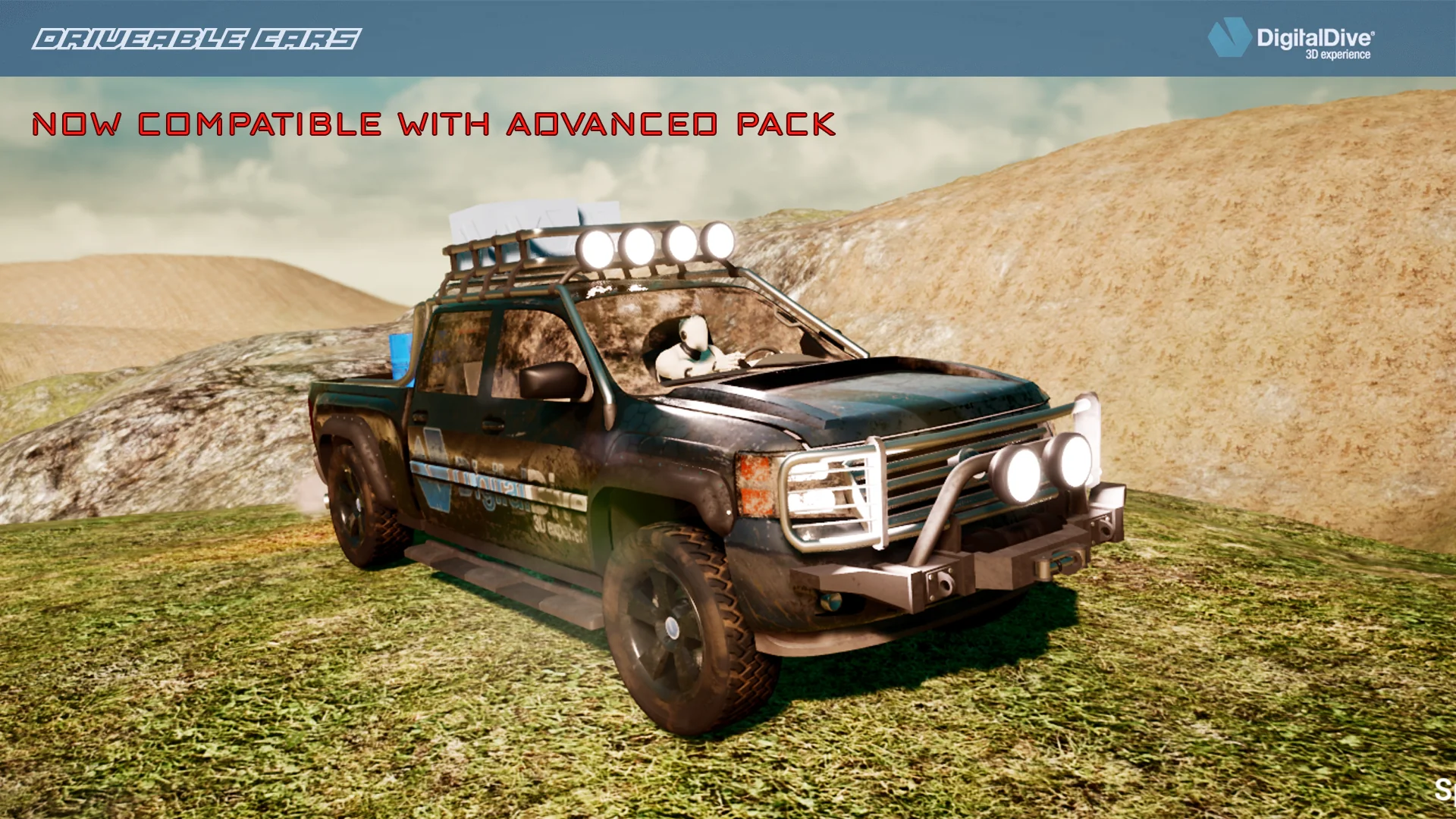
Roll the truck into a street scene and it already behaves like something a player owns. The lights switch on and off, the steering wheel turns, and a driver's hands stay locked to the rim through the whole rotation. That is the character of this GTA-style pick up for Unreal Engine 4 and 5: 3D assets and blueprints delivered together, with the interactive pieces wired rather than left as a static shell.
The Pick Up Truck Once It Starts Moving
Driving is the first thing the package commits to. The vehicle is set up as a drivable car, not a prop with a good silhouette, and the details that sell it sit where a player actually looks. The lights are toggleable, so a night scene can go from parked to lit without swapping meshes or opening a material and hunting for the right parameter. The steering wheel turns, and the driver's hands are attached to it, which means the cab reads correctly from the seat instead of showing a wheel spinning under empty air.
Those two behaviours matter most in close work. A sequence that starts inside the cab, a camera that swings past the side window, a vehicle that has to hold up when the player leans in — all of them depend on the hands and the wheel staying together. Having that come with the asset removes an animation problem before the scene work even begins, and it keeps the interior believable at the distances where interiors are usually where a vehicle model falls apart.
A 4x4 offroad pick up also carries across settings that have nothing to do with each other. The same truck works on a dirt route, at the side of a track, on a city street, or parked as set dressing in a yard. Because the lights, wheel, and camera are part of the package, it can be used as a hero vehicle a player drives and as background traffic without the two versions diverging.
Cab Cameras, Zoom, and the Orbit View
An inside camera and an outside camera are both included, and both carry zoom and orbit function. In practice that gives two quite different ways of framing the same vehicle. The outside camera circles the truck, so it can be pushed in for detail or pulled back for context, and a player can look at it from any angle without leaving the vehicle. The inside camera puts the viewpoint in the cab, where the wheel, the hands, and the lit interior sit in the frame together.
For anyone building a scene rather than just driving through it, the orbit view does quiet work. Placing a vehicle in a location usually involves checking it from several positions — how it sits on the ground, how it reads against the buildings around it — and an orbiting outside camera makes those checks part of the same asset rather than a temporary editor setup. The zoom pulls the same trick the other way, letting the camera move from a wide establishing angle down onto the truck without a second camera rig.
Four LOD Levels Behind the Blueprint Setup
Four LOD levels ship with the truck, and that is the detail that decides whether a vehicle can appear repeatedly in a scene. At close range the full model is used; as the distance grows, the lower levels take over. A single hero truck is an easy problem. A line of pick ups down a street, or one that drives away from the camera and keeps going, is where the LOD chain earns its place, because the cost of the vehicle falls as the player stops being able to see it. The package carries a set of unique properties alongside those levels.
The blueprint side is what makes the rest usable without a scripting pass. The vehicle arrives rigged and put together with optimisation in mind, so the lights, the cameras, and the steering behaviour are already part of the asset instead of a list of features to rebuild by hand. The construction is modular and customisable, which leaves room to adjust the truck for a particular project — an interior detail, a variant, a specific scene — rather than accepting or rejecting the whole thing as it stands.
Dropping the Pick Up Into a Third Person Project
Compatibility with a third person template game is the shortest route from an empty level to something playable. Projects already running the standard third person setup can bring the pick up in and have a drivable vehicle inside a game where a character is already walking around, with the camera and control assumptions of that template already in place. The truck does not need a project shaped by it first.
The package is fully compatible with both "Driveable Cars: Basic Pack" and "Drivable Cars: Advanced Pack", which changes the scale of what it is. A project already running either pack can add the pick up and keep the same conventions across the fleet instead of bolting on a vehicle that behaves differently from everything else on the road. Mixing it with the other cars in one scene is a supported combination, not a workaround, and the pick up can be the odd vehicle out in a car park or the one the player actually gets to drive.
Two Demo Builds and Their Videos
The pick up is demonstrated in two builds. The Advanced DEMO combines this package with the Advanced Packs and all available vehicles, which is the version worth loading when the question is how the truck looks next to everything else. The Basic DEMO contains what this package holds on its own, so the individual vehicle can be judged without the surrounding fleet.
Two videos cover the same split. The Pick Up Basic Video shows the truck by itself; the Pick Up plus Advanced Pack combination video shows it working alongside the advanced content. Watching the pair in that order is the most direct way to see where the package ends and where the packs begin, particularly for the interactive parts — the toggling lights, the turning wheel, the hands, the two cameras — which are easier to understand moving than listed.
For a team deciding whether this belongs in a project, the strongest concrete case sits in three places: four LOD levels that let the truck repeat across a scene, a cab view and an orbiting exterior camera that make it inspectable from both sides of the glass, and third person template compatibility that turns it into a playable vehicle without a rebuild. Add the fit with the Basic and Advanced packs and the pick up becomes a component of a fleet instead of one asset with a fixed ceiling.