"177e4e4394b9ce1f"{"id":"1001593","slug":"custom-loot-box","title":"Custom Loot Box","category":"Gameplay Features","engine":"5.5+","assetVersion":"","engineVersion":"Engine Version: 5.5+","tag":"Gameplay Features","accent":"blue","visual":"mech","summary":"Explore the Custom Loot Box framework, featuring Blueprint-driven interactivity, Data Table customization, multiplayer support, and Complete RPG compatibility.","platform":"Unreal Engine","publishedAt":"2026-10-10T16:15:46.157Z","updatedAt":"2026-10-10T16:15:46.157Z","sourceNotes":[],"fileContents":[],"compatibility":["Unreal Engine","Engine Version: 5.5+"],"featuredImage":{"alt":"Custom Loot Box","src":"/wp-content/uploads/published/2026/10/25fdec0b4584-420bd146-59e5-4709-969d-ca0b768ba059-a820667d7d.webp"},"hasDownloadLink":true,"downloads":0,"terms":[{"taxonomy":"category","slug":"gameplay-features","name":"Gameplay Features"}],"galleryImages":[{"src":"/wp-content/uploads/published/2026/10/c76f0d91a355-37372cf0-58d9-4199-8ee7-1427f4e759a9-cb7b29b665.webp","alt":"Custom Loot Box"},{"src":"/wp-content/uploads/published/2026/10/4356940cdd21-8d94bdf2-41b9-4174-96aa-352b740cbd6c-d82ae6e2e5.webp","alt":"Custom Loot Box"},{"src":"/wp-content/uploads/published/2026/10/e86ddaf89f00-89ff69cd-7eb8-4cd7-add5-cbd12f6eb4c0-8c441661e1.webp","alt":"Custom Loot Box"},{"src":"/wp-content/uploads/published/2026/10/7cc97c63b966-c3d1bf0b-8c86-45c6-b2ed-3ae4441e07e4-eec2a1653d.webp","alt":"Custom Loot Box"},{"src":"/wp-content/uploads/published/2026/10/720a1f3a9ea8-2788cca1-9a3d-4975-bc34-90b24251a9d8-1742a63bab.webp","alt":"Custom Loot Box"},{"src":"/wp-content/uploads/published/2026/10/58642772d50b-af97ffae-c972-43f7-9599-9bbc82ae6074-22d0065ad7.webp","alt":"Custom Loot Box"},{"src":"/wp-content/uploads/published/2026/10/9209875dc9fe-41fc1cab-824a-4c61-919f-d88d3885c902-d6434371a3.webp","alt":"Custom Loot Box"},{"src":"/wp-content/uploads/published/2026/10/67e2198a5906-5b792838-456b-4e6a-8207-eb34c305c5f1-b31b26aca9.webp","alt":"Custom Loot Box"},{"src":"/wp-content/uploads/published/2026/10/14f93d30ef68-7ecb3f97-d4ae-4a1e-90b1-921a0f029872-1ce383b944.webp","alt":"Custom Loot Box"},{"src":"/wp-content/uploads/published/2026/10/cae7865d6889-c4bc53c7-d223-47c6-87ab-6eb7cfef8e83-e3a23390a4.webp","alt":"Custom Loot Box"}],"accessPanel":{"kind":"resource","title":"Download this resource","eyebrow":"Free Download","message":"Log in or create a free account to start your download.","fileName":"Custom Loot Box.7z","safetyNote":"Resources are manually reviewed before listing to improve quality and reduce obvious risks.","actionLabel":"Download Free","resourceType":"Resource archive"},"contentHtml":"\u003cp\u003eData Tables and Blueprint actors form the foundation of the Custom Loot Box system, offering a structured approach to reward distribution in game development. Rather than hardcoding item references, drop logic, or presentation styles into visual scripting graphs, the asset separates the mathematical data from actor execution. Developers can implement loot chests, crates, or reward bundles containing any in-game item while managing item properties through cleanly indexed rows.\u003c/p\u003e \u003ch2\u003eBlueprints and Data Tables in the Custom Loot Box System\u003c/h2\u003e \u003cp\u003eThe core framework relies on Unreal Engine Data Tables to manage contents, visual parameters, and reward odds. Because the logic is driven by Blueprints, creators do not need to touch C++ to adjust how items deploy into the game world. Modifying an existing container or introducing an entirely new reward type happens directly within the table interface.\u003c/p\u003e \u003cp\u003eEvery reward entry functions as an independent row within the primary Data Table. Within this structure, creators configure specific parameters that dictate what an interaction produces. The system handles any item type, meaning the same container logic can output gear, currency, consumables, or specialized weaponry without requiring bespoke script forks for each item category.\u003c/p\u003e \u003ch2\u003eConfiguring Weapons, Drop Chances, and Colors per Data Table Row\u003c/h2\u003e \u003cp\u003eCustomization centers on adding a new row in the Data Table. When a new row is created, developers gain direct control over several essential parameters:\u003c/p\u003e \u003cul\u003e \u003cli\u003e\u003cstrong\u003eLoot Box Identification:\u003c/strong\u003e Defines the specific chest or container type associated with that row.\u003c/li\u003e \u003cli\u003e\u003cstrong\u003eWeapon and Item Assignment:\u003c/strong\u003e Links target items or weapons to the reward pool.\u003c/li\u003e \u003cli\u003e\u003cstrong\u003eDrop Chances:\u003c/strong\u003e Sets probability values governing how frequently specific items emerge from the box.\u003c/li\u003e \u003cli\u003e\u003cstrong\u003eVisual Colors:\u003c/strong\u003e Configures tint or tier coloration directly tied to the loot box or its awarded rewards.\u003c/li\u003e\n\u003c/ul\u003e \u003cp\u003eBy altering drop chances inside the table, designers can balance rarity curves quickly. Common items can be weighted heavily, while legendary weapons or high-tier equipment receive restricted probability values. Because colors are assigned on a per-row basis, visual rarity markers such as glowing effects, outline highlights, or crate materials can visually signal the value of the outcome instantly upon opening.\u003c/p\u003e \u003ch2\u003eInteractive Handling Across Multiplayer Environments\u003c/h2\u003e \u003cp\u003eThe Custom Loot Box asset includes full interactive scripting tailored for modern player interactions. Players approach, trigger, and open containers dynamically during gameplay. The underlying Blueprint workflows manage player input, opening animations, and state transitions so that containers do not trigger twice or fail to resolve reward rolls properly.\u003c/p\u003e \u003cp\u003eMultiplayer network environments introduce specific challenges for loot distribution, which the package is structured to accommodate. In networked games, rolling an item cannot rely purely on client-side logic without risking synchronization issues or desynchronized game states. The Blueprint architecture is set up to interact cleanly across multiplayer sessions, ensuring that container interactions register reliably across connected clients.\u003c/p\u003e \u003cp\u003eWhen an interactive container opens in a multiplayer match, the assigned colors and reward items display consistently for relevant participants. Whether items drop into shared space or reward players individually, having the item properties and chances managed centrally in the Data Table keeps client and server data aligned.\u003c/p\u003e \u003ch2\u003eInventory Integration and Complete RPG Compatibility\u003c/h2\u003e \u003cp\u003eRewards generated by the Custom Loot Box are intended to route cleanly into broader gameplay systems, notably player inventories. The asset carries native compatibility with the Complete RPG framework, allowing developers building role-playing titles to slot these loot boxes into existing quest lines, dungeon bosses, vendor tables, or world discovery points.\u003c/p\u003e \u003cp\u003eIn an RPG context, weapon distribution is critical. By permitting weapons of all types to be registered directly into the Data Table rows, the system coordinates easily with RPG inventory arrays, character equipment slots, and item stat trackers. Players defeat an encounter, interact with the custom loot box actor, and receive rolled equipment formatted to match inventory expectations.\u003c/p\u003e \u003cp\u003eBecause the logic accepts any item definition, the loot boxes can also distribute crafting reagents, quest keys, or passive stat upgrades without breaking the RPG data loop. The container acts as the physical, interactive gateway between player actions and internal character progression.\u003c/p\u003e \u003ch2\u003eSetup Maintenance and Ongoing Project Support\u003c/h2\u003e \u003cp\u003eExpanding the system as a game scales remains simple due to the unified Data Table workflow. When an update adds ten new weapons or a seasonal event demands unique themed containers, no visual script graphs need rewiring. Designers simply append ten new rows to the existing table, input the item IDs, designate the drop chances, apply the event color scheme, and compile the table.\u003c/p\u003e \u003cp\u003eDirect developer assistance is also available if implementation hurdles arise during setup or integration. Teams working with the Custom Loot Box can connect with the creator to resolve technical hitches quickly, ensuring the interactive mechanics, multiplayer components, and inventory rewards function smoothly within active project pipelines.\u003c/p\u003e\n\n\u003ch2\u003eExplore Similar Assets\u003c/h2\u003e\n\u003cul\u003e\n\u003cli\u003e\u003ca href=\"https://3dcghub.com/powerline-generator/\" title=\"Powerline Generator\"\u003ePowerline Generator\u003c/a\u003e\u003c/li\u003e\n\u003cli\u003e\u003ca href=\"https://3dcghub.com/ui-deformer/\" title=\"UI Deformer\"\u003eUI Deformer\u003c/a\u003e\u003c/li\u003e\n\u003cli\u003e\u003ca href=\"https://3dcghub.com/advanced-photo-mode/\" title=\"Advanced Photo Mode\"\u003eAdvanced Photo Mode\u003c/a\u003e\u003c/li\u003e\n\u003cli\u003e\u003ca href=\"https://3dcghub.com/stationary-weapon-ciws/\" title=\"Stationary weapon : CIWS\"\u003eStationary weapon : CIWS\u003c/a\u003e\u003c/li\u003e\n\u003cli\u003e\u003ca href=\"https://3dcghub.com/ultimate-spell-system/\" title=\"Ultimate Spell System\"\u003eUltimate Spell System\u003c/a\u003e\u003c/li\u003e\n\u003c/ul\u003e","contentTextLength":5460,"navigation":{"current":21,"total":3551,"previous":{"id":"1001594","slug":"dance-night-club","title":"Dance Night Club","category":"Interior","platform":"Unreal Engine","updatedAt":"2026-10-10T16:16:49.621Z"},"next":{"id":"1001592","slug":"cosmo-succubus-girl","title":"Cosmo Succubus Girl","category":"Humans","platform":"Unreal Engine","updatedAt":"2026-10-10T16:15:14.660Z"}},"relatedResources":[{"id":"1000437","slug":"powerline-generator","title":"Powerline Generator","category":"Gameplay Features","engine":"5.1+","assetVersion":"","engineVersion":"Engine Version: 5.1+","tag":"Gameplay Features","accent":"blue","visual":"mech","summary":"Unreal Engine 5 blueprint tool for generating powerline networks with spline controls, dynamic pole materials, cable physics, wind effects, and electric box bra","platform":"Unreal Engine","publishedAt":"2026-07-10T22:27:14.786Z","updatedAt":"2026-07-10T22:27:14.786Z","sourceNotes":[],"fileContents":[],"compatibility":["Unreal Engine","Engine Version: 5.1+"],"featuredImage":{"alt":"Powerline Generator","src":"/wp-content/uploads/published/2026/07/e62e48e2d844-a38d6222-1e25-420d-ac8a-30e5a3852fed-e38e3054db.webp"},"hasDownloadLink":true,"downloads":0},{"id":"1000757","slug":"ui-deformer","title":"UI Deformer","category":"Gameplay Features","engine":"5.4","assetVersion":"Asset Version: 1.0","engineVersion":"Engine Version: 5.4","tag":"Gameplay Features","accent":"blue","visual":"mech","summary":"Custom UMG Retainer Box plugin that deforms child widgets during gameplay, with a designer-preview toggle introduced in Unreal Engine 5.3.","platform":"Unreal Engine","publishedAt":"2026-07-27T15:31:31.432Z","updatedAt":"2026-07-27T15:31:31.432Z","sourceNotes":[],"fileContents":[],"compatibility":["Unreal Engine","Asset Version: 1.0","Engine Version: 5.4"],"featuredImage":{"alt":"UI Deformer","src":"/wp-content/uploads/published/2026/07/51c744746b3f-cd2c7e8e-bb07-49cc-960f-899e29242b86-c65770a29e.webp"},"hasDownloadLink":true,"downloads":0},{"id":"1001258","slug":"advanced-photo-mode","title":"Advanced Photo Mode","category":"Gameplay Features","engine":"5.0+","assetVersion":"","engineVersion":"Engine Version: 5.0+","tag":"Gameplay Features","accent":"blue","visual":"mech","summary":"Explore the Advanced Photo Mode Blueprint system for Unreal Engine, featuring free camera control, custom post-process effects, and ALSV4 compatibility.","platform":"Unreal Engine","publishedAt":"2026-09-27T05:25:07.061Z","updatedAt":"2026-09-27T05:25:07.061Z","sourceNotes":[],"fileContents":[],"compatibility":["Unreal Engine","Engine Version: 5.0+"],"featuredImage":{"alt":"Advanced Photo Mode","src":"/wp-content/uploads/published/2026/09/4a106ba8b56d-77522207-2a21-492e-92db-dde05285eec9-cae14ecbcc.webp"},"hasDownloadLink":true,"downloads":0}]}
Gameplay Features
Custom Loot Box
Explore the Custom Loot Box framework, featuring Blueprint-driven interactivity, Data Table customization, multiplayer support, and Complete RPG compatibility.
Data Tables and Blueprint actors form the foundation of the Custom Loot Box system, offering a structured approach to reward distribution in game development. Rather than hardcoding item references, drop logic, or presentation styles into visual scripting graphs, the asset separates the mathematical data from actor execution. Developers can implement loot chests, crates, or reward bundles containing any in-game item while managing item properties through cleanly indexed rows.
Blueprints and Data Tables in the Custom Loot Box System
The core framework relies on Unreal Engine Data Tables to manage contents, visual parameters, and reward odds. Because the logic is driven by Blueprints, creators do not need to touch C++ to adjust how items deploy into the game world. Modifying an existing container or introducing an entirely new reward type happens directly within the table interface.
Every reward entry functions as an independent row within the primary Data Table. Within this structure, creators configure specific parameters that dictate what an interaction produces. The system handles any item type, meaning the same container logic can output gear, currency, consumables, or specialized weaponry without requiring bespoke script forks for each item category.
Configuring Weapons, Drop Chances, and Colors per Data Table Row
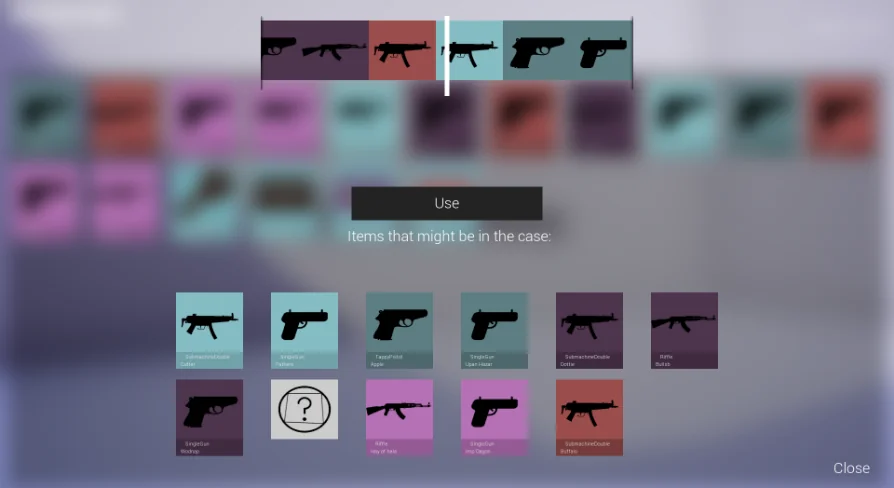
Customization centers on adding a new row in the Data Table. When a new row is created, developers gain direct control over several essential parameters:
Loot Box Identification: Defines the specific chest or container type associated with that row.
Weapon and Item Assignment: Links target items or weapons to the reward pool.
Drop Chances: Sets probability values governing how frequently specific items emerge from the box.
Visual Colors: Configures tint or tier coloration directly tied to the loot box or its awarded rewards.
By altering drop chances inside the table, designers can balance rarity curves quickly. Common items can be weighted heavily, while legendary weapons or high-tier equipment receive restricted probability values. Because colors are assigned on a per-row basis, visual rarity markers such as glowing effects, outline highlights, or crate materials can visually signal the value of the outcome instantly upon opening.
Interactive Handling Across Multiplayer Environments
The Custom Loot Box asset includes full interactive scripting tailored for modern player interactions. Players approach, trigger, and open containers dynamically during gameplay. The underlying Blueprint workflows manage player input, opening animations, and state transitions so that containers do not trigger twice or fail to resolve reward rolls properly.
Multiplayer network environments introduce specific challenges for loot distribution, which the package is structured to accommodate. In networked games, rolling an item cannot rely purely on client-side logic without risking synchronization issues or desynchronized game states. The Blueprint architecture is set up to interact cleanly across multiplayer sessions, ensuring that container interactions register reliably across connected clients.
When an interactive container opens in a multiplayer match, the assigned colors and reward items display consistently for relevant participants. Whether items drop into shared space or reward players individually, having the item properties and chances managed centrally in the Data Table keeps client and server data aligned.
Inventory Integration and Complete RPG Compatibility
Rewards generated by the Custom Loot Box are intended to route cleanly into broader gameplay systems, notably player inventories. The asset carries native compatibility with the Complete RPG framework, allowing developers building role-playing titles to slot these loot boxes into existing quest lines, dungeon bosses, vendor tables, or world discovery points.
In an RPG context, weapon distribution is critical. By permitting weapons of all types to be registered directly into the Data Table rows, the system coordinates easily with RPG inventory arrays, character equipment slots, and item stat trackers. Players defeat an encounter, interact with the custom loot box actor, and receive rolled equipment formatted to match inventory expectations.
Because the logic accepts any item definition, the loot boxes can also distribute crafting reagents, quest keys, or passive stat upgrades without breaking the RPG data loop. The container acts as the physical, interactive gateway between player actions and internal character progression.
Setup Maintenance and Ongoing Project Support
Expanding the system as a game scales remains simple due to the unified Data Table workflow. When an update adds ten new weapons or a seasonal event demands unique themed containers, no visual script graphs need rewiring. Designers simply append ten new rows to the existing table, input the item IDs, designate the drop chances, apply the event color scheme, and compile the table.
Direct developer assistance is also available if implementation hurdles arise during setup or integration. Teams working with the Custom Loot Box can connect with the creator to resolve technical hitches quickly, ensuring the interactive mechanics, multiplayer components, and inventory rewards function smoothly within active project pipelines.
 Gameplay Features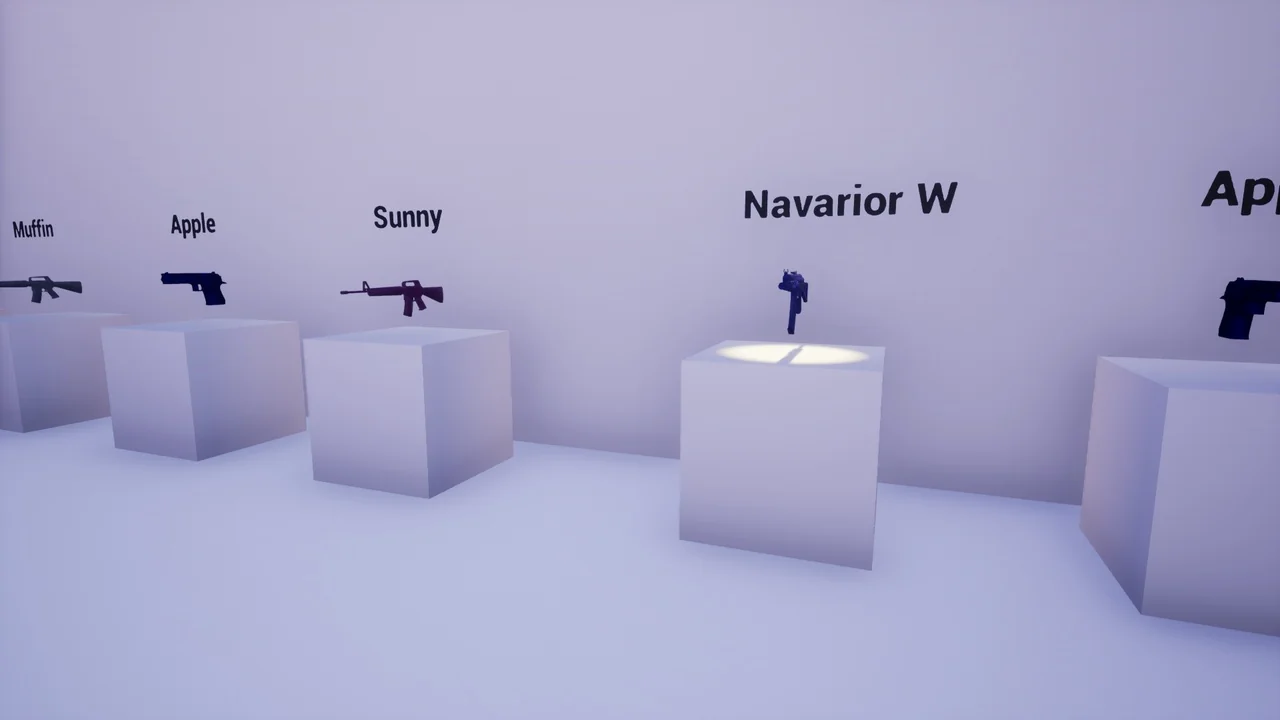
 Gameplay Features
 Gameplay Features
 Gameplay Features