"9d170a19f86e0ace"{"id":"1001258","slug":"advanced-photo-mode","title":"Advanced Photo Mode","category":"Gameplay Features","engine":"5.0+","assetVersion":"","engineVersion":"Engine Version: 5.0+","tag":"Gameplay Features","accent":"blue","visual":"mech","summary":"Explore the Advanced Photo Mode Blueprint system for Unreal Engine, featuring free camera control, custom post-process effects, and ALSV4 compatibility.","platform":"Unreal Engine","publishedAt":"2026-09-27T05:25:07.061Z","updatedAt":"2026-09-27T05:25:07.061Z","sourceNotes":[],"fileContents":[],"compatibility":["Unreal Engine","Engine Version: 5.0+"],"featuredImage":{"alt":"Advanced Photo Mode","src":"/wp-content/uploads/published/2026/09/4a106ba8b56d-77522207-2a21-492e-92db-dde05285eec9-cae14ecbcc.webp"},"hasDownloadLink":true,"downloads":0,"terms":[{"taxonomy":"category","slug":"gameplay-features","name":"Gameplay Features"}],"galleryImages":[{"src":"/wp-content/uploads/published/2026/09/a7d3109701f8-48014260-21c3-4258-83db-f4a62a17d28a-e211ee3acc.webp","alt":"Advanced Photo Mode"},{"src":"/wp-content/uploads/published/2026/09/b1af375ae14d-bb1baee4-e555-426f-b2e6-8b2275bc598d-504cdd0617.webp","alt":"Advanced Photo Mode"},{"src":"/wp-content/uploads/published/2026/09/37be9e3613a7-7c96b4f3-115e-4aca-b1af-3d17686a2aac-664153b844.webp","alt":"Advanced Photo Mode"},{"src":"/wp-content/uploads/published/2026/09/3828641f22c9-dc2f7f0f-9537-4f67-98e1-0b7647c905cb-277cde07a9.webp","alt":"Advanced Photo Mode"},{"src":"/wp-content/uploads/published/2026/09/6dc7a0ba6b8c-fd8e8a21-0c2a-4893-ac38-779905e4ce49-817a23b266.webp","alt":"Advanced Photo Mode"},{"src":"/wp-content/uploads/published/2026/09/f3fec0eee8f0-a6d85727-94ee-4f18-bff3-e2fcb29915ac-603806bdb3.webp","alt":"Advanced Photo Mode"},{"src":"/wp-content/uploads/published/2026/09/1a1f33a90a13-a5dcf7a4-b228-4527-85b3-c458819a98c4-6e91ff8e98.webp","alt":"Advanced Photo Mode"},{"src":"/wp-content/uploads/published/2026/09/f9c5ef98ad14-b1d4c071-747a-4b53-a126-29931868739b-0dc9d2ac19.webp","alt":"Advanced Photo Mode"},{"src":"/wp-content/uploads/published/2026/09/e81ee0773dc3-9756eb39-bf21-452e-b725-3c45568fec71-ae7d2cc58e.webp","alt":"Advanced Photo Mode"},{"src":"/wp-content/uploads/published/2026/09/a4017035d9ff-404f455b-2e2a-466a-8471-4be688ca8d90-3c5de2651b.webp","alt":"Advanced Photo Mode"}],"accessPanel":{"kind":"resource","title":"Download this resource","eyebrow":"Free Download","message":"Log in or create a free account to start your download.","fileName":"Content.7z","safetyNote":"Resources are manually reviewed before listing to improve quality and reduce obvious risks.","actionLabel":"Download Free","resourceType":"Resource archive"},"contentHtml":"\u003ch2\u003eIn-Game Framing and Visual Customization with Advanced Photo Mode\u003c/h2\u003e\n\u003cp\u003eCapturing high-fidelity environments and detailed character models often depends on giving players direct control over composition. Advanced Photo Mode establishes an in-game photography framework that halts gameplay so users can reposition perspective, tune depth of field, and cycle through visual adjustments without disrupting core gameplay logic. The toolset turns standard scenes into expressive snapshots, giving players reasons to linger in detailed environments and inspect assets from angles that standard gameplay cameras never reach.\u003c/p\u003e\n\u003cp\u003eVisual refinement within the system relies on customizable post-process passes. Creators can insert custom lookup tables (LUTs), layer post-process materials, and display custom branding or logos directly over the viewport. Adjusting focal length and depth of field parameters in real time makes it possible to isolate characters against soft backgrounds or draw attention to specific architectural details. Because the system outputs clean visual results, it serves both as an engaging creative feature for players and as an internal production tool for capturing promotional media, game galleries, and social snapshots without requiring manual editor viewports.\u003c/p\u003e \u003ch2\u003eCamera Modes, Tether Limits, and First-Person Support\u003c/h2\u003e\n\u003cp\u003eThe camera architecture in Advanced Photo Mode operates across three distinct operational styles. Developers can configure the system to use the player's existing camera paired with a free camera, lock the view exclusively to the player's camera, or grant access strictly through an independent free camera. This level of control makes the system adaptable to varying design constraints, whether a title requires tight third-person framing or wide environmental freedom.\u003c/p\u003e\n\u003cp\u003eWhen the free camera is enabled, designers can establish specific boundaries on exploration. The system allows an adjustable maximum tether distance relative to the player character, stopping users from clipping into unseen level geometry, wandering outside the intended playable area, or breaking visual illusion boundaries. Alternatively, the tether can be disabled completely, allowing an unrestricted free camera that navigates anywhere within the loaded level. The setup also accommodates first-person gameplay setups natively, avoiding clipping bugs and camera-rig misalignment when detaching from characters that do not utilize traditional third-person boom arms.\u003c/p\u003e \u003ch2\u003eInterface Controls, Gamepad Mapping, and Clean UI Toggles\u003c/h2\u003e\n\u003cp\u003eUser accessibility across diverse input hardware is baked directly into the system's Blueprint widgets. Advanced Photo Mode includes full support for both keyboard/mouse setups and standard gamepads, ensuring seamless functionality across console-style controls and desktop peripherals. Every key, button, and action binding can be mapped to custom inputs, accompanied by interchangeable interface icons so on-screen control prompts match the game's broader user experience guidelines.\u003c/p\u003e\n\u003cp\u003eA primary demand of virtual photography is clearing viewport clutter. The tool includes dedicated options to hide the entire graphical interface instantly, leaving only the composition visible on screen. In addition, creators can toggle mouse cursor visibility on or off depending on whether the interface is actively navigating slider menus or freely steering the camera. Through modular icon replacement and configurable layout widgets, developers can align the capture menu aesthetics with their game's visual design language without rebuilding menu trees from scratch.\u003c/p\u003e \u003ch2\u003ePause Handling and Time Dilation Adjustments for Skies\u003c/h2\u003e\n\u003cp\u003ePausing a game engine can sometimes cause unintended graphical artifacts, particularly in scenes that utilize dynamic atmospheres, procedural sky shaders, or complex world-space materials. When using the default Unreal Engine sky or third-party atmospheric sky assets, hard pausing can sometimes generate rendering artifacts such as small black dots across the sky dome or prevent dynamic atmospheric parameters from refreshing properly during capture sessions.\u003c/p\u003e\n\u003cp\u003eAdvanced Photo Mode resolves these visual discrepancies by offering an alternative pause method driven by Global Time Dilation. Setting the pause method to alter Global Time Dilation rather than executing a hard freeze allows the scene simulation to halt while the rendering pipeline continues processing sky shaders, material updates, and ambient post-processing cleanly. This approach preserves visual fidelity in outdoor environments, preventing graphical glitches from ruining framed shots while keeping animated characters and physics calculations frozen in place.\u003c/p\u003e \u003ch2\u003eCharacter System Integration and ALSV4 Setup\u003c/h2\u003e\n\u003cp\u003eProduction projects frequently rely on complex character animation frameworks, and integrating a detached camera system can pose technical hurdles when characters do not rely on standard spring arms. Advanced Photo Mode provides established integration pathways for community systems such as Advanced Locomotion System V4 (ALSV4), specifically targeting default character setups that omit typical camera components and spring arms.\u003c/p\u003e\n\u003cp\u003eThe integration process addresses common synchronization challenges, including correcting free camera field-of-view (FOV) discrepancies and realigning view rotation when shifting between locomotion states and detached photography viewports. Released across multiple iterations—including Version 4.0 and the revised Version 5.0 architecture—the asset maintains compatibility across Unreal Engine versions 4.25 through 5.1. These updates ensure that developers working in legacy 4.x codebases or transitional 5.x pipelines can implement the Blueprint logic cleanly.\u003c/p\u003e \u003ch2\u003eTarget Project Applications\u003c/h2\u003e\n\u003cp\u003eProjects focused on rich worldbuilding, narrative adventure, atmospheric exploration, or stylized combat benefit significantly from photo mode integration. Allowing players to curate personal albums, experiment with depth of field, and produce branded game captures directly elevates player engagement while generating authentic community content. Because the tool includes flexible distance restrictions, versatile input handling, and integrated fixes for sky rendering issues, it drops smoothly into indie and mid-sized productions requiring an adaptable, polished camera feature.\u003c/p\u003e\n\n\u003ch2\u003eExplore Similar Assets\u003c/h2\u003e\n\u003cul\u003e\n\u003cli\u003e\u003ca href=\"https://3dcghub.com/advanced-framework-vr-mobile-desktop/\" title=\"Advanced Framework - VR, Mobile \u0026amp; Desktop\"\u003eAdvanced Framework - VR, Mobile \u0026amp; Desktop\u003c/a\u003e\u003c/li\u003e\n\u003cli\u003e\u003ca href=\"https://3dcghub.com/instant-photo-camera/\" title=\"Instant Photo Camera\"\u003eInstant Photo Camera\u003c/a\u003e\u003c/li\u003e\n\u003cli\u003e\u003ca href=\"https://3dcghub.com/book-generator/\" title=\"Book Generator\"\u003eBook Generator\u003c/a\u003e\u003c/li\u003e\n\u003cli\u003e\u003ca href=\"https://3dcghub.com/stationary-weapon-ciws/\" title=\"Stationary weapon : CIWS\"\u003eStationary weapon : CIWS\u003c/a\u003e\u003c/li\u003e\n\u003cli\u003e\u003ca href=\"https://3dcghub.com/action-adventure-movement-system/\" title=\"Action-Adventure Movement System\"\u003eAction-Adventure Movement System\u003c/a\u003e\u003c/li\u003e\n\u003c/ul\u003e","contentTextLength":6490,"navigation":{"current":2,"total":3202,"previous":{"id":"1001259","slug":"endless-random-worlds","title":"Endless Random Worlds","category":"Procedural Systems","platform":"Unreal Engine","updatedAt":"2026-09-27T05:27:08.445Z"},"next":{"id":"1001257","slug":"triplex-house-villa","title":"Triplex House Villa","category":"Simulation","platform":"Unreal Engine","updatedAt":"2026-09-23T15:58:40.730Z"}},"relatedResources":[{"id":"28394","slug":"advanced-framework-vr-mobile-desktop","title":"Advanced Framework - VR, Mobile \u0026 Desktop","category":"Gameplay Features","engine":"5.0+","assetVersion":"Engine version: 5.0+","engineVersion":"","tag":"Gameplay Features","accent":"blue","visual":"luts","summary":"Advanced Framework is a production-ready foundation for VR, desktop, and mobile applications. It combines first-person control setups, interaction systems, multiplayer replication, navigation modes, and adaptable UI tools in one package.","platform":"Unreal Engine","publishedAt":"2026-05-12T09:33:53.000Z","updatedAt":"2026-05-12T09:33:54.000Z","sourceNotes":[],"fileContents":[],"compatibility":["Unreal Engine","Engine version: 5.0+"],"featuredImage":{"alt":"Advanced Framework - VR, Mobile \u0026 Desktop","src":"https://3dcghub.com/wp-content/uploads/2026/05/98ecd66b1773_1af6d69e-fbe1-435d-abdf-cc772ef3b31f.webp"},"hasDownloadLink":true,"downloads":0},{"id":"10977","slug":"instant-photo-camera","title":"Instant Photo Camera","category":"Gameplay Features","engine":"4.26+,5.0+","assetVersion":"Engine version: 4.26+,5.0+","engineVersion":"4.27","tag":"Gameplay Features","accent":"blue","visual":"character","summary":"Add professional photography mechanics to your project with the Instant Photo Camera. This asset includes a textured mesh, animations, and a fully functional photo gallery interface.","platform":"Unreal Engine","publishedAt":"2026-03-03T16:35:57.000Z","updatedAt":"2026-04-19T15:49:53.000Z","sourceNotes":[],"fileContents":[],"compatibility":["Unreal Engine","Engine version: 4.26+,5.0+"],"featuredImage":{"alt":"Instant Photo Camera","src":"https://3dcghub.com/wp-content/uploads/2026/03/e22a56ef-e73b-491e-90d0-8b34e4f52078.webp"},"hasDownloadLink":true,"downloads":0},{"id":"10628","slug":"book-generator","title":"Book Generator","category":"Gameplay Features","engine":"4.26+,5.0+","assetVersion":"Engine version: 4.26+,5.0+","engineVersion":"4.24","tag":"Gameplay Features","accent":"blue","visual":"character","summary":"Speed up your level design with the Book Generator, a versatile blueprint tool for creating realistic book arrangements. Customize colors, scale, and placement modes to build detailed libraries and interiors with ease.","platform":"Unreal Engine","publishedAt":"2026-03-03T15:50:23.000Z","updatedAt":"2026-04-19T15:49:58.000Z","sourceNotes":[],"fileContents":[],"compatibility":["Unreal Engine","Engine version: 4.26+,5.0+"],"featuredImage":{"alt":"Book Generator","src":"https://3dcghub.com/wp-content/uploads/2026/03/c771ab39-5a63-44a9-89f1-92d651b3e8f6.webp"},"hasDownloadLink":true,"downloads":0}]}
Gameplay Features
Advanced Photo Mode
Explore the Advanced Photo Mode Blueprint system for Unreal Engine, featuring free camera control, custom post-process effects, and ALSV4 compatibility.
In-Game Framing and Visual Customization with Advanced Photo Mode
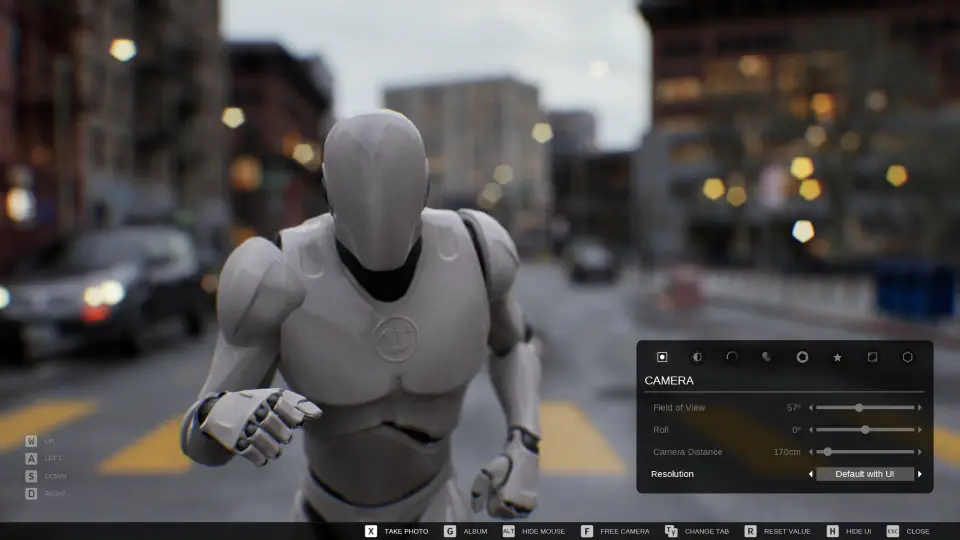
Capturing high-fidelity environments and detailed character models often depends on giving players direct control over composition. Advanced Photo Mode establishes an in-game photography framework that halts gameplay so users can reposition perspective, tune depth of field, and cycle through visual adjustments without disrupting core gameplay logic. The toolset turns standard scenes into expressive snapshots, giving players reasons to linger in detailed environments and inspect assets from angles that standard gameplay cameras never reach.
Visual refinement within the system relies on customizable post-process passes. Creators can insert custom lookup tables (LUTs), layer post-process materials, and display custom branding or logos directly over the viewport. Adjusting focal length and depth of field parameters in real time makes it possible to isolate characters against soft backgrounds or draw attention to specific architectural details. Because the system outputs clean visual results, it serves both as an engaging creative feature for players and as an internal production tool for capturing promotional media, game galleries, and social snapshots without requiring manual editor viewports.
Camera Modes, Tether Limits, and First-Person Support
The camera architecture in Advanced Photo Mode operates across three distinct operational styles. Developers can configure the system to use the player's existing camera paired with a free camera, lock the view exclusively to the player's camera, or grant access strictly through an independent free camera. This level of control makes the system adaptable to varying design constraints, whether a title requires tight third-person framing or wide environmental freedom.
When the free camera is enabled, designers can establish specific boundaries on exploration. The system allows an adjustable maximum tether distance relative to the player character, stopping users from clipping into unseen level geometry, wandering outside the intended playable area, or breaking visual illusion boundaries. Alternatively, the tether can be disabled completely, allowing an unrestricted free camera that navigates anywhere within the loaded level. The setup also accommodates first-person gameplay setups natively, avoiding clipping bugs and camera-rig misalignment when detaching from characters that do not utilize traditional third-person boom arms.
Interface Controls, Gamepad Mapping, and Clean UI Toggles
User accessibility across diverse input hardware is baked directly into the system's Blueprint widgets. Advanced Photo Mode includes full support for both keyboard/mouse setups and standard gamepads, ensuring seamless functionality across console-style controls and desktop peripherals. Every key, button, and action binding can be mapped to custom inputs, accompanied by interchangeable interface icons so on-screen control prompts match the game's broader user experience guidelines.
A primary demand of virtual photography is clearing viewport clutter. The tool includes dedicated options to hide the entire graphical interface instantly, leaving only the composition visible on screen. In addition, creators can toggle mouse cursor visibility on or off depending on whether the interface is actively navigating slider menus or freely steering the camera. Through modular icon replacement and configurable layout widgets, developers can align the capture menu aesthetics with their game's visual design language without rebuilding menu trees from scratch.
Pause Handling and Time Dilation Adjustments for Skies
Pausing a game engine can sometimes cause unintended graphical artifacts, particularly in scenes that utilize dynamic atmospheres, procedural sky shaders, or complex world-space materials. When using the default Unreal Engine sky or third-party atmospheric sky assets, hard pausing can sometimes generate rendering artifacts such as small black dots across the sky dome or prevent dynamic atmospheric parameters from refreshing properly during capture sessions.
Advanced Photo Mode resolves these visual discrepancies by offering an alternative pause method driven by Global Time Dilation. Setting the pause method to alter Global Time Dilation rather than executing a hard freeze allows the scene simulation to halt while the rendering pipeline continues processing sky shaders, material updates, and ambient post-processing cleanly. This approach preserves visual fidelity in outdoor environments, preventing graphical glitches from ruining framed shots while keeping animated characters and physics calculations frozen in place.
Character System Integration and ALSV4 Setup
Production projects frequently rely on complex character animation frameworks, and integrating a detached camera system can pose technical hurdles when characters do not rely on standard spring arms. Advanced Photo Mode provides established integration pathways for community systems such as Advanced Locomotion System V4 (ALSV4), specifically targeting default character setups that omit typical camera components and spring arms.
The integration process addresses common synchronization challenges, including correcting free camera field-of-view (FOV) discrepancies and realigning view rotation when shifting between locomotion states and detached photography viewports. Released across multiple iterations—including Version 4.0 and the revised Version 5.0 architecture—the asset maintains compatibility across Unreal Engine versions 4.25 through 5.1. These updates ensure that developers working in legacy 4.x codebases or transitional 5.x pipelines can implement the Blueprint logic cleanly.
Target Project Applications
Projects focused on rich worldbuilding, narrative adventure, atmospheric exploration, or stylized combat benefit significantly from photo mode integration. Allowing players to curate personal albums, experiment with depth of field, and produce branded game captures directly elevates player engagement while generating authentic community content. Because the tool includes flexible distance restrictions, versatile input handling, and integrated fixes for sky rendering issues, it drops smoothly into indie and mid-sized productions requiring an adaptable, polished camera feature.
 Gameplay Features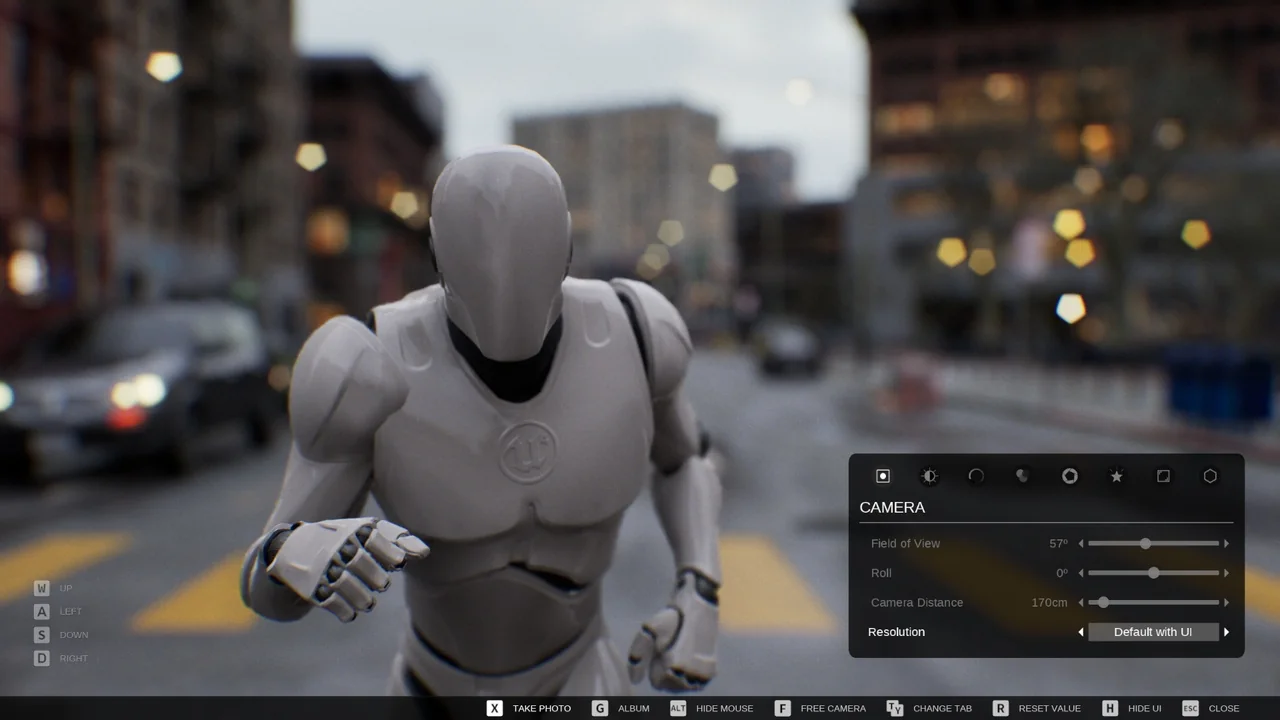
 Gameplay Features
 Gameplay Features
 Gameplay Features