"ae2217ad8e73450c"{"id":"1003020","slug":"climb-2-5d-wall-movement","title":"Climb - 2.5D Wall Movement","category":"Gameplay Features","engine":"4.21+,5.0+","assetVersion":"","engineVersion":"Engine Version: 4.21+,5.0+","tag":"Gameplay Features","accent":"blue","visual":"mech","summary":"A Blueprint-based wall movement system for 2.5D platformers, covering wall jumping, wall climbing, ledge holding and climbing, plus climbable moving walls.","platform":"Unreal Engine","indexPolicy":"index","publishedAt":"2026-11-25T16:23:48.704Z","updatedAt":"2026-11-25T16:23:48.704Z","sourceNotes":[],"fileContents":[],"compatibility":["Unreal Engine","Engine Version: 4.21+,5.0+"],"featuredImage":{"alt":"Climb - 2.5D Wall Movement","src":"/wp-content/uploads/published/2026/11/d02c93f18adb-24fc8e05-0747-4bd0-9fb8-432f71756be4-1a8d63fa8a.webp"},"hasDownloadLink":true,"downloads":0,"terms":[{"taxonomy":"category","slug":"gameplay-features","name":"Gameplay Features"}],"galleryImages":[{"src":"/wp-content/uploads/published/2026/11/5ffaf8a919d4-e330629a-32f3-400e-8212-be5b5e319bec-388a645d82.webp","alt":"Climb - 2.5D Wall Movement"},{"src":"/wp-content/uploads/published/2026/11/06ff40af2e98-ba6b6224-0dd1-48aa-90c0-30e10658e9ee-981f9307a5.webp","alt":"Climb - 2.5D Wall Movement"},{"src":"/wp-content/uploads/published/2026/11/fe67e985953e-bbac15a6-489d-4980-b7c1-aefc5e5af96c-79fafc7a39.webp","alt":"Climb - 2.5D Wall Movement"},{"src":"/wp-content/uploads/published/2026/11/b5b329cbf27f-0ea117dc-3ad3-4fb4-a9cb-d435f2b075b8-6af81b7999.webp","alt":"Climb - 2.5D Wall Movement"},{"src":"/wp-content/uploads/published/2026/11/82c089d85c53-91872b1f-6263-4508-be54-d796f023b525-7bb4ce7255.webp","alt":"Climb - 2.5D Wall Movement"},{"src":"/wp-content/uploads/published/2026/11/e624ba83e3db-da252af8-e712-4509-beee-966478481a91-66bc258b8c.webp","alt":"Climb - 2.5D Wall Movement"}],"accessPanel":{"kind":"resource","title":"Get this resource","safetyNote":"Resources are manually reviewed before listing to improve quality and reduce obvious risks.","fileName":"Content.7z","resourceType":"Resource archive","versions":[]},"contentHtml":"\u003cp\u003eA 2.5D platformer asks for movement that looks flat but behaves with depth: a character pinned to a plane, running at a wall, kicking off it, catching a ledge, and pulling up onto a route that sits just above the main path. Climb - 2.5D Wall Movement exists to support exactly that kind of layering — the vertical detours and reversed routes that turn a straight left-to-right run into a stage with shortcuts and alternate lines.\u003c/p\u003e \u003cp\u003eThe system is put together with Blueprints, and its scope is deliberately narrow. It covers the four wall interactions a 2.5D platformer tends to need, plus a set of moving walls and platforms that can be climbed the same way static geometry can. This is a movement layer rather than a full game: the piece you bring into a project that already has a character and a level layout but still needs the wall behaviour wired up.\u003c/p\u003e \u003ch2\u003eWhere a 2.5D Wall Movement Layer Earns Its Place\u003c/h2\u003e \u003cp\u003eConsider the stage shapes it opens up. A vertical shaft the player climbs instead of jumps across. A ledge above a corridor that rewards a well-timed push off a wall rather than a ground-level approach. A platform sliding across a gap that a character can latch onto and ride. Each of those is a small piece of level design that lives or dies on the character being able to interact with a surface that is not the floor.\u003c/p\u003e \u003cp\u003eBecause the moves arrive as discrete functions — wall jumping, wall climbing, ledge holding, ledge climbing — a designer can build routes that call for one of them or all of them in sequence. A single wall jump across a gap reads very differently from a long climb up a tall face, and a ledge hold gives the player a beat to hang and choose a direction before committing to the pull-up. That variety of pacing is what a 2.5D platformer leans on, and these four behaviours are the vocabulary the kit supplies for it.\u003c/p\u003e \u003ch2\u003eClimb's Four Wall Interactions\u003c/h2\u003e \u003cp\u003eWall jumping is the quickest of the four: contact with a vertical face, then a launch away from it. Wall climbing covers the vertical traversal itself, letting a character scale a surface rather than bounce off it. Ledge holding is the suspended state — the character hangs at the top edge of a wall and stays there. Ledge climbing finishes the sequence by carrying the character up and over onto the surface above.\u003c/p\u003e \u003cp\u003eRead together, they form a chain. A player jumps at a wall, climbs it, reaches the lip, holds, then climbs up. Because each step is its own function, a project can take only the parts it needs. A section built on hanging and pulling up can use ledge holding and ledge climbing on their own; a section built on vertical ascent can lean on the climb and the jump. Nothing forces the whole chain into every wall in the level.\u003c/p\u003e \u003cp\u003eThat granularity is also what makes the kit testable early. When each interaction can be dropped into a blockout separately, level ideas can be checked one behaviour at a time instead of waiting on a complete movement set before anything can be played.\u003c/p\u003e \u003ch2\u003eMoving Walls and Platforms That Can Be Climbed\u003c/h2\u003e \u003cp\u003eAlongside the static geometry, the kit includes basic moving walls and platforms. The detail that counts is that they can be climbed too, so a surface travelling through the level behaves like a wall the player can interact with rather than scenery that only carries them from one point to another.\u003c/p\u003e \u003cp\u003eIn a 2.5D layout that distinction changes how routes are timed. A moving surface that can be climbed becomes a piece of geometry a player commits to, riding it and then scaling it, which makes its travel a factor in how a section is paced rather than just a shortcut across a gap.\u003c/p\u003e \u003ch2\u003eWhat Version 3.0 Did to the Blueprint Side\u003c/h2\u003e \u003cp\u003eFebruary 2021 brought version 3.0, and it was a substantial pass rather than a small patch. It added new animations, reworked the Blueprints, and made the kit faster to add to a project. The 3.0 release also arrived with its own documentation, and an older documentation set remains available for reference.\u003c/p\u003e \u003cp\u003eNew animations matter here in a way they do not in a pack of props. Wall movement only convinces when the character's body reads correctly against the surface, so a set of animations built for the climb, the hold and the pull-up means the poses match the movement instead of being approximated from something generic. Reworked Blueprints mean the logic behind those animations is easier to follow and adjust once it is in a project — useful when a specific game wants a different feel from the default.\u003c/p\u003e \u003ch2\u003eVersion 4.24 and the Simpler Climb Blueprint Rework\u003c/h2\u003e \u003cp\u003eA later build, marked 4.24 and up, followed with a large rework of the Blueprint system aimed at making it much simpler to implement, plus another round of new animations. If implementation speed is the deciding factor, that is the build to look at — the entire purpose of the rework was to cut down the work of getting wall behaviour into a project, and the accompanying animations were refreshed at the same time.\u003c/p\u003e \u003cp\u003eWorth knowing before planning around it: the kit is no longer receiving updates. For a project already in motion that needs wall movement now, that is not necessarily a problem, because the four interactions and the moving-platform support are defined features rather than promises. For a project that expects its movement system to grow through a long production, it means treating the kit as a starting point you extend yourself rather than something that will keep pace with the rest of the game.\u003c/p\u003e \u003ch2\u003eThe Paper Tag and the Look It Suggests\u003c/h2\u003e \u003cp\u003eThe tags — Paper, Climb, Wall, Blueprint — summarise the company this asset keeps fairly well. The Paper label points at the flat, cut-out 2.5D platformer look, the sort of game where characters and scenery read as thin shapes on layered planes. That aesthetic suits the system naturally: paper characters on flat planes benefit from strong, legible wall interactions, because the whole stage is assembled from vertical faces and edges.\u003c/p\u003e \u003cp\u003eClimb and Wall name the subject, and Blueprint names the method. Nothing in the tag set points beyond what the kit actually does.\u003c/p\u003e \u003ch2\u003eFitting It Into Production\u003c/h2\u003e \u003cp\u003eThe realistic slot for Climb - 2.5D Wall Movement is early-to-mid production on a 2.5D platformer that already has a character and a level layout but still needs its wall behaviour settled. Bring it in while vertical routes are being blocked out and you want working interactions to test level ideas against, then extend it as the game's own movement needs become more specific — a different climb rhythm, a longer hold, a moving surface that behaves unlike the defaults.\u003c/p\u003e \u003cp\u003eJudged as what it is — a basic wall movement system with four core functions, climbable moving platforms, reworked Blueprints and updated animations — it does one job and says so plainly. A paper-style 2.5D platformer that needs wall jumping, climbing, ledge holding and ledge climbing wired up will find the pieces to test with and a documented Blueprint setup to build on. A team that needs a movement system to keep evolving should plan on owning that evolution.\u003c/p\u003e\n\n\u003ch2\u003eMore From The Same Workflow\u003c/h2\u003e\n\u003cul\u003e\n\u003cli\u003e\u003ca href=\"https://3dcghub.com/enhanced-locomotion-system-replication/\" rel=\"noopener noreferrer\"\u003eEnhanced Locomotion System (Replication)\u003c/a\u003e\u003c/li\u003e\n\u003cli\u003e\u003ca href=\"https://3dcghub.com/wall-hiding-system/\" rel=\"noopener noreferrer\"\u003eWall Hiding System\u003c/a\u003e\u003c/li\u003e\n\u003cli\u003e\u003ca href=\"https://3dcghub.com/cyberpunk-vehicle-hovermod-flymod/\" rel=\"noopener noreferrer\"\u003eCyberpunk Vehicle ( HoverMod + FlyMod )\u003c/a\u003e\u003c/li\u003e\n\u003cli\u003e\u003ca href=\"https://3dcghub.com/advanced-tactical-based-system/\" rel=\"noopener noreferrer\"\u003eAdvanced Tactical-based System\u003c/a\u003e\u003c/li\u003e\n\u003cli\u003e\u003ca href=\"https://3dcghub.com/nv-spline-tools/\" rel=\"noopener noreferrer\"\u003eNV Spline Tools\u003c/a\u003e\u003c/li\u003e\n\u003c/ul\u003e","contentTextLength":7158,"navigation":{"current":24,"total":4964,"previous":{"id":"1003021","slug":"close-combat-animset","title":"Close Combat Animset","category":"Combat","platform":"Unreal Engine","updatedAt":"2026-11-25T16:25:48.049Z"},"next":{"id":"1003019","slug":"clazy-runner-action-pack","title":"CLazy Runner Action Pack","category":"Locomotion / Gaits","platform":"Unreal Engine","updatedAt":"2026-11-25T16:22:40.962Z"}},"relatedResources":[{"id":"10820","slug":"enhanced-locomotion-system-replication","title":"Enhanced Locomotion System (Replication)","category":"Gameplay Features","engine":"5.5+","assetVersion":"Engine version: 5.5+","engineVersion":"5.1","tag":"Gameplay Features","accent":"blue","visual":"animation","summary":"Elevate your Unreal Engine 5 project with the Enhanced Locomotion System (Replication). This asset offers a wide range of movement options, from wall climbing to stealth assassinations, all with full replication support.","platform":"Unreal Engine","indexPolicy":"noindex","publishedAt":"2026-03-03T16:19:10.000Z","updatedAt":"2026-04-19T15:49:55.000Z","sourceNotes":[],"fileContents":[],"compatibility":["Unreal Engine","Engine version: 5.5+"],"featuredImage":{"alt":"Enhanced Locomotion System (Replication)","src":"https://3dcghub.com/wp-content/uploads/2026/03/329c207b-d6bb-4a33-be48-6178f87ecd45.webp"},"fileSizeBytes":66646611,"hasDownloadLink":true,"downloads":0},{"id":"1002946","slug":"wall-hiding-system","title":"Wall Hiding System","category":"Gameplay Features","engine":"4.26+,5.0+","assetVersion":"","engineVersion":"Engine Version: 4.26+,5.0+","tag":"Gameplay Features","accent":"blue","visual":"mech","summary":"Examine how the Wall Hiding System uses material functions, Blueprint coordinates, and opacity masks to manage occlusion in top-down games.","platform":"Unreal Engine","indexPolicy":"index","publishedAt":"2026-11-21T23:35:05.525Z","updatedAt":"2026-11-21T23:35:05.525Z","sourceNotes":[],"fileContents":[],"compatibility":["Unreal Engine","Engine Version: 4.26+,5.0+"],"featuredImage":{"alt":"Wall Hiding System","src":"/wp-content/uploads/published/2026/11/e4b0eb55d3a7-1ddc06b6-a4b6-4733-ae7f-1c427c904a71-d76e809b03.webp"},"fileSizeBytes":43922213,"hasDownloadLink":true,"downloads":0},{"id":"1002315","slug":"cyberpunk-vehicle-hovermod-flymod","title":"Cyberpunk Vehicle ( HoverMod + FlyMod )","category":"Gameplay Features","engine":"4.24+,5.0+","assetVersion":"","engineVersion":"Engine Version: 4.24+,5.0+","tag":"Gameplay Features","accent":"blue","visual":"mech","summary":"A drivable cyberpunk hover vehicle for Unreal Engine 4.23 through 5.1, with HoverMod and FlyMod setups, Blueprint-driven movement, and a scifi city look.","platform":"Unreal Engine","indexPolicy":"index","publishedAt":"2026-11-06T06:17:19.865Z","updatedAt":"2026-11-06T06:17:19.865Z","sourceNotes":[],"fileContents":[],"compatibility":["Unreal Engine","Engine Version: 4.24+,5.0+"],"featuredImage":{"alt":"Cyberpunk Vehicle ( HoverMod + FlyMod )","src":"/wp-content/uploads/published/2026/11/d7cb9f7d3bf3-60a1b470-1ada-4c88-bd9b-cff8eef41781-b7d9864591.webp"},"fileSizeBytes":469942922,"hasDownloadLink":true,"downloads":0}]}[{"id":4225,"sourceId":4225,"taxonomyId":4225,"taxonomy":"category","slug":"asset-library","name":"Asset Library","parentId":null,"count":4817,"hasChildren":true,"href":"/","seoTitle":"Free Game Assets Library | 3DCGHUB","seoDescription":"Browse free Unreal Engine, Unity, Blender assets and game development tutorials on 3DCGHUB with previews, compatibility notes, and secure downloads.","sitemapEnabled":true,"children":[{"id":4227,"sourceId":4227,"taxonomyId":4227,"taxonomy":"category","slug":"blender-add-ons-plugins","name":"Blender Add-ons \u0026 Plugins","parentId":4225,"count":10,"hasChildren":false,"href":"/category/blender-add-ons-plugins/","seoTitle":"Free Blender Add-ons \u0026 Plugins | 3DCGHUB","seoDescription":"Browse free Blender Add-ons \u0026 Plugins tools for Blender on 3DCGHUB: curated downloads with preview images, compatibility notes and secure download access.","sitemapEnabled":true},{"id":514,"sourceId":514,"taxonomyId":514,"taxonomy":"category","slug":"unity-2","name":"Unity","parentId":4225,"count":453,"hasChildren":true,"href":"/category/unity-2/","seoTitle":"Free Unity Assets | 3DCGHUB","seoDescription":"Browse free Unity resources on 3DCGHUB: curated downloads with preview images, compatibility notes and secure download access.","sitemapEnabled":true,"children":[{"id":523,"sourceId":523,"taxonomyId":523,"taxonomy":"category","slug":"2d","name":"2D","parentId":514,"count":1,"hasChildren":true,"href":"/category/2d/","seoTitle":"Free Unity 2D | 3DCGHUB","seoDescription":"Browse free 2D assets for Unity on 3DCGHUB: curated downloads with preview images, compatibility notes and secure download access.","sitemapEnabled":true},{"id":515,"sourceId":515,"taxonomyId":515,"taxonomy":"category","slug":"3d-unity-2","name":"3D","parentId":514,"count":162,"hasChildren":true,"href":"/category/3d-unity-2/","seoTitle":"Free Unity 3D Assets | 3DCGHUB","seoDescription":"Browse free 3D assets for Unity on 3DCGHUB: curated downloads with preview images, compatibility notes and secure download access.","sitemapEnabled":true},{"id":565,"sourceId":565,"taxonomyId":565,"taxonomy":"category","slug":"add-ons","name":"Add-Ons","parentId":514,"count":2,"hasChildren":false,"href":"/category/add-ons/","seoTitle":"Free Unity Add-Ons | 3DCGHUB","seoDescription":"Browse free Add-Ons assets for Unity on 3DCGHUB: curated downloads with preview images, compatibility notes and secure download access.","sitemapEnabled":true},{"id":529,"sourceId":529,"taxonomyId":529,"taxonomy":"category","slug":"audio-unity-2","name":"Audio","parentId":514,"count":1,"hasChildren":true,"href":"/category/audio-unity-2/","seoTitle":"Free Unity Audio | 3DCGHUB","seoDescription":"Browse free Audio for Unity on 3DCGHUB: curated downloads with preview images, compatibility notes and secure download access.","sitemapEnabled":true},{"id":557,"sourceId":557,"taxonomyId":557,"taxonomy":"category","slug":"templates","name":"Templates","parentId":514,"count":36,"hasChildren":true,"href":"/category/templates/","seoTitle":"Free Unity Templates | 3DCGHUB","seoDescription":"Browse free Unity project templates on 3DCGHUB. Starter kits with previews, compatibility notes, and secure download access.","sitemapEnabled":true},{"id":533,"sourceId":533,"taxonomyId":533,"taxonomy":"category","slug":"tools-unity-2","name":"Tools","parentId":514,"count":0,"hasChildren":true,"href":"/category/tools-unity-2/","sitemapEnabled":true},{"id":554,"sourceId":554,"taxonomyId":554,"taxonomy":"category","slug":"vfx-unity-2","name":"VFX","parentId":514,"count":4,"hasChildren":true,"href":"/category/vfx-unity-2/","seoTitle":"Free Unity VFX | 3DCGHUB","seoDescription":"Browse free VFX for Unity on 3DCGHUB: curated downloads with preview images, compatibility notes and secure download access.","sitemapEnabled":true}]},{"id":511,"sourceId":511,"taxonomyId":511,"taxonomy":"category","slug":"unreal-engine-2","name":"Unreal Engine","parentId":4225,"count":4355,"hasChildren":true,"href":"/category/unreal-engine-2/","seoTitle":"Free Unreal Engine Assets | 3DCGHUB","seoDescription":"Browse free Unreal Engine resources on 3DCGHUB: curated downloads with preview images, compatibility notes and secure download access.","sitemapEnabled":true,"children":[{"id":54,"sourceId":54,"taxonomyId":54,"taxonomy":"category","slug":"3d","name":"3D","parentId":511,"count":2441,"hasChildren":true,"href":"/category/3d/","seoTitle":"Free Unreal Engine 3D | 3DCGHUB","seoDescription":"Browse free 3D assets for Unreal Engine on 3DCGHUB: curated downloads with preview images, compatibility notes and secure download access.","sitemapEnabled":true},{"id":441,"sourceId":441,"taxonomyId":441,"taxonomy":"category","slug":"animations","name":"Animations","parentId":511,"count":269,"hasChildren":true,"href":"/category/animations/","seoTitle":"Free Unreal Engine Animations | 3DCGHUB","seoDescription":"Browse free Animations for Unreal Engine on 3DCGHUB: curated downloads with preview images, compatibility notes and secure download access.","sitemapEnabled":true},{"id":446,"sourceId":446,"taxonomyId":446,"taxonomy":"category","slug":"audio","name":"Audio","parentId":511,"count":63,"hasChildren":true,"href":"/category/audio/","seoTitle":"Free Unreal Engine Audio Resources | 3DCGHUB","seoDescription":"Browse free Unreal Engine audio resources including sound effects, voices, dialogue, and ambient sounds. Curated free downloads on 3DCGHUB.","sitemapEnabled":true},{"id":466,"sourceId":466,"taxonomyId":466,"taxonomy":"category","slug":"game-systems","name":"Game Systems","parentId":511,"count":381,"hasChildren":true,"href":"/category/game-systems/","seoTitle":"Free Unreal Engine Game Systems | 3DCGHUB","seoDescription":"Browse free Game Systems tools for Unreal Engine on 3DCGHUB: curated downloads with preview images, compatibility notes and secure download access.","sitemapEnabled":true},{"id":478,"sourceId":478,"taxonomyId":478,"taxonomy":"category","slug":"game-templates","name":"Game Templates","parentId":511,"count":155,"hasChildren":true,"href":"/category/game-templates/","seoTitle":"Free Unreal Engine Game Templates | 3DCGHUB","seoDescription":"Browse free Game Templates for Unreal Engine on 3DCGHUB: curated downloads with preview images, compatibility notes and secure download access.","sitemapEnabled":true},{"id":432,"sourceId":432,"taxonomyId":432,"taxonomy":"category","slug":"hdri","name":"HDRI","parentId":511,"count":6,"hasChildren":true,"href":"/category/hdri/","seoTitle":"Free Unreal Engine HDRI | 3DCGHUB","seoDescription":"Browse free Unreal Engine HDRI skies and lighting maps on 3DCGHUB. Environment lighting with previews and secure downloads.","sitemapEnabled":true},{"id":228,"sourceId":228,"taxonomyId":228,"taxonomy":"category","slug":"material-and-textures","name":"Material \u0026 Textures","parentId":511,"count":172,"hasChildren":true,"href":"/category/material-and-textures/","seoTitle":"Free Unreal Engine Material \u0026 Textures | 3DCGHUB","seoDescription":"Browse free Material \u0026 Textures for Unreal Engine on 3DCGHUB: curated downloads with preview images, compatibility notes and secure download access.","sitemapEnabled":true},{"id":298,"sourceId":298,"taxonomyId":298,"taxonomy":"category","slug":"sprites-and-flipbooks","name":"Sprites \u0026 Flipbooks","parentId":511,"count":18,"hasChildren":true,"href":"/category/sprites-and-flipbooks/","seoTitle":"Free Unreal Engine Sprites \u0026 Flipbooks | 3DCGHUB","seoDescription":"Browse free Sprites \u0026 Flipbooks assets for Unreal Engine on 3DCGHUB: curated downloads with preview images, compatibility notes and secure download access.","sitemapEnabled":true},{"id":489,"sourceId":489,"taxonomyId":489,"taxonomy":"category","slug":"tools-and-plugins","name":"Tools \u0026 Plugins","parentId":511,"count":390,"hasChildren":true,"href":"/category/tools-and-plugins/","seoTitle":"Free Unreal Engine Tools \u0026 Plugins | 3DCGHUB","seoDescription":"Browse free Tools \u0026 Plugins for Unreal Engine on 3DCGHUB: curated downloads with preview images, compatibility notes and secure download access.","sitemapEnabled":true},{"id":459,"sourceId":459,"taxonomyId":459,"taxonomy":"category","slug":"ui","name":"UI","parentId":511,"count":47,"hasChildren":true,"href":"/category/ui/","seoTitle":"Free Unreal Engine UI | 3DCGHUB","seoDescription":"Browse free UI for Unreal Engine on 3DCGHUB: curated downloads with preview images, compatibility notes and secure download access.","sitemapEnabled":true},{"id":450,"sourceId":450,"taxonomyId":450,"taxonomy":"category","slug":"vfx","name":"VFX","parentId":511,"count":413,"hasChildren":true,"href":"/category/vfx/","seoTitle":"Free Unreal Engine VFX | 3DCGHUB","seoDescription":"Browse free VFX for Unreal Engine on 3DCGHUB: curated downloads with preview images, compatibility notes and secure download access.","sitemapEnabled":true}]}]},{"id":4222,"sourceId":4222,"taxonomyId":4222,"taxonomy":"category","slug":"tutorial-library","name":"Tutorial Library","parentId":null,"count":117,"hasChildren":false,"href":"/tutorials/","seoTitle":"Free Game Development Tutorial Library | 3DCGHUB","seoDescription":"Browse free game development tutorials for Unreal Engine, Unity, Blender, and more on 3DCGHUB with practical workflows and secure downloads.","sitemapEnabled":true}]
Resource screenshots
1 / 6
Asset drops
Daily Asset Drops
Follow 3DCGHUB on Telegram for daily Unreal, Unity & Blender drops and curated CC0 releases.
Resources are manually reviewed before listing to improve quality and reduce obvious risks.
Reviewed archive
Gameplay Features
Climb - 2.5D Wall Movement
A Blueprint-based wall movement system for 2.5D platformers, covering wall jumping, wall climbing, ledge holding and climbing, plus climbable moving walls.
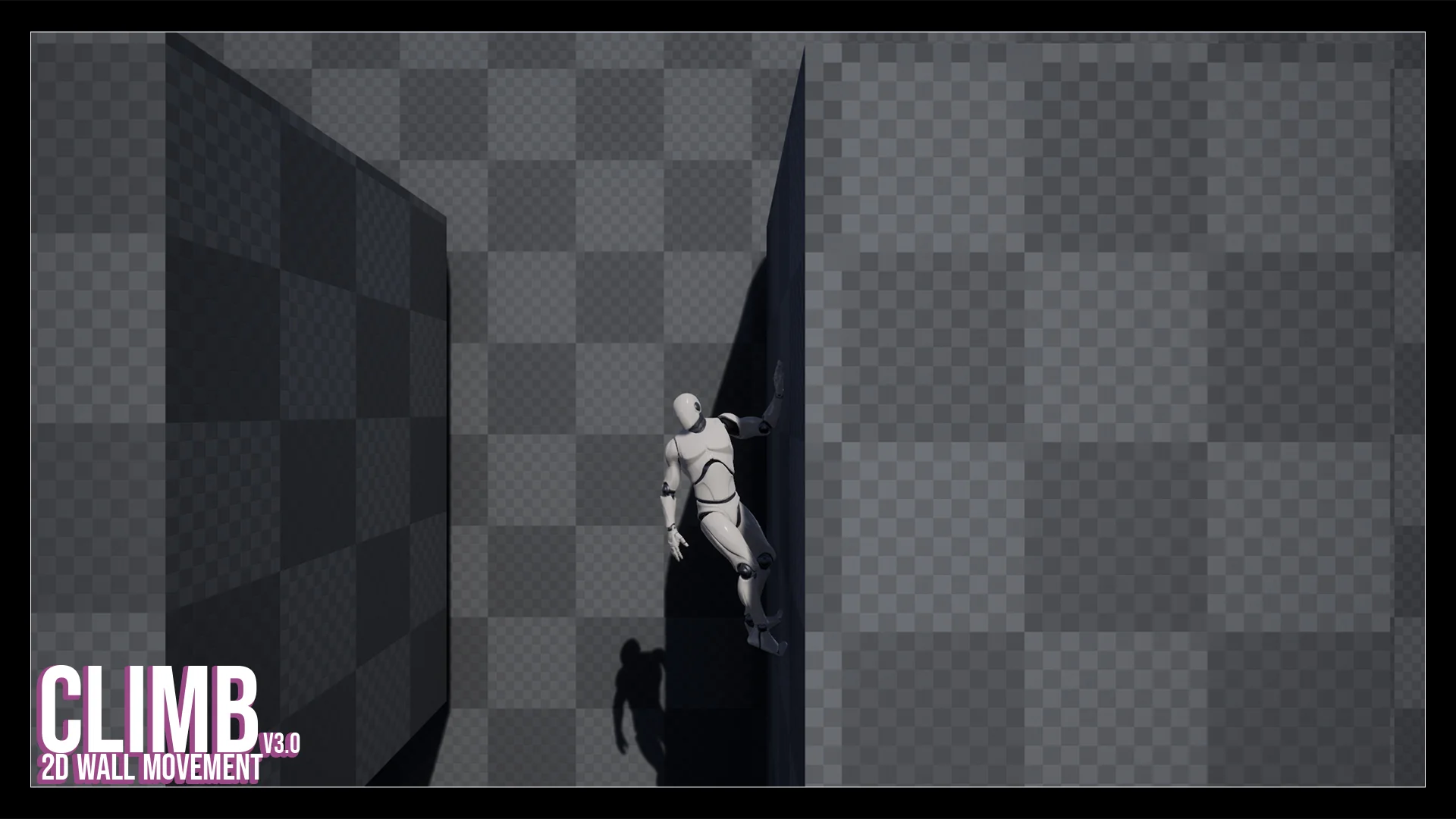
A 2.5D platformer asks for movement that looks flat but behaves with depth: a character pinned to a plane, running at a wall, kicking off it, catching a ledge, and pulling up onto a route that sits just above the main path. Climb - 2.5D Wall Movement exists to support exactly that kind of layering — the vertical detours and reversed routes that turn a straight left-to-right run into a stage with shortcuts and alternate lines.
The system is put together with Blueprints, and its scope is deliberately narrow. It covers the four wall interactions a 2.5D platformer tends to need, plus a set of moving walls and platforms that can be climbed the same way static geometry can. This is a movement layer rather than a full game: the piece you bring into a project that already has a character and a level layout but still needs the wall behaviour wired up.
Where a 2.5D Wall Movement Layer Earns Its Place
Consider the stage shapes it opens up. A vertical shaft the player climbs instead of jumps across. A ledge above a corridor that rewards a well-timed push off a wall rather than a ground-level approach. A platform sliding across a gap that a character can latch onto and ride. Each of those is a small piece of level design that lives or dies on the character being able to interact with a surface that is not the floor.
Because the moves arrive as discrete functions — wall jumping, wall climbing, ledge holding, ledge climbing — a designer can build routes that call for one of them or all of them in sequence. A single wall jump across a gap reads very differently from a long climb up a tall face, and a ledge hold gives the player a beat to hang and choose a direction before committing to the pull-up. That variety of pacing is what a 2.5D platformer leans on, and these four behaviours are the vocabulary the kit supplies for it.
Climb's Four Wall Interactions
Wall jumping is the quickest of the four: contact with a vertical face, then a launch away from it. Wall climbing covers the vertical traversal itself, letting a character scale a surface rather than bounce off it. Ledge holding is the suspended state — the character hangs at the top edge of a wall and stays there. Ledge climbing finishes the sequence by carrying the character up and over onto the surface above.
Read together, they form a chain. A player jumps at a wall, climbs it, reaches the lip, holds, then climbs up. Because each step is its own function, a project can take only the parts it needs. A section built on hanging and pulling up can use ledge holding and ledge climbing on their own; a section built on vertical ascent can lean on the climb and the jump. Nothing forces the whole chain into every wall in the level.
That granularity is also what makes the kit testable early. When each interaction can be dropped into a blockout separately, level ideas can be checked one behaviour at a time instead of waiting on a complete movement set before anything can be played.
Moving Walls and Platforms That Can Be Climbed
Alongside the static geometry, the kit includes basic moving walls and platforms. The detail that counts is that they can be climbed too, so a surface travelling through the level behaves like a wall the player can interact with rather than scenery that only carries them from one point to another.
In a 2.5D layout that distinction changes how routes are timed. A moving surface that can be climbed becomes a piece of geometry a player commits to, riding it and then scaling it, which makes its travel a factor in how a section is paced rather than just a shortcut across a gap.
What Version 3.0 Did to the Blueprint Side
February 2021 brought version 3.0, and it was a substantial pass rather than a small patch. It added new animations, reworked the Blueprints, and made the kit faster to add to a project. The 3.0 release also arrived with its own documentation, and an older documentation set remains available for reference.
New animations matter here in a way they do not in a pack of props. Wall movement only convinces when the character's body reads correctly against the surface, so a set of animations built for the climb, the hold and the pull-up means the poses match the movement instead of being approximated from something generic. Reworked Blueprints mean the logic behind those animations is easier to follow and adjust once it is in a project — useful when a specific game wants a different feel from the default.
Version 4.24 and the Simpler Climb Blueprint Rework
A later build, marked 4.24 and up, followed with a large rework of the Blueprint system aimed at making it much simpler to implement, plus another round of new animations. If implementation speed is the deciding factor, that is the build to look at — the entire purpose of the rework was to cut down the work of getting wall behaviour into a project, and the accompanying animations were refreshed at the same time.
Worth knowing before planning around it: the kit is no longer receiving updates. For a project already in motion that needs wall movement now, that is not necessarily a problem, because the four interactions and the moving-platform support are defined features rather than promises. For a project that expects its movement system to grow through a long production, it means treating the kit as a starting point you extend yourself rather than something that will keep pace with the rest of the game.
The Paper Tag and the Look It Suggests
The tags — Paper, Climb, Wall, Blueprint — summarise the company this asset keeps fairly well. The Paper label points at the flat, cut-out 2.5D platformer look, the sort of game where characters and scenery read as thin shapes on layered planes. That aesthetic suits the system naturally: paper characters on flat planes benefit from strong, legible wall interactions, because the whole stage is assembled from vertical faces and edges.
Climb and Wall name the subject, and Blueprint names the method. Nothing in the tag set points beyond what the kit actually does.
Fitting It Into Production
The realistic slot for Climb - 2.5D Wall Movement is early-to-mid production on a 2.5D platformer that already has a character and a level layout but still needs its wall behaviour settled. Bring it in while vertical routes are being blocked out and you want working interactions to test level ideas against, then extend it as the game's own movement needs become more specific — a different climb rhythm, a longer hold, a moving surface that behaves unlike the defaults.
Judged as what it is — a basic wall movement system with four core functions, climbable moving platforms, reworked Blueprints and updated animations — it does one job and says so plainly. A paper-style 2.5D platformer that needs wall jumping, climbing, ledge holding and ledge climbing wired up will find the pieces to test with and a documented Blueprint setup to build on. A team that needs a movement system to keep evolving should plan on owning that evolution.
 Gameplay Features
 Gameplay Features
 Gameplay Features