"7b46a695175d8694"{"id":"1001505","slug":"breakdown","title":"Breakdown","category":"Animations","engine":"5.0+","assetVersion":"","engineVersion":"Engine Version: 5.0+","tag":"Animations","accent":"blue","visual":"animation","summary":"Create exploded views and level assembly sequences in Unreal Engine using Breakdown Blueprints, custom movement axes, and Datasmith meshes.","platform":"Unreal Engine","publishedAt":"2026-10-09T07:32:19.643Z","updatedAt":"2026-10-09T07:32:19.643Z","sourceNotes":[],"fileContents":[],"compatibility":["Unreal Engine","Engine Version: 5.0+"],"featuredImage":{"alt":"Breakdown","src":"/wp-content/uploads/published/2026/10/df94c91af314-1cce7dbf-eb1b-4212-b40a-9252e4c03615-a9e16cce87.webp"},"hasDownloadLink":true,"downloads":0,"terms":[{"taxonomy":"category","slug":"animations-game-systems","name":"Animations"}],"galleryImages":[{"src":"/wp-content/uploads/published/2026/10/c2146d0c4ae6-8a6eb0ab-55ff-456b-b67f-a4f75818688a-cc5518548f.webp","alt":"Breakdown"},{"src":"/wp-content/uploads/published/2026/10/79e8657f3944-77341214-2231-40b5-8e5a-14d5f759b8cc-5afcef0687.webp","alt":"Breakdown"},{"src":"/wp-content/uploads/published/2026/10/2f3d82d43251-1f66f1c8-73e1-4461-9226-5541d872d7e8-73d1b5fe04.webp","alt":"Breakdown"},{"src":"/wp-content/uploads/published/2026/10/9782392532f4-4b032b4f-0cd5-42d1-97fb-bc98ee8a6ae4-7c4583d838.webp","alt":"Breakdown"}],"accessPanel":{"kind":"resource","title":"Download this resource","eyebrow":"Free Download","message":"Log in or create a free account to start your download.","fileName":"Content.7z","safetyNote":"Resources are manually reviewed before listing to improve quality and reduce obvious risks.","actionLabel":"Download Free","resourceType":"Resource archive"},"contentHtml":"\u003cp\u003eArchitectural visualizations, civil engineering demonstrations, and mechanical CAD reviews regularly require clear ways to illustrate how individual components fit together. Presenting a finished structure or complex machinery as a static object rarely explains the relationship between internal layers, structural supports, or fastening elements. Animating these exploded views manually often demands extensive keyframing across dozens or hundreds of individual parts, creating rigid setups that are difficult to iterate upon when assets change.\u003c/p\u003e\u003cp\u003eBreakdown addresses this presentation challenge by introducing a modular set of Actors that generate assembly sequences and structural breakdowns programmatically. Rather than relying on custom skeletal rigs or pre-baked object animations, the system operates directly on collections of movable StaticMeshes grouped inside an Actor volume. Once items are positioned within the boundary, a single function trigger drives the transformation, providing a rapid method to show complex systems coming together or separating into component parts.\u003c/p\u003e\u003ch2\u003eVisualizing CAD and Datasmith Assemblies in Motion\u003c/h2\u003e\u003cp\u003eEngineering and architectural workflows frequently bring geometry into real-time environments through Unreal Datasmith. Whether dealing with mechanical assemblies exported from parametric solid modeling software or layered building projects imported from architectural suites, these assets arrive as extensive hierarchies of independent parts. Breakdown is built to operate cleanly with StaticMeshes created with Unreal Datasmith, making it practical to transition directly from CAD data ingestion into interactive presentation.\u003c/p\u003e\u003cp\u003eThe scale or density of the target model does not restrict the toolset. Because the operational workflow relies on spatial bounds rather than fixed hierarchy links, users can process simple two-part enclosures or deep, multi-element mechanical systems using the exact same operational logic. By setting the StaticMeshes to movable, enclosing them within the designated breakdown boundary, and calling the execution function, artists can demonstrate technical schematics without manual transform tracks.\u003c/p\u003e\u003ch2\u003eDirectional Vectors in BP_BreakdownCubic, Cylindrical, and Spherical Actors\u003c/h2\u003e\u003cp\u003eDifferent shapes and physical assemblies require distinct separation trajectories to look natural. A gearbox or piston array moves along defined rotational or linear paths, whereas a structural frame might separate along cardinal construction axes. Breakdown provides three primary spatial Blueprints to handle these divergent spatial configurations:\u003c/p\u003e\u003cul\u003e\u003cli\u003e\u003cstrong\u003eBP_BreakdownCubic:\u003c/strong\u003e Governs movement across three Cartesian axes (X, Y, and Z). This Blueprint allows objects to expand outward along linear paths, making it suitable for architectural cross-sections, framed structures, and orthogonal mechanical assemblies. Both forward expansion and reverse assembly movements are supported.\u003c/li\u003e\u003cli\u003e\u003cstrong\u003eBP_BreakdownCylindrical:\u003c/strong\u003e Moves components along the central longitudinal axis of a cylinder as well as outward along its radial vectors. This structure fits cylindrical mechanisms, pipes, shafts, rotational housings, and turbine assemblies where elements slide along a core before pushing outward. Forward and reverse playback modes are both available.\u003c/li\u003e\u003cli\u003e\u003cstrong\u003eBP_BreakdownSpherical:\u003c/strong\u003e Drives object translation directly outward along the radial vectors of a central sphere. This creates an omnidirectional burst effect ideal for spherical housings, rounded casings, or dispersed exploded views where parts must clear an interior core evenly in all directions. Both forward and reverse directions can be engaged.\u003c/li\u003e\u003c/ul\u003e\u003cp\u003eEach of these three Blueprints gives creators direct authority over how physical parts clear one another, preventing visual collisions and preserving the legibility of internal components during motion.\u003c/p\u003e\u003ch2\u003eAssembling Environments with BP_BreakdownLevel\u003c/h2\u003e\u003cp\u003eIn addition to object-level mechanical breakdowns, spatial visualization often demands high-level staging for entire environments, terrain segments, or building storeys. For these larger sequences, the package supplies BP_BreakdownLevel. This dedicated Blueprint focuses exclusively on level breakdown and assembly sequences by managing vertical displacement along the Z-axis.\u003c/p\u003e\u003cp\u003eUnlike the multi-directional cubic, cylindrical, and spherical tools that support bidirectional playback, BP_BreakdownLevel is configured specifically for forward movement, functioning as an assembly mechanism that builds a level upward from its individual pieces. Floor plates, structural pillars, ceilings, and modular landscape assets drop or rise into place along the vertical plane. This provides a distinct presentation style for showing construction progress or assembling complete scenes in architectural showcases.\u003c/p\u003e\u003ch2\u003eFine-Tuning Motion via BP_BreakdownParameters and Timing Settings\u003c/h2\u003e\u003cp\u003eUniform movement across an entire exploded view can result in a rigid, synthetic visual feel. Breakdown provides a deep layer of animation customization options to balance timing, speed, and spatial distribution across every involved mesh. Users can adjust global parameters or attach BP_BreakdownParameters, an actor component that enables movement scale overrides for specific actors within the volume.\u003c/p\u003e\u003cp\u003eThe system exposes several distinct controls to govern the behavior of the transformation:\u003c/p\u003e\u003cul\u003e\u003cli\u003e\u003cstrong\u003eOverall Animation Speed:\u003c/strong\u003e Regulates the core timeline duration and velocity across the active breakdown sequence.\u003c/li\u003e\u003cli\u003e\u003cstrong\u003eExpansion Size Per Direction:\u003c/strong\u003e Dictates the maximum travel distance of objects along each specified movement vector, allowing wide separation along one axis while keeping another tightly packed.\u003c/li\u003e\u003cli\u003e\u003cstrong\u003eLinear and Nonlinear Speed Profiles:\u003c/strong\u003e Permits switching between strict mechanical linear interpolation and eased nonlinear curves for more dynamic, stylized motion.\u003c/li\u003e\u003cli\u003e\u003cstrong\u003eDelay Coefficients Between Actors:\u003c/strong\u003e Establishes global timing gaps between when individual meshes start moving, preventing every component from sliding at the exact same fraction of a second.\u003c/li\u003e\u003cli\u003e\u003cstrong\u003eDirectional Delay Coefficients:\u003c/strong\u003e Offers isolated delay multipliers tied specifically to directional axes, sequencing movement along one vector before another begins.\u003c/li\u003e\u003cli\u003e\u003cstrong\u003eSize-Based Sequence Coefficient:\u003c/strong\u003e Available specifically within BP_BreakdownLevel, this parameter offsets animation timing based on the physical dimensions of the objects, ensuring massive structural masses and smaller modular components assemble in a staggered, visually coherent sequence.\u003c/li\u003e\u003c/ul\u003e\u003ch2\u003ePractical Application in Technical and Interactive Pipelines\u003c/h2\u003e\u003cp\u003eBecause the logic is embedded within standalone Blueprints and accessible functions, integrating these transformations into real-time applications requires minimal overhead. Technical artists can bind the breakdown functions to UI events, runtime trigger volumes, or presentation slide controllers, turning static CAD models into interactive educational models. The included Blueprints supply the logic, transformation arrays, and timing math directly, while any props or environment assets used in visual demonstrations serve purely as conceptual examples, allowing creators to deploy the tool onto their own custom mesh libraries.\u003c/p\u003e\u003cp\u003eVisualizers working across civil engineering, architecture, product design, and interactive technical documentation gain the most utility from this setup. By abstracting the complex math of directional vector expansion and staggered delay curves into clear Actor volumes, Breakdown removes the friction of manual layout animation, letting artists focus on highlighting functional design and clean spatial clarity.\u003c/p\u003e\n\n\u003ch2\u003eRelated Resources Worth Checking\u003c/h2\u003e\n\u003cul\u003e\n\u003cli\u003e\u003ca href=\"https://3dcghub.com/smart-locomotion/\" title=\"Smart Locomotion\"\u003eSmart Locomotion\u003c/a\u003e\u003c/li\u003e\n\u003cli\u003e\u003ca href=\"https://3dcghub.com/procedural-turn-in-place-system/\" title=\"Procedural Turn in Place System\"\u003eProcedural Turn in Place System\u003c/a\u003e\u003c/li\u003e\n\u003cli\u003e\u003ca href=\"https://3dcghub.com/kai-locomotion-system/\" title=\"Kai Locomotion System\"\u003eKai Locomotion System\u003c/a\u003e\u003c/li\u003e\n\u003cli\u003e\u003ca href=\"https://3dcghub.com/scythe-animation-pack/\" title=\"Scythe Animation Pack\"\u003eScythe Animation Pack\u003c/a\u003e\u003c/li\u003e\n\u003cli\u003e\u003ca href=\"https://3dcghub.com/daily-life-ai/\" title=\"Daily Life AI\"\u003eDaily Life AI\u003c/a\u003e\u003c/li\u003e\n\u003c/ul\u003e","contentTextLength":7704,"navigation":{"current":40,"total":3481,"previous":{"id":"1001506","slug":"buggy-vehicles-pack","title":"Buggy Vehicles Pack","category":"Vehicles \u0026 Transportation","platform":"Unreal Engine","updatedAt":"2026-10-09T07:33:01.176Z"},"next":{"id":"1001504","slug":"backpacks-system-models","title":"BackPacks - System + Models","category":"Clothing \u0026 Accessories","platform":"Unreal Engine","updatedAt":"2026-10-09T07:32:01.344Z"}},"relatedResources":[{"id":"1001068","slug":"smart-locomotion","title":"Smart Locomotion","category":"Animations","engine":"5.2+","assetVersion":"","engineVersion":"Engine Version: 5.2+","tag":"Animations","accent":"blue","visual":"animation","summary":"Smart Locomotion is a multiplayer-ready movement template with FPS/TPS cameras, parkour, swimming, ladders, combat stances, Foot IK, and high-quality animations","platform":"Unreal Engine","publishedAt":"2026-09-03T16:46:08.418Z","updatedAt":"2026-09-03T16:46:08.418Z","sourceNotes":[],"fileContents":[],"compatibility":["Unreal Engine","Engine Version: 5.2+"],"featuredImage":{"alt":"Smart Locomotion","src":"/wp-content/uploads/published/2026/09/e88f36f8a02e-55b74ceb-8f2a-4af4-9e60-b34718f52e90-b86c5e3d03.webp"},"hasDownloadLink":true,"downloads":1},{"id":"1001011","slug":"procedural-turn-in-place-system","title":"Procedural Turn in Place System","category":"Animations","engine":"5.1+","assetVersion":"","engineVersion":"Engine Version: 5.1+","tag":"Animations","accent":"blue","visual":"animation","summary":"IK-based turn-in-place for UE4/UE5 humanoids with auto foot projection, customizable curves, strafing set, Control Rig setup, and replication.","platform":"Unreal Engine","publishedAt":"2026-08-22T13:14:55.097Z","updatedAt":"2026-08-22T13:14:55.097Z","sourceNotes":[],"fileContents":[],"compatibility":["Unreal Engine","Engine Version: 5.1+"],"featuredImage":{"alt":"Procedural Turn in Place System","src":"/wp-content/uploads/published/2026/08/58b7c31ef80f-667a563c-7f44-4f12-b33a-40d2aeab67cf-3a9009c480.webp"},"hasDownloadLink":true,"downloads":5},{"id":"1000248","slug":"kai-locomotion-system","title":"Kai Locomotion System","category":"Animations","engine":"4.27,5.0 - 5.1,5.3","assetVersion":"Asset Version: 1.0 - 3.5","engineVersion":"Engine Version: 4.27,5.0 - 5.1,5.3","tag":"Animations","accent":"blue","visual":"animation","summary":"A technical breakdown of the Kai Locomotion System, detailing its custom movement component, Lyra-style masking, and template animation blueprints.","platform":"Unreal Engine","publishedAt":"2026-06-30T20:28:54.678Z","updatedAt":"2026-06-30T20:28:54.678Z","sourceNotes":[],"fileContents":[],"compatibility":["Unreal Engine","Asset Version: 1.0 - 3.5","Engine Version: 4.27,5.0 - 5.1,5.3"],"featuredImage":{"alt":"Kai Locomotion System","src":"/wp-content/uploads/published/2026/06/484b946efc9c-dfc6679c-82fd-48ef-b6c1-0ad85d6e3741-dc058b177f.webp"},"hasDownloadLink":true,"downloads":0}]}
Animations
Breakdown
Create exploded views and level assembly sequences in Unreal Engine using Breakdown Blueprints, custom movement axes, and Datasmith meshes.
Category:Unreal Engine,AnimationsPlatform: Unreal EngineEngine Version: 5.0+Published: Oct 9, 2026
Animations
Resource overview
Architectural visualizations, civil engineering demonstrations, and mechanical CAD reviews regularly require clear ways to illustrate how individual components fit together. Presenting a finished structure or complex machinery as a static object rarely explains the relationship between internal layers, structural supports, or fastening elements. Animating these exploded views manually often demands extensive keyframing across dozens or hundreds of individual parts, creating rigid setups that are difficult to iterate upon when assets change.
Breakdown addresses this presentation challenge by introducing a modular set of Actors that generate assembly sequences and structural breakdowns programmatically. Rather than relying on custom skeletal rigs or pre-baked object animations, the system operates directly on collections of movable StaticMeshes grouped inside an Actor volume. Once items are positioned within the boundary, a single function trigger drives the transformation, providing a rapid method to show complex systems coming together or separating into component parts.
Visualizing CAD and Datasmith Assemblies in Motion
Engineering and architectural workflows frequently bring geometry into real-time environments through Unreal Datasmith. Whether dealing with mechanical assemblies exported from parametric solid modeling software or layered building projects imported from architectural suites, these assets arrive as extensive hierarchies of independent parts. Breakdown is built to operate cleanly with StaticMeshes created with Unreal Datasmith, making it practical to transition directly from CAD data ingestion into interactive presentation.
The scale or density of the target model does not restrict the toolset. Because the operational workflow relies on spatial bounds rather than fixed hierarchy links, users can process simple two-part enclosures or deep, multi-element mechanical systems using the exact same operational logic. By setting the StaticMeshes to movable, enclosing them within the designated breakdown boundary, and calling the execution function, artists can demonstrate technical schematics without manual transform tracks.
Directional Vectors in BP_BreakdownCubic, Cylindrical, and Spherical Actors
Different shapes and physical assemblies require distinct separation trajectories to look natural. A gearbox or piston array moves along defined rotational or linear paths, whereas a structural frame might separate along cardinal construction axes. Breakdown provides three primary spatial Blueprints to handle these divergent spatial configurations:
BP_BreakdownCubic: Governs movement across three Cartesian axes (X, Y, and Z). This Blueprint allows objects to expand outward along linear paths, making it suitable for architectural cross-sections, framed structures, and orthogonal mechanical assemblies. Both forward expansion and reverse assembly movements are supported.
BP_BreakdownCylindrical: Moves components along the central longitudinal axis of a cylinder as well as outward along its radial vectors. This structure fits cylindrical mechanisms, pipes, shafts, rotational housings, and turbine assemblies where elements slide along a core before pushing outward. Forward and reverse playback modes are both available.
BP_BreakdownSpherical: Drives object translation directly outward along the radial vectors of a central sphere. This creates an omnidirectional burst effect ideal for spherical housings, rounded casings, or dispersed exploded views where parts must clear an interior core evenly in all directions. Both forward and reverse directions can be engaged.
Each of these three Blueprints gives creators direct authority over how physical parts clear one another, preventing visual collisions and preserving the legibility of internal components during motion.
Assembling Environments with BP_BreakdownLevel
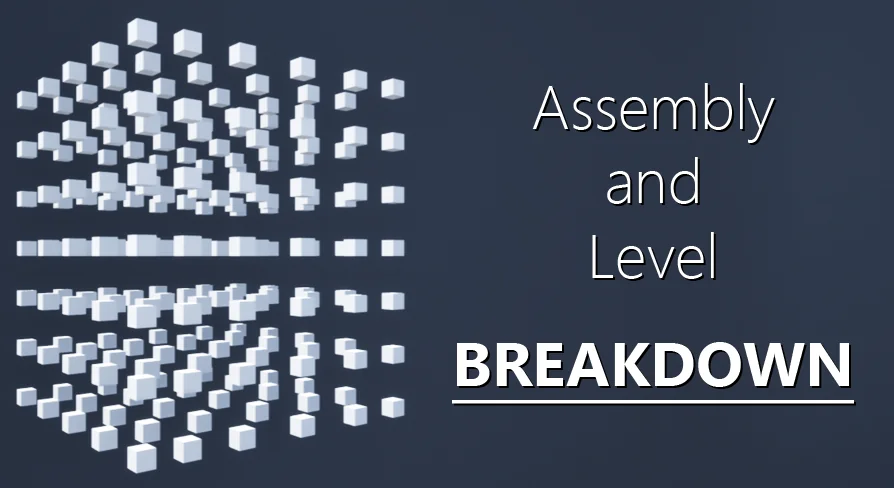
In addition to object-level mechanical breakdowns, spatial visualization often demands high-level staging for entire environments, terrain segments, or building storeys. For these larger sequences, the package supplies BP_BreakdownLevel. This dedicated Blueprint focuses exclusively on level breakdown and assembly sequences by managing vertical displacement along the Z-axis.
Unlike the multi-directional cubic, cylindrical, and spherical tools that support bidirectional playback, BP_BreakdownLevel is configured specifically for forward movement, functioning as an assembly mechanism that builds a level upward from its individual pieces. Floor plates, structural pillars, ceilings, and modular landscape assets drop or rise into place along the vertical plane. This provides a distinct presentation style for showing construction progress or assembling complete scenes in architectural showcases.
Fine-Tuning Motion via BP_BreakdownParameters and Timing Settings
Uniform movement across an entire exploded view can result in a rigid, synthetic visual feel. Breakdown provides a deep layer of animation customization options to balance timing, speed, and spatial distribution across every involved mesh. Users can adjust global parameters or attach BP_BreakdownParameters, an actor component that enables movement scale overrides for specific actors within the volume.
The system exposes several distinct controls to govern the behavior of the transformation:
Overall Animation Speed: Regulates the core timeline duration and velocity across the active breakdown sequence.
Expansion Size Per Direction: Dictates the maximum travel distance of objects along each specified movement vector, allowing wide separation along one axis while keeping another tightly packed.
Linear and Nonlinear Speed Profiles: Permits switching between strict mechanical linear interpolation and eased nonlinear curves for more dynamic, stylized motion.
Delay Coefficients Between Actors: Establishes global timing gaps between when individual meshes start moving, preventing every component from sliding at the exact same fraction of a second.
Directional Delay Coefficients: Offers isolated delay multipliers tied specifically to directional axes, sequencing movement along one vector before another begins.
Size-Based Sequence Coefficient: Available specifically within BP_BreakdownLevel, this parameter offsets animation timing based on the physical dimensions of the objects, ensuring massive structural masses and smaller modular components assemble in a staggered, visually coherent sequence.
Practical Application in Technical and Interactive Pipelines
Because the logic is embedded within standalone Blueprints and accessible functions, integrating these transformations into real-time applications requires minimal overhead. Technical artists can bind the breakdown functions to UI events, runtime trigger volumes, or presentation slide controllers, turning static CAD models into interactive educational models. The included Blueprints supply the logic, transformation arrays, and timing math directly, while any props or environment assets used in visual demonstrations serve purely as conceptual examples, allowing creators to deploy the tool onto their own custom mesh libraries.
Visualizers working across civil engineering, architecture, product design, and interactive technical documentation gain the most utility from this setup. By abstracting the complex math of directional vector expansion and staggered delay curves into clear Actor volumes, Breakdown removes the friction of manual layout animation, letting artists focus on highlighting functional design and clean spatial clarity.
 Animations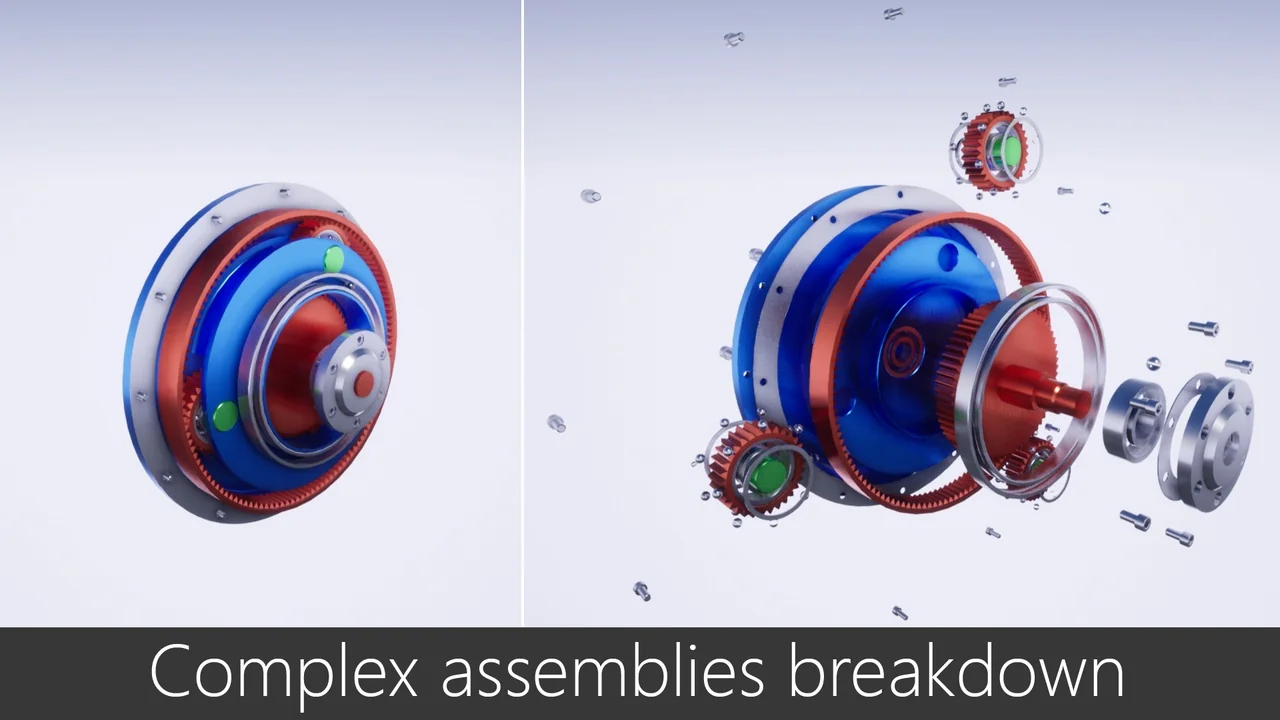
 Animations
 Animations
 Animations