"7b46a695175d8694"{"id":"1001504","slug":"backpacks-system-models","title":"BackPacks - System + Models","category":"Clothing \u0026 Accessories","engine":"5.1+","assetVersion":"","engineVersion":"Engine Version: 5.1+","tag":"Clothing","accent":"blue","visual":"mech","summary":"Examine the technical setup, UI integration, dynamic materials, and Mannequin idle animations included in BackPacks - System + Models.","platform":"Unreal Engine","publishedAt":"2026-10-09T07:32:01.344Z","updatedAt":"2026-10-09T07:32:01.344Z","sourceNotes":[],"fileContents":[],"compatibility":["Unreal Engine","Engine Version: 5.1+"],"featuredImage":{"alt":"BackPacks - System + Models","src":"/wp-content/uploads/published/2026/10/446f793a9985-d1028a21-2b31-475f-a396-3c63bf12cd9f-a53ff3cb43.webp"},"hasDownloadLink":true,"downloads":0,"terms":[{"taxonomy":"category","slug":"clothing-and-accessories","name":"Clothing \u0026 Accessories"}],"galleryImages":[{"src":"/wp-content/uploads/published/2026/10/76341e7a515c-208741b2-ee23-4e0c-9065-30e77c9a345f-f1f96d2059.webp","alt":"BackPacks - System + Models"},{"src":"/wp-content/uploads/published/2026/10/5c203c60453e-795bffd3-0f11-4ab8-809f-c92d1bc4657c-c647504bac.webp","alt":"BackPacks - System + Models"},{"src":"/wp-content/uploads/published/2026/10/d31851507a41-80281ec5-f161-4b8d-a524-0146f2fd50ad-025e4e021f.webp","alt":"BackPacks - System + Models"},{"src":"/wp-content/uploads/published/2026/10/2b96d848d76d-7741cca7-bc5c-47f2-9e64-96abc860d212-5245482337.webp","alt":"BackPacks - System + Models"},{"src":"/wp-content/uploads/published/2026/10/647bbf6fc358-f1cd1751-a226-46ce-bc1a-8935dc8a70dc-77f5eed7c4.webp","alt":"BackPacks - System + Models"},{"src":"/wp-content/uploads/published/2026/10/0a14403ee90a-bc49829a-cbdf-4bc8-8528-1e1014d023ea-004817fee1.webp","alt":"BackPacks - System + Models"}],"accessPanel":{"kind":"resource","title":"Download this resource","eyebrow":"Free Download","message":"Log in or create a free account to start your download.","fileName":"Content.7z","safetyNote":"Resources are manually reviewed before listing to improve quality and reduce obvious risks.","actionLabel":"Download Free","resourceType":"Resource archive"},"contentHtml":"\u003ch2\u003eUI System and Blueprint Script Integration\u003c/h2\u003e\u003cp\u003eIntegrating inventory equipment into a character controller requires clean communication between visual skeletal bindings and interface logic. BackPacks - System + Models delivers a dedicated UI system engineered to bridge user selection and character back-socket mounting without requiring bespoke inventory code. The blueprint system operates directly on character event loops, managing the equip state and passing cosmetic updates through the interface layer.\u003c/p\u003e\u003cp\u003eBecause the setup supports seamless integration, linking the back equipment to an existing inventory layout relies on standard script dispatches. When a player triggers an equipment swap inside the UI system, the blueprints handle model swapping, socket targeting, and style updates simultaneously. This reduces the need to build individual attachment scripts for each back accessory or write custom interface logic to refresh visual references.\u003c/p\u003e\u003cp\u003eDevelopers working with stylized project architectures can drop the included UI system directly into existing gameplay frameworks. The inventory blueprints manage callouts for equipment state, handling the active mesh updates cleanly. This structural predictability ensures that adding, removing, or swapping packs remains unified across both single-player prototypes and expanding character customization setups.\u003c/p\u003e\u003ch2\u003eDeploying 14 Backpack Assets Across 3 Styles Each\u003c/h2\u003e\u003cp\u003eAt the center of the visual lineup are 14 backpack assets, each configured with 3 distinct styles. This multiplier provides 42 visual variations out of the box, structured to fit stylized character designs without needing geometry reworks. Each unit brings distinct silhouette values, ranging from compact packs to bulkier tactical arrangements suited for broader character classes.\u003c/p\u003e\u003cp\u003eManaging 14 backpack models within an ongoing project requires reliable naming conventions and clean mesh separation. The package groups the models so that swapping styles does not disrupt pivot points or socket alignment. Because each of the 14 units contains 3 matching style iterations, character rosters can maintain visual diversity while retaining identical skeletal attachment points on the character mesh.\u003c/p\u003e\u003cp\u003eThe stylistic variations allow game projects to indicate equipment progression, loadout classes, or cosmetic rarity. A player equipping a base-level pack can visually upgrade through the secondary and tertiary styles without shifting the baseline attachment logic. This modular division keeps asset tracking simple inside standard inventory data tables, letting designers define styles as index offsets rather than distinct, disconnected assets.\u003c/p\u003e\u003ch2\u003eSurface Configuration with 4K Textures and Dynamic Materials\u003c/h2\u003e\u003cp\u003eEvery model in the collection leverages 4K textures mapped to dynamic materials. Using high-resolution texture maps on stylized forms ensures that silhouette edges, panel lines, and painted details stay crisp even under close-up third-person character cameras. The dynamic material architecture provides control over parameters directly inside the engine, removing the need to re-export textures for simple visual iterations.\u003c/p\u003e\u003cp\u003eDynamic materials allow developers to alter surface values in real time through parameter collections or blueprint scripts. Tint adjustments, accent shifts, and material instance swaps can be piped into the inventory logic, matching the pack surfaces to specific character colorways or team markers. By handling variations through dynamic material parameters rather than baking flat textures for every variant, memory footprints remain optimized even with 4K base assets.\u003c/p\u003e\u003cp\u003eThe dynamic material structure works in parallel with the 3 distinct styles assigned to each pack. When a model style is updated inside the UI system, the material instances dynamically switch parameters to accommodate the new look. This combination of 4K texture resolution and real-time material handling preserves visual fidelity across varied lighting scenarios, from bright stylized environments to high-contrast stylized interiors.\u003c/p\u003e\u003ch2\u003eRigging Alignment and 3 Idle Animations for Mannequin\u003c/h2\u003e\u003cp\u003eBack-mounted equipment often creates clipping issues or awkward visual offsets when default character poses do not account for pack depth. To solve baseline alignment hurdles, the package provides 3 idle animations for the standard Mannequin. These idles account for the volume of the 14 backpack assets, ensuring that shoulders, spine posture, and arms rest naturally around the pack geometry.\u003c/p\u003e\u003cp\u003eApplying these 3 idle variations gives character rigs an immediate mechanical foundation. The poses shift spine weighting and shoulder stance subtly, accommodating both compact and heavy pack configurations without forcing developers to manually counter-animate default idle loops. Because the motions are targeted directly to the Mannequin skeleton, retargeting them onto custom stylized character rigs requires minimal manual bone adjustment.\u003c/p\u003e\u003cp\u003eThe animations also provide clean reference baselines for socket positioning. By testing backpack sockets against the 3 idle animations for Mannequin, developers can verify that straps, utility clips, and frame components do not intersect with character meshes during breathing or resting posture shifts. This testing step confirms that all 14 backpack designs rest against the spine correctly across every supported style.\u003c/p\u003e\u003ch2\u003eCompatibility with Dunpix Ultimate Weapon Customization System\u003c/h2\u003e\u003cp\u003eCohesive character customization often extends beyond back gear into weapon loadouts and secondary gear sets. BackPacks - System + Models maintains operational compatibility with the Dunpix Ultimate Weapon Customization System v2 as well as the Stylized Futuristic Set. This interoperability ensures that back-mounted gear coordinates cleanly with dynamic weapon attachments and matching character aesthetics.\u003c/p\u003e\u003cp\u003eWhen combining these packs with the ultimate weapon customization system, socket hierarchies can be linked so that holstered rifles or secondary tools stow alongside or over the back assets. Because both setups share a stylized foundation, combining them creates a cohesive loadout interface where gear, backpacks, and weaponry communicate across unified blueprint events.\u003c/p\u003e\u003cp\u003eWorking across complementary systems simplifies the pipeline for full character loadout screens. Developers can tie the backpack UI system directly into broader equipment menus, standardizing the way weapon customization and cosmetic pack choices are saved, displayed, and executed on the character rig. The matching stylistic treatment and shared integration logic streamline development across complex character inventory setups.\u003c/p\u003e\n\n\u003ch2\u003eRelated Resources Worth Checking\u003c/h2\u003e\n\u003cul\u003e\n\u003cli\u003e\u003ca href=\"https://3dcghub.com/metawardrobe-metahuman/\" title=\"MetaWardrobe - Metahuman\"\u003eMetaWardrobe - Metahuman\u003c/a\u003e\u003c/li\u003e\n\u003cli\u003e\u003ca href=\"https://3dcghub.com/surgery-gloves-147-model-for-metahumans-all-mh-bodies-ue5-skeletons-rigged/\" title=\"Surgery Gloves 147 Model for Metahumans - All MH Bodies \u0026amp; UE5 Skeletons - Rigged\"\u003eSurgery Gloves 147 Model for Metahumans - All MH Bodies \u0026amp; UE5 Skeletons - Rigged\u003c/a\u003e\u003c/li\u003e\n\u003cli\u003e\u003ca href=\"https://3dcghub.com/octopus-backpack-procedural-tentacles-for-grabbing-throwing-and-movement/\" title=\"Octopus Backpack – Procedural Tentacles for Grabbing, Throwing and Movement\"\u003eOctopus Backpack – Procedural Tentacles for Grabbing, Throwing and Movement\u003c/a\u003e\u003c/li\u003e\n\u003cli\u003e\u003ca href=\"https://3dcghub.com/realistic-lace-material-pack-4k-v3/\" title=\"Realistic Lace Material Pack 4K - V3\"\u003eRealistic Lace Material Pack 4K - V3\u003c/a\u003e\u003c/li\u003e\n\u003cli\u003e\u003ca href=\"https://3dcghub.com/scans-vol-2-clothes-nanite-and-low-poly/\" title=\"Scans VOL.2 - Clothes (Nanite \u0026amp; Low Poly)\"\u003eScans VOL.2 - Clothes (Nanite \u0026amp; Low Poly)\u003c/a\u003e\u003c/li\u003e\n\u003c/ul\u003e","contentTextLength":6953,"navigation":{"current":41,"total":3481,"previous":{"id":"1001505","slug":"breakdown","title":"Breakdown","category":"Animations","platform":"Unreal Engine","updatedAt":"2026-10-09T07:32:19.643Z"},"next":{"id":"1001503","slug":"audio-analyzer","title":"Audio Analyzer","category":"Engine Tools","platform":"Unreal Engine","updatedAt":"2026-10-09T07:31:16.197Z"}},"relatedResources":[{"id":"28322","slug":"metawardrobe-metahuman","title":"MetaWardrobe - Metahuman","category":"Clothing \u0026 Accessories","engine":"5.4+","assetVersion":"Engine version: 5.4+","engineVersion":"","tag":"Clothing","accent":"blue","visual":"character","summary":"MetaWardrobe focuses on a common character-production task: giving MetaHuman characters more wardrobe options without starting each outfit from scratch. It is an expanding clothing pack for Unreal Engine, supported by ongoing outfit updates and tutorials, i...","platform":"Unreal Engine","publishedAt":"2026-05-07T09:12:00.000Z","updatedAt":"2026-05-07T09:12:01.000Z","sourceNotes":[],"fileContents":[],"compatibility":["Unreal Engine","Engine version: 5.4+"],"featuredImage":{"alt":"MetaWardrobe - Metahuman","src":"https://3dcghub.com/wp-content/uploads/2026/05/29dde0259099_a50126df-4113-4d58-80c0-da34ea241580.webp"},"hasDownloadLink":true,"downloads":9},{"id":"27876","slug":"surgery-gloves-147-model-for-metahumans-all-mh-bodies-ue5-skeletons-rigged","title":"Surgery Gloves 147 Model for Metahumans - All MH Bodies \u0026 UE5 Skeletons - Rigged","category":"Clothing \u0026 Accessories","engine":"5.3+","assetVersion":"Engine version: 5.3+","engineVersion":"","tag":"Clothing","accent":"blue","visual":"character","summary":"Surgery Gloves 147 targets a very specific character workflow: adding medical-style latex gloves to MetaHumans and UE5 mannequins without rebuilding the fit for each body. The package covers all male and female MetaHuman bodies, supports the new parametric...","platform":"Unreal Engine","publishedAt":"2026-04-30T05:25:47.000Z","updatedAt":"2026-04-30T05:25:48.000Z","sourceNotes":[],"fileContents":[],"compatibility":["Unreal Engine","Engine version: 5.3+"],"featuredImage":{"alt":"Surgery Gloves 147 Model for Metahumans - All MH Bodies \u0026 UE5 Skeletons - Rigged","src":"https://3dcghub.com/wp-content/uploads/2026/04/27712e77c11a_d0fa8353-fc9b-4c9a-bae4-6b195c8fb111.webp"},"hasDownloadLink":true,"downloads":3},{"id":"1001488","slug":"octopus-backpack-procedural-tentacles-for-grabbing-throwing-and-movement","title":"Octopus Backpack – Procedural Tentacles for Grabbing, Throwing and Movement","category":"Gameplay Features","engine":"5.4","assetVersion":"Asset Version: 1.0","engineVersion":"Engine Version: 5.4","tag":"Gameplay Features","accent":"blue","visual":"mech","summary":"Add boneless procedural tentacles to Unreal Engine characters for IK-driven grabbing, throwing, and physical static mesh latching mechanics.","platform":"Unreal Engine","publishedAt":"2026-10-08T09:28:15.308Z","updatedAt":"2026-10-08T09:28:15.308Z","sourceNotes":[],"fileContents":[],"compatibility":["Unreal Engine","Asset Version: 1.0","Engine Version: 5.4"],"featuredImage":{"alt":"Octopus Backpack – Procedural Tentacles for Grabbing, Throwing and Movement","src":"/wp-content/uploads/published/2026/10/1b31ff364b34-d14674a5-b458-4be6-8681-88388ee2906a-ba62b7d57b.webp"},"hasDownloadLink":true,"downloads":1}]}
Clothing
BackPacks - System + Models
Examine the technical setup, UI integration, dynamic materials, and Mannequin idle animations included in BackPacks - System + Models.
Integrating inventory equipment into a character controller requires clean communication between visual skeletal bindings and interface logic. BackPacks - System + Models delivers a dedicated UI system engineered to bridge user selection and character back-socket mounting without requiring bespoke inventory code. The blueprint system operates directly on character event loops, managing the equip state and passing cosmetic updates through the interface layer.
Because the setup supports seamless integration, linking the back equipment to an existing inventory layout relies on standard script dispatches. When a player triggers an equipment swap inside the UI system, the blueprints handle model swapping, socket targeting, and style updates simultaneously. This reduces the need to build individual attachment scripts for each back accessory or write custom interface logic to refresh visual references.
Developers working with stylized project architectures can drop the included UI system directly into existing gameplay frameworks. The inventory blueprints manage callouts for equipment state, handling the active mesh updates cleanly. This structural predictability ensures that adding, removing, or swapping packs remains unified across both single-player prototypes and expanding character customization setups.
Deploying 14 Backpack Assets Across 3 Styles Each
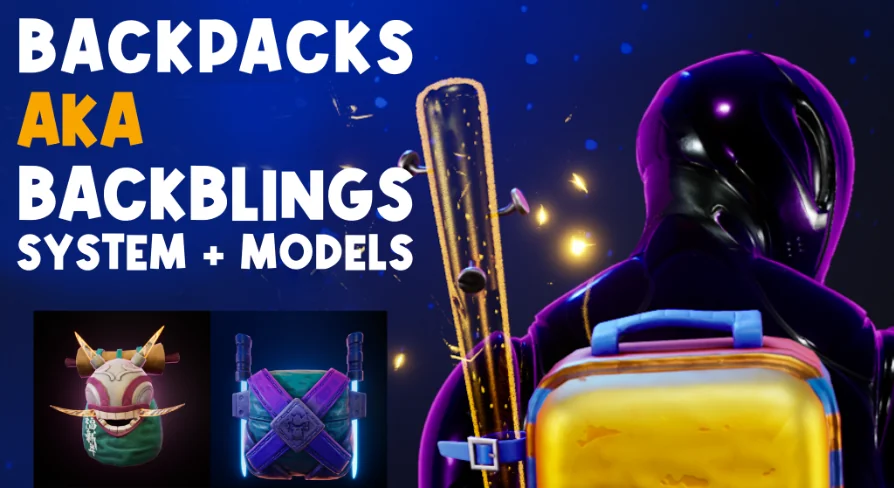
At the center of the visual lineup are 14 backpack assets, each configured with 3 distinct styles. This multiplier provides 42 visual variations out of the box, structured to fit stylized character designs without needing geometry reworks. Each unit brings distinct silhouette values, ranging from compact packs to bulkier tactical arrangements suited for broader character classes.
Managing 14 backpack models within an ongoing project requires reliable naming conventions and clean mesh separation. The package groups the models so that swapping styles does not disrupt pivot points or socket alignment. Because each of the 14 units contains 3 matching style iterations, character rosters can maintain visual diversity while retaining identical skeletal attachment points on the character mesh.
The stylistic variations allow game projects to indicate equipment progression, loadout classes, or cosmetic rarity. A player equipping a base-level pack can visually upgrade through the secondary and tertiary styles without shifting the baseline attachment logic. This modular division keeps asset tracking simple inside standard inventory data tables, letting designers define styles as index offsets rather than distinct, disconnected assets.
Surface Configuration with 4K Textures and Dynamic Materials
Every model in the collection leverages 4K textures mapped to dynamic materials. Using high-resolution texture maps on stylized forms ensures that silhouette edges, panel lines, and painted details stay crisp even under close-up third-person character cameras. The dynamic material architecture provides control over parameters directly inside the engine, removing the need to re-export textures for simple visual iterations.
Dynamic materials allow developers to alter surface values in real time through parameter collections or blueprint scripts. Tint adjustments, accent shifts, and material instance swaps can be piped into the inventory logic, matching the pack surfaces to specific character colorways or team markers. By handling variations through dynamic material parameters rather than baking flat textures for every variant, memory footprints remain optimized even with 4K base assets.
The dynamic material structure works in parallel with the 3 distinct styles assigned to each pack. When a model style is updated inside the UI system, the material instances dynamically switch parameters to accommodate the new look. This combination of 4K texture resolution and real-time material handling preserves visual fidelity across varied lighting scenarios, from bright stylized environments to high-contrast stylized interiors.
Rigging Alignment and 3 Idle Animations for Mannequin
Back-mounted equipment often creates clipping issues or awkward visual offsets when default character poses do not account for pack depth. To solve baseline alignment hurdles, the package provides 3 idle animations for the standard Mannequin. These idles account for the volume of the 14 backpack assets, ensuring that shoulders, spine posture, and arms rest naturally around the pack geometry.
Applying these 3 idle variations gives character rigs an immediate mechanical foundation. The poses shift spine weighting and shoulder stance subtly, accommodating both compact and heavy pack configurations without forcing developers to manually counter-animate default idle loops. Because the motions are targeted directly to the Mannequin skeleton, retargeting them onto custom stylized character rigs requires minimal manual bone adjustment.
The animations also provide clean reference baselines for socket positioning. By testing backpack sockets against the 3 idle animations for Mannequin, developers can verify that straps, utility clips, and frame components do not intersect with character meshes during breathing or resting posture shifts. This testing step confirms that all 14 backpack designs rest against the spine correctly across every supported style.
Compatibility with Dunpix Ultimate Weapon Customization System
Cohesive character customization often extends beyond back gear into weapon loadouts and secondary gear sets. BackPacks - System + Models maintains operational compatibility with the Dunpix Ultimate Weapon Customization System v2 as well as the Stylized Futuristic Set. This interoperability ensures that back-mounted gear coordinates cleanly with dynamic weapon attachments and matching character aesthetics.
When combining these packs with the ultimate weapon customization system, socket hierarchies can be linked so that holstered rifles or secondary tools stow alongside or over the back assets. Because both setups share a stylized foundation, combining them creates a cohesive loadout interface where gear, backpacks, and weaponry communicate across unified blueprint events.
Working across complementary systems simplifies the pipeline for full character loadout screens. Developers can tie the backpack UI system directly into broader equipment menus, standardizing the way weapon customization and cosmetic pack choices are saved, displayed, and executed on the character rig. The matching stylistic treatment and shared integration logic streamline development across complex character inventory setups.
 Clothing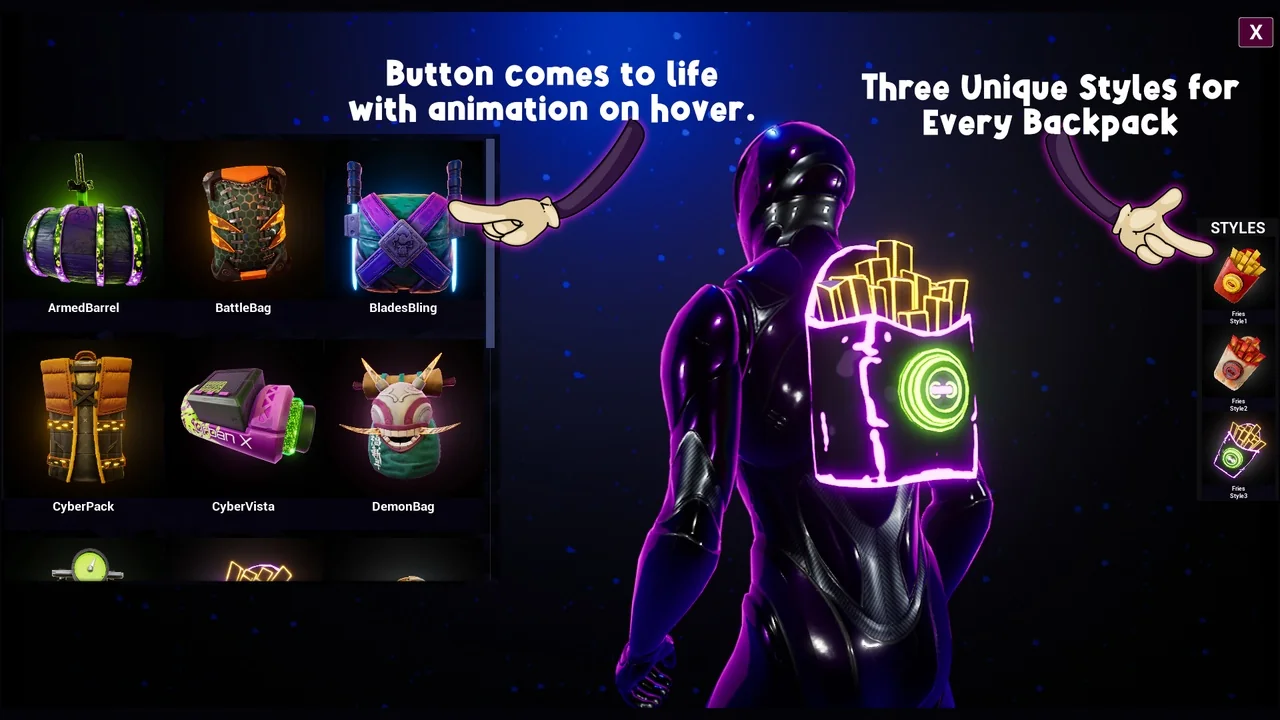
 Clothing
 Clothing
 Gameplay Features