"7ad89cffa44984cf"{"id":"1002510","slug":"bones-dragon","title":"Bones Dragon","category":"Creatures \u0026 Monsters","engine":"4.26+,5.0+","assetVersion":"","engineVersion":"Engine Version: 4.26+,5.0+","tag":"Creatures","accent":"blue","visual":"character","summary":"Detailed breakdown of the Bones Dragon asset, covering polygon budgets, LOD configuration, three-map texturing, and Character Studio animation setups.","platform":"Unreal Engine","indexPolicy":"index","publishedAt":"2026-11-13T08:45:04.389Z","updatedAt":"2026-11-13T08:45:04.389Z","sourceNotes":[],"fileContents":[],"compatibility":["Unreal Engine","Engine Version: 4.26+,5.0+"],"featuredImage":{"alt":"Bones Dragon","src":"/wp-content/uploads/published/2026/11/b7679e6f1d61-43b56921-2e2f-448f-973b-ef3f0ca4b05d-67ab57e817.webp"},"hasDownloadLink":true,"downloads":0,"terms":[{"taxonomy":"category","slug":"creatures-and-monsters","name":"Creatures \u0026 Monsters"}],"galleryImages":[{"src":"/wp-content/uploads/published/2026/11/784d56e100fe-d96c8374-b6ab-4fff-a52b-ad53e718e3bd-2932174770.webp","alt":"Bones Dragon"},{"src":"/wp-content/uploads/published/2026/11/67c6748eba5e-a53622dd-076d-4409-be00-a74b7f51d81b-572c33c564.webp","alt":"Bones Dragon"},{"src":"/wp-content/uploads/published/2026/11/495c814a2af6-63b8c475-f4cd-46e1-8d39-c7e8d7c7413c-b036c35fe8.webp","alt":"Bones Dragon"},{"src":"/wp-content/uploads/published/2026/11/9d0cc149e69b-20bd4c51-5c45-47fa-bdda-a37cdd87efa1-535c98f773.webp","alt":"Bones Dragon"},{"src":"/wp-content/uploads/published/2026/11/2873a02d2de7-e97bc178-f521-43a8-98a9-773039587f3a-a709566ab7.webp","alt":"Bones Dragon"}],"accessPanel":{"kind":"resource","title":"Get this resource","eyebrow":"Free resource","message":"Download this resource in your browser.","fileName":"Content.7z","safetyNote":"Resources are manually reviewed before listing to improve quality and reduce obvious risks.","actionLabel":"Get this resource","resourceType":"Resource archive","versions":[]},"contentHtml":"\u003cp\u003eThe Bones Dragon delivers a fully realized skeletal creature configured specifically for real-time environments that require monstrous, undead aerial and ground threats. Designed around anatomical articulation and bare bone structure, the package combines a dedicated high-detail mesh, an optimized level of detail step, specialized bone surface maps, and motion generated through 3D Max Character Studio. The asset functions both as an autonomous beast encounter and as a specialized heavyweight unit tailored for coordination with broader undead groupings, including the Skeleton Army lineup.\u003c/p\u003e \u003ch2\u003eMesh Architecture of the Bones Dragon\u003c/h2\u003e \u003cp\u003eRendering an exposed skeleton in a real-time engine presents distinct geometric challenges compared to fleshed creatures. Without continuous skin to bridge anatomy, every vertebra, rib, wing phalanx, and cranial ridge requires distinct topological definition. The primary base model of the Bones Dragon addresses this with a budget of 12,449 polygons, 23,366 triangles, and 12,236 vertexes. This density allows individual vertebral columns, cervical curves, and complex jaw structures to maintain crisp silhouettes without geometric collapse when viewed at close proximity during combat sequences or cinematic cutscenes.\u003c/p\u003e \u003cp\u003eTo preserve rendering performance when multiple creatures share the screen or when the monster moves into mid-range encounters, the asset includes an integrated level-of-detail variant. This LOD version reduces the geometry to 7,830 polygons, 14,758 triangles, and 7,923 vertexes. By eliminating unnecessary edge loops across elongated wing bones and combining smaller structural elements within the rib cage, the reduced profile retains the signature dragon silhouette while decreasing the vertex processing workload by more than a third.\u003c/p\u003e \u003ch2\u003eSurface Definition Through Diffuse, Specular, and Normal Maps\u003c/h2\u003e \u003cp\u003eThe visual identity of osseous structures relies heavily on how lighting interacts with calcified, weathered surfaces. The Bones Dragon achieves its material response through a classic three-channel configuration consisting of diffuse, specular, and normal maps. Rather than relying entirely on geometric micro-detail, the textures establish the tactile quality of ancient, desiccated bone across every segment of the creature's frame.\u003c/p\u003e \u003cp\u003eThe normal map provides essential micro-relief, simulating surface pitting, fine fractures, suture lines across the cranium, and the fibrous grain characteristic of weathered bone. These directional vectors react dynamically to in-game light sources, ensuring that directional sun angles or point-light torches reveal deep crevices along the spine and claws. Working in tandem, the specular map manages reflectivity levels, differentiating between dry, porous sections of skeletal framework and smoother, denser areas such as horn tips, teeth, and talons. The diffuse map supplies organic color variation, delivering natural discoloration, soil stains, and age gradients that ground the fantasy anatomy in realistic decay.\u003c/p\u003e \u003ch2\u003eCharacter Studio Animation and the Bones Dragon Motion Rig\u003c/h2\u003e \u003cp\u003eAnimating a multi-limbed skeletal animal requires a kinematic structure capable of handling wide wing articulations, flexible spinal movement, and expressive jaw motion. The animations for this asset were authored using Character Studio in 3D MAX. Character Studio provides specialized biped and multi-joint rig functionality, enabling coordinated locomotion cycles, aerial maneuvers, and attack animations that preserve proper mass distribution despite the absence of flesh.\u003c/p\u003e \u003cp\u003eBecause skeletal joints lack muscle mass to hide interpenetration, the motion authoring in 3D MAX demands precise keyframing around pivot points. The rig handles wing sweeps, tail whipping, and predatory lunges while preventing vertebrae and ribs from clipping into each other during complex bends. Translating these animations from 3D MAX into a runtime environment results in fluid motion that emphasizes the weight, size, and sinister nature of an apex monster.\u003c/p\u003e \u003ch2\u003eIntegration with Animation Blueprints and Scripting Systems\u003c/h2\u003e \u003cp\u003eMotion assets require responsive logic to operate reliably during gameplay. The asset incorporates dedicated script elements and an Animation Blueprint setup, connecting the authoring completed in 3D MAX directly to interactive real-time control mechanics. This arrangement governs how the creature transitions between movement states, attacks, hit reactions, and idling poses without manual assembly of raw animation clips.\u003c/p\u003e \u003cp\u003eWithin the Animation Blueprint, state machines handle the blending transitions between ground locomotion and airborne maneuvers. Blend spaces resolve velocity shifts, turning rates, and banking angles as the creature tracks target entities. The underlying scripting hooks allow technical designers to bind game logic—such as hit boxes along the jaw or wing tips, audio cue notifications for wing beats, and invulnerability windows during roar sequences—directly into the animation timeline.\u003c/p\u003e \u003ch2\u003eCohesive Deployment with the Skeleton Army\u003c/h2\u003e \u003cp\u003eIn game architecture, standalone assets often struggle to blend aesthetically with existing enemy factions. The Bones Dragon resolves this by maintaining direct stylistic and thematic compatibility with the Skeleton Army framework. Its bone coloration, surface weathering, and anatomical proportioning align with smaller skeletal infantry, archers, and mounted units, allowing it to function naturally as an aerial commander, a field boss, or a necromantic summon within the same faction hierarchy.\u003c/p\u003e \u003cp\u003eTechnical teams building fantasy RPGs, strategy titles, or dungeon encounters can drop the creature into established unit pools without reworking shader parameters or visual grading. The asset provides a cohesive heavy-tier beast that anchors combat encounters, supported by a balanced mesh budget, optimized LOD steps, and dedicated Animation Blueprint logic straight out of the box.\u003c/p\u003e\n\n\u003ch2\u003eMore From The Same Workflow\u003c/h2\u003e\n\u003cul\u003e\n\u003cli\u003e\u003ca href=\"https://3dcghub.com/animated-werewolf/\" rel=\"noopener noreferrer\"\u003eAnimated Werewolf\u003c/a\u003e\u003c/li\u003e\n\u003cli\u003e\u003ca href=\"https://3dcghub.com/orc-warlock-modular/\" rel=\"noopener noreferrer\"\u003eOrc Warlock (Modular)\u003c/a\u003e\u003c/li\u003e\n\u003cli\u003e\u003ca href=\"https://3dcghub.com/skeleton-army/\" rel=\"noopener noreferrer\"\u003eSkeleton Army\u003c/a\u003e\u003c/li\u003e\n\u003cli\u003e\u003ca href=\"https://3dcghub.com/black-dragon/\" rel=\"noopener noreferrer\"\u003eBlack Dragon\u003c/a\u003e\u003c/li\u003e\n\u003cli\u003e\u003ca href=\"https://3dcghub.com/goblin-shaman/\" rel=\"noopener noreferrer\"\u003eGoblin Shaman\u003c/a\u003e\u003c/li\u003e\n\u003c/ul\u003e","contentTextLength":6026,"navigation":{"current":67,"total":4499,"previous":{"id":"1002511","slug":"character-prisoner","title":"Character Prisoner","category":"Characters \u0026 Creatures","platform":"Unreal Engine","updatedAt":"2026-11-13T08:46:52.226Z"},"next":{"id":"1002509","slug":"bone-monster-3","title":"Bone Monster 3","category":"Characters \u0026 Creatures","platform":"Unreal Engine","updatedAt":"2026-11-13T08:43:09.387Z"}},"relatedResources":[{"id":"1002522","slug":"dragon-for-boss-monster-pbr","title":"Dragon for Boss Monster : PBR","category":"Creatures \u0026 Monsters","engine":"4.26+,5.0+","assetVersion":"","engineVersion":"Engine Version: 4.26+,5.0+","tag":"Creatures","accent":"blue","visual":"character","summary":"Examine the technical specs of Dragon for Boss Monster: PBR, featuring 4 dragon variants under 5k tris, 2048x2048 PBR textures, and 18 animations.","platform":"Unreal Engine","indexPolicy":"index","publishedAt":"2026-11-13T09:07:10.432Z","updatedAt":"2026-11-13T09:07:10.432Z","sourceNotes":[],"fileContents":[],"compatibility":["Unreal Engine","Engine Version: 4.26+,5.0+"],"featuredImage":{"alt":"Dragon for Boss Monster : PBR","src":"/wp-content/uploads/published/2026/11/0361dfebe345-7f290548-664d-40c4-b1b8-1be5aac3991b-b6a71c6843.webp"},"hasDownloadLink":true,"downloads":0},{"id":"1002503","slug":"animated-werewolf","title":"Animated Werewolf","category":"Creatures \u0026 Monsters","engine":"4.15+,5.0+","assetVersion":"","engineVersion":"Engine Version: 4.15+,5.0+","tag":"Creatures","accent":"blue","visual":"character","summary":"Detailed breakdown of the Animated Werewolf model, featuring 73 animations, 69-bone rig, root motion sets, and modular fur geometry counts.","platform":"Unreal Engine","indexPolicy":"index","publishedAt":"2026-11-13T08:09:59.230Z","updatedAt":"2026-11-13T08:09:59.230Z","sourceNotes":[],"fileContents":[],"compatibility":["Unreal Engine","Engine Version: 4.15+,5.0+"],"featuredImage":{"alt":"Animated Werewolf","src":"/wp-content/uploads/published/2026/11/2bdc373908c4-1dfe5dcf-7418-415c-8199-72e9813dd799-ac1adfd838.webp"},"hasDownloadLink":true,"downloads":0},{"id":"1002410","slug":"orc-warlock-modular","title":"Orc Warlock (Modular)","category":"Creatures \u0026 Monsters","engine":"4.18+,5.0+","assetVersion":"","engineVersion":"Engine Version: 4.18+,5.0+","tag":"Creatures","accent":"blue","visual":"character","summary":"Modular Orc Warlock 3D character featuring 4K PBR textures, 9 texture sets, facial blendshapes, dynamic bones, and cloth simulation settings.","platform":"Unreal Engine","indexPolicy":"index","publishedAt":"2026-11-10T12:07:32.680Z","updatedAt":"2026-11-10T12:07:32.680Z","sourceNotes":[],"fileContents":[],"compatibility":["Unreal Engine","Engine Version: 4.18+,5.0+"],"featuredImage":{"alt":"Orc Warlock (Modular)","src":"/wp-content/uploads/published/2026/11/ab393dc06201-809dce1d-d4c7-40a4-8ce3-bd687327bc09-5c75a6b4b4.webp"},"hasDownloadLink":true,"downloads":0}]}
Creatures
Bones Dragon
Detailed breakdown of the Bones Dragon asset, covering polygon budgets, LOD configuration, three-map texturing, and Character Studio animation setups.
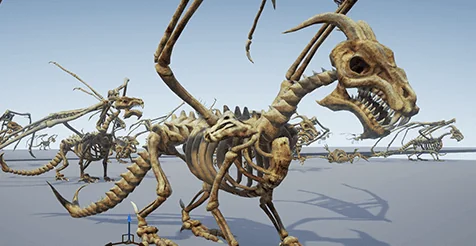
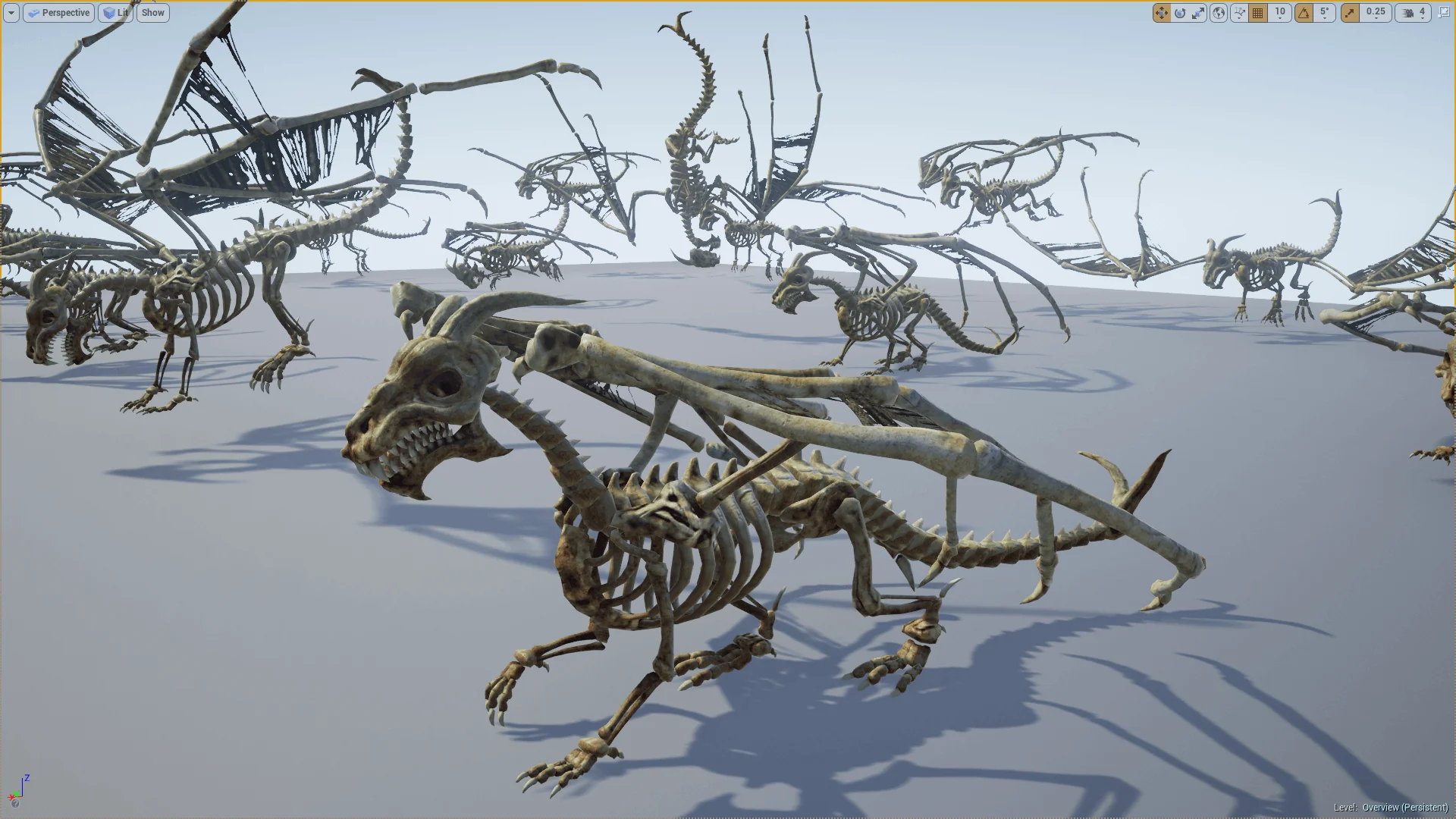
The Bones Dragon delivers a fully realized skeletal creature configured specifically for real-time environments that require monstrous, undead aerial and ground threats. Designed around anatomical articulation and bare bone structure, the package combines a dedicated high-detail mesh, an optimized level of detail step, specialized bone surface maps, and motion generated through 3D Max Character Studio. The asset functions both as an autonomous beast encounter and as a specialized heavyweight unit tailored for coordination with broader undead groupings, including the Skeleton Army lineup.
Mesh Architecture of the Bones Dragon
Rendering an exposed skeleton in a real-time engine presents distinct geometric challenges compared to fleshed creatures. Without continuous skin to bridge anatomy, every vertebra, rib, wing phalanx, and cranial ridge requires distinct topological definition. The primary base model of the Bones Dragon addresses this with a budget of 12,449 polygons, 23,366 triangles, and 12,236 vertexes. This density allows individual vertebral columns, cervical curves, and complex jaw structures to maintain crisp silhouettes without geometric collapse when viewed at close proximity during combat sequences or cinematic cutscenes.
To preserve rendering performance when multiple creatures share the screen or when the monster moves into mid-range encounters, the asset includes an integrated level-of-detail variant. This LOD version reduces the geometry to 7,830 polygons, 14,758 triangles, and 7,923 vertexes. By eliminating unnecessary edge loops across elongated wing bones and combining smaller structural elements within the rib cage, the reduced profile retains the signature dragon silhouette while decreasing the vertex processing workload by more than a third.
Surface Definition Through Diffuse, Specular, and Normal Maps
The visual identity of osseous structures relies heavily on how lighting interacts with calcified, weathered surfaces. The Bones Dragon achieves its material response through a classic three-channel configuration consisting of diffuse, specular, and normal maps. Rather than relying entirely on geometric micro-detail, the textures establish the tactile quality of ancient, desiccated bone across every segment of the creature's frame.
The normal map provides essential micro-relief, simulating surface pitting, fine fractures, suture lines across the cranium, and the fibrous grain characteristic of weathered bone. These directional vectors react dynamically to in-game light sources, ensuring that directional sun angles or point-light torches reveal deep crevices along the spine and claws. Working in tandem, the specular map manages reflectivity levels, differentiating between dry, porous sections of skeletal framework and smoother, denser areas such as horn tips, teeth, and talons. The diffuse map supplies organic color variation, delivering natural discoloration, soil stains, and age gradients that ground the fantasy anatomy in realistic decay.
Character Studio Animation and the Bones Dragon Motion Rig
Animating a multi-limbed skeletal animal requires a kinematic structure capable of handling wide wing articulations, flexible spinal movement, and expressive jaw motion. The animations for this asset were authored using Character Studio in 3D MAX. Character Studio provides specialized biped and multi-joint rig functionality, enabling coordinated locomotion cycles, aerial maneuvers, and attack animations that preserve proper mass distribution despite the absence of flesh.
Because skeletal joints lack muscle mass to hide interpenetration, the motion authoring in 3D MAX demands precise keyframing around pivot points. The rig handles wing sweeps, tail whipping, and predatory lunges while preventing vertebrae and ribs from clipping into each other during complex bends. Translating these animations from 3D MAX into a runtime environment results in fluid motion that emphasizes the weight, size, and sinister nature of an apex monster.
Integration with Animation Blueprints and Scripting Systems
Motion assets require responsive logic to operate reliably during gameplay. The asset incorporates dedicated script elements and an Animation Blueprint setup, connecting the authoring completed in 3D MAX directly to interactive real-time control mechanics. This arrangement governs how the creature transitions between movement states, attacks, hit reactions, and idling poses without manual assembly of raw animation clips.
Within the Animation Blueprint, state machines handle the blending transitions between ground locomotion and airborne maneuvers. Blend spaces resolve velocity shifts, turning rates, and banking angles as the creature tracks target entities. The underlying scripting hooks allow technical designers to bind game logic—such as hit boxes along the jaw or wing tips, audio cue notifications for wing beats, and invulnerability windows during roar sequences—directly into the animation timeline.
Cohesive Deployment with the Skeleton Army
In game architecture, standalone assets often struggle to blend aesthetically with existing enemy factions. The Bones Dragon resolves this by maintaining direct stylistic and thematic compatibility with the Skeleton Army framework. Its bone coloration, surface weathering, and anatomical proportioning align with smaller skeletal infantry, archers, and mounted units, allowing it to function naturally as an aerial commander, a field boss, or a necromantic summon within the same faction hierarchy.
Technical teams building fantasy RPGs, strategy titles, or dungeon encounters can drop the creature into established unit pools without reworking shader parameters or visual grading. The asset provides a cohesive heavy-tier beast that anchors combat encounters, supported by a balanced mesh budget, optimized LOD steps, and dedicated Animation Blueprint logic straight out of the box.
 Creatures
 Creatures
 Creatures
 Creatures