"26aaab8a5d5ed4fc"{"id":"22409","slug":"animancer-pro-v8","title":"Animancer Pro v8","category":"Animation","engine":"Original Unity version: 2022.3.14","assetVersion":"Original Unity version: 2022.3.14","engineVersion":"Asset Version:8.0.2","tag":"Animation","accent":"cyan","visual":"animation","summary":"Animancer Pro v8 streamlines the animation workflow in Unity by allowing developers to play clips directly through code, bypassing the complexities of traditional Animator Controllers while maintaining support for IK, Root Motion, and various rig types.","platform":"Unity","publishedAt":"2026-04-06T07:55:12.000Z","updatedAt":"2026-04-19T15:37:19.000Z","sourceNotes":[],"fileContents":[],"compatibility":["Unity","Original Unity version: 2022.3.14","Asset Version: 8.0.2"],"featuredImage":{"alt":"Animancer Pro v8","src":"https://3dcghub.com/wp-content/uploads/2026/04/c84d5c051360_1f5adfb2-39bc-4e32-8d62-dcc60f8b5318_1280x720_stretch.webp"},"hasDownloadLink":true,"downloads":4,"terms":[{"taxonomy":"category","slug":"animation","name":"Animation"},{"taxonomy":"post_tag","slug":"animation","name":"Animation"},{"taxonomy":"post_tag","slug":"tools","name":"Tools"},{"taxonomy":"post_tag","slug":"unity","name":"Unity"}],"galleryImages":[{"src":"https://3dcghub.com/wp-content/uploads/2026/04/d1d032fcf4d2_ff88e1b9-fdaa-4f95-9c65-b7dfa61fbd59_scaled.webp","alt":"Animancer Pro v8"},{"src":"https://3dcghub.com/wp-content/uploads/2026/04/357234488b66_12fa4ec9-bcd5-4e68-a429-6721403a763b_scaled.webp","alt":"Animancer Pro v8"},{"src":"https://3dcghub.com/wp-content/uploads/2026/04/3108bec1055a_3b63fc04-537b-47f2-96ea-e3dd296a5a9e_scaled.webp","alt":"Animancer Pro v8"},{"src":"https://3dcghub.com/wp-content/uploads/2026/04/d450e2a53145_8d2d959b-e21c-4e41-b513-396991366fd8_scaled.webp","alt":"Animancer Pro v8"},{"src":"https://3dcghub.com/wp-content/uploads/2026/04/d29aa6925faf_2c17835d-4862-4c0c-ad98-17a4a1f97861_scaled.webp","alt":"Animancer Pro v8"},{"src":"https://3dcghub.com/wp-content/uploads/2026/04/93bde49150b2_5252b040-d4b7-4056-afa0-3c56bd827fa5_scaled.webp","alt":"Animancer Pro v8"},{"src":"https://3dcghub.com/wp-content/uploads/2026/04/aeaed091c552_d303cacc-cac2-42ee-a577-6adfae4575b7_scaled.webp","alt":"Animancer Pro v8"},{"src":"https://3dcghub.com/wp-content/uploads/2026/04/b2ab4215673f_09cdb4de-cd85-4404-8c9a-b6bd177cbee1_scaled.webp","alt":"Animancer Pro v8"},{"src":"https://3dcghub.com/wp-content/uploads/2026/04/0c8ba77afb0a_cfd6c0bb-ef2a-4c01-bfc0-43e1fe6932f7_scaled.webp","alt":"Animancer Pro v8"},{"src":"https://3dcghub.com/wp-content/uploads/2026/04/2c61e4221613_e5ae005e-5d26-42f7-b7f2-9e8c5b690427_scaled.webp","alt":"Animancer Pro v8"}],"accessPanel":{"kind":"resource","title":"Access this resource","eyebrow":"Free Download","message":"Log in or create a free account to start your download.","fileName":"Animancer Pro v8.0.2.7z","safetyNote":"All resources are 100% manually reviewed to eliminate all risks.","actionLabel":"Download Free","resourceType":"Resource archive"},"contentHtml":"\u003ch2\u003eDirect Animation Playback Without Controller Overhead\u003c/h2\u003e\n\nAnimancer Pro v8 provides a streamlined approach to Unity animation by allowing developers to play animations on-demand. Unlike the traditional workflow that relies heavily on Animator Controllers and complex state machine graphs, this tool enables direct control over animation details through code. By calling a simple command such as animancer.Play(clip), the developer can trigger animations without the need for the extensive setup steps usually required by the built-in Unity system. \n\nThis architecture is designed to address the common limitations found in Animator Controllers, such as the reliance on \"Magic Strings\" and rigid transition structures. Animancer can either replace these controllers entirely or work in tandem with them, offering flexibility across various stages of development. For those working on projects ranging from simple prototypes to complex, high-fidelity systems, the ability to bypass or supplement the standard Animator Controller can significantly reduce the friction associated with maintaining and debugging animation logic.\n\n\u003ch2\u003eWorkflow Efficiency and State Management\u003c/h2\u003e\n\nThe tool introduces several features aimed at simplifying the management of animation timing and sequencing. Through the \"Easy Waiting\" system, developers can register an End Event or use a Coroutine to yield return an AnimancerState. This allows the logic to pause until an animation has finished playing, eliminating the need for manual timers or complex callback chains. \n\nTo ensure movement remains fluid, Animancer supports smooth transitions. These transitions can blend between animations over time using either linear interpolation or custom curves, providing fine-grained control over how a character or object shifts between states. This level of control is particularly useful for maintaining visual fidelity during rapid state changes or complex movement sets.\n\nOrganization is handled through flexible data structures. Rather than managing a massive graph of interconnected nodes, animations can be organized into arrays or Scriptable Objects. This programmatic approach makes the animation data more accessible and easier to manage as a project scales, ensuring that references remain clear and type-safe.\n\n\u003ch2\u003eIntegrated Finite State Machines and Live Debugging\u003c/h2\u003e\n\nIncluded with the package is a Finite State Machine (FSM) system. While this system is entirely separate from the core animation logic, it is designed to work seamlessly with it. The FSM is flexible, allowing developers to modify it or swap it out for a different state machine system if the project requires a specific logic structure. This separation of concerns ensures that the animation layer remains focused on playback and blending, while the FSM handles the higher-level behavioral logic.\n\nFor debugging and testing, the tool features a Live Inspector. This allows the developer to view the real-time details of active animations directly within the Unity Inspector. Manual controls are available for testing specific animation states and values on the fly, which helps in identifying issues without having to constantly restart the play mode or navigate through complex controller layers.\n\n\u003ch2\u003eCompatibility and Technical Support\u003c/h2\u003e\n\nAnimancer Pro v8 is compatible with Unity 2022.3 or newer. It is designed to integrate smoothly with existing plugins and supports a wide range of standard Unity animation features, including:\n\n\u003cul\u003e\n\u003cli\u003eHumanoid Animation Retargeting and Generic Rigs\u003c/li\u003e\n\u003cli\u003eSprite-based animations\u003c/li\u003e\n\u003cli\u003eRoot Motion and Animation Events\u003c/li\u003e\n\u003cli\u003eInverse Kinematics (IK)\u003c/li\u003e\n\u003c/ul\u003e\n\nPerformance is a core consideration, and while the tool can be more efficient than traditional systems, the developer notes that the performance difference is often negligible in standard use cases. For those beginning their work with the tool, a variety of samples are included to demonstrate core concepts. These range from basic implementation examples to the Platformer Game Kit, which showcases how the system functions within a complex, multi-layered environment. Additionally, an extensive User Manual and an introduction to C# in Unity are provided to support both experienced programmers and those new to the engine.\n\n\u003ch2\u003eExplore Similar Assets\u003c/h2\u003e\n\u003cul\u003e\n\u003cli\u003e\u003ca href=\"https://3dcghub.com/hand-finger-tracking-windows/\" title=\"Hand \u0026amp;amp; Finger Tracking [Windows]\"\u003eHand \u0026amp; Finger Tracking [Windows]\u003c/a\u003e\u003c/li\u003e\n\u003cli\u003e\u003ca href=\"https://3dcghub.com/tanks-multiplayer-netcode-photon/\" title=\"Tanks Multiplayer (Netcode, Photon)\"\u003eTanks Multiplayer (Netcode, Photon)\u003c/a\u003e\u003c/li\u003e\n\u003cli\u003e\u003ca href=\"https://3dcghub.com/sliding-puzzle-game-template/\" title=\"Sliding Puzzle Game Template\"\u003eSliding Puzzle Game Template\u003c/a\u003e\u003c/li\u003e\n\u003cli\u003e\u003ca href=\"https://3dcghub.com/universal-fighting-engine-2-pro/\" title=\"Universal Fighting Engine 2 (PRO)\"\u003eUniversal Fighting Engine 2 (PRO)\u003c/a\u003e\u003c/li\u003e\n\u003cli\u003e\u003ca href=\"https://3dcghub.com/turn-based-strategy-framework/\" title=\"Turn Based Strategy Framework\"\u003eTurn Based Strategy Framework\u003c/a\u003e\u003c/li\u003e\n\u003c/ul\u003e","contentTextLength":4431,"navigation":{"current":3209,"total":3400,"previous":{"id":"22415","slug":"bones-assistant","title":"Bones Assistant","category":"Animation","platform":"Unity","updatedAt":"2026-04-19T15:37:19.000Z"},"next":{"id":"22396","slug":"animal-controller-malbers-character-controller","title":"Animal Controller (Malbers Character Controller)","category":"Animation","platform":"Unity","updatedAt":"2026-04-19T15:37:19.000Z"}},"relatedResources":[{"id":"22469","slug":"magic-animation-blend","title":"Magic Animation Blend","category":"Animation","engine":"Original Unity version: 2022.3.1","assetVersion":"Original Unity version: 2022.3.1","engineVersion":"Asset Version:2.2.1","tag":"Animation","accent":"cyan","visual":"animation","summary":"Magic Animation Blend offers a solution to the complexity of Unity Animator controllers by allowing developers to manage multiple item poses through a single controller with runtime procedural blending.","platform":"Unity","publishedAt":"2026-04-06T12:57:14.000Z","updatedAt":"2026-04-19T15:37:16.000Z","sourceNotes":[],"fileContents":[],"compatibility":["Unity","Original Unity version: 2022.3.1","Asset Version: 2.2.1"],"featuredImage":{"alt":"Magic Animation Blend","src":"https://3dcghub.com/wp-content/uploads/2026/04/2585ad8df115_cdc097ee-520e-4716-9a29-b5422449658c_1280x720_stretch.webp"},"hasDownloadLink":true,"downloads":1},{"id":"22494","slug":"motion-path-animation-editor","title":"Motion Path Animation Editor","category":"Animation","engine":"Original Unity version: 2020.3.38","assetVersion":"Original Unity version: 2020.3.38","engineVersion":"Asset Version:2.2.1","tag":"Animation","accent":"cyan","visual":"animation","summary":"Motion Path Animation Editor transforms active animation clips into visual paths within the Unity Scene view, allowing for direct manipulation of position-based keyframes using handles.","platform":"Unity","publishedAt":"2026-04-06T13:02:47.000Z","updatedAt":"2026-04-19T15:37:15.000Z","sourceNotes":[],"fileContents":[],"compatibility":["Unity","Original Unity version: 2020.3.38","Asset Version: 2.2.1"],"featuredImage":{"alt":"Motion Path Animation Editor","src":"https://3dcghub.com/wp-content/uploads/2026/04/f8f9ab643723_e8a1b640-5961-4f89-b2c2-865c101f16be_1280x720_stretch.webp"},"hasDownloadLink":true,"downloads":0},{"id":"21953","slug":"american-modern-v8-engine-sound","title":"American Modern V8 Engine Sound","category":"Transportation","engine":"Original Unity version: 2020.3.12","assetVersion":"Original Unity version: 2020.3.12","engineVersion":"Asset Version:1.3","tag":"Transportation","accent":"cyan","visual":"audio","summary":"This sound pack provides a streamlined workflow for integrating modern V8 engine audio into racing games, featuring pre-edited loops and compatibility for Realistic Engine Sounds 2.","platform":"Unity","publishedAt":"2026-03-28T05:43:31.000Z","updatedAt":"2026-04-19T15:42:12.000Z","sourceNotes":[],"fileContents":[],"compatibility":["Unity","Original Unity version: 2020.3.12","Asset Version: 1.3"],"featuredImage":{"alt":"American Modern V8 Engine Sound","src":"https://3dcghub.com/wp-content/uploads/2026/03/e1ea0a7c9494_c7202549-c24b-4ae8-bf06-4198ecc8c73c_1280x720_stretch.webp"},"hasDownloadLink":true,"downloads":3}]}
Animation
Animancer Pro v8
Animancer Pro v8 streamlines the animation workflow in Unity by allowing developers to play clips directly through code, bypassing the complexities of traditional Animator Controllers while maintaining support for IK, Root Motion, and various rig types.
Direct Animation Playback Without Controller Overhead
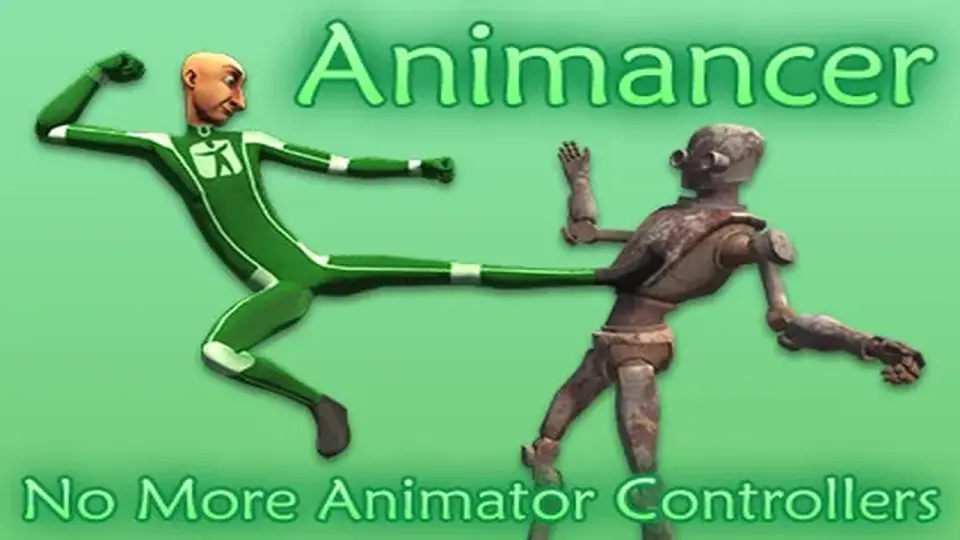
Animancer Pro v8 provides a streamlined approach to Unity animation by allowing developers to play animations on-demand. Unlike the traditional workflow that relies heavily on Animator Controllers and complex state machine graphs, this tool enables direct control over animation details through code. By calling a simple command such as animancer.Play(clip), the developer can trigger animations without the need for the extensive setup steps usually required by the built-in Unity system.
This architecture is designed to address the common limitations found in Animator Controllers, such as the reliance on "Magic Strings" and rigid transition structures. Animancer can either replace these controllers entirely or work in tandem with them, offering flexibility across various stages of development. For those working on projects ranging from simple prototypes to complex, high-fidelity systems, the ability to bypass or supplement the standard Animator Controller can significantly reduce the friction associated with maintaining and debugging animation logic.
Workflow Efficiency and State Management
The tool introduces several features aimed at simplifying the management of animation timing and sequencing. Through the "Easy Waiting" system, developers can register an End Event or use a Coroutine to yield return an AnimancerState. This allows the logic to pause until an animation has finished playing, eliminating the need for manual timers or complex callback chains.
To ensure movement remains fluid, Animancer supports smooth transitions. These transitions can blend between animations over time using either linear interpolation or custom curves, providing fine-grained control over how a character or object shifts between states. This level of control is particularly useful for maintaining visual fidelity during rapid state changes or complex movement sets.
Organization is handled through flexible data structures. Rather than managing a massive graph of interconnected nodes, animations can be organized into arrays or Scriptable Objects. This programmatic approach makes the animation data more accessible and easier to manage as a project scales, ensuring that references remain clear and type-safe.
Integrated Finite State Machines and Live Debugging
Included with the package is a Finite State Machine (FSM) system. While this system is entirely separate from the core animation logic, it is designed to work seamlessly with it. The FSM is flexible, allowing developers to modify it or swap it out for a different state machine system if the project requires a specific logic structure. This separation of concerns ensures that the animation layer remains focused on playback and blending, while the FSM handles the higher-level behavioral logic.
For debugging and testing, the tool features a Live Inspector. This allows the developer to view the real-time details of active animations directly within the Unity Inspector. Manual controls are available for testing specific animation states and values on the fly, which helps in identifying issues without having to constantly restart the play mode or navigate through complex controller layers.
Compatibility and Technical Support
Animancer Pro v8 is compatible with Unity 2022.3 or newer. It is designed to integrate smoothly with existing plugins and supports a wide range of standard Unity animation features, including:
Humanoid Animation Retargeting and Generic Rigs
Sprite-based animations
Root Motion and Animation Events
Inverse Kinematics (IK)
Performance is a core consideration, and while the tool can be more efficient than traditional systems, the developer notes that the performance difference is often negligible in standard use cases. For those beginning their work with the tool, a variety of samples are included to demonstrate core concepts. These range from basic implementation examples to the Platformer Game Kit, which showcases how the system functions within a complex, multi-layered environment. Additionally, an extensive User Manual and an introduction to C# in Unity are provided to support both experienced programmers and those new to the engine.
 Animation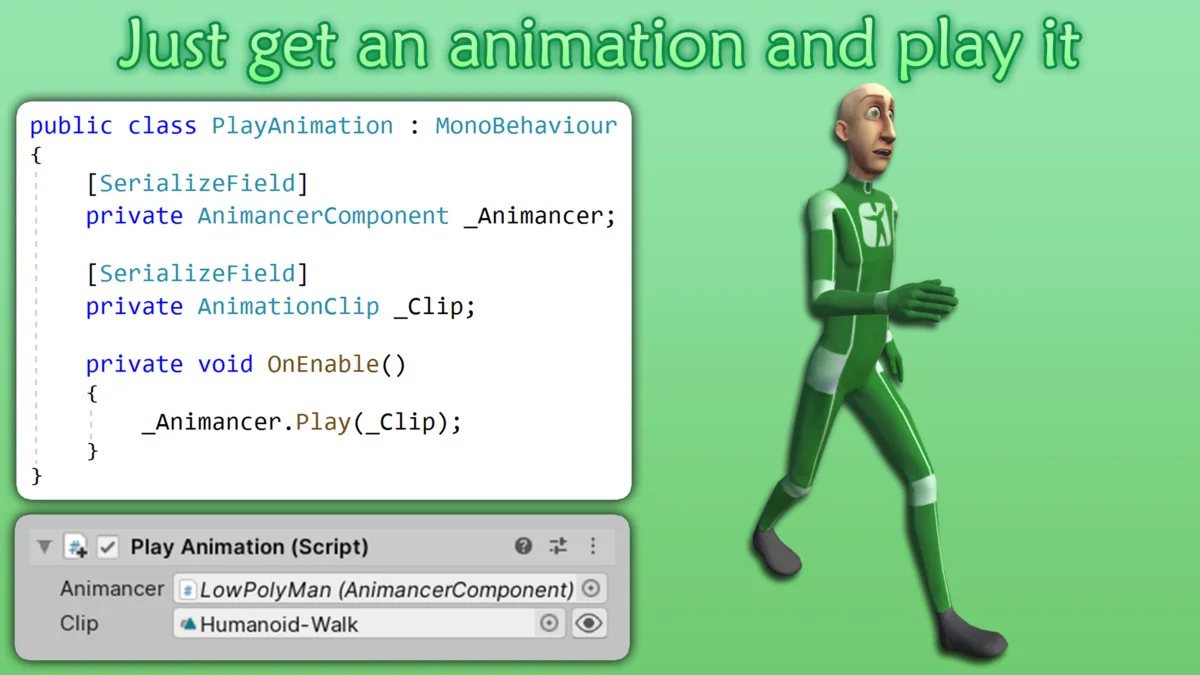
 Animation
 Animation
 Transportation