"26aaab8a5d5ed4fc"{"id":"22469","slug":"magic-animation-blend","title":"Magic Animation Blend","category":"Animation","engine":"Original Unity version: 2022.3.1","assetVersion":"Original Unity version: 2022.3.1","engineVersion":"Asset Version:2.2.1","tag":"Animation","accent":"cyan","visual":"animation","summary":"Magic Animation Blend offers a solution to the complexity of Unity Animator controllers by allowing developers to manage multiple item poses through a single controller with runtime procedural blending.","platform":"Unity","publishedAt":"2026-04-06T12:57:14.000Z","updatedAt":"2026-04-19T15:37:16.000Z","sourceNotes":[],"fileContents":[],"compatibility":["Unity","Original Unity version: 2022.3.1","Asset Version: 2.2.1"],"featuredImage":{"alt":"Magic Animation Blend","src":"https://3dcghub.com/wp-content/uploads/2026/04/2585ad8df115_cdc097ee-520e-4716-9a29-b5422449658c_1280x720_stretch.webp"},"hasDownloadLink":true,"downloads":1,"terms":[{"taxonomy":"category","slug":"animation","name":"Animation"},{"taxonomy":"post_tag","slug":"animation","name":"Animation"},{"taxonomy":"post_tag","slug":"tools","name":"Tools"},{"taxonomy":"post_tag","slug":"unity","name":"Unity"}],"galleryImages":[{"src":"https://3dcghub.com/wp-content/uploads/2026/04/f8b0ae1b7cde_be504ffe-e473-4303-96d8-c666644b1f85_scaled.webp","alt":"Magic Animation Blend"},{"src":"https://3dcghub.com/wp-content/uploads/2026/04/2a9933c70a8a_df4c2ad0-06d5-4fbe-86b0-ad15518f1afc_scaled.webp","alt":"Magic Animation Blend"},{"src":"https://3dcghub.com/wp-content/uploads/2026/04/9750e1bfbe44_a08958c2-352e-4a3d-bca8-c0c37652c7d5_scaled.webp","alt":"Magic Animation Blend"},{"src":"https://3dcghub.com/wp-content/uploads/2026/04/b619f8994f76_74c8fb26-fd3d-4e2f-8624-ecdcfef8cc96_scaled.webp","alt":"Magic Animation Blend"}],"accessPanel":{"kind":"resource","title":"Access this resource","eyebrow":"Free Download","message":"Log in or create a free account to start your download.","fileName":"Magic Animation Blend v2.2.1 (21 Apr 2025).7z","safetyNote":"All resources are 100% manually reviewed to eliminate all risks.","actionLabel":"Download Free","resourceType":"Resource archive"},"contentHtml":"\u003ch2\u003eConsolidating Animator Logic\u003c/h2\u003e\n\u003cp\u003eUnity's native Animator system often leads to complex, cluttered controllers when handling a wide variety of character poses and weapon types. Magic Animation Blend addresses this \"spaghetti\" logic by allowing a single animator controller to drive animations for various items, such as rifles, pistols, and swords. Instead of relying on numerous layers, override controllers, and intricate transitions, the tool utilizes procedural blending to manage different overlays.\u003c/p\u003e\n\n\u003cp\u003eThe core workflow involves creating an animator controller once and applying it across any item or weapon in a project. This is facilitated by a Magic Blend Asset, which provides the necessary parameters to control blending behavior at runtime. This approach is particularly applicable to diverse genres, including first-person shooters and open-world RPGs, where adding new content frequently requires unique posing without rebuilding the underlying animation logic.\u003c/p\u003e\n\n\u003ch2\u003eRuntime Customization and Visual Control\u003c/h2\u003e\n\u003cp\u003eImplementation of blending behavior is handled through adjustable sliders that can be tweaked while the game is running. This allows for immediate visual feedback on character poses and transitions without the need to restart the engine or manually modify code. The developer emphasizes that this procedural approach results in natural and smooth results, aiming to bypass the limitations of traditional state-machine transitions.\u003c/p\u003e\n\n\u003cp\u003eTo support specific technical requirements, the asset includes a Copy Bone tool, which was introduced in recent updates alongside an expanded animation library. These tools assist in refining the relationship between character rigs and the items they interact with, ensuring that the procedural overlays align correctly with the base animations.\u003c/p\u003e\n\n\u003ch2\u003eTechnical Optimization and Integration\u003c/h2\u003e\n\u003cp\u003ePerformance is a primary consideration for projects featuring high character counts. Magic Animation Blend is built on the Animation Job System, utilizing multithreaded updates to ensure that the procedural blending does not create a bottleneck. The system supports both Humanoid and Generic rig types, making it versatile for different character models and non-humanoid entities.\u003c/p\u003e\n\n\u003cp\u003eRegarding compatibility, the asset is designed for Unity versions 2022.3.1 and 2022.3.62. It supports all major render pipelines, including the Built-in Render Pipeline, HDRP, URP, and Custom SRP. While the tool is built to work natively with the Unity Animator, third-party systems such as Animancer can be integrated, though this requires custom code implementation via the Playables API.\u003c/p\u003e\n\n\u003ch2\u003eImplementation Overview\u003c/h2\u003e\n\u003cp\u003eThe package consists of 63 individual assets and is delivered as a unitypackage. By shifting the animation workload from static controller layers to runtime procedural blending, the tool simplifies the process of expanding a game's arsenal or interactive items. The focus remains on maintaining a clean project hierarchy while achieving smooth, dynamic character movement across different equipment sets.\u003c/p\u003e\n\n\u003ch2\u003eContinue Browsing Similar Packs\u003c/h2\u003e\n\u003cul\u003e\n\u003cli\u003e\u003ca href=\"https://3dcghub.com/geppetto-ai-powered-lip-sync-animation/\" title=\"Geppetto – AI-Powered Lip Sync Animation\"\u003eGeppetto – AI-Powered Lip Sync Animation\u003c/a\u003e\u003c/li\u003e\n\u003cli\u003e\u003ca href=\"https://3dcghub.com/fps-animation-framework/\" title=\"FPS Animation Framework\"\u003eFPS Animation Framework\u003c/a\u003e\u003c/li\u003e\n\u003cli\u003e\u003ca href=\"https://3dcghub.com/ultimate-animation-collection/\" title=\"ULTIMATE ANIMATION COLLECTION\"\u003eULTIMATE ANIMATION COLLECTION\u003c/a\u003e\u003c/li\u003e\n\u003cli\u003e\u003ca href=\"https://3dcghub.com/synty-animation-sword-combat/\" title=\"Synty ANIMATION – Sword Combat\"\u003eSynty ANIMATION – Sword Combat\u003c/a\u003e\u003c/li\u003e\n\u003cli\u003e\u003ca href=\"https://3dcghub.com/omni-animation-core-locomotion-pack/\" title=\"Omni Animation – Core Locomotion Pack\"\u003eOmni Animation – Core Locomotion Pack\u003c/a\u003e\u003c/li\u003e\n\u003c/ul\u003e","contentTextLength":3260,"navigation":{"current":3218,"total":3400,"previous":{"id":"22475","slug":"mesh-animator-animate-massive-crowds","title":"Mesh Animator - Animate massive crowds","category":"Animation","platform":"Unity","updatedAt":"2026-04-19T15:37:16.000Z"},"next":{"id":"22508","slug":"retarget-pro","title":"Retarget Pro","category":"Animation","platform":"Unity","updatedAt":"2026-04-19T15:37:15.000Z"}},"relatedResources":[{"id":"22409","slug":"animancer-pro-v8","title":"Animancer Pro v8","category":"Animation","engine":"Original Unity version: 2022.3.14","assetVersion":"Original Unity version: 2022.3.14","engineVersion":"Asset Version:8.0.2","tag":"Animation","accent":"cyan","visual":"animation","summary":"Animancer Pro v8 streamlines the animation workflow in Unity by allowing developers to play clips directly through code, bypassing the complexities of traditional Animator Controllers while maintaining support for IK, Root Motion, and various rig types.","platform":"Unity","publishedAt":"2026-04-06T07:55:12.000Z","updatedAt":"2026-04-19T15:37:19.000Z","sourceNotes":[],"fileContents":[],"compatibility":["Unity","Original Unity version: 2022.3.14","Asset Version: 8.0.2"],"featuredImage":{"alt":"Animancer Pro v8","src":"https://3dcghub.com/wp-content/uploads/2026/04/c84d5c051360_1f5adfb2-39bc-4e32-8d62-dcc60f8b5318_1280x720_stretch.webp"},"hasDownloadLink":true,"downloads":4},{"id":"22423","slug":"fps-animation-framework","title":"FPS Animation Framework","category":"Animation","engine":"Original Unity version: 2022.3.62","assetVersion":"Original Unity version: 2022.3.62","engineVersion":"Asset Version:4.7.1","tag":"Animation","accent":"cyan","visual":"animation","summary":"This procedural animation system for Unity 6 replaces traditional blend trees with code-driven motions, offering a modular approach to weapon sway, recoil, and full-body interaction.","platform":"Unity","publishedAt":"2026-04-06T08:02:32.000Z","updatedAt":"2026-04-19T15:37:18.000Z","sourceNotes":[],"fileContents":[],"compatibility":["Unity","Original Unity version: 2022.3.62","Asset Version: 4.7.1"],"featuredImage":{"alt":"FPS Animation Framework","src":"https://3dcghub.com/wp-content/uploads/2026/04/70feeadc2dfd_1573a758-2fec-47fe-91ba-a73062b41264_1280x720_stretch.webp"},"hasDownloadLink":true,"downloads":6},{"id":"22494","slug":"motion-path-animation-editor","title":"Motion Path Animation Editor","category":"Animation","engine":"Original Unity version: 2020.3.38","assetVersion":"Original Unity version: 2020.3.38","engineVersion":"Asset Version:2.2.1","tag":"Animation","accent":"cyan","visual":"animation","summary":"Motion Path Animation Editor transforms active animation clips into visual paths within the Unity Scene view, allowing for direct manipulation of position-based keyframes using handles.","platform":"Unity","publishedAt":"2026-04-06T13:02:47.000Z","updatedAt":"2026-04-19T15:37:15.000Z","sourceNotes":[],"fileContents":[],"compatibility":["Unity","Original Unity version: 2020.3.38","Asset Version: 2.2.1"],"featuredImage":{"alt":"Motion Path Animation Editor","src":"https://3dcghub.com/wp-content/uploads/2026/04/f8f9ab643723_e8a1b640-5961-4f89-b2c2-865c101f16be_1280x720_stretch.webp"},"hasDownloadLink":true,"downloads":0}]}
Animation
Magic Animation Blend
Magic Animation Blend offers a solution to the complexity of Unity Animator controllers by allowing developers to manage multiple item poses through a single controller with runtime procedural blending.
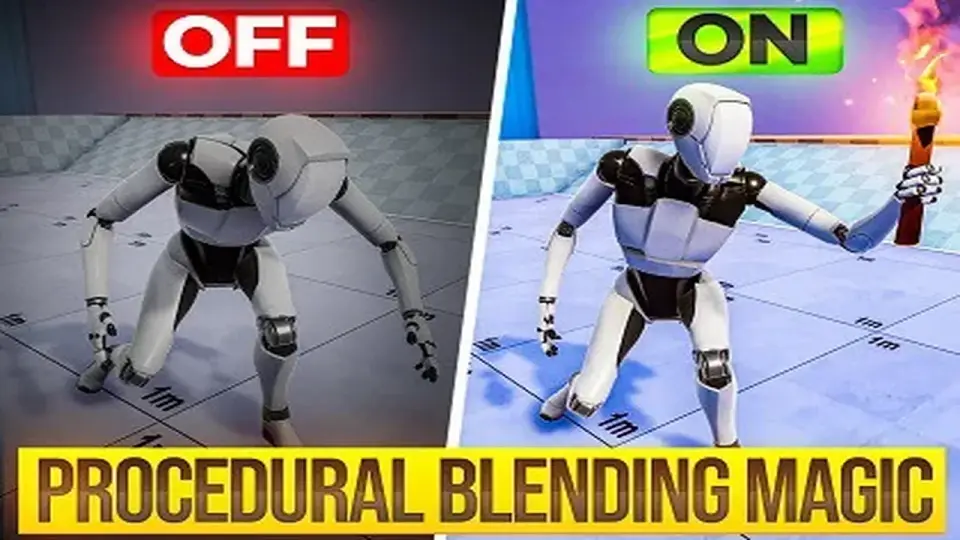
Unity's native Animator system often leads to complex, cluttered controllers when handling a wide variety of character poses and weapon types. Magic Animation Blend addresses this "spaghetti" logic by allowing a single animator controller to drive animations for various items, such as rifles, pistols, and swords. Instead of relying on numerous layers, override controllers, and intricate transitions, the tool utilizes procedural blending to manage different overlays.
The core workflow involves creating an animator controller once and applying it across any item or weapon in a project. This is facilitated by a Magic Blend Asset, which provides the necessary parameters to control blending behavior at runtime. This approach is particularly applicable to diverse genres, including first-person shooters and open-world RPGs, where adding new content frequently requires unique posing without rebuilding the underlying animation logic.
Runtime Customization and Visual Control
Implementation of blending behavior is handled through adjustable sliders that can be tweaked while the game is running. This allows for immediate visual feedback on character poses and transitions without the need to restart the engine or manually modify code. The developer emphasizes that this procedural approach results in natural and smooth results, aiming to bypass the limitations of traditional state-machine transitions.
To support specific technical requirements, the asset includes a Copy Bone tool, which was introduced in recent updates alongside an expanded animation library. These tools assist in refining the relationship between character rigs and the items they interact with, ensuring that the procedural overlays align correctly with the base animations.
Technical Optimization and Integration
Performance is a primary consideration for projects featuring high character counts. Magic Animation Blend is built on the Animation Job System, utilizing multithreaded updates to ensure that the procedural blending does not create a bottleneck. The system supports both Humanoid and Generic rig types, making it versatile for different character models and non-humanoid entities.
Regarding compatibility, the asset is designed for Unity versions 2022.3.1 and 2022.3.62. It supports all major render pipelines, including the Built-in Render Pipeline, HDRP, URP, and Custom SRP. While the tool is built to work natively with the Unity Animator, third-party systems such as Animancer can be integrated, though this requires custom code implementation via the Playables API.
Implementation Overview
The package consists of 63 individual assets and is delivered as a unitypackage. By shifting the animation workload from static controller layers to runtime procedural blending, the tool simplifies the process of expanding a game's arsenal or interactive items. The focus remains on maintaining a clean project hierarchy while achieving smooth, dynamic character movement across different equipment sets.
 Animation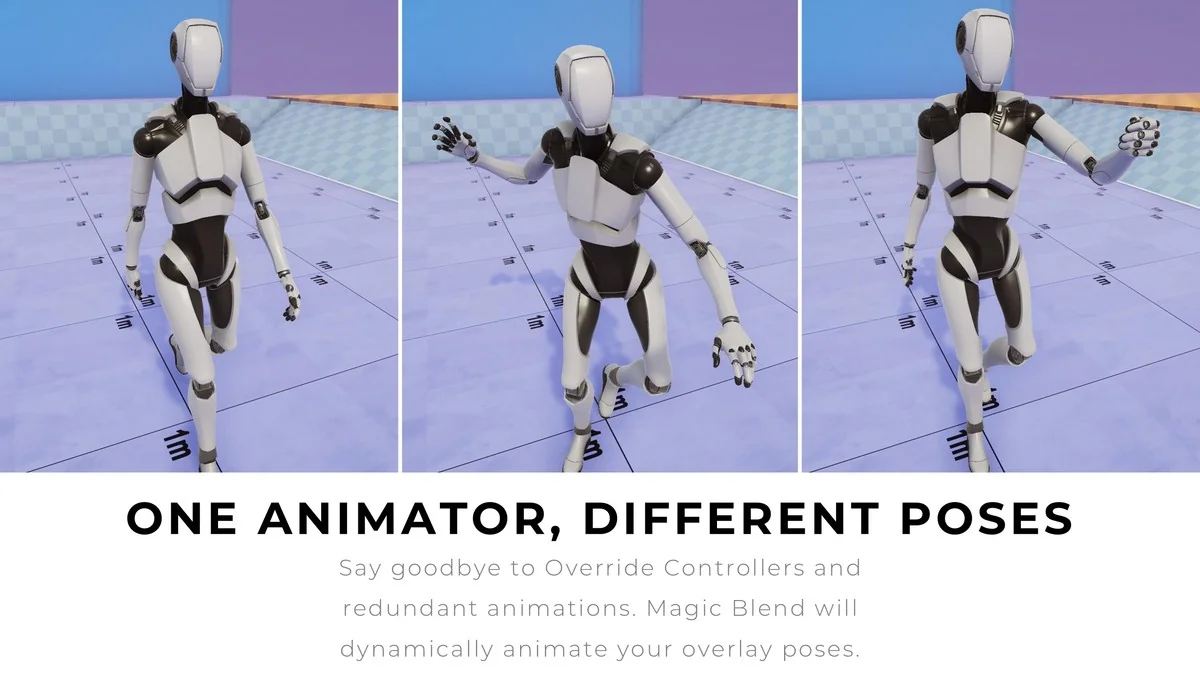
 Animation
 Animation
 Animation