"efaa631e936fd3ee"{"id":"1002274","slug":"world-event-scripted-events-simplified","title":"World Event - Scripted events simplified","category":"Gameplay Features","engine":"4.26+,5.0+","assetVersion":"","engineVersion":"Engine Version: 4.26+,5.0+","tag":"Gameplay Features","accent":"blue","visual":"mech","summary":"Create scripted in-game sequences with World Event. Move meshes, adjust visibility, trigger sounds, link events, and build custom actions using Blueprints.","platform":"Unreal Engine","publishedAt":"2026-10-29T16:32:12.991Z","updatedAt":"2026-10-29T16:32:12.991Z","sourceNotes":[],"fileContents":[],"compatibility":["Unreal Engine","Engine Version: 4.26+,5.0+"],"featuredImage":{"alt":"World Event - Scripted events simplified","src":"/wp-content/uploads/published/2026/10/1a90ebd433a0-55f6dcea-cc0f-4609-ab2a-6bd793233d85-e8ef597069.webp"},"hasDownloadLink":true,"downloads":0,"terms":[{"taxonomy":"category","slug":"gameplay-features","name":"Gameplay Features"}],"galleryImages":[{"src":"/wp-content/uploads/published/2026/10/f91097051096-c14dfadf-ed43-40c3-a91d-05ac44b3004d-dc55697965.webp","alt":"World Event - Scripted events simplified"},{"src":"/wp-content/uploads/published/2026/10/39f0bfc27da7-d7657402-c021-43bf-aaad-fffc1fc78952-67e6bcae12.webp","alt":"World Event - Scripted events simplified"},{"src":"/wp-content/uploads/published/2026/10/05325ecef59c-292e2101-73aa-4ec5-8853-d0f49809b7ae-3410176571.webp","alt":"World Event - Scripted events simplified"},{"src":"/wp-content/uploads/published/2026/10/71344a924783-3175e99e-b097-4b2a-bdf1-960633795c98-cc31d41ba0.webp","alt":"World Event - Scripted events simplified"}],"accessPanel":{"kind":"resource","title":"Download this resource","eyebrow":"Free Download","message":"Log in or create a free account to start your download.","fileName":"Content.7z","safetyNote":"Resources are manually reviewed before listing to improve quality and reduce obvious risks.","actionLabel":"Download Free","resourceType":"Resource archive"},"contentHtml":"\u003ch2\u003eManaging Stage Actors Through World Event Logic\u003c/h2\u003e\u003cp\u003eHandling environmental sequences often requires complex logic strings just to coordinate a few objects in a scene. World Event provides a simplified framework to manage these in-game occurrences directly across the actors placed on stage.\u003c/p\u003e\u003cp\u003eWhen a scene demands that level geometry, interactive props, or background assets react at a specific gameplay beat, setting up individual triggers from scratch can slow development to a crawl. The tool establishes a direct method to manipulate stage actors without wrestling with entangled graph networks. Game worlds thrive on dynamic reactions, and grouping discrete reactions into clearly defined scripted occurrences lets developers turn a static room or an open outdoor zone into a responsive space. By handling execution sequences through a dedicated event tool, world builders can orchestrate precise timing across multiple elements situated throughout the level.\u003c/p\u003e\u003ch2\u003eTransforming Meshes and Spatial Visibility in Scripted Events\u003c/h2\u003e\u003cp\u003eManipulating object transforms and visual states is central to pacing in-game happenings. The tool includes native actions that move meshes and make them invisible during scene execution.\u003c/p\u003e\u003cp\u003eRepositioning a mesh can represent a physical shift in the environment, such as a falling pillar, a sliding secret doorway, or a piece of machinery activating within an industrial interior. Toggling mesh visibility introduces opportunities for disappearing barriers, instant asset reveals, or staged illusions where an object vanishes upon player inspection. Combining transform displacement with visibility switches gives designers the ability to clear paths, simulate sudden physical disruptions, or remove items from the playable zone cleanly. These operations target the static or dynamic actors already placed in the level, ensuring that alterations happen in real time without requiring complex cinematic pipelines.\u003c/p\u003e\u003ch2\u003eAudio Triggers and Chaining World Events\u003c/h2\u003e\u003cp\u003eAudio cues give weight to physical scene changes, and sequences rarely function in isolation. World Event natively triggers sound playback and can fire off secondary World Events to build cohesive multi-part chains.\u003c/p\u003e\u003cp\u003ePlaying sound effects alongside physical movement or visual changes anchors the event in the player's sensory experience. A sliding stone hatch gains instant physical weight when paired with an audio trigger playing a heavy grinding effect. Beyond isolated moments, the capacity to trigger another World Event forms the backbone of cascading sequences. Once an initial event concludes—or at a specified interval—it can invoke a downstream event elsewhere in the level. This linking mechanism allows complex staging, such as an alarm sounding in one corridor, followed immediately by security gates closing and lights extinguishing across an entire compound, without requiring a single bloated Blueprint to control every remote component.\u003c/p\u003e\u003ch2\u003eExtending Blueprints with Custom Actions\u003c/h2\u003e\u003cp\u003eEvery project introduces unique requirements that pre-packaged logic cannot fully anticipate. World Event is structured as a modular Blueprint tool that allows developers to author custom actions with minimal friction.\u003c/p\u003e\u003cp\u003eThe modular architecture ensures that designers are not locked into a rigid list of preset operations. When a scenario requires a bespoke event—such as applying specialized tags, initiating particle bursts, or altering gameplay state variables—developers can construct new custom actions within the Blueprint environment. These custom extensions sit naturally alongside standard commands like moving meshes, hiding assets, or playing sounds. Because the system embraces this modular philosophy, teams can adapt the toolkit to match their exact genre demands, creating a bespoke collection of reusable action nodes that any level designer on the team can drag into a sequence.\u003c/p\u003e\u003ch2\u003eCompatibility with MIS - Modular Interaction System\u003c/h2\u003e\u003cp\u003eConnecting event sequences to player-driven gameplay requires reliable bridges between trigger conditions and world responses. World Event offers verified compatibility with the Modular Interaction System (MIS), uniting interaction frameworks with world-state modifications.\u003c/p\u003e\u003cp\u003eIn setups utilizing the Modular Interaction System, player interactions can immediately feed into the World Event pipeline. When a player interacts with a switch, a console, or an environmental item governed by MIS, that input can instantly execute a World Event sequence. The compatibility bridges the gap between interactive player prompts and macro-level world shifts. Instead of scripting duplicate logic to connect player inputs to world actors, the integration keeps interaction handling modular and clean.\u003c/p\u003e\u003ch2\u003eDeploying World Event Across Production Pipelines\u003c/h2\u003e\u003cp\u003eStructuring scripted events within a demo or a production build requires tools that minimize iteration time. World Event fits into pipelines where level designers need to test, iterate, and refine environmental reactions rapidly.\u003c/p\u003e\u003cp\u003eThe presence of demo configurations highlights how the tool operates out of the box, offering clear references for structuring chained actions, audio cues, and actor manipulations. Projects in pre-production or active level assembly gain a predictable method for staging encounters, puzzles, and cinematic world interactions. Because the system relies entirely on Blueprint logic and modular design, technical designers can maintain high standards of code hygiene while giving world artists the freedom to assemble engaging, reactive scenes across the game world.\u003c/p\u003e\n\n\u003ch2\u003eContinue Browsing Similar Packs\u003c/h2\u003e\n\u003cul\u003e\n\u003cli\u003e\u003ca href=\"https://3dcghub.com/multiplayer-traps-pack/\" title=\"Multiplayer Traps Pack\"\u003eMultiplayer Traps Pack\u003c/a\u003e\u003c/li\u003e\n\u003cli\u003e\u003ca href=\"https://3dcghub.com/open-world-ai-multiplayer-spawn-system/\" title=\"Open World AI Multiplayer Spawn System\"\u003eOpen World AI Multiplayer Spawn System\u003c/a\u003e\u003c/li\u003e\n\u003cli\u003e\u003ca href=\"https://3dcghub.com/blockout-starter-pack/\" title=\"Blockout Starter Pack\"\u003eBlockout Starter Pack\u003c/a\u003e\u003c/li\u003e\n\u003cli\u003e\u003ca href=\"https://3dcghub.com/gameplay-ability-system-gas-fully-optimized-game-ready/\" title=\"Gameplay Ability System ( GAS ), Fully Optimized, Game-Ready\"\u003eGameplay Ability System ( GAS ), Fully Optimized, Game-Ready\u003c/a\u003e\u003c/li\u003e\n\u003cli\u003e\u003ca href=\"https://3dcghub.com/defender-melee-combat/\" title=\"Defender: Melee Combat\"\u003eDefender: Melee Combat\u003c/a\u003e\u003c/li\u003e\n\u003c/ul\u003e","contentTextLength":5745,"navigation":{"current":11,"total":4209,"previous":{"id":"1002275","slug":"zen-dev","title":"Zen Dev","category":"Engine Tools","platform":"Unreal Engine","updatedAt":"2026-10-29T16:32:49.171Z"},"next":{"id":"1002273","slug":"wooden-ui","title":"Wooden UI","category":"UI Kits / HUDs","platform":"Unreal Engine","updatedAt":"2026-10-29T16:31:28.723Z"}},"relatedResources":[{"id":"1000854","slug":"multiplayer-traps-pack","title":"Multiplayer Traps Pack","category":"Gameplay Features","engine":"4.26+,5.0+","assetVersion":"","engineVersion":"Engine Version: 4.26+,5.0+","tag":"Gameplay Features","accent":"blue","visual":"mech","summary":"Blueprint multiplayer traps: spike plates, spinning saws, flamethrowers, swinging maces. Animation-free, no event tick, per-trap settings, mesh-swappable.","platform":"Unreal Engine","publishedAt":"2026-08-04T16:58:03.710Z","updatedAt":"2026-08-04T16:58:03.710Z","sourceNotes":[],"fileContents":[],"compatibility":["Unreal Engine","Engine Version: 4.26+,5.0+"],"featuredImage":{"alt":"Multiplayer Traps Pack","src":"/wp-content/uploads/published/2026/08/baa4c8cf0c46-aa3aeac9-d975-4dac-a312-19c77e90c7e5-c3127b0699.webp"},"hasDownloadLink":true,"downloads":3},{"id":"1000922","slug":"open-world-ai-multiplayer-spawn-system","title":"Open World AI Multiplayer Spawn System","category":"Gameplay Features","engine":"4.26+,5.0+","assetVersion":"","engineVersion":"Engine Version: 4.26+,5.0+","tag":"Gameplay Features","accent":"blue","visual":"mech","summary":"A server-side Blueprint spawn system for open-world multiplayer games, with roaming, stationary, and path AI, friendly or zombie variants.","platform":"Unreal Engine","publishedAt":"2026-08-08T05:05:40.195Z","updatedAt":"2026-08-08T05:05:40.195Z","sourceNotes":[],"fileContents":[],"compatibility":["Unreal Engine","Engine Version: 4.26+,5.0+"],"featuredImage":{"alt":"Open World AI Multiplayer Spawn System","src":"/wp-content/uploads/published/2026/08/c4917032d21c-cb7e3ead-ba0b-445c-8608-4fe8a4722c7e-d50d7d81fc.webp"},"hasDownloadLink":true,"downloads":2},{"id":"10611","slug":"blockout-starter-pack","title":"Blockout Starter Pack","category":"Gameplay Features","engine":"4.26+,5.0+","assetVersion":"Engine version: 4.26+,5.0+","engineVersion":"4.22","tag":"Gameplay Features","accent":"blue","visual":"mech","summary":"The Blockout Starter Pack is a collection of 12 blueprints designed to accelerate world building. These tools allow for quick placement, interactive elements, and easy customization using your own assets.","platform":"Unreal Engine","publishedAt":"2026-03-03T15:47:16.000Z","updatedAt":"2026-04-19T15:49:58.000Z","sourceNotes":[],"fileContents":[],"compatibility":["Unreal Engine","Engine version: 4.26+,5.0+"],"featuredImage":{"alt":"Blockout Starter Pack","src":"https://3dcghub.com/wp-content/uploads/2026/03/e291e696-3153-443c-b1dc-4f8edf396fd2.webp"},"hasDownloadLink":true,"downloads":1}]}
Gameplay Features
World Event - Scripted events simplified
Create scripted in-game sequences with World Event. Move meshes, adjust visibility, trigger sounds, link events, and build custom actions using Blueprints.
Handling environmental sequences often requires complex logic strings just to coordinate a few objects in a scene. World Event provides a simplified framework to manage these in-game occurrences directly across the actors placed on stage.
When a scene demands that level geometry, interactive props, or background assets react at a specific gameplay beat, setting up individual triggers from scratch can slow development to a crawl. The tool establishes a direct method to manipulate stage actors without wrestling with entangled graph networks. Game worlds thrive on dynamic reactions, and grouping discrete reactions into clearly defined scripted occurrences lets developers turn a static room or an open outdoor zone into a responsive space. By handling execution sequences through a dedicated event tool, world builders can orchestrate precise timing across multiple elements situated throughout the level.
Transforming Meshes and Spatial Visibility in Scripted Events
Manipulating object transforms and visual states is central to pacing in-game happenings. The tool includes native actions that move meshes and make them invisible during scene execution.
Repositioning a mesh can represent a physical shift in the environment, such as a falling pillar, a sliding secret doorway, or a piece of machinery activating within an industrial interior. Toggling mesh visibility introduces opportunities for disappearing barriers, instant asset reveals, or staged illusions where an object vanishes upon player inspection. Combining transform displacement with visibility switches gives designers the ability to clear paths, simulate sudden physical disruptions, or remove items from the playable zone cleanly. These operations target the static or dynamic actors already placed in the level, ensuring that alterations happen in real time without requiring complex cinematic pipelines.
Audio Triggers and Chaining World Events
Audio cues give weight to physical scene changes, and sequences rarely function in isolation. World Event natively triggers sound playback and can fire off secondary World Events to build cohesive multi-part chains.
Playing sound effects alongside physical movement or visual changes anchors the event in the player's sensory experience. A sliding stone hatch gains instant physical weight when paired with an audio trigger playing a heavy grinding effect. Beyond isolated moments, the capacity to trigger another World Event forms the backbone of cascading sequences. Once an initial event concludes—or at a specified interval—it can invoke a downstream event elsewhere in the level. This linking mechanism allows complex staging, such as an alarm sounding in one corridor, followed immediately by security gates closing and lights extinguishing across an entire compound, without requiring a single bloated Blueprint to control every remote component.
Extending Blueprints with Custom Actions
Every project introduces unique requirements that pre-packaged logic cannot fully anticipate. World Event is structured as a modular Blueprint tool that allows developers to author custom actions with minimal friction.
The modular architecture ensures that designers are not locked into a rigid list of preset operations. When a scenario requires a bespoke event—such as applying specialized tags, initiating particle bursts, or altering gameplay state variables—developers can construct new custom actions within the Blueprint environment. These custom extensions sit naturally alongside standard commands like moving meshes, hiding assets, or playing sounds. Because the system embraces this modular philosophy, teams can adapt the toolkit to match their exact genre demands, creating a bespoke collection of reusable action nodes that any level designer on the team can drag into a sequence.
Compatibility with MIS - Modular Interaction System
Connecting event sequences to player-driven gameplay requires reliable bridges between trigger conditions and world responses. World Event offers verified compatibility with the Modular Interaction System (MIS), uniting interaction frameworks with world-state modifications.
In setups utilizing the Modular Interaction System, player interactions can immediately feed into the World Event pipeline. When a player interacts with a switch, a console, or an environmental item governed by MIS, that input can instantly execute a World Event sequence. The compatibility bridges the gap between interactive player prompts and macro-level world shifts. Instead of scripting duplicate logic to connect player inputs to world actors, the integration keeps interaction handling modular and clean.
Deploying World Event Across Production Pipelines
Structuring scripted events within a demo or a production build requires tools that minimize iteration time. World Event fits into pipelines where level designers need to test, iterate, and refine environmental reactions rapidly.
The presence of demo configurations highlights how the tool operates out of the box, offering clear references for structuring chained actions, audio cues, and actor manipulations. Projects in pre-production or active level assembly gain a predictable method for staging encounters, puzzles, and cinematic world interactions. Because the system relies entirely on Blueprint logic and modular design, technical designers can maintain high standards of code hygiene while giving world artists the freedom to assemble engaging, reactive scenes across the game world.
 Gameplay Features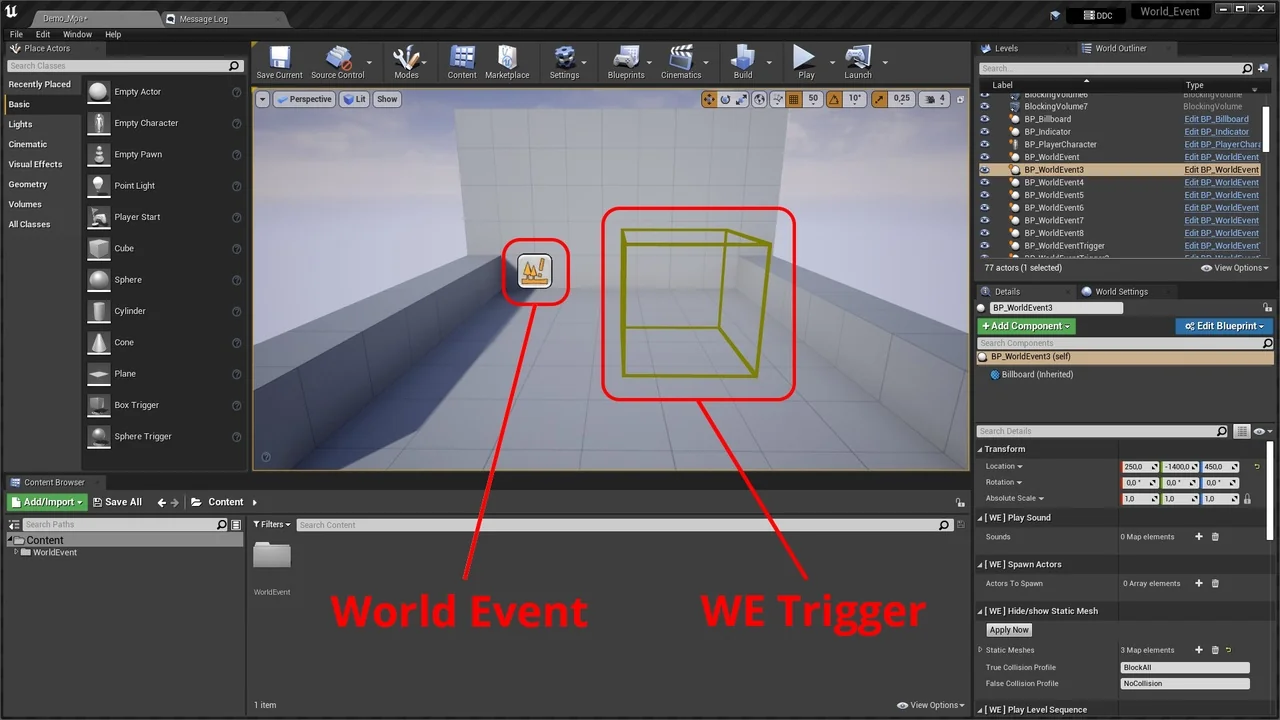
 Gameplay Features
 Gameplay Features
 Gameplay Features