"efaa631e936fd3ee"{"id":"1002273","slug":"wooden-ui","title":"Wooden UI","category":"UI Kits / HUDs","engine":"4.26+,5.0+","assetVersion":"","engineVersion":"Engine Version: 4.26+,5.0+","tag":"UI Kits / HUDs","accent":"blue","visual":"mech","summary":"Technical overview of Wooden UI, covering layered PSD structure, buttons, checkboxes, framework layouts, and Fantasy Icons Megapack pairing.","platform":"Unreal Engine","publishedAt":"2026-10-29T16:31:28.723Z","updatedAt":"2026-10-29T16:31:28.723Z","sourceNotes":[],"fileContents":[],"compatibility":["Unreal Engine","Engine Version: 4.26+,5.0+"],"featuredImage":{"alt":"Wooden UI","src":"/wp-content/uploads/published/2026/10/d19c0c2e23e4-65bf25c7-221f-4a90-a5fb-bd7972d21e9d-31fcd9cfc5.webp"},"hasDownloadLink":true,"downloads":0,"terms":[{"taxonomy":"category","slug":"ui-kits-huds","name":"UI Kits / HUDs"}],"galleryImages":[{"src":"/wp-content/uploads/published/2026/10/756da4886e76-a33ede00-11fe-45b4-a975-c3558b067088-cdab41388c.webp","alt":"Wooden UI"},{"src":"/wp-content/uploads/published/2026/10/f5b5c0517b8c-d53667d3-6e06-4ff9-bd58-3475e78897c7-19f5ff366a.webp","alt":"Wooden UI"}],"accessPanel":{"kind":"resource","title":"Download this resource","eyebrow":"Free Download","message":"Log in or create a free account to start your download.","fileName":"Wooden UI.7z","safetyNote":"Resources are manually reviewed before listing to improve quality and reduce obvious risks.","actionLabel":"Download Free","resourceType":"Resource archive"},"contentHtml":"\u003ch2\u003eDeconstructing the Layered PSD Architecture\u003c/h2\u003e\n\u003cp\u003eWorking with the Wooden UI package begins directly inside Photoshop or a compatible graphics editor by unpacking the layered PSD. Because the graphic elements are supplied in a fully layered structure rather than flat raster sheets, production artists can inspect, modify, and export individual components without having to cut them from destructive backgrounds. Layer groups separate the individual interface modules, preserving layer masks, blending attributes, and component alignments. This setup gives interface artists complete control over wood grain highlights, edge bevels, drop shadows, and border ornaments before generating production-ready texture atlases or UI slices.\u003c/p\u003e\n\u003cp\u003eMaintaining separation across layers simplifies the task of matching custom game aspect ratios. When UI scaling is required, having access to isolated background frames, surface textures, and perimeter frames makes it straightforward to adjust padding or generate nine-slice borders. Game UI artists can pull individual bounding layers into game engines without bringing along embedded visual artifacts from neighboring elements, creating a cleaner handoff between 2D art production and game-engine widget construction.\u003c/p\u003e \u003ch2\u003eFramework Elements, Panels, and Structural Containers\u003c/h2\u003e\n\u003cp\u003eThe core framework within Wooden UI supplies the foundational visual hierarchy required for menus, inventories, dialogue boxes, and status panels. Instead of leaving developers to stitch together ad-hoc shapes, the framework pieces establish a unified rustic material treatment. The structural borders establish clear container bounds, providing a distinct separation between active play space and HUD displays, or between navigation tabs and interior content windows.\u003c/p\u003e\n\u003cp\u003eThese framework layers function as the architectural skeleton for custom screen layouts. When building complex screens such as quest logs, character inventories, or merchant stalls, the framework pieces can be tiled, sliced, or duplicated to generate sub-panels within a parent window. Because the wood treatment carries consistent light direction and contour depth throughout the layered PSD, nested frames retain visual coherence even when arranged in dense, multi-tiered layouts.\u003c/p\u003e \u003ch2\u003eInteractive Controls: Wooden Buttons and Checkbox Components\u003c/h2\u003e\n\u003cp\u003eInteractive user inputs in Wooden UI are represented by dedicated button assemblies and checkbox components. Buttons are grouped to support the standard interactive cycles expected in software interfaces, allowing artists to set up visual states such as default, focused, pressed, and disabled. The tactile wooden surface detailing helps interactive elements read immediately as clickable objects against flatter background regions.\u003c/p\u003e\n\u003cp\u003eThe checkbox elements handle toggle-state representations, providing clean visual confirmations for options menus, inventory filters, and skill tree selectors. Because these components are preserved as distinct layers within the PSD, artists can isolate the active check indicator from the wooden housing box. This isolation allows technical artists to link the check asset to game engine boolean values cleanly, animating or swapping the active state without disturbing the underlying wooden border.\u003c/p\u003e \u003ch2\u003eIcon Placement and Visual Pairing with Fantasy Icons Megapack\u003c/h2\u003e\n\u003cp\u003eWooden UI includes dedicated icons and decorative framing accents configured to sit seamlessly alongside the interactive controls and framework borders. These embedded iconography components provide visual shorthand for common interface tasks, such as navigation shortcuts, resource tracking, and menu navigation. The visual weight and stylized wood surfaces establish a solid base that pairs directly with the Fantasy Icons Megapack.\u003c/p\u003e\n\u003cp\u003eCombining the Wooden UI framework with the Fantasy Icons Megapack expands the range of display options for inventory slots, spell books, and equipment menus. Because the internal padding and border styling of the wooden framework accommodate standardized icon footprints, elements from the Fantasy Icons Megapack can be dropped directly into the icon slots without scaling discrepancies or stylistic clashes. The warm, carved material profile of the wooden containers complements the bold silhouettes and saturated palettes found across fantasy-themed item collections.\u003c/p\u003e \u003ch2\u003eInterface Asset Export and Production Handoff\u003c/h2\u003e\n\u003cp\u003eMoving Wooden UI into a functional runtime environment requires an organized export pass from the layered PSD file. UI artists can establish explicit slice boundaries around the framework margins, button bases, checkboxes, and individual icons. Exporting these sliced layers as lossless PNG assets preserves crisp outer boundaries and semi-transparent shadows, ensuring smooth compositing over active gameplay viewports.\u003c/p\u003e\n\u003cp\u003eFor engine implementation, the framework assets adapt efficiently to 9-slice or 3-slice scaling techniques. Dividing the wooden framework borders into static corners and repeatable edge segments allows developers to construct windows of arbitrary dimensions without distorting the wood grain or corner carvings. Buttons benefit from similar slicing logic, enabling long dialogue choice bars and compact square toggles to utilize the same underlying art assets while preserving crisp resolution across high-density displays.\u003c/p\u003e\n\n\u003ch2\u003eContinue Browsing Similar Packs\u003c/h2\u003e\n\u003cul\u003e\n\u003cli\u003e\u003ca href=\"https://3dcghub.com/sdf-robo-progress-bars/\" title=\"SDF Robo Progress Bars\"\u003eSDF Robo Progress Bars\u003c/a\u003e\u003c/li\u003e\n\u003cli\u003e\u003ca href=\"https://3dcghub.com/pro-hud-pack-horror-skin/\" title=\"Pro HUD Pack: Horror Skin\"\u003ePro HUD Pack: Horror Skin\u003c/a\u003e\u003c/li\u003e\n\u003cli\u003e\u003ca href=\"https://3dcghub.com/advanced-credits/\" title=\"Advanced Credits\"\u003eAdvanced Credits\u003c/a\u003e\u003c/li\u003e\n\u003cli\u003e\u003ca href=\"https://3dcghub.com/advanced-hud-style-12/\" title=\"Advanced HUD-Style 12\"\u003eAdvanced HUD-Style 12\u003c/a\u003e\u003c/li\u003e\n\u003cli\u003e\u003ca href=\"https://3dcghub.com/pro-hud-navigation-tools-only/\" title=\"Pro HUD: Navigation Tools Only\"\u003ePro HUD: Navigation Tools Only\u003c/a\u003e\u003c/li\u003e\n\u003c/ul\u003e","contentTextLength":5456,"navigation":{"current":12,"total":4209,"previous":{"id":"1002274","slug":"world-event-scripted-events-simplified","title":"World Event - Scripted events simplified","category":"Gameplay Features","platform":"Unreal Engine","updatedAt":"2026-10-29T16:32:12.991Z"},"next":{"id":"1002272","slug":"wooden-doors-modular-sounds","title":"Wooden Doors. Modular Sounds.","category":"Sound Effects","platform":"Unreal Engine","updatedAt":"2026-10-29T16:31:11.516Z"}},"relatedResources":[{"id":"1002196","slug":"sdf-robo-progress-bars","title":"SDF Robo Progress Bars","category":"UI Kits / HUDs","engine":"4.26+,5.0+","assetVersion":"","engineVersion":"Engine Version: 4.26+,5.0+","tag":"UI Kits / HUDs","accent":"blue","visual":"mech","summary":"Explore SDF Robo Progress Bars, an advanced master material using signed distance functions for vector-sharp circular and rectangular interface meters.","platform":"Unreal Engine","publishedAt":"2026-10-29T14:39:35.924Z","updatedAt":"2026-10-29T14:39:35.924Z","sourceNotes":[],"fileContents":[],"compatibility":["Unreal Engine","Engine Version: 4.26+,5.0+"],"featuredImage":{"alt":"SDF Robo Progress Bars","src":"/wp-content/uploads/published/2026/10/4d90ae46e9d9-36a06d93-e903-4a91-953d-4bc4f2330691-4f39c6d6b4.webp"},"hasDownloadLink":true,"downloads":0},{"id":"1002155","slug":"pro-hud-pack-horror-skin","title":"Pro HUD Pack: Horror Skin","category":"UI Kits / HUDs","engine":"4.24+,5.0+","assetVersion":"","engineVersion":"Engine Version: 4.24+,5.0+","tag":"UI Kits / HUDs","accent":"blue","visual":"mech","summary":"Pro HUD Pack: Horror Skin provides navigational compass tools, minimaps, task alerts, and runtime HUD nodes tailored for horror and wargame interfaces.","platform":"Unreal Engine","publishedAt":"2026-10-29T09:59:23.096Z","updatedAt":"2026-10-29T09:59:23.096Z","sourceNotes":[],"fileContents":[],"compatibility":["Unreal Engine","Engine Version: 4.24+,5.0+"],"featuredImage":{"alt":"Pro HUD Pack: Horror Skin","src":"/wp-content/uploads/published/2026/10/2a99ef34b46b-984148b6-ffe2-475d-ba56-5890c73bd792-62e4a00883.webp"},"hasDownloadLink":true,"downloads":0},{"id":"1001936","slug":"advanced-credits","title":"Advanced Credits","category":"UI Kits / HUDs","engine":"4.26+,5.0+","assetVersion":"","engineVersion":"Engine Version: 4.26+,5.0+","tag":"UI Kits / HUDs","accent":"blue","visual":"mech","summary":"Advanced Credits provides a customizable closing credits system featuring 3D widget VR support, title styling, audio fading, and sequence end events.","platform":"Unreal Engine","publishedAt":"2026-10-24T11:13:05.800Z","updatedAt":"2026-10-24T11:13:05.800Z","sourceNotes":[],"fileContents":[],"compatibility":["Unreal Engine","Engine Version: 4.26+,5.0+"],"featuredImage":{"alt":"Advanced Credits","src":"/wp-content/uploads/published/2026/10/6e75a1d5818d-a56d4a50-2a3e-4e79-8d17-0fc329c763a2-b7b42a1076.webp"},"hasDownloadLink":true,"downloads":0}]}
UI Kits / HUDs
Wooden UI
Technical overview of Wooden UI, covering layered PSD structure, buttons, checkboxes, framework layouts, and Fantasy Icons Megapack pairing.
Working with the Wooden UI package begins directly inside Photoshop or a compatible graphics editor by unpacking the layered PSD. Because the graphic elements are supplied in a fully layered structure rather than flat raster sheets, production artists can inspect, modify, and export individual components without having to cut them from destructive backgrounds. Layer groups separate the individual interface modules, preserving layer masks, blending attributes, and component alignments. This setup gives interface artists complete control over wood grain highlights, edge bevels, drop shadows, and border ornaments before generating production-ready texture atlases or UI slices.
Maintaining separation across layers simplifies the task of matching custom game aspect ratios. When UI scaling is required, having access to isolated background frames, surface textures, and perimeter frames makes it straightforward to adjust padding or generate nine-slice borders. Game UI artists can pull individual bounding layers into game engines without bringing along embedded visual artifacts from neighboring elements, creating a cleaner handoff between 2D art production and game-engine widget construction.
Framework Elements, Panels, and Structural Containers
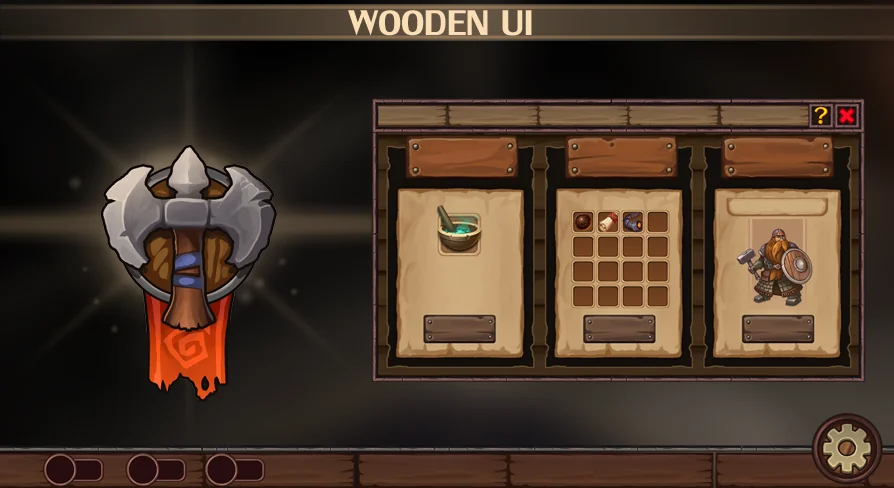
The core framework within Wooden UI supplies the foundational visual hierarchy required for menus, inventories, dialogue boxes, and status panels. Instead of leaving developers to stitch together ad-hoc shapes, the framework pieces establish a unified rustic material treatment. The structural borders establish clear container bounds, providing a distinct separation between active play space and HUD displays, or between navigation tabs and interior content windows.
These framework layers function as the architectural skeleton for custom screen layouts. When building complex screens such as quest logs, character inventories, or merchant stalls, the framework pieces can be tiled, sliced, or duplicated to generate sub-panels within a parent window. Because the wood treatment carries consistent light direction and contour depth throughout the layered PSD, nested frames retain visual coherence even when arranged in dense, multi-tiered layouts.
Interactive Controls: Wooden Buttons and Checkbox Components
Interactive user inputs in Wooden UI are represented by dedicated button assemblies and checkbox components. Buttons are grouped to support the standard interactive cycles expected in software interfaces, allowing artists to set up visual states such as default, focused, pressed, and disabled. The tactile wooden surface detailing helps interactive elements read immediately as clickable objects against flatter background regions.
The checkbox elements handle toggle-state representations, providing clean visual confirmations for options menus, inventory filters, and skill tree selectors. Because these components are preserved as distinct layers within the PSD, artists can isolate the active check indicator from the wooden housing box. This isolation allows technical artists to link the check asset to game engine boolean values cleanly, animating or swapping the active state without disturbing the underlying wooden border.
Icon Placement and Visual Pairing with Fantasy Icons Megapack
Wooden UI includes dedicated icons and decorative framing accents configured to sit seamlessly alongside the interactive controls and framework borders. These embedded iconography components provide visual shorthand for common interface tasks, such as navigation shortcuts, resource tracking, and menu navigation. The visual weight and stylized wood surfaces establish a solid base that pairs directly with the Fantasy Icons Megapack.
Combining the Wooden UI framework with the Fantasy Icons Megapack expands the range of display options for inventory slots, spell books, and equipment menus. Because the internal padding and border styling of the wooden framework accommodate standardized icon footprints, elements from the Fantasy Icons Megapack can be dropped directly into the icon slots without scaling discrepancies or stylistic clashes. The warm, carved material profile of the wooden containers complements the bold silhouettes and saturated palettes found across fantasy-themed item collections.
Interface Asset Export and Production Handoff
Moving Wooden UI into a functional runtime environment requires an organized export pass from the layered PSD file. UI artists can establish explicit slice boundaries around the framework margins, button bases, checkboxes, and individual icons. Exporting these sliced layers as lossless PNG assets preserves crisp outer boundaries and semi-transparent shadows, ensuring smooth compositing over active gameplay viewports.
For engine implementation, the framework assets adapt efficiently to 9-slice or 3-slice scaling techniques. Dividing the wooden framework borders into static corners and repeatable edge segments allows developers to construct windows of arbitrary dimensions without distorting the wood grain or corner carvings. Buttons benefit from similar slicing logic, enabling long dialogue choice bars and compact square toggles to utilize the same underlying art assets while preserving crisp resolution across high-density displays.
 UI Kits / HUDs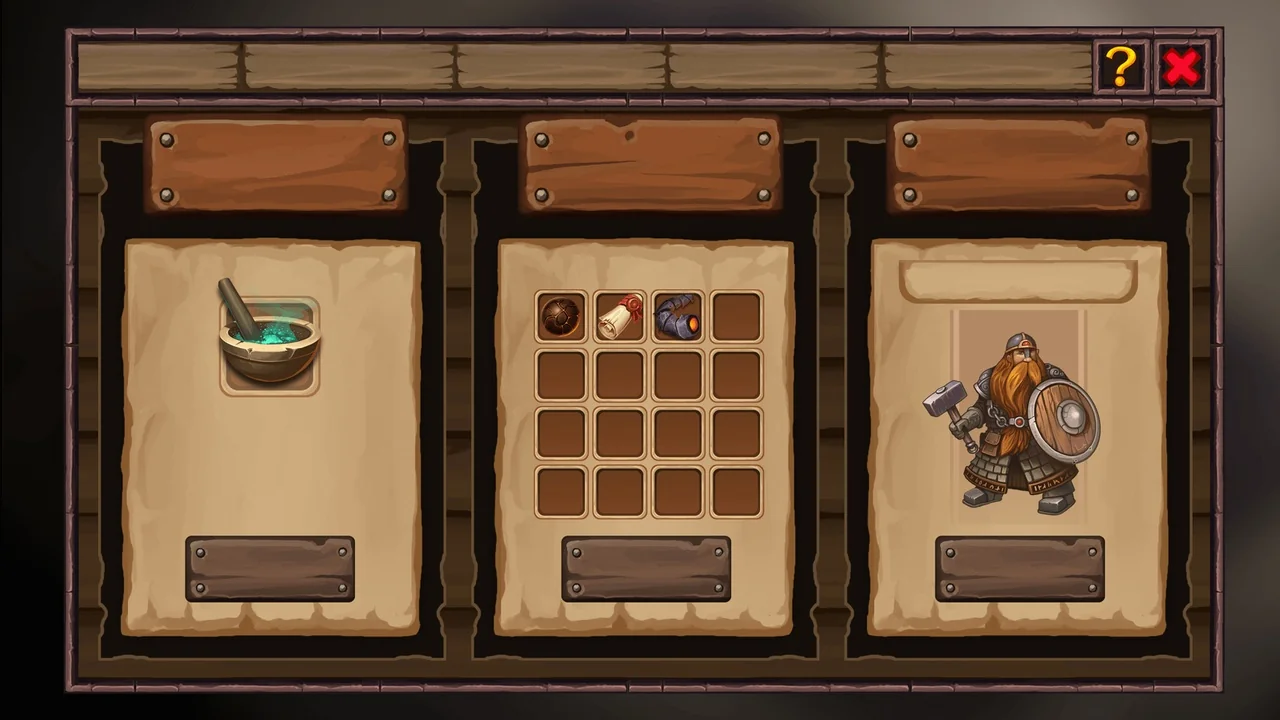
 UI Kits / HUDs
 UI Kits / HUDs
 UI Kits / HUDs