"1f00f67f9253451b"{"id":"1000933","slug":"winter-dragon-wyvern","title":"Winter Dragon (Wyvern)","category":"Characters \u0026 Creatures","engine":"4.26+,5.0+","assetVersion":"","engineVersion":"Engine Version: 4.26+,5.0+","tag":"Characters","accent":"blue","visual":"character","summary":"A UE4-rendered wyvern with 56 animations, ice and realistic skins, blend shapes, and a hue-shiftable material instance for quick winter dragon variations.","platform":"Unreal Engine","publishedAt":"2026-08-09T17:00:32.602Z","updatedAt":"2026-08-09T17:00:32.602Z","sourceNotes":[],"fileContents":[],"compatibility":["Unreal Engine","Engine Version: 4.26+,5.0+"],"featuredImage":{"alt":"Winter Dragon (Wyvern)","src":"/wp-content/uploads/published/2026/08/fb846469fc17-a7cd50c8-93e9-4c62-a6cd-a2d15f3ce167-4ccf19b9f5.webp"},"hasDownloadLink":true,"downloads":0,"terms":[{"taxonomy":"category","slug":"characters-and-creatures","name":"Characters \u0026 Creatures"}],"galleryImages":[{"src":"/wp-content/uploads/published/2026/08/72ca615052d6-fbc1b367-612a-474a-b17f-83e2ecb14708-2298afe6cd.webp","alt":"Winter Dragon (Wyvern)"},{"src":"/wp-content/uploads/published/2026/08/8d4e4baeb171-f71da3b4-3c0a-48f5-9970-51be3ab9f4c9-0bf80d15e8.webp","alt":"Winter Dragon (Wyvern)"},{"src":"/wp-content/uploads/published/2026/08/0cf8e708d9cf-2f762d5c-ec1f-4bcb-abe4-3d57b321025a-06d504d5e0.webp","alt":"Winter Dragon (Wyvern)"},{"src":"/wp-content/uploads/published/2026/08/e4f06b476b81-a747700d-03d9-4c31-9941-3d84362a86fc-04db201624.webp","alt":"Winter Dragon (Wyvern)"},{"src":"/wp-content/uploads/published/2026/08/fbd0289af448-990f81d5-518c-49bd-ae57-94e0f014c1c6-724d18676f.webp","alt":"Winter Dragon (Wyvern)"},{"src":"/wp-content/uploads/published/2026/08/67bc35eb6c48-7da1d3f3-5c12-4bce-90e2-5cfef17778f6-c7031034e2.webp","alt":"Winter Dragon (Wyvern)"},{"src":"/wp-content/uploads/published/2026/08/0c0985820acd-ad1d1f6b-f8c0-4f84-a3f7-e551eb15754b-7623f9a8ed.webp","alt":"Winter Dragon (Wyvern)"},{"src":"/wp-content/uploads/published/2026/08/c71ee9100ec2-bd7435b1-0484-493f-b710-fdc99905e150-3c855bb4d4.webp","alt":"Winter Dragon (Wyvern)"},{"src":"/wp-content/uploads/published/2026/08/7ddf288d2e0d-2eb3141f-1ace-4b5a-ad41-ee84a527497d-cc81798b90.webp","alt":"Winter Dragon (Wyvern)"},{"src":"/wp-content/uploads/published/2026/08/d526bbd06321-5fd3b11e-8972-4340-8a3b-5654c77f8f77-37ff10c713.webp","alt":"Winter Dragon (Wyvern)"}],"accessPanel":{"kind":"resource","title":"Download this resource","eyebrow":"Free Download","message":"Log in or create a free account to start your download.","fileName":"Winter Dragon (Wyvern).7z","safetyNote":"Resources are manually reviewed before listing to improve quality and reduce obvious risks.","actionLabel":"Download Free","resourceType":"Resource archive"},"contentHtml":"\u003cp\u003eSetting up the \u003cem\u003eWinter Dragon (Wyvern)\u003c/em\u003e means starting from a clean Unreal Engine 4 (UE4) scene. The creature renders entirely in UE4, and there are no Visual Effects (VFX) systems attached to the asset, so the 1st pass in the \u003ccode\u003eViewport\u003c/code\u003e is all about the model itself. The tag set points toward a \u003cem\u003elow-poly\u003c/em\u003e, \u003cem\u003erealistic\u003c/em\u003e creature with \u003cem\u003emedieval fantasy\u003c/em\u003e roots, and the visual intent leans into \u003cem\u003ecold\u003c/em\u003e and \u003cem\u003ehorror-adjacent\u003c/em\u003e vibes. For a team building a Role-Playing Game (RPG) monster or a frozen enemy encounter, this dragon brings a recognizable silhouette without forcing a heavy particle pipeline.\u003c/p\u003e\n\n\u003ch2\u003eDropping into an Unreal Engine 4 (UE4) Project\u003c/h2\u003e\n\n\u003cp\u003eThe \u003cem\u003eWinter Dragon\u003c/em\u003e is shaped by the UE4 renderer, which is the 1st thing to confirm before bringing it into a project. Since it is rendered in UE4, the shading and Material expectations are set for that engine. The asset has no VFX, so any breath, ice shatter, or ambient cold effects will need to come from the developer's own particle setup. That is not a limitation so much as a clean starting point: the creature is ready for animation and Material iteration, and the visual polish is left to the implementation.\u003c/p\u003e\n\n\u003cp\u003eThe \u003cem\u003elow-poly\u003c/em\u003e tag is useful for performance-minded projects. Combined with the \u003cem\u003erealistic\u003c/em\u003e tag, it suggests a model that prioritizes shape and proportion over dense geometric detail, which fits well in mid-range production pipelines. The \u003cem\u003emedieval\u003c/em\u003e, \u003cem\u003eRPG\u003c/em\u003e, \u003cem\u003ecold\u003c/em\u003e, and \u003cem\u003ewinter\u003c/em\u003e tags further anchor the creature in a fantasy context. The wyvern can slip into snow-covered forts, frozen passes, or the lair of an ice-focused boss without requiring a full reskin.\u003c/p\u003e\n\n\u003ch2\u003e\u003cem\u003eWinter Dragon\u003c/em\u003e Animation Blueprint and 56 Clips\u003c/h2\u003e\n\n\u003cp\u003eAnimation is where the \u003cem\u003eWinter Dragon\u003c/em\u003e shows its range. There are 56 animations total, which is a substantial library for a single creature. A number that high usually covers Locomotion, attacks, idle variations, and reaction states, giving developers a solid baseline for gameplay integration. Because the asset is tagged as an \u003ccode\u003eAnimation Blueprint\u003c/code\u003e, it is reasonable to expect the creature to drive through a \u003ccode\u003eBlueprint\u003c/code\u003e-controlled \u003ccode\u003eState Machine\u003c/code\u003e, though the source does not detail the exact blueprint structure.\u003c/p\u003e\n\n\u003cp\u003eAlongside the animation clips, the \u003cem\u003eWinter Dragon\u003c/em\u003e uses \u003ccode\u003eBlend Shapes\u003c/code\u003e for 2 specific facial states: \u003ccode\u003eEye Closed\u003c/code\u003e and \u003ccode\u003eBreath\u003c/code\u003e. The \u003ccode\u003eEye Closed\u003c/code\u003e \u003ccode\u003eBlend Shape\u003c/code\u003e can be used for blinking, sleep, or death states, while the \u003ccode\u003eBreath\u003c/code\u003e \u003ccode\u003eBlend Shape\u003c/code\u003e expands the chest or nostrils for a dragon's inhale-exhale cycle. Those 2 shapes add life during dialogue, Cinematics, or simple idle moments. They are practical, lightweight additions that do not require complicated \u003ccode\u003eNode Graphs\u003c/code\u003e to make a difference in a scene.\u003c/p\u003e\n\n\u003ch2\u003eMaterial Instance: \u003ccode\u003eBody\u003c/code\u003e, \u003ccode\u003eIce\u003c/code\u003e, \u003ccode\u003eEye\u003c/code\u003e, and the \u003ccode\u003eRGB Mask\u003c/code\u003e\u003c/h2\u003e\n\n\u003cp\u003eThe Material setup is shaped by 3 named Materials: \u003ccode\u003eBody\u003c/code\u003e, \u003ccode\u003eIce\u003c/code\u003e, and \u003ccode\u003eEye\u003c/code\u003e. Each 1 serves a distinct part of the creature's surface. The \u003ccode\u003eBody\u003c/code\u003e Material covers the main scales and hide, the \u003ccode\u003eIce\u003c/code\u003e Material handles frozen or frostbitten areas, and the \u003ccode\u003eEye\u003c/code\u003e Material takes care of the sockets. Having these as separate Materials means the developer can tweak the cold areas independently from the skin, which is useful when iterating on how much frost should cover the wyvern.\u003c/p\u003e\n\n\u003cp\u003eThe \u003ccode\u003eMaterial Instance\u003c/code\u003e uses an \u003ccode\u003eRGB Mask\u003c/code\u003e with a clear breakdown: \u003ccode\u003eR\u003c/code\u003e feeds the edges, \u003ccode\u003eG\u003c/code\u003e controls the base color, and \u003ccode\u003eB\u003c/code\u003e targets the jaw. This channel mapping allows a single instance to blend between different visual layers, and it gives direct, artist-friendly control over which regions show edge effects, the underlying skin tone, or the jaw texture. On top of that, a \u003ccode\u003eHue Shift\u003c/code\u003e option is included, so the entire creature's color palette can be adjusted across a spectrum without reworking the Texture Maps. That is a quick way to make a blue-ice wyvern, a sickly pale one, or a molten-frost hybrid, depending on the scene's tone.\u003c/p\u003e\n\n\u003ch2\u003e2 Texture Skins and PBR Textures\u003c/h2\u003e\n\n\u003cp\u003eThe \u003cem\u003eWinter Dragon\u003c/em\u003e ships with 2 Texture Skins: \u003cem\u003eice\u003c/em\u003e and \u003cem\u003erealistic\u003c/em\u003e. The \u003cem\u003eice\u003c/em\u003e skin presumably leans into a frozen, crystalline look, while the \u003cem\u003erealistic\u003c/em\u003e skin offers a more grounded dragon appearance that works outside of a purely arctic setting. This dual-skin approach means the same Mesh and animation set can serve different visual identities across multiple levels or game modes.\u003c/p\u003e\n\n\u003cp\u003eOn the texture quality side, the asset is Physically Based Rendering (PBR) with Metallic and Roughness maps included. The dragon's surface responds properly to lighting in UE4. With a Low-Poly model and \u003ccode\u003ePBR\u003c/code\u003e Textures, the wyvern can maintain a believable appearance in a wide range of lighting conditions, from dark horror corridors to bright snowfields. The combination of \u003ccode\u003eHue Shift\u003c/code\u003e and the \u003ccode\u003eRGB Mask\u003c/code\u003e also means that texture work can be further customized at the Material level, reducing the need to re-export Textures every time a color change is considered.\u003c/p\u003e\n\n\u003ch2\u003eCompatibility and Fit for Cold-Themed Encounters\u003c/h2\u003e\n\n\u003cp\u003e1 compatibility note is attached to the asset: \u003ccode\u003eMHC Glasses V1\u003c/code\u003e. This is a specific compatibility reference, likely related to a particular character or framework setup in the user's project. Beyond that, the tag list shows \u003ccode\u003eAnimation Blueprint\u003c/code\u003e, which points toward a creature that is intended to plug into a typical UE4 Animation Pipeline. The absence of VFX keeps the pipeline simple, but it also means the developer has room to add breath, frost, or aura effects without working around existing assets.\u003c/p\u003e\n\n\u003cp\u003eFor a Low-Poly wyvern that needs to act as a winter boss, a medieval mount, or a horror-themed monster, the \u003cem\u003eWinter Dragon\u003c/em\u003e covers a lot of ground. The \u003ccode\u003eMaterial Instance\u003c/code\u003e's \u003ccode\u003eRGB Mask\u003c/code\u003e gives targeted control over the edges, base color, and jaw, while the \u003ccode\u003eHue Shift\u003c/code\u003e allows fast palette changes. The 2 \u003ccode\u003eBlend Shapes\u003c/code\u003e add facial life, and the 56 animations give it enough physical vocabulary to feel responsive in gameplay. All of this is wrapped in a UE4-rendered asset with \u003ccode\u003ePBR\u003c/code\u003e Textures and no external VFX dependencies.\u003c/p\u003e\n\n\u003cp\u003eWhen the weather turns cold in a project, the \u003cem\u003eWinter Dragon (Wyvern)\u003c/em\u003e is ready to step in with its full animation library and flexible Material setup. The Mesh is paired with practical customization tools, making it a solid fit for teams that need a believable ice dragon without straining the production schedule.\u003c/p\u003e\n\n\u003ch2\u003eMore From The Same Workflow\u003c/h2\u003e\n\u003cul\u003e\n\u003cli\u003e\u003ca href=\"https://3dcghub.com/wyvern-rex-lite-version/\" title=\"Wyvern Rex Lite Version\"\u003eWyvern Rex Lite Version\u003c/a\u003e\u003c/li\u003e\n\u003cli\u003e\u003ca href=\"https://3dcghub.com/desert-dragon/\" title=\"DESERT DRAGON\"\u003eDESERT DRAGON\u003c/a\u003e\u003c/li\u003e\n\u003cli\u003e\u003ca href=\"https://3dcghub.com/dragon/\" title=\"Dragon\"\u003eDragon\u003c/a\u003e\u003c/li\u003e\n\u003cli\u003e\u003ca href=\"https://3dcghub.com/mafioso/\" title=\"Mafioso\"\u003eMafioso\u003c/a\u003e\u003c/li\u003e\n\u003cli\u003e\u003ca href=\"https://3dcghub.com/dragon-flame-fx/\" title=\"Dragon Flame FX\"\u003eDragon Flame FX\u003c/a\u003e\u003c/li\u003e\n\u003c/ul\u003e","contentTextLength":6251,"navigation":{"current":396,"total":3222,"previous":{"id":"1000934","slug":"brushify-canyons-pack","title":"Brushify - Canyons Pack","category":"Desert","platform":"Unreal Engine","updatedAt":"2026-08-10T02:36:50.580Z"},"next":{"id":"1000932","slug":"water-physics","title":"Water Physics","category":"Physics","platform":"Unreal Engine","updatedAt":"2026-08-09T16:56:30.145Z"}},"relatedResources":[{"id":"3813","slug":"wyvern-rex-lite-version","title":"Wyvern Rex Lite Version","category":"Characters \u0026 Creatures","engine":"4.26,5.0+","assetVersion":"Engine version: 4.26,5.0+","engineVersion":"4.26","tag":"Characters","accent":"blue","visual":"character","summary":"Enhance your game with the Wyvern Rex Lite, a realistic 3D creature asset for Unreal Engine. Featuring 57 animations and PBR textures for high-quality visuals.","platform":"Unreal Engine","publishedAt":"2026-02-09T09:41:44.000Z","updatedAt":"2026-04-19T15:57:33.000Z","sourceNotes":[],"fileContents":[],"compatibility":["Unreal Engine","Engine version: 4.26,5.0+"],"featuredImage":{"alt":"Wyvern Rex Lite Version","src":"https://3dcghub.com/wp-content/uploads/2026/02/ae44ba16-2972-44d2-8122-d0d6f42a4112.webp"},"hasDownloadLink":true,"downloads":0},{"id":"2208","slug":"desert-dragon","title":"DESERT DRAGON","category":"Characters \u0026 Creatures","engine":"4.26+,5.0+","assetVersion":"Engine version: 4.26+,5.0+","engineVersion":"4.15","tag":"Characters","accent":"blue","visual":"character","summary":"Enhance your arid game environments with this detailed Desert Dragon 3D model. Featuring 30 animations, 4K textures, and a professional rig for PC and consoles.","platform":"Unreal Engine","publishedAt":"2026-02-07T08:26:40.000Z","updatedAt":"2026-04-19T15:58:05.000Z","sourceNotes":[],"fileContents":[],"compatibility":["Unreal Engine","Engine version: 4.26+,5.0+"],"featuredImage":{"alt":"DESERT DRAGON","src":"https://3dcghub.com/wp-content/uploads/2026/02/2f418f9c.webp"},"hasDownloadLink":true,"downloads":1},{"id":"1000053","slug":"dragon","title":"Dragon","category":"Creatures \u0026 Monsters","engine":"5.1+","assetVersion":"","engineVersion":"5.1+","tag":"Creatures","accent":"blue","visual":"character","summary":"A cinematic wyvern with walking, flight, landing, takeoff, fire breath, Control Rig, Live Link facial mocap support, and Fire and Ice textures.","platform":"Unreal Engine","publishedAt":"2026-05-22T13:33:18.918Z","updatedAt":"2026-05-22T13:33:18.918Z","sourceNotes":[],"fileContents":[],"compatibility":["Unreal Engine","Engine version: 5.1+"],"featuredImage":{"alt":"Dragon","src":"/wp-content/uploads/published/2026/05/e28671acc617-e0b72e17-c394-4668-a933-1fd9e18939e3-c4991e3716.webp"},"hasDownloadLink":true,"downloads":4}]}
Characters
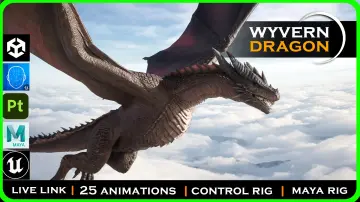
Winter Dragon (Wyvern)
A UE4-rendered wyvern with 56 animations, ice and realistic skins, blend shapes, and a hue-shiftable material instance for quick winter dragon variations.
Setting up the Winter Dragon (Wyvern) means starting from a clean Unreal Engine 4 (UE4) scene. The creature renders entirely in UE4, and there are no Visual Effects (VFX) systems attached to the asset, so the 1st pass in the Viewport is all about the model itself. The tag set points toward a low-poly, realistic creature with medieval fantasy roots, and the visual intent leans into cold and horror-adjacent vibes. For a team building a Role-Playing Game (RPG) monster or a frozen enemy encounter, this dragon brings a recognizable silhouette without forcing a heavy particle pipeline.
Dropping into an Unreal Engine 4 (UE4) Project
The Winter Dragon is shaped by the UE4 renderer, which is the 1st thing to confirm before bringing it into a project. Since it is rendered in UE4, the shading and Material expectations are set for that engine. The asset has no VFX, so any breath, ice shatter, or ambient cold effects will need to come from the developer's own particle setup. That is not a limitation so much as a clean starting point: the creature is ready for animation and Material iteration, and the visual polish is left to the implementation.
The low-poly tag is useful for performance-minded projects. Combined with the realistic tag, it suggests a model that prioritizes shape and proportion over dense geometric detail, which fits well in mid-range production pipelines. The medieval, RPG, cold, and winter tags further anchor the creature in a fantasy context. The wyvern can slip into snow-covered forts, frozen passes, or the lair of an ice-focused boss without requiring a full reskin.
Winter Dragon Animation Blueprint and 56 Clips
Animation is where the Winter Dragon shows its range. There are 56 animations total, which is a substantial library for a single creature. A number that high usually covers Locomotion, attacks, idle variations, and reaction states, giving developers a solid baseline for gameplay integration. Because the asset is tagged as an Animation Blueprint, it is reasonable to expect the creature to drive through a Blueprint-controlled State Machine, though the source does not detail the exact blueprint structure.
Alongside the animation clips, the Winter Dragon uses Blend Shapes for 2 specific facial states: Eye Closed and Breath. The Eye ClosedBlend Shape can be used for blinking, sleep, or death states, while the BreathBlend Shape expands the chest or nostrils for a dragon's inhale-exhale cycle. Those 2 shapes add life during dialogue, Cinematics, or simple idle moments. They are practical, lightweight additions that do not require complicated Node Graphs to make a difference in a scene.
Material Instance: Body, Ice, Eye, and the RGB Mask
The Material setup is shaped by 3 named Materials: Body, Ice, and Eye. Each 1 serves a distinct part of the creature's surface. The Body Material covers the main scales and hide, the Ice Material handles frozen or frostbitten areas, and the Eye Material takes care of the sockets. Having these as separate Materials means the developer can tweak the cold areas independently from the skin, which is useful when iterating on how much frost should cover the wyvern.
The Material Instance uses an RGB Mask with a clear breakdown: R feeds the edges, G controls the base color, and B targets the jaw. This channel mapping allows a single instance to blend between different visual layers, and it gives direct, artist-friendly control over which regions show edge effects, the underlying skin tone, or the jaw texture. On top of that, a Hue Shift option is included, so the entire creature's color palette can be adjusted across a spectrum without reworking the Texture Maps. That is a quick way to make a blue-ice wyvern, a sickly pale one, or a molten-frost hybrid, depending on the scene's tone.
2 Texture Skins and PBR Textures
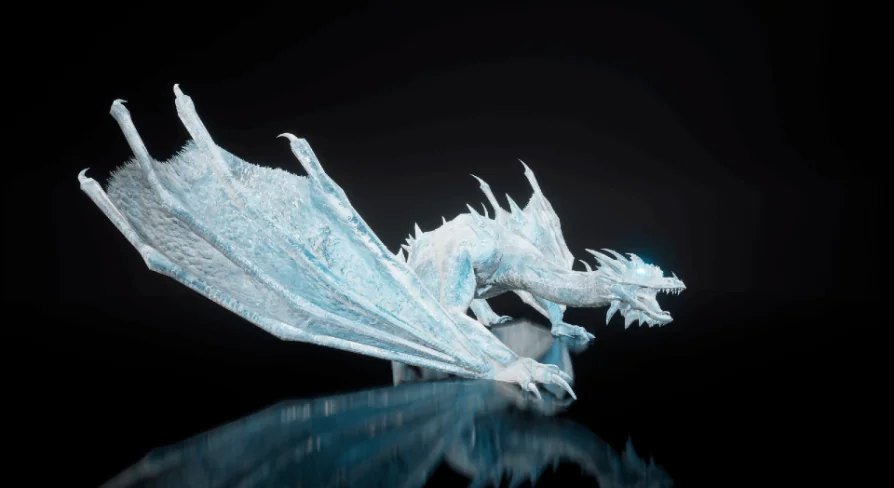
The Winter Dragon ships with 2 Texture Skins: ice and realistic. The ice skin presumably leans into a frozen, crystalline look, while the realistic skin offers a more grounded dragon appearance that works outside of a purely arctic setting. This dual-skin approach means the same Mesh and animation set can serve different visual identities across multiple levels or game modes.
On the texture quality side, the asset is Physically Based Rendering (PBR) with Metallic and Roughness maps included. The dragon's surface responds properly to lighting in UE4. With a Low-Poly model and PBR Textures, the wyvern can maintain a believable appearance in a wide range of lighting conditions, from dark horror corridors to bright snowfields. The combination of Hue Shift and the RGB Mask also means that texture work can be further customized at the Material level, reducing the need to re-export Textures every time a color change is considered.
Compatibility and Fit for Cold-Themed Encounters
1 compatibility note is attached to the asset: MHC Glasses V1. This is a specific compatibility reference, likely related to a particular character or framework setup in the user's project. Beyond that, the tag list shows Animation Blueprint, which points toward a creature that is intended to plug into a typical UE4 Animation Pipeline. The absence of VFX keeps the pipeline simple, but it also means the developer has room to add breath, frost, or aura effects without working around existing assets.
For a Low-Poly wyvern that needs to act as a winter boss, a medieval mount, or a horror-themed monster, the Winter Dragon covers a lot of ground. The Material Instance's RGB Mask gives targeted control over the edges, base color, and jaw, while the Hue Shift allows fast palette changes. The 2 Blend Shapes add facial life, and the 56 animations give it enough physical vocabulary to feel responsive in gameplay. All of this is wrapped in a UE4-rendered asset with PBR Textures and no external VFX dependencies.
When the weather turns cold in a project, the Winter Dragon (Wyvern) is ready to step in with its full animation library and flexible Material setup. The Mesh is paired with practical customization tools, making it a solid fit for teams that need a believable ice dragon without straining the production schedule.
 Characters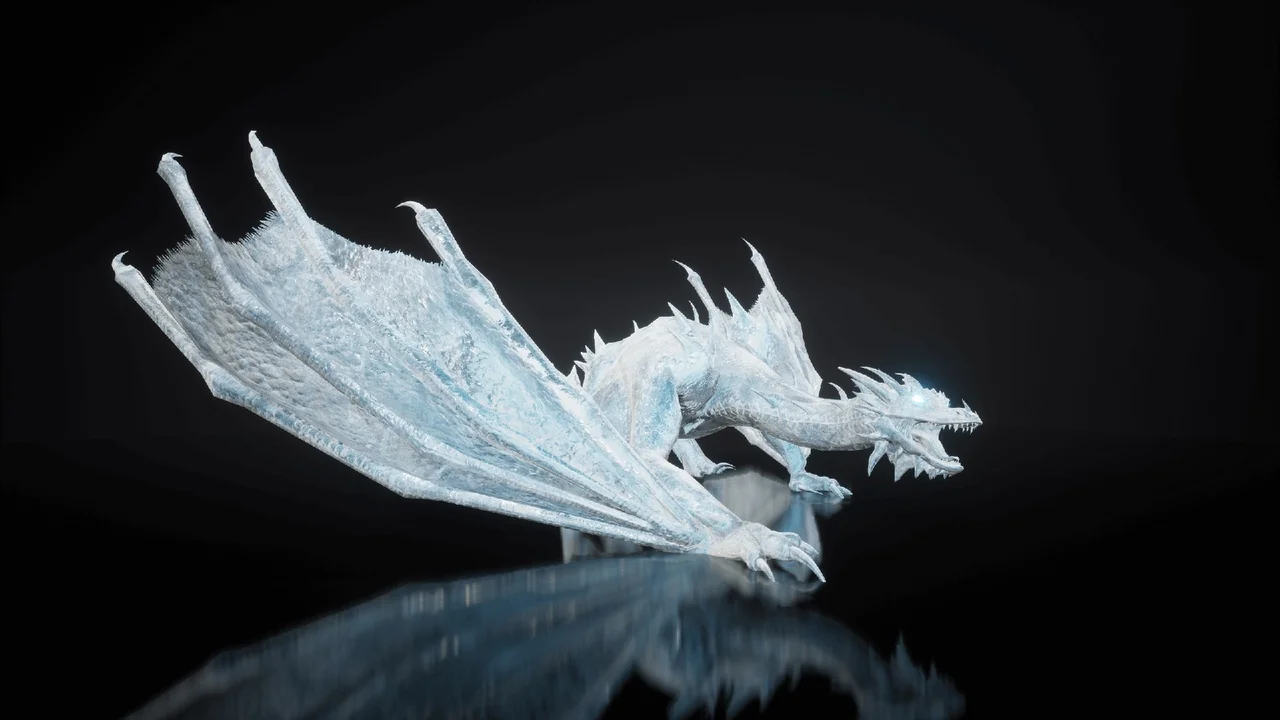
 Characters
 Characters
 Creatures