"7ad89cffa44984cf"{"id":"1002553","slug":"dragons-pack-pbr","title":"Dragons Pack PBR","category":"Characters \u0026 Creatures","engine":"4.26+,5.0+","assetVersion":"","engineVersion":"Engine Version: 4.26+,5.0+","tag":"Characters","accent":"blue","visual":"character","summary":"A modular dragon character with three heads, four backs, two tails, morphable meshes, land and air animations, riding gear, and texture customization.","platform":"Unreal Engine","indexPolicy":"index","publishedAt":"2026-11-13T10:44:04.939Z","updatedAt":"2026-11-13T10:44:04.939Z","sourceNotes":[],"fileContents":[],"compatibility":["Unreal Engine","Engine Version: 4.26+,5.0+"],"featuredImage":{"alt":"Dragons Pack PBR","src":"/wp-content/uploads/published/2026/11/3da1c57f3803-c7f49a80-8d53-4c2e-a37d-b60a8158091b-4055ba50f8.webp"},"hasDownloadLink":true,"downloads":0,"terms":[{"taxonomy":"category","slug":"characters-and-creatures","name":"Characters \u0026 Creatures"}],"galleryImages":[{"src":"/wp-content/uploads/published/2026/11/1c1a87dbd931-366751bb-208d-4b17-bc5d-9157a1a7720a-adb7d82305.webp","alt":"Dragons Pack PBR"},{"src":"/wp-content/uploads/published/2026/11/4d53b32483c2-b59333d2-2b16-47c9-a29d-94de6de335ce-6e2883ee53.webp","alt":"Dragons Pack PBR"},{"src":"/wp-content/uploads/published/2026/11/e09b2c59a59e-8956e668-52b4-49dc-8113-b64f86ab46ab-c8a5f51a18.webp","alt":"Dragons Pack PBR"},{"src":"/wp-content/uploads/published/2026/11/0e1d15a09855-5b50603f-562d-4ee6-86a0-6c42efb696d7-42b4036d21.webp","alt":"Dragons Pack PBR"},{"src":"/wp-content/uploads/published/2026/11/7133b98e5d90-3b4cd4ce-46ec-4692-baad-d8c7bc4cea2a-49c740e0e8.webp","alt":"Dragons Pack PBR"},{"src":"/wp-content/uploads/published/2026/11/c002cfdf88c6-7065b5f9-05ad-47d5-8271-441914bc77d9-396870bcd0.webp","alt":"Dragons Pack PBR"},{"src":"/wp-content/uploads/published/2026/11/dc4f54ea1af0-b9e9402b-e57e-473e-9b59-f6731a3cd62f-3cb0557db7.webp","alt":"Dragons Pack PBR"},{"src":"/wp-content/uploads/published/2026/11/e2da818c8597-3ebe473c-f436-4939-97d1-0fd8f9dc168b-f2699d337e.webp","alt":"Dragons Pack PBR"},{"src":"/wp-content/uploads/published/2026/11/4c6ac975dd15-864cae04-92a5-452b-b3ba-51b84d42602a-40eaafad19.webp","alt":"Dragons Pack PBR"},{"src":"/wp-content/uploads/published/2026/11/e723ad3b40f6-32f48b80-0cee-4f35-99b3-42eb6adcdc2a-d7799a400b.webp","alt":"Dragons Pack PBR"}],"accessPanel":{"kind":"resource","title":"Get this resource","eyebrow":"Free resource","message":"Download this resource in your browser.","fileName":"Dragons Pack PBR.7z","safetyNote":"Resources are manually reviewed before listing to improve quality and reduce obvious risks.","actionLabel":"Get this resource","resourceType":"Resource archive","versions":[]},"contentHtml":"\u003cp\u003eDragons Pack PBR is assembled in layers, and the order of those layers decides how much rework the setup costs. The modular body comes first — a head, a back option, and a tail — then the animation blueprint that drives the clips, then the morph and texture passes that stop every instance from reading as the same animal. Swapping a part after animations and gear are attached means retesting everything that touches the body, so the parts selection is the right place to start.\u003c/p\u003e \u003ch2\u003eThree Heads, Four Backs, Two Tails, One Assembly Step\u003c/h2\u003e\n\u003cp\u003eThe modular set is small enough to hold in your head: three heads, four back options, and two tails. Combined as stated, that gives twenty-four base silhouettes before any morphing or texture work. Each choice carries a different kind of weight in a scene. The head sets the face and the front read of the creature, the back option changes the profile along the body, and the tail changes the trailing line and how the animal occupies the space behind it. Because these are separate pieces rather than baked variants, swapping one does not force a re-import of the others.\u003c/p\u003e\n\u003cp\u003eFor a production pass, the useful habit is to settle on a fixed set of archetypes early — a handful of head, back, and tail triples that represent the dragons a project actually needs — and to keep those combinations written down. The pack carries both a character tag and a modular tag, and the second one is what shapes the workflow. Modularity rewards planning and punishes ad-hoc swapping once animation and gear are attached to the body.\u003c/p\u003e \u003ch3\u003eMesh Morphing as a Variation Layer\u003c/h3\u003e\n\u003cp\u003eMorphing runs across each head and the entire body, and it is the layer that turns a finite part count into an effectively open-ended one. Proportion changes on the head and on the body produce looks the part list alone cannot reach, and because the morphs are built to support randomization in-game, dragons spawned from the same head, back, and tail combination do not have to look like copies of each other. That matters most in scenes where several dragons appear at once and the eye starts comparing them.\u003c/p\u003e\n\u003cp\u003eTreat morphing as a second axis of difference rather than a replacement for the parts. A morphed head is still the same head base, so the strongest variation comes from stacking the two: pick a distinctive head, back, and tail triple, then push the morphs in a different direction for each instance. The morph work is also the cheapest place to make a dragon feel heavier, leaner, or older without touching geometry counts or animation.\u003c/p\u003e \u003ch2\u003eWiring Dragons Pack PBR Into an Animation Blueprint\u003c/h2\u003e\n\u003cp\u003eThe set ships with a large body of animations covering both land and air movement, and the animation blueprint is where those clips get organized into something a character can run. Two contexts exist — ground and flight — and the real work is in the handoff between them. Ground movement covers the creature on foot, and the air set covers it in flight; a state machine holding both, with a clean transition in each direction, keeps the dragon readable whichever state it is in.\u003c/p\u003e\n\u003cp\u003eAnimation is the layer most exposed to part changes, precisely because the body, head, and tail are interchangeable. A clip authored against the base body still plays when the parts change, but the visual result shifts: a longer tail or a heavier back alters the read of a turn or a landing even though the clip itself has not moved. Testing a few representative combinations rather than only the default one is the practical defense, and it is faster to do that before the state machine is layered with project-specific logic.\u003c/p\u003e \u003ch3\u003eWhat the Script and Blueprint Tags Point At\u003c/h3\u003e\n\u003cp\u003eThe script and animation blueprint tags both point at runtime behavior rather than at content. That is where the state machine lives and where the randomized morph values get triggered, which is why the two belong in the same stage of setup. Wiring the blueprint first and the randomization second keeps the debugging surface small: one pass for transitions, another for the shape variation, rather than both changing at once.\u003c/p\u003e \u003ch2\u003eSaddle, Reins, and Bridle Need Their Own Pass\u003c/h2\u003e\n\u003cp\u003eRiding gear — a saddle, reins, and a bridle — comes with the pack, and it is easiest to handle as a separate assembly step instead of folding it into the base character. The reins and bridle go with the head, and the saddle goes with the body. With three heads and four back options available, gear that sits correctly on one configuration is worth checking against the others before it is relied on in a scene. Body and head morphs are the other thing to verify, since equipment positioned against a default shape can drift against a morphed one.\u003c/p\u003e\n\u003cp\u003eGear also changes how the animation reads. A dragon without the saddle and reins is a creature in the world; the same dragon with them is a ridden animal, and the ground and flight clips carry that meaning differently once the equipment is on. Decide per character whether the gear is always attached or toggled, and keep that decision consistent across the archetypes so the set does not end up half-mounted.\u003c/p\u003e \u003ch2\u003eTexture Customization Against the PBR Surface\u003c/h2\u003e\n\u003cp\u003eTexture customization is offered as unlimited, which in practice means the surface is open to reworking rather than locked to one fixed set of maps. Running that through a PBR workflow gives control over how the dragon responds to the light in a scene, and the realistic tag sets the target: a believable creature rather than a stylized one. Read alongside the fantasy and medieval tags, the intended result is a dragon that belongs in a period-flavored setting while still being lit like a realistic asset.\u003c/p\u003e\n\u003cp\u003eTexture, morph, and part choice stack on top of one another — twenty-four structural combinations, an open set of morph-driven proportions, and unrestricted texture work above both. The reason to keep them as three distinct passes is that they fail differently and cost differently to change. A texture adjustment is cheap late in a project, a morph adjustment is moderate, and a part swap is the expensive one because it can reach back into animation and gear placement.\u003c/p\u003e \u003ch2\u003eRunning the Dragons Pack PBR Beside the Plant Monster Pack\u003c/h2\u003e\n\u003cp\u003eCompatibility with the Plant Monster Pack is noted for this set, so a project already using that creature pack can bring dragons into the same environment without treating them as an isolated addition. Creatures that share a scene need a shared sense of scale and lighting more than they need a shared art direction, and the realistic surface treatment here is the part that does that work.\u003c/p\u003e\n\u003cp\u003eOnce the first dragon works — parts chosen, blueprint running, gear seated, texture assigned — save that configuration and reuse it as the template for the rest. Rebuilding from an empty character for each new dragon is where modular packs usually go wrong, because the animation and gear setup gets repeated by hand and drifts between characters. A saved preset per archetype, with its head, back, tail, and morph settings recorded, keeps later additions to a short checklist: swap the parts, confirm the animation still reads, confirm the gear still sits, then vary the texture.\u003c/p\u003e\n\n\u003ch2\u003eExplore Similar Assets\u003c/h2\u003e\n\u003cul\u003e\n\u003cli\u003e\u003ca href=\"https://3dcghub.com/wyvern-rex-lite-version/\" rel=\"noopener noreferrer\"\u003eWyvern Rex Lite Version\u003c/a\u003e\u003c/li\u003e\n\u003cli\u003e\u003ca href=\"https://3dcghub.com/black-dragon/\" rel=\"noopener noreferrer\"\u003eBlack Dragon\u003c/a\u003e\u003c/li\u003e\n\u003cli\u003e\u003ca href=\"https://3dcghub.com/mushroom-monster-pack-pbr/\" rel=\"noopener noreferrer\"\u003eMushroom Monster Pack PBR\u003c/a\u003e\u003c/li\u003e\n\u003cli\u003e\u003ca href=\"https://3dcghub.com/winter-dragon-wyvern/\" rel=\"noopener noreferrer\"\u003eWinter Dragon (Wyvern)\u003c/a\u003e\u003c/li\u003e\n\u003cli\u003e\u003ca href=\"https://3dcghub.com/dragon-for-boss-monster-pbr/\" rel=\"noopener noreferrer\"\u003eDragon for Boss Monster : PBR\u003c/a\u003e\u003c/li\u003e\n\u003c/ul\u003e","contentTextLength":7263,"navigation":{"current":24,"total":4499,"previous":{"id":"1002554","slug":"npc-zombie-woman","title":"NPC Zombie Woman","category":"Characters \u0026 Creatures","platform":"Unreal Engine","updatedAt":"2026-11-13T10:45:37.029Z"},"next":{"id":"1002552","slug":"npc-zombie-man","title":"NPC Zombie Man","category":"Characters \u0026 Creatures","platform":"Unreal Engine","updatedAt":"2026-11-13T10:05:07.335Z"}},"relatedResources":[{"id":"3813","slug":"wyvern-rex-lite-version","title":"Wyvern Rex Lite Version","category":"Characters \u0026 Creatures","engine":"4.26,5.0+","assetVersion":"Engine version: 4.26,5.0+","engineVersion":"4.26","tag":"Characters","accent":"blue","visual":"character","summary":"Enhance your game with the Wyvern Rex Lite, a realistic 3D creature asset for Unreal Engine. Featuring 57 animations and PBR textures for high-quality visuals.","platform":"Unreal Engine","indexPolicy":"noindex","publishedAt":"2026-02-09T09:41:44.000Z","updatedAt":"2026-04-19T15:57:33.000Z","sourceNotes":[],"fileContents":[],"compatibility":["Unreal Engine","Engine version: 4.26,5.0+"],"featuredImage":{"alt":"Wyvern Rex Lite Version","src":"https://3dcghub.com/wp-content/uploads/2026/02/ae44ba16-2972-44d2-8122-d0d6f42a4112.webp"},"hasDownloadLink":true,"downloads":0},{"id":"1002508","slug":"black-dragon","title":"Black Dragon","category":"Characters \u0026 Creatures","engine":"4.15+,5.0+","assetVersion":"","engineVersion":"Engine Version: 4.15+,5.0+","tag":"Characters","accent":"blue","visual":"character","summary":"A technical breakdown of the Black Dragon asset, examining its 32 Ktris geometry, 105-bone rig, dual-material setup, 4K textures, and 22 animations.","platform":"Unreal Engine","indexPolicy":"index","publishedAt":"2026-11-13T08:22:50.098Z","updatedAt":"2026-11-13T08:22:50.098Z","sourceNotes":[],"fileContents":[],"compatibility":["Unreal Engine","Engine Version: 4.15+,5.0+"],"featuredImage":{"alt":"Black Dragon","src":"/wp-content/uploads/published/2026/11/57ed55afd22d-4b325e15-b03d2a6228.webp"},"hasDownloadLink":true,"downloads":0},{"id":"1002551","slug":"mushroom-monster-pack-pbr","title":"Mushroom Monster Pack PBR","category":"Characters \u0026 Creatures","engine":"4.26+,5.0+","assetVersion":"","engineVersion":"Engine Version: 4.26+,5.0+","tag":"Characters","accent":"blue","visual":"character","summary":"Explore the Mushroom Monster Pack PBR, featuring rigged animations, 30 morph targets, 9 texture variants, Substance customization, and audio.","platform":"Unreal Engine","indexPolicy":"index","publishedAt":"2026-11-13T10:04:14.578Z","updatedAt":"2026-11-13T10:04:14.578Z","sourceNotes":[],"fileContents":[],"compatibility":["Unreal Engine","Engine Version: 4.26+,5.0+"],"featuredImage":{"alt":"Mushroom Monster Pack PBR","src":"/wp-content/uploads/published/2026/11/d7d8072a8c88-491e2cc5-7246-4ed0-a58e-d7c143dda8c7-91e9c83b0d.webp"},"hasDownloadLink":true,"downloads":0}]}
Characters
Dragons Pack PBR
A modular dragon character with three heads, four backs, two tails, morphable meshes, land and air animations, riding gear, and texture customization.
Dragons Pack PBR is assembled in layers, and the order of those layers decides how much rework the setup costs. The modular body comes first — a head, a back option, and a tail — then the animation blueprint that drives the clips, then the morph and texture passes that stop every instance from reading as the same animal. Swapping a part after animations and gear are attached means retesting everything that touches the body, so the parts selection is the right place to start.
Three Heads, Four Backs, Two Tails, One Assembly Step
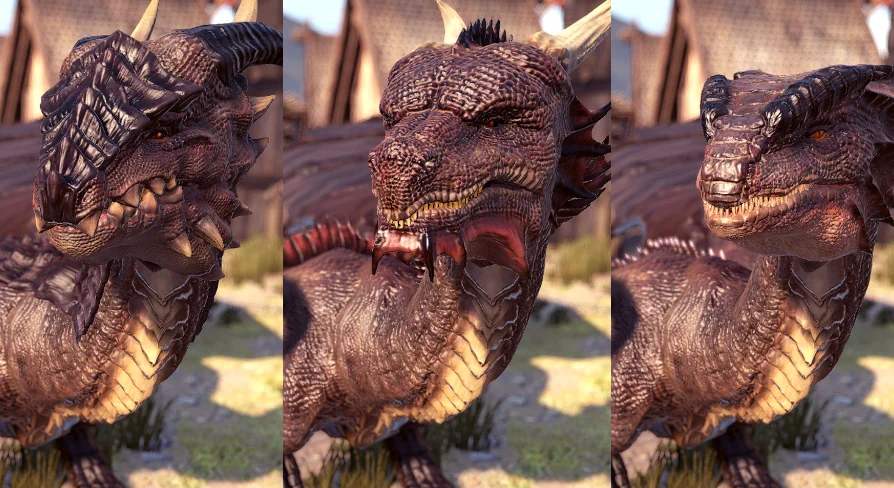
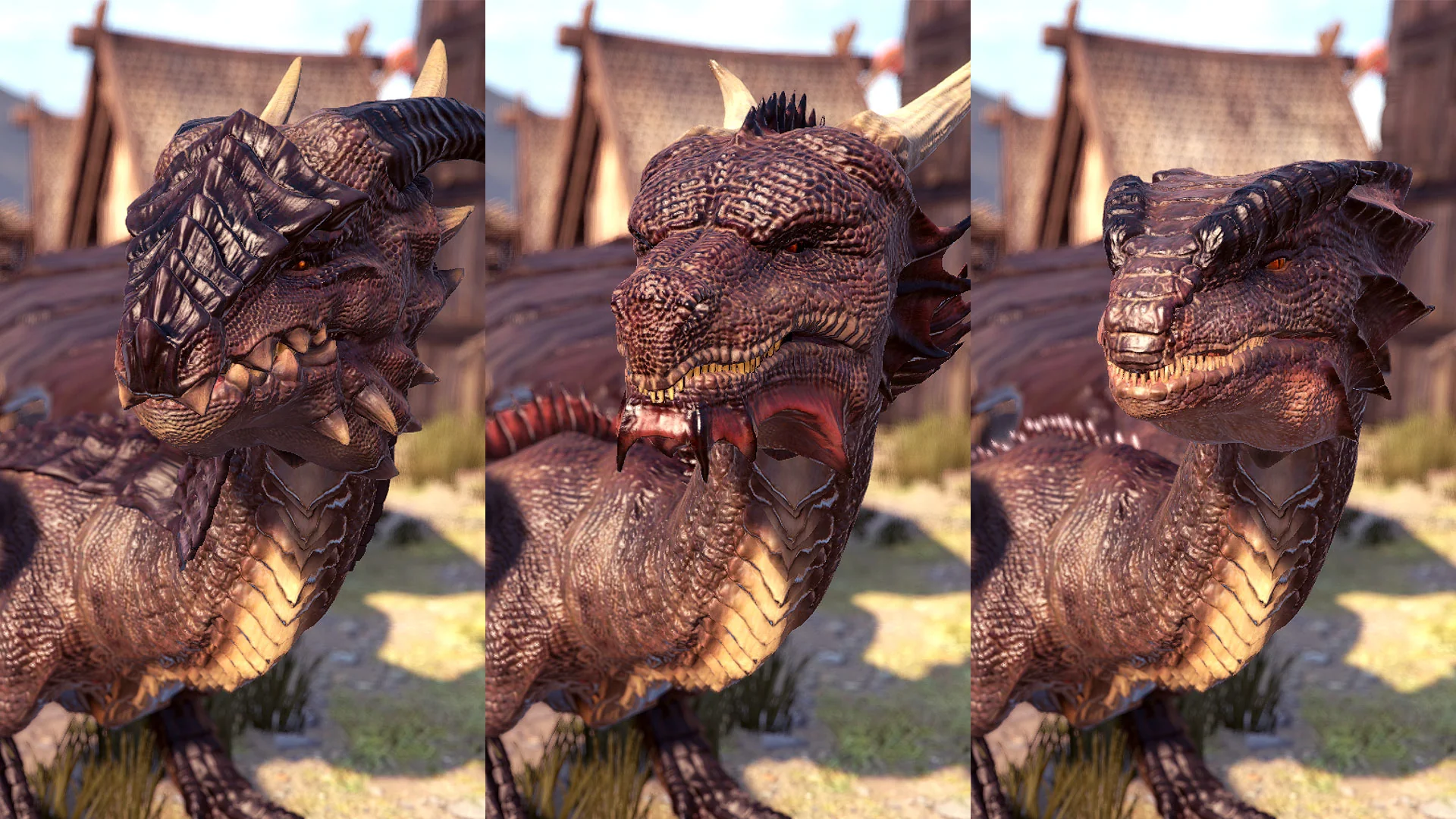
The modular set is small enough to hold in your head: three heads, four back options, and two tails. Combined as stated, that gives twenty-four base silhouettes before any morphing or texture work. Each choice carries a different kind of weight in a scene. The head sets the face and the front read of the creature, the back option changes the profile along the body, and the tail changes the trailing line and how the animal occupies the space behind it. Because these are separate pieces rather than baked variants, swapping one does not force a re-import of the others.
For a production pass, the useful habit is to settle on a fixed set of archetypes early — a handful of head, back, and tail triples that represent the dragons a project actually needs — and to keep those combinations written down. The pack carries both a character tag and a modular tag, and the second one is what shapes the workflow. Modularity rewards planning and punishes ad-hoc swapping once animation and gear are attached to the body.
Mesh Morphing as a Variation Layer
Morphing runs across each head and the entire body, and it is the layer that turns a finite part count into an effectively open-ended one. Proportion changes on the head and on the body produce looks the part list alone cannot reach, and because the morphs are built to support randomization in-game, dragons spawned from the same head, back, and tail combination do not have to look like copies of each other. That matters most in scenes where several dragons appear at once and the eye starts comparing them.
Treat morphing as a second axis of difference rather than a replacement for the parts. A morphed head is still the same head base, so the strongest variation comes from stacking the two: pick a distinctive head, back, and tail triple, then push the morphs in a different direction for each instance. The morph work is also the cheapest place to make a dragon feel heavier, leaner, or older without touching geometry counts or animation.
Wiring Dragons Pack PBR Into an Animation Blueprint
The set ships with a large body of animations covering both land and air movement, and the animation blueprint is where those clips get organized into something a character can run. Two contexts exist — ground and flight — and the real work is in the handoff between them. Ground movement covers the creature on foot, and the air set covers it in flight; a state machine holding both, with a clean transition in each direction, keeps the dragon readable whichever state it is in.
Animation is the layer most exposed to part changes, precisely because the body, head, and tail are interchangeable. A clip authored against the base body still plays when the parts change, but the visual result shifts: a longer tail or a heavier back alters the read of a turn or a landing even though the clip itself has not moved. Testing a few representative combinations rather than only the default one is the practical defense, and it is faster to do that before the state machine is layered with project-specific logic.
What the Script and Blueprint Tags Point At
The script and animation blueprint tags both point at runtime behavior rather than at content. That is where the state machine lives and where the randomized morph values get triggered, which is why the two belong in the same stage of setup. Wiring the blueprint first and the randomization second keeps the debugging surface small: one pass for transitions, another for the shape variation, rather than both changing at once.
Saddle, Reins, and Bridle Need Their Own Pass
Riding gear — a saddle, reins, and a bridle — comes with the pack, and it is easiest to handle as a separate assembly step instead of folding it into the base character. The reins and bridle go with the head, and the saddle goes with the body. With three heads and four back options available, gear that sits correctly on one configuration is worth checking against the others before it is relied on in a scene. Body and head morphs are the other thing to verify, since equipment positioned against a default shape can drift against a morphed one.
Gear also changes how the animation reads. A dragon without the saddle and reins is a creature in the world; the same dragon with them is a ridden animal, and the ground and flight clips carry that meaning differently once the equipment is on. Decide per character whether the gear is always attached or toggled, and keep that decision consistent across the archetypes so the set does not end up half-mounted.
Texture Customization Against the PBR Surface
Texture customization is offered as unlimited, which in practice means the surface is open to reworking rather than locked to one fixed set of maps. Running that through a PBR workflow gives control over how the dragon responds to the light in a scene, and the realistic tag sets the target: a believable creature rather than a stylized one. Read alongside the fantasy and medieval tags, the intended result is a dragon that belongs in a period-flavored setting while still being lit like a realistic asset.
Texture, morph, and part choice stack on top of one another — twenty-four structural combinations, an open set of morph-driven proportions, and unrestricted texture work above both. The reason to keep them as three distinct passes is that they fail differently and cost differently to change. A texture adjustment is cheap late in a project, a morph adjustment is moderate, and a part swap is the expensive one because it can reach back into animation and gear placement.
Running the Dragons Pack PBR Beside the Plant Monster Pack
Compatibility with the Plant Monster Pack is noted for this set, so a project already using that creature pack can bring dragons into the same environment without treating them as an isolated addition. Creatures that share a scene need a shared sense of scale and lighting more than they need a shared art direction, and the realistic surface treatment here is the part that does that work.
Once the first dragon works — parts chosen, blueprint running, gear seated, texture assigned — save that configuration and reuse it as the template for the rest. Rebuilding from an empty character for each new dragon is where modular packs usually go wrong, because the animation and gear setup gets repeated by hand and drifts between characters. A saved preset per archetype, with its head, back, tail, and morph settings recorded, keeps later additions to a short checklist: swap the parts, confirm the animation still reads, confirm the gear still sits, then vary the texture.
 Characters
 Characters
 Characters
 Characters