"efaa631e936fd3ee"{"id":"1002270","slug":"winsome-girl","title":"Winsome Girl","category":"Humans","engine":"4.26+,5.0+","assetVersion":"","engineVersion":"Engine Version: 4.26+,5.0+","tag":"Humans","accent":"blue","visual":"mech","summary":"Explore Winsome Girl, a stylized modern female character rigged to the UE4 Epic skeleton with morph targets, demo posing, and Animation Blueprint logic.","platform":"Unreal Engine","publishedAt":"2026-10-29T16:29:50.361Z","updatedAt":"2026-10-29T16:29:50.361Z","sourceNotes":[],"fileContents":[],"compatibility":["Unreal Engine","Engine Version: 4.26+,5.0+"],"featuredImage":{"alt":"Winsome Girl","src":"/wp-content/uploads/published/2026/10/3a43c12e093c-23e13005-5dbc-47d8-884b-3289593e6190-03c194c8a5.webp"},"hasDownloadLink":true,"downloads":0,"terms":[{"taxonomy":"category","slug":"humans","name":"Humans"}],"galleryImages":[{"src":"/wp-content/uploads/published/2026/10/fe3062d32b94-ee9d07d0-b442-4da3-a9c6-3598789ff8ce-db9e4c4676.webp","alt":"Winsome Girl"},{"src":"/wp-content/uploads/published/2026/10/84e8be38c750-0155041a-eb72-4f6b-8d64-f7a32b6b9b61-c530ad4177.webp","alt":"Winsome Girl"},{"src":"/wp-content/uploads/published/2026/10/de14a502cdf0-78e7909d-1e72-4d2c-a7ad-29575fe53e62-14cb8e7261.webp","alt":"Winsome Girl"},{"src":"/wp-content/uploads/published/2026/10/47cd5019744d-7ce1466e-065f-4713-be75-11c87e99e71f-7492cd5c40.webp","alt":"Winsome Girl"},{"src":"/wp-content/uploads/published/2026/10/8bb8e3f3f8ab-363bd9ed-2676-4fb9-98f2-dbb638bf3202-1d5b6452cb.webp","alt":"Winsome Girl"},{"src":"/wp-content/uploads/published/2026/10/f76befa60c8e-83a3653c-8c78-41b3-8ecf-fed7d2bb7f2c-cd2874d8b5.webp","alt":"Winsome Girl"},{"src":"/wp-content/uploads/published/2026/10/0b2cbe535f38-12c6b88c-6bf5-41a2-96af-58d0792c5d9a-5961303307.webp","alt":"Winsome Girl"},{"src":"/wp-content/uploads/published/2026/10/8331b41e2927-38d25fc6-976e-4291-bbd8-09c20ac1c3ad-ac1be1e1f9.webp","alt":"Winsome Girl"},{"src":"/wp-content/uploads/published/2026/10/86b036ce9592-1382f42c-da8c-4713-afd0-3625c8334d0a-f614a9d4d4.webp","alt":"Winsome Girl"}],"accessPanel":{"kind":"resource","title":"Download this resource","eyebrow":"Free Download","message":"Log in or create a free account to start your download.","fileName":"Content.7z","safetyNote":"Resources are manually reviewed before listing to improve quality and reduce obvious risks.","actionLabel":"Download Free","resourceType":"Resource archive"},"contentHtml":"\u003ch2\u003eRigging Winsome Girl to the Epic Skeleton UE4\u003c/h2\u003e\u003cp\u003eWinsome Girl centers on a stylized modern female character structured directly around the standard Epic skeleton for Unreal Engine 4. By adopting this established bone hierarchy, the mesh avoids custom bone mapping requirements that often complicate third-party character imports. The skeleton follows standard naming conventions, joint orientations, and hierarchical parent-child relationships, meaning typical locomotion sets, jumps, falls, and upper-body combat stances transfer straight onto the model without manual hierarchy reconstruction.\u003c/p\u003e\u003cp\u003eIn real-time viewport setups, placing the mesh under a standard character component allows immediate access to standard motion data. Because the weighting adheres to the canonical UE4 mannequin proportion logic, standard root motion behaviors, socket attachments for props or accessories, and rotational joint limits remain consistent across gameplay and cinematic sequences. Animators can quickly verify deformation across the shoulders, elbows, hips, and knees by cycling through default standard motion libraries, observing how the stylized mesh retains volume during high-movement locomotion passes.\u003c/p\u003e\u003ch2\u003eUtilizing Morph Targets and Demo Pose Configurations\u003c/h2\u003e\u003cp\u003eBeyond the skeletal structure, the character incorporates a selection of morph targets alongside a preconfigured demo pose. Morph targets provide localized vertex adjustments that alter specific features without altering the primary skeletal joints. In a real-time production setting, these deformation shapes enable subtle changes to facial or silhouette definition, letting developers introduce expression variations or fine-tune facial contours during close-up camera framing.\u003c/p\u003e\u003cp\u003eBecause morph targets operate directly within the engine's mesh pipeline, their weights can be driven dynamically through material parameters, curves within animation sequences, or direct scalar inputs in blueprint graphs. Blending these morph targets alongside skeletal joint rotations prevents rigid, static expressions during spoken dialogue sequences or reactive combat impacts. Meanwhile, the included demo pose serves as an immediate visual baseline. Artists can load the demo pose into the viewport to examine mesh weights, evaluate default skinning tension across resting joints, and ensure directional light maps behave as intended across stylized surface contours before applying complex animation sequences.\u003c/p\u003e\u003ch2\u003eImplementing Animation Blueprint and Script Frameworks\u003c/h2\u003e\u003cp\u003eThe character configuration leverages Unreal Engine's Animation Blueprint system and accompanying script components. An Animation Blueprint acts as the operational bridge between game logic and skeletal motion, evaluating runtime parameters such as velocity, ground contact, and jump states to transition between blend spaces and motion states. Because this character connects naturally with Animation Blueprints, integrating it into an existing gameplay framework requires minimal setup overhead.\u003c/p\u003e\u003cp\u003eDevelopers can route standard character variables—such as movement direction, crouch toggles, or velocity vectors—directly into state machine transition rules. The animation graph handles blend spaces, layered blends per bone for upper-body actions, and procedural corrections like foot placement or head tracking. Script functionality supports responsive interaction logic, letting developers bind event triggers to character states, play montage assets seamlessly, and regulate physics blend weights when switching between scripted states and dynamic ragdoll reactions.\u003c/p\u003e\u003ch2\u003eStaging the Modern Stylized Female Character in Cinematic Sequences\u003c/h2\u003e\u003cp\u003eStylized visual identity defines the asset's aesthetic direction, pairing clean figurative proportions with a modern thematic design. When preparing cinematic sequences or narrative cutscenes, the model operates effectively as a focal point within urban, contemporary, or fantastical scenarios. In complex cinematic productions, multiple complementary scene assets and specialized background environment products are often brought together to construct full sequences, with the character serving as the narrative subject.\u003c/p\u003e\u003cp\u003eSequencer tracks can direct the skeletal mesh through precise custom motion data, blending skeletal tracks with curve data linked to the built-in morph targets. Because the character maintains stylized surface clarity, directional lighting, rim highlights, and ambient occlusion passes accent the mesh cleanly without visual noise. Whether placed in an interior cinematic cutscene or an active outdoor environment, the stylized female silhouette retains readable forms across wide, medium, and close-up camera angles.\u003c/p\u003e\u003ch2\u003eRetargeting Pipelines and Sword Elf Compatibility\u003c/h2\u003e\u003cp\u003eWhen working across diverse character rosters, animation retargeting documents provide the necessary instructions to redirect motions between varying proportions. Even within the standard Epic skeleton framework, variations in limb length, spine spacing, and rest pose alignment require standardized retargeting chains. Documented retargeting setups ensure that animations authored for taller, broader, or differently scaled mannequins map cleanly onto this stylized female frame without causing joint hyper-extension or mesh clipping around the torso and shoulders.\u003c/p\u003e\u003cp\u003eThis standardized skeletal alignment also extends to compatibility considerations with other complementary figures, such as the Sword Elf character asset. When building interconnected projects where assets like Sword Elf share development space with Winsome Girl, relying on the unified Epic skeleton standard allows developers to recycle complex animation asset libraries, shared locomotion state machines, and synchronized cinematic performances across both characters. Teams evaluating character assets for multi-figure projects gain a consistent skeletal foundation that simplifies asset iteration, animation reusability, and engine integration.\u003c/p\u003e\n\n\u003ch2\u003eMore From The Same Workflow\u003c/h2\u003e\n\u003cul\u003e\n\u003cli\u003e\u003ca href=\"https://3dcghub.com/xiao-jue-asian-girl/\" title=\"Xiao Jue - Asian Girl\"\u003eXiao Jue - Asian Girl\u003c/a\u003e\u003c/li\u003e\n\u003cli\u003e\u003ca href=\"https://3dcghub.com/assassin-girl-modular/\" title=\"Assassin Girl Modular\"\u003eAssassin Girl Modular\u003c/a\u003e\u003c/li\u003e\n\u003cli\u003e\u003ca href=\"https://3dcghub.com/survivor-girl-1-modular/\" title=\"Survivor Girl 1 (Modular)\"\u003eSurvivor Girl 1 (Modular)\u003c/a\u003e\u003c/li\u003e\n\u003cli\u003e\u003ca href=\"https://3dcghub.com/modular-elf-archer-girl/\" title=\"Modular Elf Archer Girl\"\u003eModular Elf Archer Girl\u003c/a\u003e\u003c/li\u003e\n\u003cli\u003e\u003ca href=\"https://3dcghub.com/cosmo-cat-girl/\" title=\"Cosmo Cat Girl\"\u003eCosmo Cat Girl\u003c/a\u003e\u003c/li\u003e\n\u003c/ul\u003e","contentTextLength":6085,"navigation":{"current":15,"total":4209,"previous":{"id":"1002271","slug":"wolf-male","title":"Wolf - Male","category":"Animals","platform":"Unreal Engine","updatedAt":"2026-10-29T16:30:16.430Z"},"next":{"id":"1002269","slug":"wind-turbine","title":"Wind Turbine","category":"Buildings \u0026 Architecture","platform":"Unreal Engine","updatedAt":"2026-10-29T16:29:29.827Z"}},"relatedResources":[{"id":"1000717","slug":"xiao-jue-asian-girl","title":"Xiao Jue - Asian Girl","category":"Humans","engine":"4.26+,5.0+","assetVersion":"","engineVersion":"Engine Version: 4.26+,5.0+","tag":"Humans","accent":"blue","visual":"mech","summary":"Xiao Jue is a fully rigged, modular Asian girl character for Unity, Unreal, and Substance Painter, featuring 52 ARKit blendshapes, 4K textures, Epic Skeleton ri","platform":"Unreal Engine","publishedAt":"2026-07-24T12:37:39.846Z","updatedAt":"2026-07-24T12:37:39.846Z","sourceNotes":[],"fileContents":[],"compatibility":["Unreal Engine","Engine Version: 4.26+,5.0+"],"featuredImage":{"alt":"Xiao Jue - Asian Girl","src":"/wp-content/uploads/published/2026/07/ffa17768091c-29071cfa-7475-41d7-a8ee-0dae6795a052-b8ba4430a8.webp"},"hasDownloadLink":true,"downloads":7},{"id":"1000421","slug":"assassin-girl-modular","title":"Assassin Girl Modular","category":"Humans","engine":"4.27,5.0+","assetVersion":"","engineVersion":"Engine Version: 4.27,5.0+","tag":"Humans","accent":"blue","visual":"mech","summary":"Modular rigged female assassin character with Epic Skeleton, facial blendshapes, PBR 4K textures, and Unreal Engine physics. Includes dagger and multiple body t","platform":"Unreal Engine","publishedAt":"2026-07-09T20:16:25.138Z","updatedAt":"2026-07-09T20:16:25.138Z","sourceNotes":[],"fileContents":[],"compatibility":["Unreal Engine","Engine Version: 4.27,5.0+"],"featuredImage":{"alt":"Assassin Girl Modular","src":"/wp-content/uploads/published/2026/07/571d57f12c7f-2b2ffcf1-fa74-4d6a-81c3-00378fd516a0-1a49c79810.webp"},"hasDownloadLink":true,"downloads":4},{"id":"1000206","slug":"survivor-girl-1-modular","title":"Survivor Girl 1 (Modular)","category":"Humans","engine":"4.26+,5.0+","assetVersion":"","engineVersion":"Engine Version: 4.26+,5.0+","tag":"Humans","accent":"blue","visual":"mech","summary":"A fully rigged, modular female character model designed for apocalyptic survival games, featuring facial blendshapes, 4K PBR textures, and low-poly weapons.","platform":"Unreal Engine","publishedAt":"2026-06-23T19:35:44.835Z","updatedAt":"2026-06-23T19:35:44.835Z","sourceNotes":[],"fileContents":[],"compatibility":["Unreal Engine","Engine Version: 4.26+,5.0+"],"featuredImage":{"alt":"Survivor Girl 1 (Modular)","src":"/wp-content/uploads/published/2026/06/ea003c542fdd-d82dc264-87e2-40e6-a96c-2a4b916b4cb7-25e2910de6.webp"},"hasDownloadLink":true,"downloads":5}]}
Humans
Winsome Girl
Explore Winsome Girl, a stylized modern female character rigged to the UE4 Epic skeleton with morph targets, demo posing, and Animation Blueprint logic.
Category:Unreal Engine,HumansPlatform: Unreal EngineEngine Version: 4.26+,5.0+Published: Oct 29, 2026
Humans
Resource overview
Rigging Winsome Girl to the Epic Skeleton UE4
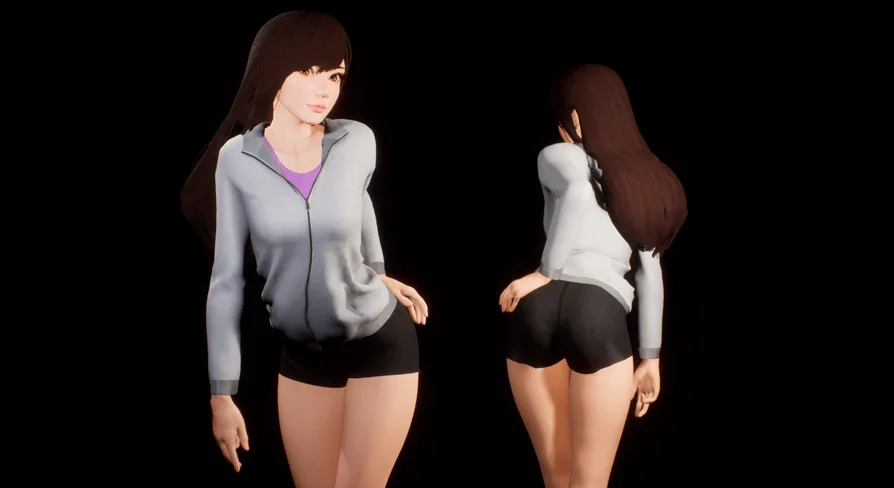
Winsome Girl centers on a stylized modern female character structured directly around the standard Epic skeleton for Unreal Engine 4. By adopting this established bone hierarchy, the mesh avoids custom bone mapping requirements that often complicate third-party character imports. The skeleton follows standard naming conventions, joint orientations, and hierarchical parent-child relationships, meaning typical locomotion sets, jumps, falls, and upper-body combat stances transfer straight onto the model without manual hierarchy reconstruction.
In real-time viewport setups, placing the mesh under a standard character component allows immediate access to standard motion data. Because the weighting adheres to the canonical UE4 mannequin proportion logic, standard root motion behaviors, socket attachments for props or accessories, and rotational joint limits remain consistent across gameplay and cinematic sequences. Animators can quickly verify deformation across the shoulders, elbows, hips, and knees by cycling through default standard motion libraries, observing how the stylized mesh retains volume during high-movement locomotion passes.
Utilizing Morph Targets and Demo Pose Configurations
Beyond the skeletal structure, the character incorporates a selection of morph targets alongside a preconfigured demo pose. Morph targets provide localized vertex adjustments that alter specific features without altering the primary skeletal joints. In a real-time production setting, these deformation shapes enable subtle changes to facial or silhouette definition, letting developers introduce expression variations or fine-tune facial contours during close-up camera framing.
Because morph targets operate directly within the engine's mesh pipeline, their weights can be driven dynamically through material parameters, curves within animation sequences, or direct scalar inputs in blueprint graphs. Blending these morph targets alongside skeletal joint rotations prevents rigid, static expressions during spoken dialogue sequences or reactive combat impacts. Meanwhile, the included demo pose serves as an immediate visual baseline. Artists can load the demo pose into the viewport to examine mesh weights, evaluate default skinning tension across resting joints, and ensure directional light maps behave as intended across stylized surface contours before applying complex animation sequences.
Implementing Animation Blueprint and Script Frameworks
The character configuration leverages Unreal Engine's Animation Blueprint system and accompanying script components. An Animation Blueprint acts as the operational bridge between game logic and skeletal motion, evaluating runtime parameters such as velocity, ground contact, and jump states to transition between blend spaces and motion states. Because this character connects naturally with Animation Blueprints, integrating it into an existing gameplay framework requires minimal setup overhead.
Developers can route standard character variables—such as movement direction, crouch toggles, or velocity vectors—directly into state machine transition rules. The animation graph handles blend spaces, layered blends per bone for upper-body actions, and procedural corrections like foot placement or head tracking. Script functionality supports responsive interaction logic, letting developers bind event triggers to character states, play montage assets seamlessly, and regulate physics blend weights when switching between scripted states and dynamic ragdoll reactions.
Staging the Modern Stylized Female Character in Cinematic Sequences
Stylized visual identity defines the asset's aesthetic direction, pairing clean figurative proportions with a modern thematic design. When preparing cinematic sequences or narrative cutscenes, the model operates effectively as a focal point within urban, contemporary, or fantastical scenarios. In complex cinematic productions, multiple complementary scene assets and specialized background environment products are often brought together to construct full sequences, with the character serving as the narrative subject.
Sequencer tracks can direct the skeletal mesh through precise custom motion data, blending skeletal tracks with curve data linked to the built-in morph targets. Because the character maintains stylized surface clarity, directional lighting, rim highlights, and ambient occlusion passes accent the mesh cleanly without visual noise. Whether placed in an interior cinematic cutscene or an active outdoor environment, the stylized female silhouette retains readable forms across wide, medium, and close-up camera angles.
Retargeting Pipelines and Sword Elf Compatibility
When working across diverse character rosters, animation retargeting documents provide the necessary instructions to redirect motions between varying proportions. Even within the standard Epic skeleton framework, variations in limb length, spine spacing, and rest pose alignment require standardized retargeting chains. Documented retargeting setups ensure that animations authored for taller, broader, or differently scaled mannequins map cleanly onto this stylized female frame without causing joint hyper-extension or mesh clipping around the torso and shoulders.
This standardized skeletal alignment also extends to compatibility considerations with other complementary figures, such as the Sword Elf character asset. When building interconnected projects where assets like Sword Elf share development space with Winsome Girl, relying on the unified Epic skeleton standard allows developers to recycle complex animation asset libraries, shared locomotion state machines, and synchronized cinematic performances across both characters. Teams evaluating character assets for multi-figure projects gain a consistent skeletal foundation that simplifies asset iteration, animation reusability, and engine integration.
 Humans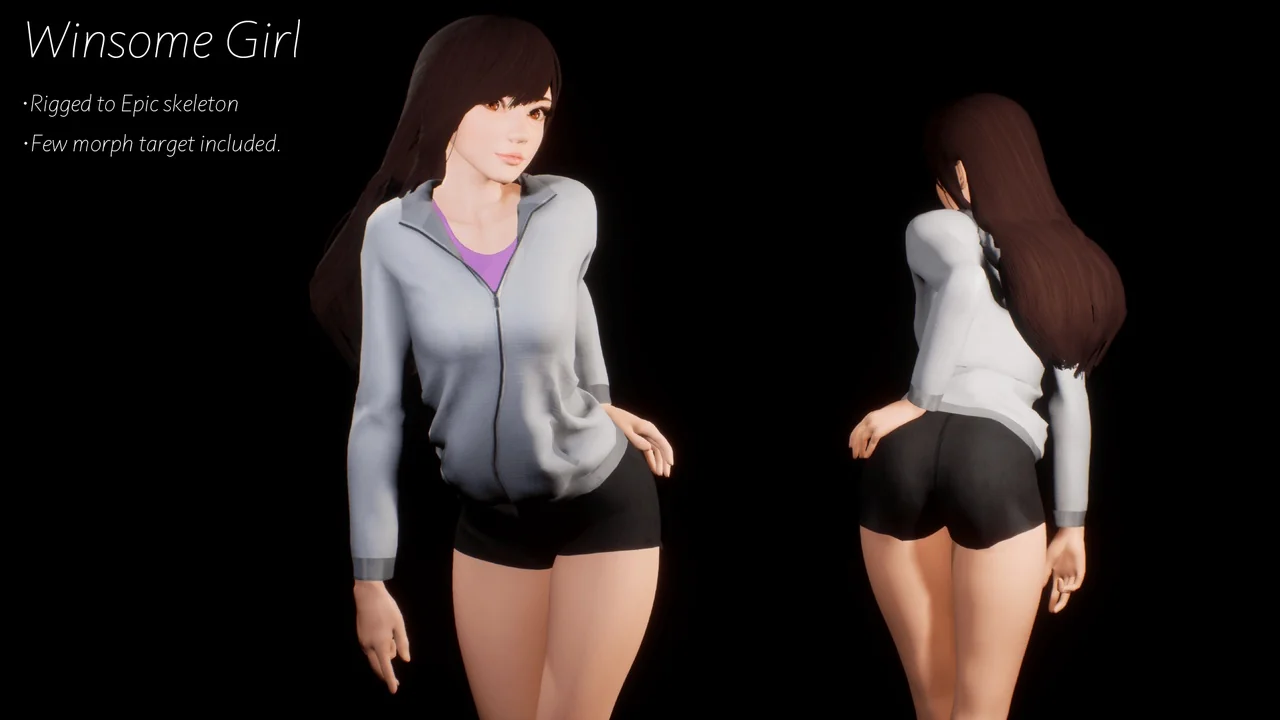
 Humans
 Humans
 Humans