"26aaab8a5d5ed4fc"{"id":"23034","slug":"webar-foundation","title":"webar-foundation","category":"Integration","engine":"Original Unity version: 2021.3.15","assetVersion":"Original Unity version: 2021.3.15","engineVersion":"Asset Version:1.0.2","tag":"Integration","accent":"cyan","visual":"audio","summary":"A package designed for the WebGL HTML5 platform that enables developers to create browser-based AR applications with features like multi-target image tracking and face mesh effects.","platform":"Unity","publishedAt":"2026-04-07T14:12:08.000Z","updatedAt":"2026-04-19T15:36:55.000Z","sourceNotes":[],"fileContents":[],"compatibility":["Unity","Original Unity version: 2021.3.15","Asset Version: 1.0.2"],"featuredImage":{"alt":"webar-foundation","src":"https://3dcghub.com/wp-content/uploads/2026/04/647d1e7b22a8_564a17a1-6eda-4f56-b022-e18de4eeed0a_1280x720_stretch.webp"},"hasDownloadLink":true,"downloads":2,"terms":[{"taxonomy":"category","slug":"integration","name":"Integration"},{"taxonomy":"post_tag","slug":"tools","name":"Tools"},{"taxonomy":"post_tag","slug":"unity","name":"Unity"},{"taxonomy":"post_tag","slug":"vfx","name":"VFX"}],"galleryImages":[],"accessPanel":{"kind":"resource","title":"Access this resource","eyebrow":"Free Download","message":"Log in or create a free account to start your download.","fileName":"webar-foundation v1.0.2.7z","safetyNote":"All resources are 100% manually reviewed to eliminate all risks.","actionLabel":"Download Free","resourceType":"Resource archive"},"contentHtml":"\u003ch2\u003eWeb-Based Augmented Reality via Unity\u003c/h2\u003e\n\u003cp\u003eThe webar-foundation package provides a framework for developing augmented reality applications specifically for the WebGL HTML5 platform. While many AR solutions are locked to native mobile applications, this package mirrors the functionality of AR Foundation but targets web browsers. It utilizes JavaScript plugins to integrate with WebAR SDKs, allowing Unity developers to deploy AR content that users can access directly through a URL without downloading a dedicated app.\u003c/p\u003e\n\n\u003ch2\u003eTracking Capabilities and Effects\u003c/h2\u003e\n\u003cp\u003eThe core functionality of the package revolves around two primary AR features: Image Tracking and Face Tracking. The Image Tracking system is capable of detecting and tracking multiple targets simultaneously, making it suitable for interactive marketing, educational tools, or art installations where several markers need to be active at once.\u003c/p\u003e\n\u003cp\u003eThe Face Tracking component supports face mesh effects and anchors. This allows for the placement of digital objects on specific facial landmarks or the overlay of complex 3D meshes that move and deform with the user's face. These features are powered by the underlying MindAR engine, which is integrated directly into the Unity workflow.\u003c/p\u003e\n\n\u003ch2\u003eDevelopment Workflow and Editor Integration\u003c/h2\u003e\n\u003cp\u003eTo streamline the creation process, the package includes a debugging tool that runs directly within the Unity Editor. This allows developers to test their AR logic and visual setups without the constant need to build and host the WebGL project during the early stages of development. The integration works by bridging Unity's environment with the necessary JavaScript libraries required for browser-based spatial computing.\u003c/p\u003e\n\u003cp\u003eBecause the package is built on open-source foundations, the source code is transparent and fully customizable. Developers have the ability to modify the underlying AR engine or the integration logic to suit specific project needs. There are no external licensing or subscription requirements for hosting the final application, allowing it to be deployed on any domain the developer controls.\u003c/p\u003e\n\n\u003ch2\u003eTechnical Requirements and Pipeline Support\u003c/h2\u003e\n\u003cp\u003eThe package is compatible with several versions of Unity, specifically starting from 2021.3.15 and including support for version 6000.0.42. It is designed to work across different rendering setups, maintaining compatibility with both the Built-in Render Pipeline and the Universal Render Pipeline (URP) in the supported Unity versions.\u003c/p\u003e\n\u003cp\u003eThe transition from native AR development to WebGL is handled through the package's integration with MindAR version 1.2.5. This ensures that the tracking algorithms are backed by an established open-source SDK that has been tested across various mobile and desktop browser environments. The asset package itself remains lightweight at approximately 121 KB, containing the necessary scripts and plugins to facilitate the WebGL AR connection.\u003c/p\u003e\n\n\u003ch2\u003ePractical Implementation and Deployment\u003c/h2\u003e\n\u003cp\u003eWhen deploying projects using webar-foundation, the final output is a standard WebGL build that can be hosted on any web server. This makes it a viable option for developers who need to deliver AR experiences that are cross-platform by default, as it leverages the browser's access to the device camera. The package provides a direct path for those familiar with Unity's AR Foundation to transition their skills into the web ecosystem while maintaining control over the source code and hosting environment.\u003c/p\u003e\n\n\u003ch2\u003eMore From The Same Workflow\u003c/h2\u003e\n\u003cul\u003e\n\u003cli\u003e\u003ca href=\"https://3dcghub.com/opencv-for-unity/\" title=\"OpenCV for Unity\"\u003eOpenCV for Unity\u003c/a\u003e\u003c/li\u003e\n\u003cli\u003e\u003ca href=\"https://3dcghub.com/exporter-for-unreal-to-for-unity-2026/\" title=\"Exporter for Unreal to/for Unity 2026\"\u003eExporter for Unreal to/for Unity 2026\u003c/a\u003e\u003c/li\u003e\n\u003cli\u003e\u003ca href=\"https://3dcghub.com/dialogue-system-for-unity/\" title=\"Dialogue System for Unity\"\u003eDialogue System for Unity\u003c/a\u003e\u003c/li\u003e\n\u003cli\u003e\u003ca href=\"https://3dcghub.com/ambient-sounds-interactive-soundscapes-for-unity-6/\" title=\"Ambient Sounds – Interactive Soundscapes for Unity 6\"\u003eAmbient Sounds – Interactive Soundscapes for Unity 6\u003c/a\u003e\u003c/li\u003e\n\u003cli\u003e\u003ca href=\"https://3dcghub.com/pegasus-flythroughs-for-unity-6/\" title=\"Pegasus – Flythroughs for Unity 6\"\u003ePegasus – Flythroughs for Unity 6\u003c/a\u003e\u003c/li\u003e\n\u003c/ul\u003e","contentTextLength":3675,"navigation":{"current":3272,"total":3400,"previous":{"id":"22934","slug":"world-map-2d-edition-2","title":"World Map 2D Edition 2","category":"GUI","platform":"Unity","updatedAt":"2026-04-19T15:36:56.000Z"},"next":{"id":"23031","slug":"opencv-for-unity","title":"OpenCV for Unity","category":"Integration","platform":"Unity","updatedAt":"2026-04-19T15:36:55.000Z"}},"relatedResources":[{"id":"22673","slug":"imagine-webar-image-tracker","title":"Imagine WebAR - Image Tracker","category":"Camera","engine":"Original Unity version: 2022.3.12","assetVersion":"Original Unity version: 2022.3.12","engineVersion":"Asset Version:1.7.1","tag":"Camera","accent":"cyan","visual":"audio","summary":"Imagine WebAR - Image Tracker enables markerless augmented reality within web browsers using Unity WebGL. It supports natural-feature tracking, texture extraction, and self-hosted deployment.","platform":"Unity","publishedAt":"2026-04-06T13:48:52.000Z","updatedAt":"2026-04-19T15:37:05.000Z","sourceNotes":[],"fileContents":[],"compatibility":["Unity","Original Unity version: 2022.3.12","Asset Version: 1.7.1"],"featuredImage":{"alt":"Imagine WebAR - Image Tracker","src":"https://3dcghub.com/wp-content/uploads/2026/04/54961fe8a9f1_c1602e84-41e6-4dc3-a47e-ba172ed3ff4c_1280x720_stretch.webp"},"hasDownloadLink":true,"downloads":2},{"id":"22995","slug":"exporter-for-unreal-to-for-unity-2026","title":"Exporter for Unreal to/for Unity 2026","category":"Integration","engine":"Original Unity version: 2021.3.45","assetVersion":"Original Unity version: 2021.3.45","engineVersion":"Asset Version:1.40","tag":"Integration","accent":"cyan","visual":"audio","summary":"The 2026 edition of this conversion tool enables the transfer of complete Unreal Engine levels into Unity, supporting complex assets like skinned meshes, terrain, and post-processing materials.","platform":"Unity","publishedAt":"2026-04-07T13:58:04.000Z","updatedAt":"2026-04-19T15:36:56.000Z","sourceNotes":[],"fileContents":[],"compatibility":["Unity","Original Unity version: 2021.3.45","Asset Version: 1.40"],"featuredImage":{"alt":"Exporter for Unreal to/for Unity 2026","src":"https://3dcghub.com/wp-content/uploads/2026/04/261da1439ae4_d08f85f6-0d37-4cee-8679-bc1567294c33_1280x720_stretch.webp"},"hasDownloadLink":true,"downloads":5},{"id":"23031","slug":"opencv-for-unity","title":"OpenCV for Unity","category":"Integration","engine":"Original Unity version: 2021.3.45","assetVersion":"Original Unity version: 2021.3.45","engineVersion":"Asset Version:2.5.7","tag":"Integration","accent":"cyan","visual":"mech","summary":"OpenCV for Unity enables developers to integrate the extensive OpenCV Java API within the Unity engine, supporting real-time image processing and deep learning across desktop, mobile, and XR hardware.","platform":"Unity","publishedAt":"2026-04-07T14:08:14.000Z","updatedAt":"2026-04-19T15:36:55.000Z","sourceNotes":[],"fileContents":[],"compatibility":["Unity","Original Unity version: 2021.3.45","Asset Version: 2.5.7"],"featuredImage":{"alt":"OpenCV for Unity","src":"https://3dcghub.com/wp-content/uploads/2026/04/409179eccf27_8f905a36-2ea1-4233-8696-772a84f9102c_1280x720_stretch.webp"},"hasDownloadLink":true,"downloads":0}]}
Integration
webar-foundation
A package designed for the WebGL HTML5 platform that enables developers to create browser-based AR applications with features like multi-target image tracking and face mesh effects.
The webar-foundation package provides a framework for developing augmented reality applications specifically for the WebGL HTML5 platform. While many AR solutions are locked to native mobile applications, this package mirrors the functionality of AR Foundation but targets web browsers. It utilizes JavaScript plugins to integrate with WebAR SDKs, allowing Unity developers to deploy AR content that users can access directly through a URL without downloading a dedicated app.
Tracking Capabilities and Effects
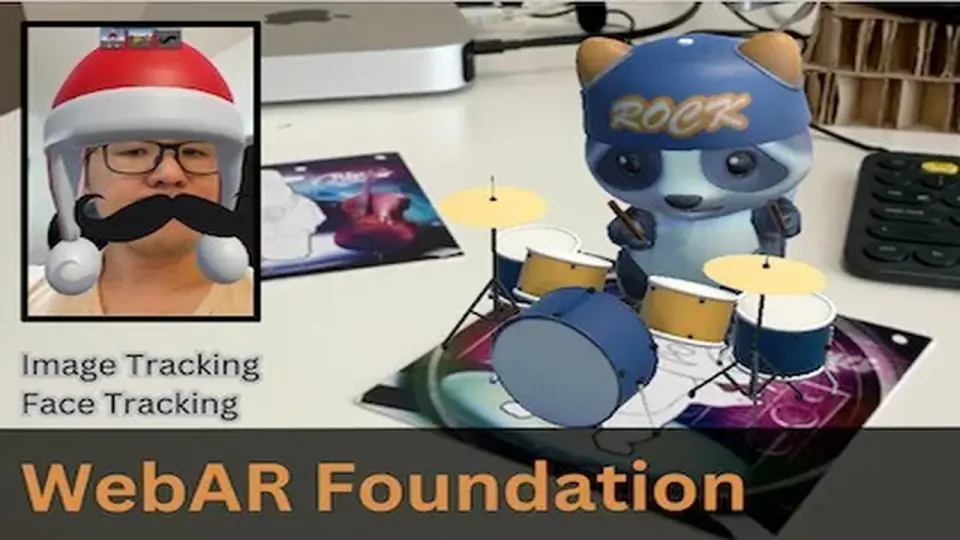
The core functionality of the package revolves around two primary AR features: Image Tracking and Face Tracking. The Image Tracking system is capable of detecting and tracking multiple targets simultaneously, making it suitable for interactive marketing, educational tools, or art installations where several markers need to be active at once.
The Face Tracking component supports face mesh effects and anchors. This allows for the placement of digital objects on specific facial landmarks or the overlay of complex 3D meshes that move and deform with the user's face. These features are powered by the underlying MindAR engine, which is integrated directly into the Unity workflow.
Development Workflow and Editor Integration
To streamline the creation process, the package includes a debugging tool that runs directly within the Unity Editor. This allows developers to test their AR logic and visual setups without the constant need to build and host the WebGL project during the early stages of development. The integration works by bridging Unity's environment with the necessary JavaScript libraries required for browser-based spatial computing.
Because the package is built on open-source foundations, the source code is transparent and fully customizable. Developers have the ability to modify the underlying AR engine or the integration logic to suit specific project needs. There are no external licensing or subscription requirements for hosting the final application, allowing it to be deployed on any domain the developer controls.
Technical Requirements and Pipeline Support
The package is compatible with several versions of Unity, specifically starting from 2021.3.15 and including support for version 6000.0.42. It is designed to work across different rendering setups, maintaining compatibility with both the Built-in Render Pipeline and the Universal Render Pipeline (URP) in the supported Unity versions.
The transition from native AR development to WebGL is handled through the package's integration with MindAR version 1.2.5. This ensures that the tracking algorithms are backed by an established open-source SDK that has been tested across various mobile and desktop browser environments. The asset package itself remains lightweight at approximately 121 KB, containing the necessary scripts and plugins to facilitate the WebGL AR connection.
Practical Implementation and Deployment
When deploying projects using webar-foundation, the final output is a standard WebGL build that can be hosted on any web server. This makes it a viable option for developers who need to deliver AR experiences that are cross-platform by default, as it leverages the browser's access to the device camera. The package provides a direct path for those familiar with Unity's AR Foundation to transition their skills into the web ecosystem while maintaining control over the source code and hosting environment.
 Integration
 Camera
 Integration
 Integration