"6ac84fdb0bd06614"{"id":"1000186","slug":"unreal-engine-5-physics","title":"Unreal Engine 5: Physics","category":"Unreal Engine","engine":"File Content: video + English subtitles","assetVersion":"Video Language: English","engineVersion":"File Content: video + English subtitles","tag":"Unreal Engine","accent":"blue","visual":"mech","summary":"Master the Chaos physics engine with this intermediate curriculum covering collisions, vectors, constraints, cables, and cloth simulations for game development.","platform":"Unreal Engine","publishedAt":"2026-06-22T04:41:32.913Z","updatedAt":"2026-06-22T04:41:32.913Z","sourceNotes":[],"fileContents":[],"compatibility":["Unreal Engine","Video Language: English","File Content: video + English subtitles"],"featuredImage":{"alt":"Unreal Engine 5: Physics","src":"/wp-content/uploads/published/2026/06/094aab7b836c-6487337-7b6a-14f3b12d26.webp"},"hasDownloadLink":true,"downloads":0,"terms":[{"taxonomy":"category","slug":"tutoriallibrary-unrealengine","name":"Unreal Engine"}],"galleryImages":[],"accessPanel":{"kind":"video-resource","title":"Download this video resource","eyebrow":"Free Download","message":"Log in or create a free account to start your download.","fileName":"Unreal Engine 5 Physics.7z","safetyNote":"Resources are manually reviewed before listing to improve quality and reduce obvious risks.","actionLabel":"Download Free","resourceType":"Video download"},"contentHtml":"\u003cp\u003eAchieving believable physical interactions in a game environment often requires moving past simple collision boundaries and static animations. Unreal Engine developers aiming to build highly interactive worlds must understand how to manipulate underlying simulation data to produce realistic movement. The intermediate-level curriculum focuses entirely on mastering these systems, guiding users through advanced video game physics simulations development. Spanning three hours and twenty-one minutes, the material dives directly into the mechanics of the Chaos physics engine.\u003c/p\u003e\n\u003cp\u003eBy breaking down the components that drive physical behavior, the curriculum provides a technical foundation for building dynamic gameplay elements. Understanding how the Chaos physics engine processes environmental interactions allows developers to build systems that react naturally to player input, structural changes, and environmental variables.\u003c/p\u003e\n\u003ch2\u003eCore Mechanics of the Chaos Physics Engine\u003c/h2\u003e\n\u003cp\u003eDeveloping a reliable physics system requires a precise understanding of how the engine calculates movement, mass, and boundaries. The foundation of this workflow involves defining physics bodies and their associated collisions. Physics bodies act as the invisible physical representations of 3D meshes within the engine, calculating gravity and resistance. Establishing accurate collisions ensures that these bodies interact correctly with the game world, preventing clipping and ensuring solid impacts between objects.\u003c/p\u003e\n\u003cp\u003eOnce the spatial data is established, the focus shifts to creating movement through forces and impulses. Applying a continuous force can simulate constant pressure, such as wind pushing against a structure or engine thrust moving a vehicle. In contrast, applying an impulse delivers an immediate, single-frame burst of energy, which is ideal for simulating explosions, sudden impacts, or projectile launches. Mastering the distinction between forces and impulses is crucial for generating accurate momentum within the Chaos physics engine.\u003c/p\u003e\n\u003ch3\u003eCalculating Movement with Vectors and Traces\u003c/h3\u003e\n\u003cp\u003eBeyond simple collisions, the physics workflow heavily relies on mathematical and spatial calculations. Developers learn to utilize vectors to determine the precise direction and magnitude of an object's trajectory. Whether calculating the arc of a thrown object or the rebound angle of a collision, vectors provide the necessary numerical data to guide physics bodies through 3D space.\u003c/p\u003e\n\u003cp\u003eTraces play a critical role in this calculation process, allowing the engine to cast invisible lines or shapes through the environment to detect surfaces, obstacles, or specific physics bodies before an interaction even occurs. By utilizing traces, developers can verify if a clear line of sight exists between a weapon and a physics body, or determine the exact surface normal of a wall before applying an explosive impulse. When combined with accurate vectors, traces ensure that the physics engine only calculates forces when and where they are logically required by the gameplay loop.\u003c/p\u003e\n\u003ch2\u003eEngineering Physics-Based Machines via Constraints\u003c/h2\u003e\n\u003cp\u003eMoving beyond free-floating objects, game environments often require mechanical setups where multiple physical elements interact under specific limitations. Constraints serve as the mechanical joints of the Unreal Engine physics system, linking multiple physics bodies together while restricting their movement along specific axes or rotational limits.\u003c/p\u003e\n\u003cp\u003eBy manipulating these constraint parameters, developers can engineer a variety of simple physics-based machines directly within the engine. The curriculum details the specific workflows necessary to construct functional ziplines and pulleys. These systems require precise tension settings and distance limitations to operate correctly, ensuring that attached physics bodies slide or hoist exactly as intended.\u003c/p\u003e\n\u003cp\u003eSimilar constraint configurations are utilized to design catapults and swings. A catapult setup requires a deep understanding of rotational constraints and sudden impulse releases to successfully launch objects across a map. Swings rely on pendulum-like physics, where constraints must hold the physics body to a central pivot point while allowing gravity and applied forces to generate realistic swinging momentum. These setups demonstrate how restricted physics bodies can create complex, interactive environmental puzzles or traversal mechanics.\u003c/p\u003e\n\u003ch2\u003eFlexible Dynamics with Cable and Cloth Systems\u003c/h2\u003e\n\u003cp\u003eWhile rigid bodies and mechanical constraints handle solid objects, modern game environments also require secondary motion from flexible materials. The workflow introduces specific systems designed to handle deformable assets, starting with the Cable component. Cables are used to generate flexible, linear connections between points in the environment, reacting to gravity and collisions.\u003c/p\u003e\n\u003cp\u003eThe implementation of cables extends to creating wires, ropes, and chains. Each of these elements requires different visual representations but relies on the same underlying physics principles of sagging, tension, and swaying when disturbed by colliding bodies or environmental forces. Ropes and chains add a necessary layer of realism to industrial or historical environments, reacting naturally as characters brush past them or as heavy physics bodies are suspended from them.\u003c/p\u003e\n\u003cp\u003eFor broader surface areas, the focus shifts to Cloth simulation. Cloth systems calculate the complex folding, stretching, and wind resistance of fabric materials within the game world. The curriculum covers the setup and implementation of clothing, allowing character garments to react dynamically to rapid movement and environmental conditions rather than remaining statically bound to an animation skeleton.\u003c/p\u003e\n\u003cp\u003eThe cloth system is equally applicable to dynamic environmental set dressing. Developers can simulate flags, curtains, banners, and sails. A heavy sail catching the wind requires fundamentally different physics parameters than a light curtain being pushed aside by a player character. By fine-tuning the cloth simulation data within the Chaos engine, developers can ensure that banners and flags ripple convincingly, adding ambient movement and physical realism to an otherwise static scene.\u003c/p\u003e\n\u003ch2\u003eCurriculum Structure and Production Implementation\u003c/h2\u003e\n\u003cp\u003eStructured by instructor David Nixon, the course workload progresses through three distinct phases: Basic Unreal Engine Physics, Intermediate Unreal Engine Physics, and Advanced Unreal Engine Physics. This tiered approach allows developers to build a stable foundational knowledge of the Chaos engine before moving on to complex machinery and intricate cloth deformations.\u003c/p\u003e\n\u003cp\u003eThe transition from Basic to Intermediate Unreal Engine Physics involves moving from single-object manipulation to multi-object interactions. In the basic phase, the focus remains heavily on establishing individual physics bodies and ensuring their collision meshes accurately reflect their geometry. As the workload shifts into the advanced stages, the complexity increases significantly, introducing interconnected systems where the movement of one physics body directly influences another through shared constraints, tensioned cables, or transferred forces.\u003c/p\u003e\n\u003cp\u003ePublished on June 02, 2025, the material is specifically targeted at developers interested in becoming experts in Unreal Engine physics. Whether constructing a complex pulley system for an adventure game, rigging dynamic sails for a ship, or ensuring that a character's clothing reacts accurately to high-speed impulses, these physics systems are essential for modern production workflows. Mastering traces, constraints, and material simulations provides the technical control necessary to build highly reactive interactive environments.\u003c/p\u003e\n\n\u003ch2\u003eMore From The Same Workflow\u003c/h2\u003e\n\u003cul\u003e\n\u003cli\u003e\u003ca href=\"https://3dcghub.com/the-ultimate-guide-to-unreal-engine-5-for-complete-beginners/\" title=\"The Ultimate Guide to Unreal Engine 5 For Complete Beginners\"\u003eThe Ultimate Guide to Unreal Engine 5 For Complete Beginners\u003c/a\u003e\u003c/li\u003e\n\u003cli\u003e\u003ca href=\"https://3dcghub.com/3d-pool-in-ue5-c-aaa-quality-beginner-to-advance/\" title=\"3D pool in UE5 C++ AAA Quality (Beginner to Advance)\"\u003e3D pool in UE5 C++ AAA Quality (Beginner to Advance)\u003c/a\u003e\u003c/li\u003e\n\u003cli\u003e\u003ca href=\"https://3dcghub.com/unreal-engine-5-5-the-ultimate-cinematic-masterclass/\" title=\"Unreal Engine 5.5 - The Ultimate Cinematic Masterclass\"\u003eUnreal Engine 5.5 - The Ultimate Cinematic Masterclass\u003c/a\u003e\u003c/li\u003e\n\u003cli\u003e\u003ca href=\"https://3dcghub.com/unreal-engine-5-c-advanced-action-rpg/\" title=\"Unreal Engine 5 C++: Advanced Action RPG\"\u003eUnreal Engine 5 C++: Advanced Action RPG\u003c/a\u003e\u003c/li\u003e\n\u003cli\u003e\u003ca href=\"https://3dcghub.com/unreal-cinematic-mastery-from-beginner-to-cinematic-creator/\" title=\"Unreal Cinematic Mastery –From Beginner to Cinematic Creator\"\u003eUnreal Cinematic Mastery –From Beginner to Cinematic Creator\u003c/a\u003e\u003c/li\u003e\n\u003c/ul\u003e","contentTextLength":8055,"navigation":{"current":1097,"total":3181,"previous":{"id":"1000187","slug":"unreal-engine-5-cinematics-for-beginners-your-first-scene","title":"Unreal Engine 5: Cinematics for Beginners – Your First Scene","category":"Unreal Engine","platform":"Unreal Engine","updatedAt":"2026-06-22T05:42:46.521Z"},"next":{"id":"1000185","slug":"unreal-engine-5-c-advanced-frontend-ui-programming","title":"Unreal Engine 5 C++: Advanced Frontend UI Programming","category":"Unreal Engine","platform":"Unreal Engine","updatedAt":"2026-06-22T04:36:47.167Z"}},"relatedResources":[{"id":"1000113","slug":"the-ultimate-guide-to-unreal-engine-5-for-complete-beginners","title":"The Ultimate Guide to Unreal Engine 5 For Complete Beginners","category":"Unreal Engine","engine":"File Content: video + English subtitles","assetVersion":"Video Language: English","engineVersion":"File Content: video + English subtitles","tag":"Unreal Engine","accent":"blue","visual":"mech","summary":"Master Unreal Engine 5 by building a first-person platformer. Learn Blueprint Visual Scripting, level design, physics, and UI through hands-on challenges.","platform":"Unreal Engine","publishedAt":"2026-06-08T16:22:45.027Z","updatedAt":"2026-06-08T16:22:45.027Z","sourceNotes":[],"fileContents":[],"compatibility":["Unreal Engine","Video Language: English","File Content: video + English subtitles"],"featuredImage":{"alt":"The Ultimate Guide to Unreal Engine 5 For Complete Beginners","src":"/wp-content/uploads/published/2026/06/9aa36f09b994-4642016-7b3f-8-bbd28ea887.webp"},"hasDownloadLink":true,"downloads":2},{"id":"24599","slug":"3d-pool-in-ue5-c-aaa-quality-beginner-to-advance","title":"3D pool in UE5 C++ AAA Quality (Beginner to Advance)","category":"Unreal Engine","engine":"Video language: English","assetVersion":"Video language: English","engineVersion":"File content: video + supporting files + English subtitles","tag":"Unreal Engine","accent":"blue","visual":"luts","summary":"This UE5 C++ course follows the making of a 3D pool game from the first code steps to final implementation. It covers Unreal Editor use, class structure, coding standards, vector math, and a physics model built from the ground up.","platform":"Unreal Engine","publishedAt":"2026-04-15T14:33:22.000Z","updatedAt":"2026-04-20T06:12:41.000Z","sourceNotes":[],"fileContents":[],"compatibility":["Unreal Engine","Video language: English","File content: video + supporting files + English subtitles"],"featuredImage":{"alt":"3D pool in UE5 C++ AAA Quality (Beginner to Advance)","src":"https://3dcghub.com/wp-content/uploads/2026/04/5537e1c029eb_course_15060_image.webp"},"hasDownloadLink":true,"downloads":0},{"id":"1001158","slug":"unreal-engine-5-multiplayer-prop-hunt-game-smartpoly","title":"Unreal Engine 5 Multiplayer Prop Hunt Game - SmartPoly","category":"Unreal Engine","engine":"File Content: video + English subtitles","assetVersion":"Video Language: English","engineVersion":"File Content: video + English subtitles","tag":"Unreal Engine","accent":"blue","visual":"mech","summary":"Build a cross-platform multiplayer Prop Hunt game for PC and Android in Unreal Engine using Blueprint Interfaces, replicated mechanics, and touch controls.","platform":"Unreal Engine","publishedAt":"2026-09-11T02:18:19.834Z","updatedAt":"2026-09-11T02:18:19.834Z","sourceNotes":[],"fileContents":[],"compatibility":["Unreal Engine","Video Language: English","File Content: video + English subtitles"],"featuredImage":{"alt":"Unreal Engine 5 Multiplayer Prop Hunt Game - SmartPoly","src":"/wp-content/uploads/published/2026/09/3fde1311282a-indrtgg7t1cqfhudrloy-coursebanner-ad218f1168.webp"},"hasDownloadLink":true,"downloads":1}]}
Unreal Engine
Unreal Engine 5: Physics
Master the Chaos physics engine with this intermediate curriculum covering collisions, vectors, constraints, cables, and cloth simulations for game development.
Category:Unreal Engine, Unreal EnginePlatform: Unreal EngineVideo Language: EnglishFile Content: video + English subtitlesPublished: Jun 22, 2026
Unreal Engine
Resource overview
Achieving believable physical interactions in a game environment often requires moving past simple collision boundaries and static animations. Unreal Engine developers aiming to build highly interactive worlds must understand how to manipulate underlying simulation data to produce realistic movement. The intermediate-level curriculum focuses entirely on mastering these systems, guiding users through advanced video game physics simulations development. Spanning three hours and twenty-one minutes, the material dives directly into the mechanics of the Chaos physics engine.
By breaking down the components that drive physical behavior, the curriculum provides a technical foundation for building dynamic gameplay elements. Understanding how the Chaos physics engine processes environmental interactions allows developers to build systems that react naturally to player input, structural changes, and environmental variables.
Core Mechanics of the Chaos Physics Engine
Developing a reliable physics system requires a precise understanding of how the engine calculates movement, mass, and boundaries. The foundation of this workflow involves defining physics bodies and their associated collisions. Physics bodies act as the invisible physical representations of 3D meshes within the engine, calculating gravity and resistance. Establishing accurate collisions ensures that these bodies interact correctly with the game world, preventing clipping and ensuring solid impacts between objects.
Once the spatial data is established, the focus shifts to creating movement through forces and impulses. Applying a continuous force can simulate constant pressure, such as wind pushing against a structure or engine thrust moving a vehicle. In contrast, applying an impulse delivers an immediate, single-frame burst of energy, which is ideal for simulating explosions, sudden impacts, or projectile launches. Mastering the distinction between forces and impulses is crucial for generating accurate momentum within the Chaos physics engine.
Calculating Movement with Vectors and Traces
Beyond simple collisions, the physics workflow heavily relies on mathematical and spatial calculations. Developers learn to utilize vectors to determine the precise direction and magnitude of an object's trajectory. Whether calculating the arc of a thrown object or the rebound angle of a collision, vectors provide the necessary numerical data to guide physics bodies through 3D space.
Traces play a critical role in this calculation process, allowing the engine to cast invisible lines or shapes through the environment to detect surfaces, obstacles, or specific physics bodies before an interaction even occurs. By utilizing traces, developers can verify if a clear line of sight exists between a weapon and a physics body, or determine the exact surface normal of a wall before applying an explosive impulse. When combined with accurate vectors, traces ensure that the physics engine only calculates forces when and where they are logically required by the gameplay loop.
Engineering Physics-Based Machines via Constraints
Moving beyond free-floating objects, game environments often require mechanical setups where multiple physical elements interact under specific limitations. Constraints serve as the mechanical joints of the Unreal Engine physics system, linking multiple physics bodies together while restricting their movement along specific axes or rotational limits.
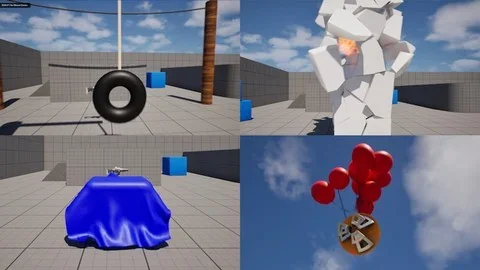
By manipulating these constraint parameters, developers can engineer a variety of simple physics-based machines directly within the engine. The curriculum details the specific workflows necessary to construct functional ziplines and pulleys. These systems require precise tension settings and distance limitations to operate correctly, ensuring that attached physics bodies slide or hoist exactly as intended.
Similar constraint configurations are utilized to design catapults and swings. A catapult setup requires a deep understanding of rotational constraints and sudden impulse releases to successfully launch objects across a map. Swings rely on pendulum-like physics, where constraints must hold the physics body to a central pivot point while allowing gravity and applied forces to generate realistic swinging momentum. These setups demonstrate how restricted physics bodies can create complex, interactive environmental puzzles or traversal mechanics.
Flexible Dynamics with Cable and Cloth Systems
While rigid bodies and mechanical constraints handle solid objects, modern game environments also require secondary motion from flexible materials. The workflow introduces specific systems designed to handle deformable assets, starting with the Cable component. Cables are used to generate flexible, linear connections between points in the environment, reacting to gravity and collisions.
The implementation of cables extends to creating wires, ropes, and chains. Each of these elements requires different visual representations but relies on the same underlying physics principles of sagging, tension, and swaying when disturbed by colliding bodies or environmental forces. Ropes and chains add a necessary layer of realism to industrial or historical environments, reacting naturally as characters brush past them or as heavy physics bodies are suspended from them.
For broader surface areas, the focus shifts to Cloth simulation. Cloth systems calculate the complex folding, stretching, and wind resistance of fabric materials within the game world. The curriculum covers the setup and implementation of clothing, allowing character garments to react dynamically to rapid movement and environmental conditions rather than remaining statically bound to an animation skeleton.
The cloth system is equally applicable to dynamic environmental set dressing. Developers can simulate flags, curtains, banners, and sails. A heavy sail catching the wind requires fundamentally different physics parameters than a light curtain being pushed aside by a player character. By fine-tuning the cloth simulation data within the Chaos engine, developers can ensure that banners and flags ripple convincingly, adding ambient movement and physical realism to an otherwise static scene.
Curriculum Structure and Production Implementation
Structured by instructor David Nixon, the course workload progresses through three distinct phases: Basic Unreal Engine Physics, Intermediate Unreal Engine Physics, and Advanced Unreal Engine Physics. This tiered approach allows developers to build a stable foundational knowledge of the Chaos engine before moving on to complex machinery and intricate cloth deformations.
The transition from Basic to Intermediate Unreal Engine Physics involves moving from single-object manipulation to multi-object interactions. In the basic phase, the focus remains heavily on establishing individual physics bodies and ensuring their collision meshes accurately reflect their geometry. As the workload shifts into the advanced stages, the complexity increases significantly, introducing interconnected systems where the movement of one physics body directly influences another through shared constraints, tensioned cables, or transferred forces.
Published on June 02, 2025, the material is specifically targeted at developers interested in becoming experts in Unreal Engine physics. Whether constructing a complex pulley system for an adventure game, rigging dynamic sails for a ship, or ensuring that a character's clothing reacts accurately to high-speed impulses, these physics systems are essential for modern production workflows. Mastering traces, constraints, and material simulations provides the technical control necessary to build highly reactive interactive environments.
 Unreal Engine
 Unreal Engine
 Unreal Engine
 Unreal Engine