"efaa631e936fd3ee"{"id":"1002240","slug":"translation-toolkit","title":"Translation Toolkit","category":"Engine Tools","engine":"5.1","assetVersion":"Asset Version: 1.6","engineVersion":"Engine Version: 5.1","tag":"Engine Tools","accent":"blue","visual":"mech","summary":"Translate tooltips, replace selected text, and inspect non-localized comments inside Unreal Engine with Translation Toolkit and the UAIP harness.","platform":"Unreal Engine","publishedAt":"2026-10-29T15:55:39.534Z","updatedAt":"2026-10-29T15:55:39.534Z","sourceNotes":[],"fileContents":[],"compatibility":["Unreal Engine","Asset Version: 1.6","Engine Version: 5.1"],"featuredImage":{"alt":"Translation Toolkit","src":"/wp-content/uploads/published/2026/10/2faf021b306c-73b8d8ce-74f7-43b0-abab-9ef973a3bf02-35e855371e.webp"},"hasDownloadLink":true,"downloads":0,"terms":[{"taxonomy":"category","slug":"engine-tools-tools-and-plugins","name":"Engine Tools"}],"galleryImages":[{"src":"/wp-content/uploads/published/2026/10/6a7e96ada99c-92444c6e-6bf1-42f0-a81f-0e3e6ada2e80-56a06553c8.webp","alt":"Translation Toolkit"},{"src":"/wp-content/uploads/published/2026/10/8aebece7eab5-ff026a3d-d7e9-4960-b43f-32b33984bc6f-ad1646229e.webp","alt":"Translation Toolkit"},{"src":"/wp-content/uploads/published/2026/10/f4e0db984e2f-f565335c-72df-46e0-8bd2-58ad84131dca-b5159cf85b.webp","alt":"Translation Toolkit"},{"src":"/wp-content/uploads/published/2026/10/995fa012aa53-09bf7007-3286-4698-be9a-0b0d4a53152c-8733d14b0a.webp","alt":"Translation Toolkit"},{"src":"/wp-content/uploads/published/2026/10/f9067f657dea-25883092-2c5c-4f20-a2b6-0ebae1bce1cf-14ae1f703b.webp","alt":"Translation Toolkit"},{"src":"/wp-content/uploads/published/2026/10/ecaa9df1977d-fc543f12-f59f-45de-88da-3a8a9a48ab6a-047694c910.webp","alt":"Translation Toolkit"}],"accessPanel":{"kind":"resource","title":"Download this resource","eyebrow":"Free Download","message":"Log in or create a free account to start your download.","fileName":"Translation Toolkit.7z","safetyNote":"Resources are manually reviewed before listing to improve quality and reduce obvious risks.","actionLabel":"Download Free","resourceType":"Resource archive"},"contentHtml":"\u003ch2\u003eConfiguring Translation Toolkit within the UAIP Harness\u003c/h2\u003e\u003cp\u003eIntegrating Translation Toolkit into an active project workspace centers entirely on the Unreal Engine editor environment. Structured as a development utility and editor tool, the plugin interfaces cleanly alongside the Unreal AI Integration Platform (UAIP) — AI Agent Harness for UE. Setting up the plugin within this harness establishes a localized pipeline where string analysis, label translation, and UI evaluation occur within the engine viewport and docking layout instead of relying on external browser lookups.\u003c/p\u003e\u003cp\u003eBecause the tool operates as a native editor utility, the initial configuration focuses on binding the toolkit's routines to the daily authoring environment. Developers working on shared, global codebases or asset pipelines frequently encounter untranslated variables, instructional descriptions, and interface elements. Placing Translation Toolkit directly into the project environment ensures that translation functions remain persistent across different editor subsystems, asset viewers, and property panels without modifying the underlying engine architecture or disrupting ongoing asset serialization.\u003c/p\u003e\u003ch2\u003eShortcut Key Activation and Editor Input Handling\u003c/h2\u003e\u003cp\u003eSpeed during asset creation depends on quick interaction patterns, and Translation Toolkit addresses this by deploying shortcut keys directly inside the editor viewport and property trees. Rather than navigating deep contextual submenus to interpret foreign text, developers can trigger translation events through hotkey combinations assigned within the editor controls.\u003c/p\u003e\u003cp\u003eExecuting a shortcut key bypasses manual copy-and-paste steps. When an unfamiliar label, metadata field, or documentation string appears in the details panel or graph layout, activating the defined key sequence sends that specific string through the translation pipeline immediately. This setup keeps hands on the keyboard and minimizes disruption during active development sessions, whether auditing unfamiliar assets or inspecting third-party blueprint frameworks.\u003c/p\u003e\u003ch2\u003ePop-Up Window Routing for Non-Localized Tooltips and Text\u003c/h2\u003e\u003cp\u003eReading non-localized text is one of the primary hurdles when integrating assets or documentation produced across different regions. Translation Toolkit handles this by extracting non-localized strings and tooltips directly from the interface and presenting the parsed results inside a clean pop-up window.\u003c/p\u003e\u003cp\u003eTooltips present unique challenges in editor interfaces because they are transient and disappear as soon as the mouse shifts position. By capturing the contents of these hovering descriptions and routing the translated output into a dedicated pop-up window, the toolkit gives developers ample time to read, evaluate, and reference technical guidelines. This pop-up mechanism functions effectively for:\u003c/p\u003e\u003cul\u003e\u003cli\u003eExtended tooltips explaining complex node functions or script parameters.\u003c/li\u003e\u003cli\u003eNon-localized editor messages, property tags, and category labels.\u003c/li\u003e\u003cli\u003eInterface descriptions embedded in legacy or third-party asset packs.\u003c/li\u003e\u003cli\u003eQuick text validation when assessing foreign-language documentation inside asset metadata.\u003c/li\u003e\u003c/ul\u003e\u003cp\u003eThe pop-up window isolates the translation from the source interface, allowing developers to inspect complex technical notes without permanently altering the original UI strings of the project.\u003c/p\u003e\u003ch2\u003eIn-Place Selected Text Replacement for Multi-Language Comments\u003c/h2\u003e\u003cp\u003eBeyond passive reading via pop-up windows, Translation Toolkit contains an active replacement system suited to mutable text fields. The plugin can translate selected text and replace it directly with the resulting translation in place.\u003c/p\u003e\u003cp\u003eThis selected text replacement functionality proves essential when navigating node networks, material graphs, and source documentation that feature comments written in various languages. Collaboration across international teams often results in graphs sprinkled with disparate foreign annotations. Using the toolkit, a developer can highlight a multi-language comment bubble, trigger the translation command, and substitute the original text with the translated output instantly.\u003c/p\u003e\u003cp\u003eDirect replacement eliminates the mechanical friction of opening external translation tools, copying the translated string, and pasting it back into the comment node. The workflow operates smoothly across comment boxes, custom text fields, and internal asset notes, helping teams standardize documentation across shared team repositories without manual drafting overhead.\u003c/p\u003e\u003ch2\u003eProduction Workflow Scope for Editor Utility and Development\u003c/h2\u003e\u003cp\u003eCategorized under development, utility, transportation, and editor tools, Translation Toolkit serves a focused role within modern Unreal Engine production environments. Its integration with the Unreal AI Integration Platform (UAIP) harness positions it as an agile operational aid for teams handling multi-regional content, complex technical transfers, or distributed codebases.\u003c/p\u003e\u003cp\u003eBy unifying pop-up inspection for non-localized tooltips with in-place text replacement for multi-language comments, the toolkit covers both read-only comprehension and active content adaptation. Developers can inspect unfamiliar tools with shortcut keys, parse interface tooltips through dedicated pop-up windows, and harmonize graph comments directly within their native Unreal Engine workspaces.\u003c/p\u003e\n\n\u003ch2\u003eContinue Browsing Similar Packs\u003c/h2\u003e\n\u003cul\u003e\n\u003cli\u003e\u003ca href=\"https://3dcghub.com/imperfecter-post-process-toolkit/\" title=\"IMPERFECTER - Post Process Toolkit\"\u003eIMPERFECTER - Post Process Toolkit\u003c/a\u003e\u003c/li\u003e\n\u003cli\u003e\u003ca href=\"https://3dcghub.com/tick-optimization-toolkit/\" title=\"Tick Optimization Toolkit\"\u003eTick Optimization Toolkit\u003c/a\u003e\u003c/li\u003e\n\u003cli\u003e\u003ca href=\"https://3dcghub.com/easy-localization-translation/\" title=\"Easy Localization Translation\"\u003eEasy Localization Translation\u003c/a\u003e\u003c/li\u003e\n\u003cli\u003e\u003ca href=\"https://3dcghub.com/multiplayer-fps-procedural-animation-toolkit/\" title=\"Multiplayer FPS Procedural Animation Toolkit\"\u003eMultiplayer FPS Procedural Animation Toolkit\u003c/a\u003e\u003c/li\u003e\n\u003cli\u003e\u003ca href=\"https://3dcghub.com/voxy-a-voxel-plugin/\" title=\"Voxy - A Voxel Plugin\"\u003eVoxy - A Voxel Plugin\u003c/a\u003e\u003c/li\u003e\n\u003c/ul\u003e","contentTextLength":5513,"navigation":{"current":45,"total":4209,"previous":{"id":"1002241","slug":"tree-felling-system","title":"Tree Felling System","category":"Procedural Systems","platform":"Unreal Engine","updatedAt":"2026-10-29T15:57:04.621Z"},"next":{"id":"1002239","slug":"trajectories-part-1","title":"Trajectories Part 1","category":"Characters \u0026 Creatures","platform":"Unreal Engine","updatedAt":"2026-10-29T15:55:05.420Z"}},"relatedResources":[{"id":"1000303","slug":"imperfecter-post-process-toolkit","title":"IMPERFECTER - Post Process Toolkit","category":"Engine Tools","engine":"5.6","assetVersion":"Asset Version: 1.3.1","engineVersion":"Engine Version: 5.6","tag":"Engine Tools","accent":"blue","visual":"mech","summary":"A modular Unreal Engine code plugin utilizing Global Shaders to simulate real-time camera imperfections like VHS compression, halation, and lens dirt.","platform":"Unreal Engine","publishedAt":"2026-07-04T07:55:29.048Z","updatedAt":"2026-07-04T07:55:29.048Z","sourceNotes":[],"fileContents":[],"compatibility":["Unreal Engine","Asset Version: 1.3.1","Engine Version: 5.6"],"featuredImage":{"alt":"IMPERFECTER - Post Process Toolkit","src":"/wp-content/uploads/published/2026/07/0d2ea1f72b31-548936e7-47a6-4b6f-b471-caf92dc97f20-a26d1363a2.webp"},"hasDownloadLink":true,"downloads":1},{"id":"24974","slug":"tick-optimization-toolkit","title":"Tick Optimization Toolkit","category":"Engine Tools","engine":"5.4,5.6","assetVersion":"Engine version: 5.4,5.6","engineVersion":"Asset Version:1.4.2 - 1.4.5","tag":"Engine Tools","accent":"blue","visual":"audio","summary":"Tick Optimization Toolkit reduces the cost of ticking in actors, components, and timelines by adjusting frequency or disabling updates through distance and visibility. It keeps the workflow in Blueprints, with C++ support available and multiplayer features...","platform":"Unreal Engine","publishedAt":"2026-04-17T15:42:20.000Z","updatedAt":"2026-04-20T06:12:34.000Z","sourceNotes":[],"fileContents":[],"compatibility":["Unreal Engine","Engine version: 5.4,5.6","Asset Version: 1.4.2 - 1.4.5"],"featuredImage":{"alt":"Tick Optimization Toolkit","src":"https://3dcghub.com/wp-content/uploads/2026/04/4cc7de927306_2a609578-563a-4cd8-88f7-0d22fce14eb2.webp"},"hasDownloadLink":true,"downloads":0},{"id":"13900","slug":"easy-localization-translation","title":"Easy Localization Translation","category":"Engine Tools","engine":"5.3 - 5.4","assetVersion":"Engine version: 5.3 - 5.4","engineVersion":"Asset Version:1.3","tag":"Engine Tools","accent":"blue","visual":"city","summary":"Streamline your development workflow with Easy Localization Translation. This editor-only plugin automates string translation using advanced AI without requiring external API setups.","platform":"Unreal Engine","publishedAt":"2026-03-11T10:37:29.000Z","updatedAt":"2026-04-19T15:46:19.000Z","sourceNotes":[],"fileContents":[],"compatibility":["Unreal Engine","Engine version: 5.3 - 5.4","Asset Version: 1.3"],"featuredImage":{"alt":"Easy Localization Translation","src":"https://3dcghub.com/wp-content/uploads/2026/03/ba888dea-e97d-4f22-a6f3-da4ec4639ad5.webp"},"hasDownloadLink":true,"downloads":0}]}
Engine Tools
Translation Toolkit
Translate tooltips, replace selected text, and inspect non-localized comments inside Unreal Engine with Translation Toolkit and the UAIP harness.
Configuring Translation Toolkit within the UAIP Harness
Integrating Translation Toolkit into an active project workspace centers entirely on the Unreal Engine editor environment. Structured as a development utility and editor tool, the plugin interfaces cleanly alongside the Unreal AI Integration Platform (UAIP) — AI Agent Harness for UE. Setting up the plugin within this harness establishes a localized pipeline where string analysis, label translation, and UI evaluation occur within the engine viewport and docking layout instead of relying on external browser lookups.
Because the tool operates as a native editor utility, the initial configuration focuses on binding the toolkit's routines to the daily authoring environment. Developers working on shared, global codebases or asset pipelines frequently encounter untranslated variables, instructional descriptions, and interface elements. Placing Translation Toolkit directly into the project environment ensures that translation functions remain persistent across different editor subsystems, asset viewers, and property panels without modifying the underlying engine architecture or disrupting ongoing asset serialization.
Shortcut Key Activation and Editor Input Handling
Speed during asset creation depends on quick interaction patterns, and Translation Toolkit addresses this by deploying shortcut keys directly inside the editor viewport and property trees. Rather than navigating deep contextual submenus to interpret foreign text, developers can trigger translation events through hotkey combinations assigned within the editor controls.
Executing a shortcut key bypasses manual copy-and-paste steps. When an unfamiliar label, metadata field, or documentation string appears in the details panel or graph layout, activating the defined key sequence sends that specific string through the translation pipeline immediately. This setup keeps hands on the keyboard and minimizes disruption during active development sessions, whether auditing unfamiliar assets or inspecting third-party blueprint frameworks.
Pop-Up Window Routing for Non-Localized Tooltips and Text
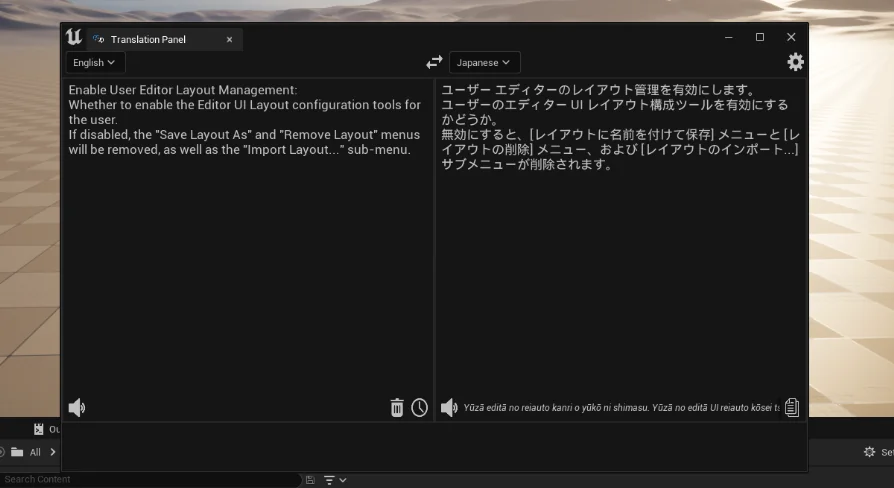
Reading non-localized text is one of the primary hurdles when integrating assets or documentation produced across different regions. Translation Toolkit handles this by extracting non-localized strings and tooltips directly from the interface and presenting the parsed results inside a clean pop-up window.
Tooltips present unique challenges in editor interfaces because they are transient and disappear as soon as the mouse shifts position. By capturing the contents of these hovering descriptions and routing the translated output into a dedicated pop-up window, the toolkit gives developers ample time to read, evaluate, and reference technical guidelines. This pop-up mechanism functions effectively for:
Extended tooltips explaining complex node functions or script parameters.
Non-localized editor messages, property tags, and category labels.
Interface descriptions embedded in legacy or third-party asset packs.
Quick text validation when assessing foreign-language documentation inside asset metadata.
The pop-up window isolates the translation from the source interface, allowing developers to inspect complex technical notes without permanently altering the original UI strings of the project.
In-Place Selected Text Replacement for Multi-Language Comments
Beyond passive reading via pop-up windows, Translation Toolkit contains an active replacement system suited to mutable text fields. The plugin can translate selected text and replace it directly with the resulting translation in place.
This selected text replacement functionality proves essential when navigating node networks, material graphs, and source documentation that feature comments written in various languages. Collaboration across international teams often results in graphs sprinkled with disparate foreign annotations. Using the toolkit, a developer can highlight a multi-language comment bubble, trigger the translation command, and substitute the original text with the translated output instantly.
Direct replacement eliminates the mechanical friction of opening external translation tools, copying the translated string, and pasting it back into the comment node. The workflow operates smoothly across comment boxes, custom text fields, and internal asset notes, helping teams standardize documentation across shared team repositories without manual drafting overhead.
Production Workflow Scope for Editor Utility and Development
Categorized under development, utility, transportation, and editor tools, Translation Toolkit serves a focused role within modern Unreal Engine production environments. Its integration with the Unreal AI Integration Platform (UAIP) harness positions it as an agile operational aid for teams handling multi-regional content, complex technical transfers, or distributed codebases.
By unifying pop-up inspection for non-localized tooltips with in-place text replacement for multi-language comments, the toolkit covers both read-only comprehension and active content adaptation. Developers can inspect unfamiliar tools with shortcut keys, parse interface tooltips through dedicated pop-up windows, and harmonize graph comments directly within their native Unreal Engine workspaces.
 Engine Tools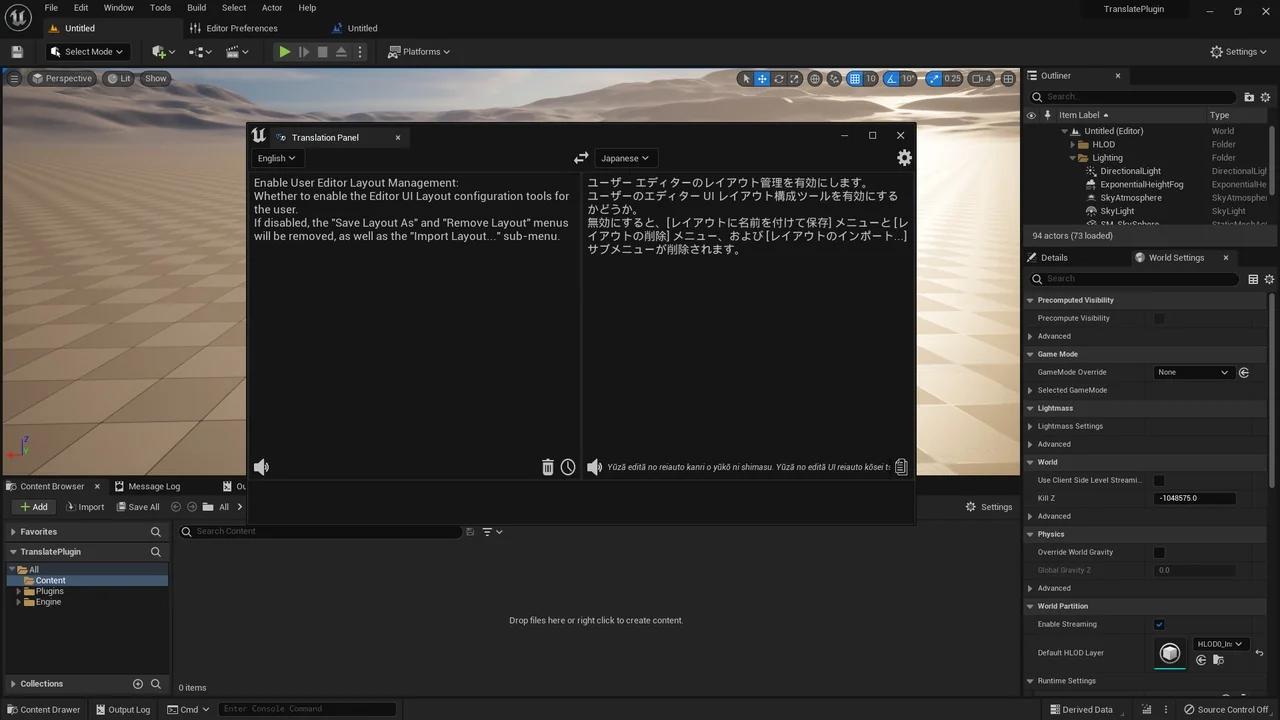
 Engine Tools
 Engine Tools
 Engine Tools