"efaa631e936fd3ee"{"id":"1002239","slug":"trajectories-part-1","title":"Trajectories Part 1","category":"Characters \u0026 Creatures","engine":"5.1+","assetVersion":"","engineVersion":"Engine Version: 5.1+","tag":"Characters","accent":"blue","visual":"character","summary":"Explore Trajectories Part 1 for Unreal Engine, featuring spline-driven chainballs, laser harpoons, CHAOS and Apex destruction, and camera zoom mechanics.","platform":"Unreal Engine","publishedAt":"2026-10-29T15:55:05.420Z","updatedAt":"2026-10-29T15:55:05.420Z","sourceNotes":[],"fileContents":[],"compatibility":["Unreal Engine","Engine Version: 5.1+"],"featuredImage":{"alt":"Trajectories Part 1","src":"/wp-content/uploads/published/2026/10/a8edd61465eb-b985a413-dc7b-4c55-bb86-935d3fd86d7f-28d290b9d7.webp"},"hasDownloadLink":true,"downloads":0,"terms":[{"taxonomy":"category","slug":"characters-and-creatures","name":"Characters \u0026 Creatures"}],"galleryImages":[{"src":"/wp-content/uploads/published/2026/10/86a3f714e2e7-adc4981a-ce3d-438f-8498-4b0eaae9d77e-f28423cd0d.webp","alt":"Trajectories Part 1"},{"src":"/wp-content/uploads/published/2026/10/056b602bc78b-32ff7b5d-024a-481c-a541-818e0df7ee2f-b1a4114758.webp","alt":"Trajectories Part 1"},{"src":"/wp-content/uploads/published/2026/10/943d8b913610-a8f0b75f-4a8a-40d1-89a9-315e2c9e1511-d5e0d24ba0.webp","alt":"Trajectories Part 1"},{"src":"/wp-content/uploads/published/2026/10/58fef4c5e19d-54358b47-bcba-4685-9b04-67b9f1ba45ea-394aef3c16.webp","alt":"Trajectories Part 1"},{"src":"/wp-content/uploads/published/2026/10/189c6072c0a9-4cd69096-95e3-432b-bd17-4545869d584c-5fd16bae64.webp","alt":"Trajectories Part 1"},{"src":"/wp-content/uploads/published/2026/10/db0fc55af99b-0d3b1ba8-fbae-478d-bda3-02b90e199942-f120969ba0.webp","alt":"Trajectories Part 1"},{"src":"/wp-content/uploads/published/2026/10/ac14de73b96e-f994fc1c-03e2-4f9f-b824-4e3447b003e9-5711f69661.webp","alt":"Trajectories Part 1"},{"src":"/wp-content/uploads/published/2026/10/a520d3b4f721-83400841-3310-433e-81b1-82262c31cebc-96d7d56153.webp","alt":"Trajectories Part 1"}],"accessPanel":{"kind":"resource","title":"Download this resource","eyebrow":"Free Download","message":"Log in or create a free account to start your download.","fileName":"Trajectories Part 1.7z","safetyNote":"Resources are manually reviewed before listing to improve quality and reduce obvious risks.","actionLabel":"Download Free","resourceType":"Resource archive"},"contentHtml":"\u003cp\u003eCombat encounters that rely on tethered weapons, arcing flails, and propelled projectiles demand precise spatial control. In dynamic action sequences where enemy combatants hurl heavy iron chainballs across an arena or impale targets with high-velocity laser harpoons, standard linear projectile paths often fail to deliver the required weight and visual drama. Trajectories Part 1 focuses entirely on solving this trajectory and impact pipeline within Unreal Engine, combining spline-guided flight paths, swappable assets, impact reactions, and physics-driven destruction.\u003c/p\u003e \u003ch2\u003eConfiguring Three Spline Chain Trajectories and Travel Speed\u003c/h2\u003e\n\u003cp\u003eAt the center of the system is the ability to draw and shape three distinct spline chain trajectories directly in the environment. Rather than relying on simple line traces or physics-only velocity calculations that can behave unpredictably in complex level geometry, designers can trace explicit spline curves that govern the flight path of the projectile from source to destination.\u003c/p\u003e\n\u003cp\u003eThese editable spline lines grant direct authority over the attack arc. Whether an enemy swings a spiked ball in a sweeping horizontal hook, lofts a tethered bomb in an overhead lob, or fires a harpoon along a tight, predatory line, the path remains fully authorable. Alongside the pathing, the travel speed of the chain can be calibrated to fit the pacing of the encounter. Fast, snappy launches can simulate high-pressure ranged assaults, while slower, deliberate chain extensions can build tension or give players clearer telegraph windows to dodge incoming strikes.\u003c/p\u003e \u003ch2\u003eSwapping Chain Meshes, Laser Tubes, and Harpoon Particle Effects\u003c/h2\u003e\n\u003cp\u003eVisual presentation is completely decoupled from the underlying logic, allowing developers to adapt the system to fantasy, modern, or sci-fi aesthetics without reworking the core blueprint scripts. The tether component supports arbitrary mesh assignment, meaning the connecting line can be represented as linked metal chain segments, glowing laser tubes, or any custom structural mesh required by the art direction.\u003c/p\u003e\n\u003cp\u003eThe projectile head follows the same modular logic. Developers can use any custom ball or harpoon mesh, switching seamlessly between medieval spiked flails, mechanical anchor heads, or futuristic energy harpoons. Furthermore, the rotational behavior of the projectile head is fully adjustable, ensuring that a spiked ball tumbles realistically through the air while an aerodynamic harpoon keeps its tip locked forward along the spline vector. To reinforce the sense of threat, particle systems such as smoke, fire, or custom environmental trails can be attached directly to the flying projectile head, tracing its route across the combat arena.\u003c/p\u003e \u003ch2\u003eCHAOS Destruction, Apex, and Target Skeletal Breakdown\u003c/h2\u003e\n\u003cp\u003ePhysical consequence defines how convincing tethered weapon impacts appear. Trajectories Part 1 incorporates support for both legacy and modern Unreal Engine destruction frameworks, maintaining operational compatibility across engine generations.\u003c/p\u003e\n\u003cul\u003e\n\u003cli\u003e\u003cstrong\u003eUnreal Engine 4:\u003c/strong\u003e Requires the native Apex Destruction plugin to be enabled in project settings to calculate mesh fracturing upon strike.\u003c/li\u003e\n\u003cli\u003e\u003cstrong\u003eUnreal Engine 5:\u003c/strong\u003e Requires the CHAOS Destruction plugin to be enabled, integrating directly with modern geometry collections and Nanite-supported environments.\u003c/li\u003e\n\u003c/ul\u003e\n\u003cp\u003eOn impact, the system gives creators control over how targets receive damage. Designers can choose whether to destroy or preserve struck static meshes and skeletal meshes. When destruction is toggled on, incoming chainballs and harpoons can shatter structural props or dismember enemy skeletal targets, turning high-momentum attacks into dramatic demolition events. For encounters that require cleaner combat boundaries, the destruction trigger can simply be deactivated, leaving target meshes intact while registering the hit.\u003c/p\u003e \u003ch2\u003eDynamic Camera Zoom and Slowmotion on Impact\u003c/h2\u003e\n\u003cp\u003eTo heighten the visceral impact of landing a successful strike or suffering a heavy blow from an enemy, the framework incorporates integrated cinematic camera responses. On hit confirmation, the system can trigger a dynamic camera zoom that pushes the viewport closer to the collision point, isolating the moment of contact.\u003c/p\u003e\n\u003cp\u003eWorking alongside the camera zoom is a toggleable slow-motion activation feature. Slowing down the simulation at the exact instant the chainball shatters an obstacle or the harpoon penetrates a target emphasizes physics reactions, particle dispersion, and structural fragmentation. Because these cinematic triggers are built into the gameplay scripts, they can be fired automatically during key combat beats, boss attacks, or critical hit events without requiring external sequence managers.\u003c/p\u003e \u003ch2\u003eProject Compatibility and Implementation Scope\u003c/h2\u003e\n\u003cp\u003eBuilt with core Blueprints and Animation Blueprints, the package is structured to allow fast integration into existing character setups, enemy attack routines, and gameplay systems. It functions as a complete self-contained combat toolset while maintaining direct compatibility with Trajectories Part 2 for expanded projectile configurations.\u003c/p\u003e\n\u003cp\u003eTeams building combat-focused titles—ranging from action RPGs and hack-and-slash brawlers to sci-fi shooters requiring tethered weaponry—benefit most from this setup. By pairing fine-grained spline pathing with native CHAOS and Apex destruction support, Trajectories Part 1 eliminates the need to build custom chain-rendering math, projectile rotation scripts, and camera impact logic from scratch.\u003c/p\u003e\n\n\u003ch2\u003eRelated Resources Worth Checking\u003c/h2\u003e\n\u003cul\u003e\n\u003cli\u003e\u003ca href=\"https://3dcghub.com/f3-warrior-girl-scarlett/\" title=\"F3 Warrior Girl Scarlett\"\u003eF3 Warrior Girl Scarlett\u003c/a\u003e\u003c/li\u003e\n\u003cli\u003e\u003ca href=\"https://3dcghub.com/infected-rage-unleashed/\" title=\"INFECTED Rage Unleashed\"\u003eINFECTED Rage Unleashed\u003c/a\u003e\u003c/li\u003e\n\u003cli\u003e\u003ca href=\"https://3dcghub.com/downhill-bike-mtb/\" title=\"Downhill BIke (MTB)\"\u003eDownhill BIke (MTB)\u003c/a\u003e\u003c/li\u003e\n\u003cli\u003e\u003ca href=\"https://3dcghub.com/bjorn-viking/\" title=\"Bjorn Viking\"\u003eBjorn Viking\u003c/a\u003e\u003c/li\u003e\n\u003cli\u003e\u003ca href=\"https://3dcghub.com/troll-collection/\" title=\"Troll Collection\"\u003eTroll Collection\u003c/a\u003e\u003c/li\u003e\n\u003c/ul\u003e","contentTextLength":5624,"navigation":{"current":46,"total":4209,"previous":{"id":"1002240","slug":"translation-toolkit","title":"Translation Toolkit","category":"Engine Tools","platform":"Unreal Engine","updatedAt":"2026-10-29T15:55:39.534Z"},"next":{"id":"1002238","slug":"track-marker-vfx","title":"Track marker vfx.","category":"Variety","platform":"Unreal Engine","updatedAt":"2026-10-29T15:54:03.356Z"}},"relatedResources":[{"id":"1001804","slug":"f3-warrior-girl-scarlett","title":"F3 Warrior Girl Scarlett","category":"Characters \u0026 Creatures","engine":"5.1+","assetVersion":"","engineVersion":"Engine Version: 5.1+","tag":"Characters","accent":"blue","visual":"character","summary":"Explore F3 Warrior Girl Scarlett for UE5, featuring modular parts, Epic Skeleton rigging, ARkit blendshapes, and Xandra Character Creator support.","platform":"Unreal Engine","publishedAt":"2026-10-21T07:55:59.371Z","updatedAt":"2026-10-21T07:55:59.371Z","sourceNotes":[],"fileContents":[],"compatibility":["Unreal Engine","Engine Version: 5.1+"],"featuredImage":{"alt":"F3 Warrior Girl Scarlett","src":"/wp-content/uploads/published/2026/10/3ff4a3d9c180-93e6847a-6539-400c-b282-f7230a72232c-bc82cfec5c.webp"},"hasDownloadLink":true,"downloads":0},{"id":"1002268","slug":"wildman","title":"Wildman","category":"Characters \u0026 Creatures","engine":"5.0+","assetVersion":"","engineVersion":"Engine Version: 5.0+","tag":"Characters","accent":"blue","visual":"character","summary":"Explore the Wildman modular stylized character asset, featuring swappable creature parts, weapons, 4K PBR textures, LODs, and a UE5 Control Rig.","platform":"Unreal Engine","publishedAt":"2026-10-29T16:29:01.463Z","updatedAt":"2026-10-29T16:29:01.463Z","sourceNotes":[],"fileContents":[],"compatibility":["Unreal Engine","Engine Version: 5.0+"],"featuredImage":{"alt":"Wildman","src":"/wp-content/uploads/published/2026/10/a11da997663c-e7dae94f-f9b2-48f3-9ca9-bcce77dcbbed-bc1f267e80.webp"},"hasDownloadLink":true,"downloads":0},{"id":"1000070","slug":"infected-rage-unleashed","title":"INFECTED Rage Unleashed","category":"Characters \u0026 Creatures","engine":"Engine Version: 5.5+","assetVersion":"Engine Version: 5.5+","engineVersion":"","tag":"Characters","accent":"blue","visual":"character","summary":"A post-apocalyptic crowd bundle with 300+ infected assets, 200 characters, modular parts, 9 groups, rigs, and Blender and UE5 workflow support.","platform":"Unreal Engine","publishedAt":"2026-06-01T15:15:17.561Z","updatedAt":"2026-10-03T14:08:27.227Z","sourceNotes":[],"fileContents":[],"compatibility":["Unreal Engine","Engine Version: 5.5+"],"featuredImage":{"alt":"INFECTED Rage Unleashed","src":"/wp-content/uploads/published/2026/06/3c8a2b26a8b1-infected-box3-57234c04b4.webp"},"hasDownloadLink":true,"downloads":2}]}
Characters
Trajectories Part 1
Explore Trajectories Part 1 for Unreal Engine, featuring spline-driven chainballs, laser harpoons, CHAOS and Apex destruction, and camera zoom mechanics.
Combat encounters that rely on tethered weapons, arcing flails, and propelled projectiles demand precise spatial control. In dynamic action sequences where enemy combatants hurl heavy iron chainballs across an arena or impale targets with high-velocity laser harpoons, standard linear projectile paths often fail to deliver the required weight and visual drama. Trajectories Part 1 focuses entirely on solving this trajectory and impact pipeline within Unreal Engine, combining spline-guided flight paths, swappable assets, impact reactions, and physics-driven destruction.
Configuring Three Spline Chain Trajectories and Travel Speed
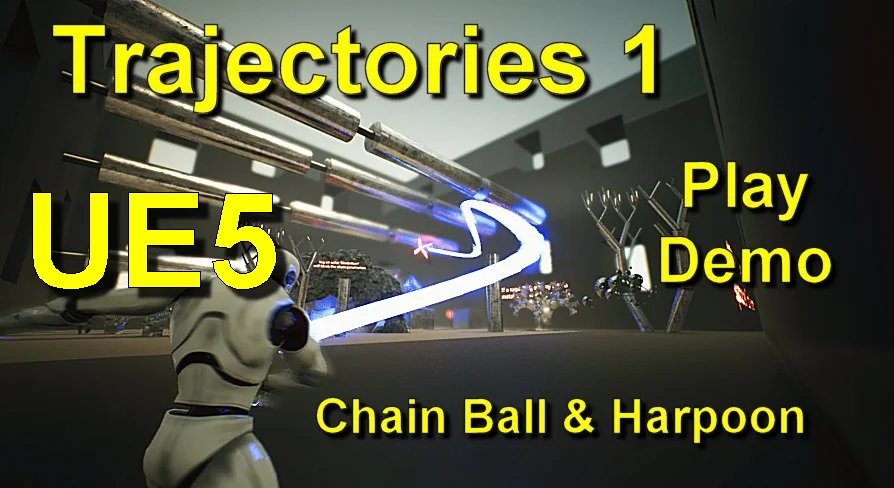
At the center of the system is the ability to draw and shape three distinct spline chain trajectories directly in the environment. Rather than relying on simple line traces or physics-only velocity calculations that can behave unpredictably in complex level geometry, designers can trace explicit spline curves that govern the flight path of the projectile from source to destination.
These editable spline lines grant direct authority over the attack arc. Whether an enemy swings a spiked ball in a sweeping horizontal hook, lofts a tethered bomb in an overhead lob, or fires a harpoon along a tight, predatory line, the path remains fully authorable. Alongside the pathing, the travel speed of the chain can be calibrated to fit the pacing of the encounter. Fast, snappy launches can simulate high-pressure ranged assaults, while slower, deliberate chain extensions can build tension or give players clearer telegraph windows to dodge incoming strikes.
Swapping Chain Meshes, Laser Tubes, and Harpoon Particle Effects
Visual presentation is completely decoupled from the underlying logic, allowing developers to adapt the system to fantasy, modern, or sci-fi aesthetics without reworking the core blueprint scripts. The tether component supports arbitrary mesh assignment, meaning the connecting line can be represented as linked metal chain segments, glowing laser tubes, or any custom structural mesh required by the art direction.
The projectile head follows the same modular logic. Developers can use any custom ball or harpoon mesh, switching seamlessly between medieval spiked flails, mechanical anchor heads, or futuristic energy harpoons. Furthermore, the rotational behavior of the projectile head is fully adjustable, ensuring that a spiked ball tumbles realistically through the air while an aerodynamic harpoon keeps its tip locked forward along the spline vector. To reinforce the sense of threat, particle systems such as smoke, fire, or custom environmental trails can be attached directly to the flying projectile head, tracing its route across the combat arena.
CHAOS Destruction, Apex, and Target Skeletal Breakdown
Physical consequence defines how convincing tethered weapon impacts appear. Trajectories Part 1 incorporates support for both legacy and modern Unreal Engine destruction frameworks, maintaining operational compatibility across engine generations.
Unreal Engine 4: Requires the native Apex Destruction plugin to be enabled in project settings to calculate mesh fracturing upon strike.
Unreal Engine 5: Requires the CHAOS Destruction plugin to be enabled, integrating directly with modern geometry collections and Nanite-supported environments.
On impact, the system gives creators control over how targets receive damage. Designers can choose whether to destroy or preserve struck static meshes and skeletal meshes. When destruction is toggled on, incoming chainballs and harpoons can shatter structural props or dismember enemy skeletal targets, turning high-momentum attacks into dramatic demolition events. For encounters that require cleaner combat boundaries, the destruction trigger can simply be deactivated, leaving target meshes intact while registering the hit.
Dynamic Camera Zoom and Slowmotion on Impact
To heighten the visceral impact of landing a successful strike or suffering a heavy blow from an enemy, the framework incorporates integrated cinematic camera responses. On hit confirmation, the system can trigger a dynamic camera zoom that pushes the viewport closer to the collision point, isolating the moment of contact.
Working alongside the camera zoom is a toggleable slow-motion activation feature. Slowing down the simulation at the exact instant the chainball shatters an obstacle or the harpoon penetrates a target emphasizes physics reactions, particle dispersion, and structural fragmentation. Because these cinematic triggers are built into the gameplay scripts, they can be fired automatically during key combat beats, boss attacks, or critical hit events without requiring external sequence managers.
Project Compatibility and Implementation Scope
Built with core Blueprints and Animation Blueprints, the package is structured to allow fast integration into existing character setups, enemy attack routines, and gameplay systems. It functions as a complete self-contained combat toolset while maintaining direct compatibility with Trajectories Part 2 for expanded projectile configurations.
Teams building combat-focused titles—ranging from action RPGs and hack-and-slash brawlers to sci-fi shooters requiring tethered weaponry—benefit most from this setup. By pairing fine-grained spline pathing with native CHAOS and Apex destruction support, Trajectories Part 1 eliminates the need to build custom chain-rendering math, projectile rotation scripts, and camera impact logic from scratch.
 Characters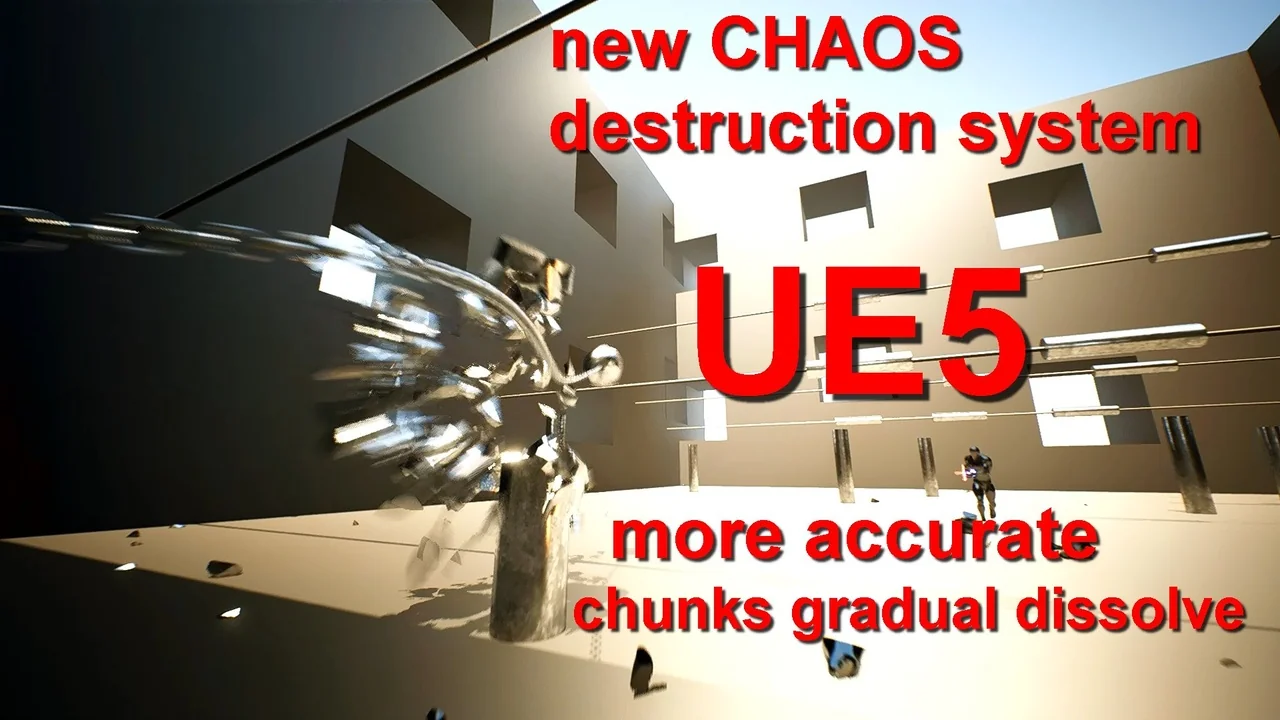
 Characters
 Characters
 Characters