"efaa631e936fd3ee"{"id":"1002241","slug":"tree-felling-system","title":"Tree Felling System","category":"Procedural Systems","engine":"5.1+","assetVersion":"","engineVersion":"Engine Version: 5.1+","tag":"Procedural Systems","accent":"blue","visual":"mech","summary":"Explore the Tree Felling System, an interactive Unreal foliage mechanic using instanced static meshes, hatchet tools, and customizable log drops.","platform":"Unreal Engine","publishedAt":"2026-10-29T15:57:04.621Z","updatedAt":"2026-10-29T15:57:04.621Z","sourceNotes":[],"fileContents":[],"compatibility":["Unreal Engine","Engine Version: 5.1+"],"featuredImage":{"alt":"Tree Felling System","src":"/wp-content/uploads/published/2026/10/6f31755d8eb4-858fa30e-0322-4f3b-821a-dddeaaf1971a-3eed207f4a.webp"},"hasDownloadLink":true,"downloads":0,"terms":[{"taxonomy":"category","slug":"procedural-systems","name":"Procedural Systems"}],"galleryImages":[{"src":"/wp-content/uploads/published/2026/10/e7fce5b1a761-bb0ec181-1b1d-4a42-a649-ebcbbb278977-ea53e3dacd.webp","alt":"Tree Felling System"},{"src":"/wp-content/uploads/published/2026/10/a8281e9c1935-d4e9bb33-ad65-4b57-a4ea-d680e29b4eea-dbfdfbb7ab.webp","alt":"Tree Felling System"},{"src":"/wp-content/uploads/published/2026/10/c8c04381a599-b745ac33-7c53-4b28-8ba4-b1634234ae86-af49c86b6d.webp","alt":"Tree Felling System"},{"src":"/wp-content/uploads/published/2026/10/29c777ff25d9-24a9440e-d792-4e4c-a1f6-bfbaa1aff855-d325bf6918.webp","alt":"Tree Felling System"},{"src":"/wp-content/uploads/published/2026/10/24956ff1b588-2a378612-9d37-4834-8091-2757b5b1aaea-4ce69de542.webp","alt":"Tree Felling System"}],"accessPanel":{"kind":"resource","title":"Download this resource","eyebrow":"Free Download","message":"Log in or create a free account to start your download.","fileName":"Content.7z","safetyNote":"Resources are manually reviewed before listing to improve quality and reduce obvious risks.","actionLabel":"Download Free","resourceType":"Resource archive"},"contentHtml":"\u003ch2\u003ePopulating Interactive Forests with the Foliage Tool\u003c/h2\u003e\n\u003cp\u003eVast, dense forests in open environments often create immediate tension between visual density and runtime processing cost. When games demand stylized or low-poly woodlands where individual trees serve as harvestable wood sources, standard actor-based approaches quickly strain system resources. The Tree Felling System addresses this by leaning directly into the engine foliage tool, allowing developers to paint extensive sweeps of trees across fantasy terrains and wilderness maps without burdening the scene with thousands of ticking actors from the start.\u003c/p\u003e\n\u003cp\u003eBy relying on foliage painting workflows, level designers can scatter various species of trees across rolling hills, rocky plateaus, or dense woodlands in minutes. Rather than hand-placing interactive entities across a landscape, designers populate the world using familiar brush-based density sliders. The resulting environment retains the high visual impact of an expansive fantasy forest while waiting quietly for player involvement.\u003c/p\u003e \u003ch2\u003eManaging Performance with Instanced Static Mesh Conversion\u003c/h2\u003e\n\u003cp\u003eThe core technical mechanism of the system centers on how geometry is handled before, during, and after player interaction. In an unharvested state, every tree exists strictly as an instanced static mesh (ISM). Instanced static meshes share draw calls across identical geometry, enabling hundreds or thousands of trunks and leaf canopies to sit on screen simultaneously with minimal performance impact.\u003c/p\u003e\n\u003cp\u003eInteraction triggers a localized state shift. When a player strikes an instanced tree, that single instance is identified, removed from the shared mesh collection, and instantly swapped with an active blueprint actor. This swap localizes computing overhead entirely to the tree currently being chopped. Once converted into an active blueprint, the tree handles structural damage, fall physics, and harvesting events directly.\u003c/p\u003e\n\u003cp\u003eTo prevent an accumulation of active actors from degrading scene performance, the system includes an automated cleanup timeout. If a player strikes a tree, turns it into a blueprint, and then walks away without finishing the job, an interaction timer begins. Once that threshold expires without further damage, the system removes the blueprint actor and restores the tree to an instanced static mesh at its original coordinate. This reversibility ensures that partial harvesting across an expansive wilderness does not leave lingering performance bottlenecks behind.\u003c/p\u003e \u003ch2\u003eLog Drops, Respawns, and Master Blueprint Configuration\u003c/h2\u003e\n\u003cp\u003eChopping down an active tree blueprint transitions the trunk into collectible resources. When felling is complete, the actor yields a specific number of collectible logs scattered near the base. Because gameplay pacing often calls for distinct resource tiers, the system does not enforce uniform yields across all flora. Wood yields can be modified per tree type, allowing slender birch trunks or ornamental fantasy trees to drop small resource bundles while grand old-growth trunks yield substantially more material.\u003c/p\u003e\n\u003cp\u003eOnce logs are generated, the system can handle environmental persistence through a built-in respawn mechanism. If enabled, felled trees are queued for regeneration, reappearing in their exact coordinates after a predetermined delay. This setup suits crafting hubs, survival camps, and persistent gathering fields where total environmental depletion would disrupt player progression. For scenarios demanding permanent deforestation or permanent clearance for player construction, the respawn feature can be bypassed.\u003c/p\u003e\n\u003cp\u003eConfiguring new tree species relies on a clean master blueprint hierarchy. New foliage types do not need custom harvesting scripts written from scratch. Developers instead establish child variations beneath the master blueprint, assigning unique visual meshes, harvest thresholds, timber drop quantities, and respawn timelines inside standard parameters.\u003c/p\u003e \u003ch2\u003eEquipping the Hatchet Actor for Character-Driven Harvesting\u003c/h2\u003e\n\u003cp\u003eDamage dealing is handled through an independent hatchet actor rather than being hardcoded into a single player character blueprint. The hatchet serves as the authoritative hit-detection and damage-transfer mechanism. Because the logic lives on the tool itself, the system avoids rigid dependencies on a specific skeleton, mesh shape, or character class.\u003c/p\u003e\n\u003cp\u003eIntegrating woodcutting into a game requires only that the target character equips the hatchet actor. Whether handling a stylized fantasy hero, an alternate playable race, or an AI companion tasked with gathering supplies, any pawn capable of swinging and equipping the weapon can interact with the master tree blueprints. Striking the mesh triggers the damage checks, initiates the instanced mesh swap, and progressively degrades the tree structure until it yields its configured timber.\u003c/p\u003e \u003ch2\u003eProject Fit and Resource Gathering Pipelines\u003c/h2\u003e\n\u003cp\u003eThe Tree Felling System is tailored for low-poly, fantasy, and stylized survival projects where natural resource harvesting forms a central loop of player progression. Because it runs on modular blueprints and standard foliage tools, it avoids complex exterior code dependencies while maintaining compatibility with companion mechanics like the Mineral Mining System.\u003c/p\u003e\n\u003cp\u003eFor teams developing exploration games, survival simulators, or RPG settlement builders, the architecture provides a functional gathering loop straight out of the box. The separation between high-density instanced meshes and on-demand blueprint actors preserves frame budgets across large maps, while the decoupled hatchet actor simplifies weapon attachment across multiple character types.\u003c/p\u003e\n\n\u003ch2\u003eRelated Resources Worth Checking\u003c/h2\u003e\n\u003cul\u003e\n\u003cli\u003e\u003ca href=\"https://3dcghub.com/procedural-mesh-blueprint/\" title=\"Procedural Mesh Blueprint\"\u003eProcedural Mesh Blueprint\u003c/a\u003e\u003c/li\u003e\n\u003cli\u003e\u003ca href=\"https://3dcghub.com/crowd-simulation-system-pro/\" title=\"Crowd Simulation System Pro\"\u003eCrowd Simulation System Pro\u003c/a\u003e\u003c/li\u003e\n\u003cli\u003e\u003ca href=\"https://3dcghub.com/simple-tree-generator/\" title=\"Simple Tree Generator\"\u003eSimple Tree Generator\u003c/a\u003e\u003c/li\u003e\n\u003cli\u003e\u003ca href=\"https://3dcghub.com/smart-spline-generator/\" title=\"Smart Spline Generator\"\u003eSmart Spline Generator\u003c/a\u003e\u003c/li\u003e\n\u003cli\u003e\u003ca href=\"https://3dcghub.com/mw-broadleaf-forest-trees-biome/\" title=\"MW Broadleaf Forest Trees Biome\"\u003eMW Broadleaf Forest Trees Biome\u003c/a\u003e\u003c/li\u003e\n\u003c/ul\u003e","contentTextLength":5822,"navigation":{"current":44,"total":4209,"previous":{"id":"1002242","slug":"truck-trailer-attach-detach-system","title":"Truck Trailer Attach Detach System","category":"Vehicles \u0026 Transportation","platform":"Unreal Engine","updatedAt":"2026-10-29T15:58:22.057Z"},"next":{"id":"1002240","slug":"translation-toolkit","title":"Translation Toolkit","category":"Engine Tools","platform":"Unreal Engine","updatedAt":"2026-10-29T15:55:39.534Z"}},"relatedResources":[{"id":"27443","slug":"procedural-mesh-blueprint","title":"Procedural Mesh Blueprint","category":"Procedural Systems","engine":"V2","assetVersion":"Engine version: 5.4+","engineVersion":"Asset Version: V2","tag":"Procedural Systems","accent":"blue","visual":"animation","summary":"Procedural Mesh Blueprint uses PCG to place child meshes on a parent mesh with a drag-and-drop workflow for environment artists. It focuses on overgrown details such as moss, grass, ivy, vines, and roots, while also supporting conversion back to static meshes.","platform":"Unreal Engine","publishedAt":"2026-04-25T12:18:37.000Z","updatedAt":"2026-07-05T06:17:14.277Z","sourceNotes":[],"fileContents":[],"compatibility":["Unreal Engine","Engine version: 5.4+","Asset Version: V2"],"featuredImage":{"alt":"Procedural Mesh Blueprint","src":"https://3dcghub.com/wp-content/uploads/2026/04/9f239b1c495b_e8794242-68b2-45e1-84c7-de84a7b8a153.webp"},"hasDownloadLink":true,"downloads":0},{"id":"1001315","slug":"crowd-simulation-system-pro","title":"Crowd Simulation System Pro","category":"Procedural Systems","engine":"4.26 - 5.8","assetVersion":"Asset Version: 1.1 - 3.1","engineVersion":"Engine Version: 4.26 - 5.8","tag":"Procedural Systems","accent":"blue","visual":"mech","summary":"An Unreal Engine plugin simplifying crowd and pedestrian simulation through splines, behavior trees, blueprints, and World Partition support.","platform":"Unreal Engine","publishedAt":"2026-10-02T08:13:04.139Z","updatedAt":"2026-10-02T08:13:04.139Z","sourceNotes":[],"fileContents":[],"compatibility":["Unreal Engine","Asset Version: 1.1 - 3.1","Engine Version: 4.26 - 5.8"],"featuredImage":{"alt":"Crowd Simulation System Pro","src":"/wp-content/uploads/published/2026/10/64854778b56b-3fe5bcf9-229b-4a8a-95f1-b1a678635185-9327fd7cd0.webp"},"hasDownloadLink":true,"downloads":0},{"id":"14610","slug":"simple-tree-generator","title":"Simple Tree Generator","category":"Engine Tools","engine":"5.6 - 5.8","assetVersion":"Asset Version: 1.1","engineVersion":"Engine version: 5.6 - 5.8","tag":"Engine Tools","accent":"blue","visual":"audio","summary":"Simple Tree Generator is a powerful tool designed specifically for Unreal Engine 5. It enables developers to procedurally create diverse trees and bushes with just a few clicks.","platform":"Unreal Engine","publishedAt":"2026-03-11T18:36:43.000Z","updatedAt":"2026-09-17T02:13:52.813Z","sourceNotes":[],"fileContents":[],"compatibility":["Unreal Engine","Asset Version: 1.1","Engine version: 5.6 - 5.8"],"featuredImage":{"alt":"Simple Tree Generator","src":"https://3dcghub.com/wp-content/uploads/2026/03/4e3b784d-7198-46b5-a343-a73957e40875.webp"},"hasDownloadLink":true,"downloads":0}]}
Procedural Systems
Tree Felling System
Explore the Tree Felling System, an interactive Unreal foliage mechanic using instanced static meshes, hatchet tools, and customizable log drops.
Populating Interactive Forests with the Foliage Tool
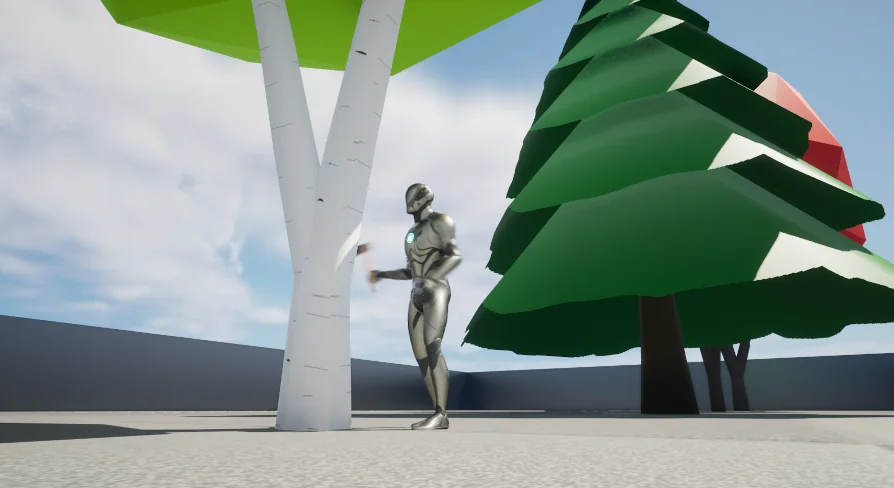
Vast, dense forests in open environments often create immediate tension between visual density and runtime processing cost. When games demand stylized or low-poly woodlands where individual trees serve as harvestable wood sources, standard actor-based approaches quickly strain system resources. The Tree Felling System addresses this by leaning directly into the engine foliage tool, allowing developers to paint extensive sweeps of trees across fantasy terrains and wilderness maps without burdening the scene with thousands of ticking actors from the start.
By relying on foliage painting workflows, level designers can scatter various species of trees across rolling hills, rocky plateaus, or dense woodlands in minutes. Rather than hand-placing interactive entities across a landscape, designers populate the world using familiar brush-based density sliders. The resulting environment retains the high visual impact of an expansive fantasy forest while waiting quietly for player involvement.
Managing Performance with Instanced Static Mesh Conversion
The core technical mechanism of the system centers on how geometry is handled before, during, and after player interaction. In an unharvested state, every tree exists strictly as an instanced static mesh (ISM). Instanced static meshes share draw calls across identical geometry, enabling hundreds or thousands of trunks and leaf canopies to sit on screen simultaneously with minimal performance impact.
Interaction triggers a localized state shift. When a player strikes an instanced tree, that single instance is identified, removed from the shared mesh collection, and instantly swapped with an active blueprint actor. This swap localizes computing overhead entirely to the tree currently being chopped. Once converted into an active blueprint, the tree handles structural damage, fall physics, and harvesting events directly.
To prevent an accumulation of active actors from degrading scene performance, the system includes an automated cleanup timeout. If a player strikes a tree, turns it into a blueprint, and then walks away without finishing the job, an interaction timer begins. Once that threshold expires without further damage, the system removes the blueprint actor and restores the tree to an instanced static mesh at its original coordinate. This reversibility ensures that partial harvesting across an expansive wilderness does not leave lingering performance bottlenecks behind.
Log Drops, Respawns, and Master Blueprint Configuration
Chopping down an active tree blueprint transitions the trunk into collectible resources. When felling is complete, the actor yields a specific number of collectible logs scattered near the base. Because gameplay pacing often calls for distinct resource tiers, the system does not enforce uniform yields across all flora. Wood yields can be modified per tree type, allowing slender birch trunks or ornamental fantasy trees to drop small resource bundles while grand old-growth trunks yield substantially more material.
Once logs are generated, the system can handle environmental persistence through a built-in respawn mechanism. If enabled, felled trees are queued for regeneration, reappearing in their exact coordinates after a predetermined delay. This setup suits crafting hubs, survival camps, and persistent gathering fields where total environmental depletion would disrupt player progression. For scenarios demanding permanent deforestation or permanent clearance for player construction, the respawn feature can be bypassed.
Configuring new tree species relies on a clean master blueprint hierarchy. New foliage types do not need custom harvesting scripts written from scratch. Developers instead establish child variations beneath the master blueprint, assigning unique visual meshes, harvest thresholds, timber drop quantities, and respawn timelines inside standard parameters.
Equipping the Hatchet Actor for Character-Driven Harvesting
Damage dealing is handled through an independent hatchet actor rather than being hardcoded into a single player character blueprint. The hatchet serves as the authoritative hit-detection and damage-transfer mechanism. Because the logic lives on the tool itself, the system avoids rigid dependencies on a specific skeleton, mesh shape, or character class.
Integrating woodcutting into a game requires only that the target character equips the hatchet actor. Whether handling a stylized fantasy hero, an alternate playable race, or an AI companion tasked with gathering supplies, any pawn capable of swinging and equipping the weapon can interact with the master tree blueprints. Striking the mesh triggers the damage checks, initiates the instanced mesh swap, and progressively degrades the tree structure until it yields its configured timber.
Project Fit and Resource Gathering Pipelines
The Tree Felling System is tailored for low-poly, fantasy, and stylized survival projects where natural resource harvesting forms a central loop of player progression. Because it runs on modular blueprints and standard foliage tools, it avoids complex exterior code dependencies while maintaining compatibility with companion mechanics like the Mineral Mining System.
For teams developing exploration games, survival simulators, or RPG settlement builders, the architecture provides a functional gathering loop straight out of the box. The separation between high-density instanced meshes and on-demand blueprint actors preserves frame budgets across large maps, while the decoupled hatchet actor simplifies weapon attachment across multiple character types.
 Procedural Systems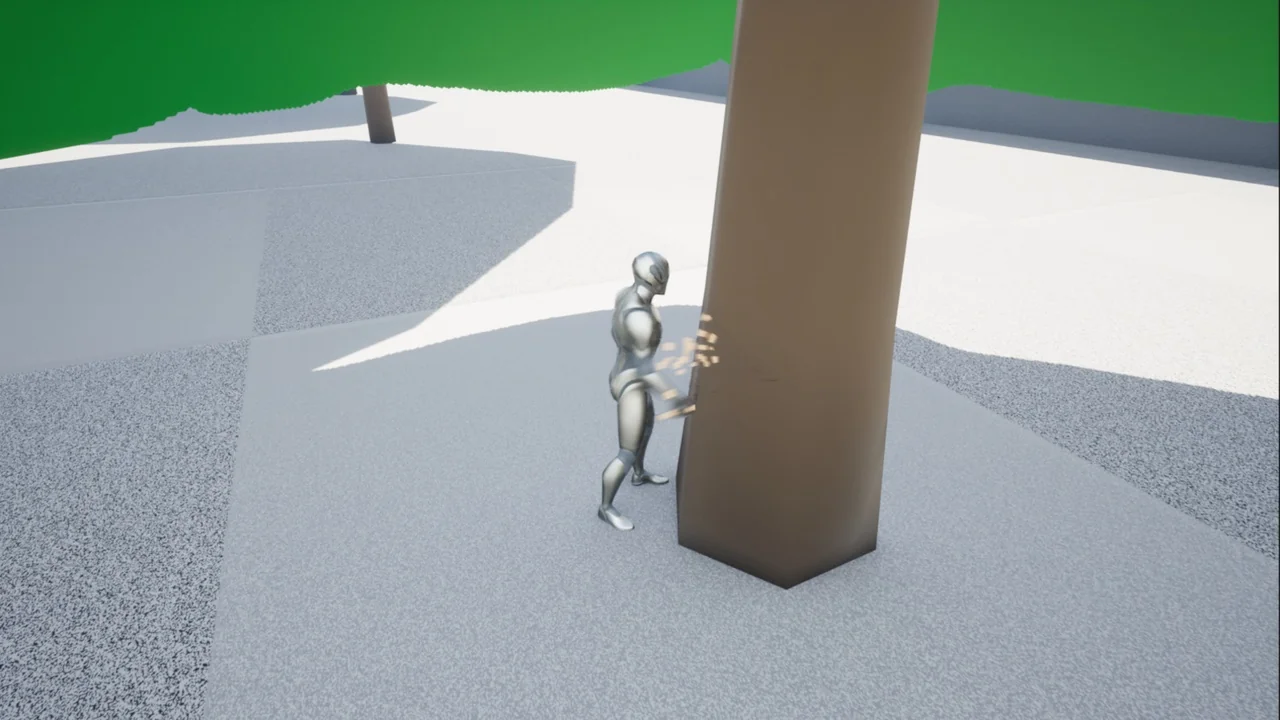
 Procedural Systems
 Procedural Systems
 Engine Tools