"4481da9c895ef786"{"id":"1001315","slug":"crowd-simulation-system-pro","title":"Crowd Simulation System Pro","category":"Procedural Systems","engine":"4.26 - 5.8","assetVersion":"Asset Version: 1.1 - 3.1","engineVersion":"Engine Version: 4.26 - 5.8","tag":"Procedural Systems","accent":"blue","visual":"mech","summary":"An Unreal Engine plugin simplifying crowd and pedestrian simulation through splines, behavior trees, blueprints, and World Partition support.","platform":"Unreal Engine","publishedAt":"2026-10-02T08:13:04.139Z","updatedAt":"2026-10-02T08:13:04.139Z","sourceNotes":[],"fileContents":[],"compatibility":["Unreal Engine","Asset Version: 1.1 - 3.1","Engine Version: 4.26 - 5.8"],"featuredImage":{"alt":"Crowd Simulation System Pro","src":"/wp-content/uploads/published/2026/10/64854778b56b-3fe5bcf9-229b-4a8a-95f1-b1a678635185-9327fd7cd0.webp"},"hasDownloadLink":true,"downloads":0,"terms":[{"taxonomy":"category","slug":"procedural-systems-tools-and-plugins","name":"Procedural Systems"}],"galleryImages":[{"src":"/wp-content/uploads/published/2026/10/ca56f3353f81-73e961d0-bee4-45bf-8cff-572faf07d986-c074d9a065.webp","alt":"Crowd Simulation System Pro"},{"src":"/wp-content/uploads/published/2026/10/7002757e201d-43a839a0-89d8-4312-a8de-588349ce73a3-132729b4ea.webp","alt":"Crowd Simulation System Pro"},{"src":"/wp-content/uploads/published/2026/10/db363b489115-b8178155-997c-46d6-98d0-52c12fa77dd7-7031277081.webp","alt":"Crowd Simulation System Pro"},{"src":"/wp-content/uploads/published/2026/10/993d74a8331e-6016a4eb-a084-4a4e-b8d4-38a91074baee-bc1990da2f.webp","alt":"Crowd Simulation System Pro"}],"accessPanel":{"kind":"resource","title":"Download this resource","eyebrow":"Free Download","message":"Log in or create a free account to start your download.","fileName":"Procedural NPC Crowds V2.7z","safetyNote":"Resources are manually reviewed before listing to improve quality and reduce obvious risks.","actionLabel":"Download Free","resourceType":"Resource archive"},"contentHtml":"\u003ch2\u003ePopulating Cityscapes and Sandboxes from Prototypes to Open Worlds\u003c/h2\u003e\u003cp\u003ePopulating a digital environment with believable foot traffic often presents an uncomfortable choice between weeks of custom behavioral architecture or rigid, low-fidelity background loops. In dense cityscapes, urban sandboxes, and expansive open-world levels, empty sidewalks immediately ruin immersion. Building realistic crowds traditionally demands dedicated navigation meshes, complex steering code, custom spawn managers, and constant performance profiling.\u003c/p\u003e\u003cp\u003eCrowd Simulation System Pro approaches this challenge by delivering a plug-and-play pedestrian simulation workflow directly inside Unreal Engine. Instead of requiring developers to spend days engineering agent perception and avoidance systems from scratch, the plugin automates agent spawning, pathfinding integration, and performance optimization right out of the box. A developer can lay out a single urban block for a rapid prototype or populate wide multi-district layouts in minutes rather than burning production cycles on basic crowd logic.\u003c/p\u003e\u003cp\u003eThe system is structured to scale smoothly across disparate project requirements. It accommodates everything from weekend game jams that need moving background characters on short deadlines to massive commercial titles that demand dense populations moving through complex urban networks. Because it avoids rigid architectural assumptions, teams of varying sizes can deploy dynamic pedestrians without overhauling existing project structures.\u003c/p\u003e\u003ch2\u003eAgent Spawning and Pathfinding Integration Using Unreal Splines\u003c/h2\u003e\u003cp\u003eAt the center of pedestrian movement lies the challenge of guiding crowds along predictable corridors while maintaining organic movement. Many custom systems rely on external simulation graphs that run isolated from standard engine navigation. Crowd Simulation System Pro grounds its logic in tools developers already use daily, relying on Unreal Engine splines to define pathways, sidewalks, and traversal routes.\u003c/p\u003e\u003cp\u003eBy drawing splines directly in the level editor, designers designate where pedestrians move, spawn, and transition. The plugin handles the underlying spawning mechanics, instantiating agents into the scene and interfacing cleanly with engine pathfinding so entities navigate their routes without sinking into terrain or colliding blindly into obstacles.\u003c/p\u003e\u003cp\u003eThis reliance on splines removes the friction of configuring separate navigation grids just for ambient characters. Designers can adjust a curve on an avenue, drop a spline along an alleyway, and immediately observe pedestrian agents traversing the path. The setup process takes minutes, allowing level artists and designers to refine traffic lanes visually while the plugin coordinates actor presence and movement parameters under the hood.\u003c/p\u003e\u003ch2\u003eBehavior Trees and Native Blueprints Without Custom Abstraction Layers\u003c/h2\u003e\u003cp\u003eCrowd systems frequently fail in production when they introduce proprietary frameworks that isolate artificial intelligence from the rest of the project. If modifying an NPC interaction requires learning a bespoke scripting layer, maintenance costs skyrocket. Crowd Simulation System Pro circumvents this issue by running on standard Unreal Engine Blueprints and native Behavior Trees.\u003c/p\u003e\u003cp\u003eBecause the logic flows through standard Behavior Trees, configuring how an agent reacts, stops, or transitions requires no foreign programming models. Game developers can leverage familiar task nodes, decorators, and blackboard variables to dictate pedestrian behavior. If a pedestrian needs to react to gameplay events or stop at specific points, the logic is authored right inside the familiar Unreal Engine gameplay framework.\u003c/p\u003e\u003cp\u003eThis direct implementation ensures that programmers and technical designers avoid fighting an opaque black-box system. Blueprints remain fully accessible, making it simple to bind custom gameplay triggers, hook into custom character meshes, or trigger state changes when a player enters pedestrian spaces. The plugin handles the heavy computation while leaving behavioral logic accessible through standard Unreal tooling.\u003c/p\u003e\u003ch2\u003eManaging Map Density and World Partition Scaling\u003c/h2\u003e\u003cp\u003eHigh agent counts present severe performance challenges, particularly when moving from small test maps to large-scale open worlds. A system that performs well in an enclosed courtyard can easily choke CPU threads when asked to handle thousands of actors across kilometers of terrain. The plugin scales vertically to support densely populated maps while maintaining steady runtime performance through integrated optimization routines.\u003c/p\u003e\u003cp\u003eLarge landscapes built with Unreal Engine's World Partition introduce distinct streaming conditions, as cells continuously load and unload based on player proximity. Crowd Simulation System Pro adapts quickly to World Partition streaming, managing agent lifecycles as level cells stream in and out. It preserves map population continuity without introducing heavy abstraction layers that developers would otherwise have to write and maintain themselves.\u003c/p\u003e\u003cp\u003eAutomated optimization balances runtime processing so that high visual density does not translate into unsustainable actor overhead. By offloading the resource-intensive tasks of path calculation, culling, and spawn throttling, the plugin allows urban centers to feel packed while preserving the performance headroom required for primary gameplay systems.\u003c/p\u003e\u003ch2\u003eVisual Integration with Niagara and Cel Shader Pro\u003c/h2\u003e\u003cp\u003ePopulating a space is as much an aesthetic challenge as a technical one. Pedestrians must visually integrate with the project's art direction, whether the title targets grounded realism or distinct stylized visuals. The plugin operates smoothly alongside particle setups and secondary visual effects, fitting into pipelines that use Niagara for ambient environmental reactions or gameplay feedback.\u003c/p\u003e\u003cp\u003eFor projects pursuing stylized rendering, the system maintains compatibility with Cel Shader Pro. Developers building non-photorealistic city environments can deploy active crowd networks that seamlessly inherit cel-shaded post-processing, outline profiles, and custom lighting models without visual artifacts or rendering conflicts on active crowd meshes. This compatibility makes the tool equally viable for stylized action games, anime-inspired urban sandboxes, and graphic-novel aesthetics.\u003c/p\u003e\u003ch2\u003eProduction Environments Best Suited for the System\u003c/h2\u003e\u003cp\u003eBecause the system avoids heavy setup overhead, it fits neatly into several production environments:\u003c/p\u003e\u003cul\u003e\u003cli\u003eSolo developers who need lively urban backdrops without dedicating weeks to AI engineering.\u003c/li\u003e\u003cli\u003eSmall indie teams building sandboxes where ambient pedestrian life is essential for atmosphere but secondary to core mechanics.\u003c/li\u003e\u003cli\u003eRapid prototyping teams testing gameplay flow across active streetscapes in game jams or pre-production phases.\u003c/li\u003e\u003cli\u003eLarger studios building sprawling commercial releases that require dependable World Partition compatibility and native Blueprint maintainability.\u003c/li\u003e\u003c/ul\u003e\u003cp\u003eBy pairing engine-standard splines and Behavior Trees with automated spawning and optimization, Crowd Simulation System Pro bridges the gap between fast level dressing and reliable production architecture.\u003c/p\u003e\n\n\u003ch2\u003eMore From The Same Workflow\u003c/h2\u003e\n\u003cul\u003e\n\u003cli\u003e\u003ca href=\"https://3dcghub.com/easy-flight-model/\" title=\"Easy Flight Model\"\u003eEasy Flight Model\u003c/a\u003e\u003c/li\u003e\n\u003cli\u003e\u003ca href=\"https://3dcghub.com/physical-rope/\" title=\"Physical Rope\"\u003ePhysical Rope\u003c/a\u003e\u003c/li\u003e\n\u003cli\u003e\u003ca href=\"https://3dcghub.com/overcrowd-massive-crowd-simulation/\" title=\"OverCrowd - Massive Crowd Simulation\"\u003eOverCrowd - Massive Crowd Simulation\u003c/a\u003e\u003c/li\u003e\n\u003cli\u003e\u003ca href=\"https://3dcghub.com/forest-tools-ultimate-scattering-system/\" title=\"Forest Tools - Ultimate Scattering System\"\u003eForest Tools - Ultimate Scattering System\u003c/a\u003e\u003c/li\u003e\n\u003cli\u003e\u003ca href=\"https://3dcghub.com/procedural-nature-generator/\" title=\"Procedural Nature Generator\"\u003eProcedural Nature Generator\u003c/a\u003e\u003c/li\u003e\n\u003c/ul\u003e","contentTextLength":7346,"navigation":{"current":23,"total":3269,"previous":{"id":"1001316","slug":"action-camera-manager-2","title":"Action Camera Manager","category":"Gameplay Features","platform":"Unreal Engine","updatedAt":"2026-10-02T09:07:50.866Z"},"next":{"id":"1001314","slug":"sentry","title":"Sentry","category":"Engine Tools","platform":"Unreal Engine","updatedAt":"2026-10-02T08:12:05.147Z"}},"relatedResources":[{"id":"15259","slug":"easy-flight-model","title":"Easy Flight Model","category":"Procedural Systems","engine":"5.4 - 5.8","assetVersion":"Asset Version: 3.23 - 3.34","engineVersion":"Engine version: 5.4 - 5.8","tag":"Procedural Systems","accent":"blue","visual":"city","summary":"Easy Flight Model provides a realistic framework for simulating fixed-wing aircraft and aerodynamic objects using physics impulses. It computes flight dynamics based on mass, velocity, and location.","platform":"Unreal Engine","publishedAt":"2026-03-12T08:25:55.000Z","updatedAt":"2026-09-04T15:23:00.546Z","sourceNotes":[],"fileContents":[],"compatibility":["Unreal Engine","Asset Version: 3.23 - 3.34","Engine version: 5.4 - 5.8"],"featuredImage":{"alt":"Easy Flight Model","src":"https://3dcghub.com/wp-content/uploads/2026/03/32989088-74c7-4cb2-a882-a51bae1bc416.webp"},"hasDownloadLink":true,"downloads":0},{"id":"15291","slug":"physical-rope","title":"Physical Rope","category":"Procedural Systems","engine":"5.3","assetVersion":"Engine version: 5.3","engineVersion":"Asset Version:2.0","tag":"Procedural Systems","accent":"blue","visual":"city","summary":"Physical Rope provides a realistic, physically collidable, and simulatable solution for game development. This Blueprint-based asset allows for advanced interactions with environmental objects.","platform":"Unreal Engine","publishedAt":"2026-03-12T08:31:31.000Z","updatedAt":"2026-04-19T15:44:51.000Z","sourceNotes":[],"fileContents":[],"compatibility":["Unreal Engine","Engine version: 5.3","Asset Version: 2.0"],"featuredImage":{"alt":"Physical Rope","src":"https://3dcghub.com/wp-content/uploads/2026/03/354e56ff-3064-4abd-ae86-5393e1075bef.webp"},"hasDownloadLink":true,"downloads":0},{"id":"28127","slug":"overcrowd-massive-crowd-simulation","title":"OverCrowd - Massive Crowd Simulation","category":"Engine Tools","engine":"5.6","assetVersion":"Engine version: 5.6","engineVersion":"Asset Version:1.0","tag":"Engine Tools","accent":"blue","visual":"audio","summary":"Scenes fill quickly with thousands of animated characters, from stadium seats to battle lines, while keeping the workflow inside Unreal Engine 5. OverCrowd focuses on modular character setup, VAT conversion, Niagara-driven behaviors, and tools that scale fr...","platform":"Unreal Engine","publishedAt":"2026-05-04T14:28:50.000Z","updatedAt":"2026-05-04T14:28:51.000Z","sourceNotes":[],"fileContents":[],"compatibility":["Unreal Engine","Engine version: 5.6","Asset Version: 1.0"],"featuredImage":{"alt":"OverCrowd - Massive Crowd Simulation","src":"https://3dcghub.com/wp-content/uploads/2026/05/69c20c2d1a6b_2ac5b60b-5a52-4074-a01c-5f549185dbe2.webp"},"hasDownloadLink":true,"downloads":2}]}
Procedural Systems
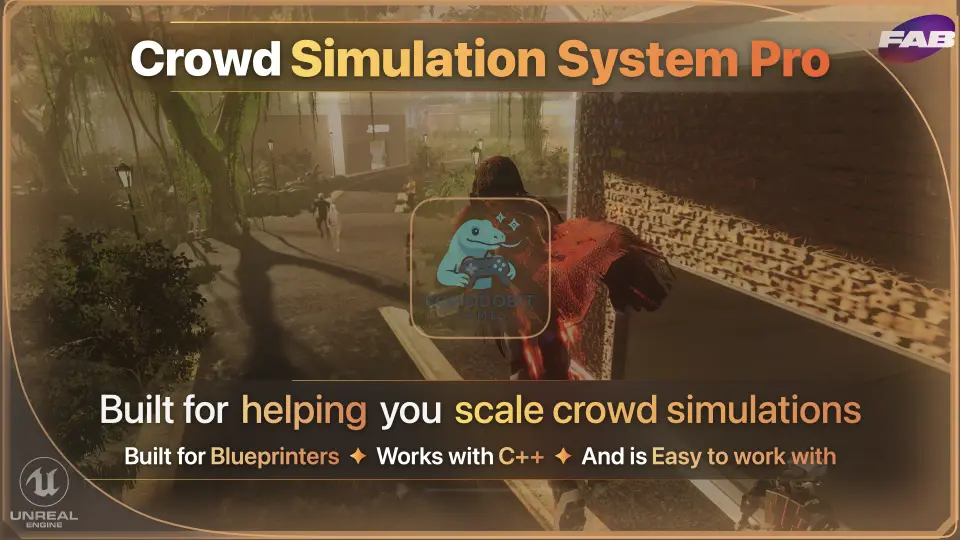
Crowd Simulation System Pro
An Unreal Engine plugin simplifying crowd and pedestrian simulation through splines, behavior trees, blueprints, and World Partition support.
Populating Cityscapes and Sandboxes from Prototypes to Open Worlds
Populating a digital environment with believable foot traffic often presents an uncomfortable choice between weeks of custom behavioral architecture or rigid, low-fidelity background loops. In dense cityscapes, urban sandboxes, and expansive open-world levels, empty sidewalks immediately ruin immersion. Building realistic crowds traditionally demands dedicated navigation meshes, complex steering code, custom spawn managers, and constant performance profiling.
Crowd Simulation System Pro approaches this challenge by delivering a plug-and-play pedestrian simulation workflow directly inside Unreal Engine. Instead of requiring developers to spend days engineering agent perception and avoidance systems from scratch, the plugin automates agent spawning, pathfinding integration, and performance optimization right out of the box. A developer can lay out a single urban block for a rapid prototype or populate wide multi-district layouts in minutes rather than burning production cycles on basic crowd logic.
The system is structured to scale smoothly across disparate project requirements. It accommodates everything from weekend game jams that need moving background characters on short deadlines to massive commercial titles that demand dense populations moving through complex urban networks. Because it avoids rigid architectural assumptions, teams of varying sizes can deploy dynamic pedestrians without overhauling existing project structures.
Agent Spawning and Pathfinding Integration Using Unreal Splines
At the center of pedestrian movement lies the challenge of guiding crowds along predictable corridors while maintaining organic movement. Many custom systems rely on external simulation graphs that run isolated from standard engine navigation. Crowd Simulation System Pro grounds its logic in tools developers already use daily, relying on Unreal Engine splines to define pathways, sidewalks, and traversal routes.
By drawing splines directly in the level editor, designers designate where pedestrians move, spawn, and transition. The plugin handles the underlying spawning mechanics, instantiating agents into the scene and interfacing cleanly with engine pathfinding so entities navigate their routes without sinking into terrain or colliding blindly into obstacles.
This reliance on splines removes the friction of configuring separate navigation grids just for ambient characters. Designers can adjust a curve on an avenue, drop a spline along an alleyway, and immediately observe pedestrian agents traversing the path. The setup process takes minutes, allowing level artists and designers to refine traffic lanes visually while the plugin coordinates actor presence and movement parameters under the hood.
Behavior Trees and Native Blueprints Without Custom Abstraction Layers
Crowd systems frequently fail in production when they introduce proprietary frameworks that isolate artificial intelligence from the rest of the project. If modifying an NPC interaction requires learning a bespoke scripting layer, maintenance costs skyrocket. Crowd Simulation System Pro circumvents this issue by running on standard Unreal Engine Blueprints and native Behavior Trees.
Because the logic flows through standard Behavior Trees, configuring how an agent reacts, stops, or transitions requires no foreign programming models. Game developers can leverage familiar task nodes, decorators, and blackboard variables to dictate pedestrian behavior. If a pedestrian needs to react to gameplay events or stop at specific points, the logic is authored right inside the familiar Unreal Engine gameplay framework.
This direct implementation ensures that programmers and technical designers avoid fighting an opaque black-box system. Blueprints remain fully accessible, making it simple to bind custom gameplay triggers, hook into custom character meshes, or trigger state changes when a player enters pedestrian spaces. The plugin handles the heavy computation while leaving behavioral logic accessible through standard Unreal tooling.
Managing Map Density and World Partition Scaling
High agent counts present severe performance challenges, particularly when moving from small test maps to large-scale open worlds. A system that performs well in an enclosed courtyard can easily choke CPU threads when asked to handle thousands of actors across kilometers of terrain. The plugin scales vertically to support densely populated maps while maintaining steady runtime performance through integrated optimization routines.
Large landscapes built with Unreal Engine's World Partition introduce distinct streaming conditions, as cells continuously load and unload based on player proximity. Crowd Simulation System Pro adapts quickly to World Partition streaming, managing agent lifecycles as level cells stream in and out. It preserves map population continuity without introducing heavy abstraction layers that developers would otherwise have to write and maintain themselves.
Automated optimization balances runtime processing so that high visual density does not translate into unsustainable actor overhead. By offloading the resource-intensive tasks of path calculation, culling, and spawn throttling, the plugin allows urban centers to feel packed while preserving the performance headroom required for primary gameplay systems.
Visual Integration with Niagara and Cel Shader Pro
Populating a space is as much an aesthetic challenge as a technical one. Pedestrians must visually integrate with the project's art direction, whether the title targets grounded realism or distinct stylized visuals. The plugin operates smoothly alongside particle setups and secondary visual effects, fitting into pipelines that use Niagara for ambient environmental reactions or gameplay feedback.
For projects pursuing stylized rendering, the system maintains compatibility with Cel Shader Pro. Developers building non-photorealistic city environments can deploy active crowd networks that seamlessly inherit cel-shaded post-processing, outline profiles, and custom lighting models without visual artifacts or rendering conflicts on active crowd meshes. This compatibility makes the tool equally viable for stylized action games, anime-inspired urban sandboxes, and graphic-novel aesthetics.
Production Environments Best Suited for the System
Because the system avoids heavy setup overhead, it fits neatly into several production environments:
Solo developers who need lively urban backdrops without dedicating weeks to AI engineering.
Small indie teams building sandboxes where ambient pedestrian life is essential for atmosphere but secondary to core mechanics.
Rapid prototyping teams testing gameplay flow across active streetscapes in game jams or pre-production phases.
Larger studios building sprawling commercial releases that require dependable World Partition compatibility and native Blueprint maintainability.
By pairing engine-standard splines and Behavior Trees with automated spawning and optimization, Crowd Simulation System Pro bridges the gap between fast level dressing and reliable production architecture.
 Procedural Systems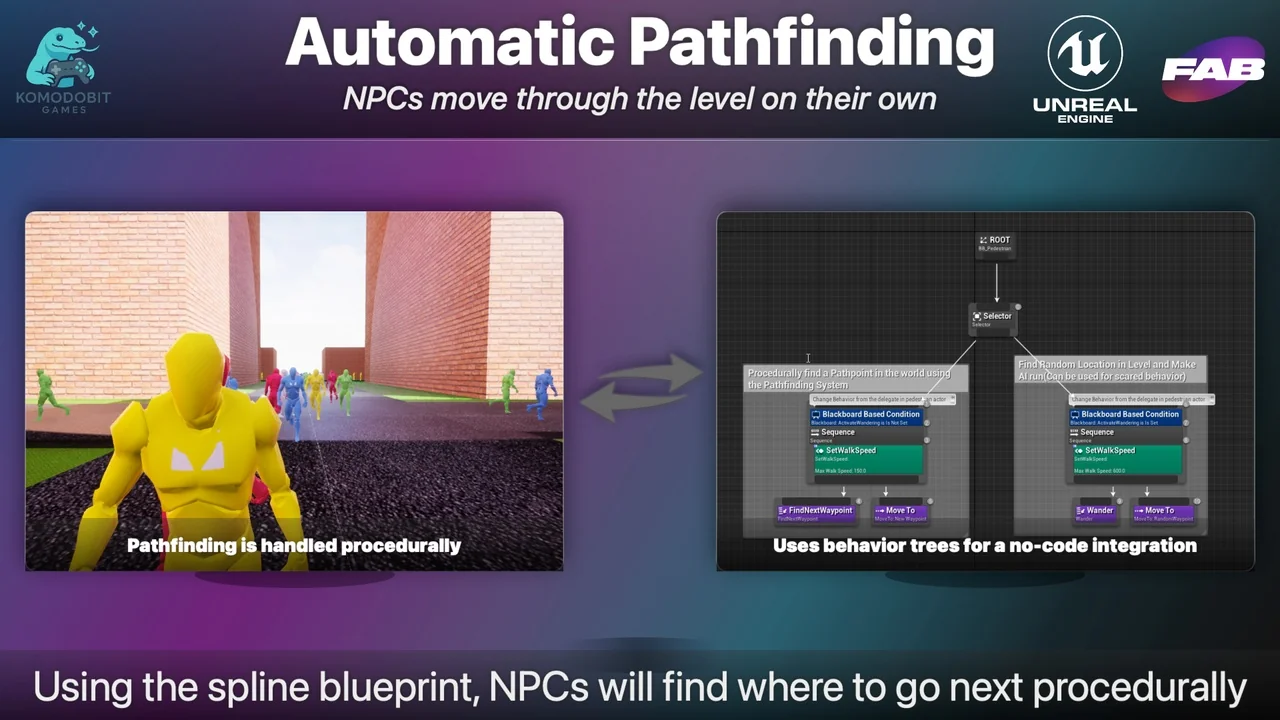
 Procedural Systems
 Procedural Systems
 Engine Tools