"7066dd76da796369"{"id":"15259","slug":"easy-flight-model","title":"Easy Flight Model","category":"Procedural Systems","engine":"5.4 - 5.8","assetVersion":"Asset Version: 3.23 - 3.34","engineVersion":"Engine version: 5.4 - 5.8","tag":"Procedural Systems","accent":"blue","visual":"city","summary":"Easy Flight Model provides a realistic framework for simulating fixed-wing aircraft and aerodynamic objects using physics impulses. It computes flight dynamics based on mass, velocity, and location.","platform":"Unreal Engine","publishedAt":"2026-03-12T08:25:55.000Z","updatedAt":"2026-09-04T15:23:00.546Z","sourceNotes":[],"fileContents":[],"compatibility":["Unreal Engine","Asset Version: 3.23 - 3.34","Engine version: 5.4 - 5.8"],"featuredImage":{"alt":"Easy Flight Model","src":"https://3dcghub.com/wp-content/uploads/2026/03/32989088-74c7-4cb2-a882-a51bae1bc416.webp"},"hasDownloadLink":true,"downloads":0,"terms":[{"taxonomy":"category","slug":"procedural-systems-tools-and-plugins","name":"Procedural Systems"},{"taxonomy":"post_tag","slug":"code","name":"Code"},{"taxonomy":"post_tag","slug":"easy-flight-model","name":"Easy Flight Model"},{"taxonomy":"post_tag","slug":"flight-simulation","name":"Flight Simulation"},{"taxonomy":"post_tag","slug":"plugins","name":"Plugins"},{"taxonomy":"post_tag","slug":"unreal-engine-5","name":"Unreal Engine 5"},{"taxonomy":"post_tag","slug":"vehicles","name":"Vehicles"}],"galleryImages":[{"src":"https://3dcghub.com/wp-content/uploads/2026/03/65dcca25dc17_4fcb5a8f-34a5-4729-b94d-6e3abc0f475e.webp","alt":"Easy Flight Model"},{"src":"https://3dcghub.com/wp-content/uploads/2026/03/bf64f2778d50_904a7170-d4d8-4eb9-b455-e70f4f332035.webp","alt":"Easy Flight Model"},{"src":"https://3dcghub.com/wp-content/uploads/2026/03/f5110ba1b9b7_4dcd176e-9890-49f7-a089-d17577bacaa6.webp","alt":"Easy Flight Model"},{"src":"https://3dcghub.com/wp-content/uploads/2026/03/d2d200b77672_a8c445fa-7131-4808-88b7-f9af918042dc.webp","alt":"Easy Flight Model"}],"accessPanel":{"kind":"resource","title":"Download this resource","eyebrow":"Free Download","message":"Log in or create a free account to start your download.","fileName":"Easy Flight Model.7z","safetyNote":"Resources are manually reviewed before listing to improve quality and reduce obvious risks.","actionLabel":"Download Free","resourceType":"Resource archive"},"contentHtml":"\u003cp\u003eFlight simulation in Unreal Engine often falls into one of two traps: the vehicle is either glued to a spline or animated with canned rotations, or it has so much hand-tuned thrust and drag that it only behaves correctly under perfect conditions. Easy Flight Model takes the opposite route. Instead of scripting a fake flight feel, it evaluates the physical state of an object and lets the engine's own physics system respond to real aerodynamic forces. That leaves a plugin that behaves consistently across very different types of aerial objects.\u003c/p\u003e \u003ch2\u003eAerodynamic Forces Computed from Physics Properties\u003c/h2\u003e \u003cp\u003eAt its core, Easy Flight Model is a code-based plugin that works by gathering location, velocity, mass, and other properties from the physics object it is attached to. From those inputs, it calculates the aerodynamic forces that would act on that object at that exact moment. Once the forces are computed, the plugin applies them back to the object as physics impulses.\u003c/p\u003e \u003cp\u003eThis creates a closed loop between the object's motion and the forces it experiences. Move the object faster, and the model calculates higher dynamic pressure. Change its orientation, and the lift and drag vectors shift accordingly. Rotate the object during a turn, and the physics engine feels the resulting moment. Nothing is pre-baked into keyframes or velocity curves.\u003c/p\u003e \u003cp\u003eBecause the plugin depends on the object's current properties rather than a fixed set of flight parameters, it is easy to drop onto a rigid body and see how it responds. The designer gets a flight model that reacts to mass, speed, and position the way a real physical body would, which means changes to the object's weight or shape automatically alter the flight behavior without requiring separate tuning per object.\u003c/p\u003e \u003ch2\u003eBuilt for Fixed-Wing Aircraft and Projectile-Style Bodies\u003c/h2\u003e \u003cp\u003eEasy Flight Model was created with fixed-wing airplanes in mind, but its scope goes beyond standard aircraft. The plugin can also simulate bombs, missiles, and similar objects that travel through the air along ballistic or guided paths. That makes it a single aerodynamic system for two common game situations: a plane that needs realistic lift and drag, and a projectile that needs to fall or accelerate while interacting with the air around it.\u003c/p\u003e \u003cp\u003eFor a missile, this means the flight model can respond to changes in thrust, orientation, and velocity, while still obeying the same core physics as an airplane. For a bomb released from an aircraft, the plugin can supply lift and drag forces that would be negligible at low speed but increasingly significant as the bomb accelerates. Since the system is based on general aerodynamic principles rather than airplane-specific assumptions, the same setup can be reused across categories of moving objects.\u003c/p\u003e \u003cp\u003eThe underlying method also keeps things predictable for gameplay. Because velocity and location are the core inputs, the model naturally behaves differently at stall speeds, during sharp turns, or in a vertical dive. Developers looking to tune a plane, missile, or falling payload can reason about the physics engine variables instead of wrestling with per-axis animation curves.\u003c/p\u003e \u003ch2\u003eTwo UE 5.1 Example Projects and a Tutorial Playlist\u003c/h2\u003e \u003cp\u003eGetting started with Easy Flight Model is supported by hands-on material. Two example projects are provided for Unreal Engine 5.1. Both example projects have corresponding preview videos that show the flight model in action. The first example project demonstrates the plugin in one sort of scene, while the second example project offers a separate perspective on how the same workflow can be applied.\u003c/p\u003e \u003cp\u003eThe tutorial playlist expands on setup and usage. It walks through the process of attaching the plugin to a physics object, configuring the relevant properties, and understanding how the computed aerodynamic forces create the intended motion. Because the plugin itself is code-based, the tutorials are useful for developers who want to see how the integration works inside a real Unreal Engine project rather than relying on a floating window of parameters.\u003c/p\u003e \u003cp\u003eHaving two separate example projects matters for production. One might serve as a reference for a particular airplane model or flight style, while the other becomes a starting point for missiles or other projectiles. Watching the previews before downloading gives a quick look at how the plugin behaves visually, including the way the object accelerates, turns, and settles into stable flight.\u003c/p\u003e \u003cp\u003eEasy Flight Model is not intended to replace an entire aerial gameplay system, but it fills the most difficult part of the pipeline: making objects move through the air with believable physics. For a team working in UE 5.1, the plugin's approach of turning physics properties into impulses means the same underlying code can carry a light reconnaissance plane, a heavy bomber, or a high-speed missile through the same trusted physics framework.\u003c/p\u003e","contentTextLength":4899,"navigation":{"current":1064,"total":4016,"previous":{"id":"1001077","slug":"brushify-beach-pack","title":"Brushify - Beach Pack","category":"Mountain","platform":"Unreal Engine","updatedAt":"2026-09-04T15:48:57.154Z"},"next":{"id":"1001076","slug":"vp-temples-of-cambodia-ruins-exterior-and-interior","title":"[VP] Temples of Cambodia - Ruins exterior and interior","category":"Historical","platform":"Unreal Engine","updatedAt":"2026-09-04T15:20:59.646Z"}},"relatedResources":[{"id":"1002019","slug":"fantasy-flight-packs-bundle","title":"Fantasy Flight Packs Bundle","category":"Vehicles \u0026 Transportation","engine":"5.0+","assetVersion":"","engineVersion":"Engine Version: 5.0+","tag":"Vehicles","accent":"blue","visual":"mech","summary":"Explore the Fantasy Flight Packs Bundle, featuring five aerial contraptions, custom materials, particle effects, animations, and modular Blueprints.","platform":"Unreal Engine","publishedAt":"2026-10-26T12:57:39.888Z","updatedAt":"2026-10-26T12:57:39.888Z","sourceNotes":[],"fileContents":[],"compatibility":["Unreal Engine","Engine Version: 5.0+"],"featuredImage":{"alt":"Fantasy Flight Packs Bundle","src":"/wp-content/uploads/published/2026/10/c480f5d6ef5d-f12cb19f-817c-473d-ab6b-4bd987cf089d-c59b51a4dd.webp"},"hasDownloadLink":true,"downloads":0},{"id":"16649","slug":"rotor-downwash-fx-vdb","title":"Rotor Downwash FX VDB","category":"Spells \u0026 Combat","engine":"5.4+","assetVersion":"Engine version: 5.4+","engineVersion":"5.3","tag":"Spells \u0026 Combat","accent":"blue","visual":"city","summary":"Improve the realism of your flight simulations with the Rotor Downwash FX VDB pack. This collection features ten specialized effects designed to simulate the intense wind and dust displacement caused by rotors.","platform":"Unreal Engine","publishedAt":"2026-03-12T17:45:18.000Z","updatedAt":"2026-04-19T15:43:44.000Z","sourceNotes":[],"fileContents":[],"compatibility":["Unreal Engine","Engine version: 5.4+"],"featuredImage":{"alt":"Rotor Downwash FX VDB","src":"https://3dcghub.com/wp-content/uploads/2026/03/9e7df733-1668-42e2-957a-be321482d1fb.webp"},"hasDownloadLink":true,"downloads":1},{"id":"5173","slug":"physics-based-helicopter","title":"Physics Based Helicopter","category":"Vehicles \u0026 Transportation","engine":"4.26+,5.0+","assetVersion":"Engine version: 4.26+,5.0+","engineVersion":"4.21","tag":"Vehicles","accent":"blue","visual":"audio","summary":"Enhance your project with a realistic physics-based helicopter for Unreal Engine 5. Features include autopilot, AI, ground effects, and wind zone blueprints.","platform":"Unreal Engine","publishedAt":"2026-02-14T18:02:11.000Z","updatedAt":"2026-04-19T15:57:00.000Z","sourceNotes":[],"fileContents":[],"compatibility":["Unreal Engine","Engine version: 4.26+,5.0+"],"featuredImage":{"alt":"Physics Based Helicopter","src":"https://3dcghub.com/wp-content/uploads/2026/02/93a9e7a2-e6cf-48d3-93b3-7e49092a7662.webp"},"hasDownloadLink":true,"downloads":4}]}
Procedural Systems
Easy Flight Model
Easy Flight Model provides a realistic framework for simulating fixed-wing aircraft and aerodynamic objects using physics impulses. It computes flight dynamics based on mass, velocity, and location.
Flight simulation in Unreal Engine often falls into one of two traps: the vehicle is either glued to a spline or animated with canned rotations, or it has so much hand-tuned thrust and drag that it only behaves correctly under perfect conditions. Easy Flight Model takes the opposite route. Instead of scripting a fake flight feel, it evaluates the physical state of an object and lets the engine's own physics system respond to real aerodynamic forces. That leaves a plugin that behaves consistently across very different types of aerial objects.
Aerodynamic Forces Computed from Physics Properties
At its core, Easy Flight Model is a code-based plugin that works by gathering location, velocity, mass, and other properties from the physics object it is attached to. From those inputs, it calculates the aerodynamic forces that would act on that object at that exact moment. Once the forces are computed, the plugin applies them back to the object as physics impulses.
This creates a closed loop between the object's motion and the forces it experiences. Move the object faster, and the model calculates higher dynamic pressure. Change its orientation, and the lift and drag vectors shift accordingly. Rotate the object during a turn, and the physics engine feels the resulting moment. Nothing is pre-baked into keyframes or velocity curves.
Because the plugin depends on the object's current properties rather than a fixed set of flight parameters, it is easy to drop onto a rigid body and see how it responds. The designer gets a flight model that reacts to mass, speed, and position the way a real physical body would, which means changes to the object's weight or shape automatically alter the flight behavior without requiring separate tuning per object.
Built for Fixed-Wing Aircraft and Projectile-Style Bodies
Easy Flight Model was created with fixed-wing airplanes in mind, but its scope goes beyond standard aircraft. The plugin can also simulate bombs, missiles, and similar objects that travel through the air along ballistic or guided paths. That makes it a single aerodynamic system for two common game situations: a plane that needs realistic lift and drag, and a projectile that needs to fall or accelerate while interacting with the air around it.
For a missile, this means the flight model can respond to changes in thrust, orientation, and velocity, while still obeying the same core physics as an airplane. For a bomb released from an aircraft, the plugin can supply lift and drag forces that would be negligible at low speed but increasingly significant as the bomb accelerates. Since the system is based on general aerodynamic principles rather than airplane-specific assumptions, the same setup can be reused across categories of moving objects.
The underlying method also keeps things predictable for gameplay. Because velocity and location are the core inputs, the model naturally behaves differently at stall speeds, during sharp turns, or in a vertical dive. Developers looking to tune a plane, missile, or falling payload can reason about the physics engine variables instead of wrestling with per-axis animation curves.
Two UE 5.1 Example Projects and a Tutorial Playlist
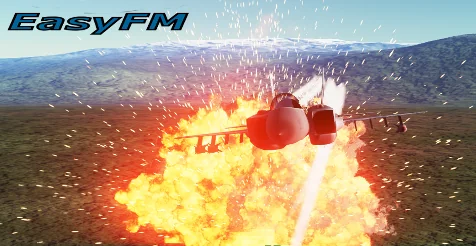
Getting started with Easy Flight Model is supported by hands-on material. Two example projects are provided for Unreal Engine 5.1. Both example projects have corresponding preview videos that show the flight model in action. The first example project demonstrates the plugin in one sort of scene, while the second example project offers a separate perspective on how the same workflow can be applied.
The tutorial playlist expands on setup and usage. It walks through the process of attaching the plugin to a physics object, configuring the relevant properties, and understanding how the computed aerodynamic forces create the intended motion. Because the plugin itself is code-based, the tutorials are useful for developers who want to see how the integration works inside a real Unreal Engine project rather than relying on a floating window of parameters.
Having two separate example projects matters for production. One might serve as a reference for a particular airplane model or flight style, while the other becomes a starting point for missiles or other projectiles. Watching the previews before downloading gives a quick look at how the plugin behaves visually, including the way the object accelerates, turns, and settles into stable flight.
Easy Flight Model is not intended to replace an entire aerial gameplay system, but it fills the most difficult part of the pipeline: making objects move through the air with believable physics. For a team working in UE 5.1, the plugin's approach of turning physics properties into impulses means the same underlying code can carry a light reconnaissance plane, a heavy bomber, or a high-speed missile through the same trusted physics framework.
Preview Gallery
Resource screenshots
4 curated preview images
1 / 4
Free Download
Download this resource
Log in or create a free account to start your download.
Resources are manually reviewed before listing to improve quality and reduce obvious risks.
 Procedural Systems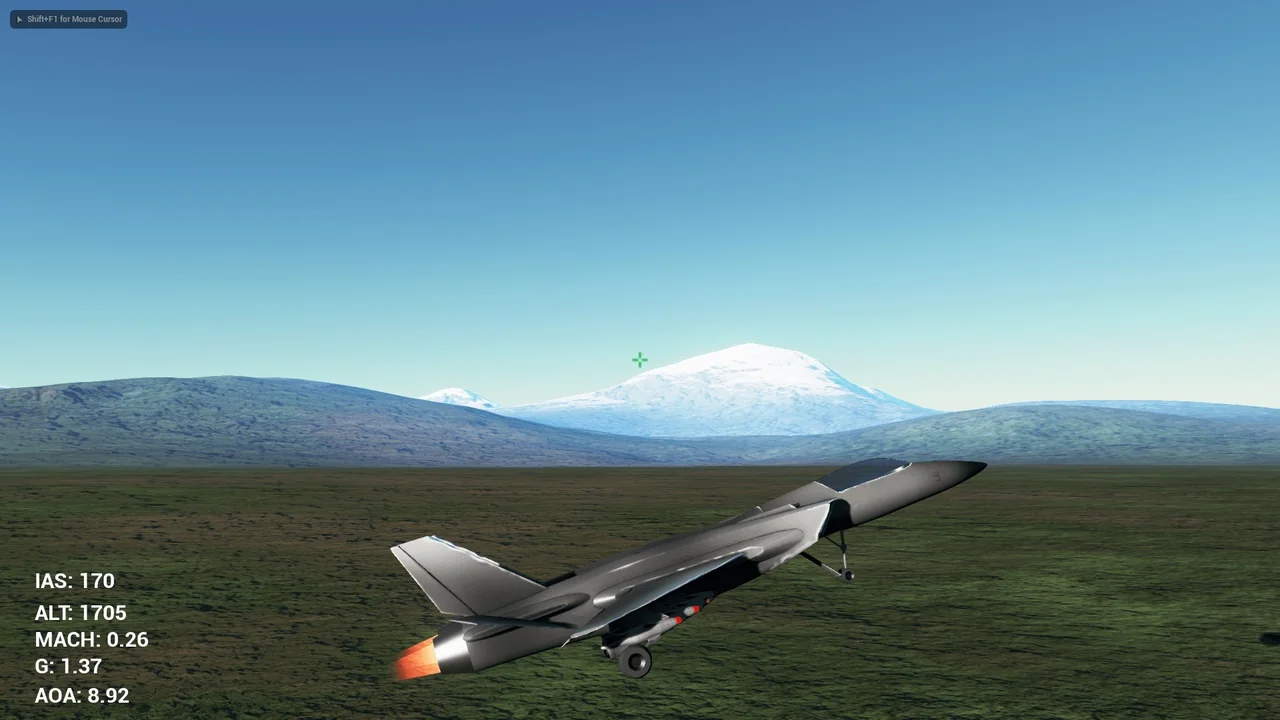
 Vehicles
 Spells & Combat
 Vehicles