"c14ff6bd758dadb1"{"id":"1001077","slug":"brushify-beach-pack","title":"Brushify - Beach Pack","category":"Mountain","engine":"5.0+","assetVersion":"","engineVersion":"Engine Version: 5.0+","tag":"Mountain","accent":"blue","visual":"mech","summary":"Brushify - Beach Pack for Unreal Engine includes a ready-made beach level, 8K drone scans of cliffs, photoscanned Whitby coast assets, and an 11-biome Landscape","platform":"Unreal Engine","publishedAt":"2026-09-04T15:48:57.154Z","updatedAt":"2026-09-04T15:48:57.154Z","sourceNotes":[],"fileContents":[],"compatibility":["Unreal Engine","Engine Version: 5.0+"],"featuredImage":{"alt":"Brushify - Beach Pack","src":"/wp-content/uploads/published/2026/09/d223fe94eabd-2a63debb-356e-4470-9fb5-f70a98f30265-a5a96ee900.webp"},"hasDownloadLink":true,"downloads":0,"terms":[{"taxonomy":"category","slug":"mountain","name":"Mountain"}],"galleryImages":[{"src":"/wp-content/uploads/published/2026/09/03809d4e3525-ebeca703-5e25-4543-bbfd-512ed9a1e610-b1f0c47e92.webp","alt":"Brushify - Beach Pack"},{"src":"/wp-content/uploads/published/2026/09/6374ea9e0e54-ad0ca4c2-523b-40e9-b14c-415d03271e17-5aeee3cdbf.webp","alt":"Brushify - Beach Pack"},{"src":"/wp-content/uploads/published/2026/09/1952aee529a1-0c3af7b2-557e-4eb3-90ee-c28150862fd5-733ae78978.webp","alt":"Brushify - Beach Pack"},{"src":"/wp-content/uploads/published/2026/09/c1e83861d3fd-9756b8f3-bb9c-4989-8498-1812d72a7cfc-fdfa445ae1.webp","alt":"Brushify - Beach Pack"},{"src":"/wp-content/uploads/published/2026/09/f39a6df50d7c-2b06c11c-ace3-46b4-8277-adbc31d18d5c-a2fb453907.webp","alt":"Brushify - Beach Pack"},{"src":"/wp-content/uploads/published/2026/09/bdbbb815f933-cc04668b-3e0b-4f39-9f6a-9b88c310f2fa-875cbaf44e.webp","alt":"Brushify - Beach Pack"},{"src":"/wp-content/uploads/published/2026/09/7de029f72b8b-343aaaae-1b6e-4440-b76f-1e07d09be4cb-6f2dd7aa11.webp","alt":"Brushify - Beach Pack"},{"src":"/wp-content/uploads/published/2026/09/213ca004143b-eb8b8399-b4fa-4cb7-9a47-44934fb1ac34-baa11a1b96.webp","alt":"Brushify - Beach Pack"},{"src":"/wp-content/uploads/published/2026/09/ac501c18f78c-6ed9e15e-850e-4a01-956e-7e2df5f3d373-6097a641e9.webp","alt":"Brushify - Beach Pack"},{"src":"/wp-content/uploads/published/2026/09/0bf57d92395d-f0912222-a601-47c2-8c0c-9637cc534f05-f074714b84.webp","alt":"Brushify - Beach Pack"}],"accessPanel":{"kind":"resource","title":"Download this resource","eyebrow":"Free Download","message":"Log in or create a free account to start your download.","fileName":"Content.7z","safetyNote":"Resources are manually reviewed before listing to improve quality and reduce obvious risks.","actionLabel":"Download Free","resourceType":"Resource archive"},"contentHtml":"\u003cp\u003eBrushify - Beach Pack drops a complete coastal environment into Unreal Engine with a prebuilt level, 8K drone scans, and photoscanned objects drawn from real English beaches. The kit is aimed at level designers and environment artists who want a jump start: open the level, run it, and you have a full landscape with textures and props already wired in. Everything visible in the pack's screenshots is provided, along with the Brushify shader setup that produced those shots.\u003c/p\u003e \u003ch2\u003eReady-Made Beach Level and Asset Showcase\u003c/h2\u003e\n\u003cp\u003eTwo levels sit inside this pack. The first is a ready-made and optimized Beach level that was assembled from Brushify assets. It runs out of the box, so you can start testing gameplay immediately, block out cinematic shots, or study how the material layers and spawners were placed in a finished scene. The second is a Beach assets showcase level that lines up the environment pieces in a clear context, which makes it easier to evaluate a rock or driftwood prop before scattering it across your own map.\u003c/p\u003e \u003ch2\u003eFour 8K Drone Scans of Beach Cliffs\u003c/h2\u003e\n\u003cp\u003eLarge-scale terrain variation comes from four UHD drone scans of beach cliffs. Each scan is built from several 8192x8192 textures, which lets the landscape hold detail from near to far without looking soft or repetitive. These scans are intended to be dropped onto a landscape quickly, adding a broad, realistic coastline surface before you go in with finer sculpting tools.\u003c/p\u003e\n\u003cp\u003eThe physical reference for the pack was recorded on beaches along the east coast of England, with the landscape around Whitby and Scarborough supplying both the data and the visual direction. That regional consistency is easy to feel when you move from the cliff scans to the loose rock and shingle pieces: the stone types, weathering, and color all belong to the same coast rather than being pulled from contradicting locations.\u003c/p\u003e \u003ch2\u003eLandscape Auto Material with 11 Automatic Paint Layers\u003c/h2\u003e\n\u003cp\u003eThe core terrain workflow is handled by the Brushify Landscape Auto Material. It lets an artist paint multiple biomes across huge landscapes by treating each biome as its own automatic paint layer. There are 11 landscape layers to choose from, with Grass, Desert, Forest, Snow, Beach, Dunes, Mud, and Craters among them. Once the material is assigned to any landscape, it can automatically texture the terrain and populate it with optimized rocks or grass that match the biome being painted.\u003c/p\u003e\n\u003cp\u003eUnder the hood, the material includes a long list of rendering systems. Runtime Virtual Texturing (RVT) helps keep texture memory manageable, while Parallax Occlusion Mapping (POM) raises the apparent depth of close surfaces. Tri-planar mapping avoids stretched detail on slopes and cliff walls, and tessellation and height data add actual geometric displacement. Roughness, a reduced distance tiling feature, flow mapping, and a three-stage LOD system for far, medium, and near views all slot into the same shader. The overdraw is optimized so the material can cover a wide landscape without sinking the draw cost. Best of all, the shader graph is modular: functions that are not needed for a particular project can be removed or altered without rewriting the whole network.\u003c/p\u003e\n\u003cp\u003eThe Beach Pack also includes the complete shader set from the Brushify Environment Shaders pack, which keeps the whole coastline on a unified visual system. Because these shaders are 100% compatible with other existing Brushify packages, the beach setup is not a dead end when you want to add a different environment later.\u003c/p\u003e \u003ch2\u003ePhotoscanned Objects and Procedural Spawners\u003c/h2\u003e\n\u003cp\u003eOn the prop side, the pack concentrates on what actually collects on a shoreline. There are 5 variations of beach rocks, 2 variations of shingle rocks, and 3 variations of driftwood, all photoscanned and optimized for use around the coast. These assets were produced with up-to-date photogrammetry techniques, so each rock or twisted piece of wood carries a realistic surface texture and silhouette.\u003c/p\u003e\n\u003cp\u003eInstead of forcing manual placement, the pack includes preset procedural spawners for beach rocks, shingle rocks, and driftwood. The spawners are there to quickly scatter stones across a tidal flat or build up shingle embankments along the waterline. Mesh vertex counts range from 1,000 to 80,000, which lets some pieces stay heavy and detailed while lighter versions fill the distance. Every mesh has 5 LODs, and foliage and rock textures reach up to 8K resolution, keeping the props in the same visual class as the drone-scan terrain.\u003c/p\u003e\n\u003cp\u003eOne extra model in the pack is a public-domain boat scan from the Scottish Maritime Museum, the RNLB Jane Anne, which can sit in the scene as a piece of maritime dressing without needing a separate model purchase.\u003c/p\u003e \u003ch2\u003eUE5 Project Settings and Brushify Shader Compatibility\u003c/h2\u003e\n\u003cp\u003eUnreal Engine 5 users need to make three project settings changes before the Beach Pack behaves as intended. In Project Settings, search for RHI and switch it to DX12. Then enable Generate Mesh Distance Fields and enable Virtual Texturing. The official UE5 demonstration of the pack runs with those features active and uses additional third-party plugins that are not part of the download. With the base settings turned on, the material systems and landscape texturing in the shipped level line up with the established Brushify workflows.\u003c/p\u003e\n\u003cp\u003eBrushify packs are built to live together. Because they share generic objects, textures, and shaders, merging packs into the same project is done through the Epic Launcher: choose 'Add to project' and select 'Overwrite files.' Following that step lets a Beach project expand into a wider world with forest, desert, or other Brushify biomes while keeping a single material system underneath it all.\u003c/p\u003e\n\u003cp\u003eFrom the first playable level to a coastline packed with shingle and driftwood, the Brushify Beach Pack gives an environment artist a direct route to a production-grade shore without patching together mismatched assets. The drone scans supply the broad geography, the Landscape Auto Material brings biome flexibility, and the spawners make the final pass over the sand feel less like a manual chore.\u003c/p\u003e\n\n\u003ch2\u003eContinue Browsing Similar Packs\u003c/h2\u003e\n\u003cul\u003e\n\u003cli\u003e\u003ca href=\"https://3dcghub.com/brushify-grasslands-pack/\" title=\"Brushify - Grasslands Pack\"\u003eBrushify - Grasslands Pack\u003c/a\u003e\u003c/li\u003e\n\u003cli\u003e\u003ca href=\"https://3dcghub.com/brushify-cliffs-pack/\" title=\"Brushify - Cliffs Pack\"\u003eBrushify - Cliffs Pack\u003c/a\u003e\u003c/li\u003e\n\u003cli\u003e\u003ca href=\"https://3dcghub.com/brushify-volcano-pack/\" title=\"Brushify Volcano Pack\"\u003eBrushify Volcano Pack\u003c/a\u003e\u003c/li\u003e\n\u003cli\u003e\u003ca href=\"https://3dcghub.com/brushify-moorlands-pack/\" title=\"Brushify - Moorlands Pack\"\u003eBrushify - Moorlands Pack\u003c/a\u003e\u003c/li\u003e\n\u003cli\u003e\u003ca href=\"https://3dcghub.com/brushify-arctic-pack/\" title=\"Brushify - Arctic Pack\"\u003eBrushify - Arctic Pack\u003c/a\u003e\u003c/li\u003e\n\u003c/ul\u003e","contentTextLength":6251,"navigation":{"current":752,"total":3719,"previous":{"id":"1001078","slug":"assault-rifle-animations","title":"Assault Rifle Animations","category":"Combat","platform":"Unreal Engine","updatedAt":"2026-09-04T15:56:17.751Z"},"next":{"id":"15259","slug":"easy-flight-model","title":"Easy Flight Model","category":"Procedural Systems","platform":"Unreal Engine","updatedAt":"2026-09-04T15:23:00.546Z"}},"relatedResources":[{"id":"1001396","slug":"brushify-floating-islands","title":"Brushify - Floating Islands","category":"Mountain","engine":"4.26+,5.0+","assetVersion":"","engineVersion":"Engine Version: 4.26+,5.0+","tag":"Mountain","accent":"blue","visual":"mech","summary":"Build suspended fantasy and alien terrains in Unreal Engine 5 using Brushify - Floating Islands, featuring modular prefabs and an auto landscape material.","platform":"Unreal Engine","publishedAt":"2026-10-04T17:50:49.947Z","updatedAt":"2026-10-04T17:50:49.947Z","sourceNotes":[],"fileContents":[],"compatibility":["Unreal Engine","Engine Version: 4.26+,5.0+"],"featuredImage":{"alt":"Brushify - Floating Islands","src":"/wp-content/uploads/published/2026/10/97bf9d1cfb82-0c60deb5-50e3-43cf-ba20-c0da89d406a6-4050f9c2e1.webp"},"hasDownloadLink":true,"downloads":0},{"id":"1000943","slug":"brushify-grasslands-pack","title":"Brushify - Grasslands Pack","category":"Mountain","engine":"4.27,5.0+","assetVersion":"","engineVersion":"Engine Version: 4.27,5.0+","tag":"Mountain","accent":"blue","visual":"mech","summary":"Ready-made grassland environment for UE5 with Nanite and Lumen, alpha brushes, distance meshes, procedural rock spawners, and an 11-biome landscape auto materia","platform":"Unreal Engine","publishedAt":"2026-08-13T03:46:52.840Z","updatedAt":"2026-08-13T03:46:52.840Z","sourceNotes":[],"fileContents":[],"compatibility":["Unreal Engine","Engine Version: 4.27,5.0+"],"featuredImage":{"alt":"Brushify - Grasslands Pack","src":"/wp-content/uploads/published/2026/08/68ad5e690040-5a03b7b8-d70f-42be-9844-be6366ac7dd1-689593a1ed.webp"},"hasDownloadLink":true,"downloads":2},{"id":"1000940","slug":"brushify-cliffs-pack","title":"Brushify - Cliffs Pack","category":"Mountain","engine":"4.26+,5.0+","assetVersion":"","engineVersion":"Engine Version: 4.26+,5.0+","tag":"Mountain","accent":"blue","visual":"mech","summary":"Modular cliff meshes, a ready-made UE5 level, and a landscape auto material with 11 biomes. Nanite and Lumen compatible, updated for UE 5.4.","platform":"Unreal Engine","publishedAt":"2026-08-10T03:37:26.959Z","updatedAt":"2026-08-10T03:37:26.959Z","sourceNotes":[],"fileContents":[],"compatibility":["Unreal Engine","Engine Version: 4.26+,5.0+"],"featuredImage":{"alt":"Brushify - Cliffs Pack","src":"/wp-content/uploads/published/2026/08/fe870353c1f3-7dce15fb-52a6-4abc-b664-addba31eee03-1f036ffba2.webp"},"hasDownloadLink":true,"downloads":1}]}
Mountain
Brushify - Beach Pack
Brushify - Beach Pack for Unreal Engine includes a ready-made beach level, 8K drone scans of cliffs, photoscanned Whitby coast assets, and an 11-biome Landscape
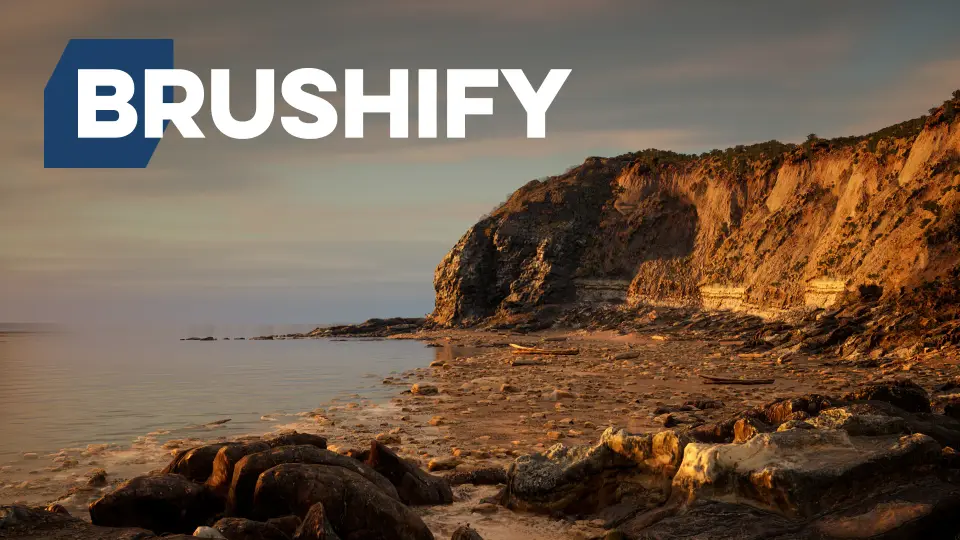
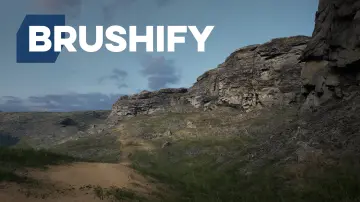
Brushify - Beach Pack drops a complete coastal environment into Unreal Engine with a prebuilt level, 8K drone scans, and photoscanned objects drawn from real English beaches. The kit is aimed at level designers and environment artists who want a jump start: open the level, run it, and you have a full landscape with textures and props already wired in. Everything visible in the pack's screenshots is provided, along with the Brushify shader setup that produced those shots.
Ready-Made Beach Level and Asset Showcase
Two levels sit inside this pack. The first is a ready-made and optimized Beach level that was assembled from Brushify assets. It runs out of the box, so you can start testing gameplay immediately, block out cinematic shots, or study how the material layers and spawners were placed in a finished scene. The second is a Beach assets showcase level that lines up the environment pieces in a clear context, which makes it easier to evaluate a rock or driftwood prop before scattering it across your own map.
Four 8K Drone Scans of Beach Cliffs
Large-scale terrain variation comes from four UHD drone scans of beach cliffs. Each scan is built from several 8192x8192 textures, which lets the landscape hold detail from near to far without looking soft or repetitive. These scans are intended to be dropped onto a landscape quickly, adding a broad, realistic coastline surface before you go in with finer sculpting tools.
The physical reference for the pack was recorded on beaches along the east coast of England, with the landscape around Whitby and Scarborough supplying both the data and the visual direction. That regional consistency is easy to feel when you move from the cliff scans to the loose rock and shingle pieces: the stone types, weathering, and color all belong to the same coast rather than being pulled from contradicting locations.
Landscape Auto Material with 11 Automatic Paint Layers
The core terrain workflow is handled by the Brushify Landscape Auto Material. It lets an artist paint multiple biomes across huge landscapes by treating each biome as its own automatic paint layer. There are 11 landscape layers to choose from, with Grass, Desert, Forest, Snow, Beach, Dunes, Mud, and Craters among them. Once the material is assigned to any landscape, it can automatically texture the terrain and populate it with optimized rocks or grass that match the biome being painted.
Under the hood, the material includes a long list of rendering systems. Runtime Virtual Texturing (RVT) helps keep texture memory manageable, while Parallax Occlusion Mapping (POM) raises the apparent depth of close surfaces. Tri-planar mapping avoids stretched detail on slopes and cliff walls, and tessellation and height data add actual geometric displacement. Roughness, a reduced distance tiling feature, flow mapping, and a three-stage LOD system for far, medium, and near views all slot into the same shader. The overdraw is optimized so the material can cover a wide landscape without sinking the draw cost. Best of all, the shader graph is modular: functions that are not needed for a particular project can be removed or altered without rewriting the whole network.
The Beach Pack also includes the complete shader set from the Brushify Environment Shaders pack, which keeps the whole coastline on a unified visual system. Because these shaders are 100% compatible with other existing Brushify packages, the beach setup is not a dead end when you want to add a different environment later.
Photoscanned Objects and Procedural Spawners
On the prop side, the pack concentrates on what actually collects on a shoreline. There are 5 variations of beach rocks, 2 variations of shingle rocks, and 3 variations of driftwood, all photoscanned and optimized for use around the coast. These assets were produced with up-to-date photogrammetry techniques, so each rock or twisted piece of wood carries a realistic surface texture and silhouette.
Instead of forcing manual placement, the pack includes preset procedural spawners for beach rocks, shingle rocks, and driftwood. The spawners are there to quickly scatter stones across a tidal flat or build up shingle embankments along the waterline. Mesh vertex counts range from 1,000 to 80,000, which lets some pieces stay heavy and detailed while lighter versions fill the distance. Every mesh has 5 LODs, and foliage and rock textures reach up to 8K resolution, keeping the props in the same visual class as the drone-scan terrain.
One extra model in the pack is a public-domain boat scan from the Scottish Maritime Museum, the RNLB Jane Anne, which can sit in the scene as a piece of maritime dressing without needing a separate model purchase.
UE5 Project Settings and Brushify Shader Compatibility
Unreal Engine 5 users need to make three project settings changes before the Beach Pack behaves as intended. In Project Settings, search for RHI and switch it to DX12. Then enable Generate Mesh Distance Fields and enable Virtual Texturing. The official UE5 demonstration of the pack runs with those features active and uses additional third-party plugins that are not part of the download. With the base settings turned on, the material systems and landscape texturing in the shipped level line up with the established Brushify workflows.
Brushify packs are built to live together. Because they share generic objects, textures, and shaders, merging packs into the same project is done through the Epic Launcher: choose 'Add to project' and select 'Overwrite files.' Following that step lets a Beach project expand into a wider world with forest, desert, or other Brushify biomes while keeping a single material system underneath it all.
From the first playable level to a coastline packed with shingle and driftwood, the Brushify Beach Pack gives an environment artist a direct route to a production-grade shore without patching together mismatched assets. The drone scans supply the broad geography, the Landscape Auto Material brings biome flexibility, and the spawners make the final pass over the sand feel less like a manual chore.
 Mountain
 Mountain
 Mountain
 Mountain