"fb5ea1e7d1b41445"{"id":"1002399","slug":"sword-elf","title":"Sword Elf","category":"Humans","engine":"4.22+,5.0+","assetVersion":"","engineVersion":"Engine Version: 4.22+,5.0+","tag":"Humans","accent":"blue","visual":"mech","summary":"Examine the technical integration, UE4 Epic skeleton retargeting, locomotion setup, and prototyping workflow for the stylized fantasy Sword Elf character.","platform":"Unreal Engine","indexPolicy":"index","publishedAt":"2026-11-10T04:28:30.060Z","updatedAt":"2026-11-10T04:28:30.060Z","sourceNotes":[],"fileContents":[],"compatibility":["Unreal Engine","Engine Version: 4.22+,5.0+"],"featuredImage":{"alt":"Sword Elf","src":"/wp-content/uploads/published/2026/11/b6a5d88c5d56-7011a649-dd4f-4904-8e6a-28ac32d5a955-e2a7ba0f70.webp"},"hasDownloadLink":true,"downloads":0,"terms":[{"taxonomy":"category","slug":"humans","name":"Humans"}],"galleryImages":[{"src":"/wp-content/uploads/published/2026/11/63c62e9c956a-e2d1cacd-03d2-444f-b9c6-2e5e8fe05f35-8e22dec828.webp","alt":"Sword Elf"},{"src":"/wp-content/uploads/published/2026/11/9baaf69e6d8e-baaf75b9-e01f-4f2d-93de-4b7437d2d71e-9be4a5547b.webp","alt":"Sword Elf"},{"src":"/wp-content/uploads/published/2026/11/0fa4f09ac029-7028c92c-eda7-4fae-96a8-72d8e0d93a43-683676be4f.webp","alt":"Sword Elf"},{"src":"/wp-content/uploads/published/2026/11/7265ac38ecec-4e222790-4208-4a68-9d82-b2a790162847-f99fa2f3e9.webp","alt":"Sword Elf"},{"src":"/wp-content/uploads/published/2026/11/f5b4b7332d52-5c9b5aea-f3c4-48f6-a4b4-2f0262c03db2-57180fad5c.webp","alt":"Sword Elf"},{"src":"/wp-content/uploads/published/2026/11/74a27939f300-f27cad93-a407-4ce9-b2e8-224b611e42fc-9973d8168d.webp","alt":"Sword Elf"},{"src":"/wp-content/uploads/published/2026/11/32d50275e6d7-27b91b42-51c7-498a-a5ca-06dd6974c19d-d9ddbc2ec1.webp","alt":"Sword Elf"},{"src":"/wp-content/uploads/published/2026/11/ab929b84bd8e-4d699e66-d2b2-4148-a2e2-d79ab3d1bc5a-3870d1bba5.webp","alt":"Sword Elf"},{"src":"/wp-content/uploads/published/2026/11/eb26c35723c0-a29944d1-1013-49bf-b350-e2012898e3da-041cd5ecee.webp","alt":"Sword Elf"}],"accessPanel":{"kind":"resource","title":"Get this resource","eyebrow":"Free resource","message":"Download this resource in your browser.","fileName":"Content.7z","safetyNote":"Resources are manually reviewed before listing to improve quality and reduce obvious risks.","actionLabel":"Get this resource","resourceType":"Resource archive","versions":[]},"contentHtml":"\u003ch2\u003eIntegrating Sword Elf into UE4 Skeleton Pipelines\u003c/h2\u003e\u003cp\u003eDropping a playable character directly into an active project usually starts with rig verification and retarget testing. Sword Elf is rigged completely to the Epic skeleton within Unreal Engine 4, removing the friction often encountered when importing custom fantasy characters into established pipelines. Because the bone hierarchy matches the standard mannequin structure, the asset avoids the need for extensive bone mapping before basic motion can be tested in an environment.\u003c/p\u003e\u003cp\u003eUsing the default UE4 mannequin as a testing dummy is common during early mechanics development, but testing combat flow and spatial timing with a dedicated character mesh clarifies camera distance, attack framing, and silhouette visibility immediately. Implementing Sword Elf begins by setting up the skeletal mesh references within your character blueprint. Instead of adjusting an arbitrary skeletal root or re-weighting geometry, developers can assign the mesh to an existing character class derived from standard templates.\u003c/p\u003e\u003cp\u003eThe direct alignment with the UE4 Epic skeleton allows motion transfer through standard retargeting workflows. Developers following established retarget procedures can redirect animation assets between the default mannequin and Sword Elf without manual bone translation tweaks. This procedural compatibility ensures that custom weapon poses, dodge rolls, or secondary strike sequences already established on the base mannequin transfer directly onto the character mesh.\u003c/p\u003e\u003ch2\u003eSword Elf Locomotion and Attack Animations\u003c/h2\u003e\u003cp\u003eMovement validation requires responsive movement sets rather than idle poses. The resource supplies basic animation coverage composed of core locomotion states alongside a single combat attack sequence. This configuration fulfills the baseline mechanical requirements needed to verify character ground locomotion, sprint thresholds, turn-in-place mechanics, and initial hit-frame triggers.\u003c/p\u003e\u003cp\u003eThe included basic locomotion covers standard directional ground travel. Having immediate access to walking and running motion states that correspond directly to standard axis inputs means character physics, ground friction, and capsule acceleration can be tuned right away. Developers testing third-person camera damping or isometric tracking receive immediate visual feedback on stride length and foot planting, making it obvious whether movement feels heavy, floaty, or responsive.\u003c/p\u003e\u003cp\u003eBeyond running and walking, the included single attack animation lets gameplay programmers establish early melee timing. An attack cycle requires specific window tags, such as input buffer frames, active hit-box traces, and recovery states. With an attack already bound to the character rig, these notify events and damage triggers can be authored immediately in the animation sequence, bypassing the placeholder step where combat code runs on an unarmed or frozen mesh.\u003c/p\u003e\u003ch2\u003eScripting and Animation Blueprint Configuration\u003c/h2\u003e\u003cp\u003eConnecting skeletal data to gameplay code demands a predictable blend graph. Tagged for use with Animation Blueprints and functional scripting, Sword Elf functions within standard Unreal Engine state machines. The character handles transition variables such as movement speed, directional velocity, and combat state switches through native animation graph evaluation.\u003c/p\u003e\u003cp\u003eAn Animation Blueprint shaped by this setup typically reads vector length from the character velocity to govern locomotion blend spaces. Because basic locomotion is included natively, the blend graph can directly evaluate transitions from standing idle into full stride without needing external asset dependencies. State logic can then branch out cleanly into the designated attack state using boolean triggers or gameplay tags driven by player input actions.\u003c/p\u003e\u003cp\u003eScripting around the asset allows developers to test gameplay mechanics that rely on character presence. Whether an interactive mechanic checks weapon sockets, calculates line of sight for fantasy enemies, or triggers response animations through event dispatches, the underlying script structure maintains standard character component communication. This consistency prevents conflicts when transitioning between greybox development and playable fantasy mechanics.\u003c/p\u003e\u003ch2\u003eFacial Adjustments and Prototyping Flexibility\u003c/h2\u003e\u003cp\u003eStatic facial topology limits character performance during close-up camera passes, cutscene prototyping, or expressive gameplay prompts. Sword Elf incorporates a selection of morph targets embedded directly into the mesh geometry. These vertex offset configurations grant targeted control over specific facial expressions or mesh modifications, adding dynamic quality to an otherwise stylized, semi-realistic sculpt.\u003c/p\u003e\u003cp\u003eDriving these morph targets inside engine logic can be accomplished either through timeline tracks, direct script calls in the character blueprint, or animation curves linked to the Animation Blueprint. When a melee swing connects, or when the character sustains damage from an opposing trace, blueprint scripting can modulate morph weights dynamically to communicate exertion or physical feedback.\u003c/p\u003e\u003cp\u003eReplacing the grey default mannequin with a stylized female elf brings an immediate sense of tone to fantasy level testing. Lighting artists, environment designers, and combat scripters can evaluate material contrast, hair and armor silhouettes against environmental geometry, and character readability against varied lighting environments. Establishing this visual scale early avoids the design drift that often happens when testing fantasy mechanics purely through non-descript humanoid shapes.\u003c/p\u003e\u003ch2\u003ePipeline Alignment and Asset Compatibility\u003c/h2\u003e\u003cp\u003eProject pipelines benefit when multiple character models share identical skeletal anatomy, material setups, and retarget instructions. Sword Elf shares explicit pipeline compatibility with the Swimsuit Girl asset, ensuring uniform rigging conventions across multi-character rosters. Teams working across these assets can apply identical retargeting setups, animation blueprints, and script integrations without rebuilding character parameters from scratch.\u003c/p\u003e\u003cp\u003eThis compatibility minimizes the engineering overhead typically involved in managing disparate third-party rigs. Shared skeletal definitions allow animation blueprints authored for one character to be duplicated or directly applied to the other, streamlining character switching, skin customization, or variant testing in both sandbox environments and active prototypes.\u003c/p\u003e\n\n\u003ch2\u003eMore From The Same Workflow\u003c/h2\u003e\n\u003cul\u003e\n\u003cli\u003e\u003ca href=\"https://3dcghub.com/modular-elf-archer-girl/\" rel=\"noopener noreferrer\"\u003eModular Elf Archer Girl\u003c/a\u003e\u003c/li\u003e\n\u003cli\u003e\u003ca href=\"https://3dcghub.com/medieval-girl/\" rel=\"noopener noreferrer\"\u003eMedieval Girl\u003c/a\u003e\u003c/li\u003e\n\u003cli\u003e\u003ca href=\"https://3dcghub.com/nun-girl-modular/\" rel=\"noopener noreferrer\"\u003eNun Girl Modular\u003c/a\u003e\u003c/li\u003e\n\u003cli\u003e\u003ca href=\"https://3dcghub.com/female-gang-01/\" rel=\"noopener noreferrer\"\u003eFemale Gang 01\u003c/a\u003e\u003c/li\u003e\n\u003cli\u003e\u003ca href=\"https://3dcghub.com/winsome-girl/\" rel=\"noopener noreferrer\"\u003eWinsome Girl\u003c/a\u003e\u003c/li\u003e\n\u003c/ul\u003e","contentTextLength":6601,"navigation":{"current":20,"total":4340,"previous":{"id":"1002400","slug":"vampire-girl-remaster","title":"Vampire Girl Remaster","category":"Characters \u0026 Creatures","platform":"Unreal Engine","updatedAt":"2026-11-10T04:29:40.350Z"},"next":{"id":"1002398","slug":"skeleton-army","title":"Skeleton Army","category":"Creatures \u0026 Monsters","platform":"Unreal Engine","updatedAt":"2026-11-10T04:26:44.584Z"}},"relatedResources":[{"id":"1000197","slug":"modular-elf-archer-girl","title":"Modular Elf Archer Girl","category":"Humans","engine":"4.26+,5.0+","assetVersion":"","engineVersion":"Engine Version: 4.26+,5.0+","tag":"Humans","accent":"blue","visual":"mech","summary":"A modular female elf archer character with Epic Skeleton rigging, facial blendshapes, 4K PBR textures, separated bow and arrow, and armor color variants.","platform":"Unreal Engine","indexPolicy":"index","publishedAt":"2026-06-23T11:13:13.917Z","updatedAt":"2026-06-23T11:13:13.917Z","sourceNotes":[],"fileContents":[],"compatibility":["Unreal Engine","Engine Version: 4.26+,5.0+"],"featuredImage":{"alt":"Modular Elf Archer Girl","src":"/wp-content/uploads/published/2026/06/be7f554506e0-1c33a7e5-3b94-42e5-b8f0-224995758e1d-f080b04b74.webp"},"hasDownloadLink":true,"downloads":1},{"id":"1002392","slug":"medieval-girl","title":"Medieval Girl","category":"Humans","engine":"4.19+,5.0+","assetVersion":"","engineVersion":"Engine Version: 4.19+,5.0+","tag":"Humans","accent":"blue","visual":"mech","summary":"Examine the technical layout, modular setup, Epic Skeleton rigging, and ARKit blendshapes of the Medieval Girl 3D character asset.","platform":"Unreal Engine","indexPolicy":"index","publishedAt":"2026-11-10T04:17:58.165Z","updatedAt":"2026-11-10T04:17:58.165Z","sourceNotes":[],"fileContents":[],"compatibility":["Unreal Engine","Engine Version: 4.19+,5.0+"],"featuredImage":{"alt":"Medieval Girl","src":"/wp-content/uploads/published/2026/11/9e82bc2e09b3-9e7c2e43-aad9-4bb1-add2-43e8145276a3-3b60630b4d.webp"},"hasDownloadLink":true,"downloads":0},{"id":"1002394","slug":"nun-girl-modular","title":"Nun Girl Modular","category":"Humans","engine":"4.26+,5.0+","assetVersion":"","engineVersion":"Engine Version: 4.26+,5.0+","tag":"Humans","accent":"blue","visual":"mech","summary":"Examine the technical layout, skeleton setup, modular clothing parts, and 4K PBR textures of the Nun Girl Modular real-time character model.","platform":"Unreal Engine","indexPolicy":"index","publishedAt":"2026-11-10T04:21:06.414Z","updatedAt":"2026-11-10T04:21:06.414Z","sourceNotes":[],"fileContents":[],"compatibility":["Unreal Engine","Engine Version: 4.26+,5.0+"],"featuredImage":{"alt":"Nun Girl Modular","src":"/wp-content/uploads/published/2026/11/0fd1be5a48c1-7d16b0ab-ce7e-4e64-b786-700d4ff73aaa-57498a1b2b.webp"},"hasDownloadLink":true,"downloads":0}]}
Humans
Sword Elf
Examine the technical integration, UE4 Epic skeleton retargeting, locomotion setup, and prototyping workflow for the stylized fantasy Sword Elf character.
Category:Unreal Engine,HumansPlatform: Unreal EngineEngine Version: 4.22+,5.0+Published: Nov 10, 2026
Humans
Resource overview
Integrating Sword Elf into UE4 Skeleton Pipelines
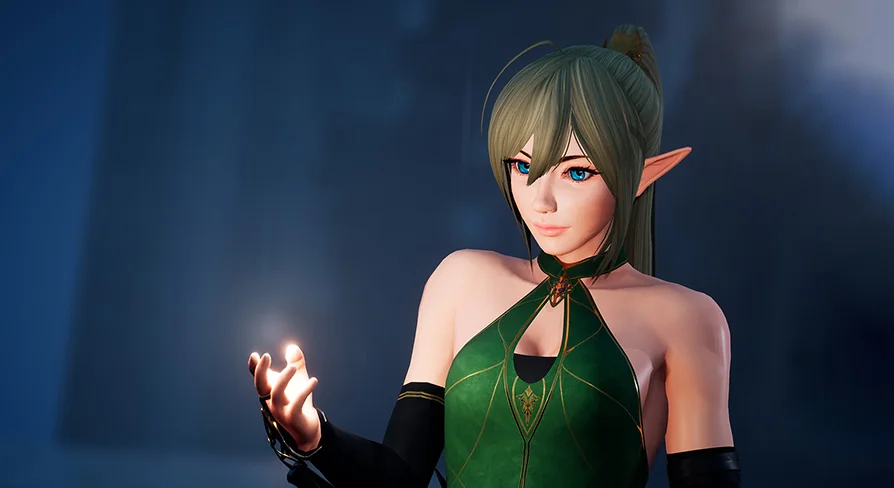
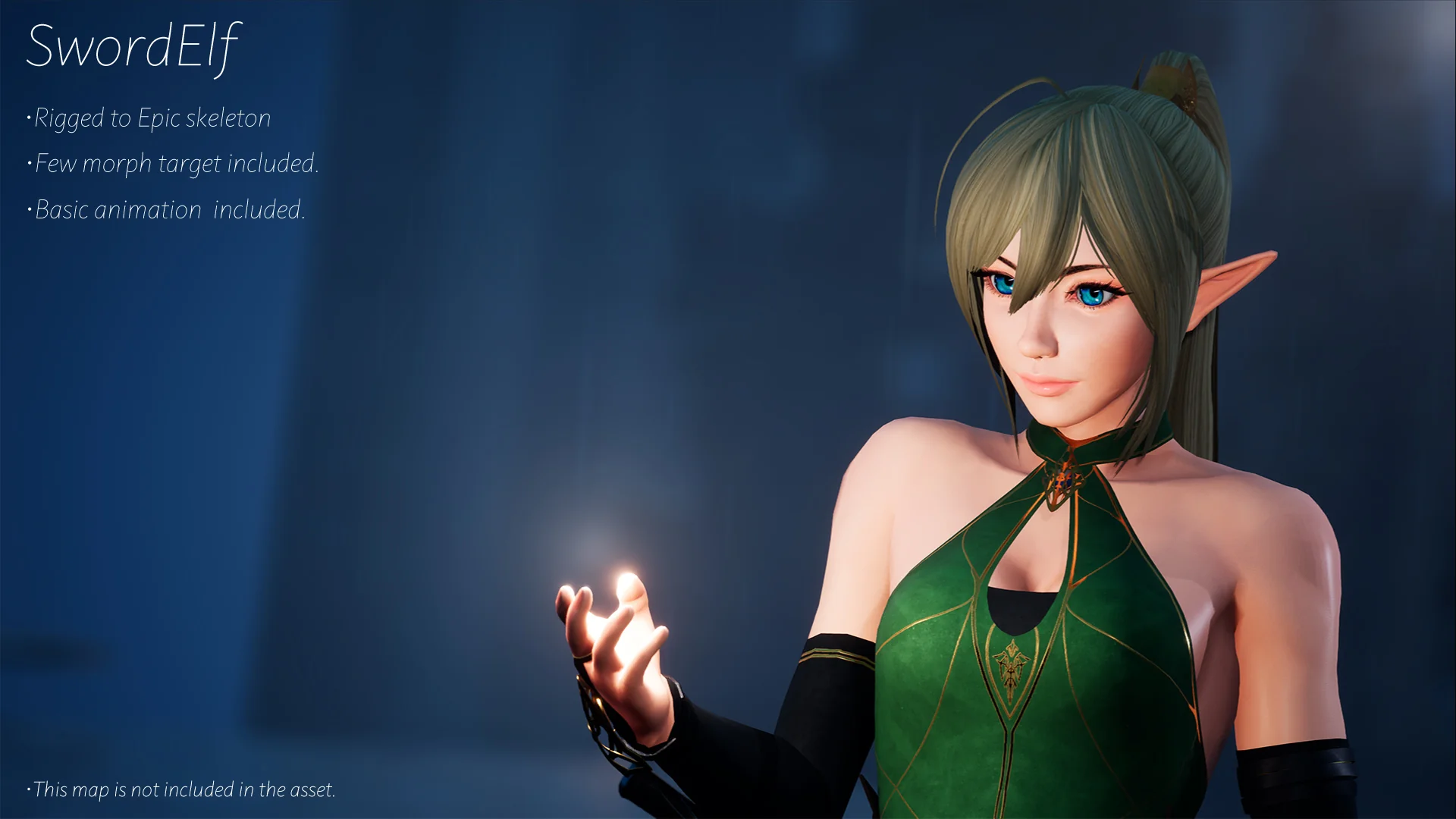
Dropping a playable character directly into an active project usually starts with rig verification and retarget testing. Sword Elf is rigged completely to the Epic skeleton within Unreal Engine 4, removing the friction often encountered when importing custom fantasy characters into established pipelines. Because the bone hierarchy matches the standard mannequin structure, the asset avoids the need for extensive bone mapping before basic motion can be tested in an environment.
Using the default UE4 mannequin as a testing dummy is common during early mechanics development, but testing combat flow and spatial timing with a dedicated character mesh clarifies camera distance, attack framing, and silhouette visibility immediately. Implementing Sword Elf begins by setting up the skeletal mesh references within your character blueprint. Instead of adjusting an arbitrary skeletal root or re-weighting geometry, developers can assign the mesh to an existing character class derived from standard templates.
The direct alignment with the UE4 Epic skeleton allows motion transfer through standard retargeting workflows. Developers following established retarget procedures can redirect animation assets between the default mannequin and Sword Elf without manual bone translation tweaks. This procedural compatibility ensures that custom weapon poses, dodge rolls, or secondary strike sequences already established on the base mannequin transfer directly onto the character mesh.
Sword Elf Locomotion and Attack Animations
Movement validation requires responsive movement sets rather than idle poses. The resource supplies basic animation coverage composed of core locomotion states alongside a single combat attack sequence. This configuration fulfills the baseline mechanical requirements needed to verify character ground locomotion, sprint thresholds, turn-in-place mechanics, and initial hit-frame triggers.
The included basic locomotion covers standard directional ground travel. Having immediate access to walking and running motion states that correspond directly to standard axis inputs means character physics, ground friction, and capsule acceleration can be tuned right away. Developers testing third-person camera damping or isometric tracking receive immediate visual feedback on stride length and foot planting, making it obvious whether movement feels heavy, floaty, or responsive.
Beyond running and walking, the included single attack animation lets gameplay programmers establish early melee timing. An attack cycle requires specific window tags, such as input buffer frames, active hit-box traces, and recovery states. With an attack already bound to the character rig, these notify events and damage triggers can be authored immediately in the animation sequence, bypassing the placeholder step where combat code runs on an unarmed or frozen mesh.
Scripting and Animation Blueprint Configuration
Connecting skeletal data to gameplay code demands a predictable blend graph. Tagged for use with Animation Blueprints and functional scripting, Sword Elf functions within standard Unreal Engine state machines. The character handles transition variables such as movement speed, directional velocity, and combat state switches through native animation graph evaluation.
An Animation Blueprint shaped by this setup typically reads vector length from the character velocity to govern locomotion blend spaces. Because basic locomotion is included natively, the blend graph can directly evaluate transitions from standing idle into full stride without needing external asset dependencies. State logic can then branch out cleanly into the designated attack state using boolean triggers or gameplay tags driven by player input actions.
Scripting around the asset allows developers to test gameplay mechanics that rely on character presence. Whether an interactive mechanic checks weapon sockets, calculates line of sight for fantasy enemies, or triggers response animations through event dispatches, the underlying script structure maintains standard character component communication. This consistency prevents conflicts when transitioning between greybox development and playable fantasy mechanics.
Facial Adjustments and Prototyping Flexibility
Static facial topology limits character performance during close-up camera passes, cutscene prototyping, or expressive gameplay prompts. Sword Elf incorporates a selection of morph targets embedded directly into the mesh geometry. These vertex offset configurations grant targeted control over specific facial expressions or mesh modifications, adding dynamic quality to an otherwise stylized, semi-realistic sculpt.
Driving these morph targets inside engine logic can be accomplished either through timeline tracks, direct script calls in the character blueprint, or animation curves linked to the Animation Blueprint. When a melee swing connects, or when the character sustains damage from an opposing trace, blueprint scripting can modulate morph weights dynamically to communicate exertion or physical feedback.
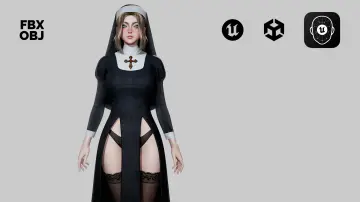
Replacing the grey default mannequin with a stylized female elf brings an immediate sense of tone to fantasy level testing. Lighting artists, environment designers, and combat scripters can evaluate material contrast, hair and armor silhouettes against environmental geometry, and character readability against varied lighting environments. Establishing this visual scale early avoids the design drift that often happens when testing fantasy mechanics purely through non-descript humanoid shapes.
Pipeline Alignment and Asset Compatibility
Project pipelines benefit when multiple character models share identical skeletal anatomy, material setups, and retarget instructions. Sword Elf shares explicit pipeline compatibility with the Swimsuit Girl asset, ensuring uniform rigging conventions across multi-character rosters. Teams working across these assets can apply identical retargeting setups, animation blueprints, and script integrations without rebuilding character parameters from scratch.
This compatibility minimizes the engineering overhead typically involved in managing disparate third-party rigs. Shared skeletal definitions allow animation blueprints authored for one character to be duplicated or directly applied to the other, streamlining character switching, skin customization, or variant testing in both sandbox environments and active prototypes.
 Humans
 Humans
 Humans
 Humans