"26aaab8a5d5ed4fc"{"id":"22522","slug":"simple-waypoint-system","title":"Simple Waypoint System","category":"Animation","engine":"Original Unity version: 2020.3.0","assetVersion":"Original Unity version: 2020.3.0","engineVersion":"Asset Version:5.5.3","tag":"Animation","accent":"cyan","visual":"animation","summary":"Simple Waypoint System provides a workflow for creating paths directly within the Unity editor, allowing game objects and characters to follow linear, curved, or bezier trajectories using built-in movement scripts.","platform":"Unity","publishedAt":"2026-04-06T13:06:24.000Z","updatedAt":"2026-04-19T15:37:14.000Z","sourceNotes":[],"fileContents":[],"compatibility":["Unity","Original Unity version: 2020.3.0","Asset Version: 5.5.3"],"featuredImage":{"alt":"Simple Waypoint System","src":"https://3dcghub.com/wp-content/uploads/2026/04/a93f9e3a5d6b_07f38191-3df8-48e0-b6c8-4678bcc8ddaa_1280x720_stretch.webp"},"hasDownloadLink":true,"downloads":0,"terms":[{"taxonomy":"category","slug":"animation","name":"Animation"},{"taxonomy":"post_tag","slug":"animation","name":"Animation"},{"taxonomy":"post_tag","slug":"game-systems","name":"Game Systems"},{"taxonomy":"post_tag","slug":"unity","name":"Unity"}],"galleryImages":[{"src":"https://3dcghub.com/wp-content/uploads/2026/04/a34294bac6bd_2ca78b8b-447f-4313-8207-1a8a43439a78_scaled.webp","alt":"Simple Waypoint System"},{"src":"https://3dcghub.com/wp-content/uploads/2026/04/01e0ea6e54fd_99bf73ce-40ee-48ea-acc7-f8aa173ceecd_scaled.webp","alt":"Simple Waypoint System"},{"src":"https://3dcghub.com/wp-content/uploads/2026/04/d171fec1786e_350f51b7-d3aa-4817-a47b-1eeb70ef5c92_scaled.webp","alt":"Simple Waypoint System"},{"src":"https://3dcghub.com/wp-content/uploads/2026/04/9e1fa446c601_0ef45427-2d95-4f69-9c26-4150eec88ae7_scaled.webp","alt":"Simple Waypoint System"},{"src":"https://3dcghub.com/wp-content/uploads/2026/04/1f2727ad691d_644da45c-5bee-442e-871c-3ac22d661f4c_scaled.webp","alt":"Simple Waypoint System"},{"src":"https://3dcghub.com/wp-content/uploads/2026/04/8a60b2afbde9_449694a7-edba-45d1-949e-43be491d2a7a_scaled.webp","alt":"Simple Waypoint System"},{"src":"https://3dcghub.com/wp-content/uploads/2026/04/663c6a8a9c28_2d17961b-9982-4aac-b794-134497f297d6_scaled.webp","alt":"Simple Waypoint System"},{"src":"https://3dcghub.com/wp-content/uploads/2026/04/f563f1620770_e706d8ef-3b30-4626-9228-c42316632eb0_scaled.webp","alt":"Simple Waypoint System"},{"src":"https://3dcghub.com/wp-content/uploads/2026/04/e4fb49ddbe79_751145a5-8acf-4394-8bde-afdfe499c2c9_scaled.webp","alt":"Simple Waypoint System"},{"src":"https://3dcghub.com/wp-content/uploads/2026/04/2669d046e65d_c0fc0dda-32f8-45d3-a8ff-2a8d57ec2920_scaled.webp","alt":"Simple Waypoint System"}],"accessPanel":{"kind":"resource","title":"Access this resource","eyebrow":"Free Download","message":"Log in or create a free account to start your download.","fileName":"Simple Waypoint System v5.5.3 (17 Nov 2024).7z","safetyNote":"All resources are 100% manually reviewed to eliminate all risks.","actionLabel":"Download Free","resourceType":"Resource archive"},"contentHtml":"\u003ch2\u003ePath Construction and Editor Integration\u003c/h2\u003e\n\u003cp\u003eThe Simple Waypoint System is designed to streamline the process of moving game objects along specific trajectories by allowing developers to construct paths directly within the Unity editor. The system supports multiple path types to suit different movement requirements, including linear, curved, and bezier paths. This flexibility ensures that whether an object needs to follow a rigid, straight-line patrol or a smooth, organic curve, the geometry can be defined without leaving the scene view.\u003c/p\u003e\n\u003cp\u003eFor projects requiring logic-based navigation, the system integrates with Unity Navigation to support NavMesh paths. This allows characters to respect baked navigation data while still following a defined set of waypoints. The developer has organized the toolset so that movement scripts can be attached to any game object, which then references the created paths to dictate its behavior in the scene.\u003c/p\u003e\n\u003ch2\u003eMovement Logic and Object Orientation\u003c/h2\u003e\n\u003cp\u003eControl over how an object traverses a path is handled through various movement scripts that include several loop types and directional options. Objects can be set to reverse their direction upon reaching the end of a path or pause at specific waypoints using built-in delay settings. To ensure movement feels integrated into the game world, the system includes an orientation feature that aligns the object to the path's direction as it moves.\u003c/p\u003e\n\u003cp\u003eA specialized Waypoint Rotation Mode offers further control by allowing objects to orient themselves based on the specific rotation of the waypoints themselves, rather than just the path's forward vector. This is particularly useful for complex character behaviors where a specific facing direction is required at certain nodes. Additionally, the system supports Mecanim Animator Controllers, enabling developers to synchronize character animations with the speed and state of the waypoint movement.\u003c/p\u003e\n\u003ch2\u003eTechnical Integration and UnityEvents\u003c/h2\u003e\n\u003cp\u003eUnder the hood, the system utilizes the DOTween engine for its tween-based movement, and the free version of DOTween is included with the package. This integration allows for smooth interpolation and easing as objects transition between waypoints. For developers who need to trigger specific game logic at certain points along a path, the system makes use of UnityEvents. This allows for the calling of custom methods whenever an object reaches a designated waypoint, facilitating environmental interactions or scripted events without deep coding overhead.\u003c/p\u003e\n\u003cp\u003eThe package contains 159 assets in total, including 10 example scenes that demonstrate various implementation scenarios. These samples cover a range of use cases, such as:\u003c/p\u003e\n\u003cul\u003e\n\u003cli\u003eSpline and Bezier path configurations\u003c/li\u003e\n\u003cli\u003eNavMesh-based movement samples\u003c/li\u003e\n\u003cli\u003ePlayer, Camera, and Rapid input examples\u003c/li\u003e\n\u003cli\u003eAdvanced event triggering and waypoint rotation\u003c/li\u003e\n\u003cli\u003eRuntime API usage for dynamic path adjustments\u003c/li\u003e\n\u003c/ul\u003e\n\u003ch2\u003eCompatibility and Project Requirements\u003c/h2\u003e\n\u003cp\u003eThe Simple Waypoint System is compatible with several versions of the Unity editor, specifically supporting 2020.3.0, 2022.3.10, and 6000.0.58. It is designed to function across different render pipelines, ensuring that the movement scripts and path visualizations work correctly in the Built-in Render Pipeline, HDRP, URP, and Custom SRP environments.\u003c/p\u003e\n\u003cp\u003eThe code is fully documented to assist with implementation, and the package includes quick start documentation to help establish basic pathing quickly. The file size remains relatively compact at 17.7 MB, making it a lightweight addition to the project hierarchy. By providing a structured way to handle path-based motion, the system removes the need for manual coordinate tracking and custom movement interpolation logic.\u003c/p\u003e\n\n\u003ch2\u003eMore From The Same Workflow\u003c/h2\u003e\n\u003cul\u003e\n\u003cli\u003e\u003ca href=\"https://3dcghub.com/pegasus-flythroughs-for-unity-6/\" title=\"Pegasus – Flythroughs for Unity 6\"\u003ePegasus – Flythroughs for Unity 6\u003c/a\u003e\u003c/li\u003e\n\u003cli\u003e\u003ca href=\"https://3dcghub.com/motion-matching-for-unity/\" title=\"Motion Matching for Unity\"\u003eMotion Matching for Unity\u003c/a\u003e\u003c/li\u003e\n\u003cli\u003e\u003ca href=\"https://3dcghub.com/retarget-pro/\" title=\"Retarget Pro\"\u003eRetarget Pro\u003c/a\u003e\u003c/li\u003e\n\u003cli\u003e\u003ca href=\"https://3dcghub.com/motion-path-animation-editor/\" title=\"Motion Path Animation Editor\"\u003eMotion Path Animation Editor\u003c/a\u003e\u003c/li\u003e\n\u003cli\u003e\u003ca href=\"https://3dcghub.com/mesh-animator-animate-massive-crowds/\" title=\"Mesh Animator – Animate massive crowds\"\u003eMesh Animator – Animate massive crowds\u003c/a\u003e\u003c/li\u003e\n\u003c/ul\u003e\n\n\u003chr\u003e\n\u003cp\u003e\u003c/p\u003e","contentTextLength":3919,"navigation":{"current":3225,"total":3400,"previous":{"id":"22528","slug":"spinal-animator","title":"Spinal Animator","category":"Animation","platform":"Unity","updatedAt":"2026-04-19T15:37:14.000Z"},"next":{"id":"22553","slug":"vr-panorama-360-pro-renderer-v5","title":"VR Panorama 360 PRO Renderer V5","category":"Animation","platform":"Unity","updatedAt":"2026-04-19T15:37:13.000Z"}},"relatedResources":[{"id":"22444","slug":"learned-motion-matching","title":"Learned Motion Matching","category":"Animation","engine":"Original Unity version: 2021.3.30","assetVersion":"Original Unity version: 2021.3.30","engineVersion":"Asset Version:1.0","tag":"Animation","accent":"cyan","visual":"animation","summary":"Learned Motion Matching implements deep learning techniques to create fluid humanoid movement without the abrupt changes common in traditional state machines. It integrates waypoint navigation and specialized IK for hand interactions within a one-click setup.","platform":"Unity","publishedAt":"2026-04-06T12:52:33.000Z","updatedAt":"2026-04-19T15:37:17.000Z","sourceNotes":[],"fileContents":[],"compatibility":["Unity","Original Unity version: 2021.3.30","Asset Version: 1.0"],"featuredImage":{"alt":"Learned Motion Matching","src":"https://3dcghub.com/wp-content/uploads/2026/04/564d6a4d735f_5738afb6-84c4-484b-a954-b6fd5602b4df_1280x720_stretch.webp"},"hasDownloadLink":true,"downloads":1},{"id":"18041","slug":"gui-simple-round","title":"GUI - Simple Round","category":"GUI","engine":"Original Unity version: 2021.3.30","assetVersion":"Original Unity version: 2021.3.30","engineVersion":"Asset Version:1.2.1","tag":"GUI","accent":"cyan","visual":"mech","summary":"Enhance your game development workflow with GUI - Simple Round, a comprehensive UI asset featuring over 690 PNG sources and 120 prefabs. It provides high-resolution graphics and customizable elements for various Unity render pipelines.","platform":"Unity","publishedAt":"2026-03-14T17:54:50.000Z","updatedAt":"2026-04-19T15:43:24.000Z","sourceNotes":[],"fileContents":[],"compatibility":["Unity","Original Unity version: 2021.3.30","Asset Version: 1.2.1"],"featuredImage":{"alt":"GUI - Simple Round","src":"https://3dcghub.com/wp-content/uploads/2026/03/25721e0113f8_5ebc449b-1bdc-4db1-bd69-f2b4f9e8f2e5.webp"},"hasDownloadLink":true,"downloads":0},{"id":"18279","slug":"gui-pro-simple-casual","title":"GUI Pro - Simple Casual","category":"Icons","engine":"Original Unity version: 2021.3.30","assetVersion":"Original Unity version: 2021.3.30","engineVersion":"Asset Version:1.0.7","tag":"Icons","accent":"cyan","visual":"luts","summary":"Enhance your game's interface with GUI Pro - Simple Casual. This comprehensive asset pack provides thousands of PNG elements and pre-made prefabs for a professional, clean look across any genre.","platform":"Unity","publishedAt":"2026-03-15T17:33:29.000Z","updatedAt":"2026-04-19T15:43:22.000Z","sourceNotes":[],"fileContents":[],"compatibility":["Unity","Original Unity version: 2021.3.30","Asset Version: 1.0.7"],"featuredImage":{"alt":"GUI Pro - Simple Casual","src":"https://3dcghub.com/wp-content/uploads/2026/03/69b7575307ce_7b14dd05-d3f8-473e-b206-f0f9af5e8c85_1280x720_stretch.webp"},"hasDownloadLink":true,"downloads":0}]}
Animation
Simple Waypoint System
Simple Waypoint System provides a workflow for creating paths directly within the Unity editor, allowing game objects and characters to follow linear, curved, or bezier trajectories using built-in movement scripts.
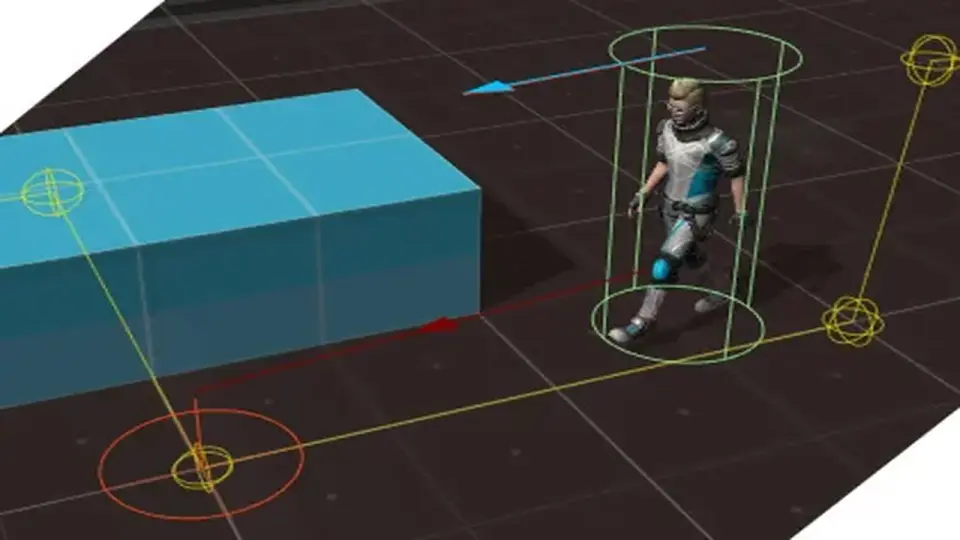
The Simple Waypoint System is designed to streamline the process of moving game objects along specific trajectories by allowing developers to construct paths directly within the Unity editor. The system supports multiple path types to suit different movement requirements, including linear, curved, and bezier paths. This flexibility ensures that whether an object needs to follow a rigid, straight-line patrol or a smooth, organic curve, the geometry can be defined without leaving the scene view.
For projects requiring logic-based navigation, the system integrates with Unity Navigation to support NavMesh paths. This allows characters to respect baked navigation data while still following a defined set of waypoints. The developer has organized the toolset so that movement scripts can be attached to any game object, which then references the created paths to dictate its behavior in the scene.
Movement Logic and Object Orientation
Control over how an object traverses a path is handled through various movement scripts that include several loop types and directional options. Objects can be set to reverse their direction upon reaching the end of a path or pause at specific waypoints using built-in delay settings. To ensure movement feels integrated into the game world, the system includes an orientation feature that aligns the object to the path's direction as it moves.
A specialized Waypoint Rotation Mode offers further control by allowing objects to orient themselves based on the specific rotation of the waypoints themselves, rather than just the path's forward vector. This is particularly useful for complex character behaviors where a specific facing direction is required at certain nodes. Additionally, the system supports Mecanim Animator Controllers, enabling developers to synchronize character animations with the speed and state of the waypoint movement.
Technical Integration and UnityEvents
Under the hood, the system utilizes the DOTween engine for its tween-based movement, and the free version of DOTween is included with the package. This integration allows for smooth interpolation and easing as objects transition between waypoints. For developers who need to trigger specific game logic at certain points along a path, the system makes use of UnityEvents. This allows for the calling of custom methods whenever an object reaches a designated waypoint, facilitating environmental interactions or scripted events without deep coding overhead.
The package contains 159 assets in total, including 10 example scenes that demonstrate various implementation scenarios. These samples cover a range of use cases, such as:
Spline and Bezier path configurations
NavMesh-based movement samples
Player, Camera, and Rapid input examples
Advanced event triggering and waypoint rotation
Runtime API usage for dynamic path adjustments
Compatibility and Project Requirements
The Simple Waypoint System is compatible with several versions of the Unity editor, specifically supporting 2020.3.0, 2022.3.10, and 6000.0.58. It is designed to function across different render pipelines, ensuring that the movement scripts and path visualizations work correctly in the Built-in Render Pipeline, HDRP, URP, and Custom SRP environments.
The code is fully documented to assist with implementation, and the package includes quick start documentation to help establish basic pathing quickly. The file size remains relatively compact at 17.7 MB, making it a lightweight addition to the project hierarchy. By providing a structured way to handle path-based motion, the system removes the need for manual coordinate tracking and custom movement interpolation logic.
 Animation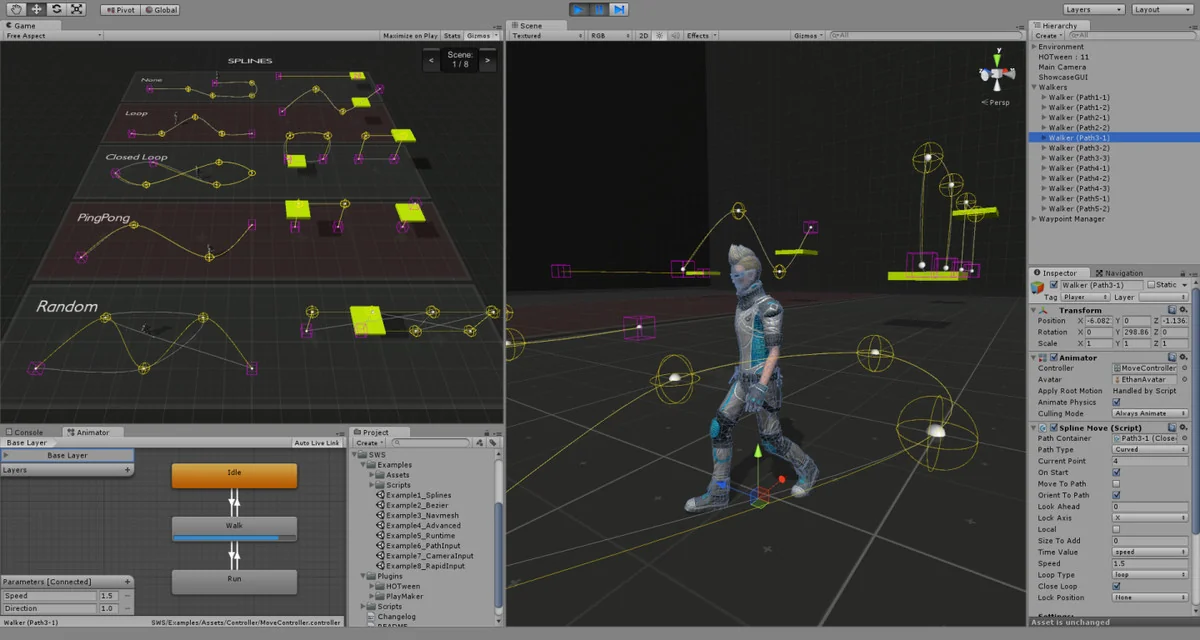
 Animation
 GUI
GUI Icons
Icons