"c14ff6bd758dadb1"{"id":"24690","slug":"real-time-fur-studio","title":"Real-Time Fur Studio","category":"Blender Add-ons \u0026 Plugins","engine":"1.04","assetVersion":"","engineVersion":"Asset Version:1.04","tag":"Blender Add","accent":"amber","visual":"animation","summary":"Real-Time Fur Studio brings real-time fur creation into Blender, turning curves into lifelike fur with more depth and realism. It suits furry creatures, character work, stylized assets, and clothing details where surface detail needs to stay readable.","platform":"Blender","publishedAt":"2026-04-16T12:44:57.000Z","updatedAt":"2026-04-20T06:12:39.000Z","sourceNotes":[],"fileContents":[],"compatibility":["Blender","Asset Version: 1.04"],"featuredImage":{"alt":"Real-Time Fur Studio","src":"https://3dcghub.com/wp-content/uploads/2026/04/6a6f5fd1cb19_2665d7192fa687424330f35ec2747e1d.webp"},"hasDownloadLink":true,"downloads":1,"terms":[{"taxonomy":"category","slug":"blender-add-ons-plugins","name":"Blender Add-ons \u0026 Plugins"},{"taxonomy":"post_tag","slug":"blender","name":"Blender"},{"taxonomy":"post_tag","slug":"characters","name":"Characters"},{"taxonomy":"post_tag","slug":"unity","name":"Unity"}],"galleryImages":[{"src":"https://3dcghub.com/wp-content/uploads/2026/04/e6eb9f3f87fd_babf054901e1e424eea64baf0712f2a5.webp","alt":"Real-Time Fur Studio"},{"src":"https://3dcghub.com/wp-content/uploads/2026/04/5f5508d1d89e_699c200d47956d5c4e63663397b30bc3.webp","alt":"Real-Time Fur Studio"},{"src":"https://3dcghub.com/wp-content/uploads/2026/04/43a58726b459_52b8255dde8dfa83aef2f4e3789bc5a3.webp","alt":"Real-Time Fur Studio"},{"src":"https://3dcghub.com/wp-content/uploads/2026/04/3f4966f89a5d_35fb974359aa0ea19c2046d9e27bc3f6.webp","alt":"Real-Time Fur Studio"},{"src":"https://3dcghub.com/wp-content/uploads/2026/04/4d626768f6f7_b78c0ff63e26b314f0e2f63c9d6023cc.webp","alt":"Real-Time Fur Studio"},{"src":"https://3dcghub.com/wp-content/uploads/2026/04/f019c63b9ca3_a7ad1e0bc83db85b4b2497b8e404a1a0.webp","alt":"Real-Time Fur Studio"}],"accessPanel":{"kind":"resource","title":"Access this resource","eyebrow":"Free Download","message":"Log in or create a free account to start your download.","fileName":"Real-Time Fur Studio V1.04.7z","safetyNote":"All resources are 100% manually reviewed to eliminate all risks.","actionLabel":"Download Free","resourceType":"Resource archive"},"contentHtml":"Creature shots, character close-ups, stylized clothing, and other fur-heavy models often need surface detail that reads quickly and clearly. Real-Time Fur Studio focuses on that kind of work inside Blender, turning curves into lifelike fur and giving the model more depth and realism without pushing the artist away from the scene.\n\u003ch2\u003eCurves that read as fur\u003c/h2\u003e\nThe main idea is direct: curves become fur. That makes the tool useful when a model needs more than a simple silhouette or a flat surface treatment. Fur can change how a character feels at a glance, and this tool is aimed at giving that detail a stronger visual presence.\n\nThe description points to furry creatures, characters, and clothing details, which makes the tool relevant for projects where surface texture needs to carry part of the design. A fur pass can change how a model reads in close-up, and Real-Time Fur Studio is positioned for that kind of visible change rather than a hidden technical pass.\n\nBecause the workflow starts from curves, it stays close to the form already in place. That is a practical fit for assets that already have a clear shape and need fur to follow that shape more naturally. Instead of feeling separate from the model, the fur becomes part of the modelâs visual structure.\n\u003ch2\u003eInside Blender, while the model is still open\u003c/h2\u003e\nReal-Time Fur Studio is a Blender tool, and its real-time angle matters for how artists work through a scene. When the fur is created inside the same environment as the model, it becomes easier to judge how the detail affects the overall read of the asset while the work is still in progress.\n\nThat is especially helpful when the goal is realism. The product is framed around adding depth and realism to 3D models, so it makes sense for projects that need the fur to hold up as part of the final look rather than functioning as a temporary sketch. The result is meant to support artists who want a more convincing surface treatment without leaving Blender to evaluate the fur on its own.\n\nThe name itself also points to a studio-style workflow: something that belongs in the asset-building process, not at the end of it. For artists shaping characters or creatures, that can make fur feel less like a separate task and more like another layer of the model being refined in place.\n\u003ch2\u003eWhere the tool fits in a fur-heavy project\u003c/h2\u003e\nProjects with furry creatures can use a curve-to-fur workflow to give forms more presence. Characters benefit in the same way, especially when fur is part of the design language and needs to be visible in close-ups. Clothing details can also take advantage of the same approach when the surface needs a clearer sense of texture and density.\n\nThe resource is also described with tags that point toward 3D modeling, 3D art, digital art, 3D animation, CGI, VFX, game design, and character design. Those tags line up with the kinds of work where fur often has to be both visually strong and practical to handle inside the asset pipeline. Real-Time Fur Studio sits naturally in that space because it is focused on direct, visual fur creation rather than a broad general-purpose toolkit.\n\nIts appeal comes from that narrow focus. Artists who already know the asset they want to build can move straight into fur generation and use the result as part of the modelâs presentation. When the scene calls for more realism, more depth, or simply a stronger fur read, the workflow is there to support that target.\n\u003ch2\u003eOther procedural tools from Blender Easy\u003c/h2\u003e\nReal-Time Fur Studio appears alongside several other procedural tools from Blender Easy. Procedural Real-Time Hair Suite is described as a lightweight set of tools for creating optimized real-time fur and hair, with a focus on fast results for Blender artists. Hair Studio creates procedural hair textures and bakes Base Color, Normal, Roughness, Specular, and Translucency maps, which makes it suited to clean, consistent textures for real-time hair cards.\n\nReal-Time Hair Cards converts curves into procedural hair cards using Blenderâs grooming tools and exports the final mesh directly to any real-time engine. Pro Hair lets artists draw guide curves directly on the surface of a model to define the direction and flow of hair or fur. Taken together, these tools show a clear procedural direction: curve-driven fur, texture creation, hair cards, and guide-curve shaping all sit in the same ecosystem.\n\nThat context helps place Real-Time Fur Studio in a practical workflow. If a project needs fur detail directly inside Blender, it fits that need. If the work later calls for hair textures, hair cards, or guide curves, the broader tool set already covers those paths as well.\n\u003ch2\u003eA practical fit for fur-heavy work\u003c/h2\u003e\nReal-Time Fur Studio is best matched to projects where fur needs to be visible, readable, and tied closely to the model from the start. It works especially well for creatures, characters, stylized assets, and clothing details that need more depth than a flat surface can provide. For artists working in Blender, it offers a direct route from curves to lifelike fur and keeps the focus on the look of the asset itself.\n\n\u003ch2\u003eMore From The Same Workflow\u003c/h2\u003e\n\u003cul\u003e\n \t\u003cli\u003e\u003ca title=\"Learn how to create a 2D Action game with Unity\" href=\"https://3dcghub.com/learn-how-to-create-a-2d-action-game-with-unity/\"\u003eLearn how to create a 2D Action game with Unity\u003c/a\u003e\u003c/li\u003e\n \t\u003cli\u003e\u003ca title=\"Egg Snatchers – Fun Local Multiplayer Game in Unity Netcode\" href=\"https://3dcghub.com/egg-snatchers-fun-local-multiplayer-game-in-unity-netcode/\"\u003eEgg Snatchers – Fun Local Multiplayer Game in Unity Netcode\u003c/a\u003e\u003c/li\u003e\n \t\u003cli\u003e\u003ca title=\"Coding in Unity: Mastering Procedural Mesh Generation\" href=\"https://3dcghub.com/coding-in-unity-mastering-procedural-mesh-generation/\"\u003eCoding in Unity: Mastering Procedural Mesh Generation\u003c/a\u003e\u003c/li\u003e\n \t\u003cli\u003e\u003ca title=\"Build a Poker Game in Unity: Complete Development Course\" href=\"https://3dcghub.com/build-a-poker-game-in-unity-complete-development-course/\"\u003eBuild a Poker Game in Unity: Complete Development Course\u003c/a\u003e\u003c/li\u003e\n \t\u003cli\u003e\u003ca title=\"Make a Match-Three Puzzle Game in Unity\" href=\"https://3dcghub.com/make-a-match-three-puzzle-game-in-unity/\"\u003eMake a Match-Three Puzzle Game in Unity\u003c/a\u003e\u003c/li\u003e\n\u003c/ul\u003e","contentTextLength":5432,"navigation":{"current":2045,"total":3719,"previous":{"id":"24703","slug":"sakuga-toon-shader-cycles-eevee","title":"Sakuga Toon Shader Cycles \u0026 Eevee","category":"Blender Add-ons \u0026 Plugins","platform":"Blender","updatedAt":"2026-04-20T06:12:39.000Z"},"next":{"id":"24677","slug":"rbc-a-physics-based-vehicle-rigging-addon","title":"Rbc | A Physics-Based Vehicle Rigging Addon","category":"Blender Add-ons \u0026 Plugins","platform":"Blender","updatedAt":"2026-04-20T06:12:39.000Z"}},"relatedResources":[{"id":"24632","slug":"auto-rig-pro-quick-rig","title":"Auto-Rig Pro: Quick Rig","category":"Blender Add-ons \u0026 Plugins","engine":"3.76.17","assetVersion":"","engineVersion":"Asset Version:3.76.17","tag":"Blender Add","accent":"amber","visual":"mech","summary":"Quick Rig moves an existing skeleton and mesh into an Auto-Rig Pro control setup without rebuilding the whole character from scratch. It supports Preserve and Convert workflows, mapping presets, and broad limb coverage.","platform":"Blender","publishedAt":"2026-04-15T15:14:33.000Z","updatedAt":"2026-04-20T06:12:40.000Z","sourceNotes":[],"fileContents":[],"compatibility":["Blender","Asset Version: 3.76.17"],"featuredImage":{"alt":"Auto-Rig Pro: Quick Rig","src":"https://3dcghub.com/wp-content/uploads/2026/04/71461bf1b529_6cd57bacdf890691c81904aa7fe63256.webp"},"hasDownloadLink":true,"downloads":7},{"id":"24650","slug":"lazy-shapekeys-shape-keys-folder-utility","title":"Lazy Shapekeys [Shape Keys Folder \u0026 Utility]","category":"Blender Add-ons \u0026 Plugins","engine":"1.0.71","assetVersion":"","engineVersion":"Asset Version:1.0.71","tag":"Blender Add","accent":"amber","visual":"character","summary":"Lazy Shapekeys [Shape Keys Folder \u0026 Utility] brings folder-based control to shape keys, with batch keyframe insert/delete and bulk value reset controls. It also creates separate objects for each key, handles forced transfer and modifier application, and ope...","platform":"Blender","publishedAt":"2026-04-15T15:25:29.000Z","updatedAt":"2026-04-20T06:12:40.000Z","sourceNotes":[],"fileContents":[],"compatibility":["Blender","Asset Version: 1.0.71"],"featuredImage":{"alt":"Lazy Shapekeys [Shape Keys Folder \u0026 Utility]","src":"https://3dcghub.com/wp-content/uploads/2026/04/be87b3db3244_c2ce39237c0551cd180db085554320c2.webp"},"hasDownloadLink":true,"downloads":0},{"id":"1000328","slug":"real-time-physics-necklaces-for-metahumans","title":"Real-Time Physics Necklaces for MetaHumans","category":"Jewelry","engine":"5.6+","assetVersion":"","engineVersion":"Engine Version: 5.6+","tag":"Jewelry","accent":"blue","visual":"character","summary":"Integrate dynamic character accessories with Real-Time Physics Necklaces for MetaHumans, featuring Control Rig setups, keyframe baking, and collision editing.","platform":"Unreal Engine","publishedAt":"2026-07-05T06:46:31.628Z","updatedAt":"2026-07-05T06:46:31.628Z","sourceNotes":[],"fileContents":[],"compatibility":["Unreal Engine","Engine Version: 5.6+"],"featuredImage":{"alt":"Real-Time Physics Necklaces for MetaHumans","src":"/wp-content/uploads/published/2026/07/6df771bc4019-d684634b-f227-4ccb-9510-79a669771da6-d7c8619f1b.webp"},"hasDownloadLink":true,"downloads":1}]}
Blender Add
Real-Time Fur Studio
Real-Time Fur Studio brings real-time fur creation into Blender, turning curves into lifelike fur with more depth and realism. It suits furry creatures, character work, stylized assets, and clothing details where surface detail needs to stay readable.
Creature shots, character close-ups, stylized clothing, and other fur-heavy models often need surface detail that reads quickly and clearly. Real-Time Fur Studio focuses on that kind of work inside Blender, turning curves into lifelike fur and giving the model more depth and realism without pushing the artist away from the scene.
Curves that read as fur
The main idea is direct: curves become fur. That makes the tool useful when a model needs more than a simple silhouette or a flat surface treatment. Fur can change how a character feels at a glance, and this tool is aimed at giving that detail a stronger visual presence.
The description points to furry creatures, characters, and clothing details, which makes the tool relevant for projects where surface texture needs to carry part of the design. A fur pass can change how a model reads in close-up, and Real-Time Fur Studio is positioned for that kind of visible change rather than a hidden technical pass.
Because the workflow starts from curves, it stays close to the form already in place. That is a practical fit for assets that already have a clear shape and need fur to follow that shape more naturally. Instead of feeling separate from the model, the fur becomes part of the modelâs visual structure.
Inside Blender, while the model is still open
Real-Time Fur Studio is a Blender tool, and its real-time angle matters for how artists work through a scene. When the fur is created inside the same environment as the model, it becomes easier to judge how the detail affects the overall read of the asset while the work is still in progress.
That is especially helpful when the goal is realism. The product is framed around adding depth and realism to 3D models, so it makes sense for projects that need the fur to hold up as part of the final look rather than functioning as a temporary sketch. The result is meant to support artists who want a more convincing surface treatment without leaving Blender to evaluate the fur on its own.
The name itself also points to a studio-style workflow: something that belongs in the asset-building process, not at the end of it. For artists shaping characters or creatures, that can make fur feel less like a separate task and more like another layer of the model being refined in place.
Where the tool fits in a fur-heavy project
Projects with furry creatures can use a curve-to-fur workflow to give forms more presence. Characters benefit in the same way, especially when fur is part of the design language and needs to be visible in close-ups. Clothing details can also take advantage of the same approach when the surface needs a clearer sense of texture and density.
The resource is also described with tags that point toward 3D modeling, 3D art, digital art, 3D animation, CGI, VFX, game design, and character design. Those tags line up with the kinds of work where fur often has to be both visually strong and practical to handle inside the asset pipeline. Real-Time Fur Studio sits naturally in that space because it is focused on direct, visual fur creation rather than a broad general-purpose toolkit.
Its appeal comes from that narrow focus. Artists who already know the asset they want to build can move straight into fur generation and use the result as part of the modelâs presentation. When the scene calls for more realism, more depth, or simply a stronger fur read, the workflow is there to support that target.
Other procedural tools from Blender Easy
Real-Time Fur Studio appears alongside several other procedural tools from Blender Easy. Procedural Real-Time Hair Suite is described as a lightweight set of tools for creating optimized real-time fur and hair, with a focus on fast results for Blender artists. Hair Studio creates procedural hair textures and bakes Base Color, Normal, Roughness, Specular, and Translucency maps, which makes it suited to clean, consistent textures for real-time hair cards.
Real-Time Hair Cards converts curves into procedural hair cards using Blenderâs grooming tools and exports the final mesh directly to any real-time engine. Pro Hair lets artists draw guide curves directly on the surface of a model to define the direction and flow of hair or fur. Taken together, these tools show a clear procedural direction: curve-driven fur, texture creation, hair cards, and guide-curve shaping all sit in the same ecosystem.
That context helps place Real-Time Fur Studio in a practical workflow. If a project needs fur detail directly inside Blender, it fits that need. If the work later calls for hair textures, hair cards, or guide curves, the broader tool set already covers those paths as well.
A practical fit for fur-heavy work
Real-Time Fur Studio is best matched to projects where fur needs to be visible, readable, and tied closely to the model from the start. It works especially well for creatures, characters, stylized assets, and clothing details that need more depth than a flat surface can provide. For artists working in Blender, it offers a direct route from curves to lifelike fur and keeps the focus on the look of the asset itself.
 Blender Add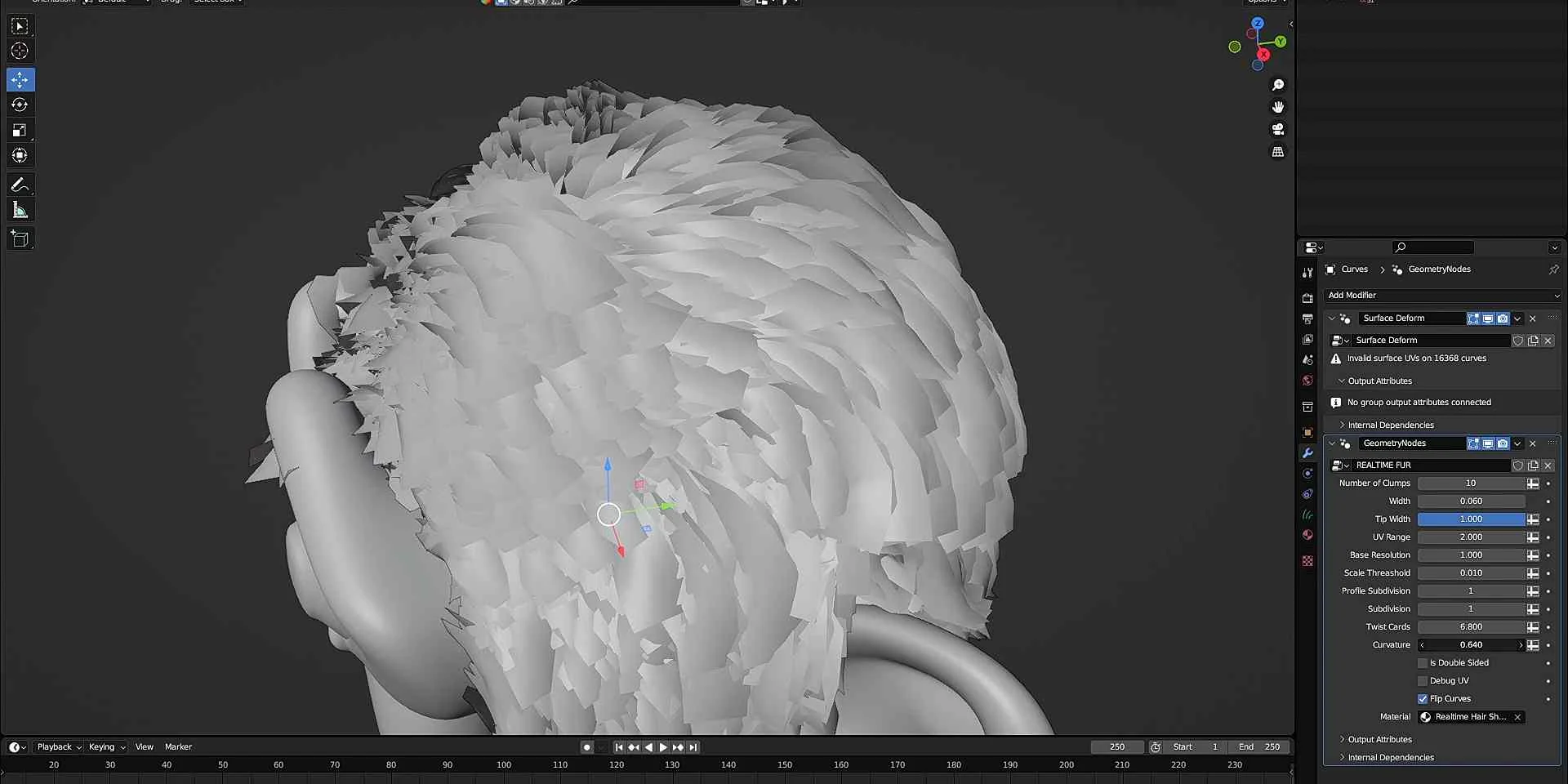
 Blender Add
![Lazy Shapekeys [Shape Keys Folder & Utility]](/_img/360/wp-content/uploads/2026/04/be87b3db3244_c2ce39237c0551cd180db085554320c2.webp) Blender Add
Blender Add Jewelry