"f813c18d2170b1f6"{"id":"24632","slug":"auto-rig-pro-quick-rig","title":"Auto-Rig Pro: Quick Rig","category":"Blender Add-ons \u0026 Plugins","engine":"3.76.17","assetVersion":"","engineVersion":"Asset Version:3.76.17","tag":"Blender Add","accent":"amber","visual":"mech","summary":"Quick Rig moves an existing skeleton and mesh into an Auto-Rig Pro control setup without rebuilding the whole character from scratch. It supports Preserve and Convert workflows, mapping presets, and broad limb coverage.","platform":"Blender","publishedAt":"2026-04-15T15:14:33.000Z","updatedAt":"2026-04-20T06:12:40.000Z","sourceNotes":[],"fileContents":[],"compatibility":["Blender","Asset Version: 3.76.17"],"featuredImage":{"alt":"Auto-Rig Pro: Quick Rig","src":"https://3dcghub.com/wp-content/uploads/2026/04/71461bf1b529_6cd57bacdf890691c81904aa7fe63256.webp"},"hasDownloadLink":true,"downloads":6,"terms":[{"taxonomy":"category","slug":"blender-add-ons-plugins","name":"Blender Add-ons \u0026 Plugins"},{"taxonomy":"post_tag","slug":"animation","name":"Animation"},{"taxonomy":"post_tag","slug":"blender","name":"Blender"},{"taxonomy":"post_tag","slug":"characters","name":"Characters"}],"galleryImages":[{"src":"https://3dcghub.com/wp-content/uploads/2026/04/70ea34c673b7_xlarge-d0226618935077040b608ae8190faeb8.webp","alt":"Auto-Rig Pro: Quick Rig"},{"src":"https://3dcghub.com/wp-content/uploads/2026/04/7839318aa3fc_xlarge-eb27410eeb24f12a44701ac27626103e.webp","alt":"Auto-Rig Pro: Quick Rig"}],"accessPanel":{"kind":"resource","title":"Access this resource","eyebrow":"Free Download","message":"Log in or create a free account to start your download.","fileName":"Auto-Rig Pro V3.76.17 Quick Rig V1.26.46.7z","safetyNote":"All resources are 100% manually reviewed to eliminate all risks.","actionLabel":"Download Free","resourceType":"Resource archive"},"contentHtml":"\u003ch2\u003eTurning an existing skeleton into a control rig\u003c/h2\u003e\u003cp\u003eQuick Rig works as an extension for the Auto-Rig Pro addon, so the process begins with Auto-Rig Pro already installed. From there, it tackles a very specific problem: taking a skeleton and mesh that already exist and moving them into an Auto-Rig Pro armature with controllers ready for animation. That makes it relevant when a character has already been built, skinned, or partially rigged and the job is to move forward without starting over.\u003c/p\u003e\u003cp\u003eThe setup is built around practical rig handling. Weights can be preserved, IK-FK generation is part of the workflow, and animation support is included in the rigging path. It is also meant to support the vast majority of character skeletons, including skeletons with non-standard bone axes. In practice, that means the tool is not limited to a single tidy bone layout; it is meant to work from the structure a character already has.\u003c/p\u003e\u003ch2\u003eAdding limbs from the existing bone chain\u003c/h2\u003e\u003cp\u003eThe limb setup follows a direct sequence. Select the first bone of a limb, such as the shoulder for an arm, and click the plus button to add that limb. The limb settings are then filled in with the correct bones, and the bone axes are set automatically as well. That automatic setup is useful when the skeleton matches the expected pattern, but the settings can be wrong in some cases if the skeleton is complex.\u003c/p\u003e\u003cp\u003eOnce the limb is added, the workflow depends on checking those settings before generating the final rig. The tool is clearly aimed at a hands-on pass through the character skeleton rather than a fully invisible conversion. That keeps the user close to the structure being rigged, which matters when a character has unusual proportions, extra bones, or bone orientations that do not fit a standard template.\u003c/p\u003e\u003ch3\u003eSpine and head chains\u003c/h3\u003e\u003cp\u003eThe supported limb definitions are broad enough to cover a range of character builds. Spines can run from two to six spine bones. Heads can include an optional neck and a head bone, with support for up to ten neck bones. Facial bones and shape keys are included in that same scope, so the upper-body setup can extend into facial structure when the character carries those elements in the skeleton or in shape key form.\u003c/p\u003e\u003ch3\u003eLegs, arms, and fingers\u003c/h3\u003e\u003cp\u003eLegs include thigh, calf, foot, and toes bones. Optional twist bones are supported, and there is a three-bones-leg option for extra thigh bones. That option is called out for quadrupedal creatures, which shows that the setup is not restricted to a standard upright character. Arms follow the same practical logic: shoulder is optional, then arm, forearm, hand, and optional finger bones, again with twist bones available. Fingers can have three or four phalanges, with or without metacarpals.\u003c/p\u003e\u003ch2\u003ePreserve or convert the base skeleton\u003c/h2\u003e\u003cp\u003eAfter the limbs are in place, the major choice is between Preserve and Convert. Preserve keeps the existing armature untouched while binding it to the rig controllers only. Convert goes further and generates a full Auto-Rig Pro armature that is compliant with the addonâs editing and exporting tools. Those are two different implementation paths, not just two names for the same result.\u003c/p\u003e\u003cp\u003ePreserve fits cases where the original skeleton should stay in place. Convert fits cases where the character needs to become a complete Auto-Rig Pro armature for a fuller editing workflow. If the setup needs to be adjusted again, Revert returns the character to the base skeleton so other settings can be tried without staying locked into one result.\u003c/p\u003e\u003cp\u003eThere are a few other behaviors tied into the rigging process. Constraint retargetting is included, although some limitations apply. Shape keys drivers retargetting is part of the tool as well. Animation support is also built in, with the skeleton animation baked to the control rig as an option. That keeps the tool connected to motion work instead of stopping at a static rigging pass.\u003c/p\u003e\u003ch2\u003eMapping presets and bones that do not fit the main limbs\u003c/h2\u003e\u003cp\u003eQuick Rig can import and export custom mapping preset files, which makes it easier to reuse a known mapping setup on different characters. Built-in mapping presets include Realillusion Character Creator, DAZ, Human Generator, Mixamo, Unreal Mannequin, and VRoid. Those presets give the workflow a starting point for several common character ecosystems before any manual adjustment is needed.\u003c/p\u003e\u003cp\u003eThe handling of orphan bones is another important part of the system. Bones that do not belong to the standard limb definitions are inserted into the rig hierarchy automatically. That includes facial bones, unusual twist and tweak bones, and bones used for clothes or props. Instead of leaving those pieces outside the rig, the hierarchy is built so they stay included.\u003c/p\u003e\u003cp\u003eThis makes the tool useful when a character has more than the obvious arm, leg, spine, and head chains. Extra bones do not have to be treated as a separate problem after the main rig is generated. They are brought into the same structure, which helps keep the control rig closer to the full skeleton that already exists on the character.\u003c/p\u003e\u003ch2\u003eWhat the workflow gives teams\u003c/h2\u003e\u003cp\u003eThe overall workflow stays focused on one task: turning an existing skeleton and mesh into an Auto-Rig Pro setup that can be used for animation. The steps are clear enough to follow directly. Add limbs from the existing bones, check the automatic limb settings, choose Preserve or Convert, and generate the rig. From there, the tool brings together weights preservation, IK-FK generation, animation support, custom mapping presets, and coverage for extra bones.\u003c/p\u003e\u003cp\u003eFor teams deciding whether this fits a character pipeline, the strongest practical takeaway is that Quick Rig is built to keep the skeleton you already have while moving it into an Auto-Rig Pro control structure. It is especially relevant when the rig includes unusual bone axes, extra facial or prop bones, or skeleton layouts that need a more flexible path than a fixed template.\u003c/p\u003e\n\n\u003ch2\u003eRelated Resources Worth Checking\u003c/h2\u003e\n\u003cul\u003e\n\u003cli\u003e\u003ca href=\"https://3dcghub.com/auto-upscale-addon/\" title=\"Auto Upscale Addon\"\u003eAuto Upscale Addon\u003c/a\u003e\u003c/li\u003e\n\u003cli\u003e\u003ca href=\"https://3dcghub.com/animated-render-border/\" title=\"Animated Render Border\"\u003eAnimated Render Border\u003c/a\u003e\u003c/li\u003e\n\u003cli\u003e\u003ca href=\"https://3dcghub.com/geppetto-ai-powered-lip-sync-animation/\" title=\"Geppetto – AI-Powered Lip Sync Animation\"\u003eGeppetto – AI-Powered Lip Sync Animation\u003c/a\u003e\u003c/li\u003e\n\u003cli\u003e\u003ca href=\"https://3dcghub.com/tropical-forest-pack/\" title=\"Tropical Forest Pack\"\u003eTropical Forest Pack\u003c/a\u003e\u003c/li\u003e\n\u003cli\u003e\u003ca href=\"https://3dcghub.com/beach-bundle-boys-and-girls/\" title=\"Beach Bundle: Boys and Girls\"\u003eBeach Bundle: Boys and Girls\u003c/a\u003e\u003c/li\u003e\n\u003c/ul\u003e","contentTextLength":6147,"navigation":{"current":1973,"total":3651,"previous":{"id":"24638","slug":"command-box-addon-for-blender","title":"Command Box Addon For Blender","category":"Blender Add-ons \u0026 Plugins","platform":"Blender","updatedAt":"2026-04-20T06:12:40.000Z"},"next":{"id":"24720","slug":"modular-staircase-blueprint","title":"Modular Staircase Blueprint","category":"Gameplay Features","platform":"Unreal Engine","updatedAt":"2026-04-20T06:12:39.000Z"}},"relatedResources":[{"id":"24677","slug":"rbc-a-physics-based-vehicle-rigging-addon","title":"Rbc | A Physics-Based Vehicle Rigging Addon","category":"Blender Add-ons \u0026 Plugins","engine":"1.4.8","assetVersion":"","engineVersion":"Asset Version:1.4.8","tag":"Blender Add","accent":"amber","visual":"character","summary":"Rbc gives Blender users a faster way to set up physics-based vehicle rigs without starting from scratch. It focuses on realistic behavior, quick setup, and enough customization to tune the rig until it responds the way a scene needs.","platform":"Blender","publishedAt":"2026-04-16T12:35:28.000Z","updatedAt":"2026-04-20T06:12:39.000Z","sourceNotes":[],"fileContents":[],"compatibility":["Blender","Asset Version: 1.4.8"],"featuredImage":{"alt":"Rbc | A Physics-Based Vehicle Rigging Addon","src":"https://3dcghub.com/wp-content/uploads/2026/04/6b83a05edc2b_xlarge-55653f94cf7d419b079f34ad6a7d2f25.webp"},"hasDownloadLink":true,"downloads":1},{"id":"24690","slug":"real-time-fur-studio","title":"Real-Time Fur Studio","category":"Blender Add-ons \u0026 Plugins","engine":"1.04","assetVersion":"","engineVersion":"Asset Version:1.04","tag":"Blender Add","accent":"amber","visual":"animation","summary":"Real-Time Fur Studio brings real-time fur creation into Blender, turning curves into lifelike fur with more depth and realism. It suits furry creatures, character work, stylized assets, and clothing details where surface detail needs to stay readable.","platform":"Blender","publishedAt":"2026-04-16T12:44:57.000Z","updatedAt":"2026-04-20T06:12:39.000Z","sourceNotes":[],"fileContents":[],"compatibility":["Blender","Asset Version: 1.04"],"featuredImage":{"alt":"Real-Time Fur Studio","src":"https://3dcghub.com/wp-content/uploads/2026/04/6a6f5fd1cb19_2665d7192fa687424330f35ec2747e1d.webp"},"hasDownloadLink":true,"downloads":1},{"id":"24650","slug":"lazy-shapekeys-shape-keys-folder-utility","title":"Lazy Shapekeys [Shape Keys Folder \u0026 Utility]","category":"Blender Add-ons \u0026 Plugins","engine":"1.0.71","assetVersion":"","engineVersion":"Asset Version:1.0.71","tag":"Blender Add","accent":"amber","visual":"character","summary":"Lazy Shapekeys [Shape Keys Folder \u0026 Utility] brings folder-based control to shape keys, with batch keyframe insert/delete and bulk value reset controls. It also creates separate objects for each key, handles forced transfer and modifier application, and ope...","platform":"Blender","publishedAt":"2026-04-15T15:25:29.000Z","updatedAt":"2026-04-20T06:12:40.000Z","sourceNotes":[],"fileContents":[],"compatibility":["Blender","Asset Version: 1.0.71"],"featuredImage":{"alt":"Lazy Shapekeys [Shape Keys Folder \u0026 Utility]","src":"https://3dcghub.com/wp-content/uploads/2026/04/be87b3db3244_c2ce39237c0551cd180db085554320c2.webp"},"hasDownloadLink":true,"downloads":0}]}
Blender Add
Auto-Rig Pro: Quick Rig
Quick Rig moves an existing skeleton and mesh into an Auto-Rig Pro control setup without rebuilding the whole character from scratch. It supports Preserve and Convert workflows, mapping presets, and broad limb coverage.
Quick Rig works as an extension for the Auto-Rig Pro addon, so the process begins with Auto-Rig Pro already installed. From there, it tackles a very specific problem: taking a skeleton and mesh that already exist and moving them into an Auto-Rig Pro armature with controllers ready for animation. That makes it relevant when a character has already been built, skinned, or partially rigged and the job is to move forward without starting over.
The setup is built around practical rig handling. Weights can be preserved, IK-FK generation is part of the workflow, and animation support is included in the rigging path. It is also meant to support the vast majority of character skeletons, including skeletons with non-standard bone axes. In practice, that means the tool is not limited to a single tidy bone layout; it is meant to work from the structure a character already has.
Adding limbs from the existing bone chain
The limb setup follows a direct sequence. Select the first bone of a limb, such as the shoulder for an arm, and click the plus button to add that limb. The limb settings are then filled in with the correct bones, and the bone axes are set automatically as well. That automatic setup is useful when the skeleton matches the expected pattern, but the settings can be wrong in some cases if the skeleton is complex.
Once the limb is added, the workflow depends on checking those settings before generating the final rig. The tool is clearly aimed at a hands-on pass through the character skeleton rather than a fully invisible conversion. That keeps the user close to the structure being rigged, which matters when a character has unusual proportions, extra bones, or bone orientations that do not fit a standard template.
Spine and head chains
The supported limb definitions are broad enough to cover a range of character builds. Spines can run from two to six spine bones. Heads can include an optional neck and a head bone, with support for up to ten neck bones. Facial bones and shape keys are included in that same scope, so the upper-body setup can extend into facial structure when the character carries those elements in the skeleton or in shape key form.
Legs, arms, and fingers
Legs include thigh, calf, foot, and toes bones. Optional twist bones are supported, and there is a three-bones-leg option for extra thigh bones. That option is called out for quadrupedal creatures, which shows that the setup is not restricted to a standard upright character. Arms follow the same practical logic: shoulder is optional, then arm, forearm, hand, and optional finger bones, again with twist bones available. Fingers can have three or four phalanges, with or without metacarpals.
Preserve or convert the base skeleton
After the limbs are in place, the major choice is between Preserve and Convert. Preserve keeps the existing armature untouched while binding it to the rig controllers only. Convert goes further and generates a full Auto-Rig Pro armature that is compliant with the addonâs editing and exporting tools. Those are two different implementation paths, not just two names for the same result.
Preserve fits cases where the original skeleton should stay in place. Convert fits cases where the character needs to become a complete Auto-Rig Pro armature for a fuller editing workflow. If the setup needs to be adjusted again, Revert returns the character to the base skeleton so other settings can be tried without staying locked into one result.
There are a few other behaviors tied into the rigging process. Constraint retargetting is included, although some limitations apply. Shape keys drivers retargetting is part of the tool as well. Animation support is also built in, with the skeleton animation baked to the control rig as an option. That keeps the tool connected to motion work instead of stopping at a static rigging pass.
Mapping presets and bones that do not fit the main limbs
Quick Rig can import and export custom mapping preset files, which makes it easier to reuse a known mapping setup on different characters. Built-in mapping presets include Realillusion Character Creator, DAZ, Human Generator, Mixamo, Unreal Mannequin, and VRoid. Those presets give the workflow a starting point for several common character ecosystems before any manual adjustment is needed.
The handling of orphan bones is another important part of the system. Bones that do not belong to the standard limb definitions are inserted into the rig hierarchy automatically. That includes facial bones, unusual twist and tweak bones, and bones used for clothes or props. Instead of leaving those pieces outside the rig, the hierarchy is built so they stay included.
This makes the tool useful when a character has more than the obvious arm, leg, spine, and head chains. Extra bones do not have to be treated as a separate problem after the main rig is generated. They are brought into the same structure, which helps keep the control rig closer to the full skeleton that already exists on the character.
What the workflow gives teams
The overall workflow stays focused on one task: turning an existing skeleton and mesh into an Auto-Rig Pro setup that can be used for animation. The steps are clear enough to follow directly. Add limbs from the existing bones, check the automatic limb settings, choose Preserve or Convert, and generate the rig. From there, the tool brings together weights preservation, IK-FK generation, animation support, custom mapping presets, and coverage for extra bones.
For teams deciding whether this fits a character pipeline, the strongest practical takeaway is that Quick Rig is built to keep the skeleton you already have while moving it into an Auto-Rig Pro control structure. It is especially relevant when the rig includes unusual bone axes, extra facial or prop bones, or skeleton layouts that need a more flexible path than a fixed template.
 Blender Add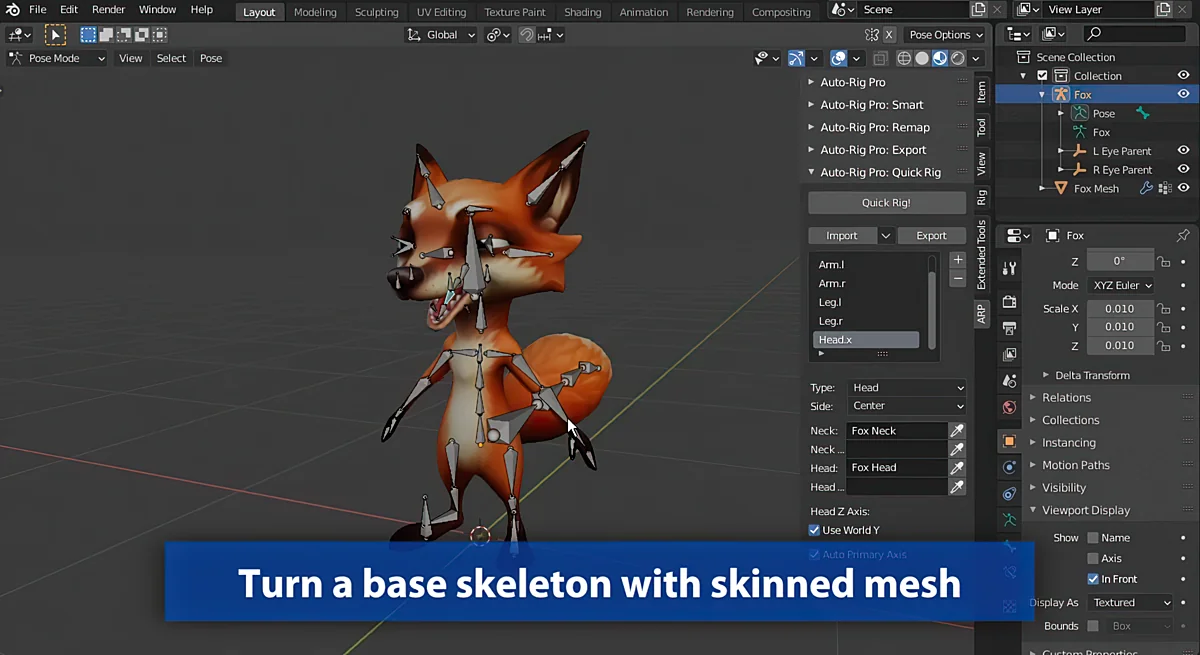
 Blender Add
 Blender Add
![Lazy Shapekeys [Shape Keys Folder & Utility]](/_img/360/wp-content/uploads/2026/04/be87b3db3244_c2ce39237c0551cd180db085554320c2.webp) Blender Add
Blender Add