"f813c18d2170b1f6"{"id":"24638","slug":"command-box-addon-for-blender","title":"Command Box Addon For Blender","category":"Blender Add-ons \u0026 Plugins","engine":"2025.11.14.Beta1","assetVersion":"","engineVersion":"Asset Version:2025.11.14.Beta1","tag":"Blender Add","accent":"amber","visual":"audio","summary":"CommandBox brings hundreds of Blender commands into a fast text-entry workflow with popup access, panel browsing, and on-demand loading. It also supports startup scripts, custom command files, and quick recall for repeated tasks.","platform":"Blender","publishedAt":"2026-04-15T15:25:11.000Z","updatedAt":"2026-04-20T06:12:40.000Z","sourceNotes":[],"fileContents":[],"compatibility":["Blender","Asset Version: 2025.11.14.Beta1"],"featuredImage":{"alt":"Command Box Addon For Blender","src":"https://3dcghub.com/wp-content/uploads/2026/04/616eee67b45a_xlarge-56a43a82f7cf3fa853a61fb8642c47f5.webp"},"hasDownloadLink":true,"downloads":0,"terms":[{"taxonomy":"category","slug":"blender-add-ons-plugins","name":"Blender Add-ons \u0026 Plugins"},{"taxonomy":"post_tag","slug":"blender","name":"Blender"},{"taxonomy":"post_tag","slug":"plugins","name":"Plugins"},{"taxonomy":"post_tag","slug":"tools","name":"Tools"}],"galleryImages":[{"src":"https://3dcghub.com/wp-content/uploads/2026/04/43b881bc4c26_xlarge-a537986bece7665b42674e0f98f1eec4.webp","alt":"Command Box Addon For Blender"},{"src":"https://3dcghub.com/wp-content/uploads/2026/04/0a77804111ee_xlarge-54ec244a26161f01c4e27a0292ab6d48.webp","alt":"Command Box Addon For Blender"},{"src":"https://3dcghub.com/wp-content/uploads/2026/04/76d4a2c9fc8c_xlarge-39687da5bcc6ac6ef68a34d51bf14c6e.webp","alt":"Command Box Addon For Blender"}],"accessPanel":{"kind":"resource","title":"Access this resource","eyebrow":"Free Download","message":"Log in or create a free account to start your download.","fileName":"Command Box Addon For Blender v2025.11.14.Beta1.7z","safetyNote":"All resources are 100% manually reviewed to eliminate all risks.","actionLabel":"Download Free","resourceType":"Resource archive"},"contentHtml":"\u003ch2\u003eCommand access without the usual Blender clutter\u003c/h2\u003e\n\u003cp\u003eCommandBox for Blender treats command handling as a direct working surface rather than a conventional add-on panel. It gathers hundreds of evolving commands into one suite of one-click smart add-ons and actions, and it is presented as an evolving ecosystem rather than a fixed plugin. That makes it useful for artists and developers who want fast access to repeated tasks without spending time hunting through layers of UI.\u003c/p\u003e\n\u003cp\u003eThe workflow stays deliberately simple. There are no tabs, tags, or categories to step through before a command runs. A short command name followed by Enter can launch the action, which suits users who already know what they want to do and want to get there quickly. Filtered browsing and double-click execution are also part of the flow, so the same command set can be handled either by typing directly or by selecting from a list.\u003c/p\u003e\n\u003cp\u003eCommandBox is also positioned as a tool for professional game developers and CG artists who rely on compact, repeatable actions inside Blender. Instead of forcing every tool to stay loaded all the time, it keeps the command space broad while keeping the interaction pattern lean.\u003c/p\u003e \u003ch3\u003eQuick ways to trigger it\u003c/h3\u003e\n\u003cul\u003e \u003cli\u003e\u003cstrong\u003eAlt+X\u003c/strong\u003e Opens CommandBox as a popup.\u003c/li\u003e \u003cli\u003e\u003cstrong\u003eCtrl+Alt+X\u003c/strong\u003e Shows the CommandBox panel.\u003c/li\u003e \u003cli\u003e\u003cstrong\u003eF5\u003c/strong\u003e Runs the current script as the default shortcut.\u003c/li\u003e \u003cli\u003eTyping commands such as \u003cstrong\u003eSlop\u003c/strong\u003e, \u003cstrong\u003eEve\u003c/strong\u003e, \u003cstrong\u003eTriq\u003c/strong\u003e, \u003cstrong\u003eKaw\u003c/strong\u003e, or \u003cstrong\u003eTors\u003c/strong\u003e And pressing Enter launches them directly.\u003c/li\u003e\n\u003c/ul\u003e\n\u003cp\u003eThat mix of shortcuts gives the addon two clear modes of use. The popup is convenient when the user wants immediate command entry. The panel is useful when commands need to be filtered first or when it is easier to double click a command after browsing. The result is a tool that can stay out of the way until a task needs to happen, then get out of the way again after the command runs.\u003c/p\u003e \u003ch2\u003eOn-demand loading keeps the tool light\u003c/h2\u003e\n\u003cp\u003eOne of the most distinctive parts of CommandBox is the way it loads only what is needed. Rather than loading everything at Blender startup, it dynamically brings in only the essential inner addons when a command calls for them, then clears them from memory. That on-demand structure is what gives the addon its lightweight behavior.\u003c/p\u003e\n\u003cp\u003eThe practical effect is straightforward: the command system stays broad without behaving like a heavy static bundle. When a command is not being used, it does not keep consuming memory in the same way a fully loaded set of addons would. When a command is needed, the required extension appears, runs, and then steps back out of memory again. For Blender users who prefer a fast startup and a cleaner working session, this dynamic approach is the main technical advantage.\u003c/p\u003e\n\u003cp\u003eThe addon is described as much lighter than classic add-ons because of that behavior. It does not follow the standard model of loading everything at startup and leaving it there. Instead, it only loads the extensions that are called, which keeps the system flexible while avoiding unnecessary overhead.\u003c/p\u003e \u003ch2\u003eCustom commands, favorite tools, and file-based control\u003c/h2\u003e\n\u003cp\u003eCommandBox is not limited to a single fixed set of actions. Blender commands can be customized within files, and favorite commands can be collected in one place. That makes it easier to shape the command set around a project or a personal workflow instead of treating it as a rigid toolbox.\u003c/p\u003e\n\u003cp\u003eThe file-based side matters because it gives the command system a place to live outside the immediate interface. Teams or individual artists can gather the commands they use most often, then call them from the same environment instead of separating them into different steps or scattered scripts. The addon also includes ready-to-use useful functions, so it has a practical base before any customization is added.\u003c/p\u003e\n\u003cp\u003eThere is also a simple rule for automatic startup behavior. Adding \u003ccode\u003e#Autorun=True\u003c/code\u003e As the third line in a \u003ccode\u003e.py\u003c/code\u003e File makes that file execute automatically at Blender startup. One example given is \u003ccode\u003eReal Full Screen.py\u003c/code\u003e, where the hotkeys become active by default at startup. That makes CommandBox relevant not only for quick command entry, but also for managing startup scripts in a direct, predictable way.\u003c/p\u003e\n\u003cp\u003eFor Blender users who depend on a few recurring actions, this setup can keep those actions close at hand without turning them into a sprawling manual routine. Commands can be filtered, opened, run, and grouped so that the important ones remain easy to reach during day-to-day work.\u003c/p\u003e \u003ch2\u003eVersion timing and Blender compatibility\u003c/h2\u003e\n\u003cp\u003eCommandBox was initially published in October 2024. The last update is listed as 2025.11.14, and it is marked compatible with Blender 4.4, 4.5, and 5.0. Those details place it clearly within current Blender use while also showing that the command system has been updated over time.\u003c/p\u003e\n\u003cp\u003eFor practical evaluation, the key takeaway is simple. CommandBox is built for fast command recall, popup access, script control, and on-demand loading inside Blender. If a workflow benefits from collecting commands in one place and triggering them with a few letters or a shortcut, this addon fits that kind of work well.\u003c/p\u003e\n\n\u003ch2\u003eContinue Browsing Similar Packs\u003c/h2\u003e\n\u003cul\u003e\n\u003cli\u003e\u003ca href=\"https://3dcghub.com/auto-upscale-addon/\" title=\"Auto Upscale Addon\"\u003eAuto Upscale Addon\u003c/a\u003e\u003c/li\u003e\n\u003cli\u003e\u003ca href=\"https://3dcghub.com/animated-render-border/\" title=\"Animated Render Border\"\u003eAnimated Render Border\u003c/a\u003e\u003c/li\u003e\n\u003cli\u003e\u003ca href=\"https://3dcghub.com/geppetto-ai-powered-lip-sync-animation/\" title=\"Geppetto – AI-Powered Lip Sync Animation\"\u003eGeppetto – AI-Powered Lip Sync Animation\u003c/a\u003e\u003c/li\u003e\n\u003cli\u003e\u003ca href=\"https://3dcghub.com/tropical-forest-pack/\" title=\"Tropical Forest Pack\"\u003eTropical Forest Pack\u003c/a\u003e\u003c/li\u003e\n\u003cli\u003e\u003ca href=\"https://3dcghub.com/beach-bundle-boys-and-girls/\" title=\"Beach Bundle: Boys and Girls\"\u003eBeach Bundle: Boys and Girls\u003c/a\u003e\u003c/li\u003e\n\u003c/ul\u003e","contentTextLength":5266,"navigation":{"current":1972,"total":3651,"previous":{"id":"24650","slug":"lazy-shapekeys-shape-keys-folder-utility","title":"Lazy Shapekeys [Shape Keys Folder \u0026 Utility]","category":"Blender Add-ons \u0026 Plugins","platform":"Blender","updatedAt":"2026-04-20T06:12:40.000Z"},"next":{"id":"24632","slug":"auto-rig-pro-quick-rig","title":"Auto-Rig Pro: Quick Rig","category":"Blender Add-ons \u0026 Plugins","platform":"Blender","updatedAt":"2026-04-20T06:12:40.000Z"}},"relatedResources":[{"id":"24677","slug":"rbc-a-physics-based-vehicle-rigging-addon","title":"Rbc | A Physics-Based Vehicle Rigging Addon","category":"Blender Add-ons \u0026 Plugins","engine":"1.4.8","assetVersion":"","engineVersion":"Asset Version:1.4.8","tag":"Blender Add","accent":"amber","visual":"character","summary":"Rbc gives Blender users a faster way to set up physics-based vehicle rigs without starting from scratch. It focuses on realistic behavior, quick setup, and enough customization to tune the rig until it responds the way a scene needs.","platform":"Blender","publishedAt":"2026-04-16T12:35:28.000Z","updatedAt":"2026-04-20T06:12:39.000Z","sourceNotes":[],"fileContents":[],"compatibility":["Blender","Asset Version: 1.4.8"],"featuredImage":{"alt":"Rbc | A Physics-Based Vehicle Rigging Addon","src":"https://3dcghub.com/wp-content/uploads/2026/04/6b83a05edc2b_xlarge-55653f94cf7d419b079f34ad6a7d2f25.webp"},"hasDownloadLink":true,"downloads":1},{"id":"24627","slug":"auto-upscale-addon","title":"Auto Upscale Addon","category":"Blender Add-ons \u0026 Plugins","engine":"3.0.7","assetVersion":"","engineVersion":"Asset Version:3.0.7","tag":"Blender Add","accent":"amber","visual":"audio","summary":"Auto Upscale Add-on for Blender gives rendered images a higher-resolution finish without adding friction to the workflow. It supports automatic and manual control, scale factors from 2x to 8x, and a choice between speed and quality priorities.","platform":"Blender","publishedAt":"2026-04-15T15:13:26.000Z","updatedAt":"2026-04-20T06:12:41.000Z","sourceNotes":[],"fileContents":[],"compatibility":["Blender","Asset Version: 3.0.7"],"featuredImage":{"alt":"Auto Upscale Addon","src":"https://3dcghub.com/wp-content/uploads/2026/04/f9189afbb669_0a812f61763544e6f8be11d3259f9b21.webp"},"hasDownloadLink":true,"downloads":0},{"id":"24614","slug":"animated-render-border","title":"Animated Render Border","category":"Blender Add-ons \u0026 Plugins","engine":"3.0.7","assetVersion":"","engineVersion":"Asset Version:3.0.7","tag":"Blender Add","accent":"amber","visual":"mech","summary":"Animated Render Border keeps Blenderâs render region moving with the subject, so the frame stays centered on selected objects or collections during animation. It also includes manual keyframing, margin control, and two tracking modes for different levels...","platform":"Blender","publishedAt":"2026-04-15T14:56:56.000Z","updatedAt":"2026-04-20T06:12:41.000Z","sourceNotes":[],"fileContents":[],"compatibility":["Blender","Asset Version: 3.0.7"],"featuredImage":{"alt":"Animated Render Border","src":"https://3dcghub.com/wp-content/uploads/2026/04/bf6d42b81598_xlarge-66de896c1d0d99e18245c16ff5fcd30c.webp"},"hasDownloadLink":true,"downloads":0}]}
Blender Add
Command Box Addon For Blender
CommandBox brings hundreds of Blender commands into a fast text-entry workflow with popup access, panel browsing, and on-demand loading. It also supports startup scripts, custom command files, and quick recall for repeated tasks.
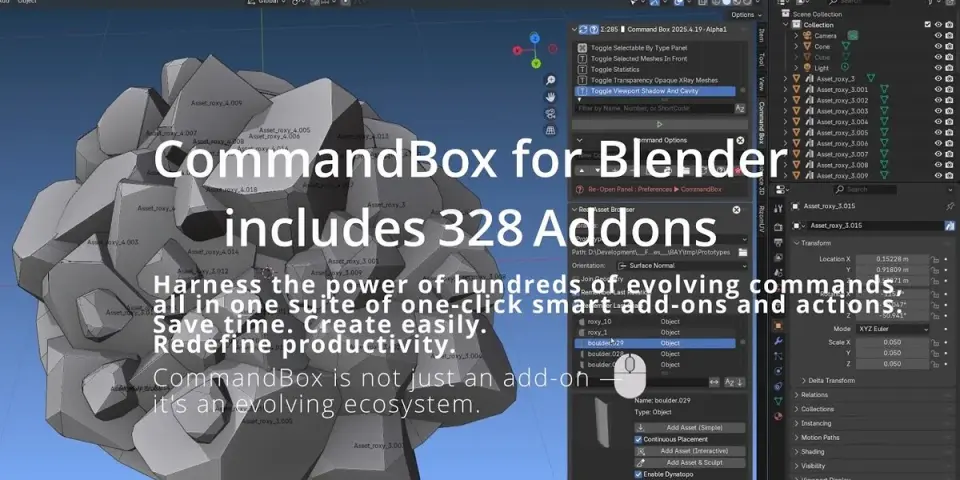
CommandBox for Blender treats command handling as a direct working surface rather than a conventional add-on panel. It gathers hundreds of evolving commands into one suite of one-click smart add-ons and actions, and it is presented as an evolving ecosystem rather than a fixed plugin. That makes it useful for artists and developers who want fast access to repeated tasks without spending time hunting through layers of UI.
The workflow stays deliberately simple. There are no tabs, tags, or categories to step through before a command runs. A short command name followed by Enter can launch the action, which suits users who already know what they want to do and want to get there quickly. Filtered browsing and double-click execution are also part of the flow, so the same command set can be handled either by typing directly or by selecting from a list.
CommandBox is also positioned as a tool for professional game developers and CG artists who rely on compact, repeatable actions inside Blender. Instead of forcing every tool to stay loaded all the time, it keeps the command space broad while keeping the interaction pattern lean.
Quick ways to trigger it
Alt+X Opens CommandBox as a popup.
Ctrl+Alt+X Shows the CommandBox panel.
F5 Runs the current script as the default shortcut.
Typing commands such as Slop, Eve, Triq, Kaw, or Tors And pressing Enter launches them directly.
That mix of shortcuts gives the addon two clear modes of use. The popup is convenient when the user wants immediate command entry. The panel is useful when commands need to be filtered first or when it is easier to double click a command after browsing. The result is a tool that can stay out of the way until a task needs to happen, then get out of the way again after the command runs.
On-demand loading keeps the tool light
One of the most distinctive parts of CommandBox is the way it loads only what is needed. Rather than loading everything at Blender startup, it dynamically brings in only the essential inner addons when a command calls for them, then clears them from memory. That on-demand structure is what gives the addon its lightweight behavior.
The practical effect is straightforward: the command system stays broad without behaving like a heavy static bundle. When a command is not being used, it does not keep consuming memory in the same way a fully loaded set of addons would. When a command is needed, the required extension appears, runs, and then steps back out of memory again. For Blender users who prefer a fast startup and a cleaner working session, this dynamic approach is the main technical advantage.
The addon is described as much lighter than classic add-ons because of that behavior. It does not follow the standard model of loading everything at startup and leaving it there. Instead, it only loads the extensions that are called, which keeps the system flexible while avoiding unnecessary overhead.
Custom commands, favorite tools, and file-based control
CommandBox is not limited to a single fixed set of actions. Blender commands can be customized within files, and favorite commands can be collected in one place. That makes it easier to shape the command set around a project or a personal workflow instead of treating it as a rigid toolbox.
The file-based side matters because it gives the command system a place to live outside the immediate interface. Teams or individual artists can gather the commands they use most often, then call them from the same environment instead of separating them into different steps or scattered scripts. The addon also includes ready-to-use useful functions, so it has a practical base before any customization is added.
There is also a simple rule for automatic startup behavior. Adding #Autorun=True As the third line in a .py File makes that file execute automatically at Blender startup. One example given is Real Full Screen.py, where the hotkeys become active by default at startup. That makes CommandBox relevant not only for quick command entry, but also for managing startup scripts in a direct, predictable way.
For Blender users who depend on a few recurring actions, this setup can keep those actions close at hand without turning them into a sprawling manual routine. Commands can be filtered, opened, run, and grouped so that the important ones remain easy to reach during day-to-day work.
Version timing and Blender compatibility
CommandBox was initially published in October 2024. The last update is listed as 2025.11.14, and it is marked compatible with Blender 4.4, 4.5, and 5.0. Those details place it clearly within current Blender use while also showing that the command system has been updated over time.
For practical evaluation, the key takeaway is simple. CommandBox is built for fast command recall, popup access, script control, and on-demand loading inside Blender. If a workflow benefits from collecting commands in one place and triggering them with a few letters or a shortcut, this addon fits that kind of work well.
 Blender Add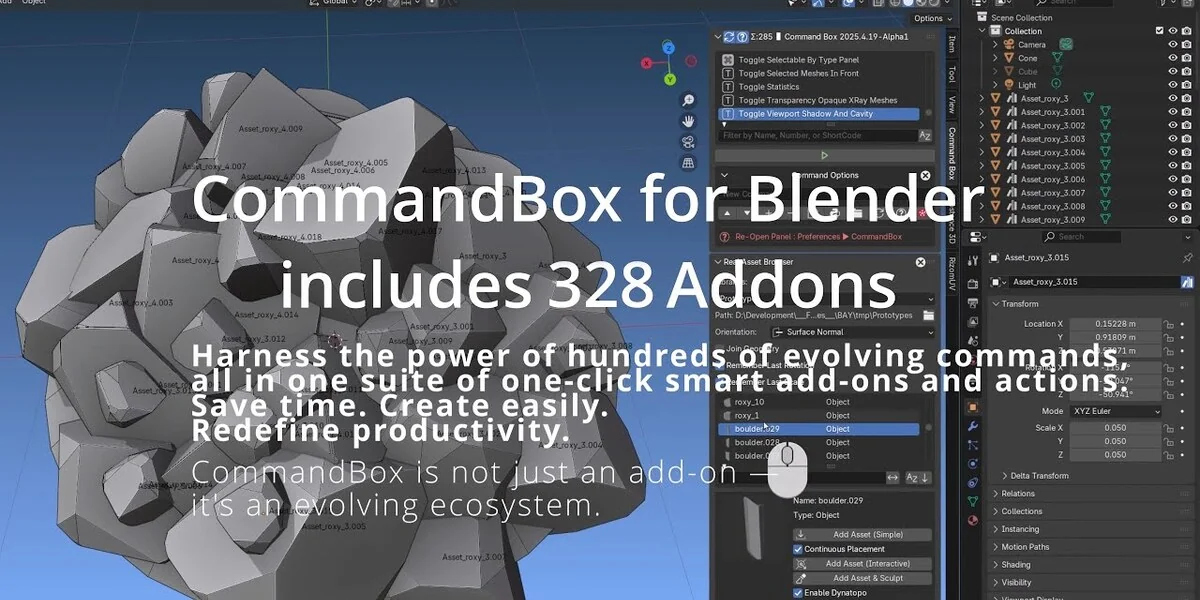
 Blender Add
 Blender Add
 Blender Add