"7b46a695175d8694"{"id":"1001446","slug":"quarry-cliffs","title":"Quarry Cliffs","category":"Industrial","engine":"4.16+,5.0+","assetVersion":"","engineVersion":"Engine Version: 4.16+,5.0+","tag":"Industrial","accent":"blue","visual":"mech","summary":"Quarry Cliffs features realistic modular 360-degree cliff meshes, 4k textures, world-space detail overlays, 4-stage LODs, and rubble piles.","platform":"Unreal Engine","publishedAt":"2026-10-08T00:46:36.484Z","updatedAt":"2026-10-08T00:46:36.484Z","sourceNotes":[],"fileContents":[],"compatibility":["Unreal Engine","Engine Version: 4.16+,5.0+"],"featuredImage":{"alt":"Quarry Cliffs","src":"/wp-content/uploads/published/2026/10/af0a7623b60e-53eeaf76-2755-4e22-b6e6-4d081a4d816c-9bdf8b14cb.webp"},"hasDownloadLink":true,"downloads":0,"terms":[{"taxonomy":"category","slug":"industrial","name":"Industrial"}],"galleryImages":[{"src":"/wp-content/uploads/published/2026/10/90dd48bd74b6-89573b9d-3074-4b6c-9475-e9b4600ff88f-e57f1f6c45.webp","alt":"Quarry Cliffs"},{"src":"/wp-content/uploads/published/2026/10/c1b21f4f03b3-0479a8fd-80ae-498a-b0f8-0000c5d31368-9bcfd7ce23.webp","alt":"Quarry Cliffs"},{"src":"/wp-content/uploads/published/2026/10/952253f93cbb-62895185-8437-4ce8-80da-4390da262c13-01634c4b98.webp","alt":"Quarry Cliffs"},{"src":"/wp-content/uploads/published/2026/10/a04367ddd3bd-1b08b58f-bd22-4407-bdc2-9c7191bf96e0-51072715d1.webp","alt":"Quarry Cliffs"},{"src":"/wp-content/uploads/published/2026/10/cf43b16a161f-0e63c167-f213-4c6c-a4a0-fd0a78f59ff6-5590a68d9a.webp","alt":"Quarry Cliffs"},{"src":"/wp-content/uploads/published/2026/10/de52360c01ce-583e833f-499f-4e2a-bb07-ba3b703d8ff0-6c814b6557.webp","alt":"Quarry Cliffs"},{"src":"/wp-content/uploads/published/2026/10/8b100b2e2aac-0b6e495a-5fb5-40e3-a231-16aee0ac84ff-3dd1d92bc9.webp","alt":"Quarry Cliffs"},{"src":"/wp-content/uploads/published/2026/10/ab55f00b2a09-32b03bad-90b0-4768-905c-ff3fb4ba21e1-19d9538152.webp","alt":"Quarry Cliffs"},{"src":"/wp-content/uploads/published/2026/10/21fc654c3438-859df1ed-72a1-4610-a0b8-d0b532628680-bdcc6323f5.webp","alt":"Quarry Cliffs"}],"accessPanel":{"kind":"resource","title":"Download this resource","eyebrow":"Free Download","message":"Log in or create a free account to start your download.","fileName":"Content.7z","safetyNote":"Resources are manually reviewed before listing to improve quality and reduce obvious risks.","actionLabel":"Download Free","resourceType":"Resource archive"},"contentHtml":"\u003cp\u003eConstructing realistic canyon formations and deep rock cuts often introduces friction between mesh scale and texture resolution. Quarry Cliffs addresses these challenges through a modular collection of realistic cliffs, supporting rubble piles, loose rocks, and terrain materials. Rather than relying on simple one-sided vista meshes, the environment pieces are engineered to function as full three-dimensional structures across complex level layouts.\u003c/p\u003e \u003ch2\u003e360-Degree Quarry Cliffs Geometry and Shared Texture Optimization\u003c/h2\u003e\n\u003cp\u003eMany modular rock packages leave mesh backs open to reduce triangle counts, which limits their placement to background perimeters or forced camera angles. In Quarry Cliffs, all large cliff pieces are fully closed from every side except the bottom. This geometry structure allows them to be deployed as true 360-degree objects that can be rotated, stacked, or repositioned freely across a level without exposing empty polygons.\u003c/p\u003e\n\u003cp\u003eTo keep memory overhead manageable across these fully enclosed volumes, the assets utilize an optimized UV layout where front and back surfaces share the same texture space. Symmetrical UV sharing can easily cause visible seams where texture islands join along the sides. Through careful UV mapping and targeted texturing, side seams have been largely eliminated. While subtle seam lines may still be detectable on certain cliffs when viewed from extreme close-up angles, the overall layout preserves high visual fidelity while cutting texture memory usage in half.\u003c/p\u003e \u003ch2\u003eWorld-Space Double Detail Overlays for Scaling and Rotation\u003c/h2\u003e\n\u003cp\u003eLarge rock formations frequently degrade visually when a camera gets close to the surface or when an artist scales a mesh beyond its initial proportions. The cliff assets solve this by implementing a double detail material overlay projected entirely in world space.\u003c/p\u003e\n\u003cp\u003eBecause these detail passes are calculated using world-space coordinates rather than standard object UVs, the physical scale and rotation of a cliff mesh do not warp or distort the micro-surface texture. Level designers can scale a cliff to towering proportions or rotate it along any axis, and the high-frequency rock patterns will maintain an identical visual density. When a player or camera moves right up to the cliff face, the world-space overlays preserve crisp surface detail that prevents the underlying textures from appearing soft or stretched.\u003c/p\u003e \u003ch2\u003eCustomizing Cliffs with Material Parameters and Vertex Painting\u003c/h2\u003e\n\u003cp\u003eThe material setup provides granular control over how the detail maps interact with the primary surfaces. Exposed parameters inside the material instances allow artists to adjust the intensity, scale, and appearance of the double detail overlays to match specific lighting or regional biome requirements.\u003c/p\u003e\n\u003cp\u003eThese material instances also support localized manual adjustments via vertex painting. If a specific section of a rock face requires fewer micro-details—or if an artist needs to blend out an overlay to create smooth transitions across intersecting meshes—the overlay detail can be painted out directly on the mesh vertices within the scene. This gives artists direct artistic control over texture variation without requiring edits to the core texture files.\u003c/p\u003e \u003ch2\u003eFour-Stage LOD Steps and Collision for Rubble Piles and Rocks\u003c/h2\u003e\n\u003cp\u003eRendering dense environmental geometry across an expansive quarry or canyon demands structured optimization. Every object in Quarry Cliffs is configured with four discrete Levels of Detail:\u003c/p\u003e\n\u003cul\u003e \u003cli\u003e\u003cstrong\u003eLOD 0:\u003c/strong\u003e 100% mesh density for primary close-range rendering\u003c/li\u003e \u003cli\u003e\u003cstrong\u003eLOD 1:\u003c/strong\u003e 50% mesh density for mid-range viewing\u003c/li\u003e \u003cli\u003e\u003cstrong\u003eLOD 2:\u003c/strong\u003e 25% mesh density for distant layout placement\u003c/li\u003e \u003cli\u003e\u003cstrong\u003eLOD 3:\u003c/strong\u003e 13% mesh density for far background horizons\u003c/li\u003e\n\u003c/ul\u003e\n\u003cp\u003eEvery asset includes its own collision mesh, ensuring proper navigation and physics responses across irregular stone surfaces. Most meshes in the collection are supplied with 4k texture sets that define the natural grain and fractures of the rock. To blend the massive cliff walls into the ground plane, the pack includes supporting rubble piles, smaller rocks, and terrain materials that create natural rockfall zones and gravel accumulations along the base of each formation.\u003c/p\u003e \u003ch2\u003eExcavator Static Mesh and Industrial Quarry Staging\u003c/h2\u003e\n\u003cp\u003eBeyond natural geological formations, the collection includes a bonus excavator static mesh to establish real-world scale and ground the scene within an industrial context. The vehicle is provided as an unrigged, unanimated static mesh intended for set dressing and environmental staging.\u003c/p\u003e\n\u003cp\u003eDespite being a static prop, the excavator follows the same technical standards as the geological assets, featuring full four-stage LODs and auto-generated player collision. Placed among the cliffs, rubble piles, and terrain surfaces, it provides immediate thematic framing for active open-pit quarries, canyon dig sites, or heavy earthmoving projects.\u003c/p\u003e\n\n\u003ch2\u003eMore From The Same Workflow\u003c/h2\u003e\n\u003cul\u003e\n\u003cli\u003e\u003ca href=\"https://3dcghub.com/modular-sci-fi-quarry-environment/\" title=\"Modular Sci-Fi Quarry Environment\"\u003eModular Sci-Fi Quarry Environment\u003c/a\u003e\u003c/li\u003e\n\u003cli\u003e\u003ca href=\"https://3dcghub.com/brushify-cliffs-pack/\" title=\"Brushify - Cliffs Pack\"\u003eBrushify - Cliffs Pack\u003c/a\u003e\u003c/li\u003e\n\u003cli\u003e\u003ca href=\"https://3dcghub.com/cliff-faces-2/\" title=\"Cliff Faces 2\"\u003eCliff Faces 2\u003c/a\u003e\u003c/li\u003e\n\u003cli\u003e\u003ca href=\"https://3dcghub.com/factory-warehouse-interior-modular-pack/\" title=\"Factory/Warehouse Interior Modular Pack\"\u003eFactory/Warehouse Interior Modular Pack\u003c/a\u003e\u003c/li\u003e\n\u003cli\u003e\u003ca href=\"https://3dcghub.com/brooke-industrial-town/\" title=\"Brooke Industrial Town\"\u003eBrooke Industrial Town\u003c/a\u003e\u003c/li\u003e\n\u003c/ul\u003e","contentTextLength":5016,"navigation":{"current":101,"total":3481,"previous":{"id":"1001447","slug":"racing-pit-lane-and-garage","title":"Racing Pit Lane and Garage","category":"Cars \u0026 Trucks","platform":"Unreal Engine","updatedAt":"2026-10-08T00:51:12.702Z"},"next":{"id":"1001445","slug":"premium-configurator","title":"Premium Configurator","category":"Gameplay Features","platform":"Unreal Engine","updatedAt":"2026-10-08T00:45:43.674Z"}},"relatedResources":[{"id":"1001106","slug":"modular-sci-fi-quarry-environment","title":"Modular Sci-Fi Quarry Environment","category":"Sci-Fi","engine":"4.26+,5.0+","assetVersion":"","engineVersion":"Engine Version: 4.26+,5.0+","tag":"Sci-Fi","accent":"blue","visual":"city","summary":"A modular sci-fi quarry environment for UE4/UE5 with fit-together parts and customizable materials for building large underground spaces. Includes tutorial, vid","platform":"Unreal Engine","publishedAt":"2026-09-07T05:54:31.086Z","updatedAt":"2026-09-07T05:54:31.086Z","sourceNotes":[],"fileContents":[],"compatibility":["Unreal Engine","Engine Version: 4.26+,5.0+"],"featuredImage":{"alt":"Modular Sci-Fi Quarry Environment","src":"/wp-content/uploads/published/2026/09/f32ade7cf9dd-fad7efa4-885c-4a61-bf93-af53aef3ddda-c597b0b3b0.webp"},"hasDownloadLink":true,"downloads":0},{"id":"1000940","slug":"brushify-cliffs-pack","title":"Brushify - Cliffs Pack","category":"Mountain","engine":"4.26+,5.0+","assetVersion":"","engineVersion":"Engine Version: 4.26+,5.0+","tag":"Mountain","accent":"blue","visual":"mech","summary":"Modular cliff meshes, a ready-made UE5 level, and a landscape auto material with 11 biomes. Nanite and Lumen compatible, updated for UE 5.4.","platform":"Unreal Engine","publishedAt":"2026-08-10T03:37:26.959Z","updatedAt":"2026-08-10T03:37:26.959Z","sourceNotes":[],"fileContents":[],"compatibility":["Unreal Engine","Engine Version: 4.26+,5.0+"],"featuredImage":{"alt":"Brushify - Cliffs Pack","src":"/wp-content/uploads/published/2026/08/fe870353c1f3-7dce15fb-52a6-4abc-b664-addba31eee03-1f036ffba2.webp"},"hasDownloadLink":true,"downloads":1},{"id":"1000730","slug":"cliff-faces-2","title":"Cliff Faces 2","category":"Nature \u0026 Plants","engine":"4.26+,5.0+","assetVersion":"","engineVersion":"Engine Version: 4.26+,5.0+","tag":"Nature \u0026 Plants","accent":"blue","visual":"mech","summary":"Cliff Faces 2 delivers curved modular rock geometry for terrain fitting, plus three foliage meshes and a ground material for natural environment builds.","platform":"Unreal Engine","publishedAt":"2026-07-26T16:01:22.093Z","updatedAt":"2026-07-26T16:01:22.093Z","sourceNotes":[],"fileContents":[],"compatibility":["Unreal Engine","Engine Version: 4.26+,5.0+"],"featuredImage":{"alt":"Cliff Faces 2","src":"/wp-content/uploads/published/2026/07/1c35614b2081-a86cd77e-229a-4630-aae1-b4bb3616af91-849a5a3442.webp"},"hasDownloadLink":true,"downloads":0}]}
Industrial
Quarry Cliffs
Quarry Cliffs features realistic modular 360-degree cliff meshes, 4k textures, world-space detail overlays, 4-stage LODs, and rubble piles.
Category:Unreal Engine,IndustrialPlatform: Unreal EngineEngine Version: 4.16+,5.0+Published: Oct 8, 2026
Industrial
Resource overview
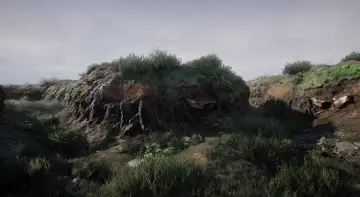
Constructing realistic canyon formations and deep rock cuts often introduces friction between mesh scale and texture resolution. Quarry Cliffs addresses these challenges through a modular collection of realistic cliffs, supporting rubble piles, loose rocks, and terrain materials. Rather than relying on simple one-sided vista meshes, the environment pieces are engineered to function as full three-dimensional structures across complex level layouts.
360-Degree Quarry Cliffs Geometry and Shared Texture Optimization
Many modular rock packages leave mesh backs open to reduce triangle counts, which limits their placement to background perimeters or forced camera angles. In Quarry Cliffs, all large cliff pieces are fully closed from every side except the bottom. This geometry structure allows them to be deployed as true 360-degree objects that can be rotated, stacked, or repositioned freely across a level without exposing empty polygons.
To keep memory overhead manageable across these fully enclosed volumes, the assets utilize an optimized UV layout where front and back surfaces share the same texture space. Symmetrical UV sharing can easily cause visible seams where texture islands join along the sides. Through careful UV mapping and targeted texturing, side seams have been largely eliminated. While subtle seam lines may still be detectable on certain cliffs when viewed from extreme close-up angles, the overall layout preserves high visual fidelity while cutting texture memory usage in half.
World-Space Double Detail Overlays for Scaling and Rotation
Large rock formations frequently degrade visually when a camera gets close to the surface or when an artist scales a mesh beyond its initial proportions. The cliff assets solve this by implementing a double detail material overlay projected entirely in world space.
Because these detail passes are calculated using world-space coordinates rather than standard object UVs, the physical scale and rotation of a cliff mesh do not warp or distort the micro-surface texture. Level designers can scale a cliff to towering proportions or rotate it along any axis, and the high-frequency rock patterns will maintain an identical visual density. When a player or camera moves right up to the cliff face, the world-space overlays preserve crisp surface detail that prevents the underlying textures from appearing soft or stretched.
Customizing Cliffs with Material Parameters and Vertex Painting
The material setup provides granular control over how the detail maps interact with the primary surfaces. Exposed parameters inside the material instances allow artists to adjust the intensity, scale, and appearance of the double detail overlays to match specific lighting or regional biome requirements.
These material instances also support localized manual adjustments via vertex painting. If a specific section of a rock face requires fewer micro-details—or if an artist needs to blend out an overlay to create smooth transitions across intersecting meshes—the overlay detail can be painted out directly on the mesh vertices within the scene. This gives artists direct artistic control over texture variation without requiring edits to the core texture files.
Four-Stage LOD Steps and Collision for Rubble Piles and Rocks
Rendering dense environmental geometry across an expansive quarry or canyon demands structured optimization. Every object in Quarry Cliffs is configured with four discrete Levels of Detail:
LOD 0: 100% mesh density for primary close-range rendering
LOD 1: 50% mesh density for mid-range viewing
LOD 2: 25% mesh density for distant layout placement
LOD 3: 13% mesh density for far background horizons
Every asset includes its own collision mesh, ensuring proper navigation and physics responses across irregular stone surfaces. Most meshes in the collection are supplied with 4k texture sets that define the natural grain and fractures of the rock. To blend the massive cliff walls into the ground plane, the pack includes supporting rubble piles, smaller rocks, and terrain materials that create natural rockfall zones and gravel accumulations along the base of each formation.
Excavator Static Mesh and Industrial Quarry Staging
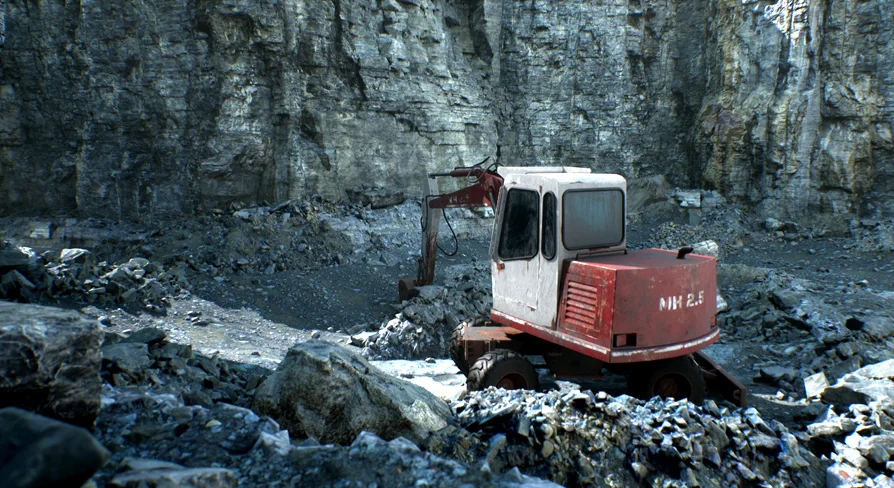
Beyond natural geological formations, the collection includes a bonus excavator static mesh to establish real-world scale and ground the scene within an industrial context. The vehicle is provided as an unrigged, unanimated static mesh intended for set dressing and environmental staging.
Despite being a static prop, the excavator follows the same technical standards as the geological assets, featuring full four-stage LODs and auto-generated player collision. Placed among the cliffs, rubble piles, and terrain surfaces, it provides immediate thematic framing for active open-pit quarries, canyon dig sites, or heavy earthmoving projects.
 Industrial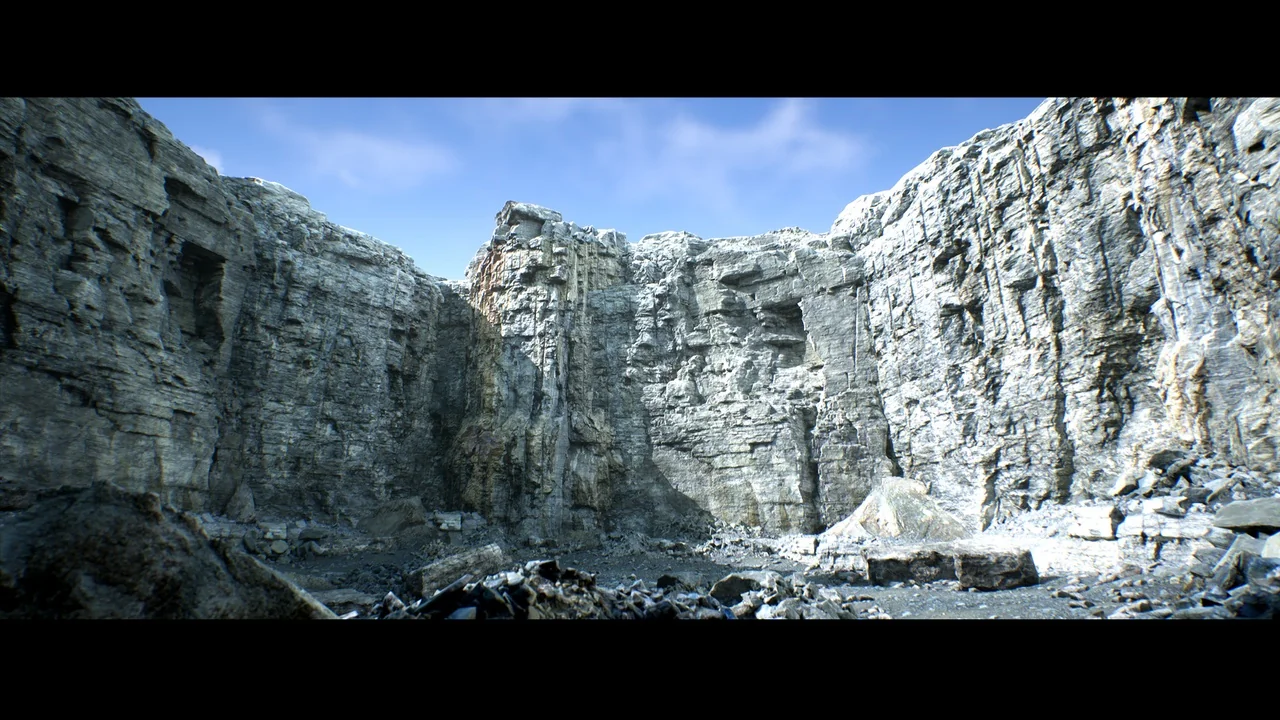
 Sci-Fi
 Mountain
 Nature & Plants