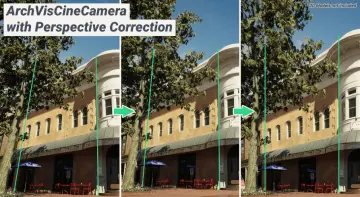
"c14ff6bd758dadb1"{"id":"1000659","slug":"panoramic-render-pass","title":"Panoramic Render Pass","category":"Engine Tools","engine":"5.4 - 5.5","assetVersion":"Asset Version: 2.06 - 3.02","engineVersion":"Engine Version: 5.4 - 5.5","tag":"Engine Tools","accent":"blue","visual":"mech","summary":"Unreal Engine plugin for panoramic and stereoscopic rendering. Supports 360-degree output, 180-to-fisheye conversion, path tracing denoising, and VR video produ","platform":"Unreal Engine","publishedAt":"2026-07-21T20:33:07.037Z","updatedAt":"2026-07-21T20:33:07.037Z","sourceNotes":[],"fileContents":[],"compatibility":["Unreal Engine","Asset Version: 2.06 - 3.02","Engine Version: 5.4 - 5.5"],"featuredImage":{"alt":"Panoramic Render Pass","src":"/wp-content/uploads/published/2026/07/ef537a226a13-31effff4-0e1e-46f5-854b-c13c800efbfa-8aa1df12fa.webp"},"hasDownloadLink":true,"downloads":1,"terms":[{"taxonomy":"category","slug":"engine-tools-tools-and-plugins","name":"Engine Tools"}],"galleryImages":[{"src":"/wp-content/uploads/published/2026/07/d2701b06b94f-2978ecda-0c4c-47ca-bb50-ddfd2f8e6f96-dfad234cd1.webp","alt":"Panoramic Render Pass"},{"src":"/wp-content/uploads/published/2026/07/744ccc7afc25-fc92c598-e728-4236-b381-382ff476228b-9795abcf4b.webp","alt":"Panoramic Render Pass"},{"src":"/wp-content/uploads/published/2026/07/03dcfedac711-dca6a978-4d7b-4c7b-9b51-852ac0b4bfec-461b01fab1.webp","alt":"Panoramic Render Pass"},{"src":"/wp-content/uploads/published/2026/07/f7b3574a8984-65269716-83d8-4e5d-8dce-8ba795e3299c-30fe54ff54.webp","alt":"Panoramic Render Pass"},{"src":"/wp-content/uploads/published/2026/07/61cce27a572b-c41ff702-d6f5-4a4e-a46c-39f0943a722c-716acbf4b5.webp","alt":"Panoramic Render Pass"},{"src":"/wp-content/uploads/published/2026/07/cf52446099ce-f10ece58-0fb2-43f0-8129-48749e94a8fa-09217b0dcf.webp","alt":"Panoramic Render Pass"},{"src":"/wp-content/uploads/published/2026/07/fe1a3b2df613-689317ad-44fe-4d89-b608-5fce47cf092d-d886e700b9.webp","alt":"Panoramic Render Pass"},{"src":"/wp-content/uploads/published/2026/07/63320ad0838a-72fcfb20-edb8-4514-8ae2-cee3d1f427d5-fd9ea14a1e.webp","alt":"Panoramic Render Pass"},{"src":"/wp-content/uploads/published/2026/07/5cb105865094-7d021c3f-16e8-44a2-b154-93ecb2398e02-cf6893002c.webp","alt":"Panoramic Render Pass"},{"src":"/wp-content/uploads/published/2026/07/d2bc9d0c8cf6-226e602d-a6b6-47b8-b463-00bab3d74c82-b158f18853.webp","alt":"Panoramic Render Pass"}],"accessPanel":{"kind":"resource","title":"Download this resource","eyebrow":"Free Download","message":"Log in or create a free account to start your download.","fileName":"Panoramic Render Pass.7z","safetyNote":"Resources are manually reviewed before listing to improve quality and reduce obvious risks.","actionLabel":"Download Free","resourceType":"Resource archive"},"contentHtml":"\u003cp\u003eThe setup process for \u003cstrong\u003ePanoramic Render Pass\u003c/strong\u003e begins with its integration into Unreal Engine, where it functions as a dedicated plugin for generating panoramic and stereoscopic imagery. Rather than relying on default camera setups or post-processing workarounds, the plugin slots directly into the engine's rendering pipeline to produce immersive 360-degree output and virtual reality-ready content. The tool is positioned as a rendering solution that bridges standard Unreal Engine scenes and panoramic delivery formats.\u003c/p\u003e \n\n\u003ch2\u003ePanoramic Output and Virtual Reality Rendering\u003c/h2\u003e \n\u003cp\u003eAt its core, the plugin supports panoramic output capable of generating images designed to make viewers feel physically present in the scene. This positions it as a tool for virtual reality production, where immersion depends on accurate spatial rendering. The panoramic images produced are intended to be realistic enough to serve as the basis for VR experiences, whether those are architectural walkthroughs, cinematic environment showcases, or game-engine-driven narrative content.\u003c/p\u003e \n\u003cp\u003eThe plugin also supports stereo rendering, which is critical for head-mounted displays and any VR application where depth perception matters. Stereo mode allows the left and right eye channels to capture slightly offset views, producing the parallax that the human brain interprets as three-dimensional space.\u003c/p\u003e \n\n\u003ch3\u003eStereo Video Capabilities\u003c/h3\u003e \n\u003cp\u003eA dedicated stereo video file is included as part of the plugin's demonstration material. This suggests that the plugin is not limited to static panoramic stills but extends into video output where stereo separation must be maintained frame by frame. For creators working on VR cinematics or 360-degree video content, this means the plugin can handle the temporal demands of moving imagery rather than being restricted to single-frame captures.\u003c/p\u003e \n\n\u003ch2\u003e180-Degree to Fisheye Conversion Workflow\u003c/h2\u003e \n\u003cp\u003eThe plugin includes a specific conversion path for translating 180-degree captures into fisheye-format output. Documentation references two versions of this conversion guide: one labeled for English audiences and one for Chinese audiences. This bilingual approach to the conversion instructions indicates that the fisheye conversion process involves a distinct set of steps that the developer considered important enough to document separately in two languages.\u003c/p\u003e \n\u003cp\u003eFisheye output serves a particular niche in panoramic rendering, especially for dome projections, planetarium-style displays, and certain VR headset formats that use fisheye optics to map the rendered image across a wide field of view. The inclusion of a dedicated 180-to-fisheye conversion suggests the plugin anticipates delivery formats beyond standard equirectangular panoramas.\u003c/p\u003e \n\n\u003ch2\u003eSampling Methods and Render Quality Controls\u003c/h2\u003e \n\u003cp\u003eVersion 2.03 of the plugin introduced a \u003cstrong\u003eBi_Cubic\u003c/strong\u003e sampling method. Bi-cubic sampling is a significant addition for panoramic rendering because the process of mapping a flat or spherical render into a panoramic projection format involves resampling pixel data. Higher-quality sampling methods reduce the artifacts that can appear during this remapping, particularly at edges and in areas with fine detail. For panoramic outputs, where the entire 360-degree field is compressed into a single image format, the quality of the sampling method directly affects the sharpness and clarity of the final result.\u003c/p\u003e \n\u003cp\u003eThe addition of bi-cubic sampling as a version-specific update implies that earlier versions of the plugin relied on a different, presumably lower-order sampling approach. The update represents a quality improvement for users who need cleaner output, especially when the panoramic images are viewed at high resolution or projected in environments where artifacts become visible.\u003c/p\u003e \n\n\u003ch2\u003ePath Tracing Denoiser Fixes\u003c/h2\u003e \n\u003cp\u003eVersion 2.04 addressed a specific issue where the path tracing denoiser was not functioning. Path tracing is a rendering approach that simulates light transport by tracing rays through a scene, and it produces highly realistic results. However, path tracing is computationally expensive and typically produces noisy images that require a denoiser to clean up.\u003c/p\u003e \n\u003cp\u003eIn the context of a panoramic render pass, a broken denoiser would force users to either render with excessive sample counts to reduce noise naturally or accept noisy output. Neither option is practical for production, especially for panoramic content where the render already covers a much wider field of view than a standard camera. The version 2.04 fix restored the denoiser's functionality, making path-traced panoramic rendering a viable workflow within the plugin.\u003c/p\u003e \n\u003cp\u003eThis fix is particularly relevant for users who rely on Unreal Engine's path tracer for photorealistic output. The combination of path tracing and panoramic rendering is demanding, but it enables some of the most realistic immersive content possible within the engine, which aligns with the plugin's stated goal of producing panoramic images that make users feel present in the scene.\u003c/p\u003e \n\n\u003ch2\u003eStereo Mode Bug Corrections\u003c/h2\u003e \n\u003cp\u003eVersion 2.07 focused on fixing bugs specific to stereo mode. Stereo rendering introduces complexities that monoscopic panoramic rendering does not face. The left and right eye channels must maintain consistent separation, and any discrepancy in timing, framing, or parameter handling between the two channels can produce visible errors in the final output. Issues in stereo mode can manifest as eye strain, incorrect depth, or visual misalignment when the content is viewed in a VR headset.\u003c/p\u003e \n\u003cp\u003eBy addressing stereo-specific bugs in a dedicated update, the plugin moved toward more reliable stereoscopic output. For production workflows where stereo accuracy is essential, these corrections would reduce the need for manual adjustments or re-renders caused by stereo channel errors.\u003c/p\u003e \n\n\u003ch2\u003eDemonstrated Use Cases and Scene Types\u003c/h2\u003e \n\u003cp\u003eThe plugin has been demonstrated across a range of Unreal Engine scenes that highlight different rendering scenarios. Demonstrations include panoramic output of the Electric Dreams environment in Unreal Engine 5.2, a 360-degree video of rural Australian landscapes, and a scene featuring a spaceship. These examples span natural outdoor environments, lush stylized content, and space-based imagery, indicating that the plugin is not limited to a specific visual style or scene complexity level.\u003c/p\u003e \n\u003cp\u003eA separate demonstration features the Ithris Cemetery scene rendered at 4K resolution. The cemetery demonstration specifically notes the absence of motion blur, which is a relevant detail for panoramic rendering. Motion blur in panoramic content can cause distractions or visual inconsistencies, especially when the panorama is being viewed with head tracking where the viewer's gaze moves independently of the rendered motion. Delivering panoramic output without motion blur suggests the plugin provides control over temporal effects that might otherwise degrade the immersive viewing experience.\u003c/p\u003e \n\u003cp\u003eDemonstration content was shared across both YouTube and BiliBili platforms, with bilingual coverage of the Electric Dreams and rural Australia scenes. The Ithris Cemetery render appeared on both platforms, indicating broader accessibility of demonstration material for users evaluating the plugin's output quality before integrating it into their own projects.\u003c/p\u003e \n\n\u003ch2\u003eWho Benefits from This Plugin\u003c/h2\u003e \n\u003cp\u003eUnreal Engine developers and technical artists working on virtual reality content, 360-degree video, and panoramic visualization are the primary audience. The plugin serves workflows that require more than standard camera rendering, specifically those that need stereo-separated panoramic output, fisheye-format delivery, or path-traced panoramas with functional denoising. The bilingual documentation and demonstration coverage suggest the tool is intended for an international user base, and the progression of version updates, from bi-cubic sampling through denoiser fixes to stereo bug corrections, reflects continued refinement of the rendering pipeline for production use.\u003c/p\u003e \n\u003cp\u003eFor teams producing VR cinematics, immersive architectural visualization, or panoramic environment showcases, the plugin provides a rendering path that handles the technical complexities of panoramic projection, stereo separation, and format conversion within the Unreal Engine environment.\u003c/p\u003e\n\n\u003ch2\u003eRelated Resources Worth Checking\u003c/h2\u003e\n\u003cul\u003e\n\u003cli\u003e\u003ca href=\"https://3dcghub.com/stereo-panoramic-player/\" title=\"Stereo Panoramic Player\"\u003eStereo Panoramic Player\u003c/a\u003e\u003c/li\u003e\n\u003cli\u003e\u003ca href=\"https://3dcghub.com/msc-screen-camera-recorder/\" title=\"MSC Screen \u0026amp; Camera Recorder\"\u003eMSC Screen \u0026amp; Camera Recorder\u003c/a\u003e\u003c/li\u003e\n\u003cli\u003e\u003ca href=\"https://3dcghub.com/web-browser-for-video/\" title=\"Web Browser For Video\"\u003eWeb Browser For Video\u003c/a\u003e\u003c/li\u003e\n\u003cli\u003e\u003ca href=\"https://3dcghub.com/zxing-for-unreal/\" title=\"ZXing For Unreal\"\u003eZXing For Unreal\u003c/a\u003e\u003c/li\u003e\n\u003cli\u003e\u003ca href=\"https://3dcghub.com/archvis-tools/\" title=\"ArchVis Tools\"\u003eArchVis Tools\u003c/a\u003e\u003c/li\u003e\n\u003c/ul\u003e","contentTextLength":8433,"navigation":{"current":1202,"total":3719,"previous":{"id":"1000633","slug":"medieval-furniture-props-gothic-props-victorian-props-medieval-furniture","title":"Medieval Furniture Props (Gothic Props, Victorian Props, Medieval, Furniture)","category":"Lighting","platform":"Unreal Engine","updatedAt":"2026-07-21T20:37:19.504Z"},"next":{"id":"1000658","slug":"mushroom-k","title":"Mushroom (K)","category":"Characters \u0026 Creatures","platform":"Unreal Engine","updatedAt":"2026-07-21T20:25:46.015Z"}},"relatedResources":[{"id":"14666","slug":"stereo-panoramic-player","title":"Stereo Panoramic Player","category":"Engine Tools","engine":"4.26 - 5.27,5.0 - 5.3","assetVersion":"Engine version: 4.26 - 5.27,5.0 - 5.3","engineVersion":"4.21","tag":"Engine Tools","accent":"blue","visual":"character","summary":"The Stereo Panoramic Player is a powerful runtime plugin designed to display and interact with 360° panoramic images and videos. It features dedicated actors for both automated virtual tours and deep programmatic customization.","platform":"Unreal Engine","publishedAt":"2026-03-11T18:53:23.000Z","updatedAt":"2026-04-19T15:45:42.000Z","sourceNotes":[],"fileContents":[],"compatibility":["Unreal Engine","Engine version: 4.26 - 5.27,5.0 - 5.3"],"featuredImage":{"alt":"Stereo Panoramic Player","src":"https://3dcghub.com/wp-content/uploads/2026/03/a896c60e-d989-4a7f-b364-62ee26955900.webp"},"hasDownloadLink":true,"downloads":1},{"id":"14227","slug":"msc-screen-camera-recorder","title":"MSC Screen \u0026 Camera Recorder","category":"Engine Tools","engine":"5.5 - 5.7","assetVersion":"Engine version: 5.5 - 5.7","engineVersion":"4.26","tag":"Engine Tools","accent":"blue","visual":"luts","summary":"The MSC Screen \u0026 Camera Recorder is a versatile tool for capturing high-quality video content within Unreal Engine. It supports standard screen recording, VR perspectives, and immersive 360-degree renders.","platform":"Unreal Engine","publishedAt":"2026-03-11T17:01:22.000Z","updatedAt":"2026-04-19T15:45:51.000Z","sourceNotes":[],"fileContents":[],"compatibility":["Unreal Engine","Engine version: 5.5 - 5.7"],"featuredImage":{"alt":"MSC Screen \u0026 Camera Recorder","src":"https://3dcghub.com/wp-content/uploads/2026/03/909261f3-99f5-4f53-96ea-5ebe6ce89c8a.webp"},"hasDownloadLink":true,"downloads":0},{"id":"1000276","slug":"archvis-tools","title":"ArchVis Tools","category":"Engine Tools","engine":"5.4 - 5.7","assetVersion":"Asset Version: 1.6.0 - 1.6.6","engineVersion":"Engine Version: 5.4 - 5.7","tag":"Engine Tools","accent":"blue","visual":"mech","summary":"An Unreal Engine plugin featuring the ArchVisCineCamera for 2-point perspective correction, custom Movie Render Queue passes, and Dataprep operations.","platform":"Unreal Engine","publishedAt":"2026-07-02T18:05:33.151Z","updatedAt":"2026-10-04T05:02:43.791Z","sourceNotes":[],"fileContents":[],"compatibility":["Unreal Engine","Asset Version: 1.6.0 - 1.6.6","Engine Version: 5.4 - 5.7"],"featuredImage":{"alt":"ArchVis Tools","src":"/wp-content/uploads/published/2026/07/575ae2bd9d17-51fe82c5-872c-4b3c-8a56-5032ba205671-80d2a452df.webp"},"hasDownloadLink":true,"downloads":1}]}
Engine Tools
Panoramic Render Pass
Unreal Engine plugin for panoramic and stereoscopic rendering. Supports 360-degree output, 180-to-fisheye conversion, path tracing denoising, and VR video produ
The setup process for Panoramic Render Pass begins with its integration into Unreal Engine, where it functions as a dedicated plugin for generating panoramic and stereoscopic imagery. Rather than relying on default camera setups or post-processing workarounds, the plugin slots directly into the engine's rendering pipeline to produce immersive 360-degree output and virtual reality-ready content. The tool is positioned as a rendering solution that bridges standard Unreal Engine scenes and panoramic delivery formats.
Panoramic Output and Virtual Reality Rendering
At its core, the plugin supports panoramic output capable of generating images designed to make viewers feel physically present in the scene. This positions it as a tool for virtual reality production, where immersion depends on accurate spatial rendering. The panoramic images produced are intended to be realistic enough to serve as the basis for VR experiences, whether those are architectural walkthroughs, cinematic environment showcases, or game-engine-driven narrative content.
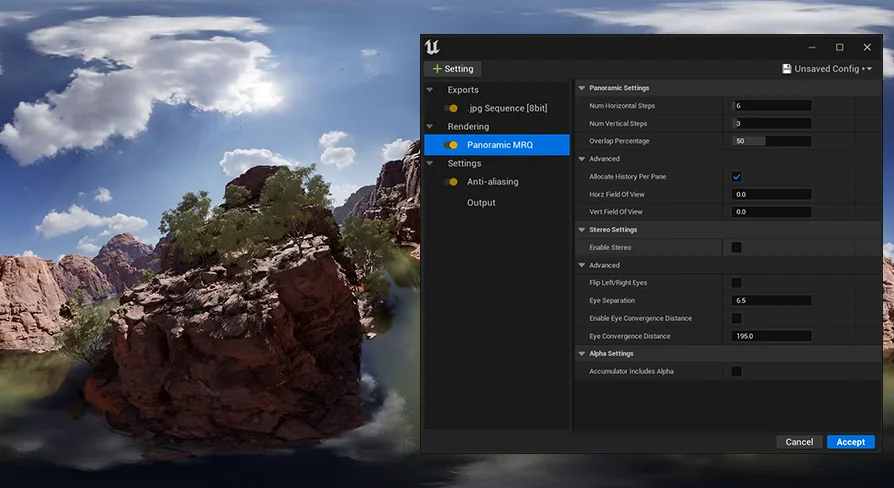
The plugin also supports stereo rendering, which is critical for head-mounted displays and any VR application where depth perception matters. Stereo mode allows the left and right eye channels to capture slightly offset views, producing the parallax that the human brain interprets as three-dimensional space.
Stereo Video Capabilities
A dedicated stereo video file is included as part of the plugin's demonstration material. This suggests that the plugin is not limited to static panoramic stills but extends into video output where stereo separation must be maintained frame by frame. For creators working on VR cinematics or 360-degree video content, this means the plugin can handle the temporal demands of moving imagery rather than being restricted to single-frame captures.
180-Degree to Fisheye Conversion Workflow
The plugin includes a specific conversion path for translating 180-degree captures into fisheye-format output. Documentation references two versions of this conversion guide: one labeled for English audiences and one for Chinese audiences. This bilingual approach to the conversion instructions indicates that the fisheye conversion process involves a distinct set of steps that the developer considered important enough to document separately in two languages.
Fisheye output serves a particular niche in panoramic rendering, especially for dome projections, planetarium-style displays, and certain VR headset formats that use fisheye optics to map the rendered image across a wide field of view. The inclusion of a dedicated 180-to-fisheye conversion suggests the plugin anticipates delivery formats beyond standard equirectangular panoramas.
Sampling Methods and Render Quality Controls
Version 2.03 of the plugin introduced a Bi_Cubic sampling method. Bi-cubic sampling is a significant addition for panoramic rendering because the process of mapping a flat or spherical render into a panoramic projection format involves resampling pixel data. Higher-quality sampling methods reduce the artifacts that can appear during this remapping, particularly at edges and in areas with fine detail. For panoramic outputs, where the entire 360-degree field is compressed into a single image format, the quality of the sampling method directly affects the sharpness and clarity of the final result.
The addition of bi-cubic sampling as a version-specific update implies that earlier versions of the plugin relied on a different, presumably lower-order sampling approach. The update represents a quality improvement for users who need cleaner output, especially when the panoramic images are viewed at high resolution or projected in environments where artifacts become visible.
Path Tracing Denoiser Fixes
Version 2.04 addressed a specific issue where the path tracing denoiser was not functioning. Path tracing is a rendering approach that simulates light transport by tracing rays through a scene, and it produces highly realistic results. However, path tracing is computationally expensive and typically produces noisy images that require a denoiser to clean up.
In the context of a panoramic render pass, a broken denoiser would force users to either render with excessive sample counts to reduce noise naturally or accept noisy output. Neither option is practical for production, especially for panoramic content where the render already covers a much wider field of view than a standard camera. The version 2.04 fix restored the denoiser's functionality, making path-traced panoramic rendering a viable workflow within the plugin.
This fix is particularly relevant for users who rely on Unreal Engine's path tracer for photorealistic output. The combination of path tracing and panoramic rendering is demanding, but it enables some of the most realistic immersive content possible within the engine, which aligns with the plugin's stated goal of producing panoramic images that make users feel present in the scene.
Stereo Mode Bug Corrections
Version 2.07 focused on fixing bugs specific to stereo mode. Stereo rendering introduces complexities that monoscopic panoramic rendering does not face. The left and right eye channels must maintain consistent separation, and any discrepancy in timing, framing, or parameter handling between the two channels can produce visible errors in the final output. Issues in stereo mode can manifest as eye strain, incorrect depth, or visual misalignment when the content is viewed in a VR headset.
By addressing stereo-specific bugs in a dedicated update, the plugin moved toward more reliable stereoscopic output. For production workflows where stereo accuracy is essential, these corrections would reduce the need for manual adjustments or re-renders caused by stereo channel errors.
Demonstrated Use Cases and Scene Types
The plugin has been demonstrated across a range of Unreal Engine scenes that highlight different rendering scenarios. Demonstrations include panoramic output of the Electric Dreams environment in Unreal Engine 5.2, a 360-degree video of rural Australian landscapes, and a scene featuring a spaceship. These examples span natural outdoor environments, lush stylized content, and space-based imagery, indicating that the plugin is not limited to a specific visual style or scene complexity level.
A separate demonstration features the Ithris Cemetery scene rendered at 4K resolution. The cemetery demonstration specifically notes the absence of motion blur, which is a relevant detail for panoramic rendering. Motion blur in panoramic content can cause distractions or visual inconsistencies, especially when the panorama is being viewed with head tracking where the viewer's gaze moves independently of the rendered motion. Delivering panoramic output without motion blur suggests the plugin provides control over temporal effects that might otherwise degrade the immersive viewing experience.
Demonstration content was shared across both YouTube and BiliBili platforms, with bilingual coverage of the Electric Dreams and rural Australia scenes. The Ithris Cemetery render appeared on both platforms, indicating broader accessibility of demonstration material for users evaluating the plugin's output quality before integrating it into their own projects.
Who Benefits from This Plugin
Unreal Engine developers and technical artists working on virtual reality content, 360-degree video, and panoramic visualization are the primary audience. The plugin serves workflows that require more than standard camera rendering, specifically those that need stereo-separated panoramic output, fisheye-format delivery, or path-traced panoramas with functional denoising. The bilingual documentation and demonstration coverage suggest the tool is intended for an international user base, and the progression of version updates, from bi-cubic sampling through denoiser fixes to stereo bug corrections, reflects continued refinement of the rendering pipeline for production use.
For teams producing VR cinematics, immersive architectural visualization, or panoramic environment showcases, the plugin provides a rendering path that handles the technical complexities of panoramic projection, stereo separation, and format conversion within the Unreal Engine environment.
 Engine Tools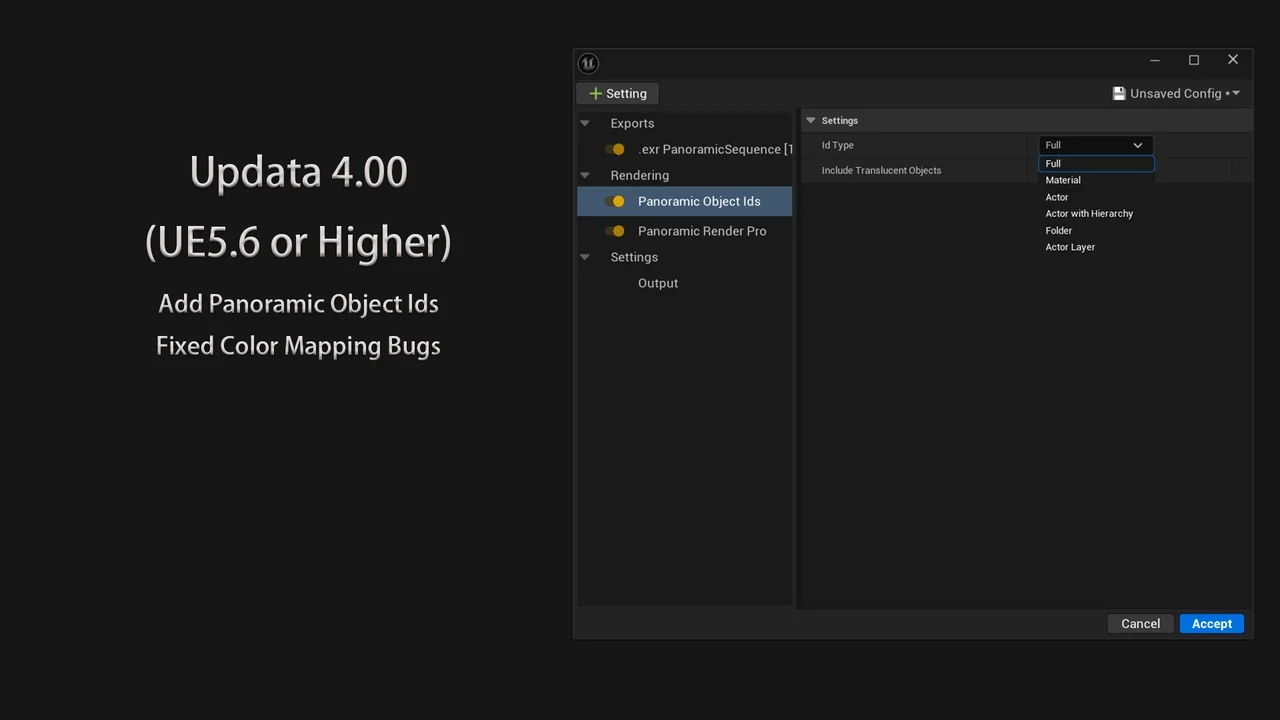
 Engine Tools
 Engine Tools
 Engine Tools