"7066dd76da796369"{"id":"1000128","slug":"optimizator","title":"Optimizator","category":"Widgets \u0026 Controls","engine":"4.26+,5.0+","assetVersion":"","engineVersion":"Engine Version: 4.26+,5.0+","tag":"Widgets \u0026 Controls","accent":"blue","visual":"mech","summary":"Optimizator is an editor widget and blueprint tool for level design work, helping track down tiny forgotten objects that still consume performance.","platform":"Unreal Engine","publishedAt":"2026-06-11T10:15:39.247Z","updatedAt":"2026-06-11T10:15:39.247Z","sourceNotes":[],"fileContents":[],"compatibility":["Unreal Engine","Engine Version: 4.26+,5.0+"],"featuredImage":{"alt":"Optimizator","src":"/wp-content/uploads/published/2026/06/f1eaa25b3310-bd7acdd8-8660-4919-b092-d7a47bd37a6c-59d1ba88e5.webp"},"hasDownloadLink":true,"downloads":0,"terms":[{"taxonomy":"category","slug":"widgets-and-controls","name":"Widgets \u0026 Controls"}],"galleryImages":[{"src":"/wp-content/uploads/published/2026/06/e815aeb0a64a-f395b9c5-0dd6-4ad3-9e60-a07e3fbe0558-8d766af5b9.webp","alt":"Optimizator"}],"accessPanel":{"kind":"resource","title":"Download this resource","eyebrow":"Free Download","message":"Log in or create a free account to start your download.","fileName":"Content.7z","safetyNote":"Resources are manually reviewed before listing to improve quality and reduce obvious risks.","actionLabel":"Download Free","resourceType":"Resource archive"},"contentHtml":"\u003cp\u003eOptimizator is an editor widget, a tool, and a blueprint resource focused on a very specific level design problem: small objects that remain in a scene after they have left a designer's attention. Those pieces may be easy to forget right after placement, yet they still consume performance. The package is set up around that practical tension between fast scene building and the hidden cost of overlooked details.\u003c/p\u003e \u003ch2\u003eOptimizator as an Editor Widget\u003c/h2\u003e\n\u003cp\u003eThe identity of Optimizator is clear from the start. It is a widget intended for editor use, which places it close to the moment where layout, object placement, and iterative scene work happen. Rather than acting as a broad-purpose content pack, it targets a recurring workflow issue inside level design itself. That focus gives it a narrow but concrete role: assisting with the discovery of objects that are present, easy to miss, and still relevant because of their performance impact.\u003c/p\u003e\n\u003cp\u003eCalling it a widget matters. A widget suggests a tool that sits within the working environment instead of standing apart from it as a separate stage of production. In practice, that makes Optimizator read as something used while reviewing or refining a level rather than something reserved for an isolated cleanup pass. The benefit is not abstract. Level design often involves rapid placement, quick visual checks, and repeated revisions. In that kind of flow, it is easy for very small scene elements to stop drawing attention long before they stop existing in the level.\u003c/p\u003e\n\u003cp\u003eThe editor-facing nature of Optimizator also reinforces its practical tone. This is not presented as a decorative add-on or a visual enhancement. Its purpose is rooted in seeing what is still there and dealing with what has been forgotten.\u003c/p\u003e \u003ch2\u003eLevel Design and the problem of tiny little objects\u003c/h2\u003e\n\u003cp\u003eOptimizator is described as most helpful for tasks related to level design, and that wording points to the kind of scene work it serves best. Level design regularly combines large spatial decisions with a long trail of smaller object placements. The larger structures tend to remain visible in memory because they define the space. Tiny objects do not always receive that same attention. They can be placed for a moment, left behind after an experiment, or simply fade into the background of a busy scene.\u003c/p\u003e\n\u003cp\u003eThat is the exact gap Optimizator addresses. It helps find those tiny little objects that were placed and then immediately forgotten. The phrase is informal, but the workflow issue behind it is familiar and concrete. Small objects can disappear from active thought even when they remain present in the level. A designer may move on to composition, pathing, or general scene iteration, while those leftovers continue to occupy the environment.\u003c/p\u003e\n\u003cp\u003eWhat makes this more than a question of tidiness is the next part of Optimizator's role: those forgotten objects still consume performance. The package is not framed around aesthetics alone. It is concerned with scene cost, which shifts the discussion from simple organization to active optimization. A tiny object may be visually minor, but Optimizator treats it as production-relevant because it is still part of what the scene must carry.\u003c/p\u003e \u003ch3\u003eForgotten placement is still active placement\u003c/h3\u003e\n\u003cp\u003eOne of the strongest ideas behind Optimizator is that forgotten content does not become inactive just because attention has moved elsewhere. In creative work, memory and actual scene state often drift apart. A designer may remember the intention of a space but not every small element that accumulated during its construction. Optimizator steps into that mismatch. It helps reconnect the current state of a level with the designer's present understanding of it.\u003c/p\u003e\n\u003cp\u003eThat makes the tool useful not only as a way to search for clutter, but also as a way to keep a level honest to its intended form. When tiny placed objects are rediscovered, a designer can decide whether they still belong. Some may support the scene. Others may only represent old experiments that never got removed. Optimizator's value is in bringing those objects back into view so that decision can happen deliberately.\u003c/p\u003e \u003ch2\u003eBlueprint Tool behavior with a clear performance purpose\u003c/h2\u003e\n\u003cp\u003eOptimizator is also tagged as a blueprint tool, which gives it a technical identity without changing its straightforward aim. The tool is driven by finding overlooked objects, and the reason for finding them is tied directly to performance consumption. That connection keeps the package grounded. It does not promise a vague improvement process. It points to a particular kind of issue and a particular reason to care about it.\u003c/p\u003e\n\u003cp\u003eThe performance angle is especially important because the objects in question are tiny. Small scale can create a false sense of harmlessness. A forgotten object may be easy to dismiss because it does not dominate the frame or define a major gameplay space. Optimizator pushes against that habit by treating these pieces as meaningful enough to seek out. Their size does not remove their cost, and that is the practical lesson embedded in the tool's purpose.\u003c/p\u003e\n\u003cp\u003eThere is also a strong creative side to that behavior. When scene work becomes more intentional, designers gain a cleaner sense of what is actually supporting the level. Removing or reviewing forgotten pieces is not just a technical act. It can sharpen the visual and functional identity of a space by reducing accidental residue from earlier passes. Optimizator therefore fits a workflow where creative judgment and performance awareness happen together rather than in separate worlds.\u003c/p\u003e \u003ch2\u003eUsing Optimizator during scene iteration\u003c/h2\u003e\n\u003cp\u003eThe most natural place for Optimizator is inside the ongoing rhythm of scene iteration. Level design is rarely a straight path from first placement to finished result. Objects are added, adjusted, abandoned, and replaced. Some elements stay because they are essential. Others remain because they were never revisited. A tool aimed at finding forgotten tiny objects becomes especially valuable in that in-between state, where the level is neither raw nor final, but dense with accumulated decisions.\u003c/p\u003e\n\u003cp\u003eIn that context, Optimizator can be understood as a way to keep iteration from becoming residue. Designers often work quickly while testing spatial ideas. Quick work is productive, but it can leave behind small pieces that no longer serve the level. Optimizator helps pull those hidden remnants back into the process. Instead of waiting for problems to become visible in a larger review, it supports a more immediate form of checking.\u003c/p\u003e\n\u003cp\u003eThis also opens a creative use case that stays faithful to the tool's stated purpose. A designer can treat Optimizator as part of regular scene maintenance while shaping a level's final feel. As tiny objects are found, the level can be refined both visually and technically. This gives not defined by adding more content, but by becoming more precise about what remains in the scene.\u003c/p\u003e \u003ch2\u003eWhere Optimizator fits best\u003c/h2\u003e\n\u003cp\u003eOptimizator fits projects where level design involves enough placed detail for small objects to slip out of notice. Its strength lies in handling a narrow but common problem: objects that were easy to place, easy to forget, and still present enough to matter. Because it is framed as an editor widget and blueprint tool, its role stays close to active development work rather than broad asset creation.\u003c/p\u003e\n\u003cp\u003eThat fit-for-purpose clarity is what gives the package its usefulness. It is not trying to cover every optimization concern or every stage of production. It focuses on helping level design work stay aware of the tiny little objects that continue to consume performance after attention has moved on. For teams or solo creators who want their scene passes to be more intentional, Optimizator is set up to handle exactly that kind of cleanup-minded review.\u003c/p\u003e\n\n\u003ch2\u003eExplore Similar Assets\u003c/h2\u003e\n\u003cul\u003e\n\u003cli\u003e\u003ca href=\"https://3dcghub.com/floating-foliage-fixer/\" title=\"Floating Foliage Fixer\"\u003eFloating Foliage Fixer\u003c/a\u003e\u003c/li\u003e\n\u003cli\u003e\u003ca href=\"https://3dcghub.com/extended-progress-bar/\" title=\"Extended Progress Bar\"\u003eExtended Progress Bar\u003c/a\u003e\u003c/li\u003e\n\u003cli\u003e\u003ca href=\"https://3dcghub.com/archviz-user-interface-3/\" title=\"ArchViz User Interface 3\"\u003eArchViz User Interface 3\u003c/a\u003e\u003c/li\u003e\n\u003cli\u003e\u003ca href=\"https://3dcghub.com/ultimate-menu-system/\" title=\"Ultimate Menu System\"\u003eUltimate Menu System\u003c/a\u003e\u003c/li\u003e\n\u003cli\u003e\u003ca href=\"https://3dcghub.com/hqui-progress-bars/\" title=\"HQUI: Progress Bars\"\u003eHQUI: Progress Bars\u003c/a\u003e\u003c/li\u003e\n\u003c/ul\u003e","contentTextLength":7928,"navigation":{"current":2038,"total":4016,"previous":{"id":"1000129","slug":"pink-cyber-girl","title":"PINK CYBER GIRL","category":"Characters \u0026 Creatures","platform":"Unreal Engine","updatedAt":"2026-06-11T10:25:15.290Z"},"next":{"id":"1000127","slug":"old-man-animset","title":"Old Man Animset","category":"Variety","platform":"Unreal Engine","updatedAt":"2026-06-11T10:12:14.396Z"}},"relatedResources":[{"id":"1002060","slug":"in-game-achievement-system","title":"In-Game Achievement System","category":"Widgets \u0026 Controls","engine":"4.22+,5.0+","assetVersion":"","engineVersion":"Engine Version: 4.22+,5.0+","tag":"Widgets \u0026 Controls","accent":"blue","visual":"mech","summary":"Organize and trigger gameplay milestones with the In-Game Achievement System, featuring Data Table management and single-node Blueprint progress updates.","platform":"Unreal Engine","publishedAt":"2026-10-26T15:18:37.072Z","updatedAt":"2026-10-26T15:18:37.072Z","sourceNotes":[],"fileContents":[],"compatibility":["Unreal Engine","Engine Version: 4.22+,5.0+"],"featuredImage":{"alt":"In-Game Achievement System","src":"/wp-content/uploads/published/2026/10/9568f94a65d8-69fe87f6-448d-4516-800f-8960181d50ad-574142ec04.webp"},"hasDownloadLink":true,"downloads":0},{"id":"1001996","slug":"damage-text","title":"Damage Text","category":"Widgets \u0026 Controls","engine":"4.26+,5.0+","assetVersion":"","engineVersion":"Engine Version: 4.26+,5.0+","tag":"Widgets \u0026 Controls","accent":"blue","visual":"mech","summary":"Add floating damage numbers and combat text directly via blueprint calls without actor setup, featuring presets, visibility checks, and multiplayer support.","platform":"Unreal Engine","publishedAt":"2026-10-26T12:14:37.980Z","updatedAt":"2026-10-26T12:14:37.980Z","sourceNotes":[],"fileContents":[],"compatibility":["Unreal Engine","Engine Version: 4.26+,5.0+"],"featuredImage":{"alt":"Damage Text","src":"/wp-content/uploads/published/2026/10/b5f9bc69fa4a-12d7495f-5890-4c48-a3d5-0d3e79d72e6c-341b7c3a05.webp"},"hasDownloadLink":true,"downloads":0},{"id":"1001924","slug":"pro-icon-pack","title":"Pro Icon Pack","category":"Widgets \u0026 Controls","engine":"4.26+,5.0+","assetVersion":"","engineVersion":"Engine Version: 4.26+,5.0+","tag":"Widgets \u0026 Controls","accent":"blue","visual":"mech","summary":"Explore the implementation and structural utility of Pro Icon Pack across HUD, inventory, and main menu systems in Unreal Engine interface design.","platform":"Unreal Engine","publishedAt":"2026-10-22T12:00:19.598Z","updatedAt":"2026-10-22T12:00:19.598Z","sourceNotes":[],"fileContents":[],"compatibility":["Unreal Engine","Engine Version: 4.26+,5.0+"],"featuredImage":{"alt":"Pro Icon Pack","src":"/wp-content/uploads/published/2026/10/eaeb4b76f65b-75923046-733b-4bd8-ba53-e45ddc9e2a36-ea737c91b8.webp"},"hasDownloadLink":true,"downloads":0}]}
Widgets & Controls
Optimizator
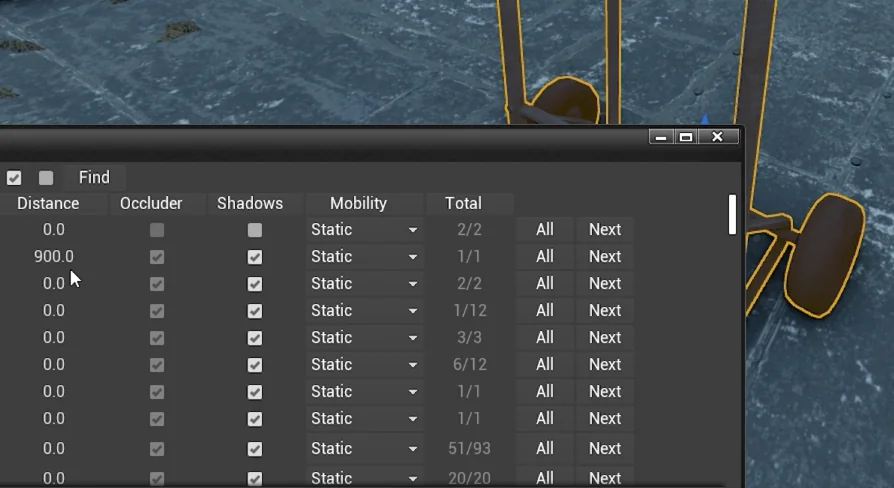
Optimizator is an editor widget and blueprint tool for level design work, helping track down tiny forgotten objects that still consume performance.
Optimizator is an editor widget, a tool, and a blueprint resource focused on a very specific level design problem: small objects that remain in a scene after they have left a designer's attention. Those pieces may be easy to forget right after placement, yet they still consume performance. The package is set up around that practical tension between fast scene building and the hidden cost of overlooked details.
Optimizator as an Editor Widget
The identity of Optimizator is clear from the start. It is a widget intended for editor use, which places it close to the moment where layout, object placement, and iterative scene work happen. Rather than acting as a broad-purpose content pack, it targets a recurring workflow issue inside level design itself. That focus gives it a narrow but concrete role: assisting with the discovery of objects that are present, easy to miss, and still relevant because of their performance impact.
Calling it a widget matters. A widget suggests a tool that sits within the working environment instead of standing apart from it as a separate stage of production. In practice, that makes Optimizator read as something used while reviewing or refining a level rather than something reserved for an isolated cleanup pass. The benefit is not abstract. Level design often involves rapid placement, quick visual checks, and repeated revisions. In that kind of flow, it is easy for very small scene elements to stop drawing attention long before they stop existing in the level.
The editor-facing nature of Optimizator also reinforces its practical tone. This is not presented as a decorative add-on or a visual enhancement. Its purpose is rooted in seeing what is still there and dealing with what has been forgotten.
Level Design and the problem of tiny little objects
Optimizator is described as most helpful for tasks related to level design, and that wording points to the kind of scene work it serves best. Level design regularly combines large spatial decisions with a long trail of smaller object placements. The larger structures tend to remain visible in memory because they define the space. Tiny objects do not always receive that same attention. They can be placed for a moment, left behind after an experiment, or simply fade into the background of a busy scene.
That is the exact gap Optimizator addresses. It helps find those tiny little objects that were placed and then immediately forgotten. The phrase is informal, but the workflow issue behind it is familiar and concrete. Small objects can disappear from active thought even when they remain present in the level. A designer may move on to composition, pathing, or general scene iteration, while those leftovers continue to occupy the environment.
What makes this more than a question of tidiness is the next part of Optimizator's role: those forgotten objects still consume performance. The package is not framed around aesthetics alone. It is concerned with scene cost, which shifts the discussion from simple organization to active optimization. A tiny object may be visually minor, but Optimizator treats it as production-relevant because it is still part of what the scene must carry.
Forgotten placement is still active placement
One of the strongest ideas behind Optimizator is that forgotten content does not become inactive just because attention has moved elsewhere. In creative work, memory and actual scene state often drift apart. A designer may remember the intention of a space but not every small element that accumulated during its construction. Optimizator steps into that mismatch. It helps reconnect the current state of a level with the designer's present understanding of it.
That makes the tool useful not only as a way to search for clutter, but also as a way to keep a level honest to its intended form. When tiny placed objects are rediscovered, a designer can decide whether they still belong. Some may support the scene. Others may only represent old experiments that never got removed. Optimizator's value is in bringing those objects back into view so that decision can happen deliberately.
Blueprint Tool behavior with a clear performance purpose
Optimizator is also tagged as a blueprint tool, which gives it a technical identity without changing its straightforward aim. The tool is driven by finding overlooked objects, and the reason for finding them is tied directly to performance consumption. That connection keeps the package grounded. It does not promise a vague improvement process. It points to a particular kind of issue and a particular reason to care about it.
The performance angle is especially important because the objects in question are tiny. Small scale can create a false sense of harmlessness. A forgotten object may be easy to dismiss because it does not dominate the frame or define a major gameplay space. Optimizator pushes against that habit by treating these pieces as meaningful enough to seek out. Their size does not remove their cost, and that is the practical lesson embedded in the tool's purpose.
There is also a strong creative side to that behavior. When scene work becomes more intentional, designers gain a cleaner sense of what is actually supporting the level. Removing or reviewing forgotten pieces is not just a technical act. It can sharpen the visual and functional identity of a space by reducing accidental residue from earlier passes. Optimizator therefore fits a workflow where creative judgment and performance awareness happen together rather than in separate worlds.
Using Optimizator during scene iteration
The most natural place for Optimizator is inside the ongoing rhythm of scene iteration. Level design is rarely a straight path from first placement to finished result. Objects are added, adjusted, abandoned, and replaced. Some elements stay because they are essential. Others remain because they were never revisited. A tool aimed at finding forgotten tiny objects becomes especially valuable in that in-between state, where the level is neither raw nor final, but dense with accumulated decisions.
In that context, Optimizator can be understood as a way to keep iteration from becoming residue. Designers often work quickly while testing spatial ideas. Quick work is productive, but it can leave behind small pieces that no longer serve the level. Optimizator helps pull those hidden remnants back into the process. Instead of waiting for problems to become visible in a larger review, it supports a more immediate form of checking.
This also opens a creative use case that stays faithful to the tool's stated purpose. A designer can treat Optimizator as part of regular scene maintenance while shaping a level's final feel. As tiny objects are found, the level can be refined both visually and technically. This gives not defined by adding more content, but by becoming more precise about what remains in the scene.
Where Optimizator fits best
Optimizator fits projects where level design involves enough placed detail for small objects to slip out of notice. Its strength lies in handling a narrow but common problem: objects that were easy to place, easy to forget, and still present enough to matter. Because it is framed as an editor widget and blueprint tool, its role stays close to active development work rather than broad asset creation.
That fit-for-purpose clarity is what gives the package its usefulness. It is not trying to cover every optimization concern or every stage of production. It focuses on helping level design work stay aware of the tiny little objects that continue to consume performance after attention has moved on. For teams or solo creators who want their scene passes to be more intentional, Optimizator is set up to handle exactly that kind of cleanup-minded review.
 Widgets & Controls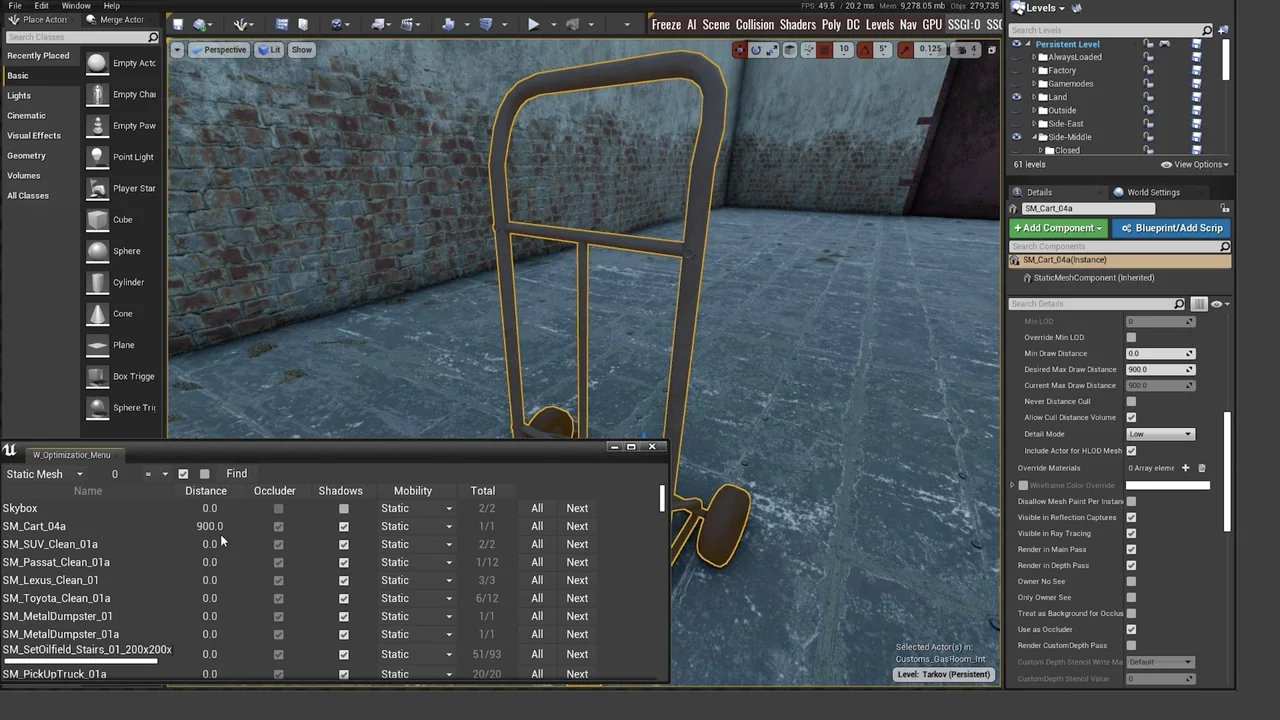
 Widgets & Controls
 Widgets & Controls
 Widgets & Controls