"c68a05d5e51405b3"{"id":"1000118","slug":"floating-foliage-fixer","title":"Floating Foliage Fixer","category":"Widgets \u0026 Controls","engine":"4.26+,5.0+","assetVersion":"","engineVersion":"Engine Version: 4.26+,5.0+","tag":"Widgets \u0026 Controls","accent":"blue","visual":"mech","summary":"A procedural Editor Widget for Unreal Engine 4 that automatically hides the exposed base edges of instanced trees and rocks on uneven terrain.","platform":"Unreal Engine","publishedAt":"2026-06-09T14:49:49.827Z","updatedAt":"2026-06-09T14:49:49.827Z","sourceNotes":[],"fileContents":[],"compatibility":["Unreal Engine","Engine Version: 4.26+,5.0+"],"featuredImage":{"alt":"Floating Foliage Fixer","src":"/wp-content/uploads/published/2026/06/37334d44826a-99a64776-465c-4794-b559-157019ec72e5-3dd92a549f.webp"},"hasDownloadLink":true,"downloads":0,"terms":[{"taxonomy":"category","slug":"widgets-and-controls","name":"Widgets \u0026 Controls"}],"galleryImages":[{"src":"/wp-content/uploads/published/2026/06/e32e819c9df4-8433c75a-b319-40fc-8832-cb53787299dd-df8014e540.webp","alt":"Floating Foliage Fixer"},{"src":"/wp-content/uploads/published/2026/06/657cc1c0cfe3-681a5215-9e4a-40c2-a4e9-1ed53078da3f-029c96e8f6.webp","alt":"Floating Foliage Fixer"},{"src":"/wp-content/uploads/published/2026/06/5be90f40b500-1f257ee0-1c19-4c45-aa99-0ec785b6d7f7-996d9a0db7.webp","alt":"Floating Foliage Fixer"},{"src":"/wp-content/uploads/published/2026/06/6f67b844f0c7-396f0f12-a1a1-4196-9825-d883489c05d7-6b601c786b.webp","alt":"Floating Foliage Fixer"}],"accessPanel":{"kind":"resource","title":"Access this resource","eyebrow":"Free Download","message":"Log in or create a free account to start your download.","fileName":"Content.7z","safetyNote":"Resources are manually reviewed before listing to improve quality and reduce obvious risks.","actionLabel":"Download Free","resourceType":"Resource archive"},"contentHtml":"\u003ch2\u003eGrounding Instanced Meshes on Uneven Terrain\u003c/h2\u003e\n\u003cp\u003eBuilding natural environments in 3D space often involves scattering thousands of instanced meshes across varied topography. When populating hillsides, valleys, and uneven terrain, developers frequently encounter instances that do not conform well to the underlying ground. Trees and rocks placed on a steep gradient often exhibit an ugly open edge where the base of the mesh sticks out horizontally from the descending slope.\u003c/p\u003e\n\u003cp\u003eResolving this visual artifact manually presents a frustrating choice for environment artists. One approach is to sink all the items uniformly into the ground to ensure no bases are exposed, but this pushes assets on flat terrain too deep, altering their intended scale and proportion. Alternatively, developers might attempt to carefully select and manually adjust only the specific instances located on the slopes. This manual selection process is time-consuming and highly inefficient for dense environments. The Floating Foliage Fixer is designed to address exactly that issue, providing a procedural Editor Widget utility to ground these assets automatically without compromising the placement of surrounding instances.\u003c/p\u003e\n\u003ch2\u003eThe Vertex-to-Ground Comparison Logic\u003c/h2\u003e\n\u003cp\u003eTo eliminate the exposed gaps on hillsides, the utility relies on a targeted geometric evaluation rather than simply dropping bounding boxes by an arbitrary distance. The system specifically isolates the lowest group of vertices on each individual foliage instance. By identifying the bottom-most geometry of a tree trunk or a rock formation, the tool establishes a precise reference point for how the asset interacts with the environment.\u003c/p\u003e\n\u003cp\u003eOnce identified, these lowest vertices are compared directly against the ground surface situated immediately beneath them. Based on this localized comparison, the system shifts the asset downward along the vertical axis. The movement is calculated precisely so that it stops only when those specific base vertices are fully hidden beneath the terrain. This vertex-to-ground comparison guarantees that the open base edge is submerged, anchoring the rock or tree naturally into the slope while leaving properly seated assets unaffected.\u003c/p\u003e\n\u003ch2\u003eOperating the Editor Widget Workflow\u003c/h2\u003e\n\u003cp\u003eIntegrating this adjustment into a level design pipeline involves a straightforward Blueprint Editor Widget workflow. Developers can launch the utility directly from their project files by running the widget located at the \u003ccode\u003eContent/FloatingFoliageFixer/FoliageFixer\u003c/code\u003e Directory path. \u003c/p\u003e\n\u003cp\u003eUpon opening the widget, the interface presents the available foliage types currently populated within the scene. Users can selectively tick the specific types of foliage they want to be fixed. This selective targeting means an artist can choose to correct the placement of scattered boulders while deliberately ignoring a specific type of grass or undergrowth. Once the desired foliage types are checked within the interface, pressing the 'fix' button executes the vertex comparison and downward adjustment across all selected instances simultaneously.\u003c/p\u003e\n\u003ch2\u003eManaging Editor Updates and Scene State\u003c/h2\u003e\n\u003cp\u003eEnvironment pipelines often require continuous back-and-forth iteration. While using the engine's native foliage editor to paint new instances, erase unwanted clusters, or adjust density scaling, the internal data regarding scene population changes. The fixer widget relies on an accurate inventory of the scene's current state to function correctly.\u003c/p\u003e\n\u003cp\u003eFor that reason, if any modifications are made within the standard foliage editor, the user must press the 'refresh' button within the utility's interface before attempting to use it again. This refresh action forces the widget to pull the latest placement data, ensuring that subsequent fixes are applied to the most up-to-date arrangement of instances. Bypassing this step after altering the environment can desync the utility from the active scene.\u003c/p\u003e\n\u003ch2\u003eUndo History and Re-applied Positions\u003c/h2\u003e\n\u003cp\u003eNavigating the engine's undo history requires specific attention when utilizing this procedural adjustment. Certain engine actions fundamentally re-apply foliage positions across the environment, which can override the tool's calculations. The most prominent example of this occurs when a developer executes a manual move on a specific foliage item, decides the new placement is incorrect, and triggers an undo command.\u003c/p\u003e\n\u003cp\u003eWhen this undo action is processed, the engine resets the foliage locations to their previous internal state, effectively wiping out the downward vertex adjustments previously generated by the widget. If this location reset occurs, the affected instances will pop back up, once again exposing their open base edges on the slopes. To resolve this, the user must return to the widget and re-apply the fix explicitly to that affected foliage type.\u003c/p\u003e\n\u003ch2\u003eProcessing Capacity and Engine Environment\u003c/h2\u003e\n\u003cp\u003eHandling dense natural environments requires a utility capable of processing thousands of coordinates efficiently. Performance metrics for this blueprint indicate an execution speed of approximately 20,000 foliage instances every 10 seconds. This processing rate is maintained even when evaluating fairly complex foliage assets with higher vertex counts, allowing level designers to run corrections on expansive forested areas or densely packed rocky landscapes rapidly.\u003c/p\u003e\n\u003cp\u003eThe tool has been primarily tested on Windows operating systems, but its underlying Blueprint architecture dictates that it should run successfully anywhere the UE4Editor operates. The package functions purely as an editor utility widget to streamline environment art pipelines. Developers must supply their own 3D tree and rock assets, as the download provides only the procedural foliage fixer itself.\u003c/p\u003e\n\n\u003ch2\u003eRelated Resources Worth Checking\u003c/h2\u003e\n\u003cul\u003e\n\u003cli\u003e\u003ca href=\"https://3dcghub.com/realistic-foliage-pack/\" title=\"Realistic Foliage Pack\"\u003eRealistic Foliage Pack\u003c/a\u003e\u003c/li\u003e\n\u003cli\u003e\u003ca href=\"https://3dcghub.com/shader-world-plugin-procedural-terrain-oceans-foliage-gpu-accelerated/\" title=\"Shader World Plugin : Procedural Terrain, Oceans, Foliage, GPU-accelerated\"\u003eShader World Plugin : Procedural Terrain, Oceans, Foliage, GPU-accelerated\u003c/a\u003e\u003c/li\u003e\n\u003cli\u003e\u003ca href=\"https://3dcghub.com/foliage-pack/\" title=\"Foliage Pack\"\u003eFoliage Pack\u003c/a\u003e\u003c/li\u003e\n\u003cli\u003e\u003ca href=\"https://3dcghub.com/grass-with-simple-interaction/\" title=\"Grass with simple interaction\"\u003eGrass with simple interaction\u003c/a\u003e\u003c/li\u003e\n\u003cli\u003e\u003ca href=\"https://3dcghub.com/shadersource-procedural-water-foliage-tool/\" title=\"SHADERSOURCE - Procedural Water Foliage Tool\"\u003eSHADERSOURCE - Procedural Water Foliage Tool\u003c/a\u003e\u003c/li\u003e\n\u003c/ul\u003e","contentTextLength":5963,"navigation":{"current":1887,"total":3860,"previous":{"id":"1000119","slug":"gltfruntime","title":"glTFRuntime","category":"Engine Tools","platform":"Unreal Engine","updatedAt":"2026-06-09T14:53:46.900Z"},"next":{"id":"1000117","slug":"desert-oasis","title":"Desert Oasis","category":"Desert","platform":"Unreal Engine","updatedAt":"2026-06-09T14:40:55.104Z"}},"relatedResources":[{"id":"8244","slug":"realistic-foliage-pack","title":"Realistic Foliage Pack","category":"Forest \u0026 Jungle","engine":"4.26+,5.0+","assetVersion":"Engine version: 4.26+,5.0+","engineVersion":"4.20","tag":"Forest \u0026 Jungle","accent":"blue","visual":"city","summary":"Create lifelike outdoor environments with this professional collection of photorealistic foliage. This pack includes trees, grass, rocks, and terrain materials for high-quality level design.","platform":"Unreal Engine","publishedAt":"2026-02-23T16:23:17.000Z","updatedAt":"2026-04-19T15:55:31.000Z","sourceNotes":[],"fileContents":[],"compatibility":["Unreal Engine","Engine version: 4.26+,5.0+"],"featuredImage":{"alt":"Realistic Foliage Pack","src":"https://3dcghub.com/wp-content/uploads/2026/02/a3bad1ef-f189-4c7a-979d-8a10fbf1946b.webp"},"hasDownloadLink":true,"downloads":0},{"id":"1001924","slug":"pro-icon-pack","title":"Pro Icon Pack","category":"Widgets \u0026 Controls","engine":"4.26+,5.0+","assetVersion":"","engineVersion":"Engine Version: 4.26+,5.0+","tag":"Widgets \u0026 Controls","accent":"blue","visual":"mech","summary":"Explore the implementation and structural utility of Pro Icon Pack across HUD, inventory, and main menu systems in Unreal Engine interface design.","platform":"Unreal Engine","publishedAt":"2026-10-22T12:00:19.598Z","updatedAt":"2026-10-22T12:00:19.598Z","sourceNotes":[],"fileContents":[],"compatibility":["Unreal Engine","Engine Version: 4.26+,5.0+"],"featuredImage":{"alt":"Pro Icon Pack","src":"/wp-content/uploads/published/2026/10/eaeb4b76f65b-75923046-733b-4bd8-ba53-e45ddc9e2a36-ea737c91b8.webp"},"hasDownloadLink":true,"downloads":0},{"id":"14579","slug":"shader-world-plugin-procedural-terrain-oceans-foliage-gpu-accelerated","title":"Shader World Plugin : Procedural Terrain, Oceans, Foliage, GPU-accelerated","category":"Engine Tools","engine":"4.27,5.0 - 5.4","assetVersion":"Engine version: 4.27,5.0 - 5.4","engineVersion":"4.26","tag":"Engine Tools","accent":"blue","visual":"character","summary":"Shader World Plugin offers a high-performance alternative to native Unreal Engine landscapes, utilizing GPU acceleration for real-time world generation. It supports massive scales and is fully editable within packaged games.","platform":"Unreal Engine","publishedAt":"2026-03-11T18:34:57.000Z","updatedAt":"2026-04-19T15:45:44.000Z","sourceNotes":[],"fileContents":[],"compatibility":["Unreal Engine","Engine version: 4.27,5.0 - 5.4"],"featuredImage":{"alt":"Shader World Plugin : Procedural Terrain, Oceans, Foliage, GPU-accelerated","src":"https://3dcghub.com/wp-content/uploads/2026/03/0922900f-bc2e-416c-a177-0cef84bcdbc8.webp"},"hasDownloadLink":true,"downloads":0}]}
Widgets & Controls
Floating Foliage Fixer
A procedural Editor Widget for Unreal Engine 4 that automatically hides the exposed base edges of instanced trees and rocks on uneven terrain.
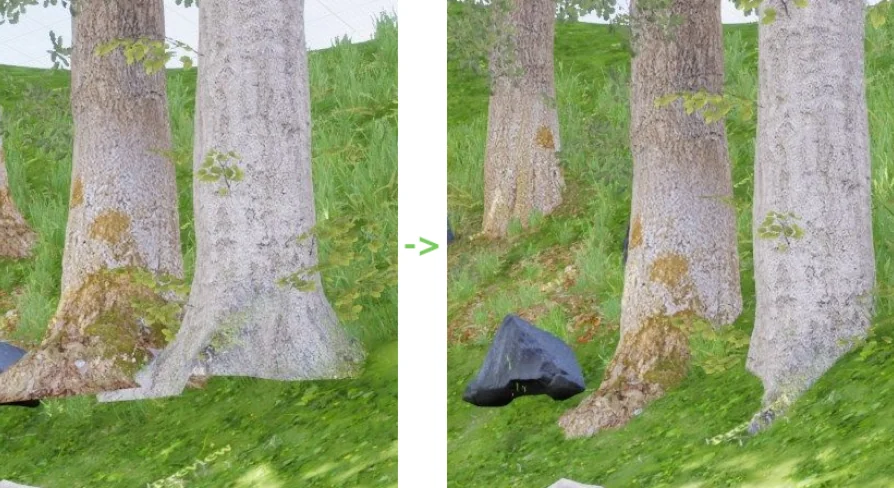
Building natural environments in 3D space often involves scattering thousands of instanced meshes across varied topography. When populating hillsides, valleys, and uneven terrain, developers frequently encounter instances that do not conform well to the underlying ground. Trees and rocks placed on a steep gradient often exhibit an ugly open edge where the base of the mesh sticks out horizontally from the descending slope.
Resolving this visual artifact manually presents a frustrating choice for environment artists. One approach is to sink all the items uniformly into the ground to ensure no bases are exposed, but this pushes assets on flat terrain too deep, altering their intended scale and proportion. Alternatively, developers might attempt to carefully select and manually adjust only the specific instances located on the slopes. This manual selection process is time-consuming and highly inefficient for dense environments. The Floating Foliage Fixer is designed to address exactly that issue, providing a procedural Editor Widget utility to ground these assets automatically without compromising the placement of surrounding instances.
The Vertex-to-Ground Comparison Logic
To eliminate the exposed gaps on hillsides, the utility relies on a targeted geometric evaluation rather than simply dropping bounding boxes by an arbitrary distance. The system specifically isolates the lowest group of vertices on each individual foliage instance. By identifying the bottom-most geometry of a tree trunk or a rock formation, the tool establishes a precise reference point for how the asset interacts with the environment.
Once identified, these lowest vertices are compared directly against the ground surface situated immediately beneath them. Based on this localized comparison, the system shifts the asset downward along the vertical axis. The movement is calculated precisely so that it stops only when those specific base vertices are fully hidden beneath the terrain. This vertex-to-ground comparison guarantees that the open base edge is submerged, anchoring the rock or tree naturally into the slope while leaving properly seated assets unaffected.
Operating the Editor Widget Workflow
Integrating this adjustment into a level design pipeline involves a straightforward Blueprint Editor Widget workflow. Developers can launch the utility directly from their project files by running the widget located at the Content/FloatingFoliageFixer/FoliageFixer Directory path.
Upon opening the widget, the interface presents the available foliage types currently populated within the scene. Users can selectively tick the specific types of foliage they want to be fixed. This selective targeting means an artist can choose to correct the placement of scattered boulders while deliberately ignoring a specific type of grass or undergrowth. Once the desired foliage types are checked within the interface, pressing the 'fix' button executes the vertex comparison and downward adjustment across all selected instances simultaneously.
Managing Editor Updates and Scene State
Environment pipelines often require continuous back-and-forth iteration. While using the engine's native foliage editor to paint new instances, erase unwanted clusters, or adjust density scaling, the internal data regarding scene population changes. The fixer widget relies on an accurate inventory of the scene's current state to function correctly.
For that reason, if any modifications are made within the standard foliage editor, the user must press the 'refresh' button within the utility's interface before attempting to use it again. This refresh action forces the widget to pull the latest placement data, ensuring that subsequent fixes are applied to the most up-to-date arrangement of instances. Bypassing this step after altering the environment can desync the utility from the active scene.
Undo History and Re-applied Positions
Navigating the engine's undo history requires specific attention when utilizing this procedural adjustment. Certain engine actions fundamentally re-apply foliage positions across the environment, which can override the tool's calculations. The most prominent example of this occurs when a developer executes a manual move on a specific foliage item, decides the new placement is incorrect, and triggers an undo command.
When this undo action is processed, the engine resets the foliage locations to their previous internal state, effectively wiping out the downward vertex adjustments previously generated by the widget. If this location reset occurs, the affected instances will pop back up, once again exposing their open base edges on the slopes. To resolve this, the user must return to the widget and re-apply the fix explicitly to that affected foliage type.
Processing Capacity and Engine Environment
Handling dense natural environments requires a utility capable of processing thousands of coordinates efficiently. Performance metrics for this blueprint indicate an execution speed of approximately 20,000 foliage instances every 10 seconds. This processing rate is maintained even when evaluating fairly complex foliage assets with higher vertex counts, allowing level designers to run corrections on expansive forested areas or densely packed rocky landscapes rapidly.
The tool has been primarily tested on Windows operating systems, but its underlying Blueprint architecture dictates that it should run successfully anywhere the UE4Editor operates. The package functions purely as an editor utility widget to streamline environment art pipelines. Developers must supply their own 3D tree and rock assets, as the download provides only the procedural foliage fixer itself.
 Widgets & Controls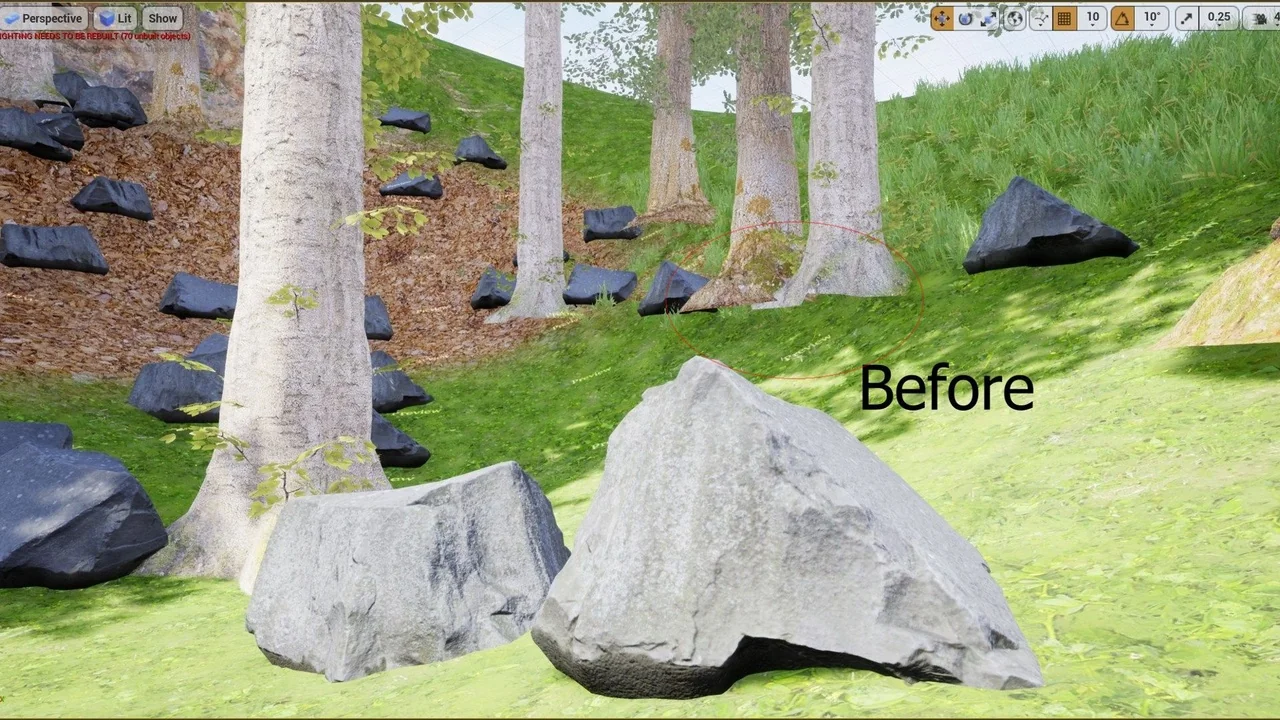
 Forest & Jungle
 Widgets & Controls
 Engine Tools