"5da73d49ff33a5b1"{"id":"1002375","slug":"nana","title":"Nana","category":"Humans","engine":"4.19+,5.0+","assetVersion":"","engineVersion":"Engine Version: 4.19+,5.0+","tag":"Humans","accent":"blue","visual":"mech","summary":"Nana is a low-poly anime knight with separate face, skin, hair, and armor textures, easy color changes, a Unity3D animation example, and UE 4.19+/5.0+.","platform":"Unreal Engine","indexPolicy":"index","publishedAt":"2026-11-09T18:45:08.233Z","updatedAt":"2026-11-09T18:45:08.233Z","sourceNotes":[],"fileContents":[],"compatibility":["Unreal Engine","Engine Version: 4.19+,5.0+"],"featuredImage":{"alt":"Nana","src":"/wp-content/uploads/published/2026/11/7c229244895a-589ec8fc-9b35-4c43-8c72-006e856a2a8d-e5353152c3.webp"},"hasDownloadLink":true,"downloads":0,"terms":[{"taxonomy":"category","slug":"humans","name":"Humans"}],"galleryImages":[{"src":"/wp-content/uploads/published/2026/11/17379fa35310-945a2611-fe69-455d-a29f-0a5c4b28284f-c805236fb9.webp","alt":"Nana"},{"src":"/wp-content/uploads/published/2026/11/6aff4971d551-8f24f0ef-8e3c-4bdb-bbf4-d80ab6f76394-9068d4f23d.webp","alt":"Nana"}],"accessPanel":{"kind":"resource","title":"Get this resource","eyebrow":"Free resource","message":"Download this resource in your browser.","fileName":"Content.7z","safetyNote":"Resources are manually reviewed before listing to improve quality and reduce obvious risks.","actionLabel":"Get this resource","resourceType":"Resource archive","versions":[]},"contentHtml":"\u003ch2\u003eThe Parts That Make Up Nana\u003c/h2\u003e\n\u003cp\u003eNana is a low-poly anime knight character built for stylized fantasy scenes, and its most concrete structure is the way the character is split for texturing. The face, skin, hair, and armor each have separate textures. That division is the practical center of the character: it keeps the knight readable as an anime and cartoon figure while giving a creator direct control over the color of each visible area. The tag set around Nana—lowpoly, fantasy, Japan, warrior, anime, cartoon, NPC, knight, hero, sword, guard—describes the role the character is meant to fill rather than a generic humanoid base.\u003c/p\u003e\n\u003cp\u003eThe SD Knight phrasing in the name places Nana in a stylized knight role. In a scene, that can read as a guard at a gate, a sword-carrying NPC in a village, or a hero unit in a small anime-styled roster. Those are different framing choices around a character already tagged for knight, warrior, guard, and hero roles. The low-poly label matters for scenes that need to keep character geometry light while retaining a clear cartoon silhouette.\u003c/p\u003e\n\u003ch2\u003eNana's Texture Split: Face, Skin, Hair, and Armor\u003c/h2\u003e\n\u003cp\u003eSeparate textures for face, skin, hair, and armor are the clearest customization route in Nana. A creator can treat each area as its own color zone instead of repainting one merged character sheet. Want a different hair color? The hair texture is separate. Want the armor to sit in a different palette from the skin? Those are separate surfaces in the texturing setup. The colors are easy to customize, and the separation is what makes that practical rather than vague.\u003c/p\u003e\n\u003cp\u003eFor anime and cartoon projects, this kind of split is useful because the face can stay consistent while the outfit changes. Nana's armor can move toward a cooler metal palette while the face and skin keep the same values. Hair can be used to distinguish one NPC from another without touching the armor. In a guard-heavy scene, the same base knight can be recolored across several posts, and the separate armor texture gives each variant a readable rank or faction color without rebuilding the character.\u003c/p\u003e\n\u003cp\u003eThe four-way split also helps when a project has a tight color script. Because face and skin are separate from hair and armor, a palette change on the outfit does not automatically drag the character's face with it. The low-poly tag and the separate texture zones work together: the model stays light, while the color work remains modular enough for a small cast of variants. The value is in the texture organization itself.\u003c/p\u003e\n\u003ch2\u003eAnimation Checks and the Unity3D Example\u003c/h2\u003e\n\u003cp\u003eNana includes an animation check, and the animation example is shown in Unity3D. That detail is useful for anyone evaluating the character for a real-time scene: the animated presentation is tied to a Unity3D example, not to an Unreal-specific setup. The animation side should be reviewed in that context, especially if the target project is Unreal Engine. The Unity3D example is the animation presentation for the character, not a universal animation package.\u003c/p\u003e\n\u003cp\u003eThe Unreal Engine side comes with an important limitation. The UE version does not come with the script and Toon shader. A team moving Nana into Unreal Engine 4.19+ or 5.0+ should expect to handle the script and toon-shading setup on its own rather than receiving those pieces as part of the character. The model and its separated textures remain the core; the Unity3D animation example and the Unreal version are not identical packages. For a project that already has its own toon pipeline, that distinction is mostly a planning note. For a project expecting a ready-made Unreal toon setup, it is the first thing to check.\u003c/p\u003e\n\u003cp\u003eThe version range is explicit: 4.19+ and 5.0+. Nana is not presented as a version-agnostic character package. Anyone integrating it into an Unreal project should confirm that the target engine version sits in that range before building an animation or shading plan around it. The compatibility note also points to Yippy Kawaii; if that name is part of the project's existing toolset, the note is relevant to the integration check.\u003c/p\u003e\n\u003ch2\u003eUsing Nana as an NPC, Guard, or Low-Poly Hero\u003c/h2\u003e\n\u003cp\u003eThe tag list gives a practical map of where Nana fits. Lowpoly and fantasy set the technical and genre frame. Japan, anime, and cartoon describe the visual language. Warrior, knight, hero, sword, and guard describe the character's role. NPC is the connective tissue: Nana can be a background guard, a quest-giving knight, a named hero, or a sword-bearing villager depending on how the scene frames the character. The asset does not need to be recast as a generic humanoid to be useful; its identity as an anime knight is the point.\u003c/p\u003e\n\u003cp\u003eIn a low-poly fantasy game, Nana can hold a gate, stand in a castle courtyard, or populate a village street as a guard. The separate armor texture makes it possible to give a group of guards a shared silhouette with small color differences. In an anime-styled RPG, the same character can step forward as a hero or a named NPC while the face and hair textures keep the character recognizable. In a cartoon project, the low-poly form and clear color zones keep the knight readable at a distance without relying on dense geometry.\u003c/p\u003e\n\u003cp\u003eThe sword and guard tags are especially direct. A guard character often needs to read quickly in a scene, and Nana's knight role supports that. A sword-carrying hero needs a silhouette that works in motion; the Unity3D animation example is the place to judge that. A background NPC needs to sit comfortably in a crowd; the low-poly label is the relevant constraint there. These are not separate products—they are different uses of the same character and its texture split.\u003c/p\u003e\n\u003ch2\u003eVersion and Shader Notes Before You Integrate Nana\u003c/h2\u003e\n\u003cp\u003eBefore Nana goes into an Unreal project, the version and shader notes are the practical checklist. The supported versions are 4.19+ and 5.0+. The UE version does not include the script or the Toon shader. The animation example is shown in Unity3D. Those three facts define the integration boundary. A team that wants the Unity3D presentation should evaluate the character there; a team that wants an Unreal version should plan for its own script and toon-shader work. The separated face, skin, hair, and armor textures travel with the character, but the Unreal package is not a turnkey toon setup.\u003c/p\u003e\n\u003cp\u003eYippy Kawaii compatibility is the other named point to verify. If the project already uses Yippy Kawaii, the compatibility note gives a starting reference. If it does not, the note is still useful as a boundary marker: it tells you which named compatibility path the character is associated with. The goal is not to assume that every toon workflow is covered; it is to match Nana's listed compatibility and version range to the project in front of you.\u003c/p\u003e\n\u003cp\u003eThe color customization path is the part that stays consistent across those checks. Whatever engine or shading route is used, the face, skin, hair, and armor remain separate texture areas. That gives a creator a straightforward way to adapt Nana's palette without rebuilding the character. The low-poly anime knight identity, the guard and hero tags, the Unity3D animation example, and the Unreal version caveat all point to the same conclusion: Nana is most useful when the project has a clear plan for its own animation and toon setup, and when the character's separated textures are used to drive color variants across a cast.\u003c/p\u003e\n\n\u003ch2\u003eExplore Similar Assets\u003c/h2\u003e\n\u003cul\u003e\n\u003cli\u003e\u003ca href=\"https://3dcghub.com/k-pop-series-sun/\" rel=\"noopener noreferrer\"\u003eK-POP SERIES - Sun\u003c/a\u003e\u003c/li\u003e\n\u003cli\u003e\u003ca href=\"https://3dcghub.com/k-pop-series-lola/\" rel=\"noopener noreferrer\"\u003eK-POP SERIES - Lola\u003c/a\u003e\u003c/li\u003e\n\u003cli\u003e\u003ca href=\"https://3dcghub.com/anime-girl-cleric/\" rel=\"noopener noreferrer\"\u003eAnime Girl Cleric\u003c/a\u003e\u003c/li\u003e\n\u003cli\u003e\u003ca href=\"https://3dcghub.com/female-mannequin-character/\" rel=\"noopener noreferrer\"\u003eFemale Mannequin Character\u003c/a\u003e\u003c/li\u003e\n\u003cli\u003e\u003ca href=\"https://3dcghub.com/modular-elf-archer-girl/\" rel=\"noopener noreferrer\"\u003eModular Elf Archer Girl\u003c/a\u003e\u003c/li\u003e\n\u003c/ul\u003e","contentTextLength":7521,"navigation":{"current":45,"total":4340,"previous":{"id":"1002376","slug":"yuko-stylized-character","title":"Yuko - Stylized Character","category":"Characters \u0026 Creatures","platform":"Unreal Engine","updatedAt":"2026-11-09T18:46:24.480Z"},"next":{"id":"1002374","slug":"modular-anime-character-girl","title":"Modular Anime Character (girl)","category":"Characters \u0026 Creatures","platform":"Unreal Engine","updatedAt":"2026-11-09T18:44:39.374Z"}},"relatedResources":[{"id":"1002391","slug":"mechanic-girl","title":"Mechanic Girl","category":"Humans","engine":"4.19+,5.0+","assetVersion":"","engineVersion":"Engine Version: 4.19+,5.0+","tag":"Humans","accent":"blue","visual":"mech","summary":"Explore the technical setup of Mechanic Girl, featuring modular meshes, ARKit facial blendshapes, 4K MatID textures, and multi-engine animation support.","platform":"Unreal Engine","indexPolicy":"index","publishedAt":"2026-11-10T04:16:59.332Z","updatedAt":"2026-11-10T04:16:59.332Z","sourceNotes":[],"fileContents":[],"compatibility":["Unreal Engine","Engine Version: 4.19+,5.0+"],"featuredImage":{"alt":"Mechanic Girl","src":"/wp-content/uploads/published/2026/11/ba2aa9f7552c-8c1f9565-999a-4b44-9c6a-310667e3adf7-68e6066e4e.webp"},"hasDownloadLink":true,"downloads":0},{"id":"1001813","slug":"k-pop-series-sun","title":"K-POP SERIES - Sun","category":"Humans","engine":"4.19+,5.0+","assetVersion":"","engineVersion":"Engine Version: 4.19+,5.0+","tag":"Humans","accent":"blue","visual":"mech","summary":"Explore the K-POP SERIES - Sun 3D character featuring 3 modular outfits, 52 Apple Blendshapes, 4K packed textures, and a UE4 Mannequin compatible rig.","platform":"Unreal Engine","indexPolicy":"index","publishedAt":"2026-10-21T08:07:28.503Z","updatedAt":"2026-10-21T08:07:28.503Z","sourceNotes":[],"fileContents":[],"compatibility":["Unreal Engine","Engine Version: 4.19+,5.0+"],"featuredImage":{"alt":"K-POP SERIES - Sun","src":"/wp-content/uploads/published/2026/10/83ca5751ce7a-5a057e83-5982-45c2-912b-4df36281063c-669168bb3d.webp"},"hasDownloadLink":true,"downloads":2},{"id":"1002405","slug":"samurai-girl-tomoe","title":"Samurai Girl Tomoe","category":"Humans","engine":"4.19+,5.0+","assetVersion":"","engineVersion":"Engine Version: 4.19+,5.0+","tag":"Humans","accent":"blue","visual":"mech","summary":"Modular 3D warrior character Samurai Girl Tomoe featuring 52 ARKit blendshapes, 4K packed textures, and an Epic Skeleton rig for action games.","platform":"Unreal Engine","indexPolicy":"index","publishedAt":"2026-11-10T07:07:18.175Z","updatedAt":"2026-11-10T07:07:18.175Z","sourceNotes":[],"fileContents":[],"compatibility":["Unreal Engine","Engine Version: 4.19+,5.0+"],"featuredImage":{"alt":"Samurai Girl Tomoe","src":"/wp-content/uploads/published/2026/11/5c46690700c0-95be6877-7081-4ad3-b57c-fd636373f3cb-40e5943225.webp"},"hasDownloadLink":true,"downloads":0}]}
Humans
Nana
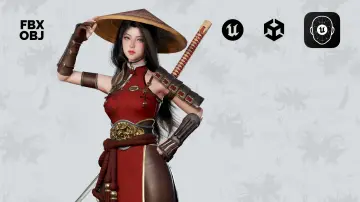
Nana is a low-poly anime knight with separate face, skin, hair, and armor textures, easy color changes, a Unity3D animation example, and UE 4.19+/5.0+.
Category:Unreal Engine,HumansPlatform: Unreal EngineEngine Version: 4.19+,5.0+Published: Nov 9, 2026
Humans
Resource overview
The Parts That Make Up Nana
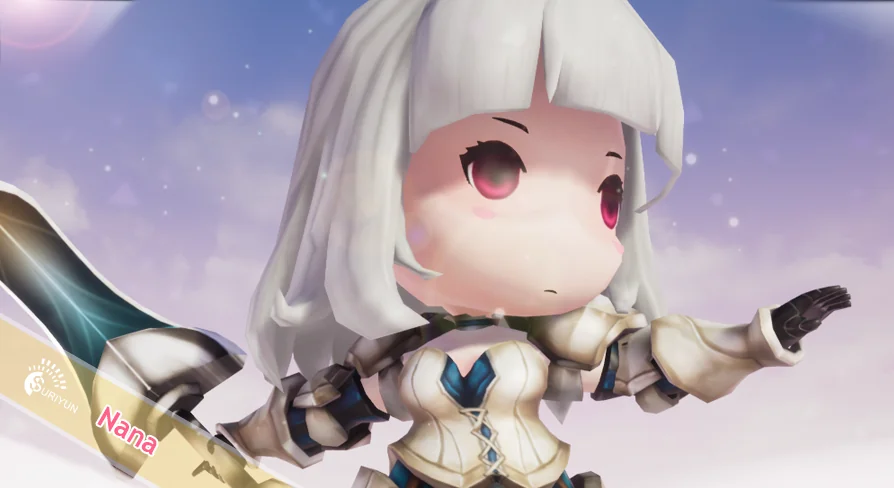
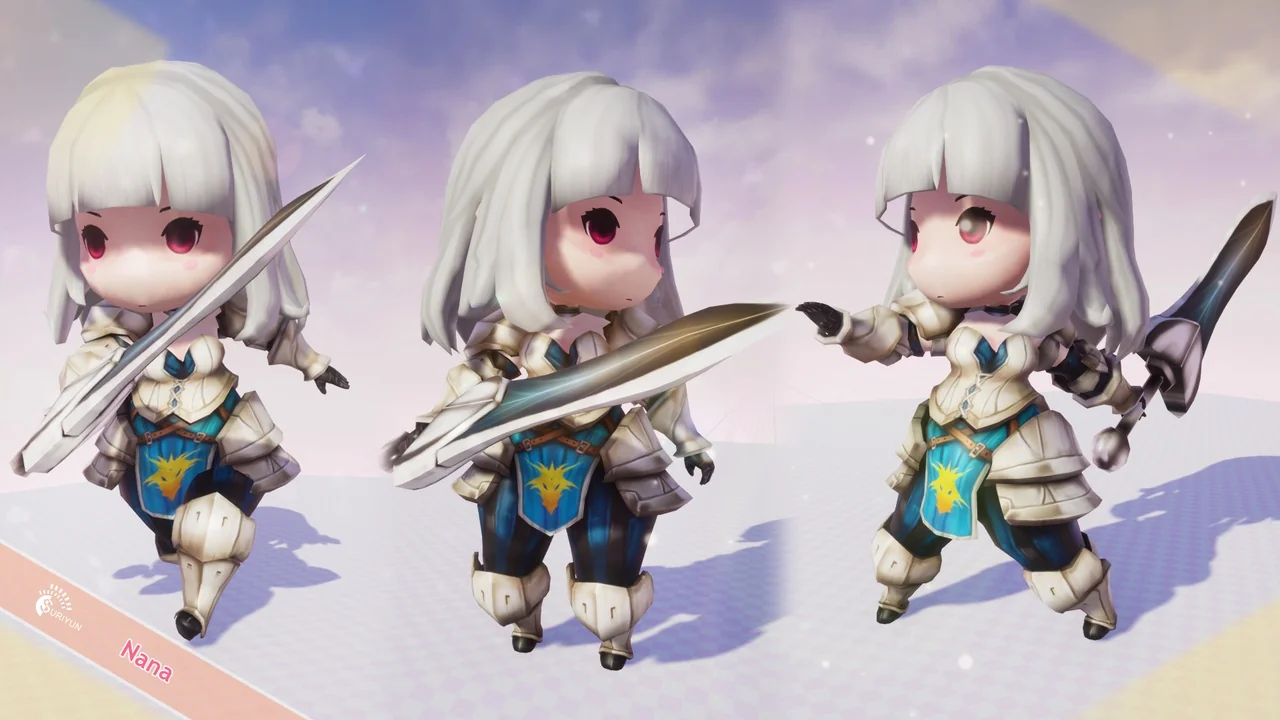
Nana is a low-poly anime knight character built for stylized fantasy scenes, and its most concrete structure is the way the character is split for texturing. The face, skin, hair, and armor each have separate textures. That division is the practical center of the character: it keeps the knight readable as an anime and cartoon figure while giving a creator direct control over the color of each visible area. The tag set around Nana—lowpoly, fantasy, Japan, warrior, anime, cartoon, NPC, knight, hero, sword, guard—describes the role the character is meant to fill rather than a generic humanoid base.
The SD Knight phrasing in the name places Nana in a stylized knight role. In a scene, that can read as a guard at a gate, a sword-carrying NPC in a village, or a hero unit in a small anime-styled roster. Those are different framing choices around a character already tagged for knight, warrior, guard, and hero roles. The low-poly label matters for scenes that need to keep character geometry light while retaining a clear cartoon silhouette.
Nana's Texture Split: Face, Skin, Hair, and Armor
Separate textures for face, skin, hair, and armor are the clearest customization route in Nana. A creator can treat each area as its own color zone instead of repainting one merged character sheet. Want a different hair color? The hair texture is separate. Want the armor to sit in a different palette from the skin? Those are separate surfaces in the texturing setup. The colors are easy to customize, and the separation is what makes that practical rather than vague.
For anime and cartoon projects, this kind of split is useful because the face can stay consistent while the outfit changes. Nana's armor can move toward a cooler metal palette while the face and skin keep the same values. Hair can be used to distinguish one NPC from another without touching the armor. In a guard-heavy scene, the same base knight can be recolored across several posts, and the separate armor texture gives each variant a readable rank or faction color without rebuilding the character.
The four-way split also helps when a project has a tight color script. Because face and skin are separate from hair and armor, a palette change on the outfit does not automatically drag the character's face with it. The low-poly tag and the separate texture zones work together: the model stays light, while the color work remains modular enough for a small cast of variants. The value is in the texture organization itself.
Animation Checks and the Unity3D Example
Nana includes an animation check, and the animation example is shown in Unity3D. That detail is useful for anyone evaluating the character for a real-time scene: the animated presentation is tied to a Unity3D example, not to an Unreal-specific setup. The animation side should be reviewed in that context, especially if the target project is Unreal Engine. The Unity3D example is the animation presentation for the character, not a universal animation package.
The Unreal Engine side comes with an important limitation. The UE version does not come with the script and Toon shader. A team moving Nana into Unreal Engine 4.19+ or 5.0+ should expect to handle the script and toon-shading setup on its own rather than receiving those pieces as part of the character. The model and its separated textures remain the core; the Unity3D animation example and the Unreal version are not identical packages. For a project that already has its own toon pipeline, that distinction is mostly a planning note. For a project expecting a ready-made Unreal toon setup, it is the first thing to check.
The version range is explicit: 4.19+ and 5.0+. Nana is not presented as a version-agnostic character package. Anyone integrating it into an Unreal project should confirm that the target engine version sits in that range before building an animation or shading plan around it. The compatibility note also points to Yippy Kawaii; if that name is part of the project's existing toolset, the note is relevant to the integration check.
Using Nana as an NPC, Guard, or Low-Poly Hero
The tag list gives a practical map of where Nana fits. Lowpoly and fantasy set the technical and genre frame. Japan, anime, and cartoon describe the visual language. Warrior, knight, hero, sword, and guard describe the character's role. NPC is the connective tissue: Nana can be a background guard, a quest-giving knight, a named hero, or a sword-bearing villager depending on how the scene frames the character. The asset does not need to be recast as a generic humanoid to be useful; its identity as an anime knight is the point.
In a low-poly fantasy game, Nana can hold a gate, stand in a castle courtyard, or populate a village street as a guard. The separate armor texture makes it possible to give a group of guards a shared silhouette with small color differences. In an anime-styled RPG, the same character can step forward as a hero or a named NPC while the face and hair textures keep the character recognizable. In a cartoon project, the low-poly form and clear color zones keep the knight readable at a distance without relying on dense geometry.
The sword and guard tags are especially direct. A guard character often needs to read quickly in a scene, and Nana's knight role supports that. A sword-carrying hero needs a silhouette that works in motion; the Unity3D animation example is the place to judge that. A background NPC needs to sit comfortably in a crowd; the low-poly label is the relevant constraint there. These are not separate products—they are different uses of the same character and its texture split.
Version and Shader Notes Before You Integrate Nana
Before Nana goes into an Unreal project, the version and shader notes are the practical checklist. The supported versions are 4.19+ and 5.0+. The UE version does not include the script or the Toon shader. The animation example is shown in Unity3D. Those three facts define the integration boundary. A team that wants the Unity3D presentation should evaluate the character there; a team that wants an Unreal version should plan for its own script and toon-shader work. The separated face, skin, hair, and armor textures travel with the character, but the Unreal package is not a turnkey toon setup.
Yippy Kawaii compatibility is the other named point to verify. If the project already uses Yippy Kawaii, the compatibility note gives a starting reference. If it does not, the note is still useful as a boundary marker: it tells you which named compatibility path the character is associated with. The goal is not to assume that every toon workflow is covered; it is to match Nana's listed compatibility and version range to the project in front of you.
The color customization path is the part that stays consistent across those checks. Whatever engine or shading route is used, the face, skin, hair, and armor remain separate texture areas. That gives a creator a straightforward way to adapt Nana's palette without rebuilding the character. The low-poly anime knight identity, the guard and hero tags, the Unity3D animation example, and the Unreal version caveat all point to the same conclusion: Nana is most useful when the project has a clear plan for its own animation and toon setup, and when the character's separated textures are used to drive color variants across a cast.
 Humans
 Humans
 Humans
 Humans