"5da73d49ff33a5b1"{"id":"1002376","slug":"yuko-stylized-character","title":"Yuko - Stylized Character","category":"Characters \u0026 Creatures","engine":"4.21+,5.0+","assetVersion":"","engineVersion":"Engine Version: 4.21+,5.0+","tag":"Characters","accent":"blue","visual":"character","summary":"Yuko is a stylized low-poly fantasy heroine with 19 animations, armed and unarmed attacks, jump and locomotion states, PBR materials, and an underwear mesh.","platform":"Unreal Engine","indexPolicy":"index","publishedAt":"2026-11-09T18:46:24.480Z","updatedAt":"2026-11-09T18:46:24.480Z","sourceNotes":[],"fileContents":[],"compatibility":["Unreal Engine","Engine Version: 4.21+,5.0+"],"featuredImage":{"alt":"Yuko - Stylized Character","src":"/wp-content/uploads/published/2026/11/8bb2ba81acd4-a3722cc0-2412-4993-a5cd-bd762b6043d4-539eb9d852.webp"},"hasDownloadLink":true,"downloads":0,"terms":[{"taxonomy":"category","slug":"characters-and-creatures","name":"Characters \u0026 Creatures"}],"galleryImages":[{"src":"/wp-content/uploads/published/2026/11/e7b14d8cc4af-650ecf9d-6e65-4b80-959b-795724442fee-18609f26a6.webp","alt":"Yuko - Stylized Character"},{"src":"/wp-content/uploads/published/2026/11/55d07ab32ea3-bcf2fb43-a403-4214-8075-ad57588eaba7-5e5ababedf.webp","alt":"Yuko - Stylized Character"},{"src":"/wp-content/uploads/published/2026/11/bc36b826717c-64dea081-43a5-4dbb-b9c3-fb0e1199f57d-b6738fb2bc.webp","alt":"Yuko - Stylized Character"},{"src":"/wp-content/uploads/published/2026/11/1482c05f14e2-677cf136-cf63-43fe-993d-cf38a386e86b-14782fb1e0.webp","alt":"Yuko - Stylized Character"},{"src":"/wp-content/uploads/published/2026/11/577604d59235-5b2c1217-779d-40fb-96b6-2092fd40982c-7f79081da5.webp","alt":"Yuko - Stylized Character"},{"src":"/wp-content/uploads/published/2026/11/0d6c3ecafd2d-2762bdb8-f1fa-42df-a87a-030f45f72ed4-9f83d0d9bf.webp","alt":"Yuko - Stylized Character"},{"src":"/wp-content/uploads/published/2026/11/115404cdcfe1-986cb3e1-7f8f-4d2e-8efd-6a038a5b808d-f1389895af.webp","alt":"Yuko - Stylized Character"},{"src":"/wp-content/uploads/published/2026/11/643f3bbaa39e-77f667de-ca3b-4274-80fb-dcf0048e146c-23995e3abe.webp","alt":"Yuko - Stylized Character"},{"src":"/wp-content/uploads/published/2026/11/c96558b7b61c-eed85a68-608b-4b54-aab6-517ec66616ee-b674de9215.webp","alt":"Yuko - Stylized Character"}],"accessPanel":{"kind":"resource","title":"Get this resource","eyebrow":"Free resource","message":"Download this resource in your browser.","fileName":"Content.7z","safetyNote":"Resources are manually reviewed before listing to improve quality and reduce obvious risks.","actionLabel":"Get this resource","resourceType":"Resource archive","versions":[]},"contentHtml":"\u003cp\u003eA stylized hero is easy to show in a still. The handoff gets harder when combat, traversal, and weapon states have to be wired. Yuko - Stylized Character arrives with a named list of 19 animations, two color materials, and a mesh update, which makes the character usable as a state map rather than a model that still needs its action set defined.\u003c/p\u003e \u003ch2\u003eYuko's 19-Clip Animation Map\u003c/h2\u003e\n\u003cp\u003eThe animation count is 19. The names divide into attack, weapon handling, idle, jump, and locomotion groups. That division is the useful part for implementation: each group belongs to a different area of a character controller, and the clip names can be matched to transitions without guesswork.\u003c/p\u003e\n\u003cp\u003eCombat is split into armed and unarmed sets. The armed group contains \u003ccode\u003eAttack_armed_01\u003c/code\u003e, \u003ccode\u003eAttack_armed_02\u003c/code\u003e, and \u003ccode\u003eAttack_armed_fail\u003c/code\u003e. The unarmed group mirrors that structure with \u003ccode\u003eAttack_unarmed_01\u003c/code\u003e, \u003ccode\u003eAttack_unarmed_02\u003c/code\u003e, and \u003ccode\u003eAttack_unarmed_fail\u003c/code\u003e. Two regular attacks and a fail outcome exist for each stance. The fail clip is separate from the two attack clips, so a character can branch to a failed action instead of reusing a hit or a neutral state.\u003c/p\u003e\n\u003cp\u003eWeapon handling is covered by \u003ccode\u003eEquip\u003c/code\u003e And \u003ccode\u003eUnequip\u003c/code\u003e. \u003ccode\u003eIdle\u003c/code\u003e Provides the neutral standing state. Jump has four entries: \u003ccode\u003eJump_start\u003c/code\u003e, \u003ccode\u003eJump_air\u003c/code\u003e, \u003ccode\u003eJump_land\u003c/code\u003e, and \u003ccode\u003eJump_land_run\u003c/code\u003e. Locomotion has three run clips and three walk clips: \u003ccode\u003eRun_f\u003c/code\u003e, \u003ccode\u003eRun_fl\u003c/code\u003e, \u003ccode\u003eRun_fr\u003c/code\u003e, \u003ccode\u003eWalk_f\u003c/code\u003e, \u003ccode\u003eWalk_fl\u003c/code\u003e, and \u003ccode\u003eWalk_fr\u003c/code\u003e. The suffixes are consistent across the two sets, which keeps a directional movement state readable during setup.\u003c/p\u003e \u003ch2\u003eArming and Disarming Yuko in Combat\u003c/h2\u003e\n\u003cp\u003e\u003ccode\u003eEquip\u003c/code\u003e And \u003ccode\u003eUnequip\u003c/code\u003e Are the bridge between the armed and unarmed attack groups. A practical state flow uses them to decide which attack family is available: after \u003ccode\u003eEquip\u003c/code\u003e, the two armed attacks can drive the combat branch; after \u003ccode\u003eUnequip\u003c/code\u003e, the two unarmed attacks take over. The fail clips sit alongside those branches, giving each stance its own unsuccessful outcome.\u003c/p\u003e\n\u003cp\u003eThe animation blueprint and script tags point to a logic-facing setup rather than a set of clips that must be wired from scratch. That matters when the character is going into an existing controller. The named states can be mapped to a state machine, and the weapon transition can be kept separate from the attack transitions. \u003ccode\u003eIdle\u003c/code\u003e Remains the neutral anchor between combat and movement, so the character has a clear state to return to when an attack, equip, or unequip action finishes.\u003c/p\u003e \u003ch2\u003eYuko's Locomotion and Jump Sequence\u003c/h2\u003e\n\u003cp\u003eThe locomotion set covers forward, forward-left, and forward-right movement in both walk and run. \u003ccode\u003eWalk_f\u003c/code\u003e, \u003ccode\u003eWalk_fl\u003c/code\u003e, and \u003ccode\u003eWalk_fr\u003c/code\u003e Form the walking trio; \u003ccode\u003eRun_f\u003c/code\u003e, \u003ccode\u003eRun_fl\u003c/code\u003e, and \u003ccode\u003eRun_fr\u003c/code\u003e Form the running trio. These are separate cycles for the two speeds, not a single direction reused across both. A controller can choose a clip by speed and by the lateral direction of input.\u003c/p\u003e\n\u003cp\u003eThe jump chain is split into takeoff, airborne, and landing states. \u003ccode\u003eJump_start\u003c/code\u003e Handles the beginning, \u003ccode\u003eJump_air\u003c/code\u003e Covers the airborne portion, and \u003ccode\u003eJump_land\u003c/code\u003e Provides the landing. \u003ccode\u003eJump_land_run\u003c/code\u003e Gives the landing a running continuation. That separation lets the jump logic resolve into a standing or moving state without collapsing the whole jump into one clip.\u003c/p\u003e\n\u003cp\u003eFor a stylized character in a fantasy roster, this is enough to build basic combat traversal without treating every movement as a special case. The clips are named by direction and phase, so the transition rules can stay close to the labels. The set does not require a new naming convention to be invented before it can be used.\u003c/p\u003e \u003ch2\u003eThe Yuko Material Set and Mesh Update\u003c/h2\u003e\n\u003cp\u003eTwo different color materials are available for the character. The package also lists five textures and two materials, and the update adds an underwear mesh. Those details affect how the character is prepared before it enters a scene: the material variants need to be checked against the mesh, and the added underwear mesh needs to be accounted for in the final body setup.\u003c/p\u003e\n\u003cp\u003eThe PBR tag places the material work in a physically based workflow, while the low-poly tag names the geometry style. Both tags are relevant to the way the character reads in a stylized fantasy scene. The two color materials provide a visual choice at the material level; the five textures and two materials describe the texture and material count that accompanies the model. The underwear mesh is a mesh-level addition, separate from the animation list, so it belongs in the assembly check rather than the state-machine check.\u003c/p\u003e\n\u003cp\u003eFor a character artist or technical artist, the material check is straightforward: confirm the two color assignments, inspect the five textures, and verify that the added underwear mesh sits correctly with the rest of the body. The package then offers a character that can be presented in either of two color treatments without changing the animation set.\u003c/p\u003e \u003ch2\u003eVersion and Blueprint Details Behind Yuko\u003c/h2\u003e\n\u003cp\u003eVersion support covers 4.21+ and 5.0+. That range is the first compatibility check for a project, because the asset should be matched to the version already in use before any state wiring begins. The animation blueprint and script tags also indicate that the package includes a logic-facing layer, not only the mesh, materials, and clips.\u003c/p\u003e\n\u003cp\u003eThe metadata describes a weapon-carrying, PBR, modular, low-poly fantasy woman structured through MOBA and RPG hero roles, with animation and scripting support. Modular and low-poly are construction tags; fantasy, woman, and hero describe the character's role; weapon, animated, script, and animation blueprint describe how the character is meant to function in a game setup. A compatibility entry also names Stylized Character - Girl.\u003c/p\u003e\n\u003cp\u003eThat combination fits a project that needs a stylized female hero with both armed and unarmed combat. The 19 animations provide the state list, the two color materials provide the visual variant, and the version range provides the integration boundary. The underwear mesh and the five textures sit in the assembly layer, while equip, unequip, attacks, jump phases, and locomotion sit in the animation layer.\u003c/p\u003e \u003ch2\u003eWhere Yuko Fits in a Fantasy Production\u003c/h2\u003e\n\u003cp\u003eYuko is most useful when a fantasy roster needs a female hero who can switch between weaponed and unarmed combat without a separate character model. The 19-clip set gives the controller explicit states for attacking, failing, equipping, unequipping, jumping, idling, walking, and running. The two color materials give the same character two presentation options, and the underwear mesh update gives the body setup an additional layer to account for.\u003c/p\u003e\n\u003cp\u003eThe character does not need to be treated as a generic asset that must be rebuilt from the ground up. Its practical entry point is the named state list: map the attack groups, place equip and unequip between them, connect the jump phases, and assign the walk and run directions. From there, the material variants and mesh update can be handled as assembly details. For a small fantasy production, that division keeps the animation work and the visual work from blocking each other.\u003c/p\u003e\n\n\u003ch2\u003eContinue Browsing Similar Packs\u003c/h2\u003e\n\u003cul\u003e\n\u003cli\u003e\u003ca href=\"https://3dcghub.com/animated-stylized-wizard/\" rel=\"noopener noreferrer\"\u003eAnimated Stylized Wizard\u003c/a\u003e\u003c/li\u003e\n\u003cli\u003e\u003ca href=\"https://3dcghub.com/unlit-stylized-military-characters/\" rel=\"noopener noreferrer\"\u003eUnlit Stylized Military Characters\u003c/a\u003e\u003c/li\u003e\n\u003cli\u003e\u003ca href=\"https://3dcghub.com/shaman-girl-modular/\" rel=\"noopener noreferrer\"\u003eShaman Girl Modular\u003c/a\u003e\u003c/li\u003e\n\u003cli\u003e\u003ca href=\"https://3dcghub.com/millie-schoolgirl/\" rel=\"noopener noreferrer\"\u003eMillie Schoolgirl\u003c/a\u003e\u003c/li\u003e\n\u003cli\u003e\u003ca href=\"https://3dcghub.com/streamer-girl-sci-fi-stylized-toon-webcam-performer/\" rel=\"noopener noreferrer\"\u003eStreamer girl. Sci-fi stylized toon webcam performer\u003c/a\u003e\u003c/li\u003e\n\u003c/ul\u003e","contentTextLength":7171,"navigation":{"current":44,"total":4340,"previous":{"id":"1002377","slug":"aki-stylized-character","title":"Aki - Stylized Character","category":"Characters \u0026 Creatures","platform":"Unreal Engine","updatedAt":"2026-11-10T03:53:51.987Z"},"next":{"id":"1002375","slug":"nana","title":"Nana","category":"Humans","platform":"Unreal Engine","updatedAt":"2026-11-09T18:45:08.233Z"}},"relatedResources":[{"id":"1002377","slug":"aki-stylized-character","title":"Aki - Stylized Character","category":"Characters \u0026 Creatures","engine":"4.21+,5.0+","assetVersion":"","engineVersion":"Engine Version: 4.21+,5.0+","tag":"Characters","accent":"blue","visual":"character","summary":"Technical analysis of Aki - Stylized Character, covering its 19 locomotion and combat animations, modular underwear mesh, dual material variants, and setup.","platform":"Unreal Engine","indexPolicy":"index","publishedAt":"2026-11-10T03:53:51.987Z","updatedAt":"2026-11-10T03:53:51.987Z","sourceNotes":[],"fileContents":[],"compatibility":["Unreal Engine","Engine Version: 4.21+,5.0+"],"featuredImage":{"alt":"Aki - Stylized Character","src":"/wp-content/uploads/published/2026/11/02ec53fb1f60-779ae982-d073-4ffd-b3c5-26fe24c6f288-dd9d13dffd.webp"},"hasDownloadLink":true,"downloads":0},{"id":"1001425","slug":"animated-stylized-wizard","title":"Animated Stylized Wizard","category":"Characters \u0026 Creatures","engine":"4.18+,5.0+","assetVersion":"","engineVersion":"Engine Version: 4.18+,5.0+","tag":"Characters","accent":"blue","visual":"character","summary":"Explore the Animated Stylized Wizard featuring a handpainted game-ready model, 70 animations, 14 character texture variations, and matched staff weapons.","platform":"Unreal Engine","indexPolicy":"index","publishedAt":"2026-10-07T06:00:07.988Z","updatedAt":"2026-10-07T06:00:07.988Z","sourceNotes":[],"fileContents":[],"compatibility":["Unreal Engine","Engine Version: 4.18+,5.0+"],"featuredImage":{"alt":"Animated Stylized Wizard","src":"/wp-content/uploads/published/2026/10/3509b7d14a4a-ca8d0d8e-9c9c-48f2-b020-6f6572cff412-d78d80b38a.webp"},"hasDownloadLink":true,"downloads":0},{"id":"1000902","slug":"unlit-stylized-military-characters","title":"Unlit Stylized Military Characters","category":"Characters \u0026 Creatures","engine":"4.26+,5.0+","assetVersion":"","engineVersion":"Engine Version: 4.26+,5.0+","tag":"Characters","accent":"blue","visual":"character","summary":"A bundle of unlit stylized military characters with toon material options, Epic skeleton compatibility, modular and standalone models, and a small texture footp","platform":"Unreal Engine","indexPolicy":"index","publishedAt":"2026-08-06T05:08:45.276Z","updatedAt":"2026-08-06T05:08:45.276Z","sourceNotes":[],"fileContents":[],"compatibility":["Unreal Engine","Engine Version: 4.26+,5.0+"],"featuredImage":{"alt":"Unlit Stylized Military Characters","src":"/wp-content/uploads/published/2026/08/fb48ecc224ed-9b72a340-637d-48b8-b18a-37118a2716f8-92ba26cd04.webp"},"hasDownloadLink":true,"downloads":4}]}
Characters
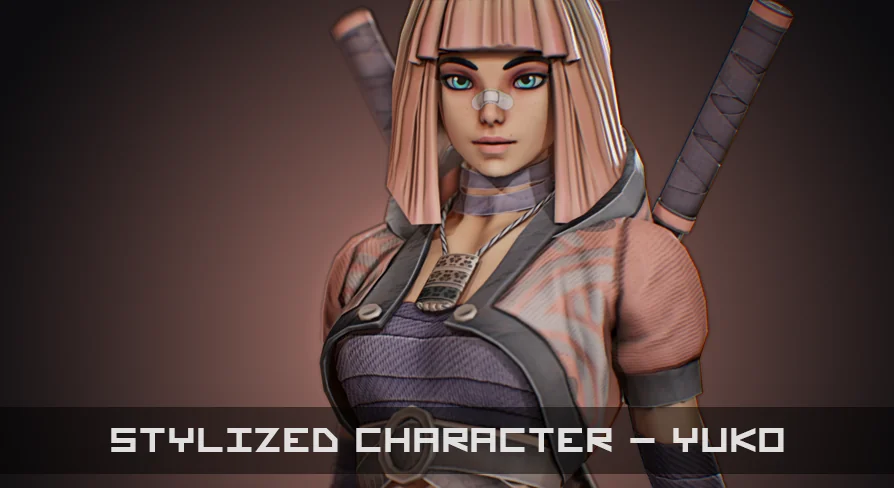
Yuko - Stylized Character
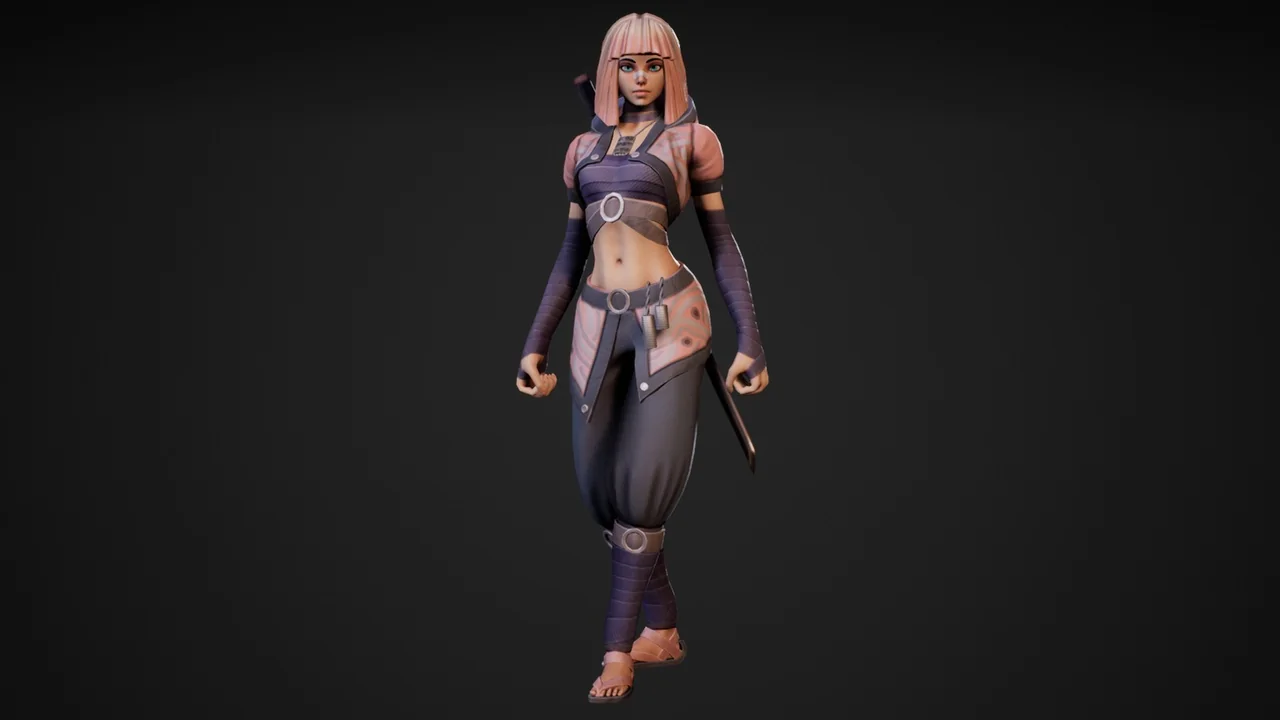
Yuko is a stylized low-poly fantasy heroine with 19 animations, armed and unarmed attacks, jump and locomotion states, PBR materials, and an underwear mesh.
A stylized hero is easy to show in a still. The handoff gets harder when combat, traversal, and weapon states have to be wired. Yuko - Stylized Character arrives with a named list of 19 animations, two color materials, and a mesh update, which makes the character usable as a state map rather than a model that still needs its action set defined.
Yuko's 19-Clip Animation Map
The animation count is 19. The names divide into attack, weapon handling, idle, jump, and locomotion groups. That division is the useful part for implementation: each group belongs to a different area of a character controller, and the clip names can be matched to transitions without guesswork.
Combat is split into armed and unarmed sets. The armed group contains Attack_armed_01, Attack_armed_02, and Attack_armed_fail. The unarmed group mirrors that structure with Attack_unarmed_01, Attack_unarmed_02, and Attack_unarmed_fail. Two regular attacks and a fail outcome exist for each stance. The fail clip is separate from the two attack clips, so a character can branch to a failed action instead of reusing a hit or a neutral state.
Weapon handling is covered by Equip And Unequip. Idle Provides the neutral standing state. Jump has four entries: Jump_start, Jump_air, Jump_land, and Jump_land_run. Locomotion has three run clips and three walk clips: Run_f, Run_fl, Run_fr, Walk_f, Walk_fl, and Walk_fr. The suffixes are consistent across the two sets, which keeps a directional movement state readable during setup.
Arming and Disarming Yuko in Combat
Equip And Unequip Are the bridge between the armed and unarmed attack groups. A practical state flow uses them to decide which attack family is available: after Equip, the two armed attacks can drive the combat branch; after Unequip, the two unarmed attacks take over. The fail clips sit alongside those branches, giving each stance its own unsuccessful outcome.
The animation blueprint and script tags point to a logic-facing setup rather than a set of clips that must be wired from scratch. That matters when the character is going into an existing controller. The named states can be mapped to a state machine, and the weapon transition can be kept separate from the attack transitions. Idle Remains the neutral anchor between combat and movement, so the character has a clear state to return to when an attack, equip, or unequip action finishes.
Yuko's Locomotion and Jump Sequence
The locomotion set covers forward, forward-left, and forward-right movement in both walk and run. Walk_f, Walk_fl, and Walk_fr Form the walking trio; Run_f, Run_fl, and Run_fr Form the running trio. These are separate cycles for the two speeds, not a single direction reused across both. A controller can choose a clip by speed and by the lateral direction of input.
The jump chain is split into takeoff, airborne, and landing states. Jump_start Handles the beginning, Jump_air Covers the airborne portion, and Jump_land Provides the landing. Jump_land_run Gives the landing a running continuation. That separation lets the jump logic resolve into a standing or moving state without collapsing the whole jump into one clip.
For a stylized character in a fantasy roster, this is enough to build basic combat traversal without treating every movement as a special case. The clips are named by direction and phase, so the transition rules can stay close to the labels. The set does not require a new naming convention to be invented before it can be used.
The Yuko Material Set and Mesh Update
Two different color materials are available for the character. The package also lists five textures and two materials, and the update adds an underwear mesh. Those details affect how the character is prepared before it enters a scene: the material variants need to be checked against the mesh, and the added underwear mesh needs to be accounted for in the final body setup.
The PBR tag places the material work in a physically based workflow, while the low-poly tag names the geometry style. Both tags are relevant to the way the character reads in a stylized fantasy scene. The two color materials provide a visual choice at the material level; the five textures and two materials describe the texture and material count that accompanies the model. The underwear mesh is a mesh-level addition, separate from the animation list, so it belongs in the assembly check rather than the state-machine check.
For a character artist or technical artist, the material check is straightforward: confirm the two color assignments, inspect the five textures, and verify that the added underwear mesh sits correctly with the rest of the body. The package then offers a character that can be presented in either of two color treatments without changing the animation set.
Version and Blueprint Details Behind Yuko
Version support covers 4.21+ and 5.0+. That range is the first compatibility check for a project, because the asset should be matched to the version already in use before any state wiring begins. The animation blueprint and script tags also indicate that the package includes a logic-facing layer, not only the mesh, materials, and clips.
The metadata describes a weapon-carrying, PBR, modular, low-poly fantasy woman structured through MOBA and RPG hero roles, with animation and scripting support. Modular and low-poly are construction tags; fantasy, woman, and hero describe the character's role; weapon, animated, script, and animation blueprint describe how the character is meant to function in a game setup. A compatibility entry also names Stylized Character - Girl.
That combination fits a project that needs a stylized female hero with both armed and unarmed combat. The 19 animations provide the state list, the two color materials provide the visual variant, and the version range provides the integration boundary. The underwear mesh and the five textures sit in the assembly layer, while equip, unequip, attacks, jump phases, and locomotion sit in the animation layer.
Where Yuko Fits in a Fantasy Production
Yuko is most useful when a fantasy roster needs a female hero who can switch between weaponed and unarmed combat without a separate character model. The 19-clip set gives the controller explicit states for attacking, failing, equipping, unequipping, jumping, idling, walking, and running. The two color materials give the same character two presentation options, and the underwear mesh update gives the body setup an additional layer to account for.
The character does not need to be treated as a generic asset that must be rebuilt from the ground up. Its practical entry point is the named state list: map the attack groups, place equip and unequip between them, connect the jump phases, and assign the walk and run directions. From there, the material variants and mesh update can be handled as assembly details. For a small fantasy production, that division keeps the animation work and the visual work from blocking each other.
 Characters
 Characters
 Characters
 Characters