"5da73d49ff33a5b1"{"id":"1002374","slug":"modular-anime-character-girl","title":"Modular Anime Character (girl)","category":"Characters \u0026 Creatures","engine":"5.3+","assetVersion":"","engineVersion":"Engine Version: 5.3+","tag":"Characters","accent":"blue","visual":"character","summary":"A modular anime girl assembled from roughly 60 recolorable parts, with expression morph targets, edited normals, and animation blueprint plus script wiring.","platform":"Unreal Engine","indexPolicy":"index","publishedAt":"2026-11-09T18:44:39.374Z","updatedAt":"2026-11-09T18:44:39.374Z","sourceNotes":[],"fileContents":[],"compatibility":["Unreal Engine","Engine Version: 5.3+"],"featuredImage":{"alt":"Modular Anime Character (girl)","src":"/wp-content/uploads/published/2026/11/c9cf5fd8b68a-ca6c0a54-e400-4d38-94a6-f1f0ac9d5246-d49586c5d7.webp"},"hasDownloadLink":true,"downloads":0,"terms":[{"taxonomy":"category","slug":"characters-and-creatures","name":"Characters \u0026 Creatures"}],"galleryImages":[{"src":"/wp-content/uploads/published/2026/11/67f1c13fcfce-eaeceb6f-600a-4b6f-8427-ff7dcaba1b0e-6d4bb48bfa.webp","alt":"Modular Anime Character (girl)"},{"src":"/wp-content/uploads/published/2026/11/1e2df6aa82f7-c0c5a9df-8a14-4a24-b066-ed58ea7e38cc-975b3edf09.webp","alt":"Modular Anime Character (girl)"},{"src":"/wp-content/uploads/published/2026/11/5134bb013e00-2765684e-5036-4fd7-9058-ee933c6d3342-4250a13315.webp","alt":"Modular Anime Character (girl)"},{"src":"/wp-content/uploads/published/2026/11/3c7dd4f4c21e-2b165c5c-96bf-413a-b7c6-5b0867e7529b-f1b796710f.webp","alt":"Modular Anime Character (girl)"},{"src":"/wp-content/uploads/published/2026/11/050f71e846bd-305343f6-4790-45f1-819b-2b94f3f31ebb-b5be46184d.webp","alt":"Modular Anime Character (girl)"},{"src":"/wp-content/uploads/published/2026/11/b0272c883ed5-843db798-9216-42a2-9d25-6fad0b8194c1-0c45510896.webp","alt":"Modular Anime Character (girl)"},{"src":"/wp-content/uploads/published/2026/11/5a7981e0e0c0-e593dfd9-c013-4281-ac04-c64d933be641-2f5cd6904f.webp","alt":"Modular Anime Character (girl)"},{"src":"/wp-content/uploads/published/2026/11/59c94a06484d-46c4250c-09b3-41d5-8884-49db03509ccc-bb3399e113.webp","alt":"Modular Anime Character (girl)"}],"accessPanel":{"kind":"resource","title":"Get this resource","eyebrow":"Free resource","message":"Download this resource in your browser.","fileName":"Content.7z","safetyNote":"Resources are manually reviewed before listing to improve quality and reduce obvious risks.","actionLabel":"Get this resource","resourceType":"Resource archive","versions":[]},"contentHtml":"\u003ch2\u003eScenes Where a Modular Anime Girl Fits\u003c/h2\u003e\n\u003cp\u003eA stylized cast rarely arrives complete. Most anime-styled projects begin with one readable face and one silhouette that holds up in-engine, then grow outward as the scene list expands. A single modular anime girl covers that first step while leaving the door open for everything after it: roughly sixty separate parts, each one colourable, plus textures that can be reworked whenever a variant needs to read as somebody else.\u003c/p\u003e\n\u003cp\u003eThat combination matters most in scenes that need more than one female character but cannot justify a separate model for each. Because the parts break apart and the colour pass runs per piece, one assembly can be recoloured into a different costume or palette without touching geometry. The same breakdown supports the opposite workflow too — starting from the full character, stripping it back, and rebuilding only the sections a specific shot requires.\u003c/p\u003e\n\u003cp\u003eThe character is female, stylized, and anime-leaning by construction rather than by shader trickery. Its face has been shaped with edited normals to reach that look, which means the styling travels with the mesh instead of depending on a post-process pass.\u003c/p\u003e \u003ch2\u003eInside the Sixty-Part Modular Breakdown\u003c/h2\u003e\n\u003cp\u003eThe pack holds approximately sixty parts. That number is the practical heart of the asset: it is large enough that a recolor and a reshuffle produce a visibly different character, and small enough that the assembly stays manageable during a scene build. Each part can be coloured as the project requires, so palette work happens piece by piece rather than as one global tint across the whole body.\u003c/p\u003e\n\u003cp\u003eColouring is only one of two customisation routes. The second runs through the textures themselves. Adjusting them is how a creator introduces a personal twist — a different fabric read, a shifted tone, a marking that does not exist on the default assembly. Nothing about the pack locks that route off; the textures are there to be edited to taste.\u003c/p\u003e\n\u003ch3\u003eWorking color and texture as separate passes\u003c/h3\u003e\n\u003cp\u003eTreating the two routes separately keeps iteration cheap. Colour changes answer the question \"does this variant belong in this scene?\" quickly, before any texture work begins. Texture edits answer the slower question of identity — the details that survive a close camera and make one modular build stop looking like another. A project can cycle through colour combinations for casting decisions, then commit texture effort only to the variants that survive the cut.\u003c/p\u003e \u003ch2\u003eEdited Normals and Expression Morph Targets on the Anime Face\u003c/h2\u003e\n\u003cp\u003eThe face carries two distinct pieces of craft. The first is the normal work mentioned above: edited normals give the head its anime shading character, so the stylised read is baked into how light meets the mesh. The second is a set of morph targets for expressions.\u003c/p\u003e\n\u003cp\u003eMorph targets change what the character can do in a scene, not just how it looks standing still. Dialogue beats, reaction shots, and idle moments all depend on a face that can move away from its neutral pose, and having those shapes on the head means expression work happens on the same asset as the body rather than in a separate pass. Combined with the editable textures, the face becomes a third customisation axis alongside part choice and colour: the geometry can be reshuffled, the surface repainted, and the expression driven independently.\u003c/p\u003e \u003ch2\u003eScript and Animation Blueprint Wiring\u003c/h2\u003e\n\u003cp\u003eBehaviour ships with the character. An animation blueprint and a script are part of the pack, which is what turns a static assembly into something that can be dropped into a playable scene and driven. The animation blueprint handles the logic side of animation — the layer where state and transitions are decided — while the script provides the accompanying logic the setup expects.\u003c/p\u003e\n\u003cp\u003eFor a team already working in-engine, that changes the first hour of integration. Instead of building animation logic from nothing and hoping the mesh matches, the wiring arrives with the character and can be inspected, adapted, or replaced. The modular parts remain independent of that logic, so swapping a section or recolouring a piece does not force a rebuild of the animation setup around it.\u003c/p\u003e\n\u003cp\u003eThe pack targets Unreal Engine 5.3 and newer, which sets the floor for any project hoping to open it without version friction.\u003c/p\u003e \u003ch2\u003eThe Character Inside Game Animation Sample\u003c/h2\u003e\n\u003cp\u003eSeeing the asset in motion is part of the package. A demo video shows the character in use, and the character also appears in the Game Animation Sample — a context where its animation blueprint, script, and modular assembly are demonstrated together rather than described in isolation. Documentation accompanies the pack for the parts that need written explanation.\u003c/p\u003e\n\u003cp\u003eFor anyone evaluating whether the assembly style suits their pipeline, those three references answer different questions. The demo video covers presentation. The Game Animation Sample covers behaviour in a running context. The documentation covers the specifics that a video cannot pause on. Running through all three before starting a build is faster than discovering the structure mid-scene.\u003c/p\u003e \u003ch2\u003eWhere This Girl Stops Mixing\u003c/h2\u003e\n\u003cp\u003eThere is a hard boundary on the pack, and it is stated plainly: this asset is not compatible with the other assets in the yyyrjis catalog. That includes Modular Fantasy RPG Girl, the closest relative in the same catalogue. Parts, textures, and setup from this character do not combine with those releases.\u003c/p\u003e\n\u003cp\u003eThe restriction is worth planning around rather than working against. A project using this girl should source its supporting characters, props, and variants from outside the yyyrjis range, or accept that this character stands as its own self-contained system. Within its own walls the modularity is generous — sixty parts, free colouring, editable textures, expression morph targets, animation blueprint, script — but those walls do not extend to sibling assets.\u003c/p\u003e\n\u003cp\u003eFit-for-project guidance comes down to scope. A stylized anime scene that needs one female lead with expression range, recolourable costume pieces, and animation logic already attached will find everything it needs here. A scene that expects to borrow parts from a neighbouring fantasy RPG character will not. Check the catalogue boundary first, then build within it — the sixty-part breakdown, the edited normals, and the morph-target face give plenty of room once that constraint is understood.\u003c/p\u003e\n\n\u003ch2\u003eRelated Resources Worth Checking\u003c/h2\u003e\n\u003cul\u003e\n\u003cli\u003e\u003ca href=\"https://3dcghub.com/modular-maid-girl/\" rel=\"noopener noreferrer\"\u003eModular Maid Girl\u003c/a\u003e\u003c/li\u003e\n\u003cli\u003e\u003ca href=\"https://3dcghub.com/shinobi-girl-akane/\" rel=\"noopener noreferrer\"\u003eShinobi Girl Akane\u003c/a\u003e\u003c/li\u003e\n\u003cli\u003e\u003ca href=\"https://3dcghub.com/f3-warrior-girl-scarlett/\" rel=\"noopener noreferrer\"\u003eF3 Warrior Girl Scarlett\u003c/a\u003e\u003c/li\u003e\n\u003cli\u003e\u003ca href=\"https://3dcghub.com/streamer-girl-sci-fi-stylized-toon-webcam-performer/\" rel=\"noopener noreferrer\"\u003eStreamer girl. Sci-fi stylized toon webcam performer\u003c/a\u003e\u003c/li\u003e\n\u003cli\u003e\u003ca href=\"https://3dcghub.com/stellar-girl-celeste/\" rel=\"noopener noreferrer\"\u003eStellar Girl Celeste\u003c/a\u003e\u003c/li\u003e\n\u003c/ul\u003e","contentTextLength":6564,"navigation":{"current":46,"total":4340,"previous":{"id":"1002375","slug":"nana","title":"Nana","category":"Humans","platform":"Unreal Engine","updatedAt":"2026-11-09T18:45:08.233Z"},"next":{"id":"1002373","slug":"lana","title":"Lana","category":"Humans","platform":"Unreal Engine","updatedAt":"2026-11-09T18:43:48.624Z"}},"relatedResources":[{"id":"3048","slug":"modular-maid-girl","title":"Modular Maid Girl","category":"Characters \u0026 Creatures","engine":"4.26+,5.0+","assetVersion":"Engine version: 4.26+,5.0+","engineVersion":"4.19","tag":"Characters","accent":"blue","visual":"character","summary":"Enhance your project with the Modular Maid Girl character. Featuring 4K textures, full rigging, and Apple Live Link Face support for games and streaming.","platform":"Unreal Engine","indexPolicy":"index","publishedAt":"2026-02-07T16:33:15.000Z","updatedAt":"2026-04-19T15:57:43.000Z","sourceNotes":[],"fileContents":[],"compatibility":["Unreal Engine","Engine version: 4.26+,5.0+"],"featuredImage":{"alt":"Modular Maid Girl","src":"https://3dcghub.com/wp-content/uploads/2026/02/09491c8d-70fe-4452-af68-9dac8d5408af.webp"},"hasDownloadLink":true,"downloads":1},{"id":"3484","slug":"shinobi-girl-akane","title":"Shinobi Girl Akane","category":"Characters \u0026 Creatures","engine":"4.26+,5.0+","assetVersion":"Engine version: 4.26+,5.0+","engineVersion":"4.19","tag":"Characters","accent":"blue","visual":"character","summary":"Explore Shinobi Girl Akane, a modular 3D character with 52 ARKit blendshapes and 4K textures. Perfect for Unreal Engine and Unity game development.","platform":"Unreal Engine","indexPolicy":"index","publishedAt":"2026-02-09T08:11:07.000Z","updatedAt":"2026-04-19T15:57:37.000Z","sourceNotes":[],"fileContents":[],"compatibility":["Unreal Engine","Engine version: 4.26+,5.0+"],"featuredImage":{"alt":"Shinobi Girl Akane","src":"https://3dcghub.com/wp-content/uploads/2026/02/83ab0876-7f93-4186-98f7-2c87e8f55144.webp"},"hasDownloadLink":true,"downloads":1},{"id":"1001804","slug":"f3-warrior-girl-scarlett","title":"F3 Warrior Girl Scarlett","category":"Characters \u0026 Creatures","engine":"5.1+","assetVersion":"","engineVersion":"Engine Version: 5.1+","tag":"Characters","accent":"blue","visual":"character","summary":"Explore F3 Warrior Girl Scarlett for UE5, featuring modular parts, Epic Skeleton rigging, ARkit blendshapes, and Xandra Character Creator support.","platform":"Unreal Engine","indexPolicy":"index","publishedAt":"2026-10-21T07:55:59.371Z","updatedAt":"2026-10-21T07:55:59.371Z","sourceNotes":[],"fileContents":[],"compatibility":["Unreal Engine","Engine Version: 5.1+"],"featuredImage":{"alt":"F3 Warrior Girl Scarlett","src":"/wp-content/uploads/published/2026/10/3ff4a3d9c180-93e6847a-6539-400c-b282-f7230a72232c-bc82cfec5c.webp"},"hasDownloadLink":true,"downloads":1}]}
Characters
Modular Anime Character (girl)
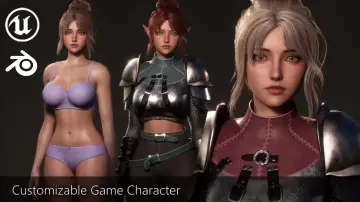
A modular anime girl assembled from roughly 60 recolorable parts, with expression morph targets, edited normals, and animation blueprint plus script wiring.
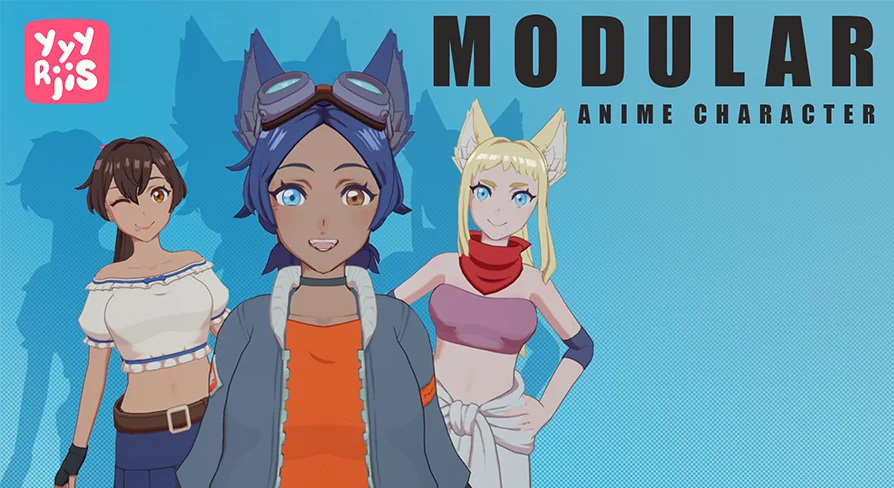
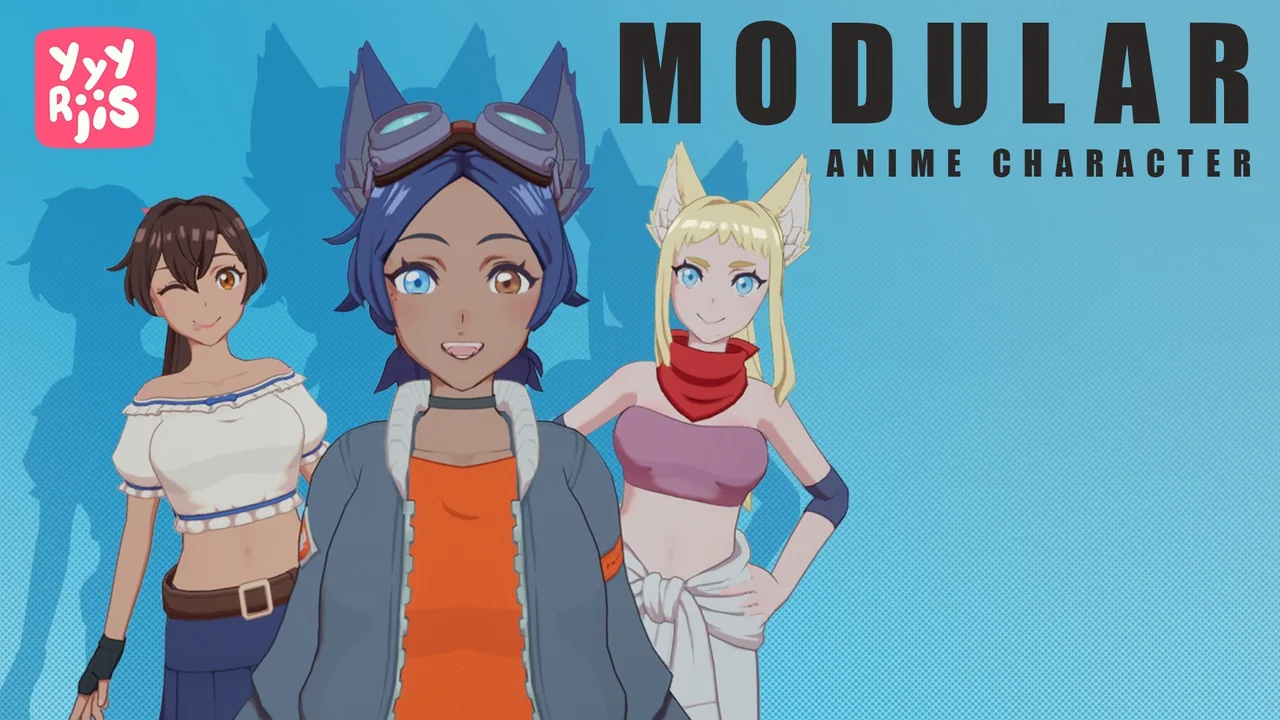
A stylized cast rarely arrives complete. Most anime-styled projects begin with one readable face and one silhouette that holds up in-engine, then grow outward as the scene list expands. A single modular anime girl covers that first step while leaving the door open for everything after it: roughly sixty separate parts, each one colourable, plus textures that can be reworked whenever a variant needs to read as somebody else.
That combination matters most in scenes that need more than one female character but cannot justify a separate model for each. Because the parts break apart and the colour pass runs per piece, one assembly can be recoloured into a different costume or palette without touching geometry. The same breakdown supports the opposite workflow too — starting from the full character, stripping it back, and rebuilding only the sections a specific shot requires.
The character is female, stylized, and anime-leaning by construction rather than by shader trickery. Its face has been shaped with edited normals to reach that look, which means the styling travels with the mesh instead of depending on a post-process pass.
Inside the Sixty-Part Modular Breakdown
The pack holds approximately sixty parts. That number is the practical heart of the asset: it is large enough that a recolor and a reshuffle produce a visibly different character, and small enough that the assembly stays manageable during a scene build. Each part can be coloured as the project requires, so palette work happens piece by piece rather than as one global tint across the whole body.
Colouring is only one of two customisation routes. The second runs through the textures themselves. Adjusting them is how a creator introduces a personal twist — a different fabric read, a shifted tone, a marking that does not exist on the default assembly. Nothing about the pack locks that route off; the textures are there to be edited to taste.
Working color and texture as separate passes
Treating the two routes separately keeps iteration cheap. Colour changes answer the question "does this variant belong in this scene?" quickly, before any texture work begins. Texture edits answer the slower question of identity — the details that survive a close camera and make one modular build stop looking like another. A project can cycle through colour combinations for casting decisions, then commit texture effort only to the variants that survive the cut.
Edited Normals and Expression Morph Targets on the Anime Face
The face carries two distinct pieces of craft. The first is the normal work mentioned above: edited normals give the head its anime shading character, so the stylised read is baked into how light meets the mesh. The second is a set of morph targets for expressions.
Morph targets change what the character can do in a scene, not just how it looks standing still. Dialogue beats, reaction shots, and idle moments all depend on a face that can move away from its neutral pose, and having those shapes on the head means expression work happens on the same asset as the body rather than in a separate pass. Combined with the editable textures, the face becomes a third customisation axis alongside part choice and colour: the geometry can be reshuffled, the surface repainted, and the expression driven independently.
Script and Animation Blueprint Wiring
Behaviour ships with the character. An animation blueprint and a script are part of the pack, which is what turns a static assembly into something that can be dropped into a playable scene and driven. The animation blueprint handles the logic side of animation — the layer where state and transitions are decided — while the script provides the accompanying logic the setup expects.
For a team already working in-engine, that changes the first hour of integration. Instead of building animation logic from nothing and hoping the mesh matches, the wiring arrives with the character and can be inspected, adapted, or replaced. The modular parts remain independent of that logic, so swapping a section or recolouring a piece does not force a rebuild of the animation setup around it.
The pack targets Unreal Engine 5.3 and newer, which sets the floor for any project hoping to open it without version friction.
The Character Inside Game Animation Sample
Seeing the asset in motion is part of the package. A demo video shows the character in use, and the character also appears in the Game Animation Sample — a context where its animation blueprint, script, and modular assembly are demonstrated together rather than described in isolation. Documentation accompanies the pack for the parts that need written explanation.
For anyone evaluating whether the assembly style suits their pipeline, those three references answer different questions. The demo video covers presentation. The Game Animation Sample covers behaviour in a running context. The documentation covers the specifics that a video cannot pause on. Running through all three before starting a build is faster than discovering the structure mid-scene.
Where This Girl Stops Mixing
There is a hard boundary on the pack, and it is stated plainly: this asset is not compatible with the other assets in the yyyrjis catalog. That includes Modular Fantasy RPG Girl, the closest relative in the same catalogue. Parts, textures, and setup from this character do not combine with those releases.
The restriction is worth planning around rather than working against. A project using this girl should source its supporting characters, props, and variants from outside the yyyrjis range, or accept that this character stands as its own self-contained system. Within its own walls the modularity is generous — sixty parts, free colouring, editable textures, expression morph targets, animation blueprint, script — but those walls do not extend to sibling assets.
Fit-for-project guidance comes down to scope. A stylized anime scene that needs one female lead with expression range, recolourable costume pieces, and animation logic already attached will find everything it needs here. A scene that expects to borrow parts from a neighbouring fantasy RPG character will not. Check the catalogue boundary first, then build within it — the sixty-part breakdown, the edited normals, and the morph-target face give plenty of room once that constraint is understood.
 Characters
 Characters
 Characters
 Characters