"d037b61901c110d2"{"id":"1002677","slug":"mae-oak-forest","title":"MAE Oak Forest","category":"Forest \u0026 Jungle","engine":"5.0+","assetVersion":"","engineVersion":"Engine Version: 5.0+","tag":"Forest \u0026 Jungle","accent":"blue","visual":"mech","summary":"A technical breakdown of MAE Oak Forest, detailing photogrammetry assets, procedural foliage setups, soft blending, and essential engine settings.","platform":"Unreal Engine","indexPolicy":"index","publishedAt":"2026-11-16T22:28:18.437Z","updatedAt":"2026-11-16T22:28:18.437Z","sourceNotes":[],"fileContents":[],"compatibility":["Unreal Engine","Engine Version: 5.0+"],"featuredImage":{"alt":"MAE Oak Forest","src":"/wp-content/uploads/published/2026/11/96e47886f7be-b14c07d0-bc28-4566-8f79-69f555be68b7-9a12d8a1ff.webp"},"fileSizeBytes":9425125230,"hasDownloadLink":true,"downloads":0,"terms":[{"taxonomy":"category","slug":"forest-and-jungle","name":"Forest \u0026 Jungle"}],"galleryImages":[{"src":"/wp-content/uploads/published/2026/11/bc09a4d1b025-074a84bb-6dfa-4f12-8d79-db3ff565c20f-f4601792f0.webp","alt":"MAE Oak Forest"},{"src":"/wp-content/uploads/published/2026/11/618342b6915f-0892f842-98b5-496e-ab17-ef2067a4d60b-9e88aad405.webp","alt":"MAE Oak Forest"},{"src":"/wp-content/uploads/published/2026/11/b955e6de3792-d9362768-2162-4904-8c6f-a6211c2e3d79-677b646bbd.webp","alt":"MAE Oak Forest"},{"src":"/wp-content/uploads/published/2026/11/6e08759596e2-ce02f8af-72d2-42bb-95fd-141eaaad2e01-a2c96d3cc7.webp","alt":"MAE Oak Forest"},{"src":"/wp-content/uploads/published/2026/11/c98bc7a3147f-586fbefa-503b-4be6-83f3-587bc0a01af3-6a0de09547.webp","alt":"MAE Oak Forest"},{"src":"/wp-content/uploads/published/2026/11/9e23e010f5d5-8fab2e62-5ebb-499e-a6a5-cb343e3a88ee-318f62493f.webp","alt":"MAE Oak Forest"},{"src":"/wp-content/uploads/published/2026/11/0c40f76eb926-0fade490-492a-4e0d-9ab5-1a3e912eb095-bf8b19ff7a.webp","alt":"MAE Oak Forest"},{"src":"/wp-content/uploads/published/2026/11/ad36e62e3b50-75bd1c85-9f61-4abe-96aa-1e2db5e5840a-0cd08efcc4.webp","alt":"MAE Oak Forest"},{"src":"/wp-content/uploads/published/2026/11/67144a0a7d92-0b594926-9a1d-4a8d-82d1-5721d68b34d8-3e8994be6b.webp","alt":"MAE Oak Forest"},{"src":"/wp-content/uploads/published/2026/11/e1901fe7d8c7-e086ddfe-edc0-471a-af85-c259c40b3f21-60be896369.webp","alt":"MAE Oak Forest"}],"accessPanel":{"kind":"resource","title":"Get this resource","eyebrow":"Free resource","message":"Download this resource in your browser.","fileName":"Content.7z","safetyNote":"Resources are manually reviewed before listing to improve quality and reduce obvious risks.","actionLabel":"Get this resource","resourceType":"Resource archive","versions":[]},"contentHtml":"\u003cp\u003eDense woodland environments present distinct technical hurdles in real-time engine workflows. Recreating an authentic temperate wilderness requires capturing biological variation, handling lighting penetration across complex foliage canopies, and preventing rigid, artificial intersections between static meshes and terrain heightmaps. MAE Oak Forest directly addresses these environment design demands by providing a comprehensive library of photogrammetry-scanned vegetation, dynamic wind controls, and procedural placement assets tailored for high-density natural scenes.\u003c/p\u003e\u003ch2\u003eStructuring Canopy Depth with MAE Oak Forest Meshes\u003c/h2\u003e\u003cp\u003eNatural woods rarely feature trees of identical maturity, so building believable depth depends entirely on structural diversity across multiple age brackets. The package supplies six distinct full-sized oak trees alongside a specialized downy oak, forming the core structural canopy. Complementing the primary timber are two oak saplings and three oak seedlings. Distributing these age variations across a hillside or clearing allows artists to convey continuous growth cycles, where young saplings cluster near canopy gaps while older specimens anchor the primary upper boundary of the scene.\u003c/p\u003e\u003cp\u003eFoliage meshes in the package are created using photometric foliage techniques combined with photogrammetry scanning for tree trunks and primary branches. This ensures physical accuracy across bark surfaces, root systems, and branch splits. To manage the immense polygon overhead generated by heavy woodland density, every mesh includes a minimum of three level-of-detail (LOD) steps complemented by billboard impostors. These impostor states allow sprawling exterior views to render deep tree lines into the horizon without stalling draw calls or overwhelming vertex processing.\u003c/p\u003e\u003ch2\u003ePopulating the Forest Floor with Botanical Scans and Rocks\u003c/h2\u003e\u003cp\u003eA convincing ground layer requires multiple strata of undergrowth beneath the tree canopy. The asset library features botanical specimens scanned from temperate ecosystems to form a varied herbaceous understory:\u003c/p\u003e\u003cul\u003e\u003cli\u003eMale Fern (2 variants) and Green Hellebore (2 variants) for mid-height shrub foliage\u003c/li\u003e\u003cli\u003eCommon Plantago (3 variants) and specialized Grass (1 variant) for low-profile clearing groundcover\u003c/li\u003e\u003cli\u003eBushes (3 variants) to interrupt sightlines and frame forest perimeters\u003c/li\u003e\u003cli\u003eGroundcovers focused on fallen leaves and twigs (2 variants) for natural soil coverage\u003c/li\u003e\u003cli\u003eFallen timber comprising four distinct log models and one oak wood stick\u003c/li\u003e\u003cli\u003eGeological assets featuring nine medium rocks and eight small rocks\u003c/li\u003e\u003cli\u003eRoad meshes (3 variants) intended for routing clear tracks through thick vegetation\u003c/li\u003e\u003c/ul\u003e\u003cp\u003eFallen logs and sticks break up flat terrain surfaces, indicating forest decay and physical passage through the wild. By alternating the two male fern variants with clusters of green hellebore and common plantago, level designers can establish irregular patches of vegetation that react naturally to sunlight breaking through the tree branches. The collection of seventeen rock meshes allows for natural rock outcroppings, riverbank edges, and trail borders that integrate directly alongside the road meshes.\u003c/p\u003e\u003ch2\u003eLandscape Soft Blending and Pixel-Depth-Offset Shadows\u003c/h2\u003e\u003cp\u003eHard intersecting lines between static meshes and landscape heightmaps routinely undermine immersion in outdoor scenes. When a tree base, rock, or fallen log sinks into uneven ground, the abrupt boundary line immediately betrays the placement of the 3D model. To solve this, all 3D scanned meshes in the package utilize a soft-blending material setup configured to interface smoothly with landscape terrain and adjacent 3D meshes.\u003c/p\u003e\u003cp\u003eThis material architecture works alongside automatic slope blending. When meshes sit across steep inclines or variable grades, the shader dynamically softens the transition, mimicking how soil, loose debris, and needle litter accumulate against solid surfaces in the wild. Working in tandem with this surface transition is a dedicated Pixel-Depth-Offset (PDO) shadow function. PDO shadow execution refines shadow contact points where foliage layers intersect the ground or overlap one another. Instead of coarse, disconnected contact shadows, the system generates softer, physically coherent transitions that match the nuanced contact ambient occlusion of real-world forest floors.\u003c/p\u003e\u003ch2\u003eConfiguring the MAE Oak Forest Engine Settings\u003c/h2\u003e\u003cp\u003eAchieving proper procedural distribution and dynamic lighting requires configuring specific engine-level systems before deploying the assets into production levels. Procedural foliage generation relies on native editor placement tools that must be initialized manually in project settings:\u003c/p\u003e\u003col\u003e\u003cli\u003eOpen the editor preferences by navigating to \u003cem\u003eEdit \u0026gt; Editor Preferences\u003c/em\u003e.\u003c/li\u003e\u003cli\u003eInput \"Procedural\" into the search field.\u003c/li\u003e\u003cli\u003eLocate and enable the \u003cstrong\u003eProcedural Foliage\u003c/strong\u003e Checkbox to initialize the procedural volume tools.\u003c/li\u003e\u003c/ol\u003e\u003cp\u003eHandling dynamic foliage shadowing across thousands of procedural instances also requires active distance field processing. The meshes rely on distance field representations to accurately handle indirect shadowing under thick canopies where traditional shadow maps become prohibitively expensive:\u003c/p\u003e\u003col\u003e\u003cli\u003eOpen the project settings via \u003cem\u003eEdit \u0026gt; Project Settings\u003c/em\u003e.\u003c/li\u003e\u003cli\u003eSearch for \"distance fields\" in the top search bar.\u003c/li\u003e\u003cli\u003eCheck the option for \u003cstrong\u003eGenerate Mesh Distance Fields\u003c/strong\u003e.\u003c/li\u003e\u003cli\u003eRestart the project editor to allow the engine to compute the distance field data for all static meshes.\u003c/li\u003e\u003c/ol\u003e\u003cp\u003eSkipping distance field generation results in inaccurate shadow distribution beneath dense tree clusters, reducing the visual impact of the photogrammetric foliage assets.\u003c/p\u003e\u003ch2\u003eDynamic Wind Systems and Large-Scale Map Layouts\u003c/h2\u003e\u003cp\u003eNatural foliage requires persistent, responsive motion to avoid a rigid appearance. The collection includes a Blueprint wind system that injects dynamic movement across the broadleaf canopies, saplings, bushes, and ground ferns. The wind setup coordinates movement across various asset scales, ensuring that delicate plants like common plantago sway at different frequencies than heavy oak trunks or thick downy oak branches.\u003c/p\u003e\u003cp\u003eTo assist implementation and benchmarking, the package includes two distinct staging levels. A 4x4 example map demonstrates large-scale environment architecture, illustrating how procedural foliage generation distributes groundcover, rocks, and mature trees across expanded terrain bounds without causing severe rendering bottlenecks. A secondary showcase map serves as an isolated reference library, presenting every scanned rock, log, road section, and foliage instance under calibrated lighting conditions for straightforward inspection, material adjustment, and asset sorting.\u003c/p\u003e\u003ch2\u003eProduction Workflows and Implementation Scenarios\u003c/h2\u003e\u003cp\u003eEnvironment artists building wilderness scenes benefit from the cohesive capture pipeline used across the entire asset set. Because both the trees and the supporting undergrowth rely on photometric foliage techniques and photogrammetry modeling, color balances, specular responses, and surface normal densities match naturally across the board. Technical designers can leverage the procedural foliage volumes to generate broad natural forests across large heightmaps, then use the provided road meshes, fallen logs, and hand-placed rock models to carve out paths, camps, or gameplay routes.\u003c/p\u003e\n\n\u003ch2\u003eRelated Resources Worth Checking\u003c/h2\u003e\n\u003cul\u003e\n\u003cli\u003e\u003ca href=\"https://3dcghub.com/procedural-oak-forest-forest-winter-forest-spring-forest-autumn-forest/\" rel=\"noopener noreferrer\"\u003eProcedural Oak Forest ( Forest , Winter Forest , Spring Forest , Autumn Forest )\u003c/a\u003e\u003c/li\u003e\n\u003cli\u003e\u003ca href=\"https://3dcghub.com/lush-stylized-environment-set/\" rel=\"noopener noreferrer\"\u003eLUSH: Stylized Environment Set\u003c/a\u003e\u003c/li\u003e\n\u003cli\u003e\u003ca href=\"https://3dcghub.com/low-poly-nature/\" rel=\"noopener noreferrer\"\u003eLow Poly Nature\u003c/a\u003e\u003c/li\u003e\n\u003cli\u003e\u003ca href=\"https://3dcghub.com/lookout-tower/\" rel=\"noopener noreferrer\"\u003eLookout Tower\u003c/a\u003e\u003c/li\u003e\n\u003cli\u003e\u003ca href=\"https://3dcghub.com/gaea/\" rel=\"noopener noreferrer\"\u003eGaea\u003c/a\u003e\u003c/li\u003e\n\u003c/ul\u003e","contentTextLength":7480,"navigation":{"current":12,"total":4611,"previous":{"id":"1002678","slug":"mediterranean-coast","title":"Mediterranean Coast","category":"Forest \u0026 Jungle","platform":"Unreal Engine","updatedAt":"2026-11-16T22:29:16.177Z"},"next":{"id":"1002676","slug":"lush-stylized-environment-set","title":"LUSH: Stylized Environment Set","category":"Forest \u0026 Jungle","platform":"Unreal Engine","updatedAt":"2026-11-16T22:26:42.482Z"}},"relatedResources":[{"id":"8228","slug":"procedural-oak-forest-forest-winter-forest-spring-forest-autumn-forest","title":"Procedural Oak Forest ( Forest , Winter Forest , Spring Forest , Autumn Forest )","category":"Forest \u0026 Jungle","engine":"4.26+,5.0+","assetVersion":"Engine version: 4.26+,5.0+","engineVersion":"4.26","tag":"Forest \u0026 Jungle","accent":"blue","visual":"city","summary":"Transform your game environments with a comprehensive collection of photorealistic nature assets. This package offers procedural tools and high-quality scans to create stunning forests across multiple seasons.","platform":"Unreal Engine","indexPolicy":"noindex","publishedAt":"2026-02-23T16:01:05.000Z","updatedAt":"2026-04-19T15:55:31.000Z","sourceNotes":[],"fileContents":[],"compatibility":["Unreal Engine","Engine version: 4.26+,5.0+"],"featuredImage":{"alt":"Procedural Oak Forest ( Forest , Winter Forest , Spring Forest , Autumn Forest )","src":"https://3dcghub.com/wp-content/uploads/2026/02/51fe3f09-aacb-45a5-b723-27a3215d3cc5.webp"},"fileSizeBytes":2327001384,"hasDownloadLink":true,"downloads":1},{"id":"1002688","slug":"scrubby-flatwoods-habitat-brush","title":"Scrubby Flatwoods Habitat Brush","category":"Forest \u0026 Jungle","engine":"5.0+","assetVersion":"","engineVersion":"Engine Version: 5.0+","tag":"Forest \u0026 Jungle","accent":"blue","visual":"mech","summary":"Examine the Scrubby Flatwoods Habitat Brush, featuring Central Florida plant species like Longleaf Pine, Saw Palmetto, and Wiregrass for virtual environments.","platform":"Unreal Engine","indexPolicy":"index","publishedAt":"2026-11-16T22:45:18.155Z","updatedAt":"2026-11-16T22:45:18.155Z","sourceNotes":[],"fileContents":[],"compatibility":["Unreal Engine","Engine Version: 5.0+"],"featuredImage":{"alt":"Scrubby Flatwoods Habitat Brush","src":"/wp-content/uploads/published/2026/11/685ed7892533-26771ffd-4d04-4070-ba79-cea84eac19f3-2307013c68.webp"},"fileSizeBytes":214594549,"hasDownloadLink":true,"downloads":0},{"id":"1002679","slug":"mesic-flatwoods-habitat-brush","title":"Mesic Flatwoods Habitat Brush","category":"Forest \u0026 Jungle","engine":"5.0+","assetVersion":"","engineVersion":"Engine Version: 5.0+","tag":"Forest \u0026 Jungle","accent":"blue","visual":"mech","summary":"Create authentic Central Florida environments with Mesic Flatwoods Habitat Brush, featuring 134 meshes, GIS-based ecosystems, and foliage painting presets.","platform":"Unreal Engine","indexPolicy":"index","publishedAt":"2026-11-16T22:29:57.567Z","updatedAt":"2026-11-16T22:29:57.567Z","sourceNotes":[],"fileContents":[],"compatibility":["Unreal Engine","Engine Version: 5.0+"],"featuredImage":{"alt":"Mesic Flatwoods Habitat Brush","src":"/wp-content/uploads/published/2026/11/03fc5d7d5f3d-3e037f39-c3ce-41f3-940e-e68fe5760859-23ef5ead28.webp"},"fileSizeBytes":248979374,"hasDownloadLink":true,"downloads":0}]}
Resource screenshots
1 / 10
Forest & Jungle
MAE Oak Forest
A technical breakdown of MAE Oak Forest, detailing photogrammetry assets, procedural foliage setups, soft blending, and essential engine settings.
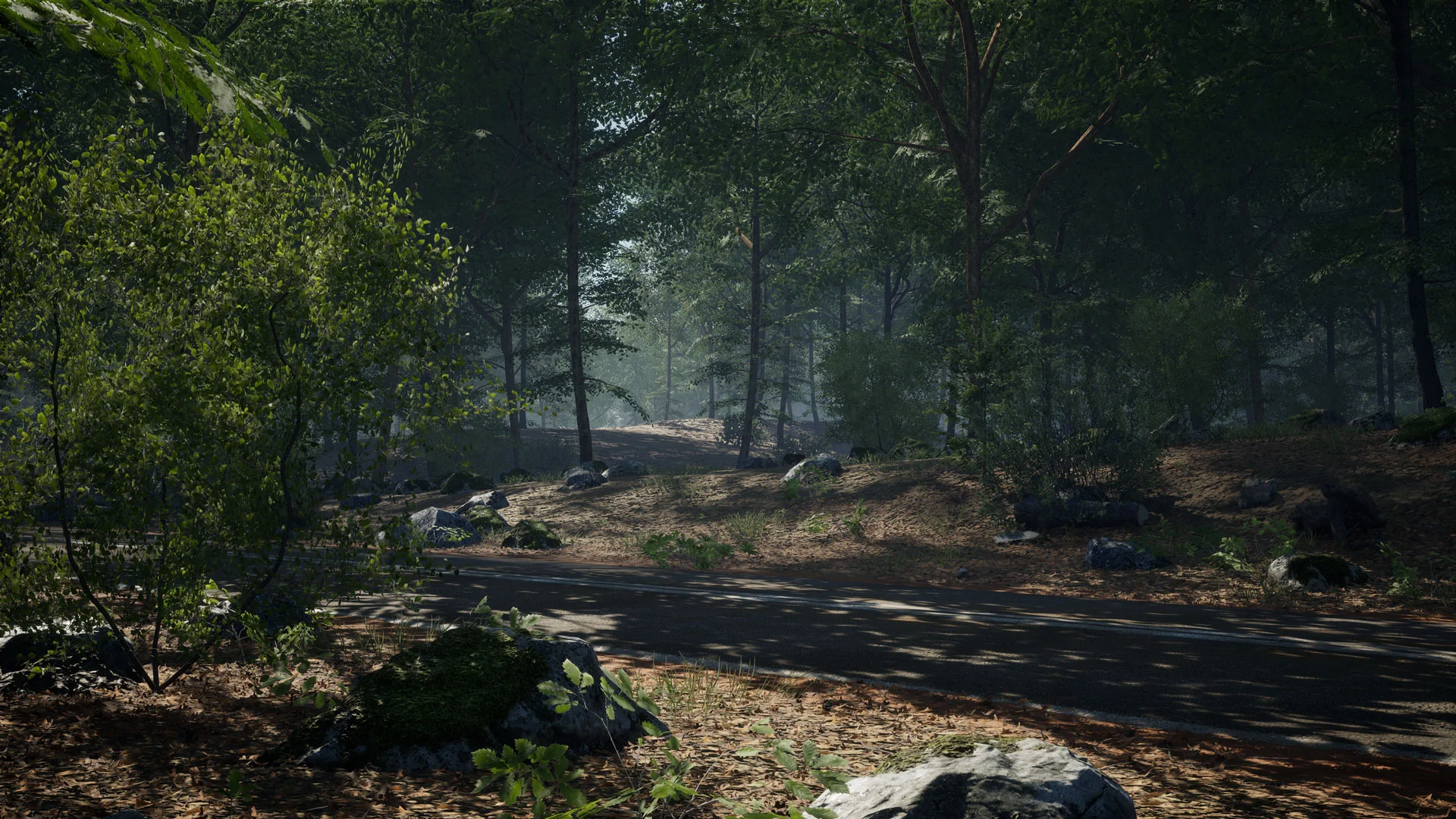
Dense woodland environments present distinct technical hurdles in real-time engine workflows. Recreating an authentic temperate wilderness requires capturing biological variation, handling lighting penetration across complex foliage canopies, and preventing rigid, artificial intersections between static meshes and terrain heightmaps. MAE Oak Forest directly addresses these environment design demands by providing a comprehensive library of photogrammetry-scanned vegetation, dynamic wind controls, and procedural placement assets tailored for high-density natural scenes.
Structuring Canopy Depth with MAE Oak Forest Meshes
Natural woods rarely feature trees of identical maturity, so building believable depth depends entirely on structural diversity across multiple age brackets. The package supplies six distinct full-sized oak trees alongside a specialized downy oak, forming the core structural canopy. Complementing the primary timber are two oak saplings and three oak seedlings. Distributing these age variations across a hillside or clearing allows artists to convey continuous growth cycles, where young saplings cluster near canopy gaps while older specimens anchor the primary upper boundary of the scene.
Foliage meshes in the package are created using photometric foliage techniques combined with photogrammetry scanning for tree trunks and primary branches. This ensures physical accuracy across bark surfaces, root systems, and branch splits. To manage the immense polygon overhead generated by heavy woodland density, every mesh includes a minimum of three level-of-detail (LOD) steps complemented by billboard impostors. These impostor states allow sprawling exterior views to render deep tree lines into the horizon without stalling draw calls or overwhelming vertex processing.
Populating the Forest Floor with Botanical Scans and Rocks
A convincing ground layer requires multiple strata of undergrowth beneath the tree canopy. The asset library features botanical specimens scanned from temperate ecosystems to form a varied herbaceous understory:
Male Fern (2 variants) and Green Hellebore (2 variants) for mid-height shrub foliage
Common Plantago (3 variants) and specialized Grass (1 variant) for low-profile clearing groundcover
Bushes (3 variants) to interrupt sightlines and frame forest perimeters
Groundcovers focused on fallen leaves and twigs (2 variants) for natural soil coverage
Fallen timber comprising four distinct log models and one oak wood stick
Geological assets featuring nine medium rocks and eight small rocks
Road meshes (3 variants) intended for routing clear tracks through thick vegetation
Fallen logs and sticks break up flat terrain surfaces, indicating forest decay and physical passage through the wild. By alternating the two male fern variants with clusters of green hellebore and common plantago, level designers can establish irregular patches of vegetation that react naturally to sunlight breaking through the tree branches. The collection of seventeen rock meshes allows for natural rock outcroppings, riverbank edges, and trail borders that integrate directly alongside the road meshes.
Landscape Soft Blending and Pixel-Depth-Offset Shadows
Hard intersecting lines between static meshes and landscape heightmaps routinely undermine immersion in outdoor scenes. When a tree base, rock, or fallen log sinks into uneven ground, the abrupt boundary line immediately betrays the placement of the 3D model. To solve this, all 3D scanned meshes in the package utilize a soft-blending material setup configured to interface smoothly with landscape terrain and adjacent 3D meshes.
This material architecture works alongside automatic slope blending. When meshes sit across steep inclines or variable grades, the shader dynamically softens the transition, mimicking how soil, loose debris, and needle litter accumulate against solid surfaces in the wild. Working in tandem with this surface transition is a dedicated Pixel-Depth-Offset (PDO) shadow function. PDO shadow execution refines shadow contact points where foliage layers intersect the ground or overlap one another. Instead of coarse, disconnected contact shadows, the system generates softer, physically coherent transitions that match the nuanced contact ambient occlusion of real-world forest floors.
Configuring the MAE Oak Forest Engine Settings
Achieving proper procedural distribution and dynamic lighting requires configuring specific engine-level systems before deploying the assets into production levels. Procedural foliage generation relies on native editor placement tools that must be initialized manually in project settings:
Open the editor preferences by navigating to Edit > Editor Preferences.
Input "Procedural" into the search field.
Locate and enable the Procedural Foliage Checkbox to initialize the procedural volume tools.
Handling dynamic foliage shadowing across thousands of procedural instances also requires active distance field processing. The meshes rely on distance field representations to accurately handle indirect shadowing under thick canopies where traditional shadow maps become prohibitively expensive:
Open the project settings via Edit > Project Settings.
Search for "distance fields" in the top search bar.
Check the option for Generate Mesh Distance Fields.
Restart the project editor to allow the engine to compute the distance field data for all static meshes.
Skipping distance field generation results in inaccurate shadow distribution beneath dense tree clusters, reducing the visual impact of the photogrammetric foliage assets.
Dynamic Wind Systems and Large-Scale Map Layouts
Natural foliage requires persistent, responsive motion to avoid a rigid appearance. The collection includes a Blueprint wind system that injects dynamic movement across the broadleaf canopies, saplings, bushes, and ground ferns. The wind setup coordinates movement across various asset scales, ensuring that delicate plants like common plantago sway at different frequencies than heavy oak trunks or thick downy oak branches.
To assist implementation and benchmarking, the package includes two distinct staging levels. A 4x4 example map demonstrates large-scale environment architecture, illustrating how procedural foliage generation distributes groundcover, rocks, and mature trees across expanded terrain bounds without causing severe rendering bottlenecks. A secondary showcase map serves as an isolated reference library, presenting every scanned rock, log, road section, and foliage instance under calibrated lighting conditions for straightforward inspection, material adjustment, and asset sorting.
Production Workflows and Implementation Scenarios
Environment artists building wilderness scenes benefit from the cohesive capture pipeline used across the entire asset set. Because both the trees and the supporting undergrowth rely on photometric foliage techniques and photogrammetry modeling, color balances, specular responses, and surface normal densities match naturally across the board. Technical designers can leverage the procedural foliage volumes to generate broad natural forests across large heightmaps, then use the provided road meshes, fallen logs, and hand-placed rock models to carve out paths, camps, or gameplay routes.
 Forest & Jungle
 Forest & Jungle
 Forest & Jungle