"2596237520a17fbf"{"id":"1002915","slug":"inventory-framework-plugin-inventory-system","title":"Inventory Framework Plugin - Inventory System","category":"Game Mechanics","engine":"5.3","assetVersion":"Asset Version: 2.4","engineVersion":"Engine Version: 5.3","tag":"Game Mechanics","accent":"blue","visual":"mech","summary":"Explore the architecture of the Inventory Framework Plugin, featuring multi-threaded queries, recursive containers, modular loot, and UMG editor tools.","platform":"Unreal Engine","indexPolicy":"index","publishedAt":"2026-11-21T15:44:15.077Z","updatedAt":"2026-11-21T15:44:15.077Z","sourceNotes":[],"fileContents":[],"compatibility":["Unreal Engine","Asset Version: 2.4","Engine Version: 5.3"],"featuredImage":{"alt":"Inventory Framework Plugin - Inventory System","src":"/wp-content/uploads/published/2026/11/76087adb060a-5573d6a7-c3bd-4f3d-be20-9079a769d6f8-c8cc48a06d.webp"},"fileSizeBytes":71758290,"hasDownloadLink":true,"downloads":0,"terms":[{"taxonomy":"category","slug":"game-mechanics-tools-and-plugins","name":"Game Mechanics"}],"galleryImages":[{"src":"/wp-content/uploads/published/2026/11/9ebd98a2e14c-77771818-bfc0-403c-b2c1-21fbdc7dbf41-d3acabbee9.webp","alt":"Inventory Framework Plugin - Inventory System"},{"src":"/wp-content/uploads/published/2026/11/403efae3ae06-ecd33519-de94-4b99-afb2-b0e5a92432fc-a8fee155f0.webp","alt":"Inventory Framework Plugin - Inventory System"},{"src":"/wp-content/uploads/published/2026/11/52bd8bc52498-d6a57762-250b-490f-8da1-f680f1299861-82085439c8.webp","alt":"Inventory Framework Plugin - Inventory System"},{"src":"/wp-content/uploads/published/2026/11/af11b44dd803-1433daa6-df8d-40ad-9b11-c07e37038385-0bab9ea9d9.webp","alt":"Inventory Framework Plugin - Inventory System"},{"src":"/wp-content/uploads/published/2026/11/ce501df1b99a-2c3e9208-9892-4f01-bae3-2ccb37046536-985724833a.webp","alt":"Inventory Framework Plugin - Inventory System"},{"src":"/wp-content/uploads/published/2026/11/ceebcb1e9d00-3e0b759d-a191-41b5-93ad-c8c6bf2fdc75-df1105d463.webp","alt":"Inventory Framework Plugin - Inventory System"},{"src":"/wp-content/uploads/published/2026/11/e12d95694094-aed3b90c-ce13-4bd6-9f76-544fb6a831a6-6c0943f04f.webp","alt":"Inventory Framework Plugin - Inventory System"},{"src":"/wp-content/uploads/published/2026/11/8019deac66e8-98bdc355-a6a5-4aa2-a7d0-9236a17eea6e-b3a29f1292.webp","alt":"Inventory Framework Plugin - Inventory System"},{"src":"/wp-content/uploads/published/2026/11/92faae2f7921-3b5190fd-50e6-47ce-aca0-2a3089236bc6-160b738c99.webp","alt":"Inventory Framework Plugin - Inventory System"},{"src":"/wp-content/uploads/published/2026/11/70afaf5556b2-dd77bd3e-e230-4c3b-9275-d443e67c7514-db54fb085a.webp","alt":"Inventory Framework Plugin - Inventory System"}],"contentHtml":"\u003cp\u003eManaging item data inside an active game environment requires balancing state tracking, performance overhead, user interface responsiveness, and network synchronization. Many conventional implementations tie data structures directly to visual widgets or enforce rigid class inheritance trees that become difficult to maintain as a project expands. The Inventory Framework Plugin approaches this problem by separating data storage and logic from presentation layers, functioning as an underlying backbone suitable for compact game prototypes as well as large open worlds with complex inventory rules.\u003c/p\u003e \u003ch2\u003eDecoupling UI Logic Across the Inventory Framework\u003c/h2\u003e\n\u003cp\u003eA core architectural principle of the framework is widget independence. Inventory calculations, state adjustments, and item transactions do not rely on visual interface widgets to function. Because logic runs independently of the presentation tier, inventory operations remain accessible across non-visual contexts, including dedicated server environments, headless tests, custom developer tools, and the standard level editor. User interface components act purely as observers and triggers rather than data authorities.\u003c/p\u003e \u003cp\u003eFor front-end implementation, the system provides designer-friendly widgets equipped out of the box to process common interaction mechanics. Designers can integrate custom animation profiles, manage complex drag-and-drop behavior, and implement stack splitting or item combining without having to construct low-level tracking systems. Visual interface navigation is routed through overridable functions, granting developers direct control over game-pad, keyboard, or mouse routing when navigating nested or multi-layered screens.\u003c/p\u003e \u003ch2\u003eRecursive Containers and Fragment-Driven Item Architecture\u003c/h2\u003e\n\u003cp\u003eHierarchical storage constraints often limit how deep an inventory hierarchy can reach. This framework bypasses fixed structural depth by employing an infinite container model that natively supports recursive nesting. A player can store an item that itself holds an arbitrary container, which in turn holds further items. Typical applications include nesting multiple backpacks within larger storage packs, or assigning complex modular weapons that hold child containers specifically reserved for internal modifications, attachments, and secondary items.\u003c/p\u003e \u003cp\u003eItem customization is driven by an extensible fragment workflow. Fragments allow developers to append any arbitrary data payload directly to individual items or containers, complete with built-in serialization support. This prevents the need to build bloated baseline item classes packed with unused parameters. Instead, specialized behavioral data lives only within the fragments assigned to relevant objects.\u003c/p\u003e \u003cp\u003eSupplementary state tracking is handled through a structured gameplay tag and tag value system. By linking numerical values or state states to specific tags, developers can establish modular item durability, rarity tiers, and distinct gameplay flags without writing custom subclasses for every condition. Items do not require a rigid parent class or strict component hierarchy, meaning actors and inventory elements can be organized with complete structural freedom.\u003c/p\u003e \u003ch2\u003eMulti-Threaded Queries, Item Sockets, and Ability System Interoperability\u003c/h2\u003e\n\u003cp\u003eSearching through vast arrays of nested items, evaluating spatial constraints, and filtering equipment states can impose measurable loads on the main game thread. To resolve this bottleneck, the plugin implements a multi-threaded item query pipeline. Complex item scans, condition checks, and property filters execute off-thread, preserving gameplay performance during heavy computational queries across large loot pools or dense inventories.\u003c/p\u003e \u003cp\u003eSpatial interaction between items expands beyond simple grid placements through item sockets. Sockets make it possible to define contextual gameplay interactions based on relative placement or proximity. An item placed into a designated socket can influence neighboring items, such as a sword positioned adjacent to or above a burning torch receiving an automatic fire buff. This mechanic links inventory organization directly to tactical gameplay effects.\u003c/p\u003e \u003cp\u003eMechanics extending beyond passive storage tie seamlessly into external systems:\u003c/p\u003e\n\u003cul\u003e \u003cli\u003e\u003cstrong\u003eAbility System Integration:\u003c/strong\u003e Designed to interface natively with the Unreal Engine Gameplay Ability System (GAS) while remaining completely compatible with custom, proprietary ability frameworks.\u003c/li\u003e \u003cli\u003e\u003cstrong\u003eAbstract Crafting Pipelines:\u003c/strong\u003e Crafting recipes, requirements, and outcomes are driven through abstract data assets, allowing recipe expansion without modifying core logic.\u003c/li\u003e \u003cli\u003e\u003cstrong\u003eModular Game Features:\u003c/strong\u003e Loot generation and tables interface with Modular Game Feature workflows, allowing development teams to inject new randomized loot tables, seasonal pools, or downloadable expansions without modifying foundational data assets.\u003c/li\u003e\n\u003c/ul\u003e \u003ch2\u003eIn-Editor Authoring and UMG-Powered Item System Tools\u003c/h2\u003e\n\u003cp\u003eIterating on item attributes typically demands running the full game client or writing custom Slate-based editor utilities. The Inventory Framework Plugin bypasses this friction by allowing developers to modify actor inventories directly inside the editor viewport as if the game were running live. State adjustments applied in the editor persist correctly, accelerating setup and balancing cycles.\u003c/p\u003e \u003cp\u003eTo support internal tooling, developers can create asset-editing tools using standard UMG widgets instead of writing complex C++ Slate code. This lowers the barrier for technical designers to build bespoke authoring tools tailored to specific project requirements. Furthermore, handling asset visual representations is automated through an actor appearance duplication pipeline. This mechanism dynamically renders and extracts item visual data for automated UI icon generation and real-time 3D item inspection menus, reducing the manual asset-pipeline burden required to produce matching 2D interface art for every 3D item in the game.\u003c/p\u003e \u003ch2\u003eControlled Replication and Network Optimization\u003c/h2\u003e\n\u003cp\u003eMultiplayer network efficiency is a primary consideration in large-scale titles. The framework limits remote procedure calls (RPCs) strictly to relevant, participating actors rather than broadcasting globally. Inventory state replication is gated so that synchronization packets are transmitted only when specific changes demand replication, providing developers granular control over bandwidth consumption while keeping automated synchronization active for foundational actions.\u003c/p\u003e \u003cp\u003eBoth Blueprint visual scripting and native C++ workflows maintain parity throughout the codebase. Nearly the entire API is exposed to both environments, preventing scenarios where technical designers hit architectural walls in Blueprints or programmers must re-expose critical variables manually. This unified surface supports flexible engineering pipelines regardless of team size or language preference.\u003c/p\u003e\n\n\u003ch2\u003eMore From The Same Workflow\u003c/h2\u003e\n\u003cul\u003e\n\u003cli\u003e\u003ca href=\"https://3dcghub.com/ninja-input/\" rel=\"noopener noreferrer\"\u003eNinja Input\u003c/a\u003e\u003c/li\u003e\n\u003cli\u003e\u003ca href=\"https://3dcghub.com/rts-rpg-unit-template-massai-multiplayer-gameplay-ability-system/\" rel=\"noopener noreferrer\"\u003eRTS/RPG Unit Template - MassAI - Multiplayer - Gameplay Ability System\u003c/a\u003e\u003c/li\u003e\n\u003cli\u003e\u003ca href=\"https://3dcghub.com/acf-u-ascent-combat-framework-ultimate-v4-c-complete-action-rpg-creator/\" rel=\"noopener noreferrer\"\u003e(ACF U) Ascent Combat Framework Ultimate V4- C++ Complete Action RPG Creator\u003c/a\u003e\u003c/li\u003e\n\u003cli\u003e\u003ca href=\"https://3dcghub.com/dynamic-surface-navigation/\" rel=\"noopener noreferrer\"\u003eDynamic Surface Navigation\u003c/a\u003e\u003c/li\u003e\n\u003cli\u003e\u003ca href=\"https://3dcghub.com/omniwalk-planetary-antigravity-magne-boots-hovercraft-traversal-system/\" rel=\"noopener noreferrer\"\u003eOmniWalk: Planetary AntiGravity, Magne-Boots, Hovercraft Traversal System\u003c/a\u003e\u003c/li\u003e\n\u003c/ul\u003e","contentTextLength":7175,"navigation":{"current":4,"total":4839,"previous":{"id":"1002916","slug":"loading-screen-with-load-percentage","title":"Loading Screen With Load Percentage","category":"Engine Tools","platform":"Unreal Engine","updatedAt":"2026-11-21T15:45:23.734Z"},"next":{"id":"1002914","slug":"industrial-lights-and-switches-blueprints-set-2-0","title":"Industrial Lights and Switches Blueprints Set 2.0","category":"Gameplay Features","platform":"Unreal Engine","updatedAt":"2026-11-21T15:43:00.035Z"}},"relatedResources":[{"id":"14889","slug":"ninja-input","title":"Ninja Input","category":"Game Mechanics","engine":"5.5 - 5.8","assetVersion":"Asset Version: 5.6.14 - 6.1.20","engineVersion":"Engine Version: 5.5 - 5.8","tag":"Game Mechanics","accent":"blue","visual":"character","summary":"Ninja Input provides a modular and extensible framework for managing player input in Unreal Engine. It features deep GAS integration, a reusable handler library, and runtime remapping for professional projects.","platform":"Unreal Engine","indexPolicy":"noindex","publishedAt":"2026-03-11T19:55:22.000Z","updatedAt":"2026-11-14T08:04:53.960Z","sourceNotes":[],"fileContents":[],"compatibility":["Unreal Engine","Asset Version: 5.6.14 - 6.1.20","Engine Version: 5.5 - 5.8"],"featuredImage":{"alt":"Ninja Input","src":"https://3dcghub.com/wp-content/uploads/2026/03/8af37d00-2645-4464-9a1d-441a01d88ea7.webp"},"fileSizeBytes":209217588,"hasDownloadLink":true,"downloads":1},{"id":"1001549","slug":"rts-rpg-unit-template-massai-multiplayer-gameplay-ability-system","title":"RTS/RPG Unit Template - MassAI - Multiplayer - Gameplay Ability System","category":"Game Mechanics","engine":"5.5","assetVersion":"Asset Version: 5.0.1","engineVersion":"Engine Version: 5.5","tag":"Game Mechanics","accent":"blue","visual":"mech","summary":"Explore the RTSUnitTemplate framework for Unreal Engine 5.7+, pairing MassAI, Character classes, GAS attributes, and responsive multiplayer replication.","platform":"Unreal Engine","indexPolicy":"index","publishedAt":"2026-10-10T03:11:48.672Z","updatedAt":"2026-10-10T03:11:48.672Z","sourceNotes":[],"fileContents":[],"compatibility":["Unreal Engine","Asset Version: 5.0.1","Engine Version: 5.5"],"featuredImage":{"alt":"RTS/RPG Unit Template - MassAI - Multiplayer - Gameplay Ability System","src":"/wp-content/uploads/published/2026/10/2c9885371932-8a9e3208-607e-4e16-a97e-3d31e7e9c132-917c5503ec.webp"},"fileSizeBytes":5619500916,"hasDownloadLink":true,"downloads":0},{"id":"28545","slug":"acf-u-ascent-combat-framework-ultimate-v4-c-complete-action-rpg-creator","title":"(ACF U) Ascent Combat Framework Ultimate V4- C++ Complete Action RPG Creator","category":"Game Mechanics","engine":"5.7","assetVersion":"Engine version: 5.7","engineVersion":"Asset Version:4.2.4","tag":"Game Mechanics","accent":"blue","visual":"luts","summary":"Ascent Combat Framework Ultimate brings combat, progression, UI, questing, dialogue, riding, and world systems into one extendable C++ framework for Unreal. It pairs production-oriented architecture with a ready-to-go sample project and broad Blueprint supp...","platform":"Unreal Engine","indexPolicy":"index","publishedAt":"2026-05-17T12:50:27.000Z","updatedAt":"2026-05-17T12:50:28.000Z","sourceNotes":[],"fileContents":[],"compatibility":["Unreal Engine","Engine version: 5.7","Asset Version: 4.2.4"],"featuredImage":{"alt":"(ACF U) Ascent Combat Framework Ultimate V4- C++ Complete Action RPG Creator","src":"https://3dcghub.com/wp-content/uploads/2026/05/db863b590c9f_97457578-1381-47fc-a623-73e693c9ec32.webp"},"fileSizeBytes":3881742116,"hasDownloadLink":true,"downloads":11}]}
Resource screenshots
1 / 10
Join our channel
Follow 3DCGHUB on Telegram for new resource drops, migration updates, and community notices.
Explore the architecture of the Inventory Framework Plugin, featuring multi-threaded queries, recursive containers, modular loot, and UMG editor tools.
Managing item data inside an active game environment requires balancing state tracking, performance overhead, user interface responsiveness, and network synchronization. Many conventional implementations tie data structures directly to visual widgets or enforce rigid class inheritance trees that become difficult to maintain as a project expands. The Inventory Framework Plugin approaches this problem by separating data storage and logic from presentation layers, functioning as an underlying backbone suitable for compact game prototypes as well as large open worlds with complex inventory rules.
Decoupling UI Logic Across the Inventory Framework
A core architectural principle of the framework is widget independence. Inventory calculations, state adjustments, and item transactions do not rely on visual interface widgets to function. Because logic runs independently of the presentation tier, inventory operations remain accessible across non-visual contexts, including dedicated server environments, headless tests, custom developer tools, and the standard level editor. User interface components act purely as observers and triggers rather than data authorities.
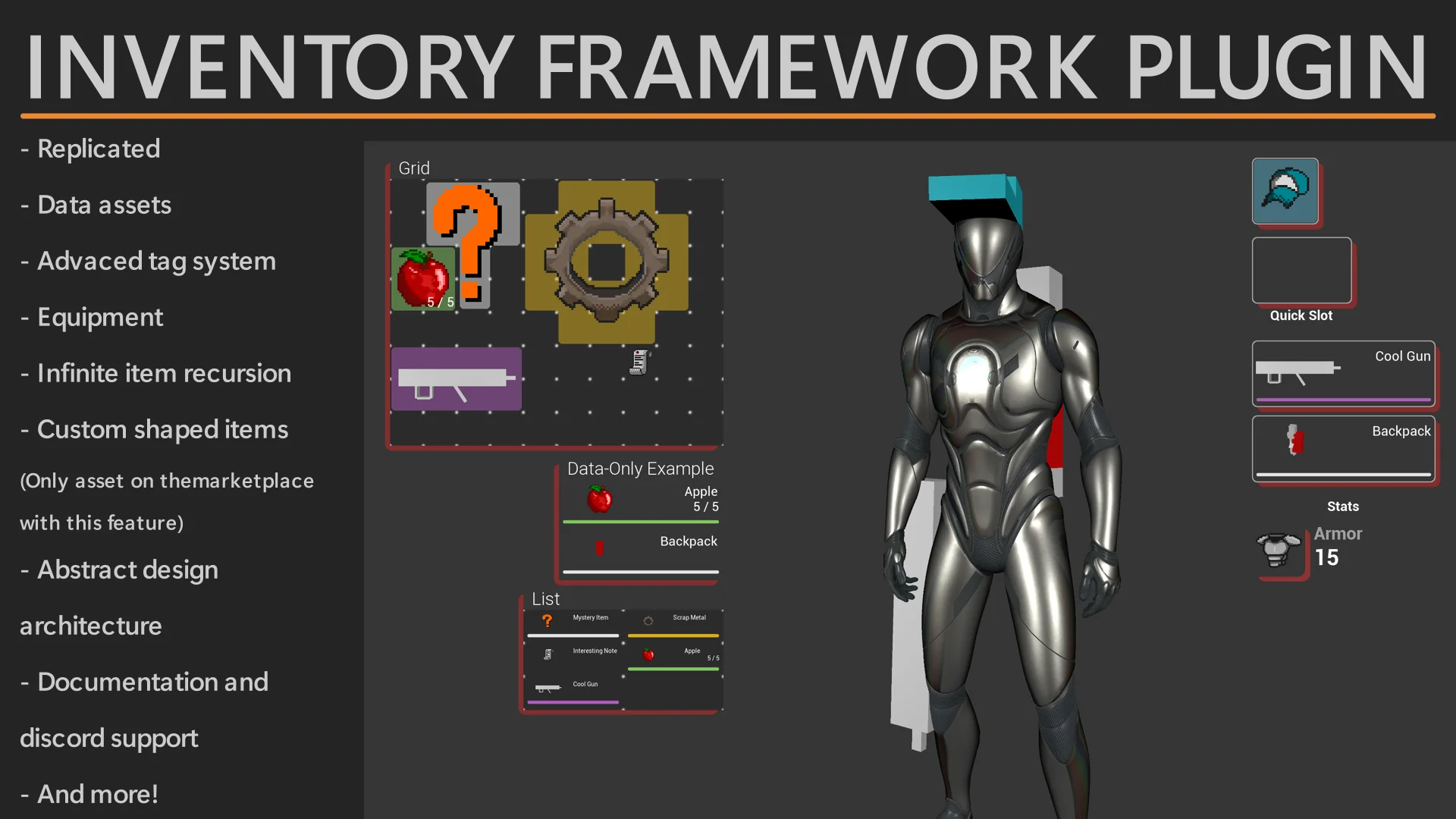
For front-end implementation, the system provides designer-friendly widgets equipped out of the box to process common interaction mechanics. Designers can integrate custom animation profiles, manage complex drag-and-drop behavior, and implement stack splitting or item combining without having to construct low-level tracking systems. Visual interface navigation is routed through overridable functions, granting developers direct control over game-pad, keyboard, or mouse routing when navigating nested or multi-layered screens.
Recursive Containers and Fragment-Driven Item Architecture
Hierarchical storage constraints often limit how deep an inventory hierarchy can reach. This framework bypasses fixed structural depth by employing an infinite container model that natively supports recursive nesting. A player can store an item that itself holds an arbitrary container, which in turn holds further items. Typical applications include nesting multiple backpacks within larger storage packs, or assigning complex modular weapons that hold child containers specifically reserved for internal modifications, attachments, and secondary items.
Item customization is driven by an extensible fragment workflow. Fragments allow developers to append any arbitrary data payload directly to individual items or containers, complete with built-in serialization support. This prevents the need to build bloated baseline item classes packed with unused parameters. Instead, specialized behavioral data lives only within the fragments assigned to relevant objects.
Supplementary state tracking is handled through a structured gameplay tag and tag value system. By linking numerical values or state states to specific tags, developers can establish modular item durability, rarity tiers, and distinct gameplay flags without writing custom subclasses for every condition. Items do not require a rigid parent class or strict component hierarchy, meaning actors and inventory elements can be organized with complete structural freedom.
Multi-Threaded Queries, Item Sockets, and Ability System Interoperability
Searching through vast arrays of nested items, evaluating spatial constraints, and filtering equipment states can impose measurable loads on the main game thread. To resolve this bottleneck, the plugin implements a multi-threaded item query pipeline. Complex item scans, condition checks, and property filters execute off-thread, preserving gameplay performance during heavy computational queries across large loot pools or dense inventories.
Spatial interaction between items expands beyond simple grid placements through item sockets. Sockets make it possible to define contextual gameplay interactions based on relative placement or proximity. An item placed into a designated socket can influence neighboring items, such as a sword positioned adjacent to or above a burning torch receiving an automatic fire buff. This mechanic links inventory organization directly to tactical gameplay effects.
Mechanics extending beyond passive storage tie seamlessly into external systems:
Ability System Integration: Designed to interface natively with the Unreal Engine Gameplay Ability System (GAS) while remaining completely compatible with custom, proprietary ability frameworks.
Abstract Crafting Pipelines: Crafting recipes, requirements, and outcomes are driven through abstract data assets, allowing recipe expansion without modifying core logic.
Modular Game Features: Loot generation and tables interface with Modular Game Feature workflows, allowing development teams to inject new randomized loot tables, seasonal pools, or downloadable expansions without modifying foundational data assets.
In-Editor Authoring and UMG-Powered Item System Tools
Iterating on item attributes typically demands running the full game client or writing custom Slate-based editor utilities. The Inventory Framework Plugin bypasses this friction by allowing developers to modify actor inventories directly inside the editor viewport as if the game were running live. State adjustments applied in the editor persist correctly, accelerating setup and balancing cycles.
To support internal tooling, developers can create asset-editing tools using standard UMG widgets instead of writing complex C++ Slate code. This lowers the barrier for technical designers to build bespoke authoring tools tailored to specific project requirements. Furthermore, handling asset visual representations is automated through an actor appearance duplication pipeline. This mechanism dynamically renders and extracts item visual data for automated UI icon generation and real-time 3D item inspection menus, reducing the manual asset-pipeline burden required to produce matching 2D interface art for every 3D item in the game.
Controlled Replication and Network Optimization
Multiplayer network efficiency is a primary consideration in large-scale titles. The framework limits remote procedure calls (RPCs) strictly to relevant, participating actors rather than broadcasting globally. Inventory state replication is gated so that synchronization packets are transmitted only when specific changes demand replication, providing developers granular control over bandwidth consumption while keeping automated synchronization active for foundational actions.
Both Blueprint visual scripting and native C++ workflows maintain parity throughout the codebase. Nearly the entire API is exposed to both environments, preventing scenarios where technical designers hit architectural walls in Blueprints or programmers must re-expose critical variables manually. This unified surface supports flexible engineering pipelines regardless of team size or language preference.
 Game Mechanics
 Game Mechanics
 Game Mechanics