"ddd0e3fb95b0aec2"{"id":"1001034","slug":"hyper-scalable-interaction-system-v4","title":"Hyper Scalable Interaction System v4","category":"Gameplay Features","engine":"5.7+","assetVersion":"Asset Version: v4","engineVersion":"Engine Version: 5.7+","tag":"Gameplay Features","accent":"blue","visual":"mech","summary":"Plug-and-play interaction for any Unreal Engine actor with prompts, progress bars, conditions, and network replication for Adventure, RPG, Co-op, and Simulation","platform":"Unreal Engine","publishedAt":"2026-08-25T11:18:18.819Z","updatedAt":"2026-08-25T11:18:18.819Z","sourceNotes":[],"fileContents":[],"compatibility":["Unreal Engine","Asset Version: v4","Engine Version: 5.7+"],"featuredImage":{"alt":"Hyper Scalable Interaction System v4","src":"/wp-content/uploads/published/2026/08/7bc00c753bb2-66597fe3-a933-47a3-b023-6e95ce537263-e5174f5999.webp"},"hasDownloadLink":true,"downloads":1,"terms":[{"taxonomy":"category","slug":"gameplay-features","name":"Gameplay Features"}],"galleryImages":[{"src":"/wp-content/uploads/published/2026/08/7dcf0b1b1ee9-42610c36-63ba-4d8f-9a7f-e13d75748de0-099a39b95e.webp","alt":"Hyper Scalable Interaction System v4"},{"src":"/wp-content/uploads/published/2026/08/f84e5ae24c0f-9a88cea7-4c40-41a4-870f-194786631117-06a5371c63.webp","alt":"Hyper Scalable Interaction System v4"},{"src":"/wp-content/uploads/published/2026/08/1b2df37aa43c-79d9ad07-1811-4dc2-af9f-f8f1eabe3a74-92fd08e8c5.webp","alt":"Hyper Scalable Interaction System v4"},{"src":"/wp-content/uploads/published/2026/08/4b335f5b2d7d-c418b587-c124-4dff-9c43-9bd2bc3156ed-c28d700977.webp","alt":"Hyper Scalable Interaction System v4"},{"src":"/wp-content/uploads/published/2026/08/05bf48485d43-ec0b980f-2a8d-4362-b3bb-db30796b671a-30c14090de.webp","alt":"Hyper Scalable Interaction System v4"},{"src":"/wp-content/uploads/published/2026/08/ac13fab17ee4-20796df5-9f75-4838-b1eb-6b1d4979ec94-dfde3c97c4.webp","alt":"Hyper Scalable Interaction System v4"},{"src":"/wp-content/uploads/published/2026/08/538eb9d06f95-08f1f01f-a357-4afb-8415-6880295d8fce-932f78ebfb.webp","alt":"Hyper Scalable Interaction System v4"},{"src":"/wp-content/uploads/published/2026/08/5ee17ba9cf48-2b25f680-a4c3-457c-9910-842820336c01-bf7ab0ef45.webp","alt":"Hyper Scalable Interaction System v4"},{"src":"/wp-content/uploads/published/2026/08/3e3410370b02-b94cc38c-3f84-4ac3-a4f1-8e4a34a1bab8-2edcc9bb2b.webp","alt":"Hyper Scalable Interaction System v4"}],"accessPanel":{"kind":"resource","title":"Download this resource","eyebrow":"Free Download","message":"Log in or create a free account to start your download.","fileName":"Hyper Scalable Interaction System v4.7z","safetyNote":"Resources are manually reviewed before listing to improve quality and reduce obvious risks.","actionLabel":"Download Free","resourceType":"Resource archive"},"contentHtml":"\u003cp\u003eEvery door, chest, NPC, switch, item, and fireplace in an Unreal Engine project is a candidate for player interaction. Usually that means rebuilding the same input checks, UI prompts, and state changes for each one. Hyper Scalable Interaction System v4 removes a large part of that repeated work with plug-and-play interaction any actor can use, backed by prompts, progress bars, conditions, and network replication. It works without code and stays compatible with keyboard, mouse, or gamepad input. The quickstart guide and documentation included with the system make the initial setup straightforward, so getting a first actor interactive is a matter of following the existing patterns rather than designing new ones.\u003c/p\u003e \u003ch2\u003eA plug-and-play interaction layer for any actor\u003c/h2\u003e\n\u003cp\u003eThe system is implemented in an abstract way, so it can be dropped onto an actor without being tangled in that actor's gameplay logic. This gives that interactivity stops being a per-asset chore and becomes a shared layer: a chest, a door, an NPC, an item, and a switch all follow the same interaction rules. Communication happens through interfaces, which keeps the system decoupled from the actual game object. Predefined interaction types are included for common cases: Interact, Toggle, and Grab. These cover a wide share of everyday gameplay interactions, while still leaving room for custom behaviors through the same interface-driven setup.\u003c/p\u003e\n\u003cp\u003eBecause the system handles multiplayer, a single setup can be used in cooperative projects as well as single-player ones. Network replication is part of the package, so the interaction layer is ready for multiplayer teams without requiring a separate networking pass. That makes it a practical fit for co-op games where players need to open the same doors or pull the same switches together.\u003c/p\u003e \u003ch2\u003eThe E key feedback loop: icons, text, and radius hints\u003c/h2\u003e\n\u003cp\u003ePlayers need to know what can be interacted with and how to interact with it. Hyper Scalable Interaction System v4 provides dynamic interact icons keyed to the E key, and dynamic interact text such as 'Hold E to X.' The text changes based on the interaction type and context, giving the player the exact input expected of them. The system also shows an interactive icon in a particular state, so the feedback is visual as well as textual.\u003c/p\u003e\n\u003cp\u003eOne of the more practical touches is the radius display. The system shows interactable objects within a certain range, which helps players find usable items or switches without scanning the ground visually. This is especially handy in a forest or in the dark, where a subtle prompt would otherwise be easy to miss. Since input is fully compatible with keyboard, mouse, or gamepad, the same feedback loop works on desktop and controller setups, letting players rely on the prompt regardless of input device.\u003c/p\u003e \u003ch2\u003eAdvanced logic and example content for real scenes\u003c/h2\u003e\n\u003cp\u003eBeyond simple 'press E to open a door,' the system supports advanced logic options for chained events. For instance, a developer can set up a button that turns one group of objects off and another on while the button is held down, with an optional reverse behavior when released. That allows for multi-step mechanisms or events that depend on a held input, without writing custom blueprints from scratch.\u003c/p\u003e\n\u003cp\u003eTo show how far the system can go, the package ships with many advanced examples: clickable buttons, toggle buttons, an interactable pull chain, an interactable crank, an interactable switch or lever, doors and fireplaces, and interactable lights. These map directly to common game scenarios. A pull chain on a lamp, a crank for a gate, a lever for a bridge, or a fireplace that can be lit all follow the same interaction layer. The examples act as reference content, demonstrating how each interaction type behaves in a real scene.\u003c/p\u003e \u003ch2\u003eA foundation built on 50,000 hours of Unreal Engine work\u003c/h2\u003e\n\u003cp\u003eHyper Scalable Interaction System v4 is part of a family of Hyper systems that share a common foundation. Every Hyper system reflects over 50,000 hours of real-world Unreal Engine development. That background is used to build modular, professional-quality systems that scale from simple projects to complex, professional games. For a developer, that experience shows in the design of the Blueprints: clear organization, straightforward naming, and a structure that stays controllable as the project grows.\u003c/p\u003e\n\u003cp\u003eGames by Hyper, the studio behind the system, emphasizes clear, well-organized Blueprints that grow with a project. The design principles are aimed at flexibility, maintainability, and performance, so a developer can extend the system without fighting it. An active Discord community supports developers during that process, and the developer, Eric, brings experience from years of leading IT and cybersecurity programs at C-level for banks, corporates, and governments before switching to game development. Today Eric teaches Game Development in Amsterdam and manages the community around Hyper, which includes over 4,000 developers. The studio also offers optional learning courses: an UE5 Fundamentals course and a Multiplayer Survival Framework course, both aligned with the same modular approach used across the Hyper ecosystem.\u003c/p\u003e \u003ch2\u003eWhere it fits: Adventure, RPG, co-op, and simulation projects\u003c/h2\u003e\n\u003cp\u003eBecause the system does not enforce a specific kind of gameplay, it fits genres where interaction happens constantly. The system is meant for Adventure, RPG, Co-op, and Simulation games. Cooperative projects especially benefit from the built-in network replication; single-player RPGs benefit from having consistent prompts for looting, NPC dialog, or world objects. In simulation projects, the same interaction layer provides the consistency needed for repeated interactable objects.\u003c/p\u003e\n\u003cp\u003eThe system is also included within MST Pro, the studio's flagship product. Developers who want to experience the larger Hyper ecosystem can explore compatible Hyper systems or try the MST Pro demo. For an indie creator or hobbyist, the main win is skipping the repetitive wiring that usually goes into chests, doors, switches, and items, while keeping the door open for advanced event chains. A demo, video, quickstart guide, and documentation give enough material to evaluate the system before starting a workflow, and written reviews from other developers can offer additional perspective on real-world use.\u003c/p\u003e\n\u003cp\u003eFor teams building adventure or simulation projects on Unreal Engine, this system removes a large chunk of repetitive work while retaining flexibility. The 50,000 hours of engine experience behind it mean the Blueprints are battle-tested rather than experimental. That is a strong reason to use it on any project where players will reach out and interact with the world. It is a practical, grounded answer to one of the most common needs in game production: making objects respond to the player in clear, consistent ways.\u003c/p\u003e\n\n\u003ch2\u003eExplore Similar Assets\u003c/h2\u003e\n\u003cul\u003e\n\u003cli\u003e\u003ca href=\"https://3dcghub.com/hyper-outliner-and-symbol-system-v4/\" title=\"Hyper Outliner and Symbol System v4\"\u003eHyper Outliner and Symbol System v4\u003c/a\u003e\u003c/li\u003e\n\u003cli\u003e\u003ca href=\"https://3dcghub.com/replicated-interaction-kit-vol-1-switch-valve-chain-etc/\" title=\"Replicated Interaction Kit Vol 1 (Switch, Valve, Chain etc.)\"\u003eReplicated Interaction Kit Vol 1 (Switch, Valve, Chain etc.)\u003c/a\u003e\u003c/li\u003e\n\u003cli\u003e\u003ca href=\"https://3dcghub.com/basic-interaction-widgets-and-notes/\" title=\"Basic Interaction, Widgets \u0026amp; Notes\"\u003eBasic Interaction, Widgets \u0026amp; Notes\u003c/a\u003e\u003c/li\u003e\n\u003cli\u003e\u003ca href=\"https://3dcghub.com/advanced-fuel-system-multiplayer-vehicle-addon/\" title=\"Advanced Fuel System: Multiplayer Vehicle Addon\"\u003eAdvanced Fuel System: Multiplayer Vehicle Addon\u003c/a\u003e\u003c/li\u003e\n\u003cli\u003e\u003ca href=\"https://3dcghub.com/hyper-menu-and-gamepad-system-v4-commonui/\" title=\"Hyper Menu and Gamepad System v4 [CommonUI]\"\u003eHyper Menu and Gamepad System v4 [CommonUI]\u003c/a\u003e\u003c/li\u003e\n\u003c/ul\u003e","contentTextLength":7124,"navigation":{"current":588,"total":3511,"previous":{"id":"1001035","slug":"hyper-time-manager-system-v4","title":"Hyper Time Manager System v4","category":"Gameplay Features","platform":"Unreal Engine","updatedAt":"2026-08-25T11:24:46.098Z"},"next":{"id":"1000060","slug":"fps-animation-pack-ultimate","title":"FPS Animation Pack Ultimate","category":"Animations","platform":"Unreal Engine","updatedAt":"2026-08-25T11:09:37.967Z"}},"relatedResources":[{"id":"1001035","slug":"hyper-time-manager-system-v4","title":"Hyper Time Manager System v4","category":"Gameplay Features","engine":"5.7+","assetVersion":"Asset Version: v4","engineVersion":"Engine Version: 5.7+","tag":"Gameplay Features","accent":"blue","visual":"mech","summary":"Hyper Time Manager System v4 centralizes in-game time in the GameState, syncing NPC schedules, day-night cycles, and world events with Blueprint, multiplayer-re","platform":"Unreal Engine","publishedAt":"2026-08-25T11:24:46.098Z","updatedAt":"2026-08-25T11:24:46.098Z","sourceNotes":[],"fileContents":[],"compatibility":["Unreal Engine","Asset Version: v4","Engine Version: 5.7+"],"featuredImage":{"alt":"Hyper Time Manager System v4","src":"/wp-content/uploads/published/2026/08/0c6d2b9b85f3-d2a03156-4b13-4068-b29a-47eca06cd2d2-7cea1ff9c1.webp"},"hasDownloadLink":true,"downloads":2},{"id":"1000705","slug":"hyper-outliner-and-symbol-system-v4","title":"Hyper Outliner and Symbol System v4","category":"Gameplay Features","engine":"5.0+","assetVersion":"Asset Version: v4","engineVersion":"Engine Version: 5.0+","tag":"Gameplay Features","accent":"blue","visual":"mech","summary":"A fully replicated Unreal Engine outline and symbol system for multiplayer games. Attach colored outlines and quest symbols to any actor with no code needed.","platform":"Unreal Engine","publishedAt":"2026-07-24T01:34:23.942Z","updatedAt":"2026-07-24T01:34:23.942Z","sourceNotes":[],"fileContents":[],"compatibility":["Unreal Engine","Asset Version: v4","Engine Version: 5.0+"],"featuredImage":{"alt":"Hyper Outliner and Symbol System v4","src":"/wp-content/uploads/published/2026/07/845c3d6251d1-155e2be8-d517-47c2-8082-3009d481e506-6f0111c465.webp"},"hasDownloadLink":true,"downloads":1},{"id":"1001300","slug":"hyper-attribute-manager-v4","title":"Hyper Attribute Manager v4","category":"Gameplay Features","engine":"5.0+","assetVersion":"","engineVersion":"Engine Version: 5.0+","tag":"Gameplay Features","accent":"blue","visual":"mech","summary":"Hyper Attribute Manager v4 delivers datatable-driven attributes, status effects, replication, and environmental temperature systems for Unreal Engine projects.","platform":"Unreal Engine","publishedAt":"2026-10-02T06:02:21.105Z","updatedAt":"2026-10-02T06:02:21.105Z","sourceNotes":[],"fileContents":[],"compatibility":["Unreal Engine","Engine Version: 5.0+"],"featuredImage":{"alt":"Hyper Attribute Manager v4","src":"/wp-content/uploads/published/2026/10/972a4b879638-0e0fc583-022d-42e5-8bc2-1dfcf595c3f2-651c2fceab.webp"},"hasDownloadLink":true,"downloads":0}]}
Gameplay Features
Hyper Scalable Interaction System v4
Plug-and-play interaction for any Unreal Engine actor with prompts, progress bars, conditions, and network replication for Adventure, RPG, Co-op, and Simulation
Every door, chest, NPC, switch, item, and fireplace in an Unreal Engine project is a candidate for player interaction. Usually that means rebuilding the same input checks, UI prompts, and state changes for each one. Hyper Scalable Interaction System v4 removes a large part of that repeated work with plug-and-play interaction any actor can use, backed by prompts, progress bars, conditions, and network replication. It works without code and stays compatible with keyboard, mouse, or gamepad input. The quickstart guide and documentation included with the system make the initial setup straightforward, so getting a first actor interactive is a matter of following the existing patterns rather than designing new ones.
A plug-and-play interaction layer for any actor
The system is implemented in an abstract way, so it can be dropped onto an actor without being tangled in that actor's gameplay logic. This gives that interactivity stops being a per-asset chore and becomes a shared layer: a chest, a door, an NPC, an item, and a switch all follow the same interaction rules. Communication happens through interfaces, which keeps the system decoupled from the actual game object. Predefined interaction types are included for common cases: Interact, Toggle, and Grab. These cover a wide share of everyday gameplay interactions, while still leaving room for custom behaviors through the same interface-driven setup.
Because the system handles multiplayer, a single setup can be used in cooperative projects as well as single-player ones. Network replication is part of the package, so the interaction layer is ready for multiplayer teams without requiring a separate networking pass. That makes it a practical fit for co-op games where players need to open the same doors or pull the same switches together.
The E key feedback loop: icons, text, and radius hints
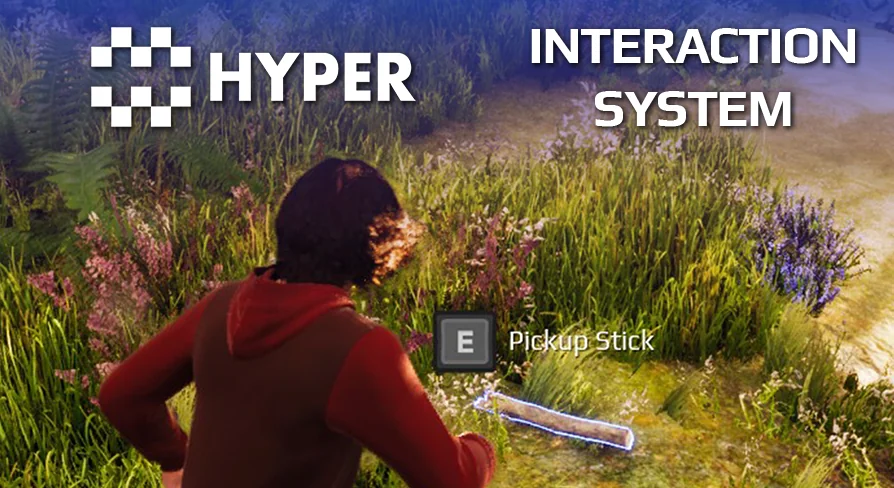
Players need to know what can be interacted with and how to interact with it. Hyper Scalable Interaction System v4 provides dynamic interact icons keyed to the E key, and dynamic interact text such as 'Hold E to X.' The text changes based on the interaction type and context, giving the player the exact input expected of them. The system also shows an interactive icon in a particular state, so the feedback is visual as well as textual.
One of the more practical touches is the radius display. The system shows interactable objects within a certain range, which helps players find usable items or switches without scanning the ground visually. This is especially handy in a forest or in the dark, where a subtle prompt would otherwise be easy to miss. Since input is fully compatible with keyboard, mouse, or gamepad, the same feedback loop works on desktop and controller setups, letting players rely on the prompt regardless of input device.
Advanced logic and example content for real scenes
Beyond simple 'press E to open a door,' the system supports advanced logic options for chained events. For instance, a developer can set up a button that turns one group of objects off and another on while the button is held down, with an optional reverse behavior when released. That allows for multi-step mechanisms or events that depend on a held input, without writing custom blueprints from scratch.
To show how far the system can go, the package ships with many advanced examples: clickable buttons, toggle buttons, an interactable pull chain, an interactable crank, an interactable switch or lever, doors and fireplaces, and interactable lights. These map directly to common game scenarios. A pull chain on a lamp, a crank for a gate, a lever for a bridge, or a fireplace that can be lit all follow the same interaction layer. The examples act as reference content, demonstrating how each interaction type behaves in a real scene.
A foundation built on 50,000 hours of Unreal Engine work
Hyper Scalable Interaction System v4 is part of a family of Hyper systems that share a common foundation. Every Hyper system reflects over 50,000 hours of real-world Unreal Engine development. That background is used to build modular, professional-quality systems that scale from simple projects to complex, professional games. For a developer, that experience shows in the design of the Blueprints: clear organization, straightforward naming, and a structure that stays controllable as the project grows.
Games by Hyper, the studio behind the system, emphasizes clear, well-organized Blueprints that grow with a project. The design principles are aimed at flexibility, maintainability, and performance, so a developer can extend the system without fighting it. An active Discord community supports developers during that process, and the developer, Eric, brings experience from years of leading IT and cybersecurity programs at C-level for banks, corporates, and governments before switching to game development. Today Eric teaches Game Development in Amsterdam and manages the community around Hyper, which includes over 4,000 developers. The studio also offers optional learning courses: an UE5 Fundamentals course and a Multiplayer Survival Framework course, both aligned with the same modular approach used across the Hyper ecosystem.
Where it fits: Adventure, RPG, co-op, and simulation projects
Because the system does not enforce a specific kind of gameplay, it fits genres where interaction happens constantly. The system is meant for Adventure, RPG, Co-op, and Simulation games. Cooperative projects especially benefit from the built-in network replication; single-player RPGs benefit from having consistent prompts for looting, NPC dialog, or world objects. In simulation projects, the same interaction layer provides the consistency needed for repeated interactable objects.
The system is also included within MST Pro, the studio's flagship product. Developers who want to experience the larger Hyper ecosystem can explore compatible Hyper systems or try the MST Pro demo. For an indie creator or hobbyist, the main win is skipping the repetitive wiring that usually goes into chests, doors, switches, and items, while keeping the door open for advanced event chains. A demo, video, quickstart guide, and documentation give enough material to evaluate the system before starting a workflow, and written reviews from other developers can offer additional perspective on real-world use.
For teams building adventure or simulation projects on Unreal Engine, this system removes a large chunk of repetitive work while retaining flexibility. The 50,000 hours of engine experience behind it mean the Blueprints are battle-tested rather than experimental. That is a strong reason to use it on any project where players will reach out and interact with the world. It is a practical, grounded answer to one of the most common needs in game production: making objects respond to the player in clear, consistent ways.
 Gameplay Features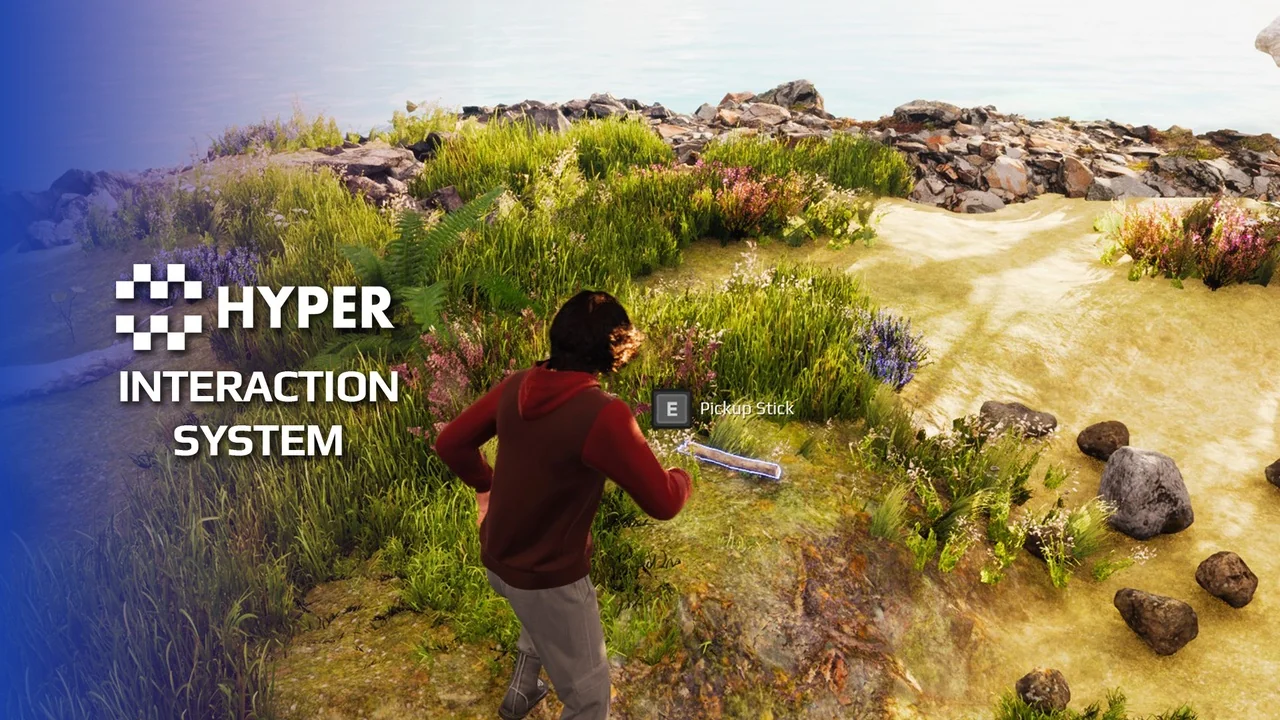
 Gameplay Features
 Gameplay Features
 Gameplay Features