"b00678cacce53329"{"id":"1002790","slug":"fire-builder","title":"Fire Builder","category":"Variety","engine":"4.16+,5.0+","assetVersion":"","engineVersion":"Engine Version: 4.16+,5.0+","tag":"Variety","accent":"blue","visual":"mech","summary":"A deep dive into Fire Builder, covering its modular 2048x2048 HDR effects, flame customization, training resources, and real-time visual implementation.","platform":"Unreal Engine","indexPolicy":"index","publishedAt":"2026-11-20T07:13:10.323Z","updatedAt":"2026-11-20T07:13:10.323Z","sourceNotes":[],"fileContents":[],"compatibility":["Unreal Engine","Engine Version: 4.16+,5.0+"],"featuredImage":{"alt":"Fire Builder","src":"/wp-content/uploads/published/2026/11/8b351af02a6e-2548e8a9-e8fd-46ec-bef8-fcdaadb35f4b-0cc178c77a.webp"},"fileSizeBytes":416207830,"hasDownloadLink":true,"downloads":0,"terms":[{"taxonomy":"category","slug":"variety-vfx","name":"Variety"}],"galleryImages":[{"src":"/wp-content/uploads/published/2026/11/e5f864f4fe56-69a21452-ca29-45b5-b44e-d1d56ecaf15e-6f9545ff27.webp","alt":"Fire Builder"},{"src":"/wp-content/uploads/published/2026/11/8bb8588119de-88c63d0d-128b-4898-89bb-d6c94ebf7cc5-9323ab7ac7.webp","alt":"Fire Builder"},{"src":"/wp-content/uploads/published/2026/11/1a69262d3ce2-e94c1b67-5e13-4129-9f5f-67f876583199-f106089caf.webp","alt":"Fire Builder"},{"src":"/wp-content/uploads/published/2026/11/f8e27d153580-eba160a4-5702-4769-840d-8fb212d1986e-170dcfdaab.webp","alt":"Fire Builder"},{"src":"/wp-content/uploads/published/2026/11/2a64e0335f7d-c88fa2d2-bc40-4941-a771-8f5ff65bf3b5-094e2748cb.webp","alt":"Fire Builder"},{"src":"/wp-content/uploads/published/2026/11/1f22f21117fa-7f50c52d-6058-4b2d-a758-d8e846ed47b4-976811d64a.webp","alt":"Fire Builder"},{"src":"/wp-content/uploads/published/2026/11/156851aac70a-185d2934-79a4-4490-9755-5ac96c1b316a-d7d8d48897.webp","alt":"Fire Builder"}],"accessPanel":{"kind":"resource","title":"Get this resource","safetyNote":"Resources are manually reviewed before listing to improve quality and reduce obvious risks.","fileName":"Content.7z","resourceType":"Resource archive","versions":[]},"contentHtml":"\u003ch2\u003eSituating Fire Builder in Real-Time Environments\u003c/h2\u003e\n\u003cp\u003eFlames in real-time graphics must balance immediate readability with nuanced shading behavior. A campfire requires localized warmth and steady ember drift, while an uncontrolled structural inferno demands sweeping tongues of flame, intense thermal luminance, and spreading burn characteristics. Achieving both extremes within a single visual framework often strains standard sprite setups, leading artists to stitch together mismatched texture sheets or settle for static flipbooks that cannot adapt to varied scene contexts.\u003c/p\u003e\n\u003cp\u003eFire Builder addresses this friction by framing fire creation as an adaptable assembly process rather than a set of rigid, pre-baked simulations. The package structures its assets so that developers can tailor heat, blaze, and burn elements to the exact scale of an environment. Whether an artist is dressing a torchlit dungeon corridor, detailing an explosive combat encounter, or populating scorched surfaces across a ruined landscape, the library supplies discrete visual elements that can be combined freely.\u003c/p\u003e\n\u003cp\u003eBecause visual effects often suffer when pushed beyond their intended scale, having access to focused building blocks prevents fire simulations from appearing repetitive. Individual flame tongues, surface scorch elements, heat distortion cues, and particle behaviors can be isolated or layered. This separation of concerns allows developers to govern each tier of the combustion process independently, giving projects the flexibility to tune visual density to match both gameplay performance and aesthetic goals.\u003c/p\u003e \u003ch2\u003eModular Assembly with Fire Builder Components\u003c/h2\u003e\n\u003cp\u003eModularity stands at the center of the library's architecture. Rather than locking developers into unalterable, single-purpose visual assets, Fire Builder enables creators to combine individual components to establish brand-new custom fire effects. This approach completely changes how visual effects artists and level designers approach thermal staging in production.\u003c/p\u003e\n\u003cp\u003eWhen assembling an effect, you are not forced to accept an all-or-nothing visual preset. A modest flame can serve as the core emitter, which can then be layered with secondary particle trails, elevated heat effects, or surface-level burn details. Conversely, scaling down an intense blaze into a smoldering residue merely requires detaching or modulating the primary inferno components while retaining the foundational scorch and ember dynamics.\u003c/p\u003e\n\u003cp\u003eThis capacity to modify existing arrangements makes iteration rapid. When lighting conditions change or an art director requests a more aggressive inferno, team members do not need to discard their initial work. They can adjust component blending, introduce supplementary flame shapes, or alter the density of active particles directly within the existing structure. The modular nature of the system ensures that distinct fire behaviors remain harmonized, even when heavily customized for specific set pieces.\u003c/p\u003e \u003ch2\u003eVisual Crispness Across 2048x2048 HDR Assets\u003c/h2\u003e\n\u003cp\u003eTexture resolution and dynamic range heavily influence whether a particle system reads as genuine fire or as a flat, low-contrast overlay. All effects across the package are authored at 2048x2048 resolution using High Dynamic Range (HDR) image formatting. This technical choice directly impacts how the fire interacts with modern rendering pipelines, camera proximity, and post-processing stacks.\u003c/p\u003e\n\u003cp\u003eA resolution of 2048x2048 preserves fine edge definition across every stage of the flame. In standard-definition particle sheets, flame tendrils often degrade into soft, pixelated silhouettes when viewed close to the camera. With 2048x2048 textures, individual ribbons of fire, internal combustion eddies, and disintegrating sparks maintain sharp boundaries. This clarity is vital when effects are placed alongside interactive props or held directly in front of a first-person camera.\u003c/p\u003e\n\u003cp\u003eAuthoring in HDR format deepens this clarity by storing authentic luminance values beyond the standard zero-to-one range. Fire naturally contains hot, radiant cores that taper into cooler, smoky fringes. HDR images capture these steep luminous gradients natively, allowing bloom, tone mapping, and exposure systems to process the effects accurately. The bright points of an inferno punch through dark scenes without turning into muddy or chalky white planes, while the subtle transition zones into heat and smoke retain detailed color differentiation.\u003c/p\u003e \u003ch2\u003eWorkflow Guidance Through Documentation and Training\u003c/h2\u003e\n\u003cp\u003eNavigating a modular asset library efficiently requires clear insight into how parts connect. The package provides a structured support foundation to assist artists throughout setup and modification, minimizing setup hurdles before assets reach production scenes.\u003c/p\u003e\n\u003cp\u003eDetailed documentation outlines the structural baseline of the modular assets, helping artists understand the intended interaction between flame layers, particle systems, and underlying visual components. Written guides serve as a steady technical reference when troubleshooting emitter settings or verifying asset parameters during engine integration.\u003c/p\u003e\n\u003cp\u003eVisual learners can consult training videos that walk through practical assembly workflows. Watching step-by-step modification demonstrations reduces the trial-and-error often required when balancing complex particle layers. Seeing how modular pieces link together in real time accelerates the creation of custom variations, making the library accessible to junior artists and seasoned technical directors alike.\u003c/p\u003e\n\u003cp\u003eBeyond static reference materials, an active Discord chat community offers direct communication channels for troubleshooting, technique sharing, and technical discourse. Paired with developer newsletter updates, the surrounding ecosystem keeps artists connected to best practices and ongoing workflow developments.\u003c/p\u003e \u003ch2\u003eTarget Scenarios for Flame and Inferno Elements\u003c/h2\u003e\n\u003cp\u003eThe library covers a thematic spectrum captured by its focus on scorch, visual, inferno, effect, blaze, heat, flame, fire, particle, and burn elements. These descriptors define a wide operational scope suitable for numerous game genres and virtual environments.\u003c/p\u003e\n\u003cp\u003eAction titles with elemental combat or destruction mechanics benefit heavily from the system's scorch and burn properties. Placing persistent heat traces and burn marks alongside active blaze components gives kinetic attacks an enduring physical impact on the environment. In slower, atmospheric titles such as survival horror or exploration adventures, dialing back the inferno elements allows artists to rely on gentle flame flickers, embers, and heat shimmer to craft tense, immersive lighting setups.\u003c/p\u003e\n\u003cp\u003eVisual effects artists, technical artists, and level designers who frequently build custom combustion effects without writing custom simulations from scratch gain the most from this toolset. By uniting 2048x2048 HDR fidelity with open modular restructuring, the library removes the friction of authoring believable, high-impact fire across diverse interactive projects.\u003c/p\u003e\n\n\u003ch2\u003eContinue Browsing Similar Packs\u003c/h2\u003e\n\u003cul\u003e\n\u003cli\u003e\u003ca href=\"https://3dcghub.com/explosion-pack-1-nature-elements/\" rel=\"noopener noreferrer\"\u003eExplosion Pack #1 - Nature Elements\u003c/a\u003e\u003c/li\u003e\n\u003cli\u003e\u003ca href=\"https://3dcghub.com/forest-fire/\" rel=\"noopener noreferrer\"\u003eForest Fire\u003c/a\u003e\u003c/li\u003e\n\u003cli\u003e\u003ca href=\"https://3dcghub.com/2d-anime-vfx-pack/\" rel=\"noopener noreferrer\"\u003e2D Anime VFX Pack\u003c/a\u003e\u003c/li\u003e\n\u003cli\u003e\u003ca href=\"https://3dcghub.com/muzzle-flashes/\" rel=\"noopener noreferrer\"\u003eMuzzle Flashes\u003c/a\u003e\u003c/li\u003e\n\u003cli\u003e\u003ca href=\"https://3dcghub.com/niagara-realistic-starter-vfx-pack-2/\" rel=\"noopener noreferrer\"\u003eNiagara Realistic Starter VFX Pack 2\u003c/a\u003e\u003c/li\u003e\n\u003c/ul\u003e","contentTextLength":7183,"navigation":{"current":90,"total":4797,"previous":{"id":"1002791","slug":"fire-energy-vfx-pack","title":"Fire Energy VFX Pack","category":"Variety","platform":"Unreal Engine","updatedAt":"2026-11-20T07:14:26.958Z"},"next":{"id":"1002789","slug":"fantasy-vfx-collection-4","title":"FANTASY VFX COLLECTION '4'","category":"Variety","platform":"Unreal Engine","updatedAt":"2026-11-20T07:11:55.402Z"}},"relatedResources":[{"id":"1002852","slug":"vectorfield-builder","title":"VectorField Builder","category":"Variety","engine":"4.16+,5.0+","assetVersion":"","engineVersion":"Engine Version: 4.16+,5.0+","tag":"Variety","accent":"blue","visual":"mech","summary":"VectorField Builder delivers over 88 vector fields and pre-built emitters for crafting GPU particle motion, swirls, tornadoes, and explosive nova visuals.","platform":"Unreal Engine","indexPolicy":"index","publishedAt":"2026-11-20T12:34:10.218Z","updatedAt":"2026-11-20T12:34:10.218Z","sourceNotes":[],"fileContents":[],"compatibility":["Unreal Engine","Engine Version: 4.16+,5.0+"],"featuredImage":{"alt":"VectorField Builder","src":"/wp-content/uploads/published/2026/11/d885dd995d0b-8fc2f9e6-2032-47bb-8c75-5af81c1e43bd-5fbdc11476.webp"},"fileSizeBytes":179555950,"hasDownloadLink":true,"downloads":0},{"id":"1002791","slug":"fire-energy-vfx-pack","title":"Fire Energy VFX Pack","category":"Variety","engine":"4.19+,5.0+","assetVersion":"","engineVersion":"Engine Version: 4.19+,5.0+","tag":"Variety","accent":"blue","visual":"mech","summary":"A guide to implementing the Fire Energy VFX Pack, focusing on evil-themed fire, smoke, ribbon trails, tornados, and portals for stylized fantasy games.","platform":"Unreal Engine","indexPolicy":"index","publishedAt":"2026-11-20T07:14:26.958Z","updatedAt":"2026-11-20T07:14:26.958Z","sourceNotes":[],"fileContents":[],"compatibility":["Unreal Engine","Engine Version: 4.19+,5.0+"],"featuredImage":{"alt":"Fire Energy VFX Pack","src":"/wp-content/uploads/published/2026/11/cfadee91cf37-0e8b39e0-8ddc-4a2f-bc2d-20d1ddb58f7c-ad56341fc0.webp"},"fileSizeBytes":78056913,"hasDownloadLink":true,"downloads":0},{"id":"1002785","slug":"explosion-pack-1-nature-elements","title":"Explosion Pack #1 - Nature Elements","category":"Variety","engine":"4.16+,5.0+","assetVersion":"","engineVersion":"Engine Version: 4.16+,5.0+","tag":"Variety","accent":"blue","visual":"mech","summary":"Explore Explosion Pack #1 - Nature Elements, featuring modular semi-realistic fire, ice, electric, and poison impacts for Unreal VR, AR, and VFX projects.","platform":"Unreal Engine","indexPolicy":"index","publishedAt":"2026-11-20T07:08:23.380Z","updatedAt":"2026-11-20T07:08:23.380Z","sourceNotes":[],"fileContents":[],"compatibility":["Unreal Engine","Engine Version: 4.16+,5.0+"],"featuredImage":{"alt":"Explosion Pack #1 - Nature Elements","src":"/wp-content/uploads/published/2026/11/63772c01f1c6-cfe5d090-a2e8-4d15-8089-866bc097ea14-6c59f3dcfd.webp"},"fileSizeBytes":17728972,"hasDownloadLink":true,"downloads":0}]}
Resource screenshots
1 / 7
Join our channel
Follow 3DCGHUB on Telegram for new resource drops, migration updates, and community notices.
Resources are manually reviewed before listing to improve quality and reduce obvious risks.
No account required
Variety
Fire Builder
A deep dive into Fire Builder, covering its modular 2048x2048 HDR effects, flame customization, training resources, and real-time visual implementation.
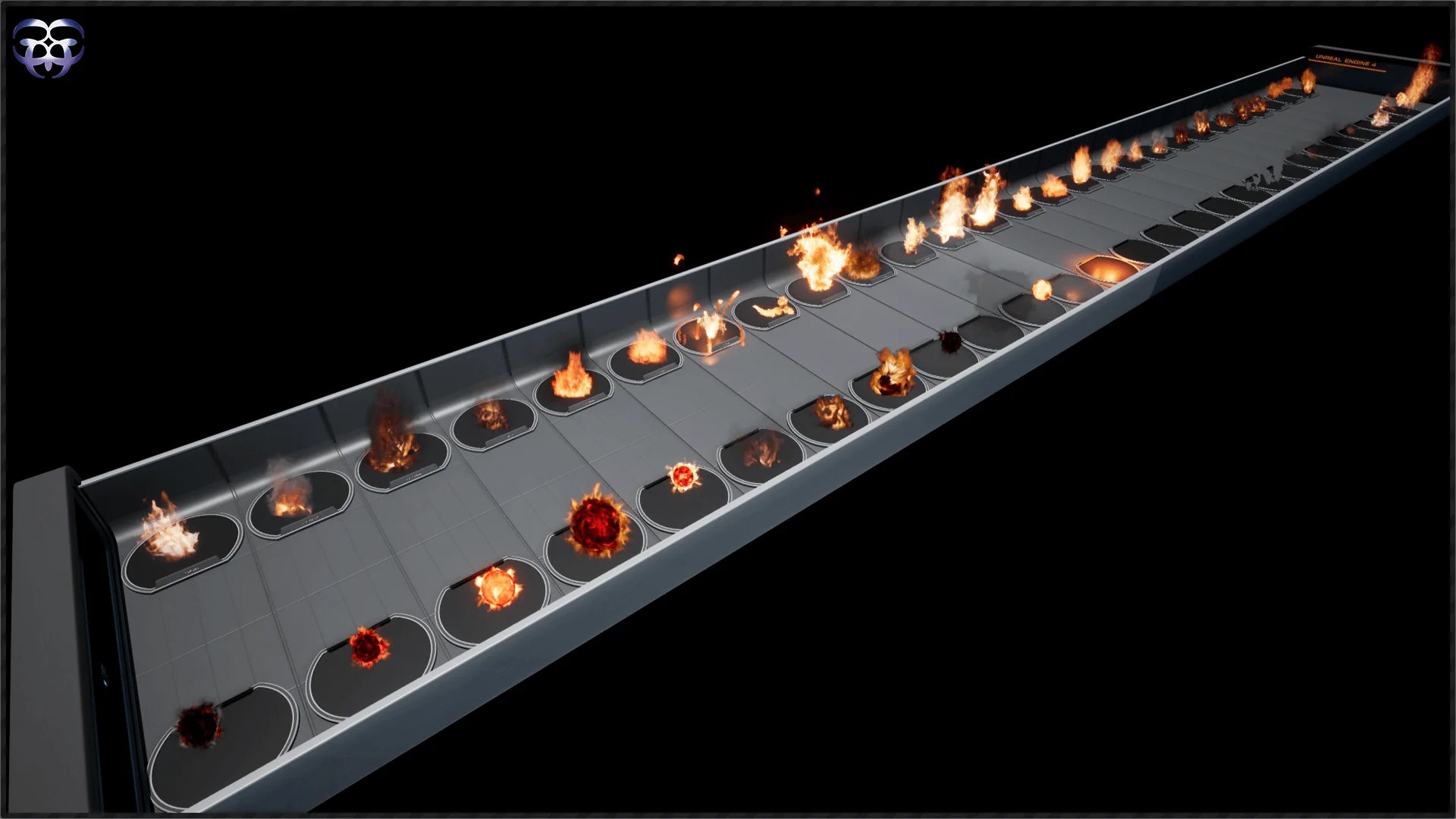
Flames in real-time graphics must balance immediate readability with nuanced shading behavior. A campfire requires localized warmth and steady ember drift, while an uncontrolled structural inferno demands sweeping tongues of flame, intense thermal luminance, and spreading burn characteristics. Achieving both extremes within a single visual framework often strains standard sprite setups, leading artists to stitch together mismatched texture sheets or settle for static flipbooks that cannot adapt to varied scene contexts.
Fire Builder addresses this friction by framing fire creation as an adaptable assembly process rather than a set of rigid, pre-baked simulations. The package structures its assets so that developers can tailor heat, blaze, and burn elements to the exact scale of an environment. Whether an artist is dressing a torchlit dungeon corridor, detailing an explosive combat encounter, or populating scorched surfaces across a ruined landscape, the library supplies discrete visual elements that can be combined freely.
Because visual effects often suffer when pushed beyond their intended scale, having access to focused building blocks prevents fire simulations from appearing repetitive. Individual flame tongues, surface scorch elements, heat distortion cues, and particle behaviors can be isolated or layered. This separation of concerns allows developers to govern each tier of the combustion process independently, giving projects the flexibility to tune visual density to match both gameplay performance and aesthetic goals.
Modular Assembly with Fire Builder Components
Modularity stands at the center of the library's architecture. Rather than locking developers into unalterable, single-purpose visual assets, Fire Builder enables creators to combine individual components to establish brand-new custom fire effects. This approach completely changes how visual effects artists and level designers approach thermal staging in production.
When assembling an effect, you are not forced to accept an all-or-nothing visual preset. A modest flame can serve as the core emitter, which can then be layered with secondary particle trails, elevated heat effects, or surface-level burn details. Conversely, scaling down an intense blaze into a smoldering residue merely requires detaching or modulating the primary inferno components while retaining the foundational scorch and ember dynamics.
This capacity to modify existing arrangements makes iteration rapid. When lighting conditions change or an art director requests a more aggressive inferno, team members do not need to discard their initial work. They can adjust component blending, introduce supplementary flame shapes, or alter the density of active particles directly within the existing structure. The modular nature of the system ensures that distinct fire behaviors remain harmonized, even when heavily customized for specific set pieces.
Visual Crispness Across 2048x2048 HDR Assets
Texture resolution and dynamic range heavily influence whether a particle system reads as genuine fire or as a flat, low-contrast overlay. All effects across the package are authored at 2048x2048 resolution using High Dynamic Range (HDR) image formatting. This technical choice directly impacts how the fire interacts with modern rendering pipelines, camera proximity, and post-processing stacks.
A resolution of 2048x2048 preserves fine edge definition across every stage of the flame. In standard-definition particle sheets, flame tendrils often degrade into soft, pixelated silhouettes when viewed close to the camera. With 2048x2048 textures, individual ribbons of fire, internal combustion eddies, and disintegrating sparks maintain sharp boundaries. This clarity is vital when effects are placed alongside interactive props or held directly in front of a first-person camera.
Authoring in HDR format deepens this clarity by storing authentic luminance values beyond the standard zero-to-one range. Fire naturally contains hot, radiant cores that taper into cooler, smoky fringes. HDR images capture these steep luminous gradients natively, allowing bloom, tone mapping, and exposure systems to process the effects accurately. The bright points of an inferno punch through dark scenes without turning into muddy or chalky white planes, while the subtle transition zones into heat and smoke retain detailed color differentiation.
Workflow Guidance Through Documentation and Training
Navigating a modular asset library efficiently requires clear insight into how parts connect. The package provides a structured support foundation to assist artists throughout setup and modification, minimizing setup hurdles before assets reach production scenes.
Detailed documentation outlines the structural baseline of the modular assets, helping artists understand the intended interaction between flame layers, particle systems, and underlying visual components. Written guides serve as a steady technical reference when troubleshooting emitter settings or verifying asset parameters during engine integration.
Visual learners can consult training videos that walk through practical assembly workflows. Watching step-by-step modification demonstrations reduces the trial-and-error often required when balancing complex particle layers. Seeing how modular pieces link together in real time accelerates the creation of custom variations, making the library accessible to junior artists and seasoned technical directors alike.
Beyond static reference materials, an active Discord chat community offers direct communication channels for troubleshooting, technique sharing, and technical discourse. Paired with developer newsletter updates, the surrounding ecosystem keeps artists connected to best practices and ongoing workflow developments.
Target Scenarios for Flame and Inferno Elements
The library covers a thematic spectrum captured by its focus on scorch, visual, inferno, effect, blaze, heat, flame, fire, particle, and burn elements. These descriptors define a wide operational scope suitable for numerous game genres and virtual environments.
Action titles with elemental combat or destruction mechanics benefit heavily from the system's scorch and burn properties. Placing persistent heat traces and burn marks alongside active blaze components gives kinetic attacks an enduring physical impact on the environment. In slower, atmospheric titles such as survival horror or exploration adventures, dialing back the inferno elements allows artists to rely on gentle flame flickers, embers, and heat shimmer to craft tense, immersive lighting setups.
Visual effects artists, technical artists, and level designers who frequently build custom combustion effects without writing custom simulations from scratch gain the most from this toolset. By uniting 2048x2048 HDR fidelity with open modular restructuring, the library removes the friction of authoring believable, high-impact fire across diverse interactive projects.
 Variety
 Variety
 Variety