"e9c335e082208b17"{"id":"1002892","slug":"easyfirebase-pro","title":"EasyFirebase Pro","category":"Engine Tools","engine":"4.27","assetVersion":"Asset Version: 1.9.7","engineVersion":"Engine Version: 4.27","tag":"Engine Tools","accent":"blue","visual":"mech","summary":"Explore EasyFirebase Pro for integrating Firebase Auth, Realtime Database, Analytics, Remote Config, Messaging, and Crashlytics across desktop and mobile.","platform":"Unreal Engine","indexPolicy":"index","publishedAt":"2026-11-21T02:01:18.104Z","updatedAt":"2026-11-21T02:01:18.104Z","sourceNotes":[],"fileContents":[],"compatibility":["Unreal Engine","Asset Version: 1.9.7","Engine Version: 4.27"],"featuredImage":{"alt":"EasyFirebase Pro","src":"/wp-content/uploads/published/2026/11/306ad41e579c-8f56bd31-882b-497f-add7-d59618c3a034-e663ba4c80.webp"},"fileSizeBytes":162602615,"hasDownloadLink":true,"downloads":0,"terms":[{"taxonomy":"category","slug":"engine-tools-tools-and-plugins","name":"Engine Tools"}],"galleryImages":[{"src":"/wp-content/uploads/published/2026/11/801092405ada-f325cae0-19a3-4c4d-9dde-23e1eff8c232-ff530af60f.webp","alt":"EasyFirebase Pro"},{"src":"/wp-content/uploads/published/2026/11/0630db253ec4-646001c1-fb3e-40a3-a920-fce06ff0dd83-97f0517ed8.webp","alt":"EasyFirebase Pro"},{"src":"/wp-content/uploads/published/2026/11/78456879f55c-ece981ae-6736-44e2-a5dd-d1797efba920-a39e76c76e.webp","alt":"EasyFirebase Pro"},{"src":"/wp-content/uploads/published/2026/11/f5705a13f955-074fba6a-ae56-47a1-a96d-8dfc5dcf23d1-510905ddc7.webp","alt":"EasyFirebase Pro"}],"contentHtml":"\u003ch2\u003eHandling Backend Architecture with EasyFirebase Pro\u003c/h2\u003e\u003cp\u003eManaging identity verification, persistent records, live game telemetry, and remote parameter updates often introduces substantial complexity to interactive projects. Developers frequently face the challenge of bridging client-side runtime logic with cloud infrastructure. EasyFirebase Pro addresses this integration by packaging a suite of Firebase tools into an engine-accessible environment, establishing direct communication between the game client and backend cloud services without requiring a dedicated custom server to handle routine operational tasks.\u003c/p\u003e\u003cp\u003eThe tool encompasses six primary functional modules: Firebase Auth, Firebase Realtime Database, Firebase Analytics, Firebase Messaging, Firebase Remote Config, and Firebase Crashlytics. By unifying these disparate systems into a cohesive structure, the plugin streamlines user onboarding, remote tuning, telemetry tracking, and database interactions across different deployment targets.\u003c/p\u003e\u003ch2\u003eAuthentication Integrations in EasyFirebase Pro\u003c/h2\u003e\u003cp\u003eUser onboarding spans multiple platforms and ecosystem preferences. To avoid locking projects into a single sign-in flow, EasyFirebase Pro supports a broad spectrum of authentication methods within its Firebase Auth component, allowing projects to tailor login flows to the conventions of specific distribution channels.\u003c/p\u003e\u003cp\u003eFor friction-free onboarding, the tool provides anonymous authentication. This allows players to access real-time cloud data and preserve their session identities immediately upon launch, bypassing manual account creation. When persistent user accounts are required across multiple sessions or devices, standard email authentication can be implemented to maintain credential-based profiles.\u003c/p\u003e\u003cp\u003eThird-party social and platform identity providers extend this flexibility further. The plugin incorporates native hooks for Google login and Facebook login, providing standard federated identity access across supported ecosystems. Platform-specific game services are also integrated: Google Play authentication is supported for Android players, while Apple Game Center support is implemented specifically for iOS devices.\u003c/p\u003e\u003cp\u003eIn addition to Game Center, Apple Login is supported within the authentication module, though it requires building the plugin to activate its functionality. This selection of providers enables developers to design identity setups ranging from simple guest logins to linked accounts that preserve player progress across diverse platforms.\u003c/p\u003e\u003ch2\u003eServerless Data Synchronization via Firebase Realtime Database\u003c/h2\u003e\u003cp\u003eTraditional multiplayer titles and cloud-connected games often rely on custom intermediate server layers to ingest, validate, and store client data. This architecture requires maintaining standalone server instances, configuring custom REST endpoints, and managing network routing. The Firebase Realtime Database component in EasyFirebase Pro provides a serverless alternative, enabling game clients to save and read data directly to and from Firebase cloud storage.\u003c/p\u003e\u003cp\u003eEliminating an intermediate server streamlines common cloud data tasks. Saving player inventories, storing character statistics, synchronizing world state flags, and retrieving dynamic leaderboards can occur directly through client calls. The database component handles read and write operations directly against cloud-hosted JSON structures.\u003c/p\u003e\u003cp\u003eBecause the Realtime Database operates alongside the Firebase Auth system, stored records can be partitioned or indexed according to authenticated user credentials. Whether a player accesses the game via anonymous authentication or through federated logins like Google or Facebook, the game client can reliably associate read and write operations with that specific player account.\u003c/p\u003e\u003ch2\u003eOperational Components: Analytics, Remote Config, Messaging, and Crashlytics\u003c/h2\u003e\u003cp\u003eBeyond baseline identity and storage pipelines, live game maintenance requires ongoing visibility into player behavior, application stability, and runtime parameter control. EasyFirebase Pro packages four supplementary components aimed at live operations: Analytics, Remote Config, Messaging, and Crashlytics.\u003c/p\u003e\u003cp\u003eThe Firebase Analytics component focuses on capturing player engagement and in-game interactions. By tracking how users navigate menus, progress through levels, and interact with game systems, analytics telemetry provides creators with the concrete behavioral data needed to optimize mechanics and make their titles more engaging.\u003c/p\u003e\u003cp\u003eFirebase Remote Config introduces the ability to alter live game parameters on the fly. Rather than packaging, compiling, and distributing an entirely new client build to tweak gameplay balance, economy values, or event flags, developers can adjust remote variables in the cloud. Supported across both desktop and mobile platforms, this workflow allows dynamic updates to take effect directly inside running clients.\u003c/p\u003e\u003cp\u003eLive-service communication and diagnostic monitoring are handled by Firebase Messaging and Firebase Crashlytics. Messaging provides the necessary infrastructure to dispatch targeted communications and push notifications to players. Meanwhile, Crashlytics captures crash traces, unhandled exceptions, and runtime performance failures during live play sessions, allowing development teams to isolate and resolve critical stability issues quickly.\u003c/p\u003e\u003ch2\u003eEasyFirebase Pro Across Android, iOS, Win64, and Mac\u003c/h2\u003e\u003cp\u003ePlatform compatibility varies considerably depending on the target operating system. Understanding the exact component distribution between mobile and desktop environments is essential when architecting client systems.\u003c/p\u003e\u003cp\u003eMobile deployments receive comprehensive feature access. On Android, all six components—Firebase Auth, Firebase Realtime Database, Firebase Analytics, Firebase Messaging, Firebase Remote Config, and Firebase Crashlytics—are fully supported. Projects targeting Android can leverage the complete cloud toolset, from federated Google Play logins to push notifications and crash reporting.\u003c/p\u003e\u003cp\u003eThe iOS platform similarly provides support for all components across the entire suite. IOS builds can deploy Firebase Auth (including Game Center and Apple Login via plugin compilation), Firebase Realtime Database, Firebase Analytics, Firebase Messaging, Firebase Remote Config, and Firebase Crashlytics without feature omissions.\u003c/p\u003e\u003cp\u003eDesktop platforms operate with a more focused subset of the feature library. On Win64, supported modules are limited to FirebaseAuth, Firebase Realtime Database, and Firebase Remote Config. The desktop environment does not include Analytics, Messaging, or Crashlytics. The Mac platform mirrors the Win64 profile exactly, providing access exclusively to FirebaseAuth, Firebase Realtime Database, and Firebase Remote Config.\u003c/p\u003e\u003cp\u003eThis platform breakdown dictates an intentional development structure. For cross-platform titles spanning desktop and mobile hardware, core identity handling, parameter tuning through Remote Config, and cloud data persistence through the Realtime Database function consistently across Win64, Mac, Android, and iOS. Teams looking to implement push messaging, automated crash diagnostics, or deep analytical tracking can structure those systems specifically around their Android and iOS deployment pipelines.\u003c/p\u003e\n\n\u003ch2\u003eContinue Browsing Similar Packs\u003c/h2\u003e\n\u003cul\u003e\n\u003cli\u003e\u003ca href=\"https://3dcghub.com/global-event-handler/\" rel=\"noopener noreferrer\"\u003eGlobal Event Handler\u003c/a\u003e\u003c/li\u003e\n\u003cli\u003e\u003ca href=\"https://3dcghub.com/json-parser-plugin/\" rel=\"noopener noreferrer\"\u003eJSON Parser Plugin\u003c/a\u003e\u003c/li\u003e\n\u003cli\u003e\u003ca href=\"https://3dcghub.com/runtime-image-loader/\" rel=\"noopener noreferrer\"\u003eRuntime Image Loader\u003c/a\u003e\u003c/li\u003e\n\u003cli\u003e\u003ca href=\"https://3dcghub.com/livevideomatting/\" rel=\"noopener noreferrer\"\u003eLiveVideoMatting\u003c/a\u003e\u003c/li\u003e\n\u003cli\u003e\u003ca href=\"https://3dcghub.com/runtime-speech-recognizer-real-time-offline-ai/\" rel=\"noopener noreferrer\"\u003eRuntime Speech Recognizer (Real-Time, Offline, AI)\u003c/a\u003e\u003c/li\u003e\n\u003c/ul\u003e","contentTextLength":7436,"navigation":{"current":43,"total":4839,"previous":{"id":"1002893","slug":"interactive-lighter","title":"Interactive Lighter","category":"Gameplay Features","platform":"Unreal Engine","updatedAt":"2026-11-21T02:03:26.276Z"},"next":{"id":"1002891","slug":"dynamic-surface-navigation","title":"Dynamic Surface Navigation","category":"Game Mechanics","platform":"Unreal Engine","updatedAt":"2026-11-21T02:00:38.202Z"}},"relatedResources":[{"id":"1002901","slug":"compact-email-service","title":"Compact Email Service [Email, Notification, Verification, Remote Config...]","category":"Engine Tools","engine":"4.27 - 5.3","assetVersion":"Asset Version: 1.0","engineVersion":"Engine Version: 4.27 - 5.3","tag":"Engine Tools","accent":"blue","visual":"mech","summary":"Send standard and verification emails directly from Unreal Engine Blueprints without configuring a dedicated mail server using Compact Email Service.","platform":"Unreal Engine","indexPolicy":"index","publishedAt":"2026-11-21T04:48:23.676Z","updatedAt":"2026-11-21T05:22:33.129Z","sourceNotes":[],"fileContents":[],"compatibility":["Unreal Engine","Asset Version: 1.0","Engine Version: 4.27 - 5.3"],"featuredImage":{"alt":"Compact Email Service","src":"/wp-content/uploads/published/2026/11/7d3b6d2daee7-48bc5121-d1b7-4f7d-b85c-82dd48dd2c4e-e5d42d9311.webp"},"fileSizeBytes":46677839,"hasDownloadLink":true,"downloads":0},{"id":"1002882","slug":"global-event-handler","title":"Global Event Handler","category":"Engine Tools","engine":"4.27","assetVersion":"Asset Version: 1.0","engineVersion":"Engine Version: 4.27","tag":"Engine Tools","accent":"blue","visual":"mech","summary":"Decouple Unreal Engine Blueprints with Global Event Handler. Utilize an Event Aggregator pattern and Game Instance Subsystem for clean cross-level messaging.","platform":"Unreal Engine","indexPolicy":"index","publishedAt":"2026-11-21T01:46:41.164Z","updatedAt":"2026-11-21T01:46:41.164Z","sourceNotes":[],"fileContents":[],"compatibility":["Unreal Engine","Asset Version: 1.0","Engine Version: 4.27"],"featuredImage":{"alt":"Global Event Handler","src":"/wp-content/uploads/published/2026/11/3475d0c9e296-2652f3a7-fc92-49e5-94f8-0e9b9420a608-4919b4e688.webp"},"fileSizeBytes":12102202,"hasDownloadLink":true,"downloads":0},{"id":"14545","slug":"runtime-vertex-paint-detection-plugin","title":"Runtime Vertex Paint \u0026 Detection Plugin","category":"Engine Tools","engine":"4.27 - 5.7","assetVersion":"Asset Version: 1.05 - 1.31.4","engineVersion":"Engine Version: 4.27 - 5.7","tag":"Engine Tools","accent":"blue","visual":"mech","summary":"Enhance your project with the Runtime Vertex Paint \u0026 Detection Plugin, a powerful tool for modifying vertex colors on static, skeletal, and dynamic meshes during runtime. It supports multi-threading and advanced detection for immersive gameplay mechanics.","platform":"Unreal Engine","indexPolicy":"noindex","publishedAt":"2026-03-11T18:24:12.000Z","updatedAt":"2026-11-21T20:54:55.686Z","sourceNotes":[],"fileContents":[],"compatibility":["Unreal Engine","Asset Version: 1.05 - 1.31.4","Engine Version: 4.27 - 5.7"],"featuredImage":{"alt":"Runtime Vertex Paint \u0026 Detection Plugin","src":"https://3dcghub.com/wp-content/uploads/2026/03/c46e2bac-87de-40a2-8df4-bbe3d8633179.webp"},"fileSizeBytes":993050032,"hasDownloadLink":true,"downloads":2}]}
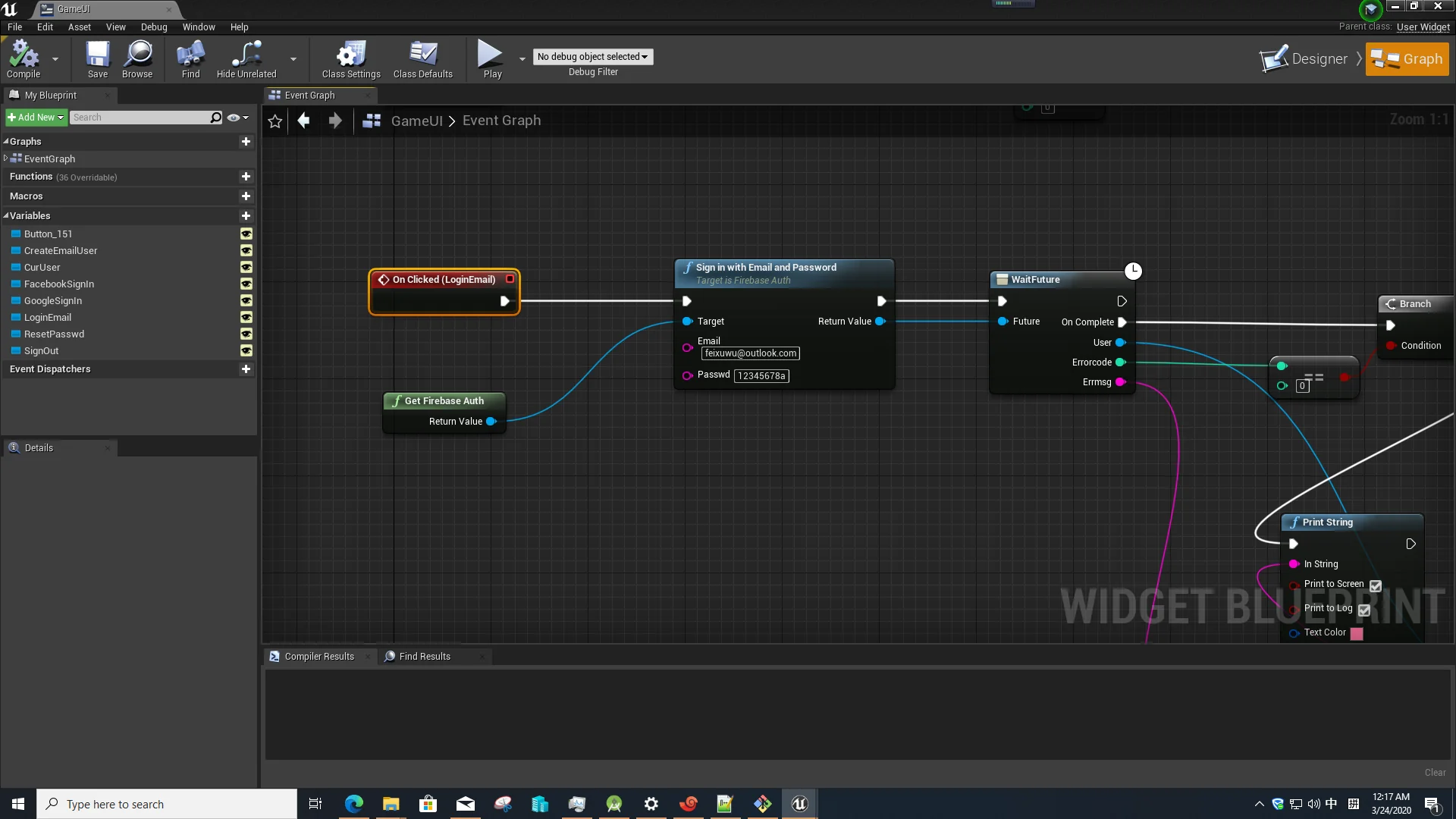
Resource screenshots
1 / 4
Join our channel
Follow 3DCGHUB on Telegram for new resource drops, migration updates, and community notices.
Explore EasyFirebase Pro for integrating Firebase Auth, Realtime Database, Analytics, Remote Config, Messaging, and Crashlytics across desktop and mobile.
Handling Backend Architecture with EasyFirebase Pro
Managing identity verification, persistent records, live game telemetry, and remote parameter updates often introduces substantial complexity to interactive projects. Developers frequently face the challenge of bridging client-side runtime logic with cloud infrastructure. EasyFirebase Pro addresses this integration by packaging a suite of Firebase tools into an engine-accessible environment, establishing direct communication between the game client and backend cloud services without requiring a dedicated custom server to handle routine operational tasks.
The tool encompasses six primary functional modules: Firebase Auth, Firebase Realtime Database, Firebase Analytics, Firebase Messaging, Firebase Remote Config, and Firebase Crashlytics. By unifying these disparate systems into a cohesive structure, the plugin streamlines user onboarding, remote tuning, telemetry tracking, and database interactions across different deployment targets.
Authentication Integrations in EasyFirebase Pro
User onboarding spans multiple platforms and ecosystem preferences. To avoid locking projects into a single sign-in flow, EasyFirebase Pro supports a broad spectrum of authentication methods within its Firebase Auth component, allowing projects to tailor login flows to the conventions of specific distribution channels.
For friction-free onboarding, the tool provides anonymous authentication. This allows players to access real-time cloud data and preserve their session identities immediately upon launch, bypassing manual account creation. When persistent user accounts are required across multiple sessions or devices, standard email authentication can be implemented to maintain credential-based profiles.
Third-party social and platform identity providers extend this flexibility further. The plugin incorporates native hooks for Google login and Facebook login, providing standard federated identity access across supported ecosystems. Platform-specific game services are also integrated: Google Play authentication is supported for Android players, while Apple Game Center support is implemented specifically for iOS devices.
In addition to Game Center, Apple Login is supported within the authentication module, though it requires building the plugin to activate its functionality. This selection of providers enables developers to design identity setups ranging from simple guest logins to linked accounts that preserve player progress across diverse platforms.
Serverless Data Synchronization via Firebase Realtime Database
Traditional multiplayer titles and cloud-connected games often rely on custom intermediate server layers to ingest, validate, and store client data. This architecture requires maintaining standalone server instances, configuring custom REST endpoints, and managing network routing. The Firebase Realtime Database component in EasyFirebase Pro provides a serverless alternative, enabling game clients to save and read data directly to and from Firebase cloud storage.
Eliminating an intermediate server streamlines common cloud data tasks. Saving player inventories, storing character statistics, synchronizing world state flags, and retrieving dynamic leaderboards can occur directly through client calls. The database component handles read and write operations directly against cloud-hosted JSON structures.
Because the Realtime Database operates alongside the Firebase Auth system, stored records can be partitioned or indexed according to authenticated user credentials. Whether a player accesses the game via anonymous authentication or through federated logins like Google or Facebook, the game client can reliably associate read and write operations with that specific player account.
Operational Components: Analytics, Remote Config, Messaging, and Crashlytics
Beyond baseline identity and storage pipelines, live game maintenance requires ongoing visibility into player behavior, application stability, and runtime parameter control. EasyFirebase Pro packages four supplementary components aimed at live operations: Analytics, Remote Config, Messaging, and Crashlytics.
The Firebase Analytics component focuses on capturing player engagement and in-game interactions. By tracking how users navigate menus, progress through levels, and interact with game systems, analytics telemetry provides creators with the concrete behavioral data needed to optimize mechanics and make their titles more engaging.
Firebase Remote Config introduces the ability to alter live game parameters on the fly. Rather than packaging, compiling, and distributing an entirely new client build to tweak gameplay balance, economy values, or event flags, developers can adjust remote variables in the cloud. Supported across both desktop and mobile platforms, this workflow allows dynamic updates to take effect directly inside running clients.
Live-service communication and diagnostic monitoring are handled by Firebase Messaging and Firebase Crashlytics. Messaging provides the necessary infrastructure to dispatch targeted communications and push notifications to players. Meanwhile, Crashlytics captures crash traces, unhandled exceptions, and runtime performance failures during live play sessions, allowing development teams to isolate and resolve critical stability issues quickly.
EasyFirebase Pro Across Android, iOS, Win64, and Mac
Platform compatibility varies considerably depending on the target operating system. Understanding the exact component distribution between mobile and desktop environments is essential when architecting client systems.
Mobile deployments receive comprehensive feature access. On Android, all six components—Firebase Auth, Firebase Realtime Database, Firebase Analytics, Firebase Messaging, Firebase Remote Config, and Firebase Crashlytics—are fully supported. Projects targeting Android can leverage the complete cloud toolset, from federated Google Play logins to push notifications and crash reporting.
The iOS platform similarly provides support for all components across the entire suite. IOS builds can deploy Firebase Auth (including Game Center and Apple Login via plugin compilation), Firebase Realtime Database, Firebase Analytics, Firebase Messaging, Firebase Remote Config, and Firebase Crashlytics without feature omissions.
Desktop platforms operate with a more focused subset of the feature library. On Win64, supported modules are limited to FirebaseAuth, Firebase Realtime Database, and Firebase Remote Config. The desktop environment does not include Analytics, Messaging, or Crashlytics. The Mac platform mirrors the Win64 profile exactly, providing access exclusively to FirebaseAuth, Firebase Realtime Database, and Firebase Remote Config.
This platform breakdown dictates an intentional development structure. For cross-platform titles spanning desktop and mobile hardware, core identity handling, parameter tuning through Remote Config, and cloud data persistence through the Realtime Database function consistently across Win64, Mac, Android, and iOS. Teams looking to implement push messaging, automated crash diagnostics, or deep analytical tracking can structure those systems specifically around their Android and iOS deployment pipelines.
 Engine Tools
 Engine Tools
 Engine Tools